community
45 Topics
Is anyone else's Windows 10 File History failing to update after the August/September updates?
Hi everyone,Since installing the KB5120249 update on August 11th, my Windows 10 (version 22H2) has been experiencing an issue where File History can find and run backups to my target drive (Drive D), but the last copy date and time of files remain unchanged, preventing any new or modified files from being backed up properly. The specific issues are as follows: Version and Timestamp Not Updating: The read and write functions of Drive D are working normally. Even after confirming that a file has been successfully saved, clicking the Run now button in Control Panel does not update the last backup timestamp or version time to the actual latest save time. Missing Previous Versions: In a file's Properties -> Previous Versions, modified or newly added files show past versions, but fail to display the latest update date. New versions are omitted as well, continuing to show No previous version available, which fails to reflect the latest changes. Strangely enough, the system sometimes backs up files even when they haven't been modified at all. I haven't changed anything on my end, and I haven't been able to successfully back up since the KB5122878 update on September 8th. I didn't mess with the settings; the problem occurred after the update. After the recent KB5124010 update in Windows 11, the file history can find and run backup drives, but the last copy date of the files remains unchanged, and any new files can be backed up. I suspect the problem persists after KB5101684 on July 29th. Is anyone else still experiencing this issue? On September 23rd, I contacted Microsoft Support to report this File History glitch caused by recent updates (including subsequent impacts from the KB5124010 update). Several other users had also reported the same problem. Two days later, Microsoft Support sent an email confirming that they were aware of the issue and were investigating.25Views0likes1CommentWindows 10 Installation problem help
The installation process either gets stuck at a certain point or fails to complete entirely. I have tried different troubleshooting steps, but the problem persists. I need help understanding what might be causing this and how I can successfully install Windows 10 without errors. Any advice or solutions would be greatly appreciated as I am unable to use my computer properly due to this issue.194Views0likes2Comments
How to Recover an EarthLink Email Account
If you've lost access to your EarthLink email account, follow these official recovery steps. EarthLink accounts are often used with third-party email clients like Outlook, so regaining access is important. Step 1: Use EarthLink's Webmail Recovery Tool Go to EarthLink's official website and click Sign In. Select Forgot Password? or Need help signing in? Enter your full EarthLink email address and the CAPTCHA shown. Step 2: Verify Your Identity EarthLink will ask you to verify ownership using one of these methods (if previously set up): Recovery email address – A code will be sent to your alternate email. Recovery phone number – A code will be sent via SMS. Security questions – Answer exactly as you set them up. Step 3: Reset Your Password Once verified, create a strong new password (at least 12 characters, with uppercase, lowercase, numbers, and symbols). Confirm the password and save it securely. Step 4: Regain Access in Microsoft Outlook (if needed) Open Outlook and go to File > Account Settings. Select your EarthLink account and click Change. Update the password to the new one. Ensure the incoming/outgoing server settings match EarthLink’s current IMAP/POP3 settings. If you still can’t recover the account: Contact EarthLink Customer Support directly. They have a dedicated account recovery team. Be prepared to verify your identity with personal info (e.g., last billing date, full name on account). Important Tips: Always log in directly via EarthLink’s website before updating settings in Outlook. Never share your recovery codes or password with anyone. Keep your recovery email and phone number up to date within EarthLink.92Views0likes0Comments
Issue with "Edit with Paint 3D" Functionality
I have recently encountered an issue with Paint 3D. When I try to edit a picture using Paint 3D by right-clicking on the photo and selecting "Edit with Paint 3D," I am unexpectedly prompted to choose an app to open the file instead of Paint 3D launching directly. Has anyone else experienced this problem, or does anyone have any insights on why this might be happening and how to resolve it? Thank you for your assistance! Following was done: Reinstall Paint 3D Open Microsoft Store: Go to the Start menu and open the Microsoft Store. Search for Paint 3D: In the search bar, type "Paint 3D." Reinstall Paint 3D: If the app is installed, you can click "Open." If it’s not installed or you suspect it might be corrupted, click "Install" or "Get" to reinstall it. Ensure Paint 3D is Enabled Open Settings: Press Win + I to open Settings. Go to Apps: Navigate to "Apps" and then "Apps & features." Find Paint 3D: Scroll through the list of installed apps to find "Paint 3D." Ensure It’s Enabled: If you find it, make sure it’s not disabled. If it is, re-enable it. Associate Image Files with Paint 3D Manually Right-click on the Image File: Right-click on an image file. Select Properties: Choose "Properties" from the context menu. Change the Default Program: In the Properties window, click the "Change" button next to "Opens with." Manually Find Paint 3D: Click "More apps" if Paint 3D is not listed. Scroll down and click "Look for another app on this PC." Navigate to C:\Program Files\WindowsApps and look for the Paint 3D executable. Note that you may need administrative permissions to access this folder. Use the Default Apps Settings Open Settings: Press Win + I to open Settings. Go to Apps: Navigate to "Apps" and then "Default apps." Reset Default Apps: Scroll down and click "Reset" under "Reset to the Microsoft recommended defaults." Change Defaults Manually: After resetting, try setting Paint 3D as the default app for your image files again. Check for System Updates Open Settings: Press Win + I to open Settings. Go to Update & Security: Navigate to "Update & Security." Check for Updates: Click "Check for updates" and install any available updates. Sometimes updates can fix issues with system apps like Paint 3D. 1. Check if Paint 3D is Installed Correctly Open PowerShell as Administrator: Press Win + X and select "Windows PowerShell (Admin)." Check Installation: Enter the following command to check if Paint 3D is installed: powershell Copy code Get-AppxPackage *Microsoft.MSPaint* | Select Name, PackageFullName If Paint 3D is listed, it’s installed. If not, proceed to reinstall it. Reinstall Paint 3D: Uninstall Paint 3D using PowerShell: powershell Copy code Get-AppxPackage *Microsoft.MSPaint* | Remove-AppxPackage Reinstall from the Microsoft Store: Open the Microsoft Store, search for "Paint 3D," and install it. 2. Reset Paint 3D Open Settings: Press Win + I to open Settings. Go to Apps: Navigate to "Apps" > "Apps & features." Find Paint 3D: Scroll down and select "Paint 3D." Advanced Options: Click on "Advanced options." Reset: Click the "Reset" button. This will reset Paint 3D to its default state. 3. Create a New User Profile Open Settings: Press Win + I to open Settings. Go to Accounts: Navigate to "Accounts" > "Family & other users." Add Someone Else to This PC: Click on "Add someone else to this PC." Create a New User: Follow the prompts to create a new user account. Log In: Log out of your current account and log in with the new user account. Check if Paint 3D works correctly in the new profile. 4. Repair Windows Using DISM and SFC Open Command Prompt as Administrator: Press Win + X and select "Command Prompt (Admin)" or "Windows PowerShell (Admin)." Run DISM: Enter the following command to repair the Windows image: powershell Copy code DISM /Online /Cleanup-Image /RestoreHealth Wait for the process to complete. Run SFC: Enter the following command to check and repair system files: powershell Copy code sfc /scannow Wait for the process to complete and restart your computer.29KViews1like11Commentssolucion imposible
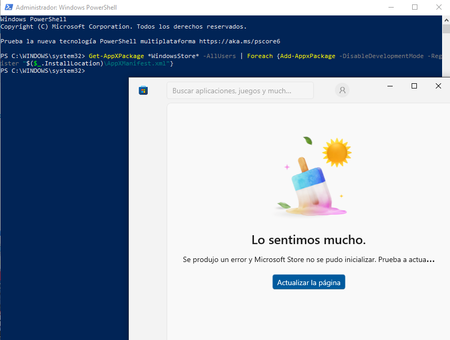
spanish version....... teniendo problemas con la aplicacion de microsoft store al iniciar la aplicacion de un momento a otro salto con un mensaje en pantalla "lo sentimos mucho se produjo un error y microsoft store no se pudo inicializar. prueba a actualizar o vuelve mas tarde" he intentado realizar distintos metodos para solucionar el problema como realizar reinstalacion con la opcion de actualizar este pc del programa media creator tool para instalar windows 10 y aun el problema persiste, he realizado un intento por la powershell con el siguiente comando Get-AppXPackage *WindowsStore* -AllUsers | Foreach {Add-AppxPackage -DisableDevelopmentMode -Register "$($_.InstallLocation)\AppXManifest.xml"} descrito en varias respuesta para casos similares dispuestos en el foro de la comunidad de microsoft respuesta proporcionada por el usuario KapilArya en el hub "https://techcommunity.microsoft.com/discussions/windowsinsiderprogram/microsoft-store-wont-launch/1513414" tambien junto a un agente de soporte se intento realizar una solucion con la creacion de un usuario nuevo para solventar y no funciono tambien se realizo el diagnostico para la instalacion de windows 11 pero mi equipo no cuenta con las caracteristicas minimas para que este sea instalado y aun asi sigo sin poder solucionar el problema y no me gustaria realizar la reinstalacion de windows 10 por medio externos (USB) por que asi perderia demasiada informacion sobre las aplicaciones y datos que tengo de varios años de recoleccion y me gustaria saber si puedo hacer algo mas para poder solucionar este problema sin perder datos me dustaria obtener ayuda lo mas pronto posible gracias por brindarme su atencion y ayuda para resolver este caso adjunto evidencias sobre problema y metodos realizados. english version...... Having problems with the Microsoft Store app. When I launch it, it suddenly pops up with a message on the screen: "We're very sorry, an error occurred and the Microsoft Store could not be initialized. Please try updating or come back later." I've tried various methods to solve the problem, such as reinstalling with the "Update this PC" option in the Media Creator Tool to install Windows 10, and the problem still persists. I tried using PowerShell with the following command: Get-AppXPackage *WindowsStore* -AllUsers | Foreach {Add-AppxPackage -DisableDevelopmentMode -Register "$($_.InstallLocation)\AppXManifest.xml"} Described in several answers for similar cases posted on the Microsoft community forum. Answer provided by user KapilArya on the hub "https://techcommunity.microsoft.com/discussions/windowsinsiderprogram/microsoft-store-wont-launch/1513414" Also, together with a support agent, a solution was attempted by creating a new user to solve the problem, but it didn't work. A diagnosis was also performed for the installation of Windows 11, but my computer doesn't have the minimum specifications for it to be installed. And even so, I still can't solve the problem and I wouldn't like to reinstall Windows 10 using external media (USB) because I would lose too much information about the applications and data that I have from several years of experience. I'm collecting and would like to know if I can do anything else to resolve this issue without losing data. I would like to get help as soon as possible. Thank you for your attention and help in resolving this issue. I attach evidence of the problem and the methods used.300Views0likes2CommentsBetreff: Windows 10 ESU-Programm – Berechtigtes Gerät zeigt keine Registrierungsoption
Betreff: Windows 10 ESU-Programm – Berechtigtes Gerät zeigt keine Registrierungsoption Nachricht: Sehr geehrtes Microsoft-Support-Team, ich bitte um Unterstützung bei der Aktivierung des ESU-Programms für mein Windows 10 Gerät. Trotz erfüllter Voraussetzungen erscheint keine Option zur Registrierung in Windows Update. Details zu meinem System: Windows-Version: Windows 10 Version 22H2 Update: KB5046613 ist installiert Microsoft-Konto: Aktiv und verknüpft (kein Kinderkonto, kein lokales Konto) Gerätetyp: Privatgerät, nicht verwaltet (AzureADJoined, DomainJoined, WorkplaceJoined = NO) DiagTrack-Dienst: Aktiviert und läuft (STATE : 4 RUNNING) ClipESUConsumer.exe: Ausgeführt mit -evaluateEligibility, jedoch ohne sichtbare Rückmeldung ESU-Option: Wird in Windows Update nicht angezeigt Ich habe bereits die Systemdateien mit sfc /scannow und DISM /RestoreHealth geprüft und repariert. Mehrere Neustarts wurden durchgeführt. Frage: Wie kann ich die ESU-Registrierung erfolgreich abschließen oder prüfen, ob mein Gerät korrekt erkannt wurde? Vielen Dank für Ihre Unterstützung. Mit freundlichen Grüßen Franz105Views1like1CommentRequest to Extend Windows 10 Support Beyond October 14, 2025
Hello Microsoft Team, I’m writing as a loyal Windows user to share my concern about the upcoming end of support for Windows 10 scheduled for October 14, 2025. Many users, including myself, rely on Windows 10 daily for work, education, and personal use. Not all of us are in a position to upgrade our hardware or switch to a new operating system without facing financial or technical challenges. Windows 10 is stable, familiar, and perfectly suits the needs of millions of people worldwide. I respectfully ask that Microsoft consider extending support for Windows 10 or providing more affordable and accessible options for users who cannot upgrade easily. Even an extended security update program for personal users (not just businesses) would make a big difference. Thank you for your time and for listening to the voices of your user community. Sincerely, Omar, Yahiya.156Views0likes2Comments
How to update Windows 10 to 22H2 when your device is dual booted
I am trying to update a computer from Windows 10 (version 1709) to Windows 10 (version 22H2) but once the update is completed the computer restarts and it stays on the version 1709. I want to also mention that the computer is dual booted with Ubuntu. Has anyone come across this issue? How would I update the Windows OS without affecting the Ubuntu OS?986Views0likes4CommentsFailure to install update error: 0x80070643 @allmembers
I am very 9interested in learning how this process works and getting the answer to my question answered. How do I fix this so that all my updates go thru automatically again? I am very grateful for any and all help. Have a blessed night.149KViews3likes20Comments