community
826 Topics
How to Convert Text to Speech on Phones?
I often have longer text that I would rather listen to than read on screen, including pasted text, articles, notes, and study material. I need a solution that works on Android or iPhone and is simple enough to use regularly. The most useful features for me would be clear, natural-sounding voices, adjustable playback speed, and an easy way to add text without going through a complicated setup. I am mainly interested in basic mobile text-to-speech reading, rather than a large set of premium productivity tools. Do you know any free methods or free text-to-speech apps that work well on phones?167Views0likes3Comments
AQEMU: a native QEMU front end for Windows 11 on x64 and ARM64. Feedback welcome
Hi all, I'm Philip, the developer of AQEMU. It's a point-and-click Qt front end for QEMU, and I've been building it for Windows 11. It has native builds for both x64 and ARM64 (Snapdragon) PCs. It bundles QEMU 11, so there's nothing extra to install. It comes with 195 ready-made guest profiles across 29 architectures, from DOS and retro PCs to ARM, RISC-V and PowerPC. It uses WHPX acceleration on x64, with TCG as the fallback everywhere else. It's open source under GPL-2.0, and there's also a Linux build. I'd really like feedback from Windows 11 users, especially anyone on Arm, on what works, what breaks and which guests you'd like added. Microsoft Store (7-day free trial): https://apps.microsoft.com/detail/9P0HGKHQ9W19?cid=techcommunity Source: https://github.com/chronic8000/aqemu49Views0likes1Comment
File History timestamp sync bug still broken in KB5124010 - Anyone else?
To the Microsoft technical team Hi everyone,Quick post to see if anyone else is still running into File History timestamp sync issues on the latest builds. Test Environments: Laptop: Windows 11 25H2 (OS Build 26200.8973) Desktop: Windows 10 22H2 (OS Build 19045.7725) Home version The Issue:This problem started back in July (KB5101684 / KB5120249). While KB5124010 fixed the scheduled backup failure and Reconnect drive prompt from KB5124008, the timestamp and version sync bugs remain unfixed: Triggering Run now manually in Control Panel does not update the Last backed up timestamp to the current time. For newly created files (such as Word files), File Properties > Previous Versions displays: No previous versions are available. Changes to the contents of older files will not display the latest timestamp version; only the date and time of the previous version will be shown. A new entity version of the file has been created without any modifications. Other users (including community members in Japan and previous discussion threads) have confirmed identical behavior. File History is essential for daily backups, so getting this sorted out is critical.I'm really on the verge of a breakdown... Hopefully, the security patch will be completed in October. If you are experiencing this issue, please upvote and comment on my Feedback Hub report so the Windows engineering team prioritizes a fix: Feedback Hub Link: https://aka.ms/AA13n22w415Views0likes7Comments
Anyone else's Windows 11 taskbar just randomly freeze?
I'm on Windows 11 25H2 and lately my taskbar keeps freezing for a few seconds at a time. Clicking the Start button or trying to open the system tray does nothing, then it suddenly catches up. It happens randomly—sometimes right after boot, sometimes in the middle of working. I've already restarted Explorer and checked for updates, but it keeps coming back. Is this a known issue, or is it just my machine? If you've run into this, did you find a real fix, or are we all just waiting on Microsoft to patch it? I'd rather not do a clean install over something this stupid.84Views1like1CommentTaskbar goes dark black intermittently
Pretty sure this is a bug with Windows' MPO or graphical presentation model, but basically: For the past few months my taskbar has 'randomly' been going dark black, usually with Chrome open. Upon moving the mouse or clicking the taskbar, it immediately reverts. It's not a monitor and it's not a driver issue. This has also persisted across a fresh format and fresh driver installs. Turning off "Show shadows under windows" seems like it reduced the frequency, but it still happens even with that disabled. I've been told that potentially, disabling HAGS might fix it - but that shouldn't be necessary in the first place. What is going on with this?1.9KViews1like7Comments
Win11 System tray Safely Remove Hardware icon disappears while a USB drive is still connected
Even if the USB flash drive is still connected to the computer, the Safely Remove Hardware and Eject Media icon in the system tray will disappear. Although the drive is still accessible in File Explorer, you cannot safely eject it. After unplugging and reinserting the drive, the icon will temporarily reappear, but it may disappear again after a short while.24Views0likes0CommentsLaptop hangs. Sometimes comes back. Other times a poweroff/reboot is necessary
I have a Dell 7506 I7 11th gen laptop. I upgraded to win11 in May '26. Since then, this problem has continually gotten worse. I don't know this is a windows problem for sure. I replaced the fan and put new thermal paste on the CPU and GPU, and the problem still occurs. My SSD died in Feb '26 and I put in a lower grade Intel one. I mention that because the last system events always seemed to be hard disk related. All the diagnostics I have run on the SSD say it is fine. I even tried to clean up any corrupted files. I have a couple of event viewer files from the last two problems, but I cannot attach them here. I'm getting tired of chasing loose ends to no avail. I am much more of a hardware person than software. I have not tried going back to Win10 yet. Any good suggestions on how to proceed to the fastest solution?8Views0likes0CommentsMicrosoft support KB5124010, KB5124008: Known issues in this update, Highlights: semantic ambiguity
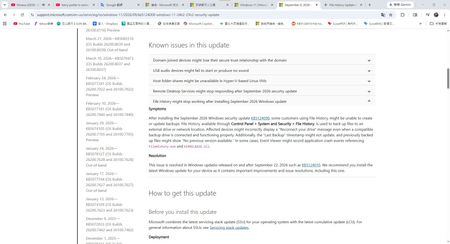
Hello, I have a question regarding Microsoft is announcement. Hi everyone,I was reviewing the Microsoft support pages for the September 2026 Windows updates and got quite confused by the wording regarding the File History bug fix. Furthermore, my actual experience after updating doesn't seem to align with the official description. I'd like to hear your thoughts on this. Question 1: Does the word after in KB5124008 imply a phased/partial fix? https://support.microsoft.com/en-us/servicing/os/windows-11/2026/09/kb5124008-windows-11-24h2-25h2-security-update In the Known issues section of KB5124008, Microsoft lists a few specific symptoms: Incorrectly displaying a Reconnect your drive message. The Last Backup timestamp might not update, and previously backed-up files might show No previous version available. Application crash events referencing FileHistory.exe. However, in the Resolution section, Microsoft states: This issue is resolved in Windows updates released on and after September 22, 2026 such as KB5124010. What exactly does after mean in this context? Does it imply that KB5124010 did not completely fix all symptoms, and the remaining issues (like the timestamp bug) will not be fully resolved until the October 13th Patch Tuesday? Question 2: Why did the KB5124010 release notes omit the timestamp issue? https://support.microsoft.com/en-us/servicing/os/windows-11/2026/09/kb5124010-windows-11-24h2-25h2-update I then checked the Highlights section for KB5124010, which states: File History Fixed: This update addresses an issue where File History might fail to back up or restore files... Affected devices might incorrectly display a Reconnect your drive message... Noticeably, it completely omits any mention of fixing the Last Backup timestamp might not update symptom. Does this omission mean that this specific part of the bug has not been fixed yet? My Actual Experience: My suspicions seem to be confirmed in my actual usage. After installing the latest KB5124010 update, my File History can now successfully find the backup drive, run properly, and back up new files (Symptom 1 is resolved). However, the Last Backup date/timestamp still has not changed at all (Symptom 2 remains). To summarize my questions: Based on Microsoft is wording, is KB5124010 only a partial fix? For the lingering issues regarding the timestamp not updating and no previous version available, do I just have to wait for the October update? Has anyone else experienced this exact situation?1.1KViews1like4CommentsAfter updating KB5127648, only half of the archive history was restored.
For Microsoft engineers After fixing the update from Windows 11 KB5124010/Windows 10 KB5120249 to Windows 11 KB5127648/Windows 10 KB5126657, the File History can find and run the backup drive, but the last copy date of the files has not changed, and any new files can be backed up. This is my question: Click in and read carefully. File History timestamp sync bug still broken in KB5124010 - Anyone else? | Microsoft Community Hub After updating KB5127648, only half of the archive history was restored. | Microsoft Community Hub This is my opinion response center report. https://aka.ms/AA13n2f3 https://aka.ms/AA13n22w https://aka.ms/AA13ucfz https://aka.ms/AA13urx3 https://aka.ms/AA13ukxv Please click here. If you have the same problem as me, please agree, add a comment, or ask your question in the feedback post. You can also paste the URL in the comments section.135Views0likes1Comment
Having an Issue with Widows File Explorer Home Icon Popping Up On Desktop
No matter where I am working with windows file explorer in the directory structure, if I delete a folder a file explorer home icon appears on the desktop, it will disappear but I haven't noticed when that happens yet. See included image of the icon.... Any ideas from anybody? Tried Dism health, sfc /scannow, rebuils icon cache etc... HELP!13Views0likes0Comments