Forum Widgets
Latest Discussions
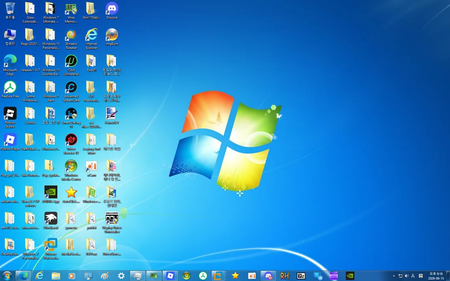
Still on Windows 10 (with a Windows 7 skin) – am I good to keep using it?
So I'm still running Windows 10, but I've got it customized to look and feel like Windows 7—start menu, theme, the whole deal. It's comfortable, it works, and I honestly just prefer the older UI. But with Windows 10 support ending next year, I'm starting to wonder—am I setting myself up for problems down the road? Security, compatibility, that kind of thing. I know I could switch to 11, but I'm not really excited about it. Just trying to figure out if I'm being reckless or if it's still fine to ride this out for a while longer. Anyone else in the same boat?LarkinFoxAug 18, 2026Iron Contributor10Views0likes0Comments
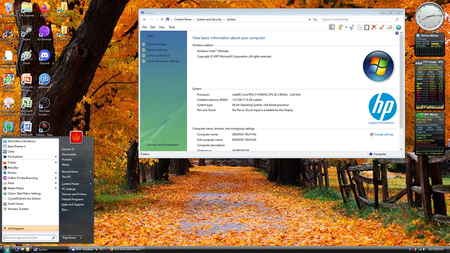
I made Windows 10 look like Vista
Yeah so I went down a rabbit hole and ended up turning my Windows 10 install into a full-on Windows Vista clone. Not just a skin—I'm talking icons, cursors, sounds, the whole UI package. Even the system info in Control Panel now says "Windows Vista" for some reason, which I didn't even expect. It's surprisingly complete and honestly kind of fun to use. Feels like stepping into a time machine. That said, I'm wondering if this is gonna bite me later. I know some mods dig pretty deep into system files, and I'm not sure how well this plays with updates or long-term stability. Anyone else done something like this? Any issues I should watch out for?GageWilderAug 18, 2026Iron Contributor16Views0likes0Comments
Kann man Windows 11 ohne Microsoft-Konto installieren?
Hallo zusammen, ich nutze seit Jahren Windows 10 mit einem lokalen Konto und komme damit einfach am besten zurecht. Jetzt habe ich mir einen neuen PC zusammengebaut und möchte darauf Windows 11 ohne Microsoft Konto installieren, so wie ich es von früher gewohnt bin – aber bei der Ersteinrichtung wird man ziemlich hartnäckig zu einer Cloud-Anmeldung gedrängt. Hat jemand von euch einen zuverlässigen Weg, um direkt bei der Installation den Kontozwang in Windows 11 zu umgehen, ohne danach umständlich nacharbeiten zu müssen? Bin für jeden praxiserprobten Tipp dankbar, gerne auch mit Hinweis auf mögliche Unterschiede je nach Windows-11-Version.NinaskoAug 18, 2026Tin Contributor36Views0likes9Comments
Laptop makes clicking, buzzing, or coil-whine sounds
My laptop emits intermittent clicking and buzzing noises, alongside a high-pitched coil whine that changes with system load. I suspect this may be related to the fans, hard drive, or power delivery components, and I am seeking advice on diagnosing the exact cause and potential solutions.DylanopenAug 18, 2026Copper Contributor24Views0likes1CommentTikTokの動画を抽出して、高音質のMP3として保存するには?
いつもお世話になっています。 TikTokに投稿されている動画から音声だけを取り出し、できるだけ高音質のMP3形式で保存したいと考えています。動画のクオリティを保ったまま音声変換を行うには、どのような手順を踏めばよいでしょうか。 以下の点について、経験のある方からアドバイスをいただけると助かります。 音質(ビットレート)をできるだけ落とさずに変換するコツ 変換後の音声にノイズや歪みが出にくい方法 TikTokの動画を高音質のMP3として保存するにはどうすればいいですか?初心者にもわかりやすく教えていただけると嬉しいです。よろしくお願いいたします。KiCoopernAug 18, 2026Copper Contributor40Views0likes8CommentsExternal monitor works before Windows loads but disappears afterward
External monitor displays the BIOS, POST, and Windows boot logo correctly, but the screen goes blank and loses signal as soon as the Windows login screen or desktop appears. This issue only occurs after Windows fully loads, indicating a driver, display settings, or graphics configuration conflict rather than a hardware connection problem.RamahucinAug 18, 2026Copper Contributor11Views0likes0CommentsA specific key causes the entire system to behave strangely
Pressing a specific key on my keyboard causes my entire system to behave strangely, including lag, unresponsiveness, or unexpected actions. This issue happens consistently whenever I press that key, disrupting normal use and making it difficult to operate my computer smoothly. I need help diagnosing and fixing this problem.GregCoxxAug 18, 2026Tin Contributor9Views0likes0CommentsTiktok video editor I can use on a PC without watermark?
Interested in TikTok app recently and plan to post more videos on it. I'm trying to find a good tiktok video editor I can run on my Windows 10 PC for editing TikTok-style videos. My main requirement is that whatever I export doesn't have a watermark slapped on it. A lot of the tools I've tried either lock that feature behind a paywall or force a watermark on the free tier. A few things I'm looking for: Runs natively on PC. Decent support for vertical/9:16 video since that's the format I'm editing for. Basic features like trimming, text overlays, transitions, and syncing clips. If you've got the best tiktok video editor you personally use and like, I'd love to hear what's worked for youAAbel2215Aug 17, 2026Copper Contributor43Views0likes9CommentsWhat is this hidden Control Panel feature in Windows10?
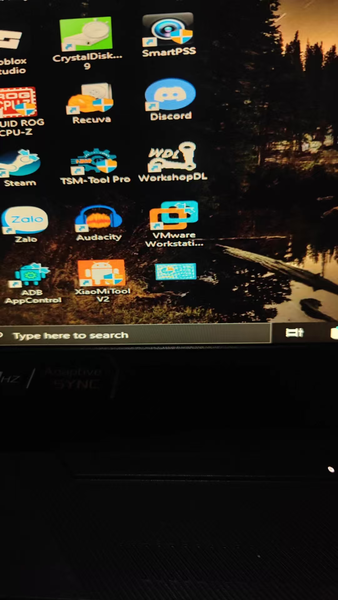
While going through some old notes recently, I stumbled upon a control panel icon that looked pretty strange. I first noticed it when I was installing software like a browser, Discord, audio software, and graphics card drivers, but I didn’t pay much attention to it at the time. Im guessing this might be God Mode, but Im not entirely sure. From what I understand, it lets you access a wide range of Windows settings in one place, which could be really useful for troubleshooting minor system issues.NicholasWuAug 17, 2026Iron Contributor32Views0likes1Comment



Tags
- windows 10169 Topics
- community42 Topics
- Windows1033 Topics
- microsoft21 Topics
- win1018 Topics
- suggestion11 Topics
- VPN10 Topics
- accessibility9 Topics
- file explorer9 Topics
- Hyper-V8 Topics