windows10
36 Topics
Is anyone else's Windows 10 File History failing to update after the August/September updates?
Hi everyone,Since installing the KB5120249 update on August 11th, my Windows 10 (version 22H2) has been experiencing an issue where File History can find and run backups to my target drive (Drive D), but the last copy date and time of files remain unchanged, preventing any new or modified files from being backed up properly. The specific issues are as follows: Version and Timestamp Not Updating: The read and write functions of Drive D are working normally. Even after confirming that a file has been successfully saved, clicking the Run now button in Control Panel does not update the last backup timestamp or version time to the actual latest save time. Missing Previous Versions: In a file's Properties -> Previous Versions, modified or newly added files show past versions, but fail to display the latest update date. New versions are omitted as well, continuing to show No previous version available, which fails to reflect the latest changes. Strangely enough, the system sometimes backs up files even when they haven't been modified at all. I haven't changed anything on my end, and I haven't been able to successfully back up since the KB5122878 update on September 8th. I didn't mess with the settings; the problem occurred after the update. After the recent KB5124010 update in Windows 11, the file history can find and run backup drives, but the last copy date of the files remains unchanged, and any new files can be backed up. I suspect the problem persists after KB5101684 on July 29th. Is anyone else still experiencing this issue? On September 23rd, I contacted Microsoft Support to report this File History glitch caused by recent updates (including subsequent impacts from the KB5124010 update). Several other users had also reported the same problem. Two days later, Microsoft Support sent an email confirming that they were aware of the issue and were investigating.207Views0likes3CommentsWindows 10 ltsc download for enterprise edition 64 bit
I heard Windows 10 Enterprise LTSC is still with official support. Is there a safe and official way to download Windows 10 LTSC Enterprise Edition 64-bit, preferably as an ISO file so I can create a bootable USB and install it on one of my PCs. I checked the normal Microsoft download page, but it seems they only provide regular Windows 10 editions there. I specifically need Windows 10 LTSC Enterprise Edition 64-bit because I want a more stable system without frequent feature updates. I plan to use it on a workstation where stability is more important than the newest features. Does anyone know the best place to download Windows 10 LTSC ISO of Enterprise Edition 64-bit?166KViews1like8CommentsForgot Windows 10 password and can't login in my laptop
It is an old Surface laptop and mainly used for app testing. The last time it was opened was a few months ago and I remembered the password was changed to a new one. Currently, I can't login this laptop as I completely forgot Windows 10 password. On the login screen, I clicked "Reset password" or "I forgot my PIN," but it didn't lead to any working recovery options for me. My primary goal is to get back into Windows 10 without losing my personal files (documents, photos, etc.). I understand that sometimes a full reset is necessary, but I would prefer to avoid it if there's another way. What is the best way to reset Windows 10 password in 2025? ThanksSolved18KViews0likes13CommentsIssues with syncing calendar from outlook calendar in taskbar
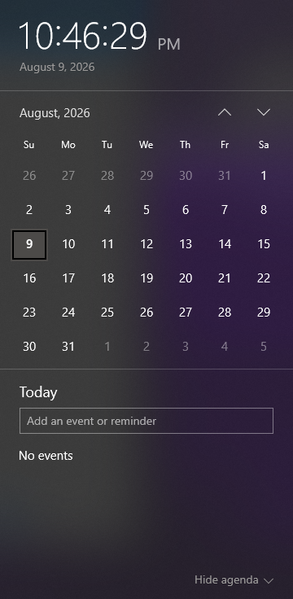
I am wondering how I can sync a specific calendar from outlook to be the one that the events get pulled from to appear in the taskbar calendar that is displayed when clicking the date/time tool. Currently the calendar that appears when I click the date and time section is blank, and trying to make a new event from that popup does not save anything. When go into the outlook calendar app, I can see the multiple email accounts and their respective calendar, but yet no events from these calendars show up when looking at the calendar popup from the taskbar. When trying to make an event in this calendar popup, it even gives me the option to save the event to one of my outlook accounts (the gmail account I have integrated), but does not successfully save any event anywhere. I am wondering what is required to be able to see the events from my outlook calendar in this popup, and to be able to quickly and conveniently make events from this taskbar popup and have them save to my actual outlook calendar. Including a screenshot of the calendar in taskbar that I am requesting help with incase of any confusion.344Views0likes3Comments
Search Bar not using colour theme on rest of device.
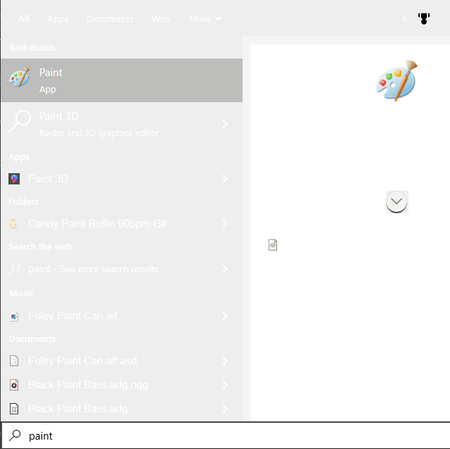
I restarted my computer today and this issue has suddenly occured, It doesnt matter what I change the colour theme too, when searching in the search menu I am presented with this light grey colour with white text which is incredibly hard to read, Online searches indicated stuff to do with Bing, Cortana and the Search registry keys, but I am not finding these keys anywhere in my registry to edit them. I have tried a few other solutions such as restarting the search services from task manager, but it is not applying the theme correctly. Had this computer for several years and never ran into this problem before, Any advice would be greatly appreciated.216Views0likes1Comment
Windows 10 wymusza sterownik
Jestem posiadaczem karty sieciowej TP-Link Archer T4U Plus V1.0. pobrałem do niej dedykowane sterowniki. Karta na tych sterownikach chodzi o wiele lepiej. Zasięg jest maksymalny i prędkość kilka razy większa niż z tymi windowsowymi. Jednak bardzo często urządzenie wyłącza się i windows wymusza mi na nim swoje sterowniki od realteka. Paskudnie one chodzą i na nich urządzenie wyłącza się i rozłącza z siecią częściej. Nie wiem już co mam zrobić by nie nadpisywalo tych sterowników. Konwencjonalne opcje mam już za sobą i nawet zmieniałem ustawienia grupy względem windows update próbujac zatrzymanie pobierania wszelkich sterowników. Nic nie działa Ticket: 710205315763Views0likes0Comments
HP support assistant optimize your performance on windows laptop not working
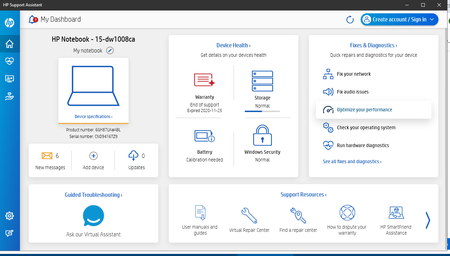
I can run HP support assistant but when I click optimize your performance nothing happens. Laptop specifications HP Laptop 15-dw1xxx Device Name LAPTOP-4TSL8KPJ Processor Intel(R) Core(TM) i5-10210U CPU @ 1.60GHz 2.11 GHz Installed RAM 8.00 GB (7.81 GB usable) Graphics Card Intel(R) UHD Graphics (128 MB) Device ID 9EEE07E5-D485-4F8E-9B13-D46EF5B002D1 Product ID 00325-81517-08523-AAOEM System Type 64-bit operating system, x64-based processor507Views0likes3CommentsKB5078885 msu package is a like a service pack
KB5078885 msu package is a like a service pack ? or it's necessary to install other package for clean new installation offline (i use the last iso 22h2 provided by microsoft with kb5033372 from 12 december 2023). win 10 doesn't want the package msu at the last time (KB5078885 installed and reboot and at the end, it's uninstalled). do you have a fix or an explanation ? thanks.362Views0likes4Comments
multiple selection not working in word-processing apps
I'm having an issue with both my laptop and desktop pc's where holding down the control key won't let me select multiple words an any word processing application (ms word, wps, notepad, etc...). I can select multiple files on my desktop using the ctrl key, and in google docs I can select multiple words with this method. The problem seems to be just with word-processing software. Anyone have any suggestions? My desktop pc has 22H2 (OS Build 19045.6466) My laptop pc has Windows 11 version 21H2 (OS Build 22000.2538)Solved502Views0likes3Comments