windows10
87 TopicsSystem Windows Ram Problem Fix
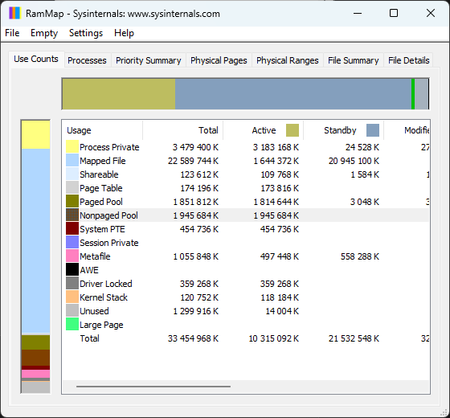
You’ve probably seen this happen — you leave your desktop or laptop running, and after a while the system starts eating a huge chunk of your RAM, even on modern hardware. Today I’m bringing a fix that removes this issue permanently and gives Windows back the speed, stability, and clean behavior it should have. By disabling two legacy predictive mechanisms (SysMain + Prefetch), the system stops aggressively caching applications, idle RAM usage drops significantly, and micro‑lags disappear. The attached screenshots show the system before and after applying the fix. This solution works on both Windows 10 and Windows 11, and it’s safe, reversible, and the improvement is immediate. System Ram Before: System Ram After: Step‑by‑step guide (Windows 10 / 11 RAM issue fix) Note: This is a safe and fully reversible system tweak. You’re simply disabling two legacy predictive mechanisms that no longer make sense on modern hardware. 1️⃣ Disable the SysMain service Press Win + R Type services.msc → press Enter Find SysMain in the list Double‑click it Set Startup type to Disabled Click Stop if the service is running Confirm with Apply and OK 2️⃣ Disable Prefetch in the Registry Press Win + R Type regedit → press Enter Navigate to: HKEY_LOCAL_MACHINE\SYSTEM\CurrentControlSet\Control\Session Manager\Memory Management\PrefetchParameters Find the value EnablePrefetcher Double‑click it and set the value to: 0 Confirm with OK 3️⃣ Restart your system After rebooting, your RAM usage in idle should drop noticeably, and the system will feel cleaner, faster, and more responsive. 4️⃣ How to revert (optional) If you ever want to undo the changes: SysMain: set Startup type back to Automatic and start the service EnablePrefetcher: set the value back to 3 (default) With my regular applications open, RAM usage dropped from 60–70% to just 33%. This is how Windows should have behaved from the beginning. On top of that, overall system responsiveness improved by roughly 50% — even weaker hardware feels noticeably faster almost immediately. This RAM regression has been around since Windows 7. After the kernel overhaul in Windows 8.1 it actually got worse, and it has followed every version of Windows all the way to today.90Views0likes0CommentsKB5078885 msu package is a like a service pack
KB5078885 msu package is a like a service pack ? or it's necessary to install other package for clean new installation offline (i use the last iso 22h2 provided by microsoft with kb5033372 from 12 december 2023). win 10 doesn't want the package msu at the last time (KB5078885 installed and reboot and at the end, it's uninstalled). do you have a fix or an explanation ? thanks.6Views0likes0CommentsMy journey to becoming a good insider tester
Windows 95 – When the Floppy Was King and the Magnet Its Executioner As a kid, I started out on Windows 95. And what fascinated me most? Floppy disks — obviously 😄 Those little plastic squares felt like treasure. I loved scribbling on them with markers… or running a magnet over them, just to see what would happen. And then I’d hear someone at home losing it: “I can’t open my work files! What did you do?! UPS!” 😅 Back then, it was pure magic. I wasn’t breaking the system yet — just exploring it like a world made of icons and sounds. Everything was new, mysterious, but somehow intuitive. Windows 95 was my gateway into the digital realm, where my journey began. 🎮 Games that shaped my childhood: Train (Vlak) – the legendary Czech game that taught me logic and planning Wolfenstein 3D – my first taste of action, adrenaline, and pixel graphics Lotus F1 – my first racing experience, hours of fun chasing the perfect lap These weren’t just games. They were my first digital textbooks — teaching me patience, reflexes, spatial awareness, and the idea that technology could feel alive. 🧠 What Windows 95 gave me: A basic feel for how systems work My first understanding of interface logic A curiosity that later evolved into technical passion This was my first contact with what I now call “system intuition.” Back then, I had no idea I’d one day dissect UI pipelines, sense micro-lags, and predict architecture. But Windows 95 gave me the first spark. And the floppy? She was queen. The magnet? Her executioner. 😄 Windows XP – The Era When I Started Testing the Limits of the System After Windows 95 came the era that completely pulled me in — Windows XP. That legendary blue theme, the green hill, the iconic sounds… it felt like a gateway into the “grown‑up” digital world. As a teenager, I loved XP — but I also started testing it in ways Microsoft would probably label today as “strongly not recommended” 😄 Back then, I wasn’t the guy who broke systems on purpose. I was the guy who clicked everything that could be clicked, opened everything that could be opened, installed everything that looked installable… turned things off, on, moved them around — and XP didn’t always survive. 🔹 What fascinated me about XP? new colors, new windows, new animations the feeling that the system was more “alive” than Windows 95 everything was faster, prettier, more modern and most importantly: there were more things to break 😄 🔹 Viruses? My first “teachers” At that time, I had no idea what a kernel was. Or the registry. Or system processes. But viruses explained it to me very quickly. All it took was opening the wrong file and suddenly: windows closed by themselves the system restarted icons disappeared and I sat there staring at the monitor like: “Ah… yeah, that definitely wasn’t supposed to happen.” And that’s how I learned. Not from books. Not from tutorials. But from my own mistakes. 🔹 Reinstalls? Just part of the routine When XP crashed, I wasn’t angry. I was curious. “What did I do? Why did it break? How do I fix it?” So I reinstalled the system over and over again. Not because I had to. But because I wanted to understand how Windows worked on the inside. 🔹 This era shaped me Windows XP was: the first system I pushed to its limits the first system that taught me to respect technology the first system that showed me that if you break something, you can also fix it the first step toward feeling the system with my whole body, not just my eyes XP was my digital puberty. Full of mistakes, experiments, discoveries… and above all, curiosity. Windows Vista – The Dark Era That Taught Me to Respect the System After XP came Vista. And Vista was beautiful… but it was also the system that gave me my first real slaps. Aero effects, glass, animations — everything looked futuristic, but it ate performance like a starving bear after winter. And this was the era when I experienced my first hardware funeral. 🔥 My First Cooked GPU During the Vista years, I managed to cook my AMD graphics card — the legendary beast with, brace yourself… 512 MB of VRAM. Yes. Half a gigabyte of pure “power.” Back then, I felt like a king. And what was I trying to run on it? GTA IV Mafia II basically anything that looked even remotely realistic Vista was sweating. The GPU was sweating. And I was sitting there like: “It’ll handle it… it definitely will.” It didn’t. How did the GPU thank me? By filling my entire room with that unmistakable smell of a component dying — that mix of burnt plastic, metal, and your own stupidity. Anyone who’s ever fried hardware knows exactly what I’m talking about. I stared at the black screen and thought: “Yeah… that was a lesson.” 🔹 Vista Taught Me to Respect Architecture This was the moment I first understood: the UI pipeline is not a toy performance is not infinite drivers are critical the system reacts to every detail and if you push too far, the hardware will make sure you feel it Vista was my first encounter with the idea that Windows is a living ecosystem — one that needs balance. And I tested that balance… until I overheated it. 🔹 Vista Was My Dark Era But it was also the era that pushed me the most. Without Vista, I would’ve never understood: why Windows 7 feels so stable why UI must be optimized why performance is never guaranteed and why you must feel the system, not just use it Vista was my first real teacher. Harsh, but fair. Windows 7 – The Era When I Started Truly Feeling the System After Vista came Windows 7. And that was the moment everything changed. Suddenly I had a system that was fast, stable, beautiful — and finally ready to keep up with my curiosity. But Windows 7 wasn’t just about the OS. It was also about my first real graphics card, the one that opened the door to gaming… even if not exactly the way I imagined. 🔥 My First Nvidia — 2 GB of Pure “Power” I don’t remember the exact model, but I remember the feeling. It was my first Nvidia card, bought through a friend, and it had a glorious 2 GB of VRAM. Back then, that felt like owning a rocket engine. And what did I try to run on it? NFS Most Wanted NHL 2004 and 2009 FIFA 2009 FIFA 2012 It had some performance… But your eyes would’ve yelled at you if they could talk. If it hit a smooth 30 fps, it was a miracle. And when it dropped to 20, I just told myself: “This is a cinematic experience.” But even with all that, I was happy. Because for the first time, I felt like I had something that could do more than just display windows. 🔹 Windows 7 Was My First “Adult” System This was the era when I first started to: understand the pipeline feel the difference between native and transitional rendering watch how the system reacted under load notice what was optimized and what wasn’t and most importantly: feel the system with my whole body Windows 7 was stable, predictable, and still open to experimentation. It was the system that let me grow without punishing me for every click. 🔹 This Era Prepared Me for Everything That Came After Without Windows 7, I would’ve never: survived the UEFI revolution of Windows 8.1 understood the architecture of Windows 10 entered the Insider program with such intuition and most importantly: become the person who can predict system changes before they even happen Windows 7 was the first system I didn’t just use… I felt it. Windows 8.1 – My First Own Laptop and the Beginning of Real Learning Windows 8.1 was a turning point for me. Not because it was the best system ever — but because it was my first laptop, bought with my own money. And when you buy something yourself, you start treating it very differently. It was a Lenovo IdeaPad something‑something (the exact model disappeared into the fog of history 😄), but I remember its soul: Intel i5 – Haswell generation (4200H) 8 GB RAM Nvidia GeForce 820M – 2 GB VRAM Back then, I felt like I was holding a rocket, not a laptop. 🔥 CS:GO – My First “Real” Esports Experience Windows 8.1 was the first system where I launched CS:GO. For me, that was something completely new — fast, modern, competitive. And even though the 820M sometimes sounded like a vacuum cleaner on steroids, I was happy. It was my first contact with a game that looked “high‑quality,” not like a pixel retro classic. 🔥 NFS Rivals – 8000 Hours of Pure Madness And then came NFS Rivals. And that’s where I disappeared. On this setup, I have a mind‑blowing 8000 hours. Yes, you read that right — eight thousand. Sometimes it dipped under 20 fps. Sometimes the game looked like it was fighting for its own survival. But I stayed because of: the soundtracks the multiplayer the adrenaline and that feeling of “even if it stutters, I’m still winning” NFS Rivals taught me one thing: Windows 8.1 was insanely fast. Even on weaker hardware, it felt light, instant, responsive. 🔥 UEFI, Secure Boot, GPT – My First Big System Shock Windows 8.1 was the first system where I encountered: UEFI Secure Boot GPT partitions the new bootloader new recovery mechanisms And I kept asking myself: “Why did they change this? How does it work? What does it do?” So I started studying. Not from books. Not from tutorials. But from my own experiments. 🔥 Viruses – My Harshest but Best Teachers This was the era when I learned through viruses. And no, I wasn’t the type who downloaded them on purpose. I was the type who clicked where he shouldn’t. And viruses showed me: how the system boots what’s critical for startup how services work what happens when something blocks the registry why some processes must never be killed And when I messed something up? Reinstall. Reinstall. Reinstall. But this time, it wasn’t punishment. It was training. 🔥 Windows 8.1 Was the Beginning of My Real Journey Without 8.1, I would’ve never: understood UEFI learned to work with GPT been ready for Windows 10 and most importantly: entered the Insider program with the intuition I have today Windows 8.1 was the first system I didn’t just explore… I studied it. And here it is — my first ever laptop. Lenovo G710, Windows 8.1, my entry into the UEFI era, my training ground, my portal into CS:GO, and the place where I survived 8000 hours in NFS Rivals. When I look at it today, I see the beginning of everything I do as an insider. Windows 10 – Entering the Insider Program and the Birth of My System Intuition Windows 10 was a turning point for me. Not because it was perfect — actually the opposite. It was a system that changed, evolved, broke, rebuilt itself… and I was there from the very beginning. This was the moment when I stopped being just a user. I became a tester. And eventually, someone who feels the system. 🔥 Joining the Insider Program – My First Step Behind the Curtain When I joined the Insider program, it felt like I had opened a door to a world that had always been hidden. Suddenly I had access to: new builds experimental features broken versions fixes that solved one thing and broke another silent UI changes and most importantly: the evolution of Windows in real time And I was completely hooked. 🔥 Windows 10 Taught Me to Read the System by Its Behavior This was the first time I started noticing: micro‑lags animation changes the difference between native and transitional rendering how DWM evolved how the pipeline shifted with every build why something felt “heavier” or “lighter” how the system reacted under load what was a bug and what was intentional Windows 10 was alive. And I learned to read its signals. 🔥 This Was the Era When I Started Predicting Changes When a new build dropped, I could tell within seconds: if it was faster if it was more stable if the UI was native or transitional if something was being rewritten in the background if the architecture was shifting if they were testing a new engine And no — this wasn’t from reading changelogs. This was from feeling the system. 🔥 Windows 10 Was My Training Camp Here I learned to: analyze the system by behavior recognize transitional UI layers identify bugs before anyone reported them track DWM development understand why some animations feel “heavy” predict what Microsoft was testing behind the scenes And most importantly — this is where the ability was born that only a few people have: feeling the system as a whole, not as a list of features. 🔥 Windows 10 Was the Beginning of My “Kikero Mode” Without Windows 10, I wouldn’t be: the person who can distinguish native UI from transitional just by movement the tester who predicts changes before Microsoft announces them the analyst who reads the system through micro‑lags the insider who understands the pipeline, animations, and architecture the guy who now creates concepts for Windows 12 Windows 10 was my biggest leap forward. This is where my intuition, my style, and my ability to read the system like a book were born. Explanation for the community: Would a bot know what 'Vlak' (the Czech game) is? Would a bot know the smell of a fried Nvidia 820M? I used a translator to fix my grammar, but the soul of that post is 100% human experience. Maybe next time try reading the content instead of just judging the formatting. Just because I like my posts to be clean and readable doesn't mean I'm an AI.81Views1like0Commentsmultiple selection not working in word-processing apps
I'm having an issue with both my laptop and desktop pc's where holding down the control key won't let me select multiple words an any word processing application (ms word, wps, notepad, etc...). I can select multiple files on my desktop using the ctrl key, and in google docs I can select multiple words with this method. The problem seems to be just with word-processing software. Anyone have any suggestions? My desktop pc has 22H2 (OS Build 19045.6466) My laptop pc has Windows 11 version 21H2 (OS Build 22000.2538)Solved116Views0likes3CommentsMBR2GPT Help (Windows 10)
Looking to enable SecureBoot so I tried the MBR2GPT command and received an error that it could not validate. I've attached a screenshot of my Disk Manager. Perhaps it's due to my existing partitions? Or maybe it has to do with how limited my Boot drive is in regards to available storage? Looking for any next steps or help, as I'm extremely illiterate when it comes to this stuff.109Views0likes5CommentsFailed to enter windows
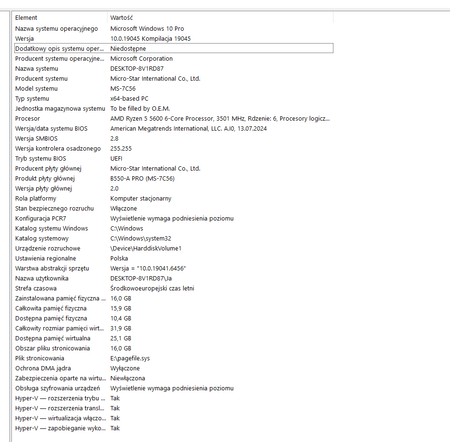
Hi everyone, After installing ubuntu, I can not get into the windows and struggle with a bios loop, and failed to repair it with iso or other startup disks. Gently ask if there is any possiblility I can repair the Windows reserving documents in C. System information : MB : B350M MORTAR (MS-7A37) CPU: AMD RYZEN 7 1700X EIGHT CORE PROCESSOR RAM 32768MB BIOS E7A37AMS.170546Views0likes1Commentsolucion imposible
spanish version....... teniendo problemas con la aplicacion de microsoft store al iniciar la aplicacion de un momento a otro salto con un mensaje en pantalla "lo sentimos mucho se produjo un error y microsoft store no se pudo inicializar. prueba a actualizar o vuelve mas tarde" he intentado realizar distintos metodos para solucionar el problema como realizar reinstalacion con la opcion de actualizar este pc del programa media creator tool para instalar windows 10 y aun el problema persiste, he realizado un intento por la powershell con el siguiente comando Get-AppXPackage *WindowsStore* -AllUsers | Foreach {Add-AppxPackage -DisableDevelopmentMode -Register "$($_.InstallLocation)\AppXManifest.xml"} descrito en varias respuesta para casos similares dispuestos en el foro de la comunidad de microsoft respuesta proporcionada por el usuario KapilArya en el hub "https://techcommunity.microsoft.com/discussions/windowsinsiderprogram/microsoft-store-wont-launch/1513414" tambien junto a un agente de soporte se intento realizar una solucion con la creacion de un usuario nuevo para solventar y no funciono tambien se realizo el diagnostico para la instalacion de windows 11 pero mi equipo no cuenta con las caracteristicas minimas para que este sea instalado y aun asi sigo sin poder solucionar el problema y no me gustaria realizar la reinstalacion de windows 10 por medio externos (USB) por que asi perderia demasiada informacion sobre las aplicaciones y datos que tengo de varios años de recoleccion y me gustaria saber si puedo hacer algo mas para poder solucionar este problema sin perder datos me dustaria obtener ayuda lo mas pronto posible gracias por brindarme su atencion y ayuda para resolver este caso adjunto evidencias sobre problema y metodos realizados. english version...... Having problems with the Microsoft Store app. When I launch it, it suddenly pops up with a message on the screen: "We're very sorry, an error occurred and the Microsoft Store could not be initialized. Please try updating or come back later." I've tried various methods to solve the problem, such as reinstalling with the "Update this PC" option in the Media Creator Tool to install Windows 10, and the problem still persists. I tried using PowerShell with the following command: Get-AppXPackage *WindowsStore* -AllUsers | Foreach {Add-AppxPackage -DisableDevelopmentMode -Register "$($_.InstallLocation)\AppXManifest.xml"} Described in several answers for similar cases posted on the Microsoft community forum. Answer provided by user KapilArya on the hub "https://techcommunity.microsoft.com/discussions/windowsinsiderprogram/microsoft-store-wont-launch/1513414" Also, together with a support agent, a solution was attempted by creating a new user to solve the problem, but it didn't work. A diagnosis was also performed for the installation of Windows 11, but my computer doesn't have the minimum specifications for it to be installed. And even so, I still can't solve the problem and I wouldn't like to reinstall Windows 10 using external media (USB) because I would lose too much information about the applications and data that I have from several years of experience. I'm collecting and would like to know if I can do anything else to resolve this issue without losing data. I would like to get help as soon as possible. Thank you for your attention and help in resolving this issue. I attach evidence of the problem and the methods used.129Views0likes2CommentsHP support assistant optimize your performance on windows laptop not working
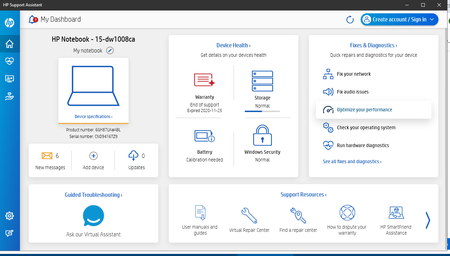
I can run HP support assistant but when I click optimize your performance nothing happens. Laptop specifications HP Laptop 15-dw1xxx Device Name LAPTOP-4TSL8KPJ Processor Intel(R) Core(TM) i5-10210U CPU @ 1.60GHz 2.11 GHz Installed RAM 8.00 GB (7.81 GB usable) Graphics Card Intel(R) UHD Graphics (128 MB) Device ID 9EEE07E5-D485-4F8E-9B13-D46EF5B002D1 Product ID 00325-81517-08523-AAOEM System Type 64-bit operating system, x64-based processor84Views0likes2CommentsESU admin account
I have enrolled my Windows 10 for ESU by changing my account to administrator and non-local account. This synced by settings and I didn't need to backup my other files to Onedrive. My update screen confirms I'm enrolled so all good so far. My question is do I need to keep my account as an Administrator now that I am enrolled? I'm a little nervous about leaving it so, as I also have a separate local admin account for installng stuff, and prefer to keep permissions separate from day to day browsing. Thanks, Paul156Views0likes2CommentsYou're Not Up To Date
Hello, I've just re-installed Windows 10. I applied Windows Update a few times. I applied Optional Updates I enrolled in Extended Windows Security Update. But I still get "Your device is missing important security and quality fixes" after clicking "Check for updates". Any help would be greatly appreciated.186Views0likes1Comment