windows 10
174 Topics
Any recommendations for a DocuSign alternative?
I’m looking for a DocuSign alternative for occasional document signing. I’d like to sign PDFs received by email and send them back, as well as send documents to other people for their signatures. A straightforward process for both the sender and the recipient would be important. When comparing services, I’d like to understand: Whether recipients can review and sign without creating an account What a free or low-cost plan includes, particularly the limits on signature requests Whether I can track outstanding signatures and download the completed documents Whether an audit trail is included or requires a paid plan Could anyone recommend a service that handles these tasks reliably? I’d especially appreciate hearing about any plan limits or recipient-side difficulties that are easy to overlook when choosing an alternative.88Views0likes1CommentWindows 10 downgrade
I have upgraded to W11 on my old laptop. Internet now drops out which I found is due to the TPM being 1.2 instead of 2.0. I want to downgrade back to W10, it has been more than 10 days so I have looked up the process for this which includes entering my previous W10 password which I have forgotten. Is there a way to find this old password ? Thanks.98Views0likes2Comments
Windows 10 unable to troubleshoot
Hello, I have an Asus laptop running Windows 10 and occasionally, it would lag (even offline while I am going through images like cropping a photo or clicking through document files- it would take 3 seconds for the action to occur)Apart from that, the start up would take tremendously long time. But since last week, I couldn't get past the black and/ blue screens after powering my laptop on ... I've already tried some, not all the troubleshooting available in the Advanced Options because even the loading alone doesn't always allow me to the next step as it shuts down instead. So I am tired of repeating the same cycle over and over again. I'll just briefly list the ones I WAS able to try and the messages I got from them for reference: Automatic Repair----- Automatic Repair couldnt repair your PC... c windows system32 logfiles srt srttrail.txt Uninstall Updates--- Not sure if it did anything because it didnt display another page Reset this PC: Keep Files.... tried both Cloud download and Local download and it both said "unable to download" Command prompt : I tried the 'recoveryenabled no' and 'safeboot minimal' Now I downloaded Media Creation Tool from a working computer in a USB but I cant even get to the blue screen. Is this how I can get it back? Or are there other options? I also wanted to make sure if I do this, will it get rid of personal files? If not, how do I make sure that I retain my files because I dont have a back up of all of them.148Views0likes1CommentWindows 10 ltsc download for enterprise edition 64 bit
I heard Windows 10 Enterprise LTSC is still with official support. Is there a safe and official way to download Windows 10 LTSC Enterprise Edition 64-bit, preferably as an ISO file so I can create a bootable USB and install it on one of my PCs. I checked the normal Microsoft download page, but it seems they only provide regular Windows 10 editions there. I specifically need Windows 10 LTSC Enterprise Edition 64-bit because I want a more stable system without frequent feature updates. I plan to use it on a workstation where stability is more important than the newest features. Does anyone know the best place to download Windows 10 LTSC ISO of Enterprise Edition 64-bit?159KViews1like8Comments
Can't Remove Microsoft Account After Windows 10 ESU Enrollment
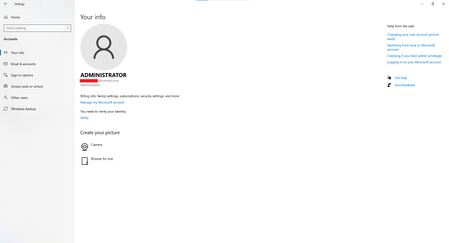
Hi, I enrolled my Windows 10 PC in the Extended Security Updates (ESU) program using my Microsoft account so I could continue receiving security updates after Windows 10 reached end of support. The update installed successfully, but now I can't remove my Microsoft account from Windows. Here's my situation: I sign in with a local Administrator account, not a Microsoft account. netplwiz confirms my account is local. However, Settings → Accounts → Your info shows my Microsoft email address. Under Settings → Accounts → Email & accounts, my Microsoft account appears under Accounts used by other apps with "All apps can sign me in." There is no Remove, Disconnect, or Sign out option. I've already tried: Removing all Microsoft-related entries from Credential Manager. Restarting the PC. Removing the device from my Microsoft account online. None of these removed the account from Windows. Is this expected behavior after enrolling in Windows 10 ESU? Is there any supported way to disconnect the Microsoft account? Thanks in advance.310Views0likes4Comments
Your device is missing important security and quality fixes.
Does anyone know how to fix Windows update saying “you’re not up-to-date” “your device is missing important security and quality fixes” i’ve reinstalled windows several times using a USB media and also the upgrade now feature neither of them have worked for me. I’ve tried clearing the update cache to clear out any corrupt files also didn’t work, I really don’t understand what could be causing this because the drives have been completely wiped and it’s a fresh install of windows, I even tried re-downloading it onto the USB just in case the download was messed up somehow, It also says my pc is enrolled in ESU so I should be getting the newest updates, at this point I think it might be something on Microsoft end327Views1like3Comments
Windows 10 Pro Digital License Not Reactivating After Replacing Motherboard with the Same Model
윈도우 7에서 윈도우10으로 무료 업그레이드후 노후환 된 메인보드를 교체를(동일 모델) 하였는데 정품인증이 안되고 있습니다. 더이상 어떻게 해야 할지 모르겠는와중 여기를 마이크로 소프트 지원팀에 채팅으로 대화하다 알게 되어서 글을 남깁니다. 현재 확인한 사항: 윈도우 버전 windows 10 pro (Retail), 마이크로 소프트 계정-> 장치 이전 pc 및 현재 pc 둘다 등록이 되어있는걸 확인 1. 설정-> 정품인증 -> 문제해결 = 해결 X 2. 설치ID를 통한 시도 해결 X I upgraded from Windows 7 to Windows 10 for free. Recently, I replaced my aging motherboard with the exact same model, but Windows is no longer activated. I was not sure what else I could do, and I learned about this community while chatting with Microsoft Support, so I decided to post here. Current information I have confirmed: - Windows version: Windows 10 Pro (Retail) - Microsoft account > Devices: Both my previous PC and my current PC are registered. Troubleshooting I have already tried: Settings > Activation > Troubleshoot: Did not resolve the issue. 2. Tried activation using the Installation ID provided by Microsoft Support: Did not resolve the issue. The Windows 7 product key I originally used is still available, but entering it in Windows 10 results in an activation error. I would like to know whether my previous Windows 10 digital license can be transferred or reactivated on the replacement motherboard.64Views0likes0Comments
Issues with syncing calendar from outlook calendar in taskbar
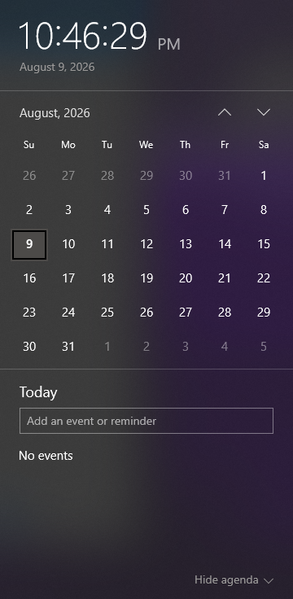
I am wondering how I can sync a specific calendar from outlook to be the one that the events get pulled from to appear in the taskbar calendar that is displayed when clicking the date/time tool. Currently the calendar that appears when I click the date and time section is blank, and trying to make a new event from that popup does not save anything. When go into the outlook calendar app, I can see the multiple email accounts and their respective calendar, but yet no events from these calendars show up when looking at the calendar popup from the taskbar. When trying to make an event in this calendar popup, it even gives me the option to save the event to one of my outlook accounts (the gmail account I have integrated), but does not successfully save any event anywhere. I am wondering what is required to be able to see the events from my outlook calendar in this popup, and to be able to quickly and conveniently make events from this taskbar popup and have them save to my actual outlook calendar. Including a screenshot of the calendar in taskbar that I am requesting help with incase of any confusion.307Views0likes3Comments