User Profile

prashantguptag
Brass Contributor
Joined Aug 17, 2016


User Widgets
Recent Discussions
M365 mobile app and Copilot
Can someone please explain how Copilot option present in Microsoft 365 mobile app relates to Copilot for M365? We have currently disabled the web content plugin in Copilot settings and also disabled copilot for Bing, Edge and Windows via MS provided PS script but still Copilot option is available in the M365 mobile app. When i did some tests, I can copy paste the content from other Intune managed apps e.g. from Outlook to this Copilot prompt in M365 app (which is also Intune managed) and the other way around also. Ideally this copy paste content should be possible because both the apps (M365 app and Outlook app) are organization managed but if we look at Copilot there, then its not the Copilot for M365 isn't it? It shows the icon of Commercial Data Protection in chat interface and also it does not search the data from organization resources. So can we somehow disable this Copilot option in M365 app or block copy paste data from other Intune managed apps? Any ideas or views on this?Web content plug-in management in M365 Copilot
Hi, Referring to this announcement MC882258 in message center, MS informed that web content plug-in management will be removed from M365 admin center, rather it will be managed as part of Optional Connected Experience for M365. We have currently disabled this web content plug-in in our environment but allowed Optional Connected Exp for the users. After this announced change, how web content plug-in will behave? Will it enabled because we have Optional connected exp. enabled? Secondly, what is the reason behind this change? Why MS has taken individual control setting away and mixed it with so many optional connected exp. where we do not have an option to choose which optional connected exp. we want to enable/disable. Its like all or nothing.Adding image to the question fails
Hi, I am tryin to create new form within Teams. For this, i have added Forms connectors to the Teams and then trying to create a new Group form. When I try to create a question and add an image to that question, the loading image keeps on showing and image never gets added. If I repeat the same steps out of Teams i.e. in Forms web interface then image gets rendered as soon as I add it. I took the fiddler trace when this issue occurs from Teams and got this response {"error":{"code":"701","message":"Required user login."}} and the failure reasons is X-FailureReason: MissingCookieOrToken Any suggestions what is wrong here? Thanks. -Prashant.1.4KViews0likes3CommentsWhat happens when Forms owner leaves the company?
Hi, One of the MS Forms Survey owner is going to leave the company but that survey is active i.e. people are updating the survey using Collaborate link. So in this case, what is going to happen? Will this survey be totally lost since the owner of the survey will not be available anymore? -Prashant.Solved74KViews1like22CommentsInviter Role - Guest access on Teams
Hi, I am using B2B guest user invitation api to invite externals in my tenant. In AAD, i have configured the this flag "Admins and users in the guest intivter role can invite" to ON and rest other flags are Off i.e. only invitor role can invite the externals not group members. So, when i use this configuration and send invitation via code, everything works fine but i am not able to see the guest in Teams membership while guest is visible as a member in Teams SPO site. Is this a limitation? -Prashant.2.2KViews0likes1CommentNested Email attachments to SPO via Flow
Hi, How can i retrieve and store attachments from an email to SPO using Power Automate? Please note that my flow works fine when email has an attachment but it does not work when attachment of the email also has another attachment i.e. nested attachment. Is there any possibility to retrieve all attachments (nested) from the email and store in SPO? -Prashant.Re: SharePoint unique permissions scope limit & impact
Alireza Rahimifarid Thanks for your response. I am still looking for a good reason to use one over another approach. For e.g. in MS docs, it is written about permissions scope hard limit for list/library items which is 50000 and recommended is 5000 but is it valid for list/library level unique permissions also?1.8KViews0likes0CommentsSharePoint unique permissions scope limit & impact
Hi, Which approach would be good considering unique permissions? 1. To have ~5000 folders in a single library and each folder having unique permissions? Folder itself will not have more than 10-20 documents. 2. Having 5000 libraries in a single site and each library has unique permissions? Will there be any impact of having so many libraries? At least MS says that there is no limit on no. of document libraries in a site.2KViews0likes5CommentsGraph API get private channel connected site url failing
I am following this article Manage lifecycle of private channels to get private channel's site url using App-Only authentication. As per the article, its giving the desired result for this first request "GET https://graph.microsoft.com/beta/teams/<group_id>/channels?$filter=membershipType eq 'private'" but for second request GET https://graph.microsoft.com/beta/teams/<group_id>/channels/<channel_id>/filesFolder its throwing error "502 Bad Gateway". Can anyone suggest what could be the issue? Error: { "error": { "code": "BadGateway", "message": "Failed to execute backend request.", "innerError": { "request-id": "6ab8032b-8d33-4543-b2f1-0e13978e9699", "date": "2020-02-05T07:00:11" } } } Jeremy Thake any tip why its failing?4.5KViews0likes8CommentsRe: Retrieve Channel Folder with Graph API returns 502 Bad Gateway
Trinetra-MSFT I am also having the same issue. I am trying to get the site url of a private channel and since private channel has separate site collection so this url https://graph.microsoft.com/beta/groups/{team-id}/drive/root/children does not provide the desired result. To get private channel site url, I am using https://graph.microsoft.com/beta/teams/group-id/channels/private-channel-Id/filesFolder but this throws 502 bad gateway in one tenant but in other tenant it works. I tried all possible ways to fix it i.e. by changing permissions to the app but it didn't work and I am stuck. Could you suggest why I am facing this issue in one tenant and is there any other way to get private channel site collection url? Please note that, before sending a request to this given url I am sending another request to get all private channels and that works in both the tenants but this one fails. -Prashant.4KViews0likes1CommentRe: Silently adding Guest users to Azure AD
Not tested but You can programmatically create guest users using Invitation API and save the the redemption url generated against each guest user name probably in a csv file. Later on you can send email to each guest user with redemption link. In Azure AD, you can configure conditional access (MFA) since start for usertype = guest. When guest user will receive your invitation email and try to redeem the invitation, MFA setup will automatically trigger for the user.11KViews0likes0CommentsRe: Office 365 group Aliases
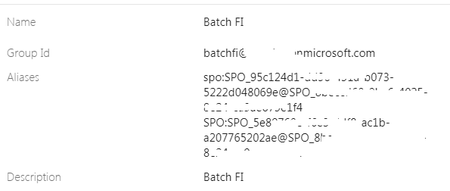
Ok did some digging around it and based on given example what i did is, I retrieved the site urls based on the guids available in group aliases for SPO. I got two different sites but when I used Graph API to get the associated site for the group I am getting only one site which is one of the site retrieved earlier. So how should i understand this? I am confused. Should I totally ignore the site and consider it orphan which is not returned by Graph API?1.2KViews0likes0Comments
Recent Blog Articles
No content to show