
Forum Widgets
Latest Discussions

Creating a meeting with an old link
I was asked to create a series of meetings (not recurring, as they take place once a month but at different times and on different days) using the one link that was used for them for previously scheduled meetings, in order not to lose the chat. Is this possible?SolvedLuciaCanoneroApr 01, 2026Copper Contributor13KViews1like7Comments
Link URL to Team Channel
Hello all, I'm trying to link a URL from a fillable PDF to a "Teams Channel". If I plug in the following URL, it works great (it links the user directly to a personal Teams Chat). However, rather than link the user to Chat channel, I want the user to be linked directly to a general Teams Channel. (I hope this makes sense). Is any of this possible? https://teams.microsoft.com/l/chat/0/0?users=XXX@XXX.com&topicName=Completed-training&message=TrainingTraining Complete:SolvedhireggieApr 01, 2026Copper Contributor116KViews1like7Comments
Allow muting a person only for me
Sometimes I am in a meeting where one of the persons in the meeting is actually near me in the world outside the screen. In this case the sound is a bit maddening since there is a small delay between the sound from the person and the sound through the teams interface. In these cases, I would like to mute the person only for me since I am sitting near and can hear the person fine without headphones. Right now I need to takeoff headphones when the person is talking and putting it back as the person finishes talking.er008Apr 01, 2026Steel Contributor129KViews199likes154CommentsAbility to reject / silence ringing calls from call queues?
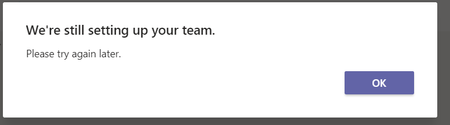
We recently switched from an on-premise phone system to MS Teams phone system. We have several call queues set up using attendant routing that ring multiple people. The challenge we are facing is that when someone calls the call queue, Teams rings for everyone in the queue. The users have the option to reject the call, but when they do so, the call will stop ringing for approx 1 second and will then start ringing again. This is problematic, because if someone is actively on a call, they have no way to stop teams from ringing, which is hugely distracting. I know presence based routing is an option, but there are multiple problems with PBR. For one, it will only allow calls to ring when a user's status is available. If someone is idle/afk, their status will go to 'away' and Teams will not ring. We still want Teams calls to ring idle users because they may simply be doing something other than working on their computer. Another issue is that if a user has a meeting on their calendar that finishes early (a frequent occurrence), the Teams status will still show busy for the remainder of the scheduled time and will not allow calls to ring, even though the scheduled meeting has ended and the user is not busy. I know users can manually set their status to DND when on a call to prevent other calls from ringing, but the problem with this is users will either forget to turn DND on, or worse, they'll forget to turn DND off. Every other phone system I've used has the option to silence a ringing call, but I cannot seem to find a way to do this in Teams. Suggestions?vrtigo1Mar 31, 2026Brass Contributor548Views4likes1CommentWe're still setting up your team. Please try again later.
Hi, I have set up a channel within Teams, I am trying to get the email address and keep getting a message "We're still setting up your team. Please try again later" This was set up about 3 hours ago.SolvedTonyTonyMar 31, 2026Copper Contributor33KViews1like18Comments
Events & Multiple Organizers
I know there is a co-organizer option but it still limits the editing capabilities for events and event series. Is or will there be an option for multiple organizers? It becomes frustrating for a team who often switch roles for availability.XtinaMar 30, 2026Copper Contributor5Views0likes0Comments
Microsoft can accuse you of Child Sexual Exploitation and Abuse
So there is cloud hosting / storage website out there called 1fichier.com and if you write that in Teams, it's fine, but if you put https:// in front of it, like https://1fichier.com then it will ne censored in Teams and you'll get an e-mail saying: Content associated with your account was detected by Microsoft as violating our terms and policy or code of conduct. The details are as follows: • Service or product used: Microsoft Teams • Policy violated: Reference to Child Sexual Exploitation and Abuse Content • Actions taken: We have removed the content in violation. This is a pretty serious accusation to throw around like this, considering this is an obvious "false positive".PerplexerMar 30, 2026Copper Contributor198Views0likes3Comments
New teams app is extremely slow to start on Mac
The new version of the Teams app is extremely slow to start it can take up to 1-2 minutes to get it running and join a call, why is it so slow? It wasn't like this before, and now I need to prepare a couple of minutes before joining a meeting because it takes such a long time to start. Is there any solution, do you plan on optimize the app?CristhianSMar 26, 2026Copper Contributor7.3KViews2likes9CommentsTeams window stuck on top of all others
I'm using the new Teams, having switched just a few days ago. Right now my Teams window is "stuck" on top of my other windows. Any window I try to move into the same space as Teams on my desktop results in Teams being over that window. This happens randomly. I've seen this behavior occasionally with Chrome as well, but not with any other app. Does anyone know why/how my Teams window got stuck on top? Is there a way to correct this without having to shut down Teams and restart it?Cal_AbMar 26, 2026Copper Contributor2.6KViews0likes2CommentsTeams webinar poll participant numbers
I'm trying to work out whether a Teams webinar using a premium account will allow more than 300 people to take part in a poll. At a recent webinar with over 500 attendees the polls crashed because too many people were trying to vote. According to some info I'm finding online, a webinar set up with a premium account will enable 1000 people to take part in the poll. However, other places seem to suggest that still capped at 300. Anyone know for sure? ThanksRos12369Mar 26, 2026Copper Contributor22Views0likes0Comments
Tags
- microsoft teams13,483 Topics
- How-to2,939 Topics
- Administrator2,649 Topics
- meetings2,556 Topics
- Settings2,297 Topics
- User Interface1,650 Topics
- tips & tricks1,496 Topics
- calling1,252 Topics
- teams1,038 Topics
- best practices991 Topics