how-to
2951 Topics
Shared Channels: @Channel mentions fail to trigger activity notifications for team-shared members
Hello everyone, I am facing a persistent issue regarding notification behavior in Microsoft Teams Shared Channels that I hope someone can clarify or help with. Scenario: We have a Shared Channel that is shared with multiple teams (e.g., 17 teams in total). Note: I know that this way of communicating is not the recommended way, but we are not allowed to use any Viva products etc. Users accessing the channel are members of those shared-in teams, but they are not listed as direct individual members in the Shared Channel's own member list. Users have their channel notification settings correctly configured to receive notifications (e.g., "All new posts" or standard banner/activity settings). The Problem: When someone uses a channel mention (e.g., @ChannelName) in this shared channel, the users who have access via the team-sharing mechanism do not receive any activity feed notifications. The workaround/oddity: They only receive the activity notification if we explicitly add each user as a direct individual member to the Shared Channel. The dilemma: Since the channel is shared with 17 teams, adding hundreds of users manually or via scripts as direct members creates massive redundancy and clutters the UI (users see the team and the channel redundantly). Inconsistency: We noticed that in older shared channels created some time ago, channel mentions worked across team shares without needing direct individual memberships. It seems newer shared channels behave differently and strictly require direct membership to trigger activity feed notifications for @Channel mentions. Questions: Is this a known design limitation or a recent backend change in Microsoft Teams for newer Shared Channels regarding how @Channel mentions resolve indirect team members? How are organizations supposed to utilize @Channel mentions effectively in large-scale collaborations involving multiple shared teams without bloating the direct membership list? Any insights or workarounds would be greatly appreciated. Thank you!10Views0likes0CommentsHow to automatically record all Teams meetings?
I have subscribed to a Teams Premium trial and added the license to a user's account. As global admin, I'm trying to enable automatic recording on ALL Teams meetings for that user. I don't want the user to need to remember to record meetings. In the Teams Admin Center, I open the Global (org-wide default) meeting policy, but there is no option here to automatically record all meetings. Instead, the only option is to enable optional recording, but users still have to manually start recording or enable recording before the meeting starts. If the user forgets to select one of these options, the meeting is not recorded. In the Teams Admin Center, I have created a custom meeting template called 'Coaching'. There is an option called 'Record meetings automatically' with a toggle. That option is disabled. When I hover over it, it says, 'Locked by another option's default value setting'. There is no hint or documentation about which other option is conflicting with the 'Record meetings automatically' option. How do I record all meetings automatically for a user? It seems so simple in Zoom!58KViews1like17Comments
Cannot deploy Custom backgrounds for Teams in VDI environment
We have detected (or so we think) a malfunction in Teams on VDI when attempting to deploy Teams backgrounds that should be available to users for their video calls. The only article that documents how to do this is the following: https://learn.microsoft.com/en-us/microsoftteams/custom-meeting-backgrounds It clearly states that the path where custom Teams backgrounds are stored is in the user profile, specifically in the folder: %LOCALAPPDATA%\Packages\MSTeams_8wekyb3d8bbwe\LocalCache\Microsoft\MSTeams\Backgrounds\Uploads Expected Process The process is not direct, but it is straightforward. Using a script, a UUID is generated, which is used to create two image files (JPG, BMP, or PNG format, depending on the original image). For example, if the original is a JPG: UUID.JPG UUID_thumb.JPG These two files are copied to the path above, and on the next Teams session startup they should be available to the user. ✅ This works correctly in physical (non-VDI) environments. Tested many times without issues. What We Have Observed in VDI Even when the file pair is copied to the correct path within the user's FSLogix profile, the image does not become available in the Teams client — even after restarting Teams multiple times or even the VDI session itself. After each restart, the files are confirmed to be persistent and located at the correct profile path.[ %LOCALAPPDATA%\Packages\MSTeams_8wekyb3d8bbwe\LocalCache\Microsoft\MSTeams\Backgrounds\Uploads folder contents] When a background image is added manually through the Teams UI, a folder is created in OneDrive called "Microsoft Teams User Custom Video Backgrounds". If additional images are manually added to that OneDrive folder, they do not appear as available in Teams. This leads us to believe that the upload process performs additional operations in the registry or other configuration locations beyond simply copying the file. A ProcMon capture was performed, but after an initial superficial inspection, it was not possible to determine exactly what is happening under the hood.361Views0likes2CommentsNEW Teams Feature: Test Your Mic & Speaker BEFORE Joining a Meeting!
🎙️ No more "Can you hear me?" moments in Microsoft Teams! Microsoft just rolled out a small but genuinely useful feature: you can now test your microphone and speaker directly from the Teams pre-join screen — before you even enter the meeting. ✅ Test your speaker with a quick tone ✅ Record and play back your mic ✅ Get a green checkmark confirming you're ready to join No more digging through Settings > Devices > Make a test call every time. Have you tried it yet? Let me know in the comments if this feature has saved you from an awkward audio moment in a meeting 👇 #MicrosoftTeams #Microsoft365 #TeamsUpdate #Productivity #RemoteWork #M365Insider143Views0likes0Comments
Random list of team meeting participants
Hi, during a daily meeting I want to prepare the list of all members and each day before a meeting I want to send to all list with the order of speaking. How I can do this. ;/ I know that this is possible but I don't have idea how. Thanks for help.3.8KViews1like2Comments
SharePoint document set as Teams Tab
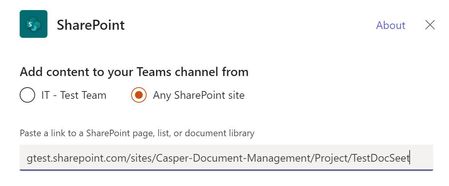
I been testing adding folders as a team tab and these work fine. Also, adding a library that contains document set's also works fine and the document sets seem to browse and operate as expected. When adding a document set URL it produces the error below. The same exact process with a folder works. It's a bit surprising this does not work as the document sets do work when adding the entire library however a specific document set like adding a folder does not work. Any feedback is appreciated.4.4KViews0likes15Comments
Cross-Tenant Shared Meeting Room Spaces
We have two M365 tenancies under our group. We need to allow users from both tenants to use Meeting room resources (book rooms, use calendars etc..). Is this just about configuring Exchange OR Sharing in EXO or do we need anything beyond that to facilitate Teams meeting room resource sharing? Would we also need to sync these meeting room objects across tenancies to allow users to see them in GAL etc.. ? Thank you!5.2KViews0likes4Comments
Still Cannot Bulk Add People or Groups in Team/Channel in 2026
It's 2026, still same issue. As a regular user/leader of a large team (hundreds of people), we still cannot bulk add people in Team/Channel. It's frustrating to add one people at a time. This has been brought up in 2020, 6 years after, same issue. teams and bulk adding of members | Microsoft Community Hub No real resolution.476Views0likes2Comments