microsoft teams
13562 Topics
Mouse button 'Back/Forward' not working in 'New Teams'
Though there are options to 'pop out' windows from Teams, Teams is a generally a single page app. As such, one of my most used features in 'Classic Teams' is switching back 'n forth between several 'tabs' I'm currently working with. Say I've got somebody on chat, but then have to quickly check something in Teams, then go back to chat. In Classic Teams this works just fine using the mouse's back & forward buttons. In 'New' Teams, this no longer registers any action at all. I assume the feature still exists, since left of the search bar there are still the back/forward UI buttons. But moving the mouse over for every time you need to switch back and forth is a lot slower and less intuitive than just using the mouse buttons. Current behavior: Mouse 'back'/'forward' buttons do not work in 'New Teams' Expected behavior: Mouse 'back/forward' buttons register the 'back' and 'forward' navigation commands as they did in 'Classic' Teams8.3KViews35likes27Comments
Cannot deploy Custom backgrounds for Teams in VDI environment
We have detected (or so we think) a malfunction in Teams on VDI when attempting to deploy Teams backgrounds that should be available to users for their video calls. The only article that documents how to do this is the following: https://learn.microsoft.com/en-us/microsoftteams/custom-meeting-backgrounds It clearly states that the path where custom Teams backgrounds are stored is in the user profile, specifically in the folder: %LOCALAPPDATA%\Packages\MSTeams_8wekyb3d8bbwe\LocalCache\Microsoft\MSTeams\Backgrounds\Uploads Expected Process The process is not direct, but it is straightforward. Using a script, a UUID is generated, which is used to create two image files (JPG, BMP, or PNG format, depending on the original image). For example, if the original is a JPG: UUID.JPG UUID_thumb.JPG These two files are copied to the path above, and on the next Teams session startup they should be available to the user. ✅ This works correctly in physical (non-VDI) environments. Tested many times without issues. What We Have Observed in VDI Even when the file pair is copied to the correct path within the user's FSLogix profile, the image does not become available in the Teams client — even after restarting Teams multiple times or even the VDI session itself. After each restart, the files are confirmed to be persistent and located at the correct profile path.[ %LOCALAPPDATA%\Packages\MSTeams_8wekyb3d8bbwe\LocalCache\Microsoft\MSTeams\Backgrounds\Uploads folder contents] When a background image is added manually through the Teams UI, a folder is created in OneDrive called "Microsoft Teams User Custom Video Backgrounds". If additional images are manually added to that OneDrive folder, they do not appear as available in Teams. This leads us to believe that the upload process performs additional operations in the registry or other configuration locations beyond simply copying the file. A ProcMon capture was performed, but after an initial superficial inspection, it was not possible to determine exactly what is happening under the hood.14Views0likes0Comments
New Poly Phones : No Microsoft Teams Sign In Option
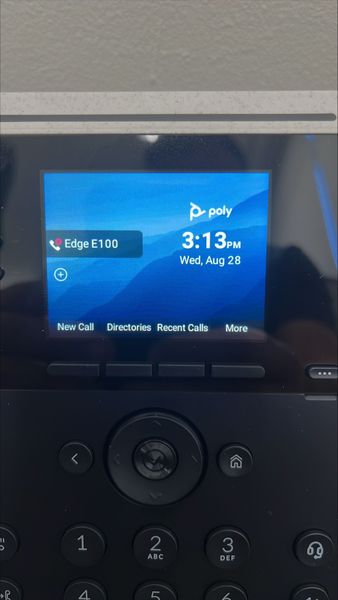
Hi everyone, Today I just set up the brand new Poly phones. I connected them to the office network and powered them up. However, Microsoft Teams Sign In Option is not available over the phone screen(see phone screen shot below). It also appears that the firmware is generic, and it look it doesn’t come with Microsoft Teams firmware or profile (see phone screen shot below). The phones are just out-of-box. Please kindly advise how these Poly phones can come up with Teams Sign In option. Thanks for your help in advance. Poly phone models I tested: Edge E100, E220 (BTW, I also test C60, the Teams Sign In option(window) pops up as expected once switching to Teams profile from generic one.) These will be set up as common area phone. I followed this official guide: Set up common area phones for Microsoft Teams: https://learn.microsoft.com/en-us/microsoftteams/set-up-common-area-phones Best regards, E.Z.2.3KViews0likes2Comments
Best way to automatically bring unfinished 1:1 action items into the next meeting?
One thing our managers keep running into is losing track of action items between recurring 1:1s. They might agree on 2–3 follow-ups during one meeting, but by the time the next one comes around those notes are sitting in Loop, OneNote, a Teams chat, or someone’s personal task list. Ideally, I’d like unfinished action items from the previous 1:1 to automatically show up in the next meeting agenda so both sides can quickly review what was actually completed.194Views0likes2Comments
Is Microsoft Teams a good Intranet?
Our company is fully on Microsoft 365, but employees still struggle to find basic information like policies, company updates, forms, department resources, and important links. Most of it is scattered across SharePoint sites, Teams channels, emails, and random folders. I want to turn Microsoft Teams into that hub where all of this lives, kind of like an intranet. Any suggestions?203Views0likes3CommentsCustomizing pasted image preview size for better visibility
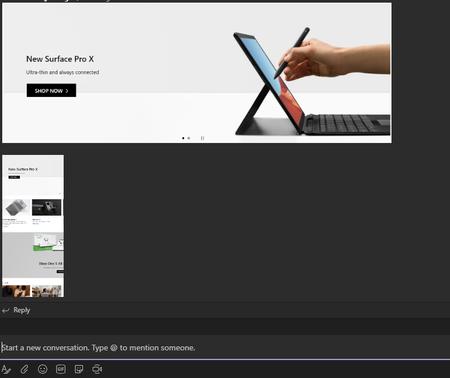
Hi all, Currently, the ctrl+c and ctrl+v function works well in Microsoft Teams, and the app will scale down the image to a preview version which is clickable to expand and view the full sized image. If the pasted image is of a certain dimension, it may be resized to a un-readable version (Bottom Image vs the top image) without clicking to expand it. Would like to know if it is possible to enlarge the image previews done by Teams for ctrl+c and ctrl+v images? Thanks!Solved28KViews1like3Comments
Planner for Private Channels
Hello all, Does anyone have any information on when Private Channels will get Planners? Teams is a collaborative tool, but you can't assign tasks to people in private channels due to the lack of planners. Any info would be greatly appreciated. Thanks!Solved418KViews29likes52Comments
Not receiving any notifications in my Samsung S26 Ultra
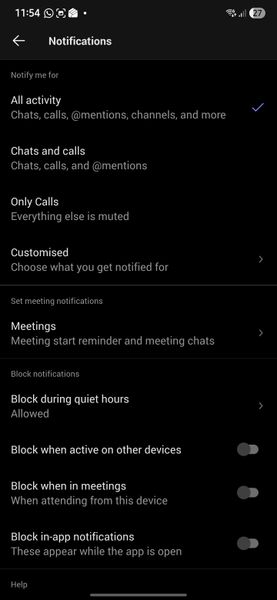
Hello, Since I moved to Samsung S26 Ultra, I am not getting any notifications. Following are my settings. Please help to fix the issue. Following are settings in Samsung phone Following are settings in my Teams app in deskop Following is the settings set for all my channels Thanks116Views0likes1CommentDirect Routing PSTN calls to Teams Auto Attendant does not forward to Shared Voicemail
Hi all, I’m running into a strange issue with a Teams Auto Attendant and I’m hoping someone here has seen it before. We have a Direct Routing number where business hours calls go to a Call Queue, which works, and after hours calls should go to Shared Voicemail for a Microsoft 365 Group. If I call the Auto Attendant from inside our Teams tenant, the after-hours Shared Voicemail works correctly. I can leave a message and the voicemail is delivered to the group inbox as expected. If I call the same number from the PSTN over Direct Routing, I hear the after-hours greeting, so the schedule and call flow are clearly being hit, but once the greeting finishes I get: “Sorry, we cannot connect your call at the moment, please try again later.” I have already verified that the resource account has the correct Teams Phone Resource Account license, Enterprise Voice is enabled, the LineURI is assigned, the Online Voice Routing Policy is assigned, the Direct Routing route and SBC look healthy, the Auto Attendant is associated with the correct resource account, the after-hours call flow points to the correct Microsoft 365 Group, and the group mailbox exists and is healthy. What makes this more confusing is that redirects to internal or tenant-side destinations work, but redirect to Shared Voicemail from a PSTN-originated call does not work. I also tested redirect to an external PSTN number, and that fails with the same error as well. Because the after-hours greeting plays correctly, and because internal Teams calls can successfully leave voicemail in the shared mailbox, I do not think the issue is with the Auto Attendant configuration itself or with the Microsoft 365 Group mailbox. At this point it looks more like the handoff or redirect path for PSTN-originated calls over Direct Routing is where things break. Has anyone run into this with a Teams Auto Attendant, Shared Voicemail, and inbound PSTN over Direct Routing? I’m trying to figure out whether this is a known limitation, a bug, or if there is some specific setting related to PSTN-originated redirects that I am missing. Thanks!291Views1like1Comment
Feature request: "AFK" status whilst on call
We would like to use Microsoft Teams calls as a continuously open call for long periods of time whilst working remotely as a team. However the current inability to visually see on the call screen whether another attendee is at their keyboard, without everyone having their cameras on all the time (which eats a lot of bandwidth) limits our ability to do so. I would like the ability to have an "away from keyboard" status, similar to the "raise hand" status, that can be set by each attendee when they step away from their desk/keyboard to grab a drink or take a comfort break. This could either be implemented by: adding a new group in which "raise hand" is one option, and "step away" is another adding a new option along the tool bar specifically for "step away" The only way to do this currently is to create another meeting (with yourself) and join that meeting so that you appear 'on-hold' within the previous call. This is very tedious to implement for every attendee involved.148Views1like1Comment