user interface
1667 Topics
Planner task comments no longer send email notifications – critical regression
This change removed a previously existing core functionality without providing an adequate replacement. With the new Planner experience, task comments no longer trigger automatic email notifications to assigned users. This breaks a critical communication mechanism that many teams relied on for reliable task coordination. As a result, assigned users are no longer consistently informed about updates, introducing a high risk of missed information and operational issues in day-to-day work. There is currently no supported or enforceable alternative to ensure users are notified. Previous behavior: Task comments triggered automatic email notifications Assigned users were reliably informed Communication was traceable and consistent Current behavior: No automatic email notifications No configuration to restore this @mentions required (manual, error-prone, not enforceable) Microsoft Support has confirmed that this is by design and cannot be reverted. From an enterprise perspective, this is not just a design change, but a regression of critical functionality without an equivalent replacement. Request: Please restore automatic email notifications for task discussions or provide a reliable, enforceable alternative for notifying assigned users. Question to the community: How are you handling this change in real-world scenarios? Switching tools? Enforcing @mentions? Moving communication out of Planner? Would appreciate hearing how others are dealing with this.1.7KViews5likes9Comments
Microsoft Teams transcription language settings
Hi! With a Microsoft 365 Business Premium license and a Copilot license, I can use transcription during a Teams meeting by setting the spoken language to Auto Detect. However, the transcription is sometimes inaccurate. Is there a way to limit the language detection scope? For example, is it possible that I select only English and Chinese, and Auto Detect is restricted to those two languages instead of also attempting to detect languages such as Spanish or French ?55Views0likes1Comment
Shared Channels: @Channel mentions fail to trigger activity notifications for team-shared members
Hello everyone, I am facing a persistent issue regarding notification behavior in Microsoft Teams Shared Channels that I hope someone can clarify or help with. Scenario: We have a Shared Channel that is shared with multiple teams (e.g., 17 teams in total). Note: I know that this way of communicating is not the recommended way, but we are not allowed to use any Viva products etc. Users accessing the channel are members of those shared-in teams, but they are not listed as direct individual members in the Shared Channel's own member list. Users have their channel notification settings correctly configured to receive notifications (e.g., "All new posts" or standard banner/activity settings). The Problem: When someone uses a channel mention (e.g., @ChannelName) in this shared channel, the users who have access via the team-sharing mechanism do not receive any activity feed notifications. The workaround/oddity: They only receive the activity notification if we explicitly add each user as a direct individual member to the Shared Channel. The dilemma: Since the channel is shared with 17 teams, adding hundreds of users manually or via scripts as direct members creates massive redundancy and clutters the UI (users see the team and the channel redundantly). Inconsistency: We noticed that in older shared channels created some time ago, channel mentions worked across team shares without needing direct individual memberships. It seems newer shared channels behave differently and strictly require direct membership to trigger activity feed notifications for @Channel mentions. Questions: Is this a known design limitation or a recent backend change in Microsoft Teams for newer Shared Channels regarding how @Channel mentions resolve indirect team members? How are organizations supposed to utilize @Channel mentions effectively in large-scale collaborations involving multiple shared teams without bloating the direct membership list? Any insights or workarounds would be greatly appreciated. Thank you!168Views0likes2Comments
Microsoft Places bug: Room images are too big, hiding info. Need a compact/resize option
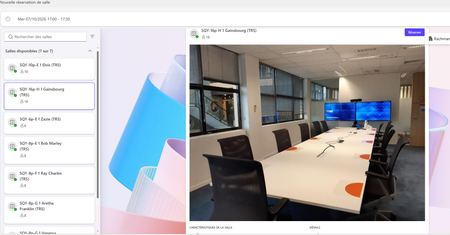
Hi everyone, We are currently deploying Microsoft Places and configuring our Resource Mailboxes. We are facing a major UI/UX issue regarding the Room Cards (Space Profiles). No matter what image size, resolution, or aspect ratio we upload for a room (via Entra ID / Exchange mailbox photo), the Microsoft Places interface automatically scales and stretches the image to fill the top banner. The image container is so large that it takes up almost the entire height of the card. As a result, critical information such as room capacity, available features/equipment, and the booking button are pushed completely out of view. Users are forced to scroll down every single time just to see basic details. This creates a poor user experience. While removing the room picture entirely provides a more compact layout, we would still like to use visual cues without sacrificing readability. Feature Requests for the Product Team: Allow administrators to disable or shrink the room image banner directly within the Places settings. Introduce a compact layout option for Room Cards where text and action buttons (like "Book") are prioritized at first glance. Fix the auto-scaling behavior so it doesn't force a massive zoom on standard 1:1 or 16:9 images. Is anyone else experiencing this, or did you find a clean workaround to force a more compact view? Thanks!49Views0likes1CommentMouse button 'Back/Forward' not working in 'New Teams'
Though there are options to 'pop out' windows from Teams, Teams is a generally a single page app. As such, one of my most used features in 'Classic Teams' is switching back 'n forth between several 'tabs' I'm currently working with. Say I've got somebody on chat, but then have to quickly check something in Teams, then go back to chat. In Classic Teams this works just fine using the mouse's back & forward buttons. In 'New' Teams, this no longer registers any action at all. I assume the feature still exists, since left of the search bar there are still the back/forward UI buttons. But moving the mouse over for every time you need to switch back and forth is a lot slower and less intuitive than just using the mouse buttons. Current behavior: Mouse 'back'/'forward' buttons do not work in 'New Teams' Expected behavior: Mouse 'back/forward' buttons register the 'back' and 'forward' navigation commands as they did in 'Classic' Teams8.8KViews35likes27Comments
Teams users cannot sign in if using personal account
Anyone have any luck with this? Know of a work around? Anything know if this is a known issue and if a fix is on the way? Once again Microsoft Support has lived up to my expectations so I'm reaching out here. Create a meeting invite link and share with a bunch of people. When clicking on the link the user is presented with options to download Teams, use the web or open with the Teams App. This applies to the Teams App link. Users with business accounts, and users who join as guest work without issue. On the join meeting window there's a link to sign in for a better experience. Clicking this link show a signing in page either indefinitely or for a while and reverts back to the join meeting window. It appears that signing in to a Teams meeting with a personal account (Outlook.com, Gmail) simply is not supported. If this is the case I would expect a message to say this but I suspect this is a bug in Teams.21KViews1like13Comments
"None" option missing from Teams background options
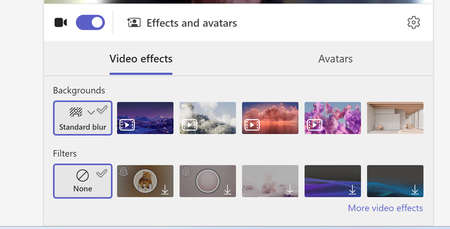
Hi, Our teams "none" background option is missing. Forcing users to use a background or the blur backgrounds. I have tried to revert back to classic teams to see if that is a fix, but I am unable to toggle it off and it takes me to download the classic teams which is just the new teams download. I do see this message "Your org sets background to blur unless something else is selected" when trying to update the background in a call. We are not disabling this option as an organization. And I can switch to other backgrounds.2KViews1like7CommentsTeams missing GIF option in messaging
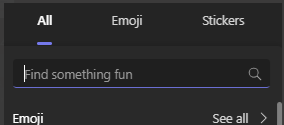
This morning we noticed the GIF option in Teams messaging is missing org wide. Desktop and Web client. Old messages that were sent with a GIF display as a link now instead of the image Our global org policy in the Admin porta is set to On Anyone else seeing this?Solved32KViews16likes39Comments
Teams is unable to access your calendar
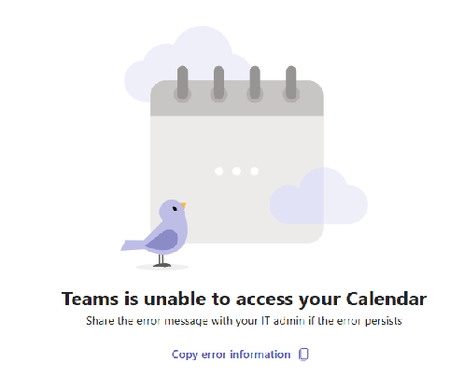
I started the below error on a lot of computers today. My co-worker did not get the error UNTIL he updated to the same version of Teams as me You have Microsoft Teams version 25072.1609.3541.7814. You've got the latest version. It was last checked on 4/7/2025. The issue is with multiple windows 11 users and their local teams installation. Brand new issue and trust me I'm the admin there were no changes by me. (in Exchange or Teams) I've run the Exchange connectivity test (ok) The MS remote connectivity test fails with this error Make sure user has Exchange Web Services EWS and REST API protocols enabled. The Microsoft 365 Teams Calendar App diagnostics referenced in the link requires a Microsoft 365 admin account to be executed This worked Friday, it does this today. What changed?Solved3.5KViews3likes11CommentsTeams Events App / Plug-in, targeting events vs registration
Hi all, We would like to leverage Teams Events app in our organization, but find it is less than ideal due to a key function in choosing whether to use a registration form with an event. There is an audience targeting function, which we would like to leverage, that is disabled once a registration form is configured. In turn, that opens the event for people who may not find it relevant in the Events view (i.e. wrong language, wrong timezone). On the other hand, if no form is configured, we can elect to turn off notifications and not add an event automatically to a calendar. That's great, but then there is no option at all to add an event from the Events view. Is there a way to subdivide the teams Events app into organizations behind the scenes, without subdividing the entire M365 tenant? Is there a chance that further development on this resource will allow for audience targeting AND registration?341Views0likes1Comment