settings
2324 Topics
Planner task comments no longer send email notifications – critical regression
This change removed a previously existing core functionality without providing an adequate replacement. With the new Planner experience, task comments no longer trigger automatic email notifications to assigned users. This breaks a critical communication mechanism that many teams relied on for reliable task coordination. As a result, assigned users are no longer consistently informed about updates, introducing a high risk of missed information and operational issues in day-to-day work. There is currently no supported or enforceable alternative to ensure users are notified. Previous behavior: Task comments triggered automatic email notifications Assigned users were reliably informed Communication was traceable and consistent Current behavior: No automatic email notifications No configuration to restore this @mentions required (manual, error-prone, not enforceable) Microsoft Support has confirmed that this is by design and cannot be reverted. From an enterprise perspective, this is not just a design change, but a regression of critical functionality without an equivalent replacement. Request: Please restore automatic email notifications for task discussions or provide a reliable, enforceable alternative for notifying assigned users. Question to the community: How are you handling this change in real-world scenarios? Switching tools? Enforcing @mentions? Moving communication out of Planner? Would appreciate hearing how others are dealing with this.1.7KViews5likes9Comments
Microsoft Teams transcription language settings
Hi! With a Microsoft 365 Business Premium license and a Copilot license, I can use transcription during a Teams meeting by setting the spoken language to Auto Detect. However, the transcription is sometimes inaccurate. Is there a way to limit the language detection scope? For example, is it possible that I select only English and Chinese, and Auto Detect is restricted to those two languages instead of also attempting to detect languages such as Spanish or French ?67Views0likes1Comment
Shared Channels: @Channel mentions fail to trigger activity notifications for team-shared members
Hello everyone, I am facing a persistent issue regarding notification behavior in Microsoft Teams Shared Channels that I hope someone can clarify or help with. Scenario: We have a Shared Channel that is shared with multiple teams (e.g., 17 teams in total). Note: I know that this way of communicating is not the recommended way, but we are not allowed to use any Viva products etc. Users accessing the channel are members of those shared-in teams, but they are not listed as direct individual members in the Shared Channel's own member list. Users have their channel notification settings correctly configured to receive notifications (e.g., "All new posts" or standard banner/activity settings). The Problem: When someone uses a channel mention (e.g., @ChannelName) in this shared channel, the users who have access via the team-sharing mechanism do not receive any activity feed notifications. The workaround/oddity: They only receive the activity notification if we explicitly add each user as a direct individual member to the Shared Channel. The dilemma: Since the channel is shared with 17 teams, adding hundreds of users manually or via scripts as direct members creates massive redundancy and clutters the UI (users see the team and the channel redundantly). Inconsistency: We noticed that in older shared channels created some time ago, channel mentions worked across team shares without needing direct individual memberships. It seems newer shared channels behave differently and strictly require direct membership to trigger activity feed notifications for @Channel mentions. Questions: Is this a known design limitation or a recent backend change in Microsoft Teams for newer Shared Channels regarding how @Channel mentions resolve indirect team members? How are organizations supposed to utilize @Channel mentions effectively in large-scale collaborations involving multiple shared teams without bloating the direct membership list? Any insights or workarounds would be greatly appreciated. Thank you!178Views0likes2CommentsArchitectural Limitation: Move LBR from Gateway to Voice Routes for Shared Trunks
The Problem: Currently, Location-Based Routing (LBR) in Microsoft Teams is hard-locked to the root OnlinePSTNGateway object (e.g., via -GatewaySiteLbrEnabled). This creates two major administrative roadblocks: Derived Trunk Limitations: For organizations utilizing multi-tenant partner architectures and derived trunking models (such as AudioCodes Live Pro/Express), the underlying global gateway configuration is owned and managed by the provider. Because administrators lack root modification rights over these shared gateway objects, they cannot enable or configure LBR. https://imgur.com/a/RzTE4nu Managing gateways via the Teams Admin Center (Voice > Direct Routing > SBCs) results in restricted or failing LBR configurations. Rigid Global Enforcement: Forcing LBR as a strict hardware-level switch creates deployment roadblocks, such as entirely blocking unmapped or remote workers. This is overly restrictive in regions like North America, where strict anti-toll-bypass compliance is not a legal mandate (unlike regions like India). The Proposed Solution: Decouple LBR from the Gateway Object: Shift LBR evaluation away from the root hardware gateway switch toggle and allow it to occur at the Voice Route, PSTN Usage, or Calling Policy layer. Support Derived & Shared Trunks: This decoupling will instantly make LBR compatible with multi-tenant SBC models, allowing enterprises to manage geographic routing via distinct voice routes (which are already peered with gateways), bypassing the need for root gateway property access. Regional Flexibility & Compliant Enforcement: Enable regional flexibility so enterprises can bypass unnecessary toll-bypass blocks in regions where they aren't mandated (like North America) without breaking calls for "Unknown" network sites. Crucially, for heavily regulated regions like India, system-enforced policies should automatically lock LBR on to strictly maintain local country regulations without relying on manual overrides. Business Impact: This enhancement will unlock advanced routing flexibility for thousands of enterprises utilizing modern cloud-hosted and derived trunking architectures. It bridges the gap between legacy PBX design constraints and modern multi-tenant cloud voice management, significantly reducing deployment friction for global organizations.20Views0likes0CommentsTeams integration with exchange on prem
Hello, I would like the possibility to schedule meetings in microsoft teams. Currently I have already created the domain on o365 and synchronized AD users. In fact, I am able to use domain credentials on Microsoft teams. Now I would like to have the possibility to schedule meetings. I currently have an exchange 2016 (CU 17) on prem. Searching the internet I found the following article https://docs.microsoft.com/en-us/MicrosoftTeams/exchange-teams-interact. From what I understand, in order to use this functionality with the exchange on premises, Exchange OAuth authentication protocol must be configured. What I need to understand is that if I have to create a hybrid exchange infrastructure in order to configure Exchange OAuth authentication protocol. Is it possible to configure Exchange OAuth authentication protocol without a hybrid infrastructure? Thank you RegardsSolved2KViews0likes3Comments
Meeting setup in teams Channel is not allowing me to update the Agenda and send updates
I am interested to understand why when I have setup a meeting from A channel I am not able to change the invitation to all the team members. When I go into teams Calendar ,. I update the agenda description, the send updates at the top right view shows up when I do the changes , however , When I click it , the changes don't take effect.157Views0likes1Comment
Security loophole in Private Channels?
We came across an interesting use case in our organization today. We have a Team and a private channel within that Teams team. Within the private channel a subsite was created. I am not an owner or member of the Team nor am I a member or owner of the private channel. However during creation of the subsite I was able to be invited with unique permissions to the subsite and I was successfully able to access it. After the initial creation of the subsite, our admin was not able to add or remove or effect any additional permissions on that subsite. Is this a loophole? I expected that without being a member of the private channel I would have absolutely zero access to any items associated with the private channel and site. Which has remained true (when I go to the private channel URL I get denied access) except that I do have access to this specific subsite. My instinct is that the reason permissions cannot be changed after the fact is that this is a genuine loophole and permissions weren't intended by Microsoft to be able to be granted at all on the subsite. This is due to the fact it is under the private channel and permissions should only be able to be changed via the admin UI or from the Teams application. Has anyone come across this in their work? Any guesses or explanations for why the subsite access would be initially available? Is this just genuinely a loophole in the permissions architecture?325Views0likes2Comments
New MTR devices unable to connect workplace
Hello collective im facing an issue with new Poly devices Poly X52 + Poly TC10 + Poly Trio 60 Poly X52 + Poly TC10 Both devices can not connect to M365. Error message: "Couldn't connect to Workplace Join. try again, or contact your admin." Firewall settings seems to be ok and devices are on the same VLAN. What is the workaround for this kind of issue or what should we check first? Best regards460Views0likes2Comments
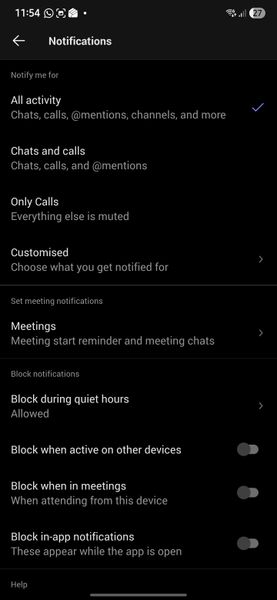
Not receiving any notifications in my Samsung S26 Ultra
Hello, Since I moved to Samsung S26 Ultra, I am not getting any notifications. Following are my settings. Please help to fix the issue. Following are settings in Samsung phone Following are settings in my Teams app in deskop Following is the settings set for all my channels Thanks356Views0likes3Comments