tips & tricks
1521 Topics
Shared Channels: @Channel mentions fail to trigger activity notifications for team-shared members
Hello everyone, I am facing a persistent issue regarding notification behavior in Microsoft Teams Shared Channels that I hope someone can clarify or help with. Scenario: We have a Shared Channel that is shared with multiple teams (e.g., 17 teams in total). Note: I know that this way of communicating is not the recommended way, but we are not allowed to use any Viva products etc. Users accessing the channel are members of those shared-in teams, but they are not listed as direct individual members in the Shared Channel's own member list. Users have their channel notification settings correctly configured to receive notifications (e.g., "All new posts" or standard banner/activity settings). The Problem: When someone uses a channel mention (e.g., @ChannelName) in this shared channel, the users who have access via the team-sharing mechanism do not receive any activity feed notifications. The workaround/oddity: They only receive the activity notification if we explicitly add each user as a direct individual member to the Shared Channel. The dilemma: Since the channel is shared with 17 teams, adding hundreds of users manually or via scripts as direct members creates massive redundancy and clutters the UI (users see the team and the channel redundantly). Inconsistency: We noticed that in older shared channels created some time ago, channel mentions worked across team shares without needing direct individual memberships. It seems newer shared channels behave differently and strictly require direct membership to trigger activity feed notifications for @Channel mentions. Questions: Is this a known design limitation or a recent backend change in Microsoft Teams for newer Shared Channels regarding how @Channel mentions resolve indirect team members? How are organizations supposed to utilize @Channel mentions effectively in large-scale collaborations involving multiple shared teams without bloating the direct membership list? Any insights or workarounds would be greatly appreciated. Thank you!151Views0likes2Comments
Meeting setup in teams Channel is not allowing me to update the Agenda and send updates
I am interested to understand why when I have setup a meeting from A channel I am not able to change the invitation to all the team members. When I go into teams Calendar ,. I update the agenda description, the send updates at the top right view shows up when I do the changes , however , When I click it , the changes don't take effect.141Views0likes1CommentIntroducing a new feature on Microsoft Teams: "Save this message"
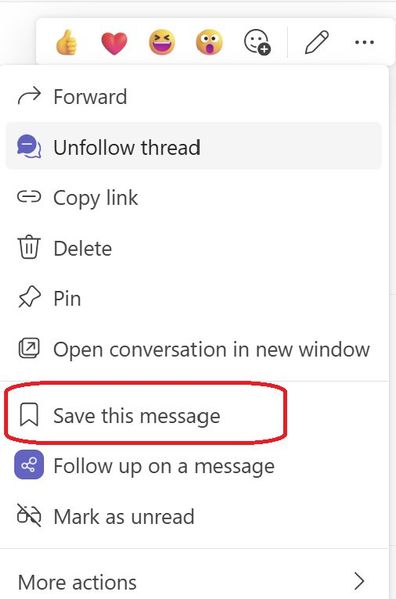
Exciting news - alongside pinning your posts/messages, you can now save them too. All your saved messages will be neatly organized under the "Saved" menu within Teams, right below the "Followed Thread" section. Look out for a special icon marking your saved messages for easy reference. And the best part? You have the flexibility to unsave messages whenever you wish. Stay organized and never lose track of important information with this handy2.2KViews1like4Comments
Security loophole in Private Channels?
We came across an interesting use case in our organization today. We have a Team and a private channel within that Teams team. Within the private channel a subsite was created. I am not an owner or member of the Team nor am I a member or owner of the private channel. However during creation of the subsite I was able to be invited with unique permissions to the subsite and I was successfully able to access it. After the initial creation of the subsite, our admin was not able to add or remove or effect any additional permissions on that subsite. Is this a loophole? I expected that without being a member of the private channel I would have absolutely zero access to any items associated with the private channel and site. Which has remained true (when I go to the private channel URL I get denied access) except that I do have access to this specific subsite. My instinct is that the reason permissions cannot be changed after the fact is that this is a genuine loophole and permissions weren't intended by Microsoft to be able to be granted at all on the subsite. This is due to the fact it is under the private channel and permissions should only be able to be changed via the admin UI or from the Teams application. Has anyone come across this in their work? Any guesses or explanations for why the subsite access would be initially available? Is this just genuinely a loophole in the permissions architecture?315Views0likes2Comments
Teams unexpectedly ends calls with Anker PowerConf S3 A3302 over USB
ANKER POWERCONF Sthree Unintended Teams call terminations Diagnostic dossier - public version Model Athree three zero two ; Public version: hostname, GUIDs and original archive names removed Summary for support intake Teams calls end spontaneously when PowerConf Sthree is used over USB with Sync device buttons enabled. The issue is reported on two units and multiple PCs, both laptops and desktops. The user is disconnected from the call; this is not merely a loss of audio. The weblogs identify an Sthree HID call-control hangup: telephony off-hook state is inactive ; followed by onDidHook ; followed by leaveCallContext=hid_triggered. An independent USB trace shows a brief stop/restart of microphone streaming immediately before the zero report. A physical button press is not required to observe these states. With synchronization OFF, we recorded the same stop/start and zero report during a call that continued. The issue is also reproduced without the Trust two four five three zero receiver. Two Bluetooth calls with synchronization saved as ON were stable, using a different control path. Observed environment Item ; Details - Speakerphone ; Anker PowerConf Sthree Athree three zero two; USB VID two nine oneA / PID three three zero two - Firmware ; two dot two dot eight reported by the user; not verified separately for both units - Teams ; two six two four six dot one six zero four dot five one three three dot eight three eight - Windows ; Microsoft components one zero dot zero dot two six one zero zero.x; detailed collection on a test PC - USB conditions ; Sthree port and cable unchanged throughout. No active Sthree Bluetooth connection reported during USB tests. - Receiver compared ; Trust two four five three zero, keyboard/mouse kit; not required to reproduce the issue Responsibility remains unresolved: neither the requester of the initial microphone stop nor the responsible component among Anker firmware, the Windows audio/HID stack and Teams interpretation has been established. The termination chain is identified; the internal cause still requires investigation. one. Comparison of tests Italian local times, UTC+zero two hours zero zero minutes, on one October two zero two six. ON/OFF refers to button synchronization. IDs Eone-Enine reference the archives in the archive index below. These outcomes are not statistical estimates of reliability. Test ; Configuration ; Outcome and evidence - Eone ; one four hours five two minutes ; USB; ON ; Call ended: Sthree telephony off-hook state is inactive report, onDidHook, hid_triggered. - Etwo ; one five hours one zero minutes ; USB; ON ; Reports transition from inactive to active about six zero ms apart; ETW shows microphone stop/start before zero. Weblog for the same session unavailable. - Ethree ; one five hours three five minutes ; Outside Teams ; Three recording cycles: microphone start ; followed by telephony off-hook state is active; stop is followed by the inactive state. Teams not detected in one four snapshots. - Efour ; one five hours four three minutes ; USB; OFF ; Stable call ~twomzero six. Stop/start and zero report at one five hours four four minutes zero two seconds; Teams logs disabled controls. - Efive ; one six hours zero one minutes ; USB; ON; Trust removed ; Stable call ~twomfive zero. No intermediate stop/start. Manual termination verified. - Esix ; one six hours one five minutes ; USB; ON; Trust reinserted ; First call stable ~fivemone six and ended manually. Second ended through HID after a brief stop/start. - Eseven ; one six hours two six minutes ; USB; ON; Trust removed ; Issue reproduced. Five transient USB/HID cycles; final hangup directly confirmed in weblogs. - Eeight ; one six hours three five minutes ; Bluetooth; OFF ; Stable call ~threemthree one. OFF saved before the call; manual termination verified. - Enine ; one six hours four two minutes ; Bluetooth; ON saved ; Two stable calls reported. No HID hangup in the available window; second manual termination verified. Additional user observations A one zero-minute call did not end unexpectedly with synchronization OFF. In the problematic tests, the option was already enabled before starting the call. The user reports no Sthree button presses during the unexpected terminations. Trust hypothesis: updated after the control test The initial stable test without the dongle was a provisional lead. Subsequent reproduction without Trust rules it out as a necessary cause. There is insufficient evidence to attribute the terminations to radio interference from the receiver or to recommend replacing it. two. Termination chain observed in Teams and USB Eone - HID-triggered termination at one four hours five two minutes Italian local time ; Relevant log line/event - one four hours five two minutes four zero seconds one six zero milliseconds ; PowerConf Sthree, Standard Hook Protect USB: Telephony usage telephony off-hook state (three two), value zero; received hook event; invoking onDidHook. - one four hours five two minutes four zero seconds one six one milliseconds ; onDidHook: leaves active call; startHangupScenario. - one four hours five two minutes four zero seconds two two zero milliseconds ; telephony off-hook state is active and line busy tone state is active: state restored after about six zero ms. - one four hours five two minutes four one seconds one six three milliseconds ; leaving call, leaveCallContext=hid_triggered. - one four hours five two minutes four one seconds three six five milliseconds ; calling_call_disconnected, same hid_triggered context. LocalUserInitiated is the software classification of the local termination and does not prove a human action. Standard Hook Protect USB is the name of the HID handler selected by Teams; it does not establish that a proprietary Anker driver is damaged. Eseven - Reproduction without Trust at one six hours two eight minutes Italian local time ; Event - one six hours two eight minutes four zero seconds five five four milliseconds ; Teams: connected call state three, active call. - one six hours two eight minutes four six seconds three nine four milliseconds ; Sthree USB microphone: interface three, alternate setting zero. - one six hours two eight minutes four six seconds four zero zero milliseconds ; Teams: received hook event on StandardHookProtectUSB. - one six hours two eight minutes four six seconds four zero five milliseconds ; Sthree Raw Input: zero two-zero zero-zero zero, telephony off-hook state is inactive. - one six hours two eight minutes four six seconds four four four milliseconds ; USB: interface three alternate setting one; restart after five zero ms. - one six hours two eight minutes four six seconds four six four milliseconds ; Sthree Raw Input: zero two-zero three-zero zero, telephony off-hook state is active. - one six hours two eight minutes four seven seconds four one four milliseconds ; Teams: leaving call, hid_triggered, leaveCallState three. - one six hours two eight minutes four seven seconds five six three milliseconds ; Teams: disconnected, leaveCallContext=hid_triggered. The initial stop/start sequence precedes the hangup. Stops and zero reports after termination may instead be consequences of it. ETW and Raw Input observe different points in the stack: timestamp differences do not measure firmware latency alone. three. Independent verification and controls Report identification and decoding The Sthree USB Raw Input path is HID / VID_two nine oneA & PID_three three zero two / MI_zero zero / Colzero two. Captured preparsed data was used with HidP_GetUsages from hid.dll, Input report and Telephony Usage Page zeroxzeroB. Decoding is based on the descriptor, not an assumption about a byte. Report ; Parser result - zero two-zero zero-zero zero ; No active telephony usages: telephony off-hook state (usage three two) is inactive, line busy tone state (usage one five one) is inactive. - zero two-zero three-zero zero ; Usages three two and one five one active: telephony off-hook state is active, line busy tone state is active. USB interface three is AudioStreaming: class zeroxzero one, subclass zeroxzero two. Alt zero has zero endpoints; alt one enables IN endpoint zeroxeight one, the microphone stream. Stopping/starting the stream is not equivalent to physically disconnecting the port. Ethree - Three recordings outside Teams USB microphone operation ; Subsequent report ; Approx. interval - one five hours three six minutes three zero seconds one eight eight milliseconds ; start ; one five hours three six minutes three zero seconds two three seven milliseconds ; telephony off-hook state is active ; four nine ms - one five hours three six minutes three six seconds eight one four milliseconds ; stop ; one five hours three six minutes three six seconds eight two zero milliseconds ; telephony off-hook state is inactive ; six ms - one five hours three six minutes four one seconds zero zero eight milliseconds ; start ; one five hours three six minutes four one seconds zero three three milliseconds ; telephony off-hook state is active ; two five ms - one five hours three six minutes four nine seconds two three four milliseconds ; stop ; one five hours three six minutes four nine seconds two four one milliseconds ; telephony off-hook state is inactive ; seven ms - one five hours three six minutes five one seconds eight six two milliseconds ; start ; one five hours three six minutes five one seconds eight eight seven milliseconds ; telephony off-hook state is active ; two five ms - one five hours three six minutes five seven seconds nine three nine milliseconds ; stop ; one five hours three six minutes five seven seconds nine five zero milliseconds ; telephony off-hook state is inactive ; one one ms Teams is not detected in the one four process snapshots for Ethree; sampling is not a continuous trace of all process starts. This comparison shows that Teams is not required to observe the zero state when the microphone stops, but does not distinguish firmware from the Windows stack. Efour - Same phenomenon, stable call with OFF During the call: alt zero at one five hours four four minutes zero two seconds zero two seven milliseconds, Raw telephony off-hook state is inactive at zero four zero milliseconds within the same second, alt one at zero eight eight milliseconds within the same second, Raw telephony off-hook state is active at one one three milliseconds within the same second. Teams logs audio device sync is disabled and controls not enabled. The call continues until the manual click at one five hours four five minutes five one seconds zero three zero milliseconds. OFF does not necessarily eliminate the reports: it prevents their use as call controls. four. Bluetooth and alternative hypotheses Enine - Two calls with synchronization saved as ON At one six hours four two minutes three four seconds five eight one milliseconds, the client logs “Toggling sync device buttons enabled to true”; at five eight four milliseconds within the same second, “audioDeviceSyncEnabled: true”. No synchronization-disabled or HID-hangup log lines appear within the two-call window available in the weblogs. First call: connected at one six hours four two minutes five three seconds zero three eight milliseconds. Manual termination is reported by the user; the corresponding explicit hangup line is absent from the examined user-log segment. Second call: connected at one six hours four five minutes zero five seconds three zero three milliseconds, hangup click at one six hours four six minutes five eight seconds five three three milliseconds/five three five milliseconds within the same second, disconnected at seven zero five milliseconds within the same second with multi-window_hangup-button_click. Selected Bluetooth endpoints: microphone [endpoint ID omitted] and speaker [endpoint ID omitted]. The monitor confirms active endpoints and Sthree USB endpoints in the unplugged state; no Sthree USB HID reports captured. Why Bluetooth is not an identical control to USB Teams uses call-control-service-vtwo / VoipCallCoordinator for the Bluetooth path. The USB HID handler does not associate these endpoints with the USB telephony device. Saving ON also logs “Slimcore version doesnt support toggle sync”: the client’s true value is confirmed, but does not establish identical propagation and handling of all native controls. Conclusion: Bluetooth is stable in the short tests and supports a USB/HID-path-specific issue. This does not establish lasting stability under all conditions or, by itself, assign responsibility to a component. Dongle, radio and USB connection The Trust two four five three zero is not required to reproduce the issue. The logs do not establish that it generates the hangup command: the decisive reports belong to the Sthree. Radio effects at two dot four GHz, USB controller/power issues and software interactions are distinct mechanisms and must not be conflated. Etwo includes two USBHUBthree “Client Initiated Recovery Action” events on Generic USB Hub VID_zero fiveEthree/PID_zero six one zero, root port four, about one minute before the main sequence. The Sthree is on root port three, not directly downstream of that hub. These events do not establish the cause of the hangup. five. Instrumentation, limitations and support requests SthreeMonitor vthree collection Raw Input and preparsed HID data; PnP inventory/changes; audio endpoint/default snapshots; processes and network; Windows events; USB ETW trace through USBXHCI, UCX and USBHUBthree. The supervisor separates collectors into processes with timeouts, writes logs during collection and handles markers and stopping. It was introduced to fix the console freeze in the previous synchronous collection. ETW session ; Events processed / lost - Etwo ; one six,one three four / zero - Ethree ; one six,two seven three / zero - Efour ; nine,eight six seven / zero - Efive ; three,one six one / zero - Esix ; two four,four one six / zero - Eseven ; eight,four four nine / zero Checked Sthree USB completions show no errors. Pending status zeroxfour zero zero zero zero zero zero zero and rundown values are not treated as completion errors. In Etwo, no Sthree PnP/Raw Input removals are recorded; audio polling at two s does not exclude shorter pauses. Collected drivers: Microsoft USB audio one zero dot zero dot two six one zero zero dot nine four four four (wdma_usb.inf); HID telephony/headset one zero dot zero dot two six one zero zero dot nine two seven eight (hidtelephonydriver.inf); HID consumer one zero dot zero dot two six one zero zero dot one (hidserv.inf); USB composite one zero dot zero dot two six one zero zero dot nine four four four (usb.inf). Different versions of different components do not establish a conflict. Limitations to retain in the assessment Raw Input is downstream of drivers, not a direct capture of bytes on the wire. Kernel-context ETW PIDs do not identify the originating client. teams.jsonl is empty in the collections considered: separate weblogs are the application-level source. In Etwo, the detailed PnP baseline is incomplete; the marker arrived after stopping began. Internal firmware and RF interference are not measured; the initial Teams export and some windows do not retain all lines at the same level of detail. Request to Microsoft Identify the client and reason for the initial microphone reconfiguration. Review telephony off-hook state handling during transient USB-stream pauses and protection against unintended hangups in the Standard Hook Protect USB handler. Specify the audio/HID capture with client attribution needed to complete the diagnosis. Request to Anker Review the telephony state exposed by Athree three zero two with firmware two dot two dot eight when the USB microphone stops/starts; confirm expected behavior and Teams compatibility. Identify any firmware fix for the exact model, avoiding unrelated updates. Mitigation verified in the tests: USB with synchronization OFF. Bluetooth is an alternative that was stable in the short tests. No indiscriminate driver reinstallation has been performed, nor has a need to replace the Trust been established. six. Archive index and references This post summarizes the evidence; full logs are not included. The table uses aliases, not original filenames. Technical sequence timestamps and software versions are retained. Full archives should only be shared through a private channel agreed with support. ID ; Archive aliases (original names omitted) - Eone ; Teams-WebLogs-Eone.zip - Etwo ; SthreeMonitor-Etwo.zip - Ethree ; SthreeMonitor-Ethree.zip - Efour ; SthreeMonitor-Efour.zip / Teams-WebLogs-Efour.zip - Efive ; SthreeMonitor-Efive.zip / Teams-WebLogs-Efive.zip - Esix ; SthreeMonitor-Esix.zip / Teams-WebLogs-Esix.zip - Eseven ; SthreeMonitor-Eseven.zip / Teams-WebLogs-Eseven.zip - Eeight ; SthreeMonitor-Eeight.zip / Teams-WebLogs-Eeight.zip - Enine ; SthreeMonitor-Enine.zip / Teams-WebLogs-Enine.zip Export mentioned but unavailable at the time of the relevant analysis: Teams-WebLogs-unavailable.zip. No conclusion relies on its contents. Local CSV/TXT analyses are derived from the files above and do not replace the originals. Official technical references Windows HID parser - HidP_GetUsages https://learn.microsoft.com/en-us/windows-hardware/drivers/ddi/hidpi/nf-hidpi-hidp_getusages USB alternate settings https://learn.microsoft.com/en-us/windows-hardware/drivers/usbcon/select-a-usb-alternate-setting Teams - device and button settings https://support.microsoft.com/en-us/teams/notifications-settings/manage-your-device-settings-in-microsoft-teams Anker - PowerConf / Sthree / PowerConf+ FAQ https://www.ankerjapan.com/blogs/faq/powerconf-powerconf-sthree-powerconf Summary based on logs and tests provided by the user. It distinguishes observed evidence, reported outcomes and unresolved hypotheses. It does not assign unproven responsibility to Microsoft, Anker or Trust.126Views0likes0Comments
Random list of team meeting participants
Hi, during a daily meeting I want to prepare the list of all members and each day before a meeting I want to send to all list with the order of speaking. How I can do this. ;/ I know that this is possible but I don't have idea how. Thanks for help.3.9KViews1like2Comments
Running engagement pulse checks in Teams, how do you track trends over time?
My lead asked me to start doing monthly pulse checks across our team of 20. I've been using Forms and dropping the link in the channel. Response rate sits around 50% which I can live with, but the real problem is that every survey is its own isolated result set. I can see this month's numbers fine. Comparing them to three months ago means exporting everything to Excel and rebuilding the comparison by hand.314Views0likes2CommentsIs Microsoft Teams a good Intranet?
Our company is fully on Microsoft 365, but employees still struggle to find basic information like policies, company updates, forms, department resources, and important links. Most of it is scattered across SharePoint sites, Teams channels, emails, and random folders. I want to turn Microsoft Teams into that hub where all of this lives, kind of like an intranet. Any suggestions?431Views0likes3Comments
Stop Automatic Calling when Screensharing
I screenshare a lot in my position; I call the coworker (Phone/Headset) and train them on what I need them to look at. I am in a large office building, and the automatic calling of the receivers' PC is disruptive, as I do not was the whole office to hear my conversation or have people hear my trainee. I see no way to disable the team auto-call once I start to screen share or in the Options. All my coworkers feel this frustration as well. I do use the computer microphone/speaks aspect when working from home, but would disable it totally, if it would stop the auto-call. I do not want it to affect meeting invites to others, as others around the country can use their PC speak/microphone, if they want. Please advise.407Views0likes2Comments