
Forum Widgets
Latest Discussions

Question about Teams Phone licensing
Hi everyone, I have a question about Teams Phone licensing: If I have some users who have Teams Phone to make and receive external calls, when one of them receives an external call, can they transfer it to another user who only has a regular Teams license but not a Teams Phone license? Or does the user I want to transfer the call to also need a Teams Phone license? I couldn't find a KB article that clarifies this. Thanks regardssanti31105Apr 20, 2026Copper Contributor35Views1like1Comment
New teams app is extremely slow to start on Mac
The new version of the Teams app is extremely slow to start it can take up to 1-2 minutes to get it running and join a call, why is it so slow? It wasn't like this before, and now I need to prepare a couple of minutes before joining a meeting because it takes such a long time to start. Is there any solution, do you plan on optimize the app?CristhianSApr 19, 2026Copper Contributor7.4KViews2likes10Comments
Display Teams chat message with date stamp rather than relative day
Is there a way to force Teams Chat messages to display the date of a message rather than "yesterday" or "today"? e.g. display "27/08/2024" instead of displaying "yesterday 2:12 pm". (I'm creating this post on 28/08.) We use screenshots of Teams messages in our processes, and having to wait for the actual date to displayed invariably means taking the screenshot is forgotten. Immersive reader always shows the actual date, but not the recipient of the message. No help there.KarenJones2667Apr 16, 2026Brass Contributor7.4KViews16likes15CommentsSeeking Solutions for Delayed Voicemail Connection in Microsoft Auto Attendant
Hello Community, I am encountering an issue with Microsoft Auto Attendant where there is a noticeable delay (approximately 5 seconds) after the greeting message and before the call is connected to the shared voicemail box. This delay occurs right before the voicemail tone prompts the caller to leave a message, leading to confusion and a less professional experience. Here are the specifics of my setup: Auto Attendant is configured with a greeting message. Calls are intended to be forwarded to a shared voicemail box via an MS365 Group. The system is set to skip the voicemail system notification. The greeting message is an uploaded audio file, not text-to-speech. Despite the setup, there is an awkward silence after the greeting and before the voicemail tone. I have attempted to find solutions, noticing that others might have faced similar issues, yet a clear resolution or workaround seems elusive. Has anyone encountered this issue and found a way to minimize or eliminate this delay? Any suggestions or insights into settings or configuration changes that could improve this situation would be greatly appreciated. Thank you for your help!Max_D1590Apr 15, 2026Copper Contributor1.1KViews0likes3CommentsPlanner task comments no longer send email notifications – critical regression
This change removed a previously existing core functionality without providing an adequate replacement. With the new Planner experience, task comments no longer trigger automatic email notifications to assigned users. This breaks a critical communication mechanism that many teams relied on for reliable task coordination. As a result, assigned users are no longer consistently informed about updates, introducing a high risk of missed information and operational issues in day-to-day work. There is currently no supported or enforceable alternative to ensure users are notified. Previous behavior: Task comments triggered automatic email notifications Assigned users were reliably informed Communication was traceable and consistent Current behavior: No automatic email notifications No configuration to restore this @mentions required (manual, error-prone, not enforceable) Microsoft Support has confirmed that this is by design and cannot be reverted. From an enterprise perspective, this is not just a design change, but a regression of critical functionality without an equivalent replacement. Request: Please restore automatic email notifications for task discussions or provide a reliable, enforceable alternative for notifying assigned users. Question to the community: How are you handling this change in real-world scenarios? Switching tools? Enforcing @mentions? Moving communication out of Planner? Would appreciate hearing how others are dealing with this.33Views1like0Comments
User with intermittent poor performance in Teams
We have a Dell laptop user who has intermittent poor performance with Teams. Video and audio get laggy. Replaced all of his hardware with newer equipment, made sure drivers were all up to date, yet the problem continues. Clearing the Teams cache works most of the time. This doesn't happen with most other users in our company. Any ideas where to focus our efforts to fix this?NoSpamSamApr 14, 2026Copper Contributor81Views1like1CommentWhat’s New in Microsoft Teams Feature Spotlight – Pop out shared content in separate window
Hey Teams Community, We’re discussing a new feature each week mentioned in the monthly What’s New in Microsoft Teams and this week we’re looking at the ability to pop out shared content into a separate window. The pop out feature in Teams makes it really easy to keep multiple things open at the same time while collaborating. Previously, users could streamline their workflows by popping out individual chat conversations, meetings, and calling experiences into a separate window. Now, users can pop out shared meeting content into a separate window. This allows users to focus on shared content while still being able to see the meeting participants. I regularly pop out chats to review content between different colleagues and I can absolutely see myself using the pop out feature for shared content in meetings when others are presenting, especially when I’m using multiple monitors. How often do you pop out chats or meetings into a separate window? Do you think this new ability to pop out shared content will help keep the flow of meetings?SolvedJohnSteckrothApr 14, 2026Community Manager3.7KViews1like3Comments
Inaccessible colour contrast for high text in Microsoft Teams in Dark mode on desktop
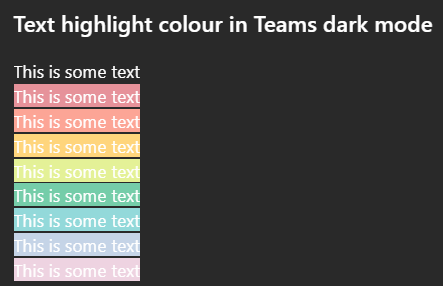
Issue: All highlighted text in Teams has poor colour contrast when in Dark mode on desktop. While some may be readable, none of the highlight colour options meet WCAG colour contrast minimums. How to reproduce Go to MS teams app on Win 11 and set appearance to dark mode. Create any default coloured text (this is white in dark mode) and apply any text highlight colour The result is inaccessible: it does not meet WCAG colour contrast thresholds and is very hard to read. Notes on behaviour On mobile (android MS Teams app) - the text colour changes to black which does meet the colour contrast minimum. This behaviour (illegible white text) on light backgrounds is also found on high contrast mode. This is different behaviour from MS word, which meets colour contrast minimum in a different way. Here highlight colours in dark mode are adjusted (e.g. the background highlight ffff00 --> is shifted to 393900 when dark mode is selected), and the text colour remains unchanged so there is enough contrast between the highlight and the white text colour. What happens next This needs a fix in make this accessible to users in dark mode so content can be read if another user has highlighted text. I'm not sure if this is the right place to post this but I was unable to register my MS account on the https://learn.microsoft.com/en-gb/answers/jlimbathApr 14, 2026Copper Contributor27Views0likes0Comments
Teams & channels names are blank
So fun UI issue on Desktop application (26072.519.4556.7438).. Teams and channels are blank and not clickable.. I've reset & repaired app, cleared the cache and reinstalled (temp fixed but same issue came back) Web version works good, but user wants a fix not a "workaround" Any ideas?TCEQJackieApr 14, 2026Copper Contributor34Views0likes0Comments

Tags
- microsoft teams13,491 Topics
- How-to2,941 Topics
- Administrator2,650 Topics
- meetings2,558 Topics
- Settings2,300 Topics
- User Interface1,654 Topics
- tips & tricks1,496 Topics
- calling1,253 Topics
- teams1,038 Topics
- best practices993 Topics