Recent Discussions
How Permissions Creep Can Halt the Microsoft Graph PowerShell SDK
The Microsoft Graph PowerShell Command Line tools app is how people run Microsoft Graph PowerShell SDK cmdlets. The app can suffer from permissions creep, meaning that over time, the app accrues a set of delegated permissions used by people to access different types of Microsoft 365 and Entra ID information. All is fine until an internal limit is reached, at which point authentication fails and some permissions must be pruned. https://office365itpros.com/2026/07/23/permissions-creep-sdk/14Views0likes0Comments
Msgbox or Modal window Crash on PC Sleep
This has been an issue for a couple of years, but I haven't spent too much time trying to solve it because I thought it would eventually go away. It hasn't and it is becoming worse as I develop other parts of my application. Situation: When a msgbox (or modal window) is open and the PC sleeps, the application hangs upon PC awake. There's no way to get out it with ending the process. To replicate: Create and save blank database Create one module with a single public test function Enter msgbox "Hang Test", vbOkOnly Hit F5 to run the code. The message box pops up. Leave it. Put PC to sleep manually with windows | power | sleep Awaken PC, Access is now frozen. GPT provides a lot of explanations for this behavior, but it doesn't make sense and must be something that can be addressed. Windows 11, Version 2606 (Build 20131.20126 Click-to-Run)23Views0likes0CommentsCurrency Formatting adding additional periods to number
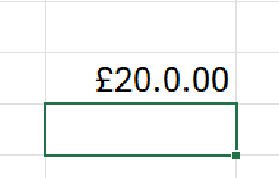
Hi, This has started happening on Excel and its baffling me so I thought I'd reach out to the community to see anyone can help. This is Excel v2606 (M365) with latest updates. Issue: I have a new work book and in a cell I simply add the number 20 I right click the cell with the 20 in it and select "Format Cells.." and change it to currency and this happens If I go back into "Format Cells" the selection has moved from Currency to Custom and it shows this: And clicking on Currency the format is shown as this: No matter what I do I can't get it to format correctly, if I change the format back to "General" it goes back to being 20. I've tried doing an online repair and that hasn't had any affect. Any help gratefully received. Rob42Views0likes2Comments
If formula based on cell value
Not sure if an "IF" formula is the right one needed here, but this is what I am trying to do. In cell B9, I want text to display based on what is in cell I6. I have I6 set up as a list of one of the following AS, EA and PI (acronyms for Assemblies, Each and Per Install) I am trying to get the worksheet to do the following If I6 is blank, I want B9 to read "Select Unit" if I6 is AS, I want B9 to read "Assemblies" if I6 is EA, I want B9 to read "EACH" if I6 is PI, I want B9 to read "Installs" This is what I started with, but I cannot figure out how to include the rest of the conditions - =IF(I6="AS","Assemblies","Select Unit") Any help would be appreciated. Thanks,29Views0likes4CommentsPurview DLP Blocks Sharing Files with Specific Domains or Users
A new DLP rule is available to control sharing of SharePoint and OneDrive files with selected domains and email addresses. The new rule supports an allow list (permit sharing) and can also specify a deny list (block sharing). The user interface takes a little getting used to, but when everything is configured and SharePoint has had a chance to respond to the block, the rule works and any attempt by a blocked user to use a sharing link is refused. https://office365itpros.com/2026/07/22/block-sharing-dlp-sharepoint/
Excel Copilot fails when local workbook filename contains #
Excel Copilot does not work with locally stored workbooks whose filename contains the '#' character. The same workbook works correctly after renaming the file to remove '#'. The same workbook also works when stored on OneDrive with '#' in the filename. The issue appears specific to local files and filename parsing. Specifically, when clicking on Copilot in Excel, Copilot says "This file type is not supported for editing with Copilot. Please save this file as a modern file format, such as ".xlsx", to be able to edit it with Copilot." Interestingly, Copilot works fine if the Excel file name contains, for example, % or &, the problem only occurs if the name contains #. We suspect this is a bug. In our workflows, we work a lot with files that have # in their names and we would be very happy if this was indeed a bug and if it was fixed. Tnx.60Views0likes8CommentsAccess 365 Issues
I’m running Windows 11 pro, dual monitors (200% laptop and 100% external). Quick repair did not work. Issue 1: When I open Access 365, the navigation bar is only about and inch wide. I can close it, but it only opens to an inch wide. How do I fix this. Issue 2: I opened the Contact template in Access then save copy. I want to customize the saved copy. The copy seems to be locked. I can’t make any edits like add fields and unfreeze pane. How can I edit copies of the templates include in my Access 365?24Views0likes1CommentHas anyone migrated from one Google Workspace to another after a company merger?
Hi all, Our company recently went through a merger and we now have two separate Google Workspace accounts that need to be consolidated into one. I need to move everything across, emails, contacts, calendars and tasks, for all users without anything getting lost in the process. Honestly not sure where to begin. Google's native tools seem limited for something like this and I don't want to start without a solid plan. Has anyone gone through a similar consolidation? How did you handle it and is there anything you wish you had known before starting?43Views0likes1CommentWhich SharePoint Communication Site layout has worked best in your organization?
Hi everyone, We're redesigning our SharePoint Online communication site and comparing different homepage layouts for HR, IT, Finance, and Corporate Communications. I'd like to hear from the community: Which homepage layout has worked best in your organization? Which web parts do you consider essential? Have you found any design patterns that significantly improved user adoption? Looking forward to learning from your experiences and recommendations.22Views0likes1Comment- 12Views0likes0Comments

Office.js: Is there any supported way to retrieve multiple non-contiguous text selections in Word?
Hi everyone, I'm developing a Word Office Add-in using Office.js. In Microsoft Word (Windows Desktop), users can select multiple non-contiguous text ranges by holding Ctrl while selecting text. However, when I use: context.document.getSelection() It only returns a single Word.Range, and I couldn't find any API to detect or retrieve all the selected ranges. I came across this related discussion: Microsoft Tech Community – Support for Retrieving Multiple Selected Ranges in Word via Office.js My questions are: 1. As of 2026, is there any supported Office.js API to retrieve multiple non-contiguous text selections? 2. Is there any workaround to detect that the user has selected multiple ranges? 3. Or is this still a platform limitation? Our use case is an AI-powered legal research add-in, where users may want to select multiple clauses from different parts of a document and send them together as context. Any guidance would be appreciated. Thanks!18Views0likes2CommentsPrimer: How to Use JSON Batching to Speed up Graph Processing
JSON batching is one of the most effective ways to speed up the processing of Graph API requests. Although it might seem complicated, once you understand how batches are put together and submitted to the Graph batch endpoint, it’s not that hard. JSON batching is of particular interest to large Microsoft 365 tenants that might need to process tens of thousands of accounts, mailboxes, groups, and so on. All explained here, along with a PowerShell script to show how it’s done. https://office365itpros.com/2026/07/21/json-batching-primer/14Views0likes0Comments
Trapped in an Authenticator Loop
Dear Community, please help! I am trapped in an Authenticator Loop. I've got a microsoft workplace account, but if I want to log in, I have to type in a code from the microsoft authenticator app. I downloaded the app, but in order to use it, I have to log into my account and in order to do so, I also have to type in a code from the authenticator app, which I don't get, because to get the code I would have to log into the authenticator app, what I would need a code for... No matter which link I click, I can't open anything before I enter the code, which I can't get. I am using teams on mac, either on a firefox browser or on the desktop app and the authenticator on an Iphone. Please don't just tell me "don't use teams on a mac", this wasn't my choice. Unfortunately, my emplyer's IT support also is chronically unavailable. So is here anyone who could help me? I've already gone through the usual deleting the app, using another browser etc. options. Best Lukas23Views0likes1Comment
Does Agent 365's governance cover app-only/service-principal agents, or only delegated-user agents?
I've been digging through the Agent 365 documentation trying to understand the enforcement model for autonomous agents — specifically ones running under app-only/service-principal auth rather than a signed-in user session. For Copilot Studio and Foundry agents built on Purview today, my understanding is that policy enforcement is tied to a human user token, and drops to audit-only when there's no delegated session behind the call. Does Agent 365's registry and governance layer change that specifically for the app-only case, or is it still primarily oriented around agents acting on behalf of a signed-in user? Trying to understand whether this is a gap that's being actively closed or whether it's still open for headless/autonomous agent scenarios. Any docs, product team clarification, or real-world experience welcome.19Views0likes2Comments
Stock symbol SKHY is missing in Excel's Stock data type
I have been frustrated trying to report a stock ticker symbol that is missing from Excel's Stock data type. SKHY is the ticker symbol for SK HYNIX INC ADR on NASDAQ. Excel responds with the following error when attempting to convert this symbol to a Stock data type: Data Type: Stocks No results found for "SKHY". How do I report this issue so that it can be fixed?67Views0likes3Comments
Subject: Need help reaching support for a compromised account where the email was changed
Greetings! My gamertag is sakhigaming2. My account was compromised a few months ago, and the hacker changed my login email completely. Because of this, the standard recovery system says my gamertag does not exist. I am currently locked out of my home Xbox console. I have my physical console Serial Numbers and hardware data for both of my household Xboxes to prove I am the original owner.Since the automated recovery forms do not recognize my old email anymore, I need a way to contact a live support agent who can escalate this to the account investigation team to track down my profile's backend ID. If anyone knows the correct path to get a live chat or callback for an alias-changed account, please let me know. Thank you, and have a great day!25Views0likes1Comment
关于windows白板停止使用造成的问题
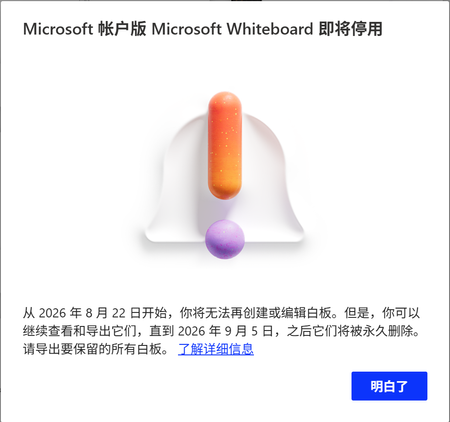
今天我打开Windows白板的时候,出现了提示即将停用,我目前可以导出为pdf或者图片还有压缩包,我想知道有没有办法在其他应用上继续进行编辑,最好可以用手写笔进行编辑 TRANSLATION When I opened Windows Whiteboard today, a message appeared saying it will be discontinued soon. For now, I can export as PDF, images, or a compressed file. I want to know if there's a way to continue editing in other apps, preferably with a stylus.97Views0likes2CommentsUsing User Assigned Managed Identities with Microsoft 365 Automation7
A user assigned managed identity (UAMI) is a secure method to authenticate with many important endpoints, including the Microsoft Graph. It’s like a system assigned managed identity (SAMI), but the big difference is that a UAMI is an Azure resource that isn’t tied to an automation account. It can be used in multiple areas of Azure and a UAMI might be a better option for large organizations that make extensive use of Azure resources. https://office365itpros.com/2026/07/20/user-assigned-managed-identity/10Views0likes0Comments



Events
Recent Blogs
- SharePoint Online is introducing a new tenant-level setting that allows organizations to choose whether heading permalinks should appear on SharePoint pages.Jul 14, 2026859Views1like1Comment
- 2 MIN READPowerPoint is getting easier to use with new SmartArt, fresh themes, a cleaner Design ribbon, and a more modern file open experience.Jul 13, 20261.2KViews2likes0Comments