Recent Discussions
How to Use Scoped Graph Permissions with SharePoint Lists
This article explains how to use scoped Graph permissions to restrict app access to lists and list items in SharePoint Online and OneDrive for Business sites. It's a follow-up to other articles covering how to restrict app access to SharePoint Online sites and files. Scoping app access to specific objects is important because otherwise apps can access everything in SharePoint Online, and that isn't good. https://office365itpros.com/2026/02/25/scoped-graph-permission-lists/11Views0likes0Comments
Outlook web UTF-8 charset
Outlook Web sends emails in my organization using the ISO-8859-1 character set. However, Copilot claims: "Outlook Web (Outlook on the Web, OWA) does not generate your messages in ISO-8859-1. It always uses UTF-8." My Outlook Web only switches to the UTF-8 character set if the email contains Unicode characters that cannot be displayed in ISO-8859-1. How can I enforce UTF-8 globally for my organization?17Views0likes1Comment
Regression: File hyperlinks with #Bookmark no longer work in Office 2601/2602
After updating to Office Version 2601/2602 (Current Channel / Current Channel Preview), file‑based hyperlinks that include a bookmark (e.g., C:\File.docx#Bookmark) no longer work. Office now rewrites the # as %23 and hands the link off to the default browser, which fails. This affects Excel, Word, PowerPoint, and Project. Rolling back to Version 2409 immediately restores correct behavior. I previously had a build newer than 2409 that supported both working file‑bookmark hyperlinks and Excel’s cell‑level dark mode, so this appears to be a regression introduced in the 2601+ hyperlink resolver rather than a local configuration issue. If anyone else is seeing this behavior, please upvote or comment so the engineering team can prioritize it. As noted, it is not just Excel, but that is the most pressing need for me.54Views0likes2CommentsWeekday only calendar
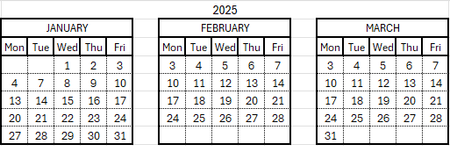
I want to to create yearly calendars with each month in it's own block that auto populates with accurate dates (previously being done manually). The issue is I want the months to only account for Monday-Friday meaning the dates only need a 5x5 grid. Something like this:77Views0likes2CommentsMicrosoft Extends DLP Policy for Copilot Protection to All Storage Locations
Microsoft has enhanced the DLP policy for Copilot to cover Office files held in any storage location instead of only Microsoft 365 locations like SharePoint Online and OneDrive for Business. The change is made in the Office augmentation loop, a little-known internal component that coordinates use of connected experiences by apps. Extending the DLP policy to cover all locations makes perfect sense. https://office365itpros.com/2026/02/24/dlp-policy-for-copilot-storage/82Views0likes0Comments
Copying column widths and row heights from one sheet to another
Hello everyone. I have to reformat a rubbish PDF i get sent everyday so i can make it legible. i have arranged the cell widths and heights and cut and pasted the data but there are 14 columns and as many as 30 rows. I have this information on PDF everyday. Is there a way i can automate this so my sheets are all the same looking?48Views0likes1CommentStudent Behaviour Tracker
This is a very cheeky request for help. Now approaching 70 I've forgotten most of what I knew about Excel. I'm a Chair of Governors at an 11-16 school. I receive notifications about pupils who have been suspended (also known as fixed term exclusion). Roughly I have about 200 individual suspensions over 1 year. I want to record and analyse these. The information to record is Name: Last and First (about 30-40 students) Reason for exclusion (usually 1 or possibly 2 out of about 8 categories) Length of exclusion 1 - 15 days Flags e.g. SEND; PP, Year group: 7, 8 , 9 10, 11 Date As many of the students are repeat offenders I'd like to set the spreadsheet up so by either by typing the name or through an editable drop down list the name appears once and then the reason for the suspension and date is entered (as opposed to multiple entries appearing on the same page). I'd then like the spreadsheet to report, using an editable date range: By pupil name; the number of suspensions; total number of days and total number of days for each category of exclusion By suspension category: number of suspensions; total number of days for each category By flag: number of suspensions; total number of days for each category Year group: 7, 8 , 9 10, 11: number of suspensions; total number of days for each category I've looked at some cheap packages e.g. at Etsy but I cant see anything that does this. There are commercial packages, intended for whole school, but cost several hundred - thousand plus, pounds. Thanks in advance if you are interested and my apologies to you if you feel this is an inappropriate request. Regards NickSolved135Views2likes4CommentsExcel workbooks keep breaking
Hi All, Sorry if this is not the right place to ask, I'm new here. Since a couple of days, my Excel workbooks keep breaking. When opening specific files, Excel states the file needs to be repaired. Everytime certain formulas are being deleted and the values are just pasted as is. I haven't had any issues with these files in the past. Previously I used a license which I bought online via a third party. It seems the issues started after an update. I switched to a license which I bought directly from Microsoft. I did a clean installation, removed all the previous versions files but the issue still exists. For a couple of days I can open the files without problems. And then yesterday excel showed an update was available and excel had to be reopened. After doing so, the issues came up again. I have a Office Home 2024 License, Excel version 16.106.1, on macOS Tahoe 26.2. T.I.A42Views1like0Comments
Can I restore my whiteboard created by Microsoft Whiteboard UWP?
I created several whiteboards by MS Whiteboard UWP in 2023. As I cannot transfer the data to new Whiteboard, I kept the old version ( Microsoft.Whiteboard_52.10201.5809.0). But days ago MS Store updated it automatically, and I lost my data. I didn't transfer it to OneDrive, so it should be stored on Azure. When I find the update (when it updated the local data should be already removed from my device) and recover the old version and login again today, I find nothing but a new created empty whiteboard, all of my data lost and I cannot access it from the cloud. How can I recover my data?33Views0likes1CommentExcel array question - spill VOWD based on forecast month
Hi, Can I have your help on a spilled question? I have the following table with information. Fore Month Jan-26 Feb-26 Mar-26 Apr-26 May-26 Jun-26 Jul-26 Aug-26 Sep-26 Oct-26 Nov-26 Dec-26 VOWD 2 - - - 3,983 15,203 11,779 2,083 - 1,742,162 1,696,156 116,267 1,162,366 - 2 - - 100,000 200,000 - - 500,000 650,000 300,000 - 466,000 - - 3 - - - 3,983 15,203 11,779 2,083 10,000 1,742,162 1,696,156 116,267 1,152,366 - 3 - - 100,000 200,000 - 250,000 250,000 650,000 - 400,000 450,000 - 100,000 4 - - - 2,000 15,203 11,779 2,083 10,000 1,742,162 1,696,156 116,267 152,366 2,000 4 - - 100,000 200,000 - 250,000 250,000 650,000 - 400,000 350,000 - 300,000 I would like to have a spilled array formula in VOWD column and the expected result is right there now. The logic is to grab the first 2 columns and sum up the amounts for the first two rows of data, and grab first three columns and sum up for the third and forth rows of data and etc. Thanks, Anna92Views0likes6Comments
Functions and formulars
Hi all, yes I am struggling to find the right formular for a problem, or to get it to work. I have a number in cell B14, which i want to return a value in cell B13. if B14 gives a value between 30 and 49 (this is manually entered) the result in B13 should be Pink (the word not a coloured cell) and if B14 gives a value between 17 and 33 the result in B13 should be Purple plus a few more along these lines and if the B14 value is under 9 result should be Yellow I am frustrated... this used to be simple for me but its been a while and any help would be appreciated.78Views0likes4Comments
Publish an Excel Add-in by just submitting the add-in manifest to Microsoft Marketplace
I am working on Excel Add-in built using the react template. We are planning to host the add-in code on our domain and update the manifest to point to the URL for our domain. Can I just submit the add-in manifest to Microsoft to publish it in Microsoft Marketplace?16Views0likes0CommentsFormula Help
I have a spreadsheet I use for bidding construction work. On items 1-40 the formula in cells G22-G65 work like they are supposed to. From G66 to G88 where the sheet stops, the formula returns #NAME?. I've checked the formula from G65 to G66 and below, and they appear to be correct. I can't figure out what the problem is. This is the formula that works. =IF(D65>0,'40'!Rate+$G$18,0) This is the formula that does not work. =IF(D66>0,'41'!Rate+$G$18,0) The '40' and '41' refer to individual sheets within the workbook that contain the data in the !Rate cell. I've been looking at this for hours and can't figure it out. Any help or advice would be great.125Views0likes6CommentsMicrosoft Takes Aim at ChatGPT
Microsoft would very much like Microsoft 365 tenants to use Copilot instead of ChatGPT. A recent comparison between Copilot and ChatGPT outlines some areas that Microsoft thinks are important when deciding which AI tool to use. Microsoft has a point because Copilot is embedded into Microsoft 365 whereas ChatGPT is more of an add-on. The competition for hearts and minds is very intense in the AI space. https://office365itpros.com/2026/02/20/copilot-and-chatgpt/48Views0likes0Comments
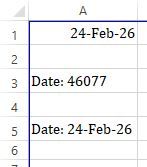
Excel returns incorrect answer to simple multiplication.
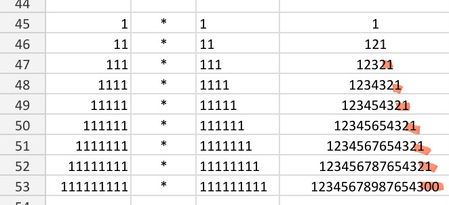
I'm saving a few favourite math examples, and ran into a problem - the last of the calculations came back with an incorrect answer. I'm using a simple =cell1*cell2 formula. It should end with 21. Please help I'm using android app. All cells formatted as numbers.Solved95Views0likes2CommentsUsing Dev Proxy with the Microsoft Graph PowerShell SDK
Dev Proxy is a Microsoft tool built to help developers figure out the most effective way of using Microsoft Graph API requests. On the surface, Dev Proxy doesn’t seem like a tool that would interest people who use the Microsoft Graph PowerShell SDK to write scripts for Microsoft 365. But all tools have some use, and Dev Proxy can help. https://office365itpros.com/2026/02/19/dev-proxy-graph-sdk/17Views0likes0CommentsRemoving a possible user selection from a slicer
I have a column field in Excel with 4 possible values. My slicer shows all 4, as it should. Three of the possible vales are alphabetic strings. One of the possible values is a blank field indicated by (blank) on the slicer. A blank is a valid value for this field in some situations, so I don't want to just ignore the rows where this field is a blank. But I would like to eliminate it as a user selection in the slicer itself. I thought checking the slicer setting, "Hide items with no data" would do the trick, but it doesn't appear to do so. Any tips on how that setting is supposed to work and/or why it might not be? (Maybe it has to actually be a 'null'?? No idea....)Solved78Views1like2Comments


Events

You’re passionate about what you do, and we’re passionate about empowering your potential. Microsoft 365 Community Conference - is your chance to keep up with AI, build game-changing skills, and take...
Tuesday, Apr 21, 2026, 08:00 AM PDTIn-Person
0likes
3Attendees
0Comments
Recent Blogs
- 2 MIN READWelcome to the February 2026 update. This month we are excited to announce expanded availability for Agent Mode in Excel, as well that you can now query modern Excel workbooks (like .xlsx, .xlsb, .xl...Feb 24, 20261.1KViews0likes0Comments
- We are continuing to streamline the ways people engage with Copilot in Excel, and we've heard your feedback that working across multiple Copilot entry points can feel fragmented. To address this, Cop...Feb 24, 2026459Views0likes0Comments