Recent Discussions

Formula for adding multiple sheets
I am trying to add multiple things across multiple sheets. example : On sheet one, I have column a date, column b check number, column c name of place, column d category, column e withdrawal amount, column f deposit amount, column g balance, column h status (cleared or pending). this same information in on sheets 2,3,4,5 and so on. I want to create a sheet that will tell me how much I have spend with each name of place (column c). let’s say sheet one looks like this 3/23 (date) 777 (check number) John Doe (name of place) 2.00 (withdrawal amount) etc. 3/23 778 John Doe Jr. 3.00 etc sheet two 3/24 666 Joe Doe Jr. 3.00 3/24 668 Joe Doe 4.00 on my total sheet with the amount I have spend with each person/place to look like this Joe Doe — 6.00 (from the 2.00+4.00) Joe Doe Jr — 6.00 (from 3.00+3.00)24Views0likes1CommentM365 Security Basics: Keeping Your Data Safe Online
In today’s digital-first world, data is one of the most valuable assets a business or individual can have. Whether it’s emails, documents, spreadsheets, or sensitive customer information, protecting that data is critical. With Microsoft 365 (M365) being one of the most widely used productivity platforms globally, understanding its security basics is no longer optional it’s essential. https://dellenny.com/m365-security-basics-keeping-your-data-safe-online/18Views0likes0CommentsTwo days of edits inexplicably disappeared
I have a 2021 MacBook Pro and two days ago I updated my OS to Tahoe 26.4.1. The update seemed to work fine, and I continued working on a Word document I had been editing for the next two days. I always save after every line I write, and I use the auto-backup feature. There was no indication that my saves were not going through. Just now, however, I opened up the document to discover that all my edits (as well as the "last saved" time) had reset to what they were two days ago, around the time of the OS update. This is the case both in Finder and when I go to the Dropbox website, which I use to automatically upload everything I work on to the cloud. This is very alarming. Why has this happened, and is there a way to recover the lost edits? When I try to do "File -> Browse Version History" the menu item is dimmed and I can't click on it. Help!15Views0likes0Comments
MO 365 Excel - Difficulty Changing a Date format
I am using MO 365 - apps for Business, currently received an Excel Spreadsheet and am attempting to change date format in Excel and have tried all the usual methods however the dates remain unchanged. I need to change the date from month /day/year as 1/31/2025 to Year/Month/Day 2025/1/31 Any Suggestions? Thanks CJ23Views0likes1Comment
Pivot Table
Hello, I am currently working on several dashboards that include multiple Pivot Tables Is there a way to filter data using the Filters field in Pivot Table design with conditions such as "greater than", "less than", etc..? At the moment, I have to manually select each value I want to keep, which is quite frustrating when the selection is huge It would be very helpful to have condition filtering available in this area Could you consider adding this feature in a future update ? Thanks in advance,8Views0likes0CommentsCreating a Planner Weekly Notification Email for Incomplete Tasks
A reader wanted a weekly incomplete task report to send details of Planner tasks to people with outstanding work to do. We used PowerShell to scan for incomplete tasks for people who are members of a group, perform some analysis on the data, and create and send email. Despite some deficiencies in the Planner Graph API, the code is pretty straightforward. https://office365itpros.com/2026/04/15/weekly-incomplete-task-report/18Views0likes0CommentsOffice Scripts
i have a business microsoft office account and am signed in with it. when i try running a script in excel i keep getting the error saying it requires a work or school account. my microsoft account says the following: your work or school account belongs to your home organisation. what do i need to do to get scripts working.22Views0likes0Comments
Formatting issues in Word Microsoft 365 Copilot online.
I am experiencing formatting issues in Word (Microsoft 365 Copilot online). I am a student, and I have a problem formatting my thesis in M365 Copilot after previously working on this file on an older device with an older version of Word. I recently purchased a new laptop, where I no longer have access to that same version of Word. My only option now is to use Word in the browser. However, the file that formatted correctly on the old device is now not formatting properly. The automatic table of contents is breaking. After clicking “Update,” Word assigns random page numbers, most often all entries show as page “8,” or, for example, the “Introduction,” which is actually on page 3 (I manually set page numbering in the old version), suddenly appears as page 5 in the table of contents. Every chapter and subchapter is shown as being on the same page, usually page 8. The formatting options and capabilities also seem worse compared to the interface of the older version. The same issue occurs on my student account. Please help, I am currently writing my thesis.12Views0likes0Comments
#DIVISION/0!
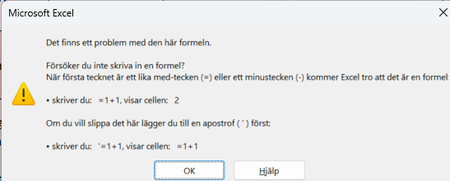
Hi. I have a problem (this is in Swedish) where I get #DIVISION/0! in a field in excel. The formula in the field is =AVRUNDA(MEDEL(G4:G22);2) Translated I think it is =ROUND(AVERAGE(G4:G22);2) I have tried to do as you described with =IFERROR(AVRUNDA(MEDEL(G4:G22);2),"") But I get an error message.33Views0likes2Comments
Insert a row
Hello, I want to insert a row in Excel to shift the existing data downward, but an error message prevents me from doing so, stating that non-empty cells would be pushed off the edge of the worksheet. Could you please tell me how to insert this row without deleting my existing data? thank you !15Views0likes1Comment
Pull data from other tab
Hopefully I can explain correctly. I have a calendar tab and on this tab, I have a box that is to give me my PTO available hours. The PTO available hours are located on a separate tab. My goal is to pull my available PTO hours over to the calendar tab BUT I'm trying to figure out if I can pull it based on today's date. Currently on my PTO tab I have the whole years worth of PTO so the calendar tab is pulling that last PTO available (December's). Any help would be greatly appreciated. Thanks56Views0likes2CommentsThe Admin Center offers a uniquely retro approach to licensed group management
You can see the name of licensed groups from the licensing blade, but you can’t click it or copy the name. Instead, you manually retype it elsewhere—because nothing says “modern cloud platform” quite like a 1997‑era workflow.27Views0likes1CommentWriting PowerShell for the Eventually Consistent Entra ID Database
Entra ID uses an eventually consistent multi-region database architecture. PowerShell code that fetches and updates Entra ID objects needs to interact with the database in the most efficient manner. This article illustrates some guidance from Microsoft engineering with examples from the Microsoft Graph PowerShell SDK. I’m sure your scripts already use these techniques, but if not, we have some helpful pointers. https://office365itpros.com/2026/04/13/eventually-consistent-entra-id/14Views0likes0CommentsPivot Table TOP 5 vs Slicer
I create a Pivot Table, sort the data then filter on the TOP 5. I then create the Pivot Chart (horizontal TOP 5 bar chart). In my dashboard, I have slicers. When a Slicer filter is applied then removed, the Pivot Table and Chart do not go back to display the TOP 5 data but the whole set of data. Any simple way to ensure the pivot table / Chart recovers only the TOP 5 values (and not the whole set of values) after the slicer filters are reset ?18Views0likes0CommentsSelect from multiple conditional format rules, based on value of another cell.
I have a spreadsheet tracking due dates for deliverables, depending on what department a deliverable is for, the acceptable time taken from order to delivery varies. On Column H, I have a formula that calculates how many days OVER the acceptable time a delivery is, I want a conditional format that colours that cell on a gradient from 1 to 150, going yellow to deep red. So a quick visual inspect will show which ones are going to be a major problem. The difficulty being the gradienjt scale will have to change depending on the department that deliverable is for. So in Column C I have the department name, this gives Column D data to look up in a config tab, that lets it check how many days is considered late using a basic Vlookup ona small table that is just two columns Dept Name, and acceptable days late number. =IF(C2="","",VLOOKUP(C2,Configuration!D$4:E$6,2,FALSE)) Then Column H looks at the order date(Col F) and delivery due date (Col G), and checks if the time between is over or under the acceptable range with a simple comparison and show how many days (If any) late the delivery will be. =IF(G2-F2>D2,(G2-F2)-D2,"") I want Column H to be conditionally formatted with the mentioned gradient, however the conditions for that gradient will change depending on whats in the Department Column C, some departments consider 14 days over to be acceptable (coloured yellow), some departments see 8 days as a critical issue (Coloured deep red). So my question is how I apply a different Conditional Formatting Rule to the cell in Col H, depending on the value of Col C. If thats even possible. I know I can do it with a macro, but I want to try keep this worksheet formula's only if possible as the person using it does not use VBA and wouldn't know how to troubleshoot if something went wrong, whereas I could explain a formula to them.63Views0likes2Comments


Events

You’re passionate about what you do, and we’re passionate about empowering your potential. Microsoft 365 Community Conference - is your chance to keep up with AI, build game-changing skills, and take...
Tuesday, Apr 21, 2026, 08:00 AM PDTIn-Person
0likes
7Attendees
0Comments
Recent Blogs
- Building in the era of AI can get very challenging. That’s exactly why we’re here to help you debug, refactor, and level up at the Microsoft 365 Community Conference, happening April 21–23, 2026 in O...Apr 15, 202617Views0likes0Comments
- 1 MIN READMay 12, 2026 at 9 AM PT is our next "Ask Microsoft Anything" with the Agent 365 team.Apr 15, 202634Views0likes0Comments