Security and AI Essentials
Protect your organization with AI-powered, end-to-end security.
Defend Against Threats
Get ahead of threat actors with integrated solutions.
Secure All Your Clouds
Protection from code to runtime.
Secure All Access
Secure access for any identity, anywhere, to any resource.
Protect Your Data
Comprehensive data security across your entire estate.
Recent Blogs

4 MIN READ
Learn about generally available and public preview identity and network access capabilities released in the past 30 days.
Jul 24, 2026454Views
1like
0Comments

See how Microsoft Entra and SAP help automate provisioning, strengthen governance, and modernize access across SAP and non-SAP applications.
Jul 23, 2026472Views
0likes
0Comments
Microsoft 365 Copilot acts on the access users already have. It does not grant new permissions — it is a force multiplier that makes existing access faster and easier to discover, aggregate, and act ...
Jul 23, 2026216Views
1like
0Comments
15 MIN READ
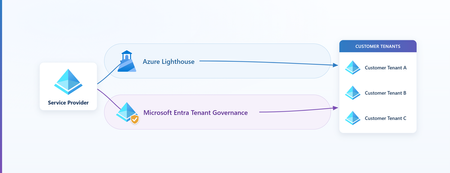
In Part 1 we built Azure Lighthouse the technical way. In Part 2, "Bring Your Partner In, Without Letting Their Identities In," we made the security case for it: let a service provider operate a cust...
Jul 23, 2026255Views
1like
2Comments
Recent Discussions

RestrictedTrafficInstall.ps1 Fails on Windows 10 IoT Enterprise LTSC 2021 with SKU Detection Error
I am encountering an issue while deploying the Restricted Traffic Limited Functionality Baseline on a Windows 10 IoT Enterprise LTSC 2021 device and would like to confirm whether this OS edition is supported or if this is a known issue with the baseline script. Operating System: Windows 10 IoT Enterprise LTSC 2021 EditionID: IoTEnterpriseS DisplayVersion: 21H2 : ...\RestrictedTrafficInstall.ps1 : Could not get SKU of current running OS. CategoryInfo : NotSpecified: (:) [Write-Error], WriteErrorException FullyQualifiedErrorId : Microsoft.PowerShell.Commands.WriteErrorException,RestrictedTrafficInstall.ps1
Windows defender is having a lot of problems.
So I have a Microsoft 365 Family subscription, and Dark Web Monitoring shows 0 monitored items. SSN verification fails and advises you to contact support. I was also unable to delete the monitored information. I’m receive the error "Something went wrong, try again in a bit." The issue occurs in the Microsoft Defender app, web portal, and across devices. Is there anyway that I can get help with this?Data Product Lineage not automatic
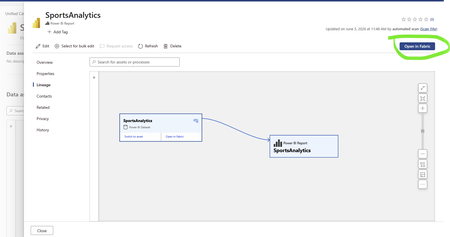
Hi all i am new in Purview and I am trying to create a lineage with a Report--> Dataset--> Tables in Data Products however after adding report only dataset is shown, how can I view all tables of this dataset. Only when I press open in fabric the Dataset the table list appears, how can I give permissions36Views0likes1CommentWindows 11 24H2 Sec Baseline → Broken SSO to on‑prem (Root cause: PKINIT SHA‑1 baseline)
Hi all, I ran into an issue with Entra-joined devices using Windows Hello for Business (Cloud Kerberos Trust) that might help others working with Windows 11 24H2 security baselines. Scenario Windows 11 25H2 devices Entra-joined (not hybrid) Intune-managed Windows Hello for Business (WHfB) enabled Cloud Kerberos Trust configured On-prem AD (Windows Server 2019/2022 DCs) Access to SMB shares / on-prem applications Symptoms SSO to on-prem resources fails Users get credential/PIN prompt instead of SSO Error message: “The system cannot contact a domain controller to service the authentication request” Client-side observations: klist → no tickets (initially) After enabling Cloud Kerberos Trust: klist get krbtgt → works klist get cifs/server.domain → fails Error: 0xc000a100 / 0x3bc4 Hash generation for the specified version and hash type is not enabled on server Root Cause The issue was caused by a Windows 11 24H2 security baseline setting related to Kerberos/PKINIT. The 24H2 baseline introduces a policy for configuring hash algorithms for certificate-based Kerberos authentication (PKINIT). This setting allows environments to disable SHA-1 and require SHA-2 algorithms. [applepie.se] Important detail: This configuration only works if the domain controllers fully support PKINIT with SHA-2, which effectively requires Windows Server 2025 domain controllers across the environment. If SHA-1 is disabled while running: Windows Server 2019 or 2022 DCs Mixed environments then PKINIT authentication fails, which directly impacts: Windows Hello for Business Cloud Kerberos Trust Any passwordless Kerberos-based authentication Why this is difficult to troubleshoot Cloud Kerberos Trust appears correctly configured AzureADKerberos object exists PRT is valid Network connectivity is fine However: Kerberos tickets are not issued correctly Service tickets (CIFS, HTTP, etc.) fail Errors are misleading and point to KDC/hash issues No explicit warning is provided in baseline guidance that mixed environments will break Resolution Revert the baseline change and allow SHA-1 for PKINIT again. Policy location: Computer Configuration → System → Kerberos / KDC → Configure hash algorithms for certificate logon Ensure: SHA-1 is set to Allowed/Default After reverting: Kerberos ticket issuance works SSO to on-prem resources is restored Recommendation Do not disable SHA-1 for PKINIT unless: All domain controllers are Windows Server 2025, and PKINIT SHA-2 support has been fully validated Treat this setting as future hardening, not production-safe for mixed environments today. Takeaway If you experience: WHfB + Cloud Kerberos Trust SSO failures klist get errors with hash generation issues Missing or failing Kerberos service tickets check the PKINIT hash configuration from the 24H2 security baseline first.
Microsoft Purview Unified Catalog; Governance Domains and Business Concepts
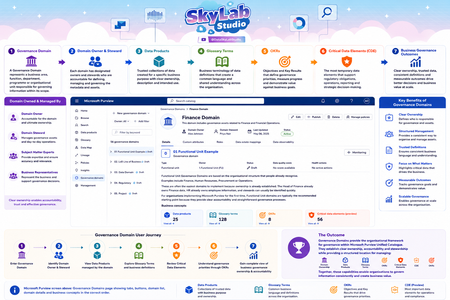
I've been using the attached artefacts for some time to help explain the knowledge exchange aspects of Microsoft Purview Unified Catalog, particularly how Governance Domains and Business Concepts work together to provide business context, ownership, stewardship and operational insights. They have been useful in workshops with data architects, governance professionals, product owners and business stakeholders to demonstrate how concepts fit together within a governance domain and contribute towards trusted information and better business outcomes. I'm interested in hearing from the wider Purview community: Do these artefacts accurately represent the intent and capabilities of Governance Domains within Microsoft Purview? Are there any concepts that you feel are missing, over-emphasised, or could be represented more clearly? How are others explaining Governance Domains and Business Concepts to non-technical stakeholders? Any feedback, suggestions, or alternative approaches would be greatly appreciated. I'm always looking to refine these materials and make them more useful for organisations adopting Purview Unified Catalog. #MicrosoftPurview #DataGovernance #DataManagement #Metadata #DataProducts #MicrosoftData #Purview #DataArchitecture #UnifiedCatalog
Best practices: Open OneDrive/SharePoint sharing but restrict Teams guest access by domain
Hi all, Since SharePoint Online and OneDrive moved fully to Microsoft Entra B2B for external sharing, we've run into a policy conflict and would like to hear how others are handling it. Our requirements Enable OneDrive and SharePoint file sharing with external users, regardless of their email domain. Restrict Microsoft Teams guest access to a predefined list of approved partner domains. Continue allowing Teams external access (federated chat and meetings) for all domains. The problem: Teams guests, SharePoint guests, and OneDrive guests are now governed by the same Microsoft Entra B2B invitation framework and the single Collaboration restrictions allow/deny list under: External Identities → External collaboration settings As a result, restricting guest invitations by domain also restricts OneDrive and SharePoint sharing for domains not on the allowlist. According to Microsoft's response in the following Q&A, this behavior is currently by design: https://learn.microsoft.com/en-us/answers/questions/5954975/onedrive-external-sharing-no-longer-working-with-a Questions to the community Has anyone implemented a solution where OneDrive/SharePoint sharing remains open to all domains while Teams guest access is restricted to approved domains only? Are there recommended approaches using Entitlement Management, Access Packages, Connected Organizations, or other Entra capabilities? Is there any roadmap item for workload-specific collaboration restrictions (e.g., separate policies for Teams guest invitations and SharePoint/OneDrive sharing)? Any real-world experience or best practices would be greatly appreciated. Thanks, BejhanPHS staged rollout works for existing users but not new synced users
We are troubleshooting an Entra ID PHS staged rollout issue with a federated domain using a third-party WS-Fed IdP. The intended behavior is that normal federated users redirect to the IdP, while users in the PHS staged rollout group receive the Microsoft/Entra password prompt instead. Existing users in the staged rollout group continue to work correctly. They enter their UPN and receive the Microsoft password prompt. One known-good test user is not provisioned in the third-party IdP and still signs in successfully through the Entra password prompt, so the working path does not require the user to exist in the IdP. The issue is only with newly created AD-synced users. Newly synced users in the same staged rollout group are still being routed to the federated IdP at HRD instead of receiving the Entra password prompt. We’ve verified the staged rollout policy and group membership from Graph, confirmed the affected users are properly AD-synced with clean immutableID/sourceAnchor, and confirmed PHS is working. Federation metadata and HRD policies also look clean. Seamless SSO/AZUREADSSOACC was checked and remediated, but the behavior did not change. For failed attempts, there is no Entra sign-in log entry, including tenant-wide interactive and non-interactive logs. However, the federated IdP logs show a WS-Fed inbound request from login.microsoftonline.com for the affected user. That makes it look like Entra HRD is routing the user to federation before sign-in logging or token issuance. The issue started around an Entra Connect AD connector/DC-path change. We have since reverted the connector to the previous known-good configuration. After reverting, we created a clean-room test user with the correct UPN set before first sync, confirmed sync/PHS/sourceAnchor, added the user directly to the staged rollout group, and waited 60+ minutes. The clean-room user still redirected to the federated IdP instead of getting the Entra password prompt. So the current behavior is that established staged-rollout users still get the Entra password prompt, but newly created synced staged-rollout users are sent to the federated IdP by HRD. Has anyone seen staged rollout get into this state, where existing users work but new synced users remain on the federated HRD path despite valid rollout policy, group membership, synced password hash, and clean immutableID/sourceAnchor? Is there any known backend cache/state reset or escalation path for HRD/staged rollout routing?
How can we identify the size of a Microsoft Purview DLP policy and individual DLP rules?
Hello Microsoft Community, According to the Microsoft Purview DLP policy reference, the following platform limits apply: Maximum size of a DLP policy: 100 KB Maximum size of an individual DLP rule: 100 KB or 102,400 characters Maximum number of rules within a policy: Limited by the overall policy size I would like to understand how these limits are calculated and how administrators can monitor the current size of an existing DLP policy or rule. Could someone please clarify the following? What exactly is included when calculating the 100 KB DLP policy size? Does the policy size include only policy-level configuration, such as locations, users, groups, administrative units, inclusions and exclusions, or does it also include the combined definitions of all rules associated with the policy? What exactly is included in the 100 KB individual rule size? Sensitive information types and their GUIDs Condition groups Instance-count and confidence-level configurations Exceptions Endpoint DLP restrictions User notifications and policy-tip messages Override options Alert and incident-report settings Recipient lists Advanced rule configuration For example, does it include: The documentation describes the rule limit as “100 KB (102,400 characters).” Is the limit based on: The number of characters The UTF-8 or Unicode byte size The serialized JSON/XML representation An internally generated policy payload Is there a supported method in the Microsoft Purview portal, Security & Compliance PowerShell, Microsoft Graph, or another API to display the current size of: A DLP policy Each DLP rule The remaining available policy capacity Can the size be estimated by exporting the output from Get-DlpCompliancePolicy and Get-DlpComplianceRule? If so, which properties should be included in the calculation, and what encoding or serialization format should be used? Does the 100 KB policy limit represent the combined size of the policy and all its rules, or are the policy and rule limits evaluated independently? What error or warning is generated when a policy or rule approaches or exceeds the limit? Is there any notification before the limit is reached? We are designing global Microsoft Purview DLP policies containing multiple Sensitive Information Types, condition groups and workload-specific rules. We need a reliable method to measure policy and rule sizes during design and ongoing policy governance. Any official guidance, supported script, API property, or calculation method would be appreciated.Solved
Entra ID External - Custom Claims Provider help
Hi, I'm working with Entra ID External identities, trying to get a 'Token Issuance Start' event in a Custom Claims Provider working correctly. I've got all the pieces in place (SPA, web api with endpoint set and configured, app registrations, basic login working successfully, etc). I just can't get the claims provider to call my claims endpoint. Tried so many different ways, get all different errors, all kinds of hours with and without ChatGPT, and still not working. I'm to the point where I'm ready to pay a consultant to help me get past this. But I'm just a solo dev working on a personal side project, I can't call an enterprise consulting company asking for an hour or two on a Zoom call, they don't deal with such miniscule jobs, at least none that I've called. I'm well past the point of making a stack overflow post or something like that, I need a one-on-one with someone familiar with Entra ID custom claims providers for External identities. But I'm guessing most folks with that knowledge are working for some big consulting firm that won't give me the time of day. Can anyone suggest a small company that could help me, or maybe a place to post online for someone that might want to make a few bucks moonlighting on the side? I'm not looking for a handout, I'll pay a reasonable rate, I just can't afford (and pretty sure I won't need) more than a couple hours. If anyone knows of some site (or anyone interested yourself) please let me know, I'd be forever grateful, I'm at my wits end :) Thanks, Andy108Views0likes2CommentsBest practices for maintaining emergency contact information
Hello everyone. Our organization is currently reviewing its emergency contact directory as part of our business continuity and operational processes. What best practices do you recommend for keeping emergency contact information updated and ensuring it remains available during incidents or emergencies? Thank you for your suggestions.Is "Endpoint Security Policies" available to us? (error getting Intune policies)
Question We'd like to use Defender \ Endpoint Security Policies. Is that possible for my tenant's environment? Getting below error on "Defender \ Endpoint Security Policies" page "There seems to be an issue getting your Intune policies" Details of our environment Purpose of defender To protect our server fleet that's running outside of Azure Tenant GCC - Moderate Scoped Region Commercial Azure East US 2 Subscription Microsoft Defender for Servers Plan 1 (No other subscription, etc.) Defender Client OS Windows 2016, 2019, 2022 RHEL8, 9 (No desktops\laptops) Agents installed on each Windows and Linux server Defender is onboarded Arc is onboarded Configured Settings and Errors Defender \ Settings \ Configuration management \ Enforcement scope https://security.microsoft.com/securitysettings/endpoints/configuration_management2 Error at top of page "Intune is not configured to allow Microsoft Defender for Endpoint to manage security configuration settings." Use MDE to enforce security configuration settings from Intune Set to ON Enable configuration management Windows Server devices On tagged devices Windows Server Domain Controller devices On tagged devices Linux devices On tagged devices Security settings management for Microsoft Defender for Cloud onboarded devices. Set to ON Manage Security settings using Configuration Manager Set to OFF Defender \ Settings \ Configuration management \ Intune Permissions https://security.microsoft.com/securitysettings/endpoints/intune_permissions Getting error "Access needed You don't have the right permissions in AAD to view this information (in addition to those you already have in MDE). To adjust your permissions, go to the AAD portal." Defender \ Endpoint Security Policies https://security.microsoft.com/policy-inventory On main page, getting below error There seems to be an issue getting your Intune policies If I try to make a new policy There seems to be an issue loading the policy authoring wizard. Intune \ Endpoint security https://intune.microsoft.com/#view/Microsoft_Intune_Workflows/SecurityManagementMenu Getting Error You don't have access Intune roles | My permissions https://intune.microsoft.com/#view/Microsoft_Intune_DeviceSettings/RolesLandingMenuBlade/~/myPermissions You're an administrator with full permissions to all Microsoft Intune resources. Intune roles | Administrator Licensing https://intune.microsoft.com/#view/Microsoft_Intune_DeviceSettings/RolesLandingMenuBlade/~/administratorLicensing Allow admins without an Intune license to access Intune. Their scope of access is determined by the Intune roles you've assigned them. I've clicked the box "Allow access to unlicensed admins" Alternatives If Defender \ Endpoint Security Policies isn't available, as alternatives, I guess we could use SCCM Antimalware policies to manage Windows servers Deploying a central mdatp_managed.json to manage Linux servers However, it would be greatly preferred to use the Defender \ Endpoint Security Policies feature for Windows and LinuxNew Blog | Microsoft Defender for Endpoint’s Safe Deployment Practices
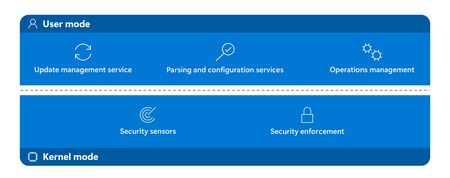
By jweberMSFT For customers it is key to understand that software vendors use safe deployment practices that help them build resilient processes that maintain productivity. This blog addresses Microsoft Defender for Endpoint’s architectural design and its approach to delivering security updates, which is grounded in Safe Deployment Practices (SDP). Microsoft Defender for Endpoint helps protect organizations against sophisticated adversaries while optimizing for resiliency, performance, and compatibility, following best practices for managing security tools in Windows. Security tools running on Windows can balance security and reliability through careful product design, as described in this post by David Weston. Security vendors can use optimized sensors which operate within kernel mode for data collection and enforcement, limiting the risk of reliability issues. The remainder of the security solution, including managing updates, loading content, and user interaction, can occur isolated within user mode, where any reliability issues are less impactful. This architecture enables Defender for Endpoint to limit its reliance on kernel mode while protecting customers in real-time. Read the full post here: Microsoft Defender for Endpoint’s Safe Deployment Practices
Acessos pastas SharePoint / SharePoint folder access
É possível identificar somente acessos a pastas do SharePoint? Algumas informações internas da companhia foram vazadas e precisamos saber quem acessou a pastas do Sharepoint onde estavam essas informações. Outra situação, é que conseguimos identificar que nessa mesma pasta alguns arquivos foram baixados, mas no relatório o usuário aparece "app@sharepoint". Alguém saberia explicar? It is possible to identify access to SharePoint folders? Some of the company's international information was leaked, and we need to know who accessed the SharePoint folders containing that data. Another issue is that we identified files being downloaded from that same folder, but the user appears as "app@sharepoint". Could anyone explain this?29Views0likes1CommentIs system-preferred first factor overriding Single Sign-On?
My colleagues and I have noticed that we've started being prompted to perform a Windows Hello for Business authentication when we use Edge to access web resources that are authenticated with Entra. Previously, this authentication occurred silently through Single Sign-On with the PRT, per Understanding Primary Refresh Token (PRT) in Microsoft Entra ID - Microsoft Entra ID | Microsoft Learn. While investigating what might have caused this change in behavior, I found MC1411574 in the M365 Message Center, which talks about a change to system-preferred authentication that started rolling out in late June 2026, whereby it now applies to the first factor as well as multi-factor authentication. I excluded myself from system-preferred authentication and sure enough, that seems to have restored the previous behavior. Is it intended that this change to system-preferred authentication will disable SSO, or do we have something misconfigured?Solved53Views0likes3CommentsHow to see which users only implement the pincode in Windows Hello?
We rolled out Windows Hello for Business in the whole organisation. All users see a Windows Hello for Business wizard where the at least need to implement the pincode. It is possible to implement also the fingerprint or face recognizing. How can I generate some report where I can see the implemented Windows Hello methods? We would like to contact everybody who only implemented the pincode to do some user adoption.
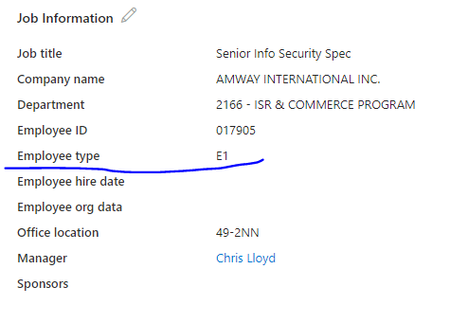
Am trying to create group with dynamic user membership using attribute "Employee Type"
Am trying to create group with dynamic user membership using attribute "Employee Type", tried to get details from Extension attribute but didn't find any option, Did anyone tried this and able to do ? I found a posting where it said to create a custom attribute that would be populated by the 'employee Type' field. That just seems a little strange to me to to create an attribute to be exactly like the one that is already there.
Can External ID (CIAM) federate to an Azure AD/Entra ID tenant using SAML?
What I'm trying to achieve I'm setting up SAML federation FROM my External ID tenant (CIAM) TO a partner's Entra ID tenant (regular organizational tenant) for a hybrid CIAM/B2B setup where: Business users authenticate via their corporate accounts (OIDC or SAML) Individual customers use username/password or social providers (OIDC) Tenant details / Terminology: CIAM tenant: External ID tenant for customer-facing applications IdP tenant: Example Partner's organizational Entra ID tenant with business accounts Custom domain: mycustomdomain.com (example domain for the IdP tenant) Configuration steps taken Step 1: IdP Tenant (Entra ID) - Created SAML App Set up Enterprise App with SAML SSO Entity ID: https://login.microsoftonline.com/<CIAM_TENANT_ID>/ Reply URL: https://<CIAM_TENANT_ID>.ciamlogin.com/login.srf NameID: Persistent format Claim mapping: emailaddress → user.mail Step 2: CIAM Tenant (External ID) - Added SAML IdP (Initially imported from the SAML metadata URL from the above setup) Federating domain: mycustomdomain.com Issuer URI: https://sts.windows.net/<IDP_TENANT_ID>/ Passive endpoint: https://login.microsoftonline.com/mycustomdomain.com/saml2 DNS TXT record added: DirectFedAuthUrl=https://login.microsoftonline.com/mycustomdomain.com/saml2 Step 3: Attached to User Flow Added SAML IdP to user flow under "Other identity providers" Saved configuration and waited for propagation The problem It doesn't work. When testing via "Run user flow": No SAML button appears (should display "Sign in with mycustomdomain") Entering email address removed for privacy reasons doesn't trigger federation The SAML provider appears configured but never shows up in the actual flow Also tried using the tenant GUID in the passive endpoint instead of the domain - same result My question Is SAML federation from External ID to regular Entra ID tenants actually possible? I know OIDC federation to Microsoft tenants is (currently, august 2025) explicitly blocked (microsoftonline.com domains are rejected). Is SAML similarly restricted? The portal lets me configure everything without throwing any errors, but it never actually works. Am I missing something in my configuration? The documentation for this use case is limited and I've had to piece together the setup from various sources. Or is this a fundamental limitation where External ID simply can't federate to ANY Microsoft tenant regardless of the protocol used?Adding PIM enabled security group to an Access Package
Hi, Recently a new feature has gone in preview, it's now possible to add PIM enabled security group to an access package. explained here: https://learn.microsoft.com/en-us/entra/id-governance/entitlement-management-access-package-eligible I followed the instruction exactly on 2 different tenants, one tenant has Entra ID Governance licence, another has the Entra Suite licence. The result on both tenants was the same. When adding a PIM enabled group to an access package. I am presented only with 2 roles (member or owner) and not with the expected 4 roles. (member, owner, eligible member, eligible owner). The group I add is created for test purpose couple of weeks ago, and really is PIM enabled (discovered ). Is this a preview that has to be activated on a tenant? (its not in the "Entra -> Identity -> settings -> Preview features" list). Am i missing something? Cheers!84Views0likes1Comment
Global Secure Access - Deleted Appliction still applies (and cannot be recreated)
Hello everyone, we currently face an issue with Global Secure Access - Private Access - Enterprise applications. An admin has delete and tried to recreate an enterprise application. When he tried added the ip address and the port he got an error, that this rule is already within another app. The link led to an "empty" app. It was found that under "app registrations" the previously deleted applicaiton is still there and it was permanently deleted. However the problem stays. If we try a connection to the ip address and port which was specified in the deleted policy, we can see an error in the GSA Event Log on the Client: Could not authenticate using a cached token... Error: 9, Message: IncorrectConfiguration {"Description":"V2Error: invalid_resource AADSTS500011: The resource principal named <id of the deleted application> was not found in the tenant named <ourTenant>. This can happen if the application has not been installed by the administrator of the tenant or consented to by any user in the tenant. You might have sent your authentication request to the wrong tenant. Unfortunatly, since the application is not permanently deleted, it cannot be restored. We tried to completly disable and reenable private access (in Entra!) but this did not fix the problem. For some reason the deleted policy is stuck in GSA and we have no idea how to get it out.82Views0likes1CommentDoes Rights Management Service currently support MFA claims from EAM?
We've been testing EAM (external authentication methods) for a few months now as we try to move our Duo configuration away from CA custom controls. I noticed today that when my Outlook (classic) client would not correctly authenticate to Rights Management Service to decrypt OME-protected emails from another org. It tries to open the message, fails to connect to RMS, and opens a copy of the email with the "click here to read the message" spiel. It then throws a "something is wrong with your account" warning in the Outlook client's top right corner. If I try to manually authenticate & let it redirect to Duo's EAM endpoint, it simply fails with an HTTP 400 error. When you close that error, it then presents another error of "No Network Connection. Please check your network settings and try again. [2603]". I can close/reopen Outlook and that warning message in the top right stays suppresses unless I attempt signing into RMS all over again. However.. If I do the same thing and instead use an alternate MFA method (MS Authenticator, for example), it signs in perfectly fine and will decrypt those OME-protected emails on the fly in the Outlook client, as expected. I verified that we excluded "aadrm.com" from SSL inspection and that we're not breaking certificate pinning. So all I can assume at the moment is that Rights Management Service isn't honoring MFA claims from EAM. Any experience/thoughts on this? Thanks in advance!




Events

in 23 hours
Join us to hear the latest news and announcements from Microsoft Security.
Speakers:
Hayete Gallot
Dave Weston
Taesoo Kim
Mustafa Suleyman
Monday, Jul 27, 2026, 12:30 PM PDTOnline
3likes
444Attendees
0Comments