azure ad connect
134 Topics
PHS staged rollout works for existing users but not new synced users
We are troubleshooting an Entra ID PHS staged rollout issue with a federated domain using a third-party WS-Fed IdP. The intended behavior is that normal federated users redirect to the IdP, while users in the PHS staged rollout group receive the Microsoft/Entra password prompt instead. Existing users in the staged rollout group continue to work correctly. They enter their UPN and receive the Microsoft password prompt. One known-good test user is not provisioned in the third-party IdP and still signs in successfully through the Entra password prompt, so the working path does not require the user to exist in the IdP. The issue is only with newly created AD-synced users. Newly synced users in the same staged rollout group are still being routed to the federated IdP at HRD instead of receiving the Entra password prompt. We’ve verified the staged rollout policy and group membership from Graph, confirmed the affected users are properly AD-synced with clean immutableID/sourceAnchor, and confirmed PHS is working. Federation metadata and HRD policies also look clean. Seamless SSO/AZUREADSSOACC was checked and remediated, but the behavior did not change. For failed attempts, there is no Entra sign-in log entry, including tenant-wide interactive and non-interactive logs. However, the federated IdP logs show a WS-Fed inbound request from login.microsoftonline.com for the affected user. That makes it look like Entra HRD is routing the user to federation before sign-in logging or token issuance. The issue started around an Entra Connect AD connector/DC-path change. We have since reverted the connector to the previous known-good configuration. After reverting, we created a clean-room test user with the correct UPN set before first sync, confirmed sync/PHS/sourceAnchor, added the user directly to the staged rollout group, and waited 60+ minutes. The clean-room user still redirected to the federated IdP instead of getting the Entra password prompt. So the current behavior is that established staged-rollout users still get the Entra password prompt, but newly created synced staged-rollout users are sent to the federated IdP by HRD. Has anyone seen staged rollout get into this state, where existing users work but new synced users remain on the federated HRD path despite valid rollout policy, group membership, synced password hash, and clean immutableID/sourceAnchor? Is there any known backend cache/state reset or escalation path for HRD/staged rollout routing?836Views1like5CommentsHybrid Join Lifecycle Model
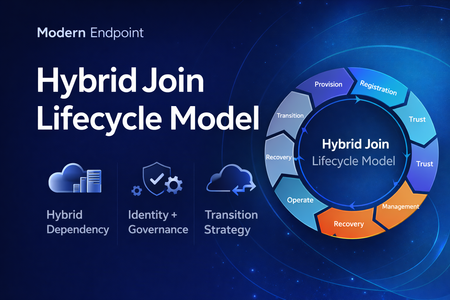
Microsoft Entra hybrid join is still a common reality in enterprise environments. For many organizations, it remains necessary because legacy applications still rely on Active Directory machine authentication, Group Policy is still in use, and on-premises operational dependencies have not fully been retired. At the same time, the long-term direction for endpoint identity is increasingly cloud-native. That creates an important architectural question: Should hybrid join be treated as a permanent device state, or as a lifecycle stage in a broader modernization journey? In practice, hybrid join is often discussed as a binary condition: the device is either hybrid joined or it is not. But from an operational perspective, that view is too limited. In real enterprise environments, hybrid join behaves much more like a lifecycle. A device moves through provisioning, registration, trust establishment, management attachment, steady-state operation, recovery, retirement, and eventually transition. That distinction matters because most hybrid join issues do not fail loudly. They usually appear as stale objects, pending registrations, broken trust, inconsistent management ownership, and environments that remain temporarily hybrid far longer than intended. Why a lifecycle model is useful Treating hybrid join as a lifecycle helps explain why so many organizations struggle with it even when the initial implementation appears technically correct. The challenge is usually not the first successful join. The challenge is everything that happens around it: Provisioning quality Trust validation Management ownership Drift detection Stale object cleanup Exit criteria for transition to Entra join Without that lifecycle view, hybrid join often becomes a static design decision with no clear operational model behind it. The eight phases 1. Provisioning The lifecycle starts when the device is built, imaged, or provisioned. This stage is more important than it looks. If the device is provisioned from a contaminated image, or if cloning and snapshot practices are not handled carefully, later identity issues are often inherited rather than newly created. Provisioning should be treated as an identity-controlled event, not just an OS deployment task. 2. Registration The device becomes known to Microsoft Entra. This is where many environments confuse visibility with readiness. A device object may exist in the cloud, but that does not automatically mean the hybrid identity state is healthy or operationally usable. 3. Trust Establishment This is the point where hybrid join becomes real. A device should not be considered fully onboarded until both sides of trust are present and healthy. In operational terms, this means the device is not only registered, but also capable of supporting the expected sign-in and identity flows. 4. Management Attachment Once trust exists, governance becomes the next question. Many organizations still balance Group Policy, Configuration Manager, Intune, and legacy application dependencies at the same time. That is exactly why hybrid join often persists. But if management ownership is not clearly defined, organizations end up with overlapping policy planes, inconsistent control, and unclear accountability. 5. Operational Steady State Hybrid join does not stop at successful registration. The device must remain healthy over time, and that means monitoring trust health, registration state, token health, line-of-sight to required infrastructure, and management consistency. A device that was healthy once is not necessarily healthy now. 6. Recovery Every real environment eventually encounters drift. Pending states, broken trust, orphaned records, reimaged devices, and inconsistent registration scenarios should not be treated as unusual edge cases. They should be expected and handled with formal recovery playbooks. Recovery is not an exception to the lifecycle. It is part of the lifecycle. 7. Retirement Retirement is one of the weakest areas in many hybrid environments. Devices are replaced or decommissioned, but their identity records often remain behind. That leads to stale objects, inventory noise, and administrative confusion. A proper lifecycle model should include a controlled retirement sequence rather than ad hoc cleanup. 8. Transition This is the most important strategic phase. The key question is no longer whether a device can remain hybrid joined, but whether there is still a justified reason to keep it there. Hybrid join may still be necessary in many environments today, but in many cases it should be treated as transitional architecture rather than the target end state. Practical takeaway Looking at hybrid join as a lifecycle creates a more useful framework for architecture decisions, operational ownership, troubleshooting, directory hygiene, governance, and transition planning toward Microsoft Entra join. That is the real value of this model. It does not replace technical implementation guidance, but it helps organizations think more clearly about why hybrid join exists, how it should be operated, and when it should eventually be retired. Final thought Hybrid join is still relevant in many enterprise environments, but it should not automatically be treated as a default destination. In many cases, it works best when it is managed as a lifecycle-driven operating model with defined phases, controls, and exit criteria. That makes it easier to stabilize operations today, while also creating a clearer path toward a more cloud-native endpoint identity model tomorrow. Full article: https://www.modernendpoint.tech/hybrid-join-lifecycle-model326Views1like0CommentsDisplay On-prem Password Policy on SSPR Page
Hi All We are beginning to rollout SSPR with on-prem writeback. So far so good. Is there a way we can display our on-prem password policy requirements on the SSPR screen? I have seen the MS docs, but can't really make any sense of them so any help would be greatly appreciated. SK460Views1like3Comments
Best practice when UPN and email address are different but both routable?
Our on-premise AD is a multi-domain forest with different business units in separate child domains. Each child domain uses a UPN of the form username[at]unitX.onpremad.com and we've validated all these in the cloud. However, all users have email addresses like fullname[at]emaildomain.com, that domain is also validated with Entra AD. Users frequently join teams in a different business unit so their AD account is migrated across domains and their UPN changes at that time, but their email address stays the same. I've read through a lot of documentation on how the best practice is for the UPN and email to be the same for O365, but that you could have them be different using alternate ID support. But when they are different, apparently there are a number of little "gotchas" in terms of application support. So, before we sync our on-prem AD, I'm trying to understand which scenario will be the best supported over the long term with the least headaches to both users and IT. Changing the on-prem UPN to match the email address isn't possible due to a critical LOB app that expects the UPN suffix to break down into username and business unit domain name. So, would it best to: Sync users with their on-prem UPN as their cloud UPN. This seems easiest to configure, but the documentation seems to imply there's a lot of manual fixing up when the UPN changes and possibly application compatibility issues since the UPN and email are different. Sync the primary email address as the cloud UPN. Looks to require custom configuration. Has the advantage that UPN and email match and the email address rarely changes. However, I'm unclear if this is supported since we'd still have some accounts (primarily administrators) without a mailbox and so no mail or proxyAddresses fields filed in. Unclear if there are any other "gotchas" to watch out for since this is a non-standard configuration. Thanks for any advice you can provide.Solved16KViews0likes4CommentsDo the Entra sync/connect apps ever successfully update themselves?
Last week I had to download and install version 2.5.79.0 of the Entra Connect Sync Agent app on our Entra Connect server because I discovered the installed version was 2.4.21.0 and that version reaches end of support on November 15. Today, I happened to check on the version of the Entra Private Network Connector app on the two servers where we have that installed, and both are running version 1.5.3925.0, which was the latest available version at the time I installed it back in March. That version was from July 2024, and there have been three new releases since then, two of which "may perform auto-update of your connector". One of those servers was a new install, but the other one was an upgrade of the installed version of the Azure Application Proxy client, and while I don't recall which version specifically was installed, I know it was quite out of date. I'm curious: Has anyone ever actually seen either the Entra Connect Sync Agent or Entra Private Network Connector successfully upgrade themselves automatically?Solved310Views1like1CommentJoin Merill Fernando and other guests for our Identity and Network Practitioner Webinar Series!
This October, we’re hosting a three-part webinar series led by expert Merill Fernando for Identity and Network Access practitioners. Join us as we journey from high-level strategy to hands-on implementation, unifying identity and network access every step of the way. Each session builds on the last, helping you move from understanding why a unified approach matters to what are the foundations to get started, and finally to how to configure in practice. The goal is to equip you with actionable skills, expert insights, and resources to secure your organization in a unified, Zero Trust way. Register below: Identity and Network Security Practitioner Webinar Series | Microsoft Community Hub128Views1like0Comments
API-driven provisioning field mapping changes resynchronize all users and groups
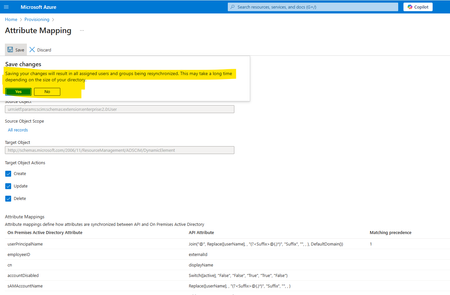
We have configured API-driven provisioning for on-premises Active Directory, along with Azure AD Connect, to synchronize on-premises AD users with Azure Entra ID. As part of the provisioning setup, we have used a separate Organizational Unit (OU) in on-premises AD (designated as the default OU for new users) while configuring API-driven provisioning. We are attempting to make some changes to the API field mapping, specifically the ‘UserPrincipalName’ regular expression (custom domain) and the ‘manager’ field, and saving the configuration. Upon attempting to save, a prompt appears (as highlighted below screenshot), indicating that this action will resynchronize all users and groups. Could you please clarify: Will this resynchronization update any existing users outside the default provisioning Organizational Unit (OU)? Specifically, what does the resynchronization operation update? For instance, will it modify the 'UserPrincipalName' and 'manager' attributes for all users including old users outside of provisioning Organizational Unit (OU)? Screen Shot - While Saving Mapping.Solved466Views0likes2Comments
Microsoft Entra Connect connecting always to old DC
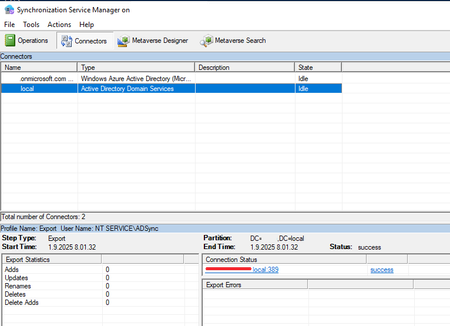
We are planning on demoting old DC server. When doing checkups I noticed that Entra Connect keeps connecting to this specific DC we'ew planning to demote everytime it connect to Active Directory. So now I'm wondering does this need any additional configuration to keep sync working after DC Demote. I found out that there is option to "Only use preferred domain controllers" but I'm not sure if that's what I want do do. There were the red line is is the old DC to be demoted. "Only use preferred domain controllers" setting. If I enable this setting I got this kind of notice. I don't feel like this is the right way to do it so I canceled at this point.Solved348Views0likes2CommentsThe salt sizes required for signing with RSAPSS do not match those used by TPM.
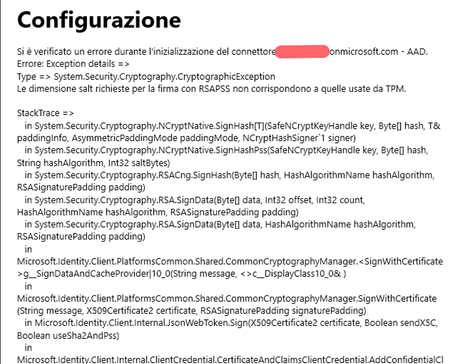
Good evening everyone. I'm getting this error when I try to perform the first sync on my Windows Server 2022. I'm trying to sync the entire directory to manage my employees' licenses. I already have a tenant with users who can stay there without any problems. I had already synced the tenant with my old server in the past. For business reasons, the infrastructure has changed, and so has the server. In Entra ID, I don't see any old syncs, but in Admin Center, I do. Could this be the problem? Any advice is invaluable, as I'm at my wits' end.439Views0likes2Comments
OU list incomplete in AAD connect
We're facing a strange issue while configuring EntraID Connect. At the point of selecting the OU we want to synchronize the list we see in the EntraID application is not complete in respect of what we see in ADUC. We miss an OU at first level, which by the way is ont of the OU we need to sync. Any idea ?Solved430Views0likes4Comments