ai
9 TopicsAsk Microsoft Anything: Why Cybersecurity Needs a New Security Stack for the AI Era with David Weston
David Weston leads Agentic Security at Microsoft, where he and his team build the AI models, autonomous agents, and evaluation systems redefining how defenders operate. At Microsoft since the Windows 7 era, he has worked across exploit mitigation design, malware analysis, APT research, and led security engineering for Windows, Xbox, Azure OS, and Microsoft's Offensive Security Research & Engineering group. His current work is leading teams training frontier security models, agentic security systems for defenders, and pushing AI-driven vulnerability discovery through Microsoft's Multi-Model Agentic Scanning Harness (MDASH). A longtime member of the research community and former CISA technical advisor, David is a regular presenter at BlueHat, Black Hat, and DEF CON. Key areas Dave and his team can discuss: The vision behind Project Perception How AI is changing the economics of cyber offense and defense Lessons learned from building MDASH and Microsoft's AI security initiatives Security-first AI development and deployment What's next for defenders as agentic systems become mainstream This will be a TEXT-BASED AMA, so ask your questions in the comment section down below and David and team will be answering via comment replies during the live hour!4.9KViews9likes16Comments
I just want to secure AI. DLP vs Info Protection vs DSPM vs Governance vs...
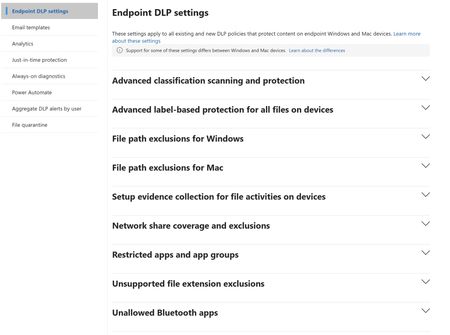
I'm with an MSP, and I've avoided Purview like the plague, because it seems to be suffering from the same 'made by marketing teams' 'strategy' the 365 documentation is. However, it's my understanding Purview policies are needed for Data control of Copilot. Here's my issue: all of these different 'solutions' sound like the exact same thing, but are pitched as if they are something different. i'm going to post a couple of descriptions for these 'solutions' to illustrate this. 'discover, label, and protect sensitive and business-critical info' 'make sure your organization can identify, monitor, and protect sensitive info across the expanding Microsoft 365 landscape' 'discover and secure all your sensitive data across Microsoft 365 and non-365 data sources' 'Discover, label, and protect sensitive and business-critical info across your multicloud data estate.' I genuinely do not have time to figure out what each of these 'solutions' are, then figure out their policies, then their giant library of settings (below)... It's not even clear to me what's active NOW, considering we never licensed Purview - but somehow have been roped into it. It SEEMS like these are all variations of marketing terms, which all point to 3-4 actual technical implementations in obscure ways. Can someone advise on the ACTUAL technical policies we want to target and enable? Or just give some clarity? I've never felt so overwhelmed or disconnected from Microsoft's environment. We just want to secure our tenant's AI usage.893Views1like9CommentsUnderstanding Microsoft 365 Copilot Risk Surface and Mitigations
Microsoft 365 Copilot acts on the access users already have. It does not grant new permissions — it is a force multiplier that makes existing access faster and easier to discover, aggregate, and act on across Microsoft 365. That speed and accessibility can also amplify existing security and governance gaps. In environments with overshared content, excessive permissions, or inconsistent governance, users may gain faster access to sensitive information than organizations realize. It’s a shift that carries important security implications organizations should understand before scaling deployment. Customers with Microsoft 365 E5 licensing may already have access to many of the tools that can help identify and reduce Copilot-related risk, but licensing alone does not reduce exposure. What’s often missing during early Copilot deployments is a clear understanding of the risk surface itself: what data is exposed, who can access it, and through which vectors.Secure the age of AI: Redefining trust, data and access
There is no question that AI is transforming the enterprise: changing how data moves, how decisions are made, and how risk takes shape. As agents access, interpret, and act on sensitive data, unmanaged AI use expands and traditional boundaries blur. Kicking off our series on Securing Data and Access in the Era of AI, Microsoft Entra VP of Product Sinead O’Donovan and Microsoft Purview GM of Product Maithili Dandige explain why legacy security models fall short in the age of AI—and why you need a strategy that brings together identity, access, and data protection. Want to adopt and enable AI innovation with greater control and confidence? Join us to learn how leading organizations are securing access, protecting data, and establishing trust for the next generation of AI-powered work. This session is part of Securing data and access in the era of AI with Microsoft Entra and Microsoft Purview. View the full series for more insights to help you move from experimenting with AI to deploying it at scale, securing sensitive data, access, and AI usage.2.1KViews2likes8CommentsSecuring data and access in the era of AI with Microsoft Entra and Microsoft Purview
As organizations move from experimenting with AI to deploying it at scale, securing sensitive data, access, and AI usage has become mission critical. In this series, Microsoft experts will show how Microsoft Entra and Microsoft Purview help you: Protect sensitive data across networks, apps, and AI interactions Govern access for users, applications, and AI agents Reduce risk while enabling innovation at scale Whether you're shaping your security strategy or implementing controls, you’ll walk away with the guidance you need to secure data and access to AI as one unified strategy. Now on demand! Secure the age of AI: Redefining trust, data and access Data and identity controls for the browser and network Unlock AI agents without sacrificing security Not able to watch here due to organizational policies? Use a personal account or visit each session page for an option to view on LinkedIn.3.5KViews3likes0CommentsUnlock AI agents without sacrificing security
AI agents are reaching into mailboxes, files, line-of-business apps, and the open web on behalf of your users—and the business wants more of them, faster. To scale agents safely, your security teams need to be able to verify each agent, govern what it can access, and enforce clear boundaries across every interaction. Learn how Microsoft Entra helps you discover shadow AI agents, govern agent permissions, keep BYOD and endpoint-based agents in scope, and apply Conditional Access to AI prompts and responses. Then see how Microsoft Purview provides visibility into agent activity, strengthens runtime data protection, helps detect agentic risk, and supports auditability across local agents developed on GitHub Copilot CLI, Claude Code, OpenAI Codex, and OpenClaw. Walk away with practical ways to unlock AI agents while keeping access and data protection aligned with your enterprise security needs. How do I participate? Select Add to Calendar to save the date, then click the Attend button to save your spot, receive event reminders, and participate in the Q&A. Not able to attend live? This session will be recorded and available on demand shortly after airing. Don't see Attend or Add to Calendar? Sign in to the Tech Community to join the conversation. If you are unable to watch the session here due to your organizational policies, you can also tune in on LinkedIn. This session is part of Securing data and access in the era of AI with Microsoft Entra and Microsoft Purview. View the full agenda for more insights to help you move from experimenting with AI to deploying it at scale, securing sensitive data, access, and AI usage.1.2KViews2likes2Comments
DLP Policy - DSPM Block sensitive info from AI sites
Having issues with this DLP policy not being triggered to block specific SITs from being pasted into ChatGPT, Google Gemine, etc. Spent several hours troubleshooting this issue on Windows 11 VM running in Parallels Desktop. Testing was done in Edge. Troubleshooting\testing done: Built Endpoint DLP policy scoped to Devices and confirmed device is onboarded/visible in Activity Explorer. Created/edited DLP rule to remove sensitivity label dependency and use SIT-based conditions (Credit Card, ABA, SSN, etc.). Set Paste to supported browsers = Block and Upload to restricted cloud service domains = Block in the same rule. Configured Sensitive service domain restrictions and tested priority/order (moved policy/rule to top). Created Sensitive service domain group for AI sites; corrected entries to hostname + prefix wildcard a format (e.g., chatgpt.com + *.chatgpt.com) after wildcard/URL-format constraints were discovered. Validated Target domain = chatgpt.com in Activity Explorer for paste events. Tested multiple SIT payloads (credit card numbers with/without context) and confirmed detection occurs. Confirmed paste events consistently show: Policy = Default Policy, Rule = JIT Fallback Allow Rule, Other matches = 0, Enforcement = Allow (meaning configured rules are not matching the PastedToBrowser activity). Verified Upload enforcement works: “DLP rule matched” events show Block for file upload to ChatGPT/LLM site group—proves domain scoping and endpoint enforcement works for upload. Disabled JIT and retested; paste events still fall back to JIT Fallback Allow Rule with JIT triggered = false. Verified Defender platform prerequisites: AMServiceVersion (Antimalware Client) = 4.18.26020.6 (meets/exceeds requirements).852Views0likes9Comments
Update Coverage Workbook in Microsoft Defender for Cloud to Include Defender for AI Plan status
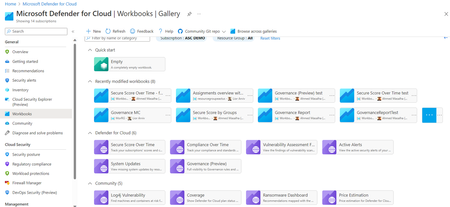
Option 1: Update the Existing Coverage Workbook Enhance the current workbook by adding a query that checks Defender for AI plan enablement across subscriptions. Steps Open the Coverage Workbook in Defender for Cloud. Edit the workbook and update the query section to include the line below. AIServices = defenderPlans.AI Display the results in a table or chart alongside other Defender plans. Save and publish the updated workbook for organization-wide visibility. Pros Single pane of glass for all Defender coverage. Easy for SOC teams already using the workbook. Cons Requires manual customization and maintenance. Updates may be overwritten during workbook template refresh. Option 2: Use Azure Resource Graph Explorer Run a Resource Graph query to check Defender for AI enablement status across multiple subscriptions without modifying the workbook. Steps Go to Azure Resource Graph Explorer in the Azure portal. Run the following query: __________________________________________________________________________________ securityresources | where type =~ "microsoft.security/pricings" | extend pricingTier = properties.pricingTier, subPlan = properties.subPlan | extend planSet = pack(name, level = case(isnotempty(subPlan),subPlan,pricingTier)) | summarize defenderPlans = make_bag(planSet) by subscriptionId | project subscriptionId, CloudPosture = defenderPlans.CloudPosture, VirtualMachines = defenderPlans.VirtualMachines, AppServices = defenderPlans.AppServices, AIServices = defenderPlans.AI, SqlServers = defenderPlans.SqlServers, SqlServerVirtualMachines = defenderPlans.SqlServerVirtualMachines, OpenSourceRelationalDatabases = defenderPlans.OpenSourceRelationalDatabases, CosmosDB = defenderPlans.CosmosDbs, StorageAccounts = defenderPlans.StorageAccounts, Containers = defenderPlans.Containers, KeyVaults = defenderPlans.KeyVaults, Arm = defenderPlans.Arm, DNS = defenderPlans.Dns, KubernetesService = defenderPlans.KubernetesService, ContainerRegistry = defenderPlans.ContainerRegistry The output appears as shown below. Export results to CSV or Power BI for reporting. Optionally, schedule the query using Azure Automation or Logic Apps for periodic checks. Pros No dependency on workbook customization. Flexible for ad hoc queries and automation. Cons Separate reporting interface from the Coverage Workbook. Requires manual execution or automation setup. Recommendation If your organization prefers a centralized dashboard, choose Option 1 and update the Coverage Workbook. For quick checks or automation, Option 2 using Resource Graph Explorer is simpler and more scalable.