Security and AI Essentials
Protect your organization with AI-powered, end-to-end security.
Defend Against Threats
Get ahead of threat actors with integrated solutions.
Secure All Your Clouds
Protection from code to runtime.
Secure All Access
Secure access for any identity, anywhere, to any resource.
Protect Your Data
Comprehensive data security across your entire estate.
Recent Blogs
For many organizations using Microsoft Intune to manage devices, integrating Intune logs into Microsoft Sentinel is an essential for security operations (Incorporate the device into the SEIM). By rou...
Apr 10, 2026430Views
1like
0Comments
5 MIN READ
Many organizations run workloads across multiple cloud providers and need to maintain a strong security posture while ensuring interoperability. Microsoft Defender for Cloud is a cloud-native applica...
Apr 10, 2026170Views
1like
0Comments
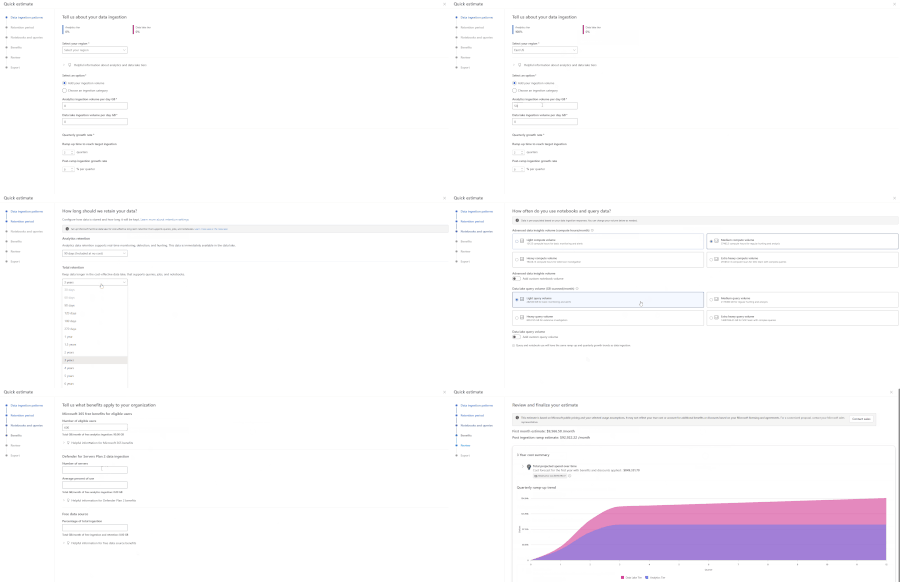
One of the first questions teams ask when evaluating Microsoft Sentinel is simple: what will this actually cost? Today, many customers and partners estimate Sentinel costs using the Azure Pricing Cal...
Apr 09, 2026853Views
0likes
0Comments
We have reviewed the new settings in Microsoft Edge version 147 and determined that there are no additional security settings that require enforcement. The Microsoft Edge version 139 security baselin...
Apr 09, 2026272Views
0likes
0Comments
Recent Discussions

XDR Advanced hunting API region availability
Hi, I am exploring XDR advanced hunting API to fetch data specific to Microsoft Defender for Endpoint tenants. The official documentation (https://learn.microsoft.com/en-us/defender-xdr/api-advanced-hunting) mentions to switch to Microsoft Graph advanced hunting API. I had below questions related to it: To fetch the region specific(US , China, Global) token and Microsoft Graph service root endpoints(https://learn.microsoft.com/en-us/graph/deployments#app-registration-and-token-service-root-endpoints ) , is the recommended way to fetch the OpenID configuration document (https://learn.microsoft.com/en-us/entra/identity-platform/v2-protocols-oidc#find-your-apps-openid-configuration-document-uri) for a tenant ID and based on the response, the region specific SERVICE/TOKEN endpoints could be fetched? Using it, there is no need to maintain different end points for tenants in different regions. And do we use the global service URL https://login.microsoftonline.com to fetch OpenID config document for a tenantID in any region? As per the documentation, Microsoft Graph Advanced hunting API is not supported in China region (https://learn.microsoft.com/en-us/graph/api/security-security-runhuntingquery?view=graph-rest-1.0&tabs=http). In this case, is it recommended to use Microsoft XDR Advanced hunting APIs(https://learn.microsoft.com/en-us/defender-xdr/api-advanced-hunting) to support all region tenants(China, US, Global)?
Custom data collection in MDE - what is default?
So you just announced the preview of "Custom data collection in Microsoft Defender for Endpoint (Preview)" which lets me ingest custom data to sentinel. Is there also an overview of what is default and what I can add? e.g. we want to examine repeating disconnects from AzureVPN clients (yes, it's most likely just Microsoft's fault, as the app ratings show 'everyone' is having them) How do I know which data I can add to DeviceCustomNetworkEvents which isnt already in DeviceNetworkEvents?"Security Operations Admin User" Predefined Critical Asset classification
In our XDR instance, the new "Security Operations Admin User" predefined Critical Asset classification (introduced last month) contains a few non-privileged users. I can't figure out by what logic they were added to this classification. It seems that the users may be using laptops that are classified as "Security Operations Admin Devices," but I can't figure out why those devices are grouped that way, either. If it were a matter of an IT user logging onto one of the machines for support, there would inevitably a lot MORE users and devices in these groups. Does anyone know what kind of activity Microsoft uses to classify users and devices as "security operations admins?"
Can I get productName in Microsoft Graph API incident response?
When using Microsoft Graph Security API, is it possible to get the productName field directly in the incident response (e.g., from /security/incidents endpoint)? Or is it only available at the alert level via /security/incidents/{id}/alerts?
Observed Automation Discrepancies
Hi Team ... I want to know the logic behind the Defender XDR Automation Engine . How it works ? I have observed Defender XDR Automation Engine Behavior contrary to expectations of identical incident and automation handling in both environments, discrepancies were observed. Specifically, incidents with high-severity alerts were automatically closed by Defender XDR's automation engine before reaching their SOC for review, raising concerns among clients and colleagues. Automation rules are clearly logged in the activity log, whereas actions performed by Microsoft Defender XDR are less transparent . A high-severity alert related to a phishing incident was closed by Defender XDR's automation, resulting in the associated incident being closed and removed from SOC review. Wherein the automation was not triggered by our own rules, but by Microsoft's Defender XDR, and sought clarification on the underlying logic.Issues blocking DeepSeek
Hi all, I am investigating DeepSeek usage in our Microsoft security environment and have found inconsistent behaviour between Defender for Cloud Apps, Defender for Endpoint, and IOC controls. I am hoping to understand if others have seen the same. Environment Full Microsoft security and management suite What we are seeing Defender for Cloud Apps DeepSeek is classified as an Unsanctioned app Cloud Discovery shows ongoing traffic and active usage Multiple successful sessions and data activity visible Defender for Endpoint Indicators DeepSeek domains and URIs have been added as Indicators with Block action Indicators show as successfully applied Advanced Hunting and Device Timeline Multiple executable processes are initiating connections to DeepSeek domains Examples include Edge, Chrome, and other executables making outbound HTTPS connections Connection status is a mix of Successful and Unsuccessful No block events recorded Settings Network Protection enabled in block mode Web Content Filtering enabled SmartScreen enabled File Hash Computation enabled Network Protection Reputation mode set to 1 Has anyone else had similar issues when trying to block DeepSeek or other apps via Microsoft security suite? I am currently working with Microsoft support on this but wanted to ask here as well.
CrowdStrike API Data Connector (via Codeless Connector Framework) (Preview)
API scopes created. Added to Connector however only streams observed are from Alerts and Hosts. Detections is not logging? Anyone experiencing this issue? Github has post about it apears to be escalated for feature request. CrowdStrikeDetections. not ingested Anyone have this setup and working?VPN Integration not persistent
Hello, We tried to configure https://learn.microsoft.com/en-us/defender-for-identity/vpn-integration from supported Cisco VPN GW. We established the RADIUS Accounting logs to be sent to DC with MDI sensors installed. Yet when we enabled this in Defender Portal (Settings > Identities > VPN) by checking the box and inserting the shared secret, the configuration is not persistent. We hit save, and we are presented with the success green message, but once we refresh the page or go elsewhere in the portal, the checkbox is not checked. Has anyone encountered the same issue? Thanks, Simon
Understand Why a Service Principal Was Created in Your Entra Tenant
Are you a tenant admin or member of a security team in your organization and find yourself asking “Why was this service principal created in our tenant?” Historically, answering this required correlating audit logs with Microsoft Graph queries or going through long investigations. Microsoft Entra now introduces enhanced audit log properties that make it significantly easier to understand the origin and intent behind newly created service principals directly from tenant audit logs. These new improvements surface additional insights within the Add service principal activity under the ApplicationManagement category—helping administrators determine whether a service principal was provisioned automatically by Microsoft services, triggered by a purchased subscription, or explicitly created by user or application activity. What’s in it for me as an Admins or member of the Security Team When a service principal is created, new metadata is now captured within Microsoft Entra audit logs that enables faster root‑cause analysis. These properties help distinguish between Microsoft‑driven provisioning processes and tenant‑initiated actions, allowing teams to quickly assess whether an event is expected platform behavior or something requiring deeper investigation. For example, administrators can now: Identify provisioning initiated by Microsoft services versus internal users or automation. Determine which tenant subscription or service plan enabled just‑in‑time provisioning. Recognize provisioning linked to Azure resource onboarding or managed identities. Investigate service principal creation without relying on additional Graph lookups. By leveraging these enriched audit logs, security teams can streamline investigations into newly created enterprise applications and reduce manual dependency on downstream data sources. This ultimately improves visibility into application onboarding events and supports faster decision‑making when assessing potential risk or unexpected provisioning activity within the tenant. Learn more here- Understand why a service principal was created in your tenant - Microsoft Entra ID | Microsoft Learn25Views0likes0Comments
How Should a Fresher Learn Microsoft Sentinel Properly?
Hello everyone, I am a fresher interested in learning Microsoft Sentinel and preparing for SOC roles. Since Sentinel is a cloud-native enterprise tool and usually used inside organizations, I am unsure how individuals without company access are expected to gain real hands-on experience. I would like to hear from professionals who actively use Sentinel: - How do freshers typically learn and practice Sentinel? - What learning resources or environments are commonly used by beginners? - What level of hands-on experience is realistically expected at entry level? I am looking for guidance based on real industry practice. Thank you for your time.120Views0likes2CommentsIssue connecting Azure Sentinel GitHub app to Sentinel Instance when IP allow list is enabled
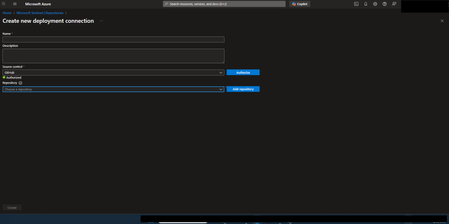
Hi everyone, I’m running into an issue connecting the Azure Sentinel GitHub app to my Sentinel workspace in order to create our CI/CD pipelines for our detection rules, and I’m hoping someone can point me in the right direction. Symptoms: When configuring the GitHub connection in Sentinel, the repository dropdown does not populate. There are no explicit errors, but the connection clearly isn’t completing. If I disable my organization’s IP allow list, everything works as expected and the repos appear immediately. I’ve seen that some GitHub Apps automatically add the IP ranges they require to an organization’s allow list. However, from what I can tell, the Azure Sentinel GitHub app does not seem to have this capability, and requires manual allow listing instead. What I’ve tried / researched: Reviewed Microsoft documentation for Sentinel ↔ GitHub integrations Looked through Azure IP range and Service Tag documentation I’ve seen recommendations to allow list the IP ranges published at //api.github.com/meta, as many GitHub apps rely on these ranges I’ve already tried allow listing multiple ranges from the GitHub meta endpoint, but the issue persists My questions: Does anyone know which IP ranges are used by the Azure Sentinel GitHub app specifically? Is there an official or recommended approach for using this integration in environments with strict IP allow lists? Has anyone successfully configured this integration without fully disabling IP restrictions? Any insight, references, or firsthand experience would be greatly appreciated. Thanks in advance!DLP policy stops working when device is joined to the local domain
i have deployed purview in the client environment (M365 E5 lic) the DLP rule presents copy to USB for fils with a certain sensitivity label. DLP agent is deployed on all devices and all devices are in sync. when i test the DLP policy on an Entra joind device it works as intended and prevents copy to USB but when i join the device to the local domain the DLP policy stops working how do i debug this?175Views0likes1Comment
Different uses of the classic portal and the new portal
Hi everyone, I explain my problem, but without expecting a solution, as I understand that is no bug/issue there. My problem is that I had all the glossary terms in the Classic glossary, with some workflows. Then when they released the new version, more oriented to data products and data mesh, I started to migrate the glossary terms to each business domain, but 1) workflows cannot be applied to new portal items (glossary terms from a business domain) and 2) the terms cannot be linked to data assets in the data map, only to data products (a container for data assets) FYI, the Enterprise Glossary is made up of all the "Approved" glossary terms in each Business Domain, and this confused me a bit at first. In other hand, if you go for the classic portal you loose all data quality functionalities inside data products. The classic one don't have data quality tracking. I think Microsoft should explain well what each portal is for and how to use it and simplify life for everyone. For example, I think they should make it clear that we should reserve the new portal only if you use Fabric and a Datamesh approach and for the rest of the architectures/uses, it is better to use the classic one. Or eventually unify the glossaries and data asset's data quality to have better experience. Thanks! David459Views1like1CommentPurview Graph API
Hello. I'm trying to find information on the Purview Graph API and it's endpoints. It looks like the endpoints aren't posted publicly and are listed within an admin console. Can someone help me with how to view the endpoints? Also, are the graph API endpoints capable of reading and creating assets into Purview?20Views0likes0Comments
Missing details in Azure Activity Logs – MICROSOFT.SECURITYINSIGHTS/ENTITIES/ACTION
The Azure Activity Logs are crucial for tracking access and actions within Sentinel. However, I’m encountering a significant lack of documentation and clarity regarding some specific operation types. Resources consulted: https://learn.microsoft.com/en-us/azure/sentinel/audit-sentinel-data https://learn.microsoft.com/en-us/rest/api/securityinsights/entities?view=rest-securityinsights-2024-01-01-preview https://learn.microsoft.com/en-us/rest/api/securityinsights/operations/list?view=rest-securityinsights-2024-09-01&tabs=HTTP My issue: I observed unauthorized activity on our Sentinel workspace. The Azure Activity Logs clearly indicate the user involved, the resource, and the operation type: "MICROSOFT.SECURITYINSIGHTS/ENTITIES/ACTION" But that’s it. No detail about what the action was, what entity it targeted, or how it was triggered. This makes auditing extremely difficult. It's clear the person was in Sentinel and perform an activity through it, from search, KQL, logs to find an entity from a KQL query. But, that's all... Strangely, this operation is not even listed in the official Sentinel Operations documentation linked above. My question: Has anyone encountered this and found a way to interpret this operation type properly? Any insight into how to retrieve more meaningful details (action context, target entity, etc.) from these events would be greatly appreciated.219Views0likes3CommentsUnable to use MS Graph DLP Api's to use with my Entra Registered App
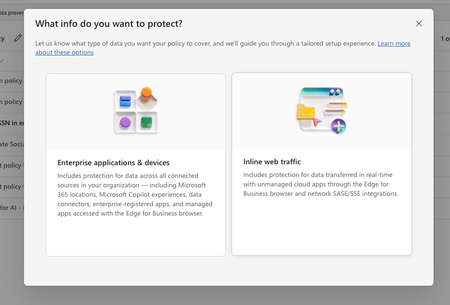
In purview, I have set of policies in DLP, where I have registered to block the US SSN in the text contents and I have created different policies in all of them I have selected the available locations: Exchange email - All accounts SharePoint sites OneDrive accounts - All accounts Teams chat and channel messages - All accounts Devices - All accounts Microsoft Defender for Cloud Apps On-premises repositories And selected action as block all, in all of them for the rule and enabled the rule (not in simulation mode) Now, I have the app registered in Entra and I try to use the following API's https://learn.microsoft.com/en-us/graph/api/userprotectionscopecontainer-compute?view=graph-rest-1.0 https://learn.microsoft.com/en-us/graph/api/userdatasecurityandgovernance-processcontent?view=graph-rest-1.0&tabs=http But whenever I use the compute api I can see i'm only getting curl -X POST https://graph.microsoft.com/v1.0/users/5fd51e08-c5f1-4298-b79b-a357eaa414ff/dataSecurityAndGovernance/protectionScopes/compute\ -H 'Authorization: Bearer <ACCESS_TOKEN>'\ -H 'Content-Type: application/json' -d '{ "activities": "uploadText,downloadText" }' { "@odata.context": "https://graph.microsoft.com/v1.0/$metadata#Collection(microsoft.graph.policyUserScope)", "value": [ { "activities": "uploadText,downloadText", "executionMode": "evaluateOffline", "locations": [ { "@odata.type": "#microsoft.graph.policyLocationApplication", "value": "b48106d9-1cdb-4d90-9485-fe2b6ee78acf" } ], "policyActions": [] } ] } My sample App's Id is showing up but always with `evaluateOffline` I don't know why it always gives 'evaluteOffline' and policyActions is always empty array Also, I can see my Entra registered app is showing up here in the value of the locations And when I use the processContent api , I always get modified in the response and nothing else like below: curl -XPOST https://graph.microsoft.com/v1.0/users/5fd51e08-c5f1-4298-b79b-a357eaa414ff/dataSecurityAndGovernance/processContent \ -H 'Authorization: <ACCESS TOKEN>'\ -H 'Content-Type: application/json' -d '{ "contentToProcess": { "contentEntries": [ { "@odata.type": "microsoft.graph.processConversationMetadata", "identifier": "07785517-9081-4fe7-a9dc-85bcdf5e9075", "content": { "@odata.type": "microsoft.graph.textContent", "data": "Please process this application for John VSmith, his SSN is 121-98-1437 and credit card number is 4532667785213500" }, "name": "Postman message", "correlationId": "d63eafd2-e3a9-4c1a-b726-a2e9b9d9580d", "sequenceNumber": 0, "isTruncated": false, "createdDateTime": "2026-04-06T00:23:20", "modifiedDateTime": "2026-04-06T00:23:20" } ], "activityMetadata": { "activity": "uploadText" }, "deviceMetadata": { "operatingSystemSpecifications": { "operatingSystemPlatform": "Windows 11", "operatingSystemVersion": "10.0.26100.0" }, "ipAddress": "127.0.0.1" }, "protectedAppMetadata": { "name": "Postman", "version": "1.0", "applicationLocation": { "@odata.type": "microsoft.graph.policyLocationApplication", "value": "b48106d9-1cdb-4d90-9485-fe2b6ee78acf" } }, "integratedAppMetadata": { "name": "Postman", "version": "1.0" } } }' In the above request I have mentioned some sample US Security SSN, but the response I get is { "@odata.context": "https://graph.microsoft.com/v1.0/$metadata#microsoft.graph.processContentResponse", "protectionScopeState": "notModified", "policyActions": [], "processingErrors": [] } But Ideally I want to see whether I can get the content is valid or not, for example in the above request, it has SSN, so ideally I should get restrictAction or something right? Or is that evaluateInline is not available or something? Note that I have purchased E5 and assigned to the user who is trying this Also, whenever I choose to create a Policy in DLP , I got two options And Lets say I choose "Enterprise applications & devices", what happens is in the Locations, I'm seeing only these as the options: And If I choose the "Inline Traffic", i'm seeing only these options In Unmanaged, I'm seeing the following And in the Enforcement Options, I have the following : And in the "Advanced DLP rules" I'm seeing only these So, can you tell me the exact steps in the Purview suite, I couldn't where to mention the Entra registered App, I searched and I couldn't find one But in the compute endpoint, https://learn.microsoft.com/en-us/graph/api/userprotectionscopecontainer-compute?view=graph-rest-1.0 I'm getting my app but only with "evaluateOffline" and with that ETag, If I use the processContent Api, its not giving anything except as I mentioned above in the postSolvedGoverning Entra‑Registered AI Apps with Microsoft Purview
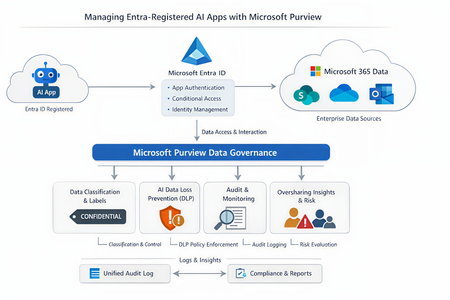
As the enterprise adoption of AI agents and intelligent applications continues to accelerate, organizations are rapidly moving beyond simple productivity tools toward autonomous, Entra‑registered AI workloads that can access, reason over, and act on enterprise data. While these capabilities unlock significant business value, they also introduce new governance, security, and compliance risks—particularly around data oversharing, identity trust boundaries, and auditability. In this context, it becomes imperative to govern AI interactions at the data layer, not just the identity layer. This is where Microsoft Purview, working alongside Microsoft Entra ID, provides a critical foundation for securing AI adoption—ensuring that AI agents can operate safely, compliantly, and transparently without undermining existing data protection controls. Lets look at the role of each solution Entra ID vs Microsoft Purview A very common misconception is that Purview “manages AI apps.” In reality, Purview and Entra serve distinct but complementary roles: Microsoft Entra ID Registers the AI app Controls authentication and authorization Enforces Conditional Access and identity governance Microsoft Purview Governs data interactions once access is granted Applies classification, sensitivity labels, DLP, auditing, and compliance controls Monitors and mitigates oversharing risks in AI prompts and responses Microsoft formally documents this split in its guidance for Entra‑registered AI apps, where Purview operates as the data governance and compliance layer on top of Entra‑secured identities. Lets look at how purview governs the Entra registered AI apps. Below is the high level reference architecture which can be extended to low level details 1. Visibility and inventory of AI usage Once an AI app is registered in Entra ID and integrated with Microsoft Purview APIs or SDK, Purview can surface AI interaction telemetry through Data Security Posture Management (DSPM). DSPM for AI provides: Visibility into which AI apps are being used Which users are invoking them What data locations and labels are touched during interactions Early indicators of oversharing risk This observability layer becomes increasingly important as organizations adopt Copilot extensions, custom agents and third‑party AI apps. 2. Classification and sensitivity awareness Purview does not rely on the AI app to “understand” sensitivity. Instead the Data remains classified and labeled at rest. AI interactions inherit that metadata at runtime Prompts and responses are evaluated against existing sensitivity labels If an AI app accesses content labeled Confidential or Highly Confidential, that classification travels with the interaction and becomes enforceable through policy. This ensures AI does not silently bypass years of data classification work already in place. 3. DLP for AI prompts and responses One of the most powerful but yet misunderstood purview capabilities is the AI‑aware DLP. Using DSPM for AI and standard Purview DLP: Prompts sent to AI apps are inspected Responses generated by AI can be validated Sensitive data types (PII, PCI, credentials, etc.) can be blocked, warned, or audited Policies are enforced consistently across M365 and AI workloads Microsoft specifically highlights this capability to prevent sensitive data from leaving trust boundaries via AI interactions. 4. Auditing and investigation Every AI interaction governed by Purview can be recorded in the Unified Audit Log, enabling: Forensic investigation Compliance validation Insider risk analysis eDiscovery for legal or regulatory needs This becomes critical when AI output influences business decisions and regulatory scrutiny increases. Audit records treat AI interactions as first‑class compliance events, not opaque system actions 5. Oversharing risk management Rather than waiting for a breach, Purview proactively highlights oversharing patterns using DSPM: AI repeatedly accessing broadly shared SharePoint sites High volumes of sensitive data referenced in prompts Excessive AI access to business‑critical repositories These insights feed remediation workflows, enabling administrators to tighten permissions, re‑scope access, or restrict AI visibility into specific datasets. In a nutshell, With agentic AI accelerating rapidly, Microsoft has made it clear that organizations must move governance closer to data, not embed it into individual AI apps. Purview provides a scalable way to enforce governance without rewriting every AI workload, while Entra continues to enforce who is allowed to act in the first place. This journey makes every organizations adopt Zero Trust at scale as its no longer limited to users, devices, and applications; It must now extend to AI apps and autonomous agents that act on behalf of the business. If you find the article insightful and you appreciate my time, please do not forget to like it 🙂120Views1like1CommentLeveraging Microsoft Graph to Automate Compliance Workflows MS Purview
Background Microsoft Purview provides organizations with capabilities to discover, classify, protect, and govern sensitive information across Microsoft 365 workloads. As organizations increasingly rely on Purview for compliance operations such as auditing, investigations, and regulatory response, there is a growing need to automate these processes beyond the Microsoft Purview portal. Microsoft exposes key compliance capabilities through Microsoft Graph APIs, enabling organizations to integrate Purview operations directly into automation workflows. The Microsoft Purview APIs in Microsoft Graph allow applications to align with data governance, security, and compliance policies defined within the Purview portal, helping ensure that applications handling sensitive information respect organizational controls. Automating eDiscovery Operations with Microsoft Graph The Microsoft Purview eDiscovery APIs available through Microsoft Graph enable organizations to automate repetitive compliance tasks and integrate with existing investigation or legal workflows. These APIs are intended to support litigation, investigation, and regulatory scenarios by allowing administrators to programmatically manage key eDiscovery components such as cases, custodians, searches, review sets, and exports. This capability allows organizations to move from manual portal‑based workflows toward repeatable, policy‑aligned processes integrated into automation platforms or downstream compliance tooling. Programmatic Access to Audit Logs Microsoft Purview Audit captures thousands of operations across Microsoft 365 services and retains them in the unified audit log for security investigations and compliance obligations. Through Microsoft Graph, administrators can now programmatically search and retrieve audit logs using the Purview Audit Search API. This API enables administrators and applications to query and retrieve relevant audit activity logs across workloads such as Exchange, Entra ID, OneDrive, SharePoint, and Intune, providing visibility into user activity and administrative operations performed across the organization. This provides a programmatic alternative to legacy PowerShell‑based audit search methods, improving reliability and enabling automation of compliance monitoring workflows. Supporting Policy‑Aware Applications Applications that integrate with Microsoft Purview APIs through Microsoft Graph can interpret and enforce compliance policies such as sensitivity labels or data loss prevention (DLP) rules. Microsoft documents that apps built using these APIs can prevent data misuse by aligning with compliance and security requirements defined within the organization’s governance framework. This integration also allows enterprise applications to respect sensitivity labels and policy‑driven controls, ensuring that interactions with organizational data remain compliant with regulatory requirements and internal governance policies. Conclusion Microsoft Purview governs organizational data through classification, retention, auditing, and investigation capabilities. Microsoft Graph provides the automation layer that allows these governance controls to be accessed programmatically. By integrating Microsoft Graph with Microsoft Purview APIs, organizations can automate eDiscovery workflows, retrieve audit logs programmatically, and ensure that applications interacting with sensitive data respect compliance policies defined within their Microsoft 365 environment. Learning Resources Use the Microsoft Purview eDiscovery API in Microsoft Graph Use Microsoft Purview APIs for eDiscovery Overview of Microsoft Purview APIs in Microsoft Graph Introducing the Microsoft Purview Audit Search Graph API42Views1like0Comments

Events
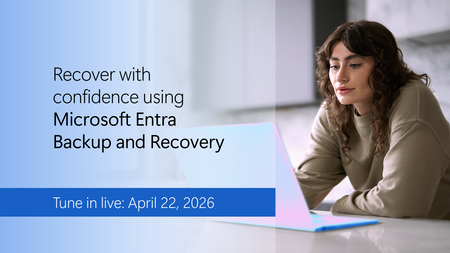
Accidental changes and security compromises can quickly cascade across your tenant. Learn how to recover with confidence using Microsoft Entra Backup and Recovery.
Tune in to see how this Microsof...
Wednesday, Apr 22, 2026, 09:00 AM PDTOnline
0likes
43Attendees
0Comments

Purview Lightning Talks Join the Microsoft Security Community for Purview Lightning Talks; quick technical sessions delivered by the community, for the community.
You’ll pick up practical Pu...
Thursday, Apr 30, 2026, 08:00 AM PDTOnline
0likes
12Attendees
0Comments