developer
18 Topics
Struggling with running DQ Scans (Long queuing and Retry Count Error Issues)
Hi everyone, I have been exploring Microsoft Purview Data Quality quite extensively. At this point, I have configured more than 4,000 data quality rules across more than 10 Microsoft Fabric capacities, each with a minimum capacity of F16. Fabric is the source for all assets registered in Purview. I have identified several issues with the product, but the two that are currently impacting me the most are the following: DQ scans failing with a generic error“Max Retry Count Reached. Ending Workflow. Current Task HandleError”The challenge is that the error message does not identify which rule is causing the failure. As a result, I have to troubleshoot manually by disabling groups of rules, rerunning the scans, and repeating the process until I find the problematic rule. This trial-and-error approach is very time-consuming, especially at this scale. This seems to be caused by issues in some of the DQ rules, even though all rules are marked as “Good to go” in Purview. When running Data Quality scans, I often receive the following error: DQ scans remain queued for a long timeI am not sure why this happens or what resource, orchestration, or scheduling constraint is causing the delay. Whenever I run these DQ scans, they remain in a Queued state for at least 10 minutes, even when there is nothing running on the Fabric capacities. Has anyone experienced similar behavior with Purview Data Quality at this scale? Specifically, I would appreciate any guidance on: How to identify which DQ rule is causing a scan failure Why scans remain queued even when Fabric capacity appears to be idle Whether there are known limitations or best practices for running thousands of DQ rules in Purview Thank you.385Views0likes2Comments
Purview SDK
I've been spending quite a bit of time working with Purview APIs, The APIs themselves are fine, but after a while I realized I was writing the same authentication, pagination and relationship handling code over and over again. So instead of construction the same code from project to project, I turned it into a python package, and now it's available on PyPI pip install purview-unified-sdk Right now, the SDK supports most of the common operations, such as creating, retrieving, updating and deleting business domains, data products, glossary terms, objectives, key results and etc., It also make it much easier to work with relationships, add group id as a owner, navigate resources and retrieve metadata across the unified catalog. https://niki9001.github.io/purview-unified-sdk/ https://github.com/purview-unified-sdk Feel free to fork the project, submit a pull request or open an issue if you have ideas or suggestions233Views0likes0Comments
Missing activity names from Audit Log documentation
We all know that the documentation team is A-tier and amazing at what they do and isn't just copy and pasting marketing materials. But I've noticed that some really obscure functionalities like 'user registered a device' or 'user joined a device' or about half the other things a user can do, are not documented on this list of activity names. The ironically named 'friendly' list doesn't work. So I actually can't audit the unfamiliar devices under our tenants? It appears that this KB is actually locked down, so more can't be added when they are discovered. How are we supposed to use the tool Microsoft has forced everyone towards, when the Documentation team is too bad to document anything, so they outsource it to the community (Microsoft victims), but then they lock down contributions (presumably, because they have some metric that keeps them from being useful - atleast based on my interactions with them). Documentation seems to be a massive fail on Microsoft's part. How did it get this way? Is there a reliable way of finding the activity name - one that ISN'T some preview Graph endpoint that I can't teach my techs to use, because I'm not teaching my techs to program?332Views1like1CommentExtend Microsoft Purview data protection to AWS Bedrock agents for cross-cloud AI governance
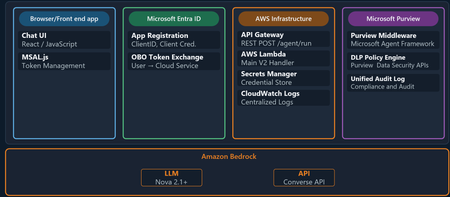
Organizations are moving fast with AI, and many of those AI workloads are not staying in one cloud. A team might use Microsoft 365 and Microsoft Purview for governance and in addition to Microsoft Foundry they may still choose to run an AI agent on AWS Bedrock or on the Google Cloud Platform. The technical challenge is straightforward: how do you keep one consistent set of data security, governance, and compliance controls when the agent itself runs outside Microsoft Azure? This is where Microsoft Purview becomes the central policy engine for your data estate. In this post, we show why that matters and then walk through a practical example: an expense approval agent running on Amazon Bedrock, protected by Microsoft Purview Data Loss Prevention (DLP) policies. ExpenseApprovalAgent" details of the Agent blade Why Purview should be the central policy engine Most organizations do not want separate policy stacks for every cloud, every model endpoint, and every app team. That leads to duplicated controls, inconsistent enforcement, and audit gaps. The better model is to separate where workloads run from where policy decisions are made. That is the value proposition for Microsoft Purview in cross-cloud AI scenarios. Purview gives you: A consistent policy layer for sensitive information types such as credit card numbers, Social Security numbers, financial data, and other regulated content. A governance plane that can extend beyond Microsoft-hosted workloads into multi-cloud environments. A compliance framework with auditability, policy traceability, and a familiar operational model for security and compliance teams. A way to apply data-aware controls to AI interactions, not just to storage locations. In practical terms, that means the same organization that already trusts Purview to govern Exchange, SharePoint, Teams, and Copilot can use Purview to govern prompts and responses in a Bedrock-based agent as well. The key architectural shift is this: your app does not need to invent its own data policy engine. It can call Purview at the points where risk exists. What this Bedrock agent demonstrates The sample solution in this blog is a cross-cloud AI pattern: The frontend is a single-page browser-based chat app. Users authenticate with Microsoft Entra ID via MSAL. The backend runs in AWS Lambda. The model is Amazon Bedrock using Nova 2 Lite. Microsoft Purview evaluates prompts and model responses for DLP policy violations. This matters because it proves a broader point: Microsoft Purview can govern AI interactions even when the model and compute are not running in Azure. The core architecture As shown above the end-to-end flow follows this pattern: A user signs in through Microsoft Entra ID from the frontend. The frontend sends the user's access token and prompt to an API endpoint in AWS. The Lambda function exchanges that token using the On-Behalf-Of flow so Purview can evaluate under the signed-in user's identity. Purview scans the full prompt for sensitive information before the model is called. If the prompt is allowed, the Lambda function sends the request to Amazon Bedrock. Purview scans the model response before it is returned to the user. The frontend shows the result along with a Purview evaluation badge. That gives you two strong governance controls: In-line data loss prevention enforcement, which can block risky requests before they ever reach the model. Response-time enforcement, which can stop sensitive data from being returned even if a model generates it. The implementation also uses the user's identity for policy evaluation. That is important because governance decisions should reflect who is asking, not just what application is running. Why this pattern is useful for security, governance, and compliance teams There are three reasons this pattern is worth paying attention to. First, it aligns policy with risk rather than with hosting location. The compute might run in Lambda and the model might be in Bedrock, but Purview still remains the policy decision point. Second, it improves operational clarity. Security teams do not have to learn a different governance toolchain for each AI stack. They can keep using Purview concepts, policy models, and audit workflows. Third, it supports real-world adoption. Most large enterprises are hybrid and multi-cloud already. A governance pattern that only works for one vendor's runtime is not enough. Policy definition in Purview Two polices are needed to enforce DLP-a collection policy for Enterprise AI Apps and a DLP policy Collection policy 2. DLP policy Follow the steps outlined here to create the DLP policy for Enterprise AI Apps. Sample provided: purview-api-samples/DLPforCustomAIApps at main · microsoft/purview-api-samples To replicate this scenario, follow this link to the official GitHub repo: purview-api-samples/AWSBedrock at main · microsoft/purview-api-samples Once deployed, you will have: An AWS Lambda function that calls Amazon Bedrock. A browser frontend that authenticates with Microsoft Entra ID. Microsoft Purview evaluating both prompts and responses. A demo flow where safe prompts succeed and sensitive prompts are blocked. With the App and agent deployed, now comes the moment when the architectural value becomes clear. The model runtime is AWS Bedrock, but the policy decision is still coming from Microsoft Purview. Below screenshot shows the prompt containing sensitive information being blocked based on the policy evaluation by Purview. Minimal code integration requirements using the SDK Below is the code needed to perform the integration between Purview and Bedrock to perform the in and outbound inspection of content destined to and from the Bedrock model. Results of Purview’s verdict presented to user in the App UI Review governance evidence in Purview Data Security Posture Management Summary The bigger story here is not just that Microsoft Purview can protect an Amazon Bedrock agent. It is that organizations can centralize data security, governance, and compliance policy even while their AI architecture becomes more distributed across multiple clouds. That is the operational win. Developers keep the freedom to choose the best runtime and model platform. Security and compliance teams keep a central policy engine they already understand and trust. AI applications can be multi-cloud, but your data protection model does not have to be fragmented. Additional resources Configure Microsoft Purview - purview-sdk | Microsoft Learn Microsoft Purview Developer Platform Documentation - purview-sdk | Microsoft Learn1.4KViews1like1Comment
Unable to use MS Graph DLP Api's to use with my Entra Registered App
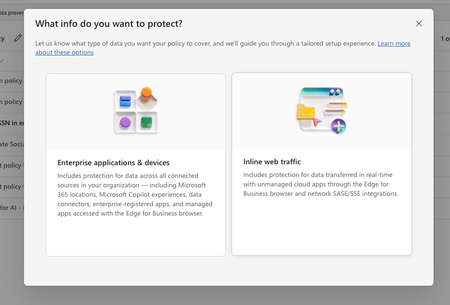
In purview, I have set of policies in DLP, where I have registered to block the US SSN in the text contents and I have created different policies in all of them I have selected the available locations: Exchange email - All accounts SharePoint sites OneDrive accounts - All accounts Teams chat and channel messages - All accounts Devices - All accounts Microsoft Defender for Cloud Apps On-premises repositories And selected action as block all, in all of them for the rule and enabled the rule (not in simulation mode) Now, I have the app registered in Entra and I try to use the following API's https://learn.microsoft.com/en-us/graph/api/userprotectionscopecontainer-compute?view=graph-rest-1.0 https://learn.microsoft.com/en-us/graph/api/userdatasecurityandgovernance-processcontent?view=graph-rest-1.0&tabs=http But whenever I use the compute api I can see i'm only getting curl -X POST https://graph.microsoft.com/v1.0/users/5fd51e08-c5f1-4298-b79b-a357eaa414ff/dataSecurityAndGovernance/protectionScopes/compute\ -H 'Authorization: Bearer <ACCESS_TOKEN>'\ -H 'Content-Type: application/json' -d '{ "activities": "uploadText,downloadText" }' { "@odata.context": "https://graph.microsoft.com/v1.0/$metadata#Collection(microsoft.graph.policyUserScope)", "value": [ { "activities": "uploadText,downloadText", "executionMode": "evaluateOffline", "locations": [ { "@odata.type": "#microsoft.graph.policyLocationApplication", "value": "b48106d9-1cdb-4d90-9485-fe2b6ee78acf" } ], "policyActions": [] } ] } My sample App's Id is showing up but always with `evaluateOffline` I don't know why it always gives 'evaluteOffline' and policyActions is always empty array Also, I can see my Entra registered app is showing up here in the value of the locations And when I use the processContent api , I always get modified in the response and nothing else like below: curl -XPOST https://graph.microsoft.com/v1.0/users/5fd51e08-c5f1-4298-b79b-a357eaa414ff/dataSecurityAndGovernance/processContent \ -H 'Authorization: <ACCESS TOKEN>'\ -H 'Content-Type: application/json' -d '{ "contentToProcess": { "contentEntries": [ { "@odata.type": "microsoft.graph.processConversationMetadata", "identifier": "07785517-9081-4fe7-a9dc-85bcdf5e9075", "content": { "@odata.type": "microsoft.graph.textContent", "data": "Please process this application for John VSmith, his SSN is 121-98-1437 and credit card number is 4532667785213500" }, "name": "Postman message", "correlationId": "d63eafd2-e3a9-4c1a-b726-a2e9b9d9580d", "sequenceNumber": 0, "isTruncated": false, "createdDateTime": "2026-04-06T00:23:20", "modifiedDateTime": "2026-04-06T00:23:20" } ], "activityMetadata": { "activity": "uploadText" }, "deviceMetadata": { "operatingSystemSpecifications": { "operatingSystemPlatform": "Windows 11", "operatingSystemVersion": "10.0.26100.0" }, "ipAddress": "127.0.0.1" }, "protectedAppMetadata": { "name": "Postman", "version": "1.0", "applicationLocation": { "@odata.type": "microsoft.graph.policyLocationApplication", "value": "b48106d9-1cdb-4d90-9485-fe2b6ee78acf" } }, "integratedAppMetadata": { "name": "Postman", "version": "1.0" } } }' In the above request I have mentioned some sample US Security SSN, but the response I get is { "@odata.context": "https://graph.microsoft.com/v1.0/$metadata#microsoft.graph.processContentResponse", "protectionScopeState": "notModified", "policyActions": [], "processingErrors": [] } But Ideally I want to see whether I can get the content is valid or not, for example in the above request, it has SSN, so ideally I should get restrictAction or something right? Or is that evaluateInline is not available or something? Note that I have purchased E5 and assigned to the user who is trying this Also, whenever I choose to create a Policy in DLP , I got two options And Lets say I choose "Enterprise applications & devices", what happens is in the Locations, I'm seeing only these as the options: And If I choose the "Inline Traffic", i'm seeing only these options In Unmanaged, I'm seeing the following And in the Enforcement Options, I have the following : And in the "Advanced DLP rules" I'm seeing only these So, can you tell me the exact steps in the Purview suite, I couldn't where to mention the Entra registered App, I searched and I couldn't find one But in the compute endpoint, https://learn.microsoft.com/en-us/graph/api/userprotectionscopecontainer-compute?view=graph-rest-1.0 I'm getting my app but only with "evaluateOffline" and with that ETag, If I use the processContent Api, its not giving anything except as I mentioned above in the postSolved215Views0likes1Comment
Unified Catalog Self-Serve Analytics - Data products and other elements do not sync
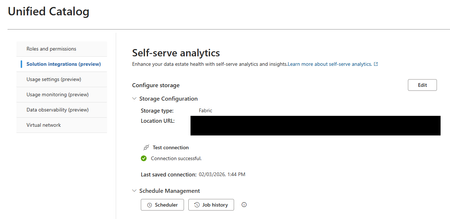
Dears, I intend to create a custom interface through a PowerBI report in Fabric to distribute Purview Unified Catalog browser. I use the feature "Unified Catalog Self-Serve Analytics" to deliver the Unified Data Catalog content in a Fabric Lakehouse. However, from the 44 data products created, only 22 are delivered to the lakehouse, in the data product table I have tried in different lakehouse, same result. I would love some advice to help me configure this properly. Do you face the same issue ? Best, Antoine228Views0likes2CommentsHow to cancel a Norton subscription Allow Uniqueness of Glossary Terms across Governance Domains
When glossary terms are created and published, there is no check for the same term name in another governance domain. Some organizations do want to enforce term uniqueness across all domains. Would it be feasible to provide an optional switch in Unified Catalog settings to turn this on?154Views0likes1Comment
Cross workspace lineage for Fabric Lakehouse tables in Purview
I’m currently exploring lineage capture in Microsoft Purview for Fabric Lakehouse tables that are spread across multiple workspaces, following medallion architecture (Bronze, Silver, Gold in separate Fabric workspaces). While reviewing the documentation, I noticed the stated limitation around cross-workspace lineage for non-power BI assets, as mentioned here: https://learn.microsoft.com/en-us/purview/data-map-lineage-fabric Is there any update or workaround planned to support cross-workspace Fabric lineage in Purview? Is this limitation on the product roadmap or actively being worked on? Until native support is available, are there any recommended design patterns to handle lineage in this scenario?397Views0likes1Comment