Recent Discussions

Weekday only calendar
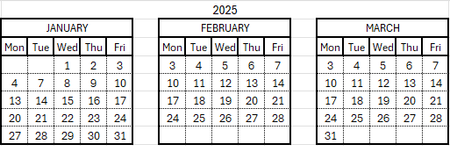
I want to to create yearly calendars with each month in it's own block that auto populates with accurate dates (previously being done manually). The issue is I want the months to only account for Monday-Friday meaning the dates only need a 5x5 grid. Something like this:38Views0likes1CommentRegression: File hyperlinks with #Bookmark no longer work in Office 2601/2602
After updating to Office Version 2601/2602 (Current Channel / Current Channel Preview), file‑based hyperlinks that include a bookmark (e.g., C:\File.docx#Bookmark) no longer work. Office now rewrites the # as %23 and hands the link off to the default browser, which fails. This affects Excel, Word, PowerPoint, and Project. Rolling back to Version 2409 immediately restores correct behavior. I previously had a build newer than 2409 that supported both working file‑bookmark hyperlinks and Excel’s cell‑level dark mode, so this appears to be a regression introduced in the 2601+ hyperlink resolver rather than a local configuration issue. If anyone else is seeing this behavior, please upvote or comment so the engineering team can prioritize it. As noted, it is not just Excel, but that is the most pressing need for me.37Views0likes2Comments
I can't add an O365 email to Outlook desktop client but I can access it from the web
I can't add a O365 to Outlook desktop client but I can access from the web This a weird thing, whenever I try to add in Outlook from File > Add Account I get the message "Something went wrong and Outlook couldn't set up your account". From Control Panel > Mail > Email accounts > New > Manual Setup > here I put the email and gets stuck at "Searching for... Settings" and then " An encrypted connection to your email is not available, click Next to attempt using an unencrypted connection", so I do that and get the error "We're sorry we couldn't set up your account automatically. To try setting up the account yourself click Next" which is basically the same. Everything works fine in the browser, any ideas on this?19KViews1like11Comments
Copying column widths and row heights from one sheet to another
Hello everyone. I have to reformat a rubbish PDF i get sent everyday so i can make it legible. i have arranged the cell widths and heights and cut and pasted the data but there are 14 columns and as many as 30 rows. I have this information on PDF everyday. Is there a way i can automate this so my sheets are all the same looking?44Views0likes1CommentExchange Decommissioning Set-Remotemailbox command
Hi all, I have a situation where someone was with a hybrid Exchange Server configuration was using scripts to provision accounts with Set-RemoteMailbox. Testing was being done with the recipient management using the exchange management and noticed mailboxes are being provisioned and working as expected without even running their set-remotemailbox commands and are curious if this is even needed anymore. So I guess my question is, at this stage where .\CleanupActiveDirectoryEMT.ps1 is the last thing to do, would set-remotemailbox still be necessary, and what would it be used for. I know usually you can just create an on-prem mailbox, synced and license, so I'm not sure if set-remotemailbox is required for new mailboxes or but I'm thinking it's for managing mailboxes that were previously migrated. Thanks for any input.Microsoft Extends DLP Policy for Copilot Protection to All Storage Locations
Microsoft has enhanced the DLP policy for Copilot to cover Office files held in any storage location instead of only Microsoft 365 locations like SharePoint Online and OneDrive for Business. The change is made in the Office augmentation loop, a little-known internal component that coordinates use of connected experiences by apps. Extending the DLP policy to cover all locations makes perfect sense. https://office365itpros.com/2026/02/24/dlp-policy-for-copilot-storage/52Views0likes0Comments
Assist me with Shared Mailbox Alias Configuration in Outlook 365
We have a shared mailbox with different email alias configurations for various applications. Each application needs to send emails using its respective alias. Shared Mailbox Name: email address removed for privacy reasons Application 1: From email ID – email address removed for privacy reasons Application 2: From email ID – email address removed for privacy reasons Similarly, I need to define aliases for each application. Could you please assist me with setting this up in Outlook 365? Additionally, could you explain if there are any limitations related to using aliases?251Views0likes4Comments
Trying to create a form field that uses images (but not a simple one!)...
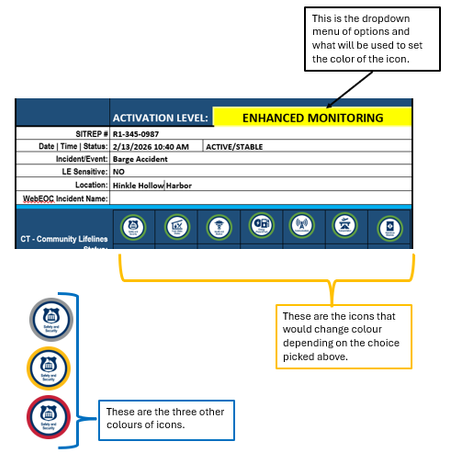
I have a Word form that uses a https://www.fema.gov/emergency-managers/practitioners/lifelines-toolkit/lifelines-icons used in the public safety community. For each icon, there are four different border colours, indicating a certain level of urgency, using the TLP model - green, yellow, red, grey. What I would like to do is create a dropdown (elsewhere on the form) where someone chooses an option in that field, and depending on the choice, the icon with the corresponding colour displays. Example: Any assistance is appreciated!Solved52Views0likes4CommentsAccess to subAddress Property of Hyperlinks in Powerpoint Javascript API
Recently my company has me developing a Taskpane Add-in for Powerpoint using the Javascript API. Right now the API is still missing a 'subAddress' property for the Powerpoint.Hyperlink class. My heart's deepest longing is to add a slide to a presentation with existing slide-to-slide hyperlinks, check those hyperlinks for discrepancies between the slide ID and the text (ie: a Hyperlink reading '13' that now links to slide 14), and finally correct the text to the subaddress ID of the hyperlink in Javascript. It is my burning passion to do this for every hyperlink in my presentation with the push of a button. In the interest of all mankind I would ask that the 'subAddress' property of the hyperlinks be available for use in addition to the 'address' and 'screenTip' properties which now exist. To the microsoft dev who can grant me this boon I offer half my kingdom. Truly there is no dev more favoured than thee.61Views1like4CommentsFormula Help
I have a spreadsheet I use for bidding construction work. On items 1-40 the formula in cells G22-G65 work like they are supposed to. From G66 to G88 where the sheet stops, the formula returns #NAME?. I've checked the formula from G65 to G66 and below, and they appear to be correct. I can't figure out what the problem is. This is the formula that works. =IF(D65>0,'40'!Rate+$G$18,0) This is the formula that does not work. =IF(D66>0,'41'!Rate+$G$18,0) The '40' and '41' refer to individual sheets within the workbook that contain the data in the !Rate cell. I've been looking at this for hours and can't figure it out. Any help or advice would be great.108Views0likes6Comments
Time sheet for hours worked
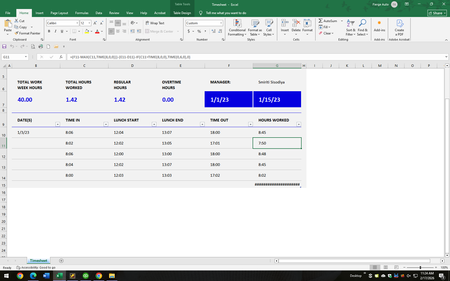
I am needing to make a sheet that shows clocking in for work - clocking out for lunch - clocking in from lunch - clocking out for the day and then the total of those hours worked per day and then grand total for the week. For our pay system we do things in 6 minute increments. I found a sample sheet through Excel, but the formula we have still isnt just right. Here is what I have and the formula for the hours worked is what I am needing help on. Any help is very much appreciated!248Views0likes12CommentsShortcuts appearing when using Option+arrow in Outlook on Chrome in Mac
luse Outlook on Chrome in my MacBook Pro. While typing an email, though, if I use Option tarrow left or right (to go back or forth between words), after a few words, the shortcut letters for the menus pop up, and stop what I'm doing. (See image.) It doesn't happen in any other window on Chrome. So it's not a Chrome thing. It's only when Outlook 365 is loaded. (Don't know if it happens in other 365 apps, as I only use Outlook, really.) Anyone experienced that? And, if so, is there a solution? I tried Outlook 365's setting, but nothing there. Thanks!19Views0likes2CommentsMicrosoft 365 Apps admin center devices are not checking in.
None of our devices have checked in since August 2nd. I see no obvious blocks in our FWs or AV systems.1.8KViews0likes7Comments
Functions and formulars
Hi all, yes I am struggling to find the right formular for a problem, or to get it to work. I have a number in cell B14, which i want to return a value in cell B13. if B14 gives a value between 30 and 49 (this is manually entered) the result in B13 should be Pink (the word not a coloured cell) and if B14 gives a value between 17 and 33 the result in B13 should be Purple plus a few more along these lines and if the B14 value is under 9 result should be Yellow I am frustrated... this used to be simple for me but its been a while and any help would be appreciated.71Views0likes4CommentsAutomating Microsoft 365 with PowerShell Second Edition
The Office 365 for IT Pros team are thrilled to announce the availability of Automating Microsoft 365 with PowerShell (2nd edition). This completely revised 350-page book delivers the most comprehensive coverage of how to use Microsoft Graph APIs and the Microsoft Graph PowerShell SDK with Microsoft 365 workloads (Entra ID, Exchange Online, SharePoint Online, Teams, Planner, and more). Existing subscribers can download the second edition now free of charge. https://office365itpros.com/2025/06/30/automating-microsoft-365-with-powershell2/702Views2likes9Comments
Excel array question - spill VOWD based on forecast month
Hi, Can I have your help on a spilled question? I have the following table with information. Fore Month Jan-26 Feb-26 Mar-26 Apr-26 May-26 Jun-26 Jul-26 Aug-26 Sep-26 Oct-26 Nov-26 Dec-26 VOWD 2 - - - 3,983 15,203 11,779 2,083 - 1,742,162 1,696,156 116,267 1,162,366 - 2 - - 100,000 200,000 - - 500,000 650,000 300,000 - 466,000 - - 3 - - - 3,983 15,203 11,779 2,083 10,000 1,742,162 1,696,156 116,267 1,152,366 - 3 - - 100,000 200,000 - 250,000 250,000 650,000 - 400,000 450,000 - 100,000 4 - - - 2,000 15,203 11,779 2,083 10,000 1,742,162 1,696,156 116,267 152,366 2,000 4 - - 100,000 200,000 - 250,000 250,000 650,000 - 400,000 350,000 - 300,000 I would like to have a spilled array formula in VOWD column and the expected result is right there now. The logic is to grab the first 2 columns and sum up the amounts for the first two rows of data, and grab first three columns and sum up for the third and forth rows of data and etc. Thanks, Anna85Views0likes6Comments
Access Northwind Dev Ed - Error GetRandomPkValue
Just downloaded the newest MS Access and selected a new Northwind Dev Ed as the first DB to create. It fails to open due to an error in the code as it searched for a non existing function GetRandomPkValue... The purpose of the missing function is to return a random primary key value by passing in the variables for a query name and a field name and then it should return a "random" numerical ID from those possible based upon the passed in variables... My question is, Is the new Northwind Dev designed to fail on purpose or did I manage to download a corrupted incomplete version or???197Views0likes5CommentsStudent Behaviour Tracker
This is a very cheeky request for help. Now approaching 70 I've forgotten most of what I knew about Excel. I'm a Chair of Governors at an 11-16 school. I receive notifications about pupils who have been suspended (also known as fixed term exclusion). Roughly I have about 200 individual suspensions over 1 year. I want to record and analyse these. The information to record is Name: Last and First (about 30-40 students) Reason for exclusion (usually 1 or possibly 2 out of about 8 categories) Length of exclusion 1 - 15 days Flags e.g. SEND; PP, Year group: 7, 8 , 9 10, 11 Date As many of the students are repeat offenders I'd like to set the spreadsheet up so by either by typing the name or through an editable drop down list the name appears once and then the reason for the suspension and date is entered (as opposed to multiple entries appearing on the same page). I'd then like the spreadsheet to report, using an editable date range: By pupil name; the number of suspensions; total number of days and total number of days for each category of exclusion By suspension category: number of suspensions; total number of days for each category By flag: number of suspensions; total number of days for each category Year group: 7, 8 , 9 10, 11: number of suspensions; total number of days for each category I've looked at some cheap packages e.g. at Etsy but I cant see anything that does this. There are commercial packages, intended for whole school, but cost several hundred - thousand plus, pounds. Thanks in advance if you are interested and my apologies to you if you feel this is an inappropriate request. Regards NickSolved125Views2likes4Comments


Events

You’re passionate about what you do, and we’re passionate about empowering your potential. Microsoft 365 Community Conference - is your chance to keep up with AI, build game-changing skills, and take...
Tuesday, Apr 21, 2026, 08:00 AM PDTIn-Person
0likes
3Attendees
0Comments
Recent Blogs
- 2 MIN READWelcome to the February 2026 update. This month we are excited to announce expanded availability for Agent Mode in Excel, as well that you can now query modern Excel workbooks (like .xlsx, .xlsb, .xl...Feb 24, 2026215Views0likes0Comments
- We are continuing to streamline the ways people engage with Copilot in Excel, and we've heard your feedback that working across multiple Copilot entry points can feel fragmented. To address this, Cop...Feb 24, 2026190Views0likes0Comments