Recent Discussions

Deleted folders
Hello, I have had an older and a new email account registered in outlook. Since the old account wasn’t connected to a server anymore, Outlook showed always some download errors. I have therefore decided to remove that account from Outlook. The problem is that I have apparently been using some folders related to that account for emails from the other and removing it made disappear, without significant warnings, all my emails. What can I do to get them back? …and there don’t seem to be any folders or files in Outlook from where to recover something, like described on some pages on the internet.25Views0likes4Comments
How to resolve continous threat (spam) emails on my android app?
Dear Awesome Community Members, I am having problems with scams on my phone's outlook app. I am recieving through my own email address addressed to me. I delete them all and also I have tried to block them but they are red flagged and says you are hacked. Please help me how to fix this issue on my phone at your earliest. Thanks and Regards, Muhammad Aquilur Rahman12Views0likes0Comments
New Outlook: This message can't be saved right now. Please try again
We are having an issue in New Outlook with shared mailboxes. This issue just started happening. User replies to an email in a shared mailbox. User changes the "from" field to her email. User tries to send the email but receives an alert "This message can't be saved right now. Please try again later." The message then closes and a copy of the email is saved to the Drafts folder. No permissions have changed. If user tries the same actions in the Outlook Web Client or Classic Outlook, the user is able to send the email without issue. We've tried resetting New Outlook, restarting Windows, behavior persists. Again, this function was working up until recently. Microsoft Outlook Version: 1.2026.317.100 WebView2 Version: 146.0.3856.84 (Stable) Please advise how we can resolve this issue.31Views0likes0Comments
Desktop Outlook from Office 365 suddenly displaying only 2 months emails in folder.
... but Searching the folder for a known item finds all the emails I expect to be there, in that particular folder. - Affects just one particular folder (a POP3 account Inbox). - No filters. - Not archived. - No options changed. - Apparently it just decided to not display them. - Online suggestions when searching only seem to mention suggestions relevant to Outlook Clients on Exchange or Outlook.com.23Views0likes2CommentsOutlook servers trouble with 3rd party Mail such as Fairmail due to broken Oauth handling?
Regarding access via FAIRMAIL app / Android (including other mail programs equally affected by this recurring issue microsoft throws at people and which sometimes they take MONTHS to fix) Authentication now throws errors for the last 24 hours approx., despite being properly accessible via outlook itself and also having proper credentials and on trying to reestablish Oauth throws absolutely weird errors envolving Jakarta which has nothing to do with my endpoint or even microsofts side? (can just assume these are totally bogus replies of microsofts mail server)34Views0likes2CommentsQuick Parts are Now Available in New Outlook
Quick Parts have officially arrived in the New Outlook experience, and many users have been asking how they work and what has changed from Classic Outlook. I put together a short walkthrough covering how to create, insert, and manage Quick Parts, along with a few notes on features that didn’t make it into the new version. 🔗 Video overview: https://youtu.be/k3rVgpGmSFs?si=rvEdCK_WgBhjlLcj 🔗 Blog post: https://traccreations4e.com/new-outlook-quick-parts Hope this helps anyone transitioning to New Outlook or supporting others who are. If you’ve already tested Quick Parts in the new interface, I’d love to hear what you think. #traccreations4e-p25 2/15/20262.4KViews4likes7Comments
outlook search not working on mac
I am desperate ! After doing several times the procedure of re indexing my emails with the spotlight confidentiality procedure several times, uploading and installing the latest version of outlook and mac Os ( Sonoma 14.3.1) I still don't have any results when i look for an email in the outlook search bar. Aybody has an idea please ? Thank you so much in advance725Views1like2Comments
How to change the people view layout in new outlook
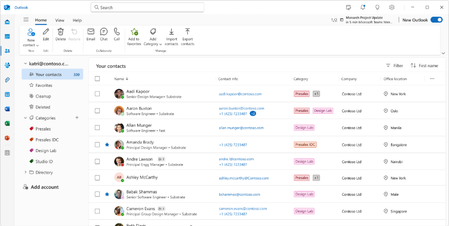
I don't like the current view in People section for my contacts in the new outlook. I want to be able to view my contacts like a phone book like the old outlook allowed me to where I can see the names, companies, addresses, phone numbers on each line. It seems like the new outlook is limited to sorting names and does not allow you to add or remove columns or change the layout to a phonebook type view like the old outlook did. Any suggestions other than reverting back to old outlook?1.4KViews3likes5Comments"New" Outlook is not great
I was forced to switch to the new version of Outlook. I have to have it for my job so I have no choice. So many things wrong when compared to the classic version. You would think that MS would migrate all the settings, views, etc. to the new version. But they didn't. -Event/reminder snooze options - now limited to two hours? Now I get reminders every two hours for something I need to snooze for days or weeks like I was able to before. -Contact views - can't view my contacts in the classic table format where I can filter/sort by company name or last name, etc. -Spell check now cleared by left mouse click instead of the usual right click like all other apps have. -No longer can select multiple email attachments like the classic version -Email folders cannot be sorted anymore Again...love Outlook but this new version is not a winner. MS...please bring back all the classic options!810Views5likes17CommentsCalendar Invitations Not Arriving with Attachment Icons in Inbox
Multiple computers in a household using Windows 11, Outlook 2021 and Google Mail. Up until the last week or so, whenever I receive a calendar invitation generated through either Outlook or Google, it arrived in my Outlook 2021 inbox with an icon showing an attachment. This is helpful in distinguishing emails that are calendar invitations versus just a regular email message. All of a sudden it just stopped doing that. I've run several tests generating calendar invitations from both "idevices" as well as Outlook on multiple computers, it doesn't matter. Calendar invitations are now arriving in my Outlook inbox with no icon. I'd like to get that functionality back. Any ideas?Solved44Views0likes3Comments
Anyone else hate the New Desktop Outlook?.
Hello people I was wondering if anyone else Hated the Desktop version of Outlook?. To me its slower and unresponsive compared to previous versions. Even Windows Mail was faster and the brings up old email accounts that you deleted and no longer use long ago. It seems while good intentions this one has not been tested properly. Just shoved out the door. And lastly trying to find Emails that your sent or received is another nightmare. You have to restart twice before it finally decides oh look there emails.6.6KViews42likes67Comments
Outlook: Teams Add-in Failing on Intialization
Hi all, Yesterday and today I have seen several people across at least two separate organizations have their Teams Add-In in Outlook crash and get disabled. Upon initial reviews from our team, we have found the following: Visual C++ runtime The .NET Runtime logs show an unhandled exception in: Microsoft.Teams.MeetingAddin.Scheduler.OneAuthUtils.Startup This occurs while the Microsoft Teams Meeting Add-in for Outlook is initializing. The crash happens right after the Teams add-in loads Curious is anyone else is seeing the same issue and if any fixes have been found.Solved347Views0likes2Comments
Outlook contact CSV import corrupts existing contacts without warning
Outlook (classic) corrupts existing contacts during CSV import without any warning. When I re-import a CSV exported by Outlook itself (UTF-8 with BOM), the contacts lose their names and email addresses and appear as “Name not available”. Using the exact same CSV content re-encoded as Shift-JIS imports correctly. This behavior is reproducible and cannot be prevented by user actions. It appears to be a defect or a flawed design in Outlook’s CSV import logic. Please investigate and provide an official explanation.7Views0likes0CommentsNew Outlook Mail Templates – Demo + Step-by-Step Guide
New Outlook now includes a fully updated Mail Templates experience that supports images, tables, links, and modern formatting — unlike the older My Templates add-in. You can also import OFT files and even forward templates to colleagues using Forward as OFT. A few important notes for anyone upgrading from Classic Outlook: Templates created, revised, or saved in New Outlook are cloud-stored only These templates do not appear in the Classic Outlook Templates folder New Outlook templates cannot be used in Classic Outlook If you want a local copy for backup, the blog post below includes a simple download method If you're migrating from Classic OFT templates or evaluating the new workflow, these two resources walk through the entire process: 📌 Full video demo: https://youtu.be/uC0ZkCQyJuc 📌 Step-by-step blog guide: https://traccreations4e.com/new-outlook-email-templates/ Hope this helps anyone exploring New Outlook’s modern template workflow. Feel free to share it with your team. Many users have been waiting for this feature before entirely switching to New Outlook. #traccreations4e-p25 11/17/2025858Views1like1Comment
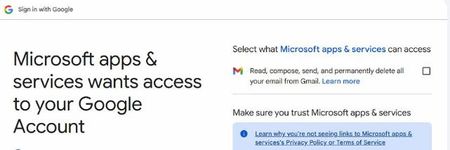
When connecting Outlook to Gmail get 'Select what Microsoft apps & services can access...'
Hi, Having tried New Outlook (yuk) and reverted I now have to fault find a Microsoft own goal (again). I've got so far using a microsoft help article and now presented with a badly worded option written in a critical place: Select what Microsoft apps & services can access: "Read, compose, send, and permanently delete all your email from Gmail." Please can a kind person clarify, that when I check the box below, all email my Gmail email will not automatically be deleted as a result of giving this permission. Does this message come from Microsoft or Google? It's hard to say. Thanks102Views0likes2CommentsIssue with emails being delayed when sent
Good Morning, I am working with a user who is sending emails, but they are being delivered a week or in one case two weeks later. She is not using Delayed Send\Delivery, that was the first thing I asked, or at least she said she didn't. This is not all the time and we were not able to replicate while I was on a call with her. What she is doing... Open a document in MS Word to fill out a report and Save it. Share the document, attach a copy instead and choose PDF. This opens, the email window, add the recipients and hits send Let's say for example she does this a 2pm on 12/4 Her sent items in Webmail show it was sent from her mailbox at this time. Recipients might receive it a week later on 12/11 at 11am Message traces in Exchange Online console show the delivered on this date, and her sent items in the Outlook Classic version on the desktop show the 12/11 date as well. My question would be, besides Delayed send, any thoughts as to what might cause emails to sit undelivered and then just be released a week later? I even checked our backup software and looked at the backup for her mailbox during the timeframe of it being sent vs. delivered to see if there was something in her Drafts or Outbox, but I did not see anything there. She says she did not do delayed send and I can't prove she didn't. In the interim, I did suggest she put a delivery receipt on these emails since they are time sensitive and need to be delivered weekly, so if she does send it and does not get the Delivered receipt, we can take a look right away. Thoughts or suggestions... Thank YouSolved463Views0likes3CommentsTwo Linked Outlook Issues Causing Accidental Emails to Wrong Clients Feature Request + Bug Report
Hi Outlook Community, I'm posting this after a real incident at work where I accidentally sent a confidential email to the wrong client. After reflecting on what went wrong, I've identified two separate but related Outlook issues that compounded the mistake and I want to raise both here so they reach the right people. Bug: Autocomplete Recipient Changes After You Press Enter This one is subtle but dangerous. When you start typing a name in the To/CC/BCC field, Outlook shows an initial autocomplete suggestion. If you press Enter before the search fully resolves, the dropdown refreshes mid-selection and the contact that actually gets added is *different* from the one that was highlighted when you hit Enter. You don't get any warning. You believe you've selected the right person. You haven't. I've submitted this via the Feedback Portal here: https://feedbackportal.microsoft.com/feedback/idea/9a32197e-5424-f111-9730-0022485314bc Suggested fix: Freeze the highlighted contact reference at the moment Enter/Tab is pressed, independent of any ongoing background search refresh. --- Feature Request: Cross-Domain Recipient Warning (like the missing-attachment check) Outlook already warns you before sending if it detects you may have forgotten an attachment. I'd love to see a similar pre-send check for this scenario: You are about to send an email to recipients across 3 different organisations. Did you mean to do this? In consulting, legal, finance, and any client-facing role, it's very easy to accidentally include someone from Client B on an email meant only for Client A especially when contacts share similar names. A configurable domain-count threshold (default: 2 external domains) with a soft confirmation prompt would catch this class of mistake before it becomes a compliance incident. Key asks: - Configurable threshold (user-level) - Domain whitelist support (e.g., always allow your own org + a known partner) - Covers To, CC, and BCC combined - Non-blocking same UX pattern as the attachment warning I've submitted this as a feature request here: https://feedbackportal.microsoft.com/feedback/idea/9a32197e-5424-f111-9730-0022485314bc --- Has anyone else run into either of these? Would love to know if the autocomplete bug is reproducible for others that would help push it up the priority queue. Thanks for reading. Sudharm P54Views0likes2Comments


Events
Recent Blogs
- For years, public folders have been the go-to solution for sharing contacts across teams and organizations - whether for maintaining client lists, managing shared employee directories, or keeping ven...Mar 23, 2026561Views0likes0Comments
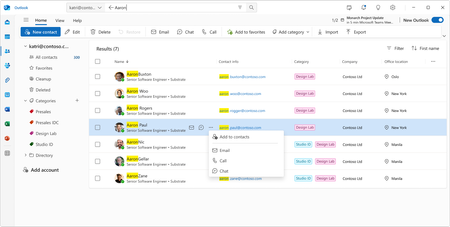
- 3 MIN READManaging contacts has always been central to how we work - but the way we work has changed dramatically. Today, we're excited to unveil a completely reimagined People experience in Outlook that makes...Mar 23, 20261.4KViews2likes1Comment