Recent Discussions
OneDrive Android stuck on "We need to update your account"
Hi, Since a few days ago, I can no longer use OneDrive on my Xiaomi phone. When I open the app, I get the following message: "We can't display this item. We need to update your account. This operation should only take a few moments." When I select OK, nothing happens. No sign-in window appears and I can't access any of my files. I've already tried: uninstalling and reinstalling OneDrive clearing the app cache and data restarting the phone checking my network connection The problem remains. What's strange is that OneDrive seems to remember my account because it opens directly on the "My files" screen instead of asking me to sign in again. Has anyone else seen this recently on Android? Thanks.37Views0likes1Comment 83Views0likes1Comment
OneDrive Taking up space on C: even when nothing is being kept on device.
Recently got a new device and had all my files on the previous device synced to my OneDrive. The C drive has about 120 GB of my data (including OS) but when I check my Disk space, I only have 5GB remaining out of 256. However, OneDrive seems to be taking about 150 GB on the disk even though all the files have the cloud icons on it.441Views0likes7Comments
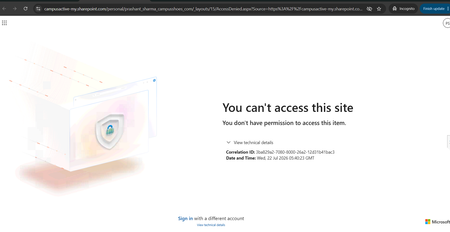
OneDrive Access Issue – User Unable to Access OneDrive Despite Multiple Troubleshooting Attempts
Hello Community, We are facing an issue with a user who is unable to access their OneDrive. Whenever the user tries to access OneDrive, the same error message continues to appear (screenshot/error attached). We have already performed the following troubleshooting steps: Removed and re-assigned the Microsoft 365 license. Executed the required PowerShell commands and confirmed that the user has a valid OneDrive URL and access permissions. Verified OneDrive and SharePoint settings from the SharePoint Admin Center. Used Microsoft Support and Recovery Assistant (SaRA) and reviewed the recommendations provided. Attempted to re-provision the user's OneDrive site. Despite completing all the above steps, the issue persists and the same error continues to be displayed. Additional Information: User has a valid Microsoft 365 license assigned. OneDrive service is enabled for the user. SharePoint Online is functioning normally for other users. Re-provisioning OneDrive did not resolve the issue. Has anyone encountered a similar issue or can suggest additional troubleshooting steps to identify the root cause? Any guidance would be greatly appreciated.212Views0likes2Comments
OneDrive suddenly became empty after university storage policy change Is recovery still possible?
Hello everyone, I am looking for technical guidance regarding a serious OneDrive for Business issue under Microsoft 365 Education. Environment - Microsoft 365 Education tenant. - University-managed account. - OneDrive for Business. - My account is still active and I can sign in normally. What happened On July 16, 2026, I signed into my OneDrive and discovered that my entire "My files" folder was empty. I verified the following: - I am signed into the correct account. - "My files" is completely empty. - The OneDrive Recycle Bin is empty. - "Restore your OneDrive" does not show any mass deletion event. - My OneDrive site is accessible, but there are no files. - I unfortunately do not have a complete local backup. A few days later, my university informed students that they had reduced the OneDrive storage quota from 5 TB to 30 GB due to a Microsoft/provider policy update. I suspect my OneDrive contained more than 30 GB because I had stored backups from my previous computer together with years of academic, personal and work files. However, I would like to understand whether exceeding the new storage quota could actually cause an existing OneDrive site to appear completely empty, or whether this suggests another issue such as: - OneDrive reprovisioning - Site replacement - License reassignment - Site deletion - Storage migration - SharePoint issue - Other administrative problem The university initially described this as a temporary Microsoft incident, but later told me that the files had been deleted because of the OneDrive application, without providing any technical explanation. I have already asked the university IT department to investigate: - Deleted Sites in SharePoint Admin Center - Second-stage Recycle Bin - Retention policies - Previous OneDrive site - Licensing history - Possible restore options My question to Microsoft experts is: 1. Can a storage quota reduction (5 TB → 30 GB) ever make an existing OneDrive appear completely empty? 2. Are there other administrative scenarios that could produce this behavior while leaving the account active? 3. Is there anything specific I should ask my Microsoft 365 administrator to verify that is commonly overlooked? Any guidance would be greatly appreciated because these files represent several years of academic, professional and personal work. Thank you very much.159Views0likes2Comments
Missing Files
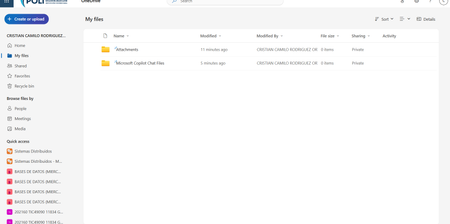
Previously, I had been using Onedrive to save data on it. I didn't have a lot of data but some folders, files, etc... Last week, on my Mac, I installed Onedrive and it was active. Today, after I signed in to my account, my files were missing. Some of it was cache when I synced it with my Mac. I know stuff was there. Now, after I sign in, there is folders there but they are empty. These folders were not there earlier. There is whole bunch of files in the recycle bin which I didn't put there. Some how the cached files ended up in the recycling bin. I am not able to install Onedrive anymore on the Mac. What is going on?108Views0likes3Comments
How do you remove OneDrive Photos
I was reading how the OneDrive Photos app was stealth installed with no announcement and no opt-out functionality. Then I discovered that the program had installed itself on my desktop servers running OneDrive for Business and is labeled as a beta product. Since we are using a non-persistent VDI environment, it is never a good thing when programs install without our knowledge or approval. We have change control and testing procedures we need to follow. It is particularly worrying that Microsoft would push beta software to corporate production environments. I need to remove this software and block reinstallation until it can be vetted, but I cannot find an independent uninstall function nor can I find instructions a command line tool like DISM. It looks like it is integrated into OneDrive. A quick response is requested. Thank you in advance829Views2likes5Comments
Block/prevent specific folders from being sync'ed
As OneDrive admins we would like to block/prevent specific folders from being sync'ed (i.e node_modules), using policies. In the roadmap there is this item: https://www.microsoft.com/microsoft-365/roadmap?id=178292 that was supposed to be rolling by now, any information about its status? Thanks400Views0likes2Comments
Windows Explorer shows "OneDrive - Tenant" for one tenant but "FirstName - Tenant" for others
Hi everyone, I'm trying to understand how Windows Explorer determines the display name of OneDrive accounts in the navigation pane. Environment Windows 11 (fully up to date) Latest OneDrive sync client One Windows user profile Four OneDrive accounts connected simultaneously: Roy - Tenant A Roy - Tenant B Roy - Personal OneDrive - Tenant C The strange part is that only one business tenant is displayed as "OneDrive - Tenant", while the others are displayed as "FirstName - Tenant". What I've already verified Microsoft 365 Display Name is correct ("Roy Möllers") Organization (Tenant Display Name) is correct User Principal Name is normal OneDrive license is assigned The tenant is a normal Microsoft 365 tenant (Nonprofit in this case) OneDrive The account is a normal OneDrive account (not just a SharePoint library) The account synchronizes correctly The issue only affects the display name in Windows Explorer Local folder All business accounts use the same folder naming convention: C:\Users\<User>\OneDrive - <Tenant> So the local folder name is not the cause. Registry I compared the registry entries under: HKCU\Software\Microsoft\OneDrive\Accounts\BusinessX The values such as look normal. DisplayName UserName UserFolder I also checked the corresponding CLSID entries under: HKEY_CLASSES_ROOT\CLSID The (Default) value is "OneDrive - <Tenant>" for all business accounts, including the tenants that Explorer displays as "FirstName - Tenant". Therefore, Explorer is clearly not using the CLSID default value directly. OneDrive cache I completely removed the local cache for the affected account: Unlinked only the affected OneDrive account Closed OneDrive completely Deleted only the corresponding BusinessX folder under: %LocalAppData%\Microsoft\OneDrive\settings Signed in again The display name remained: OneDrive - Tenant C Configuration files I compared between the working and affected tenants. No meaningful differences related to naming. Global.ini ClientPolicy.ini My question: Does anyone know where Windows Explorer actually gets the navigation pane display name from? I have not been able to find any Microsoft documentation explaining this behavior. Any technical insight would be greatly appreciated.69Views0likes2CommentsOnedrive sooo annoying but great a same time
I have an some what unwanted computer issue here with Microsoft Onedrive! I have Office 365 and use Onedrive however, it has deleted over 5,500 pictures (yes I have backups and yes I deleted them off OneDrive HOWEVER these pictures were on my computer first so why does Onedrive delete the files even one my PC is the question - is there some setting to prevent this). However, this is so annoying, especially with documents, and IF you stop syncing a folder, OneDrive will delete that folder from your PC - why, especially since the folder was originally on my computer first. So it "seems" Onedrive does things without our consent people tell me BUT I say there must be a setting - anyone know where it is?98Views0likes1Comment# OneDrive AutoSave Stopped Working After Update to Version 26.007.0112 on macOS
**Product:** Microsoft 365 and Office | OneDrive | For home | macOS ## Summary Since OneDrive automatically updated to version 26.007.0112 (26007.0112.0002) a few days ago, I am experiencing multiple issues with how Office files interact with OneDrive on my Mac. AutoSave no longer works, files that are stored locally now take noticeably longer to open, and attempting to work around the problem through Word/Excel directly results in upload failures and outdated file versions. Prior to this update, everything was working perfectly. ## Environment - **macOS version:** Tahoe 26.1 - **OneDrive version:** 26.007.0112 (26007.0112.0002) - **Office version:** Version 16.105.2 (26012530) - **Account type:** Business ## Symptoms ### 1. AutoSave no longer activates when opening files from Finder Opening any .docx or .xlsx file from the OneDrive folder in Finder results in AutoSave being off. The title bar shows "Saved on My Mac" instead of the OneDrive location. Attempting to toggle AutoSave on prompts me to "upload" the file — even though it is already in the OneDrive sync folder and marked as "Always Keep on This Device." ### 2. Files that are stored locally now open slowly Previously, opening an Office file from the OneDrive folder in Finder was instantaneous, as you would expect for a file stored on the local drive. Now, even though the files are marked as "Always Keep on This Device" and should be fully available locally, there is a noticeable delay when opening them. It appears that OneDrive or the Office app is downloading or re-fetching the file from the cloud rather than simply opening the local copy, which defeats the entire purpose of keeping files on the device. ### 3. Opening from within Word/Excel results in "Upload Failed" and serves an older version As a workaround, I tried opening files from within Word using File > Open and selecting the OneDrive location. However, this now produces an "Upload Failed" error message, and the file that opens is an older version — not the most recent version I had been working on. This is extremely concerning, as it suggests the sync between the local copy and the cloud copy may be broken, and there is a real risk of data loss or overwriting recent work with outdated content. ## Steps to Reproduce 1. Ensure files are in the OneDrive folder and marked as "Always Keep on This Device." 2. Open a .docx or .xlsx file by double-clicking it in Finder. Notice: the file takes several seconds to open (previously instant), AutoSave is off, and the title bar says "Saved on My Mac." 3. Close the file. Open Word or Excel, go to File > Open, and navigate to the OneDrive location. Open the same file. Notice: an "Upload Failed" message appears, and the file that opens is an older version, not the most recent one. ## Expected Behavior - Files stored locally via "Always Keep on This Device" should open instantly, just as any local file would. - AutoSave should be enabled automatically when opening files from the synced OneDrive folder. - Opening a file from within Word/Excel via the OneDrive location should open the current version of the file without upload errors. All of this worked exactly as expected before the update to version 26.007. ## What I've Tried - Verified that "Always Keep on This Device" is enabled for the affected folders. - Confirmed I am signed into the same Microsoft account in both OneDrive and the Office apps. - Verified files are in modern formats (.docx, .xlsx), not legacy formats. - Checked that OneDrive sync is not paused. ## Impact This is a severe workflow disruption. The combination of broken AutoSave, slow file access, and the "Upload Failed" error serving stale file versions means I cannot trust that I am working on the latest copy of my documents. There is a genuine risk of data loss — if the cloud version is out of sync with the local version, saving could overwrite recent work with an older copy. I am currently unable to rely on OneDrive for day-to-day work on my Mac. ## Additional Notes This appears to be a regression introduced by the recent OneDrive update to version 26.007. I have seen numerous other users reporting similar AutoSave and sync issues across Microsoft Q&A, Apple Community forums, and MacRumors, dating back to the original Files On-Demand changes on macOS. However, my setup was working correctly until this latest update. Relevant threads with related issues: - https://learn.microsoft.com/en-us/answers/questions/5419331/onedrive-says-saved-on-mac-autosave-not-working - https://learn.microsoft.com/en-us/answers/questions/5371608/one-drive-auto-save-no-longer-working-on-mac-os - https://learn.microsoft.com/en-us/answers/questions/5402091/onedrive-app-on-mac-not-working-for-autosave-and-t - https://forums.macrumors.com/threads/onedrive-autosave-disabled-when-opening-files-from-onedrive-folder.2442775/ I would appreciate any guidance from the community or the Microsoft team. Is this a known regression in version 26.007? Is a fix in progress? Is there a way to roll back to a previous OneDrive version that was working? Thank you.1.3KViews3likes3Comments
ONEDRIVE WEB VERSION
I use the OneDrive web version because I don't want to install the OneDrive app, as I have very little space on my C: drive. So my question is: I copied all my music from my PC to OneDrive via the web a few months ago, but it has all disappeared again! I had to do this last year as well because it had all disappeared then too. Why do I have to keep doing this? It takes a very long time because my broadband is very slow. Luckily, I have a backup on an external hard drive, but I don't want to have to keep doing this! Does anyone know why my Music folder keeps disappearing from my OneDrive (web)?71Views1like1CommentWay to recover onedrive content without my login
Is there a way to recover whatever might have been uploaded to OneDrive (because it hijacks the computer) without my old phone number? I'm still waiting for the AI to "moderate" my initial question and post it, and am assuming I'll be up a creek without a paddle. Will it let me uninstall onedrive from a samsung notebook entirely without my old phone number being accessible? (I changed my number. I have zero access to the old number and no way to get into my account to change it.) It is so wholly unethical and morally depraved that Microsoft is allowed to get away with this.33Views0likes0CommentsOneDrive login--no longer have my old phone number
Thank you in advance for any help you can provide. I have a Samsung notebook that came with preinstalled OneDrive, purchased in 2021 Since then, my phone number changed. I do not even remember signing up for onedrive--I was recovering from a neurological problem when this laptop was bought, and I am guessing onedrive can't be deleted, because its not something I would have signed up for had I been in my right mind. I don't want to try deleting it because it appears some files have been automatically uploaded to the inaccessible onedrive. Recently passed this notebook on to a family member, and his photos are getting uploaded to a one drive account I no longer have the cell phone number to verify log in on with. The log in support page has zero option that works to get my login phone number changed. Obviously, Microsoft phone support blocks your number once you call because they do not care about non-business customers. How can we recover the photos that were forced-to-upload to onedrive without the old phone number? Once we do that, will it cause issues on the samsung notebook to uninstall onedrive, if that is even possible. Thank you.24Views0likes0Comments
Enabling OneDrive Health Sync
Hello, once again being victimized by Microsoft 😒 Have a series of users reporting constant sync errors. We've reached out to Microsoft technical support and they just successively told us it was garbage and not to use it. Anyway, trying to get the Sync Health Dashboard to work, based off this document: https://learn.microsoft.com/en-us/sharepoint/sync-health?tabs=windows It's one of those Microsoft documents that the community CAN'T edit, so of course - it's out of date and incorrect. From what I can figure, based on research from other sources, most of this process is now arbitrary, and you have to create a 'EnableSyncAdminReport' in some policy location in the registry. Computer\HKEY_LOCAL_MACHINE\SOFTWARE\Microsoft\OneDrive < already exists, but not referenced by documentation Computer\HKEY_LOCAL_MACHINE\SOFTWARE\Policies\Microsoft\OneDrive < key doesn't exist, but is referenced by documentation. but this sorta 'try it and see' methodology really upsets me. Anyone have any insight to this, and why the documentation team fails to update the documentation, or whether this process will work or not?275Views0likes1CommentProblems: The folder has a number over 1000 and isn’t synchronising with the iPhone
I have created several folders with numbers in their names, such as ‘now1002rampf’; I can see these on OneDrive on my PC, but unfortunately not on my iPhone, OneDrive app. This only affects the ones with a number higher than 999.70Views0likes1CommentOnedrive downloaded zip file unable to open on Windows PC
I have downloaded all my files in onedrive (roughly 80GB, all into a zip file around 20 GB) into my PC, but my PC stated "Windows cannot open the folder. The compressed file (zip) "xxxxx" is invalid. How should I deal with that situation.313Views0likes1CommentMissing data
I recieved several emails from Microsoft that were legit. I was advised I am 290+ GB over my quota for 5GB I realize my Clipchamp was saving to my personal OneDrive NOT my business OneDrive (where I have 5TB) Anyway, I opened a ticket with Microsoft and they confirmed my personal OneDrive has 1GB of data in it -- not 290+ Looks like my data vanished... Can you please contact me and help with resolution?61Views0likes1Comment

Events
Recent Blogs
- 2 MIN READGet ready for the August 2026 OneDrive Customer Office Hours! This session creates space for open conversation around the latest updates and how they support the way you use your files every day. In ...Aug 10, 2026222Views0likes0Comments
 Get ready for the July 2026 OneDrive Customer Office Hours! This session creates space for open conversation around the latest updates and how they support the way you use your files every day. In th...Jul 07, 2026686Views0likes3Comments