Recent Discussions
Running Commands Across VM Scale Set Instances Without RDP/SSH Using Azure CLI Run Command
If you’ve ever managed an Azure Virtual Machine Scale Set (VMSS), you’ve likely run into this situation: You need to validate something across all nodes, such as: Checking a configuration value Retrieving logs Applying a registry change Confirming runtime settings Running a quick diagnostic command And then you realize: You’re not dealing with two or three machines you’re dealing with 40… 80… or even hundreds of instances. The Traditional Approach (and Its Limitations) Historically, administrators would: Open RDP connections to Windows nodes SSH into Linux nodes Execute commands manually on each instance While this may work for a small number of machines, in real‑world environments such as: Azure Batch (user‑managed pools) Azure Service Fabric (classic clusters) VMSS‑based application tiers This approach quickly becomes: Operationally inefficient Time‑consuming Sometimes impossible Especially when: RDP or SSH ports are blocked Network Security Groups restrict inbound connectivity Administrative credentials are unavailable Network configuration issues prevent guest access Azure Run Command To address this, Azure provides a built‑in capability to execute commands inside virtual machines through the Azure control plane, without requiring direct guest OS connectivity. This feature is called Run Command. You can review the official documentation here: Run scripts in a Linux VM in Azure using action Run Commands - Azure Virtual Machines | Microsoft Learn Run scripts in a Windows VM in Azure using action Run Commands - Azure Virtual Machines | Microsoft Learn Run Command uses the Azure VM Agent installed on the virtual machine to execute PowerShell or shell scripts directly inside the guest OS. Because execution happens via the Azure control plane, you can run commands even when: RDP or SSH ports are blocked NSGs restrict inbound access Administrative user configuration is broken In fact, Run Command is specifically designed to troubleshoot and remediate virtual machines that cannot be accessed through standard remote access methods. Prerequisites & Restrictions. Before using Run Command, ensure the following: VM Agent installed and in Ready state Outbound connectivity from the VM to Azure public IPs over TCP 443 to return execution results. If outbound connectivity is blocked, scripts may run successfully but no output will be returned to the caller. Additional limitations include: Output limited to the last 4,096 bytes One script execution at a time per VM Interactive scripts are not supported Maximum execution time of 90 minutes Full list of restrictions and limitations are available here: https://learn.microsoft.com/en-us/azure/virtual-machines/windows/run-command?tabs=portal%2Cpowershellremove#restrictions Required Permissions (RBAC) Executing Run Command requires appropriate Azure RBAC permissions. Action Permission List available Run Commands Microsoft.Compute/locations/runCommands/read Execute Run Command Microsoft.Compute/virtualMachines/runCommand/action The execution permission is included in: Virtual Machine Contributor role (or higher) Users without this permission will be unable to execute remote scripts through Run Command. Azure CLI: az vm vs az vmss When using Azure CLI, you’ll encounter two similar‑looking commands that behave very differently. az vm run-command invoke Used for standalone VMs Also used for Flexible VM Scale Sets Targets VMs by name az vmss run-command invoke Used only for Uniform VM Scale Sets Targets instances by numeric instanceId (0, 1, 2, …) Example: az vmss run-command invoke --instance-id <id> Unlike standalone VM execution, VMSS instances must be referenced using the parameter "--instance-id" to identify which scale set instance will run the script. Important: Uniform vs Flexible VM Scale Sets This distinction is critical when automating Run Command execution. Uniform VM Scale Sets Instances are managed as identical replicas Each instance has a numeric instanceId Supported by az vmss run-command invoke Flexible VM Scale Sets Each instance is a first‑class Azure VM resource Instance identifiers are VM names, not numbers az vmss run-command invoke is not supported Must use az vm run-command invoke per VM To determine which orchestration mode your VMSS uses: az vmss show -g "${RG}" -n "${VMSS}" --query "orchestrationMode" -o tsv Windows vs Linux Targets Choose the appropriate command ID based on the guest OS: Windows VMs → RunPowerShellScript Linux VMs → RunShellScript Example Scenario - Retrieve Hostname From All VMSS Instances The following examples demonstrate how to retrieve the hostname from all VMSS instances using Azure CLI and Bash. Flexible VMSS, Bash (Azure CLI) RG="<ResourceGroup>" VMSS="<VMSSName>" SUBSCRIPTION_ID="<SubscriptionID>" az account set --subscription "${SUBSCRIPTION_ID}" VM_NAMES=$(az vmss list-instances \ -g "${RG}" \ -n "${VMSS}" \ --query "[].name" \ -o tsv) for VM in $VM_NAMES; do echo "Running on VM: $VM" az vm run-command invoke \ -g "${RG}" \ -n "$VM" \ --command-id RunShellScript \ --scripts "hostname" \ --query "value[0].message" \ -o tsv done Uniform VMSS, Bash (Azure CLI) RG="<ResourceGroup>" VMSS="<VMSSName>" SUBSCRIPTION_ID="<SubscriptionID>" az account set --subscription "${SUBSCRIPTION_ID}" INSTANCE_IDS=$(az vmss list-instances -g "${RG}" -n "${VMSS}" --query "[].instanceId" -o tsv) for ID in $INSTANCE_IDS; do echo "Running on instanceId: $ID" az vmss run-command invoke \ -g "${RG}" \ -n "${VMSS}" \ --instance-id "$ID" \ --command-id RunShellScript \ --scripts "hostname" \ --query "value[0].message" \ -o tsv done Summary Azure Run Command provides a scalable method to: Execute diagnostics Apply configuration changes Collect logs Validate runtime settings …across VMSS instances without requiring RDP or SSH connectivity. This significantly simplifies operational workflows in large‑scale compute environments such as: Azure Batch (user‑managed pools) Azure Service Fabric classic clusters VMSS‑based application tiers33Views0likes0Comments[Architecture Pattern] Scaling Sync-over-Async Edge Gateways by Bypassing Service Bus Sessions
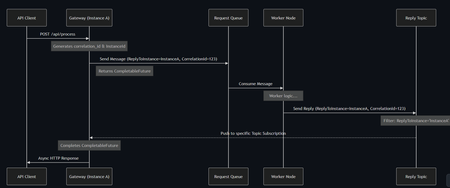
Hi everyone, I wanted to share an architectural pattern and an open-source implementation we recently built to solve a major scaling bottleneck at the edge: bridging legacy synchronous HTTP clients to long-running asynchronous AI workers. The Problem: Stateful Bottlenecks at the Edge When dealing with slow AI generation tasks (e.g., 45+ seconds), standard REST APIs will drop the connection resulting in 504 Gateway Timeouts. The standard integration pattern here is Sync-over-Async. The Gateway accepts the HTTP request, drops a message onto Azure Service Bus, waits for the worker to reply, and maps the reply back to the open HTTP connection. However, the default approach is to use Service Bus Sessions for request-reply correlation. At scale, this introduces severe limitations: 1. Stateful Gateways: The Gateway pod must request an exclusive lock on the session. It becomes tightly coupled to that specific request. 2. Horizontal Elasticity is Broken: If a reply arrives, it must go to the specific pod holding the lock. Other idle pods cannot assist. 3. Hard Limits: A traffic spike easily exhausts the namespace concurrent session limits (especially on the Standard tier). The Solution: Stateless Filtered Topics To achieve true horizontal scale, the API Gateway layer must be 100% stateless. We bypassed Sessions entirely by pushing the routing logic down to the broker using a Filtered Topic Pattern. How it works: 1. The Gateway injects a CorrelationId property (e.g., Instance-A-Req-1) into the outbound request. 2. Instead of locking a session, the Gateway spins up a lightweight, dynamic subscription on a shared Reply Topic with a SQL Filter: CorrelationId = 'Instance-A-Req-1'. 3. The AI worker processes the task and drops the reply onto the shared topic with the same property. 4. The Azure Service Bus broker evaluates the SQL filter and pushes the message directly to the correct Gateway pod. No session locks. No implicit instance affinity. Complete horizontal scalability. If a pod crashes, its temporary subscription simply drops—preventing locked poison messages. Open Source Implementation Implementing dynamic Service Bus Administration clients and receiver lifecycles is complex, so I abstracted this pattern into a Spring Boot starter for the community. It handles all the dynamic subscription and routing logic under the hood, allowing developers to execute highly scalable Sync-over-Async flows with a single line of code returning a CompletableFuture. GitHub Repository: https://github.com/ShivamSaluja/sentinel-servicebus-starter Full Technical Write-up: https://dev.to/shivamsaluja/sync-over-async-bypassing-azure-service-bus-session-limits-for-ai-workloads-269d I would love to hear from other architects in this hub. Have you run into similar session exhaustion limits when building Edge API Gateways? Have you adopted similar stateless broker-side routing, or do you rely on sticky sessions at your load balancers?32Views0likes0CommentsProyecto Escolar Tecnológico
Estamos haciendo un trabajo de investigación sobre las nuevas tecnologías aplicadas a la gestión empresarial ya que estamos desarrollando un proyecto de software para el sector de odontología y me gustaría preguntarle a los expertos: ¿Qué tecnologías se consideran "el estándar de oro" o esenciales para aplicar en 2026, y que ustedes ya han utilizado?.8Views0likes0CommentsExcited to share my latest open-source project: KubeCost Guardian
After seeing how many DevOps teams struggle with Kubernetes cost visibility on Azure, I built a full-stack cost optimization platform from scratch. 𝗪𝗵𝗮𝘁 𝗶𝘁 𝗱𝗼𝗲𝘀: ✅ Real-time AKS cluster monitoring via Azure SDK ✅ Cost breakdown per namespace, node, and pod ✅ AI-powered recommendations generated from actual cluster state ✅ One-click optimization actions ✅ JWT-secured dashboard with full REST API 𝗧𝗲𝗰𝗵 𝗦𝘁𝗮𝗰𝗸: - React 18 + TypeScript + Vite - Tailwind CSS + shadcn/ui + Recharts - Node.js + Express + TypeScript - Azure SDK (@azure/arm-containerservice) - JWT Authentication + Azure Service Principal 𝗪𝗵𝗮𝘁 𝗺𝗮𝗸𝗲𝘀 𝗶𝘁 𝗱𝗶𝗳𝗳𝗲𝗿𝗲𝗻𝘁: Most cost tools show you generic estimates. KubeCost Guardian reads your actual VM size, node count, and cluster configuration to generate recommendations that are specific to your infrastructure not averages. For example, if your cluster has only 2 nodes with no autoscaler enabled, it immediately flags the HA risk and calculates exactly how much you'd save by switching to Spot instances based on your actual VM size. This project is fully open-source and built for the DevOps community. ⭐ GitHub: https://github.com/HlaliMedAmine/kubecost-guardian This project represents hours of hard work, and passion. I decided to make it open-source so everyone can benefit from it 🤝 ,If you find it useful, I’d really appreciate your support . Your support motivates me to keep building and sharing more powerful projects 👌. More exciting ideas are coming soon… stay tuned! 🔥.Pipeline Intelligence is live and open-source real-time Azure DevOps monitoring powered by AI .
Every DevOps team I've worked with had the same problem: Slow pipelines. Zero visibility. No idea where to start. So I stopped complaining and built the solution. So I built something about it. ⚡ Pipeline Intelligence is a full-stack Azure DevOps monitoring dashboard that: ✅ Connects to your real Azure DevOps organization via REST API ✅ Detects bottlenecks across all your pipelines automatically ✅ Calculates exactly how much time your team is wasting per month ✅ Uses Gemini AI to generate prioritized fixes with ready-to-paste YAML solutions ✅ JWT-secured, Docker-ready, and fully open-source Tech Stack: → React 18 + Vite + Tailwind CSS → Node.js + Express + Azure DevOps API v7 → Google Gemini 1.5 Flash → JWT Authentication + Docker 𝗪𝗵𝗮𝘁 𝗺𝗮𝗸𝗲𝘀 𝗶𝘁 𝗱𝗶𝗳𝗳𝗲𝗿𝗲𝗻𝘁? Most tools show you generic estimates. Pipeline Intelligence reads your actual cluster config, node count, and pipeline structure and gives you recommendations specific to your infrastructure. 🎯 This year, I set myself a personal challenge: Build and open-source a series of production-grade tools exclusively focused on Azure services tools that solve real problems for real DevOps teams. This project represents weeks of research, architecture decisions, and late-night debugging sessions. I'm sharing it with the community because I believe great tooling should be accessible to everyone not locked behind enterprise paywalls. If this resonates with you, I have one simple ask: 👉 A like, a comment, or a share takes 3 seconds but it helps this reach the DevOps engineers who need it most. Your support is what keeps me building. ❤️ GitHub: https://github.com/HlaliMedAmine/pipeline-intelligenceAzure Key Vault Replication: Why Paired Regions Alone Don’t Guarantee Business Continuity
As customers modernize toward multi‑region architectures in Azure, one question comes up repeatedly: “If my region goes down, will Azure Key Vault continue to work without disruption?” The short answer: it depends on what you mean by “work.” Azure Key Vault provides strong durability and availability guarantees, but those guarantees are often misunderstood—especially when customers assume paired‑region replication equals full disaster recovery. In reality, Azure Key Vault replication is designed for survivability, not uninterrupted write access or customer‑controlled failover. This post explains: How Azure Key Vault replication actually works (per Microsoft Learn) Why paired‑region failover does not equal business continuity Two reference architectures that implement true multi‑region Key Vault availability, with Terraform How Azure Key Vault Replication Works (Per Microsoft Learn) Azure Key Vault includes multiple layers of Microsoft‑managed redundancy. In‑Region and Zone Resiliency Vault contents are replicated within the region. In regions that support availability zones, Key Vault is zone‑resilient by default. This protects against localized hardware or zone failures. Paired‑Region Replication If a Key Vault is deployed in a region with an Azure‑defined paired region, its contents are asynchronously replicated to that paired region. This replication is automatic and cannot be configured, observed, or tested by customers. Microsoft‑Managed Regional Failover If Microsoft declares a full regional outage, requests are automatically routed to the paired region. After failover, the vault operates in read‑only mode: ✅ Read secrets, keys, and certificates ✅ Perform cryptographic operations ❌ Create, update, rotate, or delete secrets, keys, or certificates This is a critical distinction. Paired‑region replication preserves access — not operational continuity. Why Paired‑Region Replication Is Not Business Continuity From a reliability and DR perspective, several limitations matter: Failover is Microsoft‑initiated, not customer‑controlled No write operations during regional failover No secret rotation or certificate renewal No way to test DR Accidental deletions replicate No point‑in‑time recovery without backups Microsoft Learn explicitly states that critical workloads may require custom multi‑region strategies beyond built‑in replication. For many customers, this means Azure Key Vault becomes a single‑region dependency in an otherwise multi‑region application design. The Multi‑Region Key Vault Pattern The two GitHub repositories below implement a common architectural shift: Multiple independent Key Vaults deployed in separate regions, with customer‑controlled replication and failover. Instead of relying on invisible platform replication, the vaults become first‑class, region‑scoped resources, aligned with application failover. Solution 1: Private, Locked‑Down Multi‑Region Key Vault Replication Repository: 👉 https://github.com/jclem2000/KeyVault-MultiRegion-Replication-Private Architecture Highlights Independent Key Vault per region Private Endpoints only No public network exposure Terraform‑based deployment Controlled replication using Event Based synchronization What This Enables ✅ Full read/write access during regional outages ✅ Continued secret rotation and certificate renewal ✅ Customer‑defined failover and RTO ✅ DR testing and validation ✅ Strong alignment with zero‑trust and regulated environments Trade‑offs Higher operational complexity Requires automation and application awareness of multiple vaults Solution 2: Low‑Cost Public Multi‑Region Key Vault Replication Repository: 👉 https://github.com/jclem2000/KeyVault-MultiRegion-Replication-Public Architecture Highlights Independent Key Vault per region Public endpoints Minimal networking dependencies Terraform‑based Controlled replication using Event Based synchronization Optimized for simplicity and cost What This Enables ✅ Full read/write availability in any region ✅ Clear and testable DR posture ✅ Lower cost than private endpoint designs ✅ Suitable for many non‑regulated workloads Trade‑offs Public exposure (mitigated via firewall rules, RBAC, and conditional access) Not appropriate for all compliance requirements Requires automation and application awareness of multiple vaults Azure Native Replication vs Customer‑Managed Multi‑Region Vaults Capability Azure Paired Region Multi‑Region Vaults Read access during outage ✅ ✅ Write access during outage ❌ ✅ Secret rotation during outage ❌ ✅ Customer‑controlled failover ❌ ✅ DR testing ❌ ✅ Isolation from accidental deletion ❌ ✅ Predictable RTO ❌ ✅ Azure Key Vault’s native replication optimizes for platform durability. The multi‑region pattern optimizes for application continuity. When to Use Each Approach Paired‑Region Replication Is Often Enough When: Secrets are mostly static Read‑only access during outages is acceptable RTO is flexible You prefer Microsoft‑managed recovery Multi‑Region Vaults Are Recommended When: Secrets or certificates rotate frequently Applications must remain writable during outages Deterministic failover is required DR testing is mandatory Regulatory or operational isolation is needed Closing Thoughts Azure Key Vault behaves exactly as documented on Microsoft Learn—but it’s important to be clear about what those guarantees mean. Paired‑region replication protects your data, not your ability to operate. If your application is designed to survive a regional outage, Key Vault must follow the same multi‑region design principles as the application itself. The reference architectures above show how to extend Azure’s native durability model into true operational resilience, without waiting for a platform‑level failover decision.181Views0likes0CommentsThe March 2026 Innovation Challenge Winners
For this round of the Innovation Challenge the organizations we sponsor helped over 15,000 developers get the skills it takes to build AI solutions on Azure. This program is grounded in Microsoft’s mission and designed to enable a diverse and qualified community of professional developers coming together to tackle big problems. We helped almost 1,000 people earn Microsoft certifications and Applied Skills credentials, and 300 participated in the invitation only March 2026 Innovation Challenge hackathon. Teams represented SHPE, Women in Cloud, Código Facilito, DIO, GenSpark, NASA Space Apps, Project Blue Mountain, and TechBridge. Check out the winning project to meet some of the best AI talent in our community and to get inspired about what we can build together! First place $10,000 Pebble. - AI Cognitive Load Companion Pebble. is named after a worry stone: something small and smooth you reach for when the world feels like too much. It's an AI cognitive support companion that turns overwhelming documents, tasks, and information into calm, structured clarity. Built for neurodivergent minds. Useful for everyone. Second place $5,000 The Living Memory Bridge We believe dementia represents the most extreme form of cognitive overload that exists. It is not just information overload. It is cognitive loss: the gradual erosion of the very tools people use to process the world. Every principle in the brief applies here in its most urgent form: simplified language, adaptive communication, calm and dignity-preserving interactions, personalized memory anchors, and support that meets people exactly where they are. Query to Insight Analytics CRAM CRAM is a natural language healthcare analytics platform built entirely on Azure that lets clinical and administrative staff query a patient database using plain English, no SQL required. Users type a question like "What are the top 10 conditions among diabetic patients?" and get back a written summary, a data table, and an auto-generated chart in seconds. Third place $2,500 ClearStep ClearStep is an action-first AI system designed to reduce decision overload in high-risk or confusing situations. Instead of only detecting risk, it tells users exactly what to do next. The core innovation is architectural: model output is not trusted. Every response is enforced by a validation layer that guarantees structure, corrects model errors, and prevents unsafe or misleading outputs from reaching the user. DataTalk Our platform enables seamless data ingestion from Excel, CSV, SharePoint, and OneDrive, processes it through a two-layer analytical pipeline powered by DuckDB, and orchestrates four specialized AI agents that work as a team: understanding intent, reading data structure, generating and self-correcting SQL, and enforcing security and auditability at every step RAGulator AI Governance Engine Advanced, governed, and traceable RAG (Retrieval-Augmented Generation) system for international trade. RAGulator is a 100% functional solution that unifies the Azure intelligence ecosystem to deliver grounded responses with immutable bibliographic citations.998Views3likes0CommentsHow on god's green earth do you buy an API key? Bing custom search API.
I just want to give Microsoft money. I want to buy an API key for the Bing custom search. How do I do this? I get to Production and click "Click to issue paid tier key" and I keep getting the same god-awful """ Could not create the marketplace item Oops! Could not create the marketplace item Gallery item is required, no gallery item is provided. """ in the Azure marketplace. I just want to spend money. How do I do that?16Views0likes0CommentsDetecting ACI IP Drift and Auto-Updating Private DNS (A + PTR) with Event Grid + Azure Functions
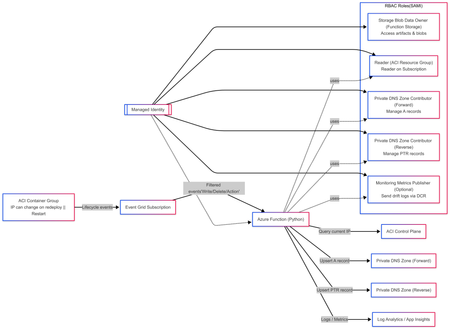
Solution Author Aditya_AzureNinja , Chiragsharma30 Solution Version v1.0 TL;DR Azure Container Instances (ACI) container groups can be recreated/updated over time and may receive new private IPs, which can cause DNS mismatches if forward and reverse records aren’t updated. This post shares an event-driven pattern that detects ACI IP drift and automatically reconciles Private DNS A (forward) and PTR (reverse) records using Event Grid + Azure Functions. Key requirement: Event delivery is at-least-once, so the solution must be idempotent. Problem statement In hub-and-spoke environments using per-spoke Private DNS zones for isolation, ACI workloads created/updated/deleted over time can receive new private IPs. We need to ensure: Forward lookup: aci-name.<spoke-zone> (A record) → current ACI private IP Reverse lookup: IP → aci-name.<spoke-zone> (PTR record) Two constraints drive this design: Azure Private DNS auto-registration is VM-only and does not create PTR records, so ACI needs explicit A/PTR record management. Reverse DNS is scoped to the VNet (reverse zone must be linked to the querying VNet, otherwise reverse lookup returns NXDOMAIN). Design principle: This solution was designed with the following non‑negotiable engineering goals: Event‑driven DNS updates must be triggered directly from resource lifecycle events, not polling or scheduled jobs. Container creation, restart, and deletion are the only reliable sources of truth for IP changes in ACI. Idempotent Azure Event Grid delivers events with at‑least‑once semantics. The system must safely process duplicate events without creating conflicting DNS records or failing on retries. Stateless The automation must not rely on in‑memory or persisted state to determine correctness. DNS itself is treated as the baseline state, allowing functions to scale, restart, and replay events without drift or dependency on prior executions. Clear failure modes DNS reconciliation failures must be explicit and observable. If DNS updates fail, the function invocation must fail loudly so the issue is visible, alertable, and actionable—never silently ignored. Components Event Grid subscriptions (filtered to ACI container group lifecycle events) Azure Function App (Python) with System Assigned Managed Identity Private DNS forward zone (A records) Private DNS reverse zone (PTR records) Supporting infra (typical): Storage account (function artifacts / operational needs) Application Insights + Log Analytics (observability) Event-driven flow ACI container group is created/updated/deleted. Event Grid emits a lifecycle event (delivery can be repeated). Function is triggered and reads the current ACI private IP. Function reconciles DNS: Upsert A record to current IP Upsert PTR record to FQDN Remove stale PTR(s) for hostname/IP as needed Function logs reconciliation outcome (updated vs no-op). Architecture overview (INFRA) This follows the“Event-driven registration” approach: Event Grid → Azure Function that reconciles DNS on ACI lifecycle events. RBAC at a glance (Managed Identity) Role Scope Purpose Storage Blob Data Owner Function App deployment storage account Access function artifacts and operational blobs (required because shared key access is disabled). Reader Each ACI workload resource group Read container group state and determine the current private IP. Private DNS Zone Contributor Private DNS forward zone(s) Create, update, and delete A records for ACI hostnames. Private DNS Zone Contributor Private DNS reverse zone(s) Create, update, and clean up PTR records for ACI IPs. Monitoring Metrics Publisher (optional) Data Collection Rule (DCR) Upload structured IP‑drift events to Log Analytics via the ingestion API. --- --- Architecture overview (APP) Event‑Driven DNS Reconciliation for Azure Container Instances 1. Event contract: what the function receives Azure Event Grid delivers events using a consistent envelope (Event Grid schema). Each event includes, at a minimum: topic subject id eventType eventTime data dataVersion metadataVersion In Azure Functions, the Event Grid trigger binding is the recommended way to receive these events directly. Why the subject field matters The subject field typically contains the ARM resource ID path of the affected resource. This solution relies on subject to: verify that the event is for an ACI container group (Microsoft.ContainerInstance/containerGroups) extract: subscription ID resource group name container group name Using subject avoids dependence on publisher‑specific payload fields and keeps parsing fast, deterministic, and resilient. 2. Subscription design: filter hard, process little The solution follows a strict runbook pattern: subscribe only to ARM lifecycle events filter aggressively so only ACI container groups are included trigger reconciliation only on meaningful state transitions Recommended Event Grid event types Microsoft.Resources.ResourceWriteSuccess (create / update / stop state changes) Microsoft.Resources.ResourceDeleteSuccess (container group deletion) Microsoft.Resources.ResourceActionSuccess (optional) (restart / start / stop actions, environment‑dependent) This keeps the Function App simple, predictable, and low‑noise. 3. Application design: two functions, one contract The application is intentionally split into authoritative mutation and read‑only validation. Component A — DNS Reconciler (authoritative writer) A thin Python v2 model wrapper: receives the Event Grid event validates this is an ACI container group event parses identifiers from the ARM subject resolves DNS configuration from a JSON mapping (environment variable) delegates DNS mutation to a deterministic worker script DNS changes are not implemented inline in Python. Instead, the function: constructs a controlled set of environment variables invokes a worker script (/bin/bash) via subprocess streams stdout/stderr into function logs treats non‑zero exit codes as hard failures This thin wrapper + deterministic worker pattern isolates DNS correctness logic while keeping the event handler stable and testable. Component B — IP Drift Tracker (stateless observer) The drift tracker is a read‑only, stateless validator designed for correctness monitoring. It: parses identifiers from the event subject exits early on delete events (nothing to validate) reads the live ACI private IP using the Azure SDK reads the current DNS A record baseline compares live vs DNS state and emits drift telemetry Core comparison logic No DNS record exists → emit first_seen DNS record matches live IP → emit no_change DNS record differs from live IP → emit drift_detected (old/new IP) Optionally, drift events can be shipped to Log Analytics using DCR‑based ingestion. 4. DNS Reconciler: execution flow Step 1 — Early filtering Reject any event whose subject does not contain: Microsoft.ContainerInstance/containerGroups. This avoids unnecessary processing and ensures strict contract enforcement. Step 2 — ARM subject parsing The function splits the subject path and extracts: resource group container group name This approach is fast, robust, and avoids publisher‑specific schema dependencies. Step 3 — Zone configuration resolution DNS configuration is resolved from a JSON map stored in an environment variable. If no matching configuration exists for the resource group: the function logs the condition exits without error Why this matters This keeps the solution multi‑environment without duplicating deployments. Only configuration changes — not code — are required. Step 4 — Delegation to worker logic The function constructs a deterministic runtime context and invokes the worker: forward zone name reverse zone name(s) container group name current private IP TTL and execution flags The worker performs reconciliation and exits with explicit success or failure. 5. What “reconciliation” actually means Reconciliation follows clear, idempotent semantics. Create / Update events Upsert A record if record exists and matches current IP → no‑op else → create or overwrite with new IP Upsert PTR record compute PTR name using IP octets and reverse zone alignment create or overwrite PTR to hostname.<forward-zone> Delete events delete the A record for the hostname scan PTR record sets: remove targets matching the hostname delete record set if empty All operations are safe to repeat. 6. Why IP drift tracking is separate DNS reconciliation enforces correctness at event time, but drift can still occur due to: manual DNS edits partial failures delete / recreate race conditions unexpected redeployments or restarts The drift tracker exists as a continuous correctness validator, not as a repair mechanism. This separation keeps responsibilities clear: Reconciler → fixes state Drift tracker → observes and reports state 7. Observability: correctness vs runtime health There is an important distinction: Runtime health container crashes image pull failures restarts platform events (visible in standard ACI / Container logs) DNS correctness A record != live IP missing PTR records stale reverse mappings The IP Drift Tracker provides this correctness layer, which complements — not replaces — runtime monitoring. 8. Engineering constraints that shape the design At‑least‑once delivery → idempotency Event Grid delivery must be treated as at‑least‑once. Every reconciliation action is safe to execute multiple times. Explicit failure behavior If the worker script returns a non‑zero exit code: the function invocation fails the failure is visible and alertable incorrect DNS does not silently persistBuilding Multi-Agent Orchestration Using Microsoft Semantic Kernel: A Complete Step-by-Step Guide
What You Will Build By the end of this guide, you will have a working multi-agent system where 4 specialist AI agents collaborate to diagnose production issues: ClientAnalyst — Analyzes browser, JavaScript, CORS, uploads, and UI symptoms NetworkAnalyst — Analyzes DNS, TCP/IP, TLS, load balancers, and firewalls ServerAnalyst — Analyzes backend logs, database, deployments, and resource limits Coordinator — Synthesizes all findings into a root cause report with a prioritized action plan These agents don't just run in sequence — they debate, cross-examine, and challenge each other's findings through a shared conversation, producing a diagnosis that's better than any single agent could achieve alone. Table of Contents Why Multi-Agent? The Problem with Single Agents Architecture Overview Understanding the Key SK Components The Actor Model — How InProcessRuntime Works Setting Up Your Development Environment Step-by-Step: Building the Multi-Agent Analyzer The Agent Interaction Flow — Round by Round Bugs I Found & Fixed — Lessons Learned Running with Different AI Providers What to Build Next 1. Why Multi-Agent? The Problem with Single Agents A single AI agent analyzing a production issue is like having one doctor diagnose everything — they'll catch issues in their specialty but miss cross-domain connections. Consider this problem: "Users report 504 Gateway Timeout errors when uploading files larger than 10MB. Started after Friday's deployment. Worse during peak hours." A single agent might say "it's a server timeout" and stop. But the real root cause often spans multiple layers: The client is sending chunked uploads with an incorrect Content-Length header (client-side bug) The load balancer has a 30-second timeout that's too short for large uploads (network config) The server recently deployed a new request body parser that's 3x slower (server-side regression) The combination only fails during peak hours because connection pool saturation amplifies the latency No single perspective catches this. You need specialists who analyze independently, then debate to find the cross-layer causal chain. That's what multi-agent orchestration gives you. The 5 Orchestration Patterns in SK Semantic Kernel provides 5 built-in patterns for agent collaboration: SEQUENTIAL: A → B → C → Done (pipeline — each builds on previous) CONCURRENT: ↗ A ↘ Task → B → Aggregate ↘ C ↗ (parallel — results merged) GROUP CHAT: A ↔ B ↔ C ↔ D ← We use this one (rounds, shared history, debate) HANDOFF: A → (stuck?) → B → (complex?) → Human (escalation with human-in-the-loop) MAGENTIC: LLM picks who speaks next dynamically (AI-driven speaker selection) We use GroupChatOrchestration with RoundRobinGroupChatManager because our problem requires agents to see each other's work, challenge assumptions, and build on each other's analysis across two rounds. 2. Architecture Overview Here's the complete architecture of what we're building: 3. Understanding the Key SK Components Before we write code, let's understand the 5 components we'll use and the design pattern each implements: ChatCompletionAgent — Strategy Pattern The agent definition. Each agent is a combination of: name — unique identifier (used in round-robin ordering) instructions — the persona and rules (this is the prompt engineering) service — which AI provider to call (Strategy Pattern — swap providers without changing agent logic) description — what other agents/tools understand about this agent agent = ChatCompletionAgent( name="ClientAnalyst", instructions="You are ONLY ClientAnalyst...", service=gemini_service, # ← Strategy: swap to OpenAI with zero changes description="Analyzes client-side issues", ) GroupChatOrchestration — Mediator Pattern The orchestration defines HOW agents interact. It's the Mediator — agents don't talk to each other directly. Instead, the orchestration manages a shared ChatHistory and routes messages through the Manager. RoundRobinGroupChatManager — Strategy Pattern The Manager decides WHO speaks next. RoundRobinGroupChatManager cycles through agents in a fixed order. SK also provides AutomaticGroupChatManager where the LLM decides who speaks next. max_rounds is the total number of messages per agent or cycle. With 4 agents and max_rounds=8, each agent speaks exactly twice. InProcessRuntime — Actor Model Abstraction The execution engine. Every agent becomes an "actor" with its own kind of mailbox (message queue). The runtime delivers messages between actors. Key properties: No shared state — agents communicate only through messages Sequential processing — each agent processes one message at a time Location transparency — same code works in-process today, distributed tomorrow agent_response_callback — Observer Pattern A function that fires after EVERY agent response. We use it to display each agent's output in real-time with emoji labels and round numbers. 4. The Actor Model — How InProcessRuntime Works The Actor Model is a concurrency pattern where each entity is an isolated "actor" with a private mailbox. Here's what happens inside InProcessRuntime when we run our demo: runtime.start() │ ├── Creates internal message loop (asyncio event loop) │ orchestration.invoke(task="504 timeout...", runtime=runtime) │ ├── Creates Actor[Orchestrator] → manages overall flow ├── Creates Actor[Manager] → RoundRobinGroupChatManager ├── Creates Actor[ClientAnalyst] → mailbox created, waiting ├── Creates Actor[NetworkAnalyst] → mailbox created, waiting ├── Creates Actor[ServerAnalyst] → mailbox created, waiting └── Creates Actor[Coordinator] → mailbox created, waiting Manager receives "start" message │ ├── Checks turn order: [Client, Network, Server, Coordinator] ├── Sends task to ClientAnalyst mailbox │ → ClientAnalyst processes: calls LLM → response │ → Response added to shared ChatHistory │ → callback fires (displayed in Notebook UI) │ → Sends "done" back to Manager │ ├── Manager updates: turn_index=1 ├── Sends to NetworkAnalyst mailbox │ → Same flow... │ ├── ... (ServerAnalyst, Coordinator for Round 1) │ ├── Manager checks: messages=4, max_rounds=8 → continue │ ├── Round 2: same cycle with cross-examination │ └── After message 8: Manager sends "complete" → OrchestrationResult resolves → result.get() returns final answer runtime.stop_when_idle() → All mailboxes empty → clean shutdown The Actor Model guarantees: No race conditions (each actor processes one message at a time) No deadlocks (no shared locks to contend for) No shared mutable state (agents communicate only via messages) 5. Setting Up Your Development Environment Prerequisites Python 3.11 or 3.12 (3.13+ may have compatibility issues with some SK connectors) Visual Studio Code with the Python and Jupyter extensions An API key from one of: Google AI Studio (free), OpenAI Step 1: Install Python Download from python.org. During installation, check "Add Python to PATH". Verify: python --version # Python 3.12.x Step 2: Install VS Code Extensions Open VS Code, go to Extensions (Ctrl+Shift+X), and install: Python (by Microsoft) — Python language support Jupyter (by Microsoft) — Notebook support Pylance (by Microsoft) — IntelliSense and type checking Step 3: Create Project Folder mkdir sk-multiagent-demo cd sk-multiagent-demo Open in VS Code: code . Step 4: Create Virtual Environment Open the VS Code terminal (Ctrl+`) and run: # Create virtual environment python -m venv sk-env # Activate it # Windows: sk-env\Scripts\activate # macOS/Linux: source sk-env/bin/activate You should see (sk-env) in your terminal prompt. Step 5: Install Semantic Kernel For Google Gemini (free tier — recommended for getting started): pip install semantic-kernel[google] python-dotenv ipykernel For OpenAI (paid API key): pip install semantic-kernel openai python-dotenv ipykernel For Azure AI Foundry (enterprise, Entra ID auth): pip install semantic-kernel azure-identity python-dotenv ipykernel Step 6: Register the Jupyter Kernel python -m ipykernel install --user --name=sk-env --display-name="Semantic Kernel (Python 3.12)" You can also select if this is already available from your environment from VSCode as below: Step 7: Get Your API Key Option A — Google Gemini (FREE, recommended for demo): Go to https://aistudio.google.com/apikey Click "Create API Key" Copy the key Free tier limits: 15 requests/minute, 1 million tokens/minute — more than enough for this demo. Option B — OpenAI: Go to https://platform.openai.com/api-keys Create a new key Copy the key Option C — Azure AI Foundry: Deploy a model in Azure AI Foundry portal Note the endpoint URL and deployment name If key-based auth is disabled, you'll need Entra ID with permissions Step 8: Create the .env File In your project root, create a file named .env: For Gemini: GOOGLE_AI_API_KEY=AIzaSy...your-key-here GOOGLE_AI_GEMINI_MODEL_ID=gemini-2.5-flash For OpenAI: OPENAI_API_KEY=sk-...your-key-here OPENAI_CHAT_MODEL_ID=gpt-4o For Azure AI Foundry: AZURE_OPENAI_ENDPOINT=https://your-resource.cognitiveservices.azure.com AZURE_OPENAI_CHAT_DEPLOYMENT_NAME=gpt-4o AZURE_OPENAI_API_KEY=your-key Step 9: Create the Notebook In VS Code: Click File > New File Save as multi_agent_analyzer.ipynb In the top-right of the notebook, click Select Kernel Choose Semantic Kernel (Python 3.12) (or your sk-env) Your environment is ready. Let's build. 6. Step-by-Step: Building the Multi-Agent Analyzer Cell 1: Verify Setup import semantic_kernel print(f"Semantic Kernel version: {semantic_kernel.__version__}") from semantic_kernel.agents import ( ChatCompletionAgent, GroupChatOrchestration, RoundRobinGroupChatManager, ) from semantic_kernel.agents.runtime import InProcessRuntime from semantic_kernel.contents import ChatMessageContent print("All imports successful") Cell 2: Load API Key and Create Service For Gemini: import os from dotenv import load_dotenv load_dotenv() from semantic_kernel.connectors.ai.google.google_ai import ( GoogleAIChatCompletion, GoogleAIChatPromptExecutionSettings, ) from semantic_kernel.contents import ChatHistory GEMINI_API_KEY = os.getenv("GOOGLE_AI_API_KEY") GEMINI_MODEL = os.getenv("GOOGLE_AI_GEMINI_MODEL_ID", "gemini-2.5-flash") service = GoogleAIChatCompletion( gemini_model_id=GEMINI_MODEL, api_key=GEMINI_API_KEY, ) print(f"Service created: Gemini {GEMINI_MODEL}") # Smoke test settings = GoogleAIChatPromptExecutionSettings() test_history = ChatHistory(system_message="You are a helpful assistant.") test_history.add_user_message("Say 'Connected!' and nothing else.") response = await service.get_chat_message_content( chat_history=test_history, settings=settings ) print(f"Model says: {response.content}") For OpenAI: import os from dotenv import load_dotenv load_dotenv() from semantic_kernel.connectors.ai.open_ai import ( OpenAIChatCompletion, OpenAIChatPromptExecutionSettings, ) from semantic_kernel.contents import ChatHistory service = OpenAIChatCompletion( ai_model_id=os.getenv("OPENAI_CHAT_MODEL_ID", "gpt-4o"), ) print(f"Service created: OpenAI {os.getenv('OPENAI_CHAT_MODEL_ID', 'gpt-4o')}") # Smoke test settings = OpenAIChatPromptExecutionSettings() test_history = ChatHistory(system_message="You are a helpful assistant.") test_history.add_user_message("Say 'Connected!' and nothing else.") response = await service.get_chat_message_content( chat_history=test_history, settings=settings ) print(f"Model says: {response.content}") Cell 3: Define All 4 Agents This is the most important cell — the prompt engineering that makes the demo work: from semantic_kernel.agents import ChatCompletionAgent # ═══════════════════════════════════════════════════ # AGENT 1: Client-Side Analyst # ═══════════════════════════════════════════════════ client_agent = ChatCompletionAgent( name="ClientAnalyst", description="Analyzes problems from the client-side: browser, JS, CORS, caching, UI symptoms", instructions="""You are ONLY **ClientAnalyst**. You must NEVER speak as NetworkAnalyst, ServerAnalyst, or Coordinator. Every word you write is from ClientAnalyst's perspective only. You are a senior front-end and client-side diagnostics expert. When given a problem statement, analyze it EXCLUSIVELY from the client side: 1. **Browser & Rendering**: DOM issues, JavaScript errors, CSS rendering, browser compatibility, memory leaks, console errors. 2. **Client-Side Caching**: Stale cache, service worker issues, local storage corruption. 3. **Network from Client View**: CORS errors, preflight failures, request timeouts, client-side retry storms, fetch/XHR configuration. 4. **Upload Handling**: File API usage, chunk upload implementation, progress tracking, FormData construction, content-type headers. 5. **UI/UX Symptoms**: What the user sees, error messages displayed, loading states. ROUND 1: Provide your independent analysis. Do NOT reference other agents. List your top 3 most likely causes with evidence. Every response MUST be at least 200 words. ROUND 2: You MUST: - Reference NetworkAnalyst and ServerAnalyst BY NAME - State specifically where you AGREE or DISAGREE with their findings - Answer the Coordinator's questions from your perspective - Add NEW cross-layer insights you see from the client perspective - Do NOT just say 'I agree' — provide substantive technical reasoning Be specific, evidence-based, and prioritize findings by likelihood.""", service=service, ) # ═══════════════════════════════════════════════════ # AGENT 2: Network Analyst # ═══════════════════════════════════════════════════ network_agent = ChatCompletionAgent( name="NetworkAnalyst", description="Analyzes problems from the network side: DNS, TCP, TLS, firewalls, load balancers, latency", instructions="""You are ONLY **NetworkAnalyst**. You must NEVER speak as ClientAnalyst, ServerAnalyst, or Coordinator. Every word you write is from NetworkAnalyst's perspective only. You are a senior network infrastructure diagnostics expert. When given a problem statement, analyze it EXCLUSIVELY from the network layer: 1. **DNS & Resolution**: DNS TTL, propagation delays, record misconfigurations. 2. **TCP/IP & Connections**: Connection pooling, keep-alive, TCP window scaling, connection resets, SYN floods. 3. **TLS/SSL**: Certificate issues, handshake failures, protocol version mismatches. 4. **Load Balancers & Proxies**: Sticky sessions, health checks, timeout configs, request body size limits, proxy buffering. 5. **Firewall & WAF**: Rule blocks, rate limiting, request inspection delays, geo-blocking, DDoS protection interference. ROUND 1: Provide your independent analysis. Do NOT reference other agents. List your top 3 most likely causes with evidence. Every response MUST be at least 200 words. ROUND 2: You MUST: - Reference ClientAnalyst and ServerAnalyst BY NAME - State specifically where you AGREE or DISAGREE with their findings - Answer the Coordinator's questions from your perspective - Add NEW cross-layer insights you see from the network perspective - Do NOT just say 'I am ready to proceed' — provide substantive technical analysis Be specific, evidence-based, and prioritize findings by likelihood.""", service=service, ) # ═══════════════════════════════════════════════════ # AGENT 3: Server-Side Analyst # ═══════════════════════════════════════════════════ server_agent = ChatCompletionAgent( name="ServerAnalyst", description="Analyzes problems from the server side: backend app, database, logs, resources, deployments", instructions="""You are ONLY **ServerAnalyst**. You must NEVER speak as ClientAnalyst, NetworkAnalyst, or Coordinator. Every word you write is from ServerAnalyst's perspective only. You are a senior backend and infrastructure diagnostics expert. When given a problem statement, analyze it EXCLUSIVELY from the server side: 1. **Application Server**: Error logs, exception traces, thread pool exhaustion, memory leaks, CPU spikes, garbage collection pauses. 2. **Database**: Slow queries, connection pool saturation, lock contention, deadlocks, replication lag, query plan changes. 3. **Deployment & Config**: Recent deployments, configuration changes, feature flags, environment variable mismatches, rollback candidates. 4. **Resource Limits**: File upload size limits, request body limits, disk space, temporary file cleanup, storage quotas. 5. **External Dependencies**: Upstream API timeouts, third-party service degradation, queue backlogs, cache (Redis/Memcached) issues. ROUND 1: Provide your independent analysis. Do NOT reference other agents. List your top 3 most likely causes with evidence. Every response MUST be at least 200 words. ROUND 2: You MUST: - Reference ClientAnalyst and NetworkAnalyst BY NAME - State specifically where you AGREE or DISAGREE with their findings - Answer the Coordinator's questions from your perspective - Add NEW cross-layer insights you see from the server perspective - Do NOT just say 'I agree' — provide substantive technical reasoning Be specific, evidence-based, and prioritize findings by likelihood.""", service=service, ) # ═══════════════════════════════════════════════════ # AGENT 4: Coordinator # ═══════════════════════════════════════════════════ coordinator_agent = ChatCompletionAgent( name="Coordinator", description="Synthesizes all specialist analyses into a final root cause report with prioritized action plan", instructions="""You are ONLY **Coordinator**. You must NEVER speak as ClientAnalyst, NetworkAnalyst, or ServerAnalyst. You synthesize — you do NOT do domain-specific analysis. You are the lead engineer who synthesizes the team's findings. ═══ ROUND 1 BEHAVIOR (your first turn, message 4) ═══ Keep this SHORT — maximum 300 words. - Note 2-3 KEY PATTERNS across the three analyses - Identify where specialists AGREE (high-confidence) - Identify where they CONTRADICT (needs resolution) - Ask 2-3 SPECIFIC QUESTIONS for Round 2 Round 1 MUST NOT: assign tasks, create action plans, write reports, or tell agents what to take lead on. Observation + questions ONLY. ═══ ROUND 2 BEHAVIOR (your final turn, message 8) ═══ Keep this FOCUSED — maximum 800 words. Produce a structured report: 1. **Root Cause** (1 paragraph): The #1 most likely cause with causal chain across layers. Reference specific findings from each specialist. 2. **Confidence** (short list): - HIGH: Areas where all 3 agreed - MEDIUM: Areas where 2 of 3 agreed - LOW: Disagreements needing investigation 3. **Action Plan** (numbered, max 6 items): For each: - What to do (specific) - Owner (Client/Network/Server team) - Time estimate 4. **Quick Wins vs Long-term** (2 short lists) Do NOT repeat what specialists already said verbatim. Synthesize, don't echo.""", service=service, ) # ═══════════════════════════════════════════════════ # All 4 agents — order = RoundRobin order # ═══════════════════════════════════════════════════ agents = [client_agent, network_agent, server_agent, coordinator_agent] print(f"{len(agents)} agents created:") for i, a in enumerate(agents, 1): print(f" {i}. {a.name}: {a.description[:60]}...") print(f"\nRoundRobin order: {' → '.join(a.name for a in agents)}") Cell 4: Run the Analysis from semantic_kernel.agents import GroupChatOrchestration, RoundRobinGroupChatManager from semantic_kernel.agents.runtime import InProcessRuntime from semantic_kernel.contents import ChatMessageContent from IPython.display import display, Markdown # ╔══════════════════════════════════════════════════════════╗ # ║ EDIT YOUR PROBLEM STATEMENT HERE ║ # ╚══════════════════════════════════════════════════════════╝ PROBLEM = """ Users are reporting intermittent 504 Gateway Timeout errors when trying to upload files larger than 10MB through our web application. The issue started after last Friday's deployment and seems worse during peak hours (2-5 PM EST). Some users also report that smaller file uploads work fine but the progress bar freezes at 85% for large files before timing out. """ # ════════════════════════════════════════════════════════════ agent_responses = [] def agent_response_callback(message: ChatMessageContent) -> None: name = message.name or "Unknown" content = message.content or "" agent_responses.append({"agent": name, "content": content}) emoji = { "ClientAnalyst": "🖥️", "NetworkAnalyst": "🌐", "ServerAnalyst": "⚙️", "Coordinator": "🎯" }.get(name, "🔹") round_num = (len(agent_responses) - 1) // len(agents) + 1 display(Markdown( f"---\n### {emoji} {name} (Message {len(agent_responses)}, Round {round_num})\n\n{content}" )) MAX_ROUNDS = 8 # 4 agents × 2 rounds = 8 messages exactly task = f"""## Problem Statement {PROBLEM.strip()} ## Discussion Rules You are in a GROUP DISCUSSION with 4 members. You can see ALL previous messages. There are exactly 2 rounds. ### ROUND 1 (Messages 1-4): Independent Analysis - ClientAnalyst, NetworkAnalyst, ServerAnalyst: Analyze from YOUR domain only. Give your top 3 most likely causes with evidence and reasoning. - Coordinator: Note patterns across the 3 analyses. Ask 2-3 specific questions. Do NOT assign tasks yet. ### ROUND 2 (Messages 5-8): Cross-Examination & Final Report - ClientAnalyst, NetworkAnalyst, ServerAnalyst: You MUST reference the OTHER specialists BY NAME. State where you agree, disagree, or have new insights. Answer the Coordinator's questions. Provide SUBSTANTIVE analysis. - Coordinator: Produce the FINAL structured report: root cause, confidence levels, prioritized action plan with owners and time estimates. IMPORTANT: Each agent speaks as THEMSELVES only. Never impersonate another agent.""" display(Markdown(f"## Problem Statement\n\n{PROBLEM.strip()}")) display(Markdown(f"---\n## Discussion Starting — {len(agents)} agents, {MAX_ROUNDS} rounds\n")) # Build and run orchestration = GroupChatOrchestration( members=agents, manager=RoundRobinGroupChatManager(max_rounds=MAX_ROUNDS), agent_response_callback=agent_response_callback, ) runtime = InProcessRuntime() runtime.start() result = await orchestration.invoke(task=task, runtime=runtime) final_result = await result.get(timeout=300) await runtime.stop_when_idle() display(Markdown(f"---\n## FINAL CONCLUSION\n\n{final_result}")) Cell 5: Statistics and Validation print("═" * 55) print(" ANALYSIS STATISTICS") print("═" * 55) emojis = {"ClientAnalyst": "🖥️", "NetworkAnalyst": "🌐", "ServerAnalyst": "⚙️", "Coordinator": "🎯"} agent_counts = {} agent_chars = {} for r in agent_responses: agent_counts[r["agent"]] = agent_counts.get(r["agent"], 0) + 1 agent_chars[r["agent"]] = agent_chars.get(r["agent"], 0) + len(r["content"]) for agent, count in agent_counts.items(): em = emojis.get(agent, "🔹") chars = agent_chars.get(agent, 0) avg = chars // count if count else 0 print(f" {em} {agent}: {count} msg(s), ~{chars:,} chars (avg {avg:,}/msg)") print(f"\n Total messages: {len(agent_responses)}") total_chars = sum(len(r['content']) for r in agent_responses) print(f" Total analysis: ~{total_chars:,} characters") # Validation print(f"\n Validation:") import re identity_issues = [] for r in agent_responses: other_agents = [a.name for a in agents if a.name != r["agent"]] for other in other_agents: pattern = rf'(?i)as {re.escape(other)}[,:]?\s+I\b' if re.search(pattern, r["content"][:300]): identity_issues.append(f"{r['agent']} impersonated {other}") if identity_issues: print(f" Identity confusion: {identity_issues}") else: print(f" No identity confusion detected") thin = [r for r in agent_responses if len(r["content"].strip()) < 100] if thin: for t in thin: print(f" Thin response from {t['agent']}") else: print(f" All responses are substantive") Cell 6: Save Report from datetime import datetime timestamp = datetime.now().strftime("%Y%m%d_%H%M%S") filename = f"analysis_report_{timestamp}.md" with open(filename, "w", encoding="utf-8") as f: f.write(f"# Problem Analysis Report\n\n") f.write(f"**Generated:** {datetime.now().strftime('%Y-%m-%d %H:%M:%S')}\n") f.write(f"**Agents:** {', '.join(a.name for a in agents)}\n") f.write(f"**Rounds:** {MAX_ROUNDS}\n\n---\n\n") f.write(f"## Problem Statement\n\n{PROBLEM.strip()}\n\n---\n\n") for i, r in enumerate(agent_responses, 1): em = emojis.get(r['agent'], '🔹') round_num = (i - 1) // len(agents) + 1 f.write(f"### {em} {r['agent']} (Message {i}, Round {round_num})\n\n") f.write(f"{r['content']}\n\n---\n\n") f.write(f"## Final Conclusion\n\n{final_result}\n") print(f"Report saved to: {filename}") 7. The Agent Interaction Flow — Round by Round Here's what actually happens during the 8-message orchestration: Round 1: Independent Analysis (Messages 1-4) Msg Agent What They See What They Do 1 ClientAnalyst Problem statement only Analyzes from client perspective: upload chunking, progress bar freezing at 85%, CORS, content-type headers 2 NetworkAnalyst Problem + ClientAnalyst's analysis Gives INDEPENDENT analysis despite seeing msg 1: load balancer timeouts, proxy body size limits, TCP window scaling 3 ServerAnalyst Problem + msgs 1-2 Gives INDEPENDENT analysis: recent deployment regression, request body parser, thread pool exhaustion, disk space 4 Coordinator Problem + msgs 1-3 Observes patterns: "All three mention timeout configuration. ClientAnalyst and NetworkAnalyst both point to body size. Question: Was the deployment a backend-only change or did it include infra?" Round 2: Cross-Examination (Messages 5-8) Msg Agent What They Do 5 ClientAnalyst "I agree with NetworkAnalyst that the load balancer timeout is likely a factor — the 85% freeze point matches the 30-second LB timeout for a 10MB upload on our average upload speed. However, I disagree with ServerAnalyst about thread pool exhaustion because the UI shows a clean 504, not a connection reset." 6 NetworkAnalyst "ServerAnalyst's point about the recent deployment is critical — if the new request parser is 3x slower, that would push uploads past the LB timeout. I can confirm the LB has a 30s idle timeout. The fix is both: increase LB timeout AND optimize the parser." 7 ServerAnalyst "Responding to Coordinator's question: The deployment was backend-only — a new multipart parser using streaming instead of buffered reads. ClientAnalyst is correct that the 504 is from the LB, not the app. The app itself returns 200 after 45 seconds, but the LB kills the connection at 30." 8 Coordinator Produces final structured report with root cause: "The backend deployment introduced a slower multipart parser (45s vs 15s for 10MB). The load balancer's 30s timeout kills the connection at ~85% progress. Fix: immediate — increase LB timeout to 120s. Short-term — optimize parser. Long-term — implement chunked uploads with progress resumption." Notice: The Round 2 analysis is dramatically better than Round 1. Agents reference each other by name, build on each other's findings, and the Coordinator can synthesize a cross-layer causal chain that no single agent could have produced. I made a small adjustment to the issue with Azure Web Apps. Please find the details below from testing carried out using Google Gemini: 8. Bugs I Found & Fixed — Lessons Learned Building this demo taught me several important lessons about multi-agent systems: Bug 1: Agents Speaking Only Once Symptom: Only 4 messages instead of 8. Root cause: The agents list was missing the Coordinator. It was defined in a separate cell and wasn't included in the members list. Fix: All 4 agents must be in the same list passed to GroupChatOrchestration. Bug 2: NetworkAnalyst Says "I'm Ready to Proceed" Symptom: NetworkAnalyst's Round 2 response was just "I'm ready to proceed with the analysis" — no actual content. Root cause: The Coordinator's Round 1 message was assigning tasks ("NetworkAnalyst, please check the load balancer config"), and the agent was acknowledging the assignment instead of analyzing. Fix: Added explicit constraint to Coordinator: "Round 1 MUST NOT assign tasks — observation + questions ONLY." Bug 3: ServerAnalyst Says "As NetworkAnalyst, I..." Symptom: ServerAnalyst's response started with "As NetworkAnalyst, I believe..." Root cause: LLM identity bleeding. When agents share ChatHistory, the LLM sometimes loses track of which agent it's currently playing. This is especially common with Gemini. Fix: Identity anchoring at the very top of every agent's instructions: "You are ONLY ServerAnalyst. You must NEVER speak as ClientAnalyst, NetworkAnalyst, or Coordinator." Bug 4: Gemini Gives Thin/Empty Responses Symptom: Some agents responded with just one sentence or "I concur." Root cause: Gemini 2.5 Flash is more concise than GPT-4o by default. Without explicit length requirements, it takes shortcuts. Fix: Added "Every response MUST be at least 200 words" and "Answer the Coordinator's questions" to every specialist's instructions. Bug 5: Coordinator's Report is 18K Characters Symptom: The Coordinator's Round 2 response was absurdly long — repeating everything every specialist said. Fix: Added word limits: "Round 1 max 300 words, Round 2 max 800 words" and "Synthesize, don't echo." Bug 6: MAX_ROUNDS Math Symptom: With MAX_ROUNDS=9, ClientAnalyst spoke a 3rd time after the Coordinator's final report — breaking the clean 2-round structure. Fix: MAX_ROUNDS must equal (number of agents × number of rounds). For 4 agents × 2 rounds = 8. 9. Running with Different AI Providers The beauty of SK's Strategy Pattern is that you change ONE LINE to switch providers. Everything else — agents, orchestration, callbacks, validation — stays identical. Gemini setup: from semantic_kernel.connectors.ai.google.google_ai import GoogleAIChatCompletion service = GoogleAIChatCompletion( gemini_model_id="gemini-2.5-flash", api_key=os.getenv("GOOGLE_AI_API_KEY"), ) OpenAI Setup from semantic_kernel.connectors.ai.open_ai import OpenAIChatCompletion service = OpenAIChatCompletion( ai_model_id="gpt-4o", api_key=os.getenv("OPEN_AI_API_KEY"), ) 10. What to Build Next Add Plugins to Agents Give agents real tools — not just LLM reasoning - looks exciting right ;) class NetworkDiagnosticPlugin: (description="Pings a host and returns latency") def ping(self, host: str) -> str: result = subprocess.run(["ping", "-c", "3", host], capture_output=True, text=True) return result.stdout class LogSearchPlugin: (description="Searches server logs for error patterns") def search_logs(self, pattern: str, hours: int = 1) -> str: # Query your log aggregator (Splunk, ELK, Azure Monitor) return query_logs(pattern, hours) Add Filters for Governance Intercept every agent call for PII redaction and audit logging: .filter(filter_type=FilterTypes.FUNCTION_INVOCATION) async def audit_filter(context, next): print(f"[AUDIT] {context.function.name} called by agent") await next(context) print(f"[AUDIT] {context.function.name} returned") Try Different Orchestration Patterns Replace GroupChat with Sequential for a pipeline approach: # Instead of debate, each agent builds on the previous orchestration = SequentialOrchestration( members=[client_agent, network_agent, server_agent, coordinator_agent] ) Or Concurrent for parallel analysis: # All specialists analyze simultaneously, Coordinator aggregates orchestration = ConcurrentOrchestration( members=[client_agent, network_agent, server_agent] ) Deploy to Azure Move from InProcessRuntime to Azure Container Apps for production scaling. The agent code doesn't change — only the runtime. Summary The key insight from building this demo: multi-agent systems produce better results than single agents not because each agent is smarter, but because the debate structure forces cross-domain thinking that a single prompt can never achieve. The Coordinator's final report consistently identifies causal chains that span client, network, and server layers — exactly the kind of insight that production incident response teams need. Semantic Kernel makes this possible with clean separation of concerns: agents define WHAT to analyze, orchestration defines HOW they interact, the manager defines WHO speaks when, the runtime handles WHERE it executes, and callbacks let you OBSERVE everything. Each piece is independently swappable — that's the power of SK from Microsoft. Resources: GitHub: github.com/microsoft/semantic-kernel Docs: learn.microsoft.com/semantic-kernel Orchestration Patterns: learn.microsoft.com/semantic-kernel/frameworks/agent/agent-orchestration Discord: aka.ms/sk/discord Disclaimer: The sample scripts provided in this article are provided AS IS without warranty of any kind. The author is not responsible for any issues, damages, or problems that may arise from using these scripts. Users should thoroughly test any implementation in their environment before deploying to production. Azure services and APIs may change over time, which could affect the functionality of the provided scripts. Always refer to the latest Azure documentation for the most up-to-date information. Thanks for reading this blog! I hope you found it helpful and informative for building AI agents with SK (Semantic Kernel) 😀349Views3likes0CommentsDocker Engine v29 on Linux: Why data-root No Longer Prevents OS Disk Growth (and How to Fix It)
Scope Applies to Linux hosts only Does not apply to Windows or Docker Desktop Problem Summary After upgrading to Docker Engine v29 or reimaging Linux nodes with this version, you may observe unexpected growth on the OS disk, even when Docker is configured with a custom data-root pointing to a mounted data disk. This commonly affects cloud environments (VMSS, Azure Batch, self‑managed Linux VMs) where the OS disk is intentionally kept small and container data is expected to reside on a separate data disk. What Changed in Docker Engine v29 (Linux) Starting with Docker Engine 29.0, containerd’s image store becomes the default storage backend on fresh installations. Docker explicitly documents this behavior: “The containerd image store is the default storage backend for Docker Engine 29.0 and later on fresh installations.” Docker containerd image store documentation Key points on Linux: Docker now delegates image and snapshot storage to containerd containerd uses its own content store and snapshotters Docker’s traditional data-root setting no longer controls all container storage Docker Engine v29 was released on 11 November 2025, and this behavior is by design, not a regression. Where Disk Usage Goes on Linux Docker’s daemon documentation clarifies the split: Legacy storage (pre‑v29 or upgraded installs): All data under /var/lib/docker Docker Engine v29 (containerd image store enabled): Images & snapshots → /var/lib/containerd Other Docker data (volumes, configs, metadata) → /var/lib/docker Crucially: “The data-root option does not affect image and container data stored in /var/lib/containerd when using the containerd image store.” Docker daemon data directory documentation This explains why OS disk usage continues to grow even when data-root is set to a data disk. Why the Old Configuration Worked Before On earlier Docker versions, Docker fully managed image and snapshot storage. Configuring: { "data-root": "/mnt/docker-data" } Was sufficient to redirect all container storage off the OS disk. With Docker Engine v29: containerd owns image and snapshot storage data-root only affects Docker‑managed data OS disk growth after upgrades or reimages is expected behavior This aligns fully with Docker’s documented design changes. Linux Workaround: Redirect containerd Storage To restore the intended behavior on Linux, keeping both Docker and containerd storage on the mounted data disk, containerd’s storage path must also be redirected. A practical workaround is to relocate /var/lib/containerd using a symbolic link. Example (Linux) sudo systemctl stop docker.socket docker containerd || true; sudo mkdir -p /mnt/docker-data /mnt/containerd; sudo rm -rf /var/lib/containerd; sudo ln -s /mnt/containerd /var/lib/containerd; echo "{\"data-root\": \"/mnt/docker-data\"}" | sudo tee /etc/docker/daemon.json; sudo systemctl daemon-reload; sudo systemctl start containerd docker' What This Does Stops Docker and containerd Creates container storage directories on the mounted data disk Redirects /var/lib/containerd → /mnt/containerd Keeps Docker’s data-root at /mnt/docker-data Restarts services with a unified storage layout This workaround is effective because it explicitly accounts for containerd‑managed paths introduced in Docker Engine v29, restoring the behavior that existed prior to the change. Key Takeaways Docker Engine v29 introduces a fundamental storage architecture change on Linux data-root alone is no longer sufficient OS disk growth after upgrades or reimages is expected containerd storage must also be redirected The workaround aligns with Docker’s official documentation and design References Docker daemon data directory https://docs.docker.com/engine/daemon/ containerd image store (Docker Engine v29) https://docs.docker.com/engine/storage/containerd/ Docker Engine v29 release notes https://docs.docker.com/engine/release-notes/29/117Views0likes0CommentsHow Solution Architects Can Use Microsoft’s Azure Globe Experience to Design Smarter Architectures
In today’s cloud-driven landscape, solution architects are expected to make decisions that balance performance, scalability, compliance, cost, and even sustainability. It’s no longer enough to simply choose the right services—you also need to choose the right locations. https://dellenny.com/how-solution-architects-can-use-microsofts-azure-globe-experience-to-design-smarter-cloud-architectures/43Views0likes0CommentsMy First TechCommunity Post: Azure VPN Gateway BGP Timer Mismatches
This is my first post on the Microsoft TechCommunity. Today is my seven-year anniversary at Microsoft. In my current role as a Senior Cloud Solution Architect supporting Infrastructure in Cloud & AI Platforms, I want to start by sharing a real-world lesson learned from customer engagements rather than a purely theoretical walkthrough. This work and the update of the official documentation on Microsoft Learn is the culmination of nearly two years of support for a very large global SD-WAN deployment with hundreds of site-to-site VPN connections into Azure VPN Gateway. The topic is deceptively simple—BGP timers—but mismatched expectations can cause significant instability when connecting on‑premises environments to Azure. If you’ve ever seen seemingly random BGP session resets, intermittent route loss, or confusing failover behavior, there’s a good chance that a timer mismatch between Azure and your customer premises equipment (CPE) was a contributing factor. Customer Expectation: BGP Timer Negotiation Many enterprise routers and firewalls support aggressive BGP timers and expect them to be negotiated during session establishment. A common configuration I see in customer environments looks like: Keepalive: 10 seconds Hold time: 30 seconds This configuration is not inherently wrong. In fact, it is often used intentionally to speed up failure detection and convergence in conventional network environments. My past experience with short timers was in a national cellular network carrier between core switching routers in adjacent racks, but all other connections used the default timer values. The challenge appears when that expectation is carried into Azure VPN Gateway. Azure VPN Gateway Reality: Fixed BGP Timers Azure VPN Gateway supports BGP but uses fixed timers (60/180) and won’t negotiate down. The timers are documented: The BGP keepalive timer is 60 seconds, and the hold timer is 180 seconds. Azure VPN Gateways use fixed timer values and do not support configurable keepalive or hold timers. This behavior is consistent across supported VPN Gateway SKUs that offer BGP support. Unlike some on‑premises devices, Azure will not adapt its timers downward during session establishment. What Happens During a Timer Mismatch When a CPE is configured with a 30‑second hold timer, it expects to receive BGP keepalives well within that window. Azure, however, sends BGP keepalives every 60 seconds. From the CPE’s point of view: No keepalive is received within 30 seconds The BGP hold timer expires The session is declared dead and torn down Azure may not declare the peer down on the same timeline as the CPE. This mismatch leads to repeated session flaps. The Hidden Side Effect: BGP State and Stability Controls During these rapid teardown and re‑establishment cycles, many CPE platforms rebuild their BGP tables and may increment internal routing metadata. When this occurs repeatedly: Azure observes unexpected and rapid route updates The BGP finite state machine is forced to continually reset and re‑converge BGP session stability is compromised CPE equipment logging may trigger alerts and internal support tickets. The resulting behavior is often described by customers as “Azure randomly drops routes” or “BGP is unstable”, when the instability originates from mismatched BGP timer expectations between the CPE and Azure VPN Gateway. Why This Is More Noticeable on VPN (Not ExpressRoute) This issue is far more common with VPN Gateway than with ExpressRoute. ExpressRoute supports BFD and allows faster failure detection without relying solely on aggressive BGP timers. VPN Gateway does not support BFD, so customers sometimes compensate by lowering BGP timers on the CPE—unintentionally creating this mismatch. The VPN path is Internet/WAN-like where delay/loss/jitter is normal, so conservative timer choices are stability-focused. Updated Azure Documentation The good news is that the official Azure documentation has been updated to clearly state the fixed BGP timer values for VPN Gateway: Keepalive: 60 seconds Hold time: 180 seconds Timer negotiation: Azure uses fixed timers Azure VPN Gateway FAQ | Microsoft Learn This clarification helps set the right expectations and prevents customers from assuming Azure behaves like conventional CPE routers. Practical Guidance If you are connecting a CPE to Azure VPN Gateway using BGP: Do not configure BGP timers lower than Azure’s defaults Align CPE timers to 60 / 180 or higher Avoid using aggressive timers as a substitute for BFD For further resilience: Consider Active‑Active VPN Gateways for better resiliency Use 4 Tunnels commonly implemented in a bowtie configuration for even better resiliency and traffic stability Closing Thoughts This is a great example of how cloud networking often behaves correctly, but differently than conventional on‑premises networking environments. Understanding those differences—and documenting them clearly—can save hours of troubleshooting and frustration. If this post helps even one engineer avoid a late‑night or multi-month BGP debugging session, then it has done its job. I did use AI (M365 Copilot) to aid in formatting and to validate technical accuracy. Otherwise, these are my thoughts. Thanks for reading my first TechCommunity post.220Views4likes0CommentsHelp wanted: Refresh articles in Azure Architecture Center (AAC)
I’m the Project Manager for architecture review boards (ARBs) in the Azure Architecture Center (AAC). We’re looking for subject matter experts to help us improve the freshness of the AAC, Cloud Adoption Framework (CAF), and Well-Architected Framework (WAF) repos. This opportunity is currently limited to Microsoft employees only. As an ARB member, your main focus is to review, update, and maintain content to meet quarterly freshness targets. Your involvement directly impacts the quality, relevance, and direction of Azure Patterns & Practices content across AAC, CAF, and WAF. The content in these repos reaches almost 900,000 unique readers per month, so your time investment has a big, global impact. The expected commitment is 4-6 hours per month, including attendance at weekly or bi-weekly sync meetings. Become an ARB member to gain: Increased visibility and credibility as a subject‑matter expert by contributing to Microsoft‑authored guidance used by customers and partners worldwide. Broader internal reach and networking without changing roles or teams. Attribution on Microsoft Learn articles that you own. Opportunity to take on expanded roles over time (for example, owning a set of articles, mentoring contributors, or helping shape ARB direction). We’re recruiting new members across several ARBs. Our highest needs are in the Web ARB, Containers ARB, and Data & Analytics ARB: The Web ARB focuses on modern web application architecture on Azure—App Service and PaaS web apps, APIs and API Management, ingress and networking (Application Gateway, Front Door, DNS), security and identity, and designing for reliability, scalability, and disaster recovery. The Containers ARB focuses on containerized and Kubernetes‑based architectures—AKS design and operations, networking and ingress, security and identity, scalability, and reliability for production container platforms. The Data & Analytics ARB focuses on data platform and analytics architectures—data ingestion and integration, analytics and reporting, streaming and real‑time scenarios, data security and governance, and designing scalable, reliable data solutions on Azure. We’re also looking for people to take ownership of other articles across AAC, CAF, and WAF. These articles span many areas, including application and solution architectures, containers and compute, networking and security, governance and observability, data and integration, and reliability and operational best practices. You don’t need to know everything—deep expertise in one or two areas and an interest in keeping Azure architecture guidance accurate and current is what matters most. Please reply to this post if you’re interested in becoming an ARB member, and I’ll follow up with next steps. If you prefer, you can email me at v-jodimartis@microsoft.com. Thanks! 🙂Help wanted: Refresh articles in Azure Architecture Center (AAC)
I’m the Project Manager for architecture review boards (ARBs) in the Azure Architecture Center (AAC). We’re looking for subject matter experts to help us improve the freshness of the AAC, Cloud Adoption Framework (CAF), and Well-Architected Framework (WAF) repos. This opportunity is currently limited to Microsoft employees only. As an ARB member, your main focus is to review, update, and maintain content to meet quarterly freshness targets. Your involvement directly impacts the quality, relevance, and direction of Azure Patterns & Practices content across AAC, CAF, and WAF. The content in these repos reaches almost 900,000 unique readers per month, so your time investment has a big, global impact. The expected commitment is 4-6 hours per month, including attendance at weekly or bi-weekly sync meetings. Become an ARB member to gain: Increased visibility and credibility as a subject‑matter expert by contributing to Microsoft‑authored guidance used by customers and partners worldwide. Broader internal reach and networking without changing roles or teams. Attribution on Microsoft Learn articles that you own. Opportunity to take on expanded roles over time (for example, owning a set of articles, mentoring contributors, or helping shape ARB direction). We’re recruiting new members across several ARBs. Our highest needs are in the Web ARB, Containers ARB, and Data & Analytics ARB: The Web ARB focuses on modern web application architecture on Azure—App Service and PaaS web apps, APIs and API Management, ingress and networking (Application Gateway, Front Door, DNS), security and identity, and designing for reliability, scalability, and disaster recovery. The Containers ARB focuses on containerized and Kubernetes‑based architectures—AKS design and operations, networking and ingress, security and identity, scalability, and reliability for production container platforms. The Data & Analytics ARB focuses on data platform and analytics architectures—data ingestion and integration, analytics and reporting, streaming and real‑time scenarios, data security and governance, and designing scalable, reliable data solutions on Azure. We’re also looking for people to take ownership of other articles across AAC, CAF, and WAF. These articles span many areas, including application and solution architectures, containers and compute, networking and security, governance and observability, data and integration, and reliability and operational best practices. You don’t need to know everything—deep expertise in one or two areas and an interest in keeping Azure architecture guidance accurate and current is what matters most. Please reply to this post if you’re interested in becoming an ARB member, and I’ll follow up with next steps. If you prefer, you can email me at v-jodimartis@microsoft.com. Thanks! 🙂43Views0likes0CommentsHi everyone!
Hi everyone! 👋 I’m new to this community and currently learning Azure Analytics. I’m really excited to be here and connect with people who have experience in this field. I believe the discussions and knowledge shared by members here are very valuable, and I’m looking forward to learning from all of you. If you have any advice, resources, or tips for someone starting with Azure Analytics, I’d really appreciate it. Happy to be part of this community! 😊47Views2likes0CommentsAgentic AI in IT: Self-Healing Systems and Smart Incident Response (Microsoft Ecosystem Perspective)
Modern IT infrastructures are evolving rapidly. Organizations now run workloads across hybrid cloud environments, microservices architectures, Kubernetes clusters, and distributed applications. Managing this complexity with traditional monitoring tools is becoming increasingly difficult. https://dellenny.com/agentic-ai-in-it-self-healing-systems-and-smart-incident-response-microsoft-ecosystem-perspective/61Views0likes0CommentsImproper AVD Host Decommissioning – A Practical Governance Framework
Hi everyone, After working with multiple production Azure Virtual Desktop environments, I noticed a recurring issue that rarely gets documented properly: Improper host decommissioning. Scaling out AVD is easy. Scaling down safely is where environments silently drift. Common issues I’ve seen in the field: Session hosts deleted before drain completion Orphaned Entra ID device objects Intune-managed device records left behind Stale registration tokens FSLogix containers remaining locked Defender onboarding objects not cleaned Host pool inconsistencies over time The problem is not technical complexity. It’s lifecycle governance. So I built a structured approach to host decommissioning focused on: Drain validation Active session verification Controlled removal from host pool VM deletion sequencing Identity cleanup validation Registration token rotation Logging and execution safety I’ve published a practical framework here: The framework is fully documented and includes validation logic and logging. https://github.com/modernendpoint/AVD-Host-Decommission-Framework The goal is simple: Not just removing a VM — but preserving platform integrity. I’m curious: How are you handling host lifecycle management in your AVD environments? Fully automated? Manual? Integrated with scaling plans? Identity cleanup included? Would love to hear how others approach this. Menahem Suissa AVD | Intune | Identity-Driven Architecture170Views0likes0CommentsAdmin‑On‑Behalf‑Of issue when purchasing subscription
Hello everyone! I want to reach out to you on the internet and ask if anyone has the same issue as we do when creating PAYG Azure subscriptions in a customer's tenant, in which we have delegated access via GDAP through PartnerCenter. It is a bit AI formatted question. When an Azure NCE subscription is created for a customer via an Indirect Provider portal, the CSP Admin Agent (foreign principal) is not automatically assigned Owner on the subscription. As a result: AOBO (Admin‑On‑Behalf‑Of) does not activate The subscription is invisible to the partner when accessing Azure via Partner Center service links The partner cannot manage and deploy to a subscription they just provided This breaks the expected delegated administration flow. Expected Behavior For CSP‑created Azure subscriptions: The CSP Admin Agent group should automatically receive Owner (or equivalent) on the subscription AOBO should work immediately, without customer involvement The partner should be able to see the subscription in Azure Portal and deploy resources Actual Behavior Observed For Azure NCE subscriptions created via an Indirect Provider: No RBAC assignment is created for the foreign AdminAgent group The subscription is visible only to users inside the customer tenant Partner Center role (Admin Agent foreign group) is present, but without Azure RBAC. Required Customer Workaround For each new Azure NCE subscription, the customer must: Sign in as Global Admin Use “Elevate access to manage all Azure subscriptions and management groups” Assign themselves Owner on the subscription Manually assign Owner to the partner’s foreign AdminAgent group Only after this does AOBO start working. Example Partner tries to access the subscription: https://portal.azure.com/#@customer.onmicrosoft.com/resource/subscriptions/<subscription-id>/overview But there is no subscription visible "None of the entries matched the given filter" https://learn.microsoft.com/en-us/azure/role-based-access-control/elevate-access-global-admin?tabs=azure-portal%2Centra-audit-logs#step-1-elevate-access-for-a-global-administrator from the customer's global admin. and manual RBAC fix in Cloud console: az role assignment create \ --assignee-object-id "<AdminAgent-Foreign-Group-ObjectId>" \ --role "Owner" \ --scope "/subscriptions/<subscription-id>" \ --assignee-principal-type "ForeignGroup" After this, AOBO works as expected for delegated administrators (foreign user accounts). Why This Is a Problem Partners sell Azure subscriptions that they cannot access Forces resources from customers to involvement from customers Breaks delegated administration principles For Indirect CSPs managing many tenants, this is a decent operational blocker. Key Question to Microsoft / Community Does anyone else struggle with this? Is this behavior by design for Azure NCE + Indirect CSP? Am I missing some point of view on why not to do it in the suggested way?82Views0likes0CommentsAzure’s Default Outbound Access Changes: Guidance for Azure Virtual Desktop Customers
After March 31, 2026, newly created Azure Virtual Networks (VNets) will no longer have default outbound internet access (DOA) enabled by default. Azure Virtual Desktop customers must configure outbound connectivity explicitly when setting up new VNets. This post explains what’s changing, who’s impacted, and the recommended actions, including Private Subnets. What is Default Outbound Access (DOA)? Default Outbound Access is Azure’s legacy behavior that allowed all resources in a virtual network to reach the public internet without configuring a specific internet egress path. This allowed telemetry, Windows activation, updates, and other service dependencies to reach external endpoints even when no explicit outbound connectivity method was configured. What’s changing? After March 31, 2026, as detailed in Azure’s communications, Azure will no longer enable DOA by default for new virtual networks. Instead, the VNet will be configured for Private Subnet option, allowing you to designate subnets without internet access for improved isolation and compliance. These changes encourage more intentional, secure network configurations while offering flexibility for different workload needs. Disabling Private Subnet option will allow administrators to restore DOA capabilities to the VNet, although Microsoft strongly recommends using NAT Gateway to provide outbound Internet access for session hosts. Impact on Azure Virtual Desktop Customers For Azure Virtual Desktop deployments created after March 31, 2026, outbound internet access must be explicitly configured, otherwise deployment and connectivity of the Session Hosts will fail. Existing VNets remain unaffected and will continue to use the configured internet access method. What You Should Do To prepare for Azure’s Default Outbound Access changes and ensure your Azure Virtual Desktop deployments remain secure and functional. Recommendations Update deployment plans to ensure either an explicit NAT, such as a NAT Gateway or Default Outbound access (not recommended) is enabled by disabling the Private Subnet option. Test connectivity to ensure all services dependent on outbound access continue to function as expected. Supported Outbound Access Methods To maintain connectivity, choose one of these supported methods: NAT Gateway (recommended) Note: Direct RDP Shortpath (UDP over STUN) cannot be established through a NAT Gateway because its symmetric NAT policy prevents direct UDP connectivity over public networks. Azure Standard Load Balancer Public IP address on a VM Azure Firewall or third-party Network Virtual Appliance (NVA). Note, it is not recommended to route RDP or other long-lived connections through Azure Firewall or any other network virtual appliance which allows for automatic scale-in. A direct method such as NAT Gateway should be used. More information about the pros and cons of each method can be found at Default Outbound Access. Resources: Azure updates | Microsoft Azure Default Outbound Access in Azure Transition to an explicit method of public connectivity| Microsoft Learn Quickstart: Create a NAT Gateway Quick FAQ Does this affect existing VNets? No. Only VNets created after March 31, 2026, are affected. Existing VNets will continue to operate as normal. What if I do nothing on a new VNet? Host pool deployment will fail, and connectivity will fail because the VNet does not have internet access. Configure NAT Gateway or another supported method before starting a host pool deployment. Why do Azure Virtual Desktop session hosts need outbound internet access? Many Azure Virtual Desktop functions depend on the session host having outbound access to Microsoft services. Without configuring NAT Gateway or another supported method of explicit outbound for the VNet, Azure Virtual Desktop will not deploy or function correctly. What are the required endpoints? Please see https://learn.microsoft.com/azure/virtual-desktop/required-fqdn-endpoint?tabs=azure for a list of the endpoints required. Why might peer-to-peer connectivity using STUN-based UDP hole punching not work when using NAT Gateway? NAT Gateway uses a type of network address translation that does not support cone symmetric NAT behavior. This can prevent STUN (Simple Traversal Underneath NAT) based UDP hole punching, commonly used for establishing peer-to-peer connections, from working as expected. If your application relies on reliable UDP connectivity between peers, STUN may revert to TURN (Traversal Using Relays around NAT) in some instances. TURN relays traffic between endpoints, ensuring consistent connectivity even when direct peer-to-peer paths are blocked. This helps maintain smooth real-time experiences for your users. What explicit outbound options support STUN? Azure Standard Load Balancer supports UDP over STUN. How do I configure Azure Firewall? For additional security you can configure Azure Firewall using these instructions: https://learn.microsoft.com/en-us/azure/firewall/protect-azure-virtual-desktop?context=/azure/virtual-desktop/context/context . It is strongly recommended that a direct method of access is used for RDP and other long-lived connections such as VPN or Secure Web Gateway tunnels. This is due to devices such as Azure firewall scaling in when load is low which can disrupt connectivity. Wrap-up Azure’s change reinforces intentional networking for better security. By planning explicit egress, Azure Virtual Desktop customers can stay compliant and keep session hosts reliably connected.1.7KViews1like0Comments
Events
If your organization has an Azure cloud commitment, Microsoft Marketplace can be a powerful tool for optimizing how that spend is used. Tune in to explore how your organization can leverage its Azure...
Wednesday, Apr 29, 2026, 08:30 AM PDTOnline
1like
13Attendees
0Comments
Recent Blogs
- Introduction When your Logic App Standard is integrated with a Virtual Network (VNET), you can use these APIs to troubleshoot connectivity issues to downstream resources like SQL databases, Storage...Apr 19, 202664Views0likes0Comments
- If you've been following my previous posts on the Ingress NGINX retirement, you'll know the story so far. The community Ingress NGINX project was retired in March 2026, and Microsoft's extended suppo...Apr 19, 202650Views0likes0Comments