azure container instances
20 TopicsVirtual nodes on Azure Container Instances: a new compute layer for AKS
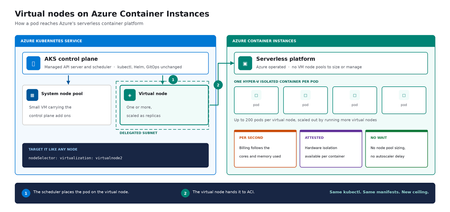
Meet virtual nodes on ACI Azure Kubernetes Service (AKS) gives you managed Kubernetes: the full Kubernetes API without operating the control plane yourself. Virtual nodes on Azure Container Instances go a step further, letting your pods run directly on Azure's serverless container platform, with the elasticity and with no capacity planning and no waiting for machines. Whether you already run AKS or want a managed Kubernetes that bursts without node management, this is for you. In short: virtual nodes on ACI attach Azure's serverless container platform to your cluster as Kubernetes nodes. Pods run as Hyper-V isolated containers, sized per pod rather than packed onto a fixed VM, up to 200 pods per virtual node. Run multiple virtual nodes, scaled as replicas, for more. They behave like any other pod: same kubectl, Helm, and GitOps. Kubernetes has always assumed a fixed set of machines underneath it. That assumption shapes everything above it: you size a node pool for a specific VM type in a specific region, you plan for peak rather than for average, and every workload on a node shares the same kernel and the same security boundary. Virtual nodes on ACI relaxs that assumption, which is what makes both elastic capacity and per container isolation possible without a different Kubernetes. If you've used the original AKS virtual nodes add-on (Virtual Kubelet based), this is not a rebrand. It is a new implementation that integrates far more deeply with Kubernetes, lifts most prior limitations (init containers, persistent volumes, managed identity, richer networking), and adds confidential containers as a first-class capability. The migration guide can be found here. Two capabilities carry the rest of this post: effortless burst capacity, and confidential containers. How virtual nodes on ACI work ACI runs every container as a Hyper-V isolated container, which means each one gets its own lightweight virtual machine boundary rather than sharing a kernel with its neighbors. Azure operates that platform. A virtual node connects it to your cluster. The cluster's control plane, the component that decides where each container runs, sees two kinds of destination: a small pool of virtual machines carrying cluster services, and one or more virtual nodes. From the application manifest's perspective, nothing changes. The pod lands on a virtual node; the virtual node hands it off to ACI. See Microsoft Learn: virtual nodes on ACI for the official capability and current limits. Virtual nodes on ACI in practice The rest of this post is hands on. You do not need to be a Kubernetes expert to follow it. kubectl is the command line tool for talking to a cluster, Helm installs packaged software into one, and a manifest is a text file describing what you want to run. If you have a cluster, everything below runs against it as written. The manifests behind the examples live in a companion demo repo. Setup is documented officially, and you can reproduce this end to end from the ACI virtual nodes documentation and the microsoft/virtualnodesOnAzureContainerInstances Helm repo. One requirement before you start: deploy into a delegated ACI subnet, meaning a subnet in your virtual network set aside for the ACI platform to place containers in. Size it for peak pod count plus headroom, since every pod consumes an address from it for its lifetime. Demo manifest files can be found in this repo, a personal sample repo provided as is and not a supported Microsoft artifact. Enable virtual nodes on ACI The virtual node is deployed via Helm. The Microsoft GitHub repo is itself a Helm repository, so a single helm install is all you strictly need. Cloning first, shown here, just makes it easier to customize values. Running kubectl get nodes afterward confirms the node registered. git clone https://github.com/microsoft/virtualnodesOnAzureContainerInstances.git helm install <yourReleaseName> ./virtualnodesOnAzureContainerInstances/Helm/virtualnode kubectl get nodes The virtual node appears alongside any existing capacity, ready to accept work. A virtual node is a Kubernetes node You target it the same way you would target any node. These few lines in a manifest say "run this on the virtual node": nodeSelector: virtualization: virtualnode2 kubernetes.io/os: linux tolerations: - key: virtual-kubelet.io/provider operator: Exists effect: NoSchedule That is the entire integration surface. No new API to learn, no separate deployment pipeline, no application changes. kubectl describe, kubectl logs, and kubectl exec, the standard commands for inspecting and troubleshooting, all work as they would anywhere else, including opening a shell inside a container running in a Hyper-V isolated boundary. Scaling stays trivial. kubectl scale deployment demo-deployment --replicas=10 lands every replica on the same virtual node, with no VMSS scale event, no provisioning latency, no climbing node-count chart. The same flow scales just as cleanly to hundreds. Cost follows the same shape. Each pod is billed per second against the cores and memory it requests, at ACI rates, and billing stops when the pod stops. Logs and metrics flow through the same path you already use, so existing dashboards and alerts keep working. One annotation makes a pod confidential Turning a regular container into a confidential one takes a single addition to its manifest: a policy that pins exactly which images, commands, environment variables, mounts, and capabilities are permitted inside the Trusted Execution Environment. The format is a base64 encoded Rego document, called a CCE (Container Confidential Enforcement) policy. You do not write that policy by hand. A tool generates it from the manifest you already have: az extension add -n confcom az confcom acipolicygen --virtual-node-yaml ./hello-world-deployment.yaml The tool pulls each image, hashes its layers, builds the allow-list, and injects the annotation back into the manifest. kubectl apply, and you're done. (acipolicygen has prerequisites of its own, including a working Docker installation; see the confcom documentation.) Here is why this is a genuinely new isolation primitive rather than a stronger version of an existing one. Most container security policy is enforced by software in the cluster, which means an attacker who compromises the host can potentially bypass it. This policy is enforced by the guest operating system inside the TEE instead. The underlying hardware, AMD SEV-SNP, also produces an attestation report, retrievable from inside the container, which is a cryptographic proof that the workload running is the workload you specified and nothing tampered with it. That is the guarantee regulated industries have been asking for, and increasingly the one AI workloads running untrusted code need too. The same per pod boundary is also what makes multi-tenancy on a single cluster realistic, though multi-tenancy in production still depends on your network and identity boundaries, which sit outside what the isolation layer itself provides. Background: Microsoft Learn: confidential containers on ACI. Wrapping up Virtual nodes on ACI give containers on Azure two things that were previously hard to deliver cleanly on Kubernetes: Effortless burst capacity on Azure's serverless container platform, billed per second for the cores and memory used, with no capacity planning and no waiting for machines. Confidential containers with hardware attested, per container isolation inside a Trusted Execution Environment. Virtual nodes are additive, not a replacement. Traditional node pools remain the right home for steady state, DaemonSet, and persistent volume workloads, and AKS features such as Node Auto Provisioning and Virtual Machine Node Pools already make that baseline more flexible. Virtual nodes on ACI absorb the spikes, the short-lived jobs, and the specialized isolation work on top. Where to start New to containers on Azure? Start with a small AKS cluster and add a virtual node from day one. You get a managed Kubernetes environment without having to guess your peak capacity in advance, and the elastic layer is there the first time you need it. Already running AKS? Add a virtual node to an existing cluster and move one bursty or short lived workload to it. Nothing else changes, and the comparison is immediate. Evaluating platforms? The capability that is hard to find elsewhere is the confidential containers path: hardware attested isolation per container, reachable through a standard Kubernetes manifest. The result: virtual nodes on ACI expand what AKS can run, with more capacity and stronger isolation, without changing the Kubernetes operating model you already use. Same kubectl, same manifests, same GitOps. New ceiling. For the high-level overview, official documentation, and Helm details, the Microsoft Learn is the source of truth. The companion repo holds the demo manifests used in this post. Acknowledgements I'd like to thank Gurpreet Virdi, Partner Group Engineering Manager, whose guidance shaped this post from the first outline through to publication. Her product leadership ensured this post reflects both the technical depth and the customer value of virtual nodes on ACI. Thanks to Gabriel Fuhrman, Senior Software Engineer, for his detailed technical review. His feedback refined the technical content and significantly improved the accuracy and depth of this post. Christopher Little, Principal CSA, shaped the enterprise adoption perspective, and Adam Sharif, CSA, reviewed the post from the earliest draft. Thanks also to Kirthi Maguluri, Senior Product Manager, and Varun Shandilya, Principal Product Manager, for their review of the blog.259Views0likes0CommentsIPv6 Dual-Stack Endpoints for Azure Container Registry (Public Preview)
By Johnson Shi, Aviral Takkar, Bin Du Introduction Two of the most common networking questions we hear from teams running Azure Container Registry (ACR) are: "Can my registry serve clients on IPv6 networks?" — Teams operating IPv6-only or dual-stack networks need their container registry reachable over IPv6. "How do we start moving registry traffic toward IPv6 without breaking anything?" — Organizations guarding against IPv4 address exhaustion, or operating under IPv6 transition mandates, want a migration path that doesn't disrupt existing IPv4 clients. Today, we're announcing the public preview of IPv6 dual-stack endpoints for Azure Container Registry for public endpoints and firewall rules, with IPv6 over private endpoints planned for GA. Set your registry's endpoint protocol to IPv4AndIPv6 , and its endpoints become reachable over both IPv4 and IPv6 — so IPv4-only, dual-stack, and IPv6-capable clients all connect to the same registry, each over whichever protocol their network stack selects. Key Takeaways ACR registries now support an endpointProtocol setting with two values: IPv4 (default) and IPv4AndIPv6 (dual stack, preview). Dual stack is additive — your registry continues serving IPv4 clients exactly as before. There is no IPv6-only mode. Dual stack requires dedicated data endpoints to be enabled ( --data-endpoint-enabled true ), and dedicated data endpoints require the Premium SKU. The service enforces this requirement. You can enable it today with Azure CLI 2.87.0 via az acr update --endpoint-protocol IPv4AndIPv6 . FQDN-based client firewall rules keep working unchanged; IP-based allowlists need to account for IPv6 traffic. Limitation: This public preview covers IPv6 for the registry's public endpoints and firewall rules only. IPv6 over private endpoints is planned for a future release. Limitation: ACR Tasks isn't supported on a registry that has IPv6 dual-stack enabled. Tasks does not work when the endpoint protocol isIPv6 dual-stack, including quick builds (with az acr build) and quick task runs (with az acr run). Support is planned for a future release. How to enable it On an existing registry (Azure CLI 2.87.0 or later) Dual stack requires dedicated data endpoints, so enable both in a single update: az acr update --name <your-registry> --data-endpoint-enabled true --endpoint-protocol IPv4AndIPv6 If dedicated data endpoints are already enabled, set the endpoint protocol on its own: az acr update --name <your-registry> --endpoint-protocol IPv4AndIPv6 Verify the configuration: az acr show --name <your-registry> --query "{endpointProtocol:endpointProtocol, dataEndpointEnabled:dataEndpointEnabled}" { "dataEndpointEnabled": true, "endpointProtocol": "IPv4AndIPv6" } Note: If your clients sit behind a firewall and you're enabling dedicated data endpoints for the first time, add firewall rules for <your-registry>.<region>.data.azurecr.io before enabling — switching from *.blob.core.windows.net to dedicated data endpoints changes where layer blobs are downloaded from. See Dedicated data endpoints for details. Reverting to IPv4 Dual stack is reversible at any time: az acr update --name <your-registry> --endpoint-protocol IPv4 Reverting the endpoint protocol leaves dedicated data endpoints enabled; disable them separately if desired. Scope of this preview This public preview enables IPv6 for the registry's public endpoints — the login server, dedicated data endpoints, and regional endpoints (if enabled). IPv6 over private endpoints isn't part of this preview. Support is planned for a future release. Until then, registries reached through a private endpoint continue to use IPv4. Additionally, IPv6 dual-stack support for ACR Tasks, including support for `az acr build` and `az acr run`, are not supported in the public preview. Support is planned for a future release. Requirements and how features compose Requirement Why Premium SKU Dedicated data endpoints are a Premium feature. Dedicated data endpoints enabled IPv4AndIPv6 requires dataEndpointEnabled: true ; the service rejects the setting otherwise. Azure CLI 2.87.0+ Adds --endpoint-protocol to az acr update . For geo-replicated registries, the endpoint protocol is a registry-level setting, and dedicated data endpoints exist in every replica region. Firewall guidance: rules based on registry FQDNs — the login server, dedicated data endpoints, and regional endpoints (if enabled) — continue to work unchanged for dual-stack registries; only IP-address-based allowlists need updating for IPv6. To learn more, see IPv6 dual-stack endpoints in Azure Container Registry (preview) and the ACR endpoint reference. If you have further questions about IPv6 dual-stack endpoints or dedicated data endpoints, reach out to us on the Azure Container Registry GitHub repository or file feedback through the Azure portal.287Views1like0CommentsDesigning for High Availability: The Operational Reference for Running a Geo-Replicated ACR
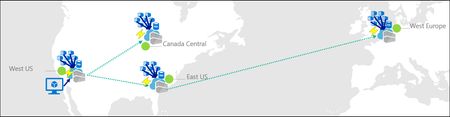
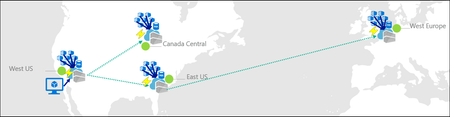
By Johnson Shi, Zoey (Zhuyu) Li, Huangli Wu Introduction Three of the most common questions we hear from enterprise teams running geo-replicated Azure Container Registries (ACR) are: "How do I control which region serves my traffic?" — When my AKS clusters are spread across regions, can I pin each one to its co-located replica, or am I stuck with however the global endpoint routes? "What happens during a regional incident — is failover automatic or do I have to act?" — If the registry in one region degrades, does the global endpoint reroute on its own, or do I need to manually disable the affected replica? "What happens after the region recovers — does traffic return on its own?" — Is there a cooldown, a quarantine, or any manual step before failback? We answer those head-on, then go deeper on the operational details that come up when you actually run a geo-replicated registry: authentication across endpoint switches, throttling under load concentration, eventual-consistency failure modes, home region outage scope, webhooks, and private endpoint interaction. We draw on the official geo-replication docs, the global endpoint health-aware failover blog, the regional endpoints engineering design implementation, the regional endpoints public preview and private preview announcements, and the ACR reference for various registry endpoints, . This post also draws notes from the ACR product team on roadmap items that aren't yet documented elsewhere. Key Takeaways Health-aware failover is automatic. When the registry in a region degrades, the global endpoint reroutes away from it on the order of minutes, evaluated per-registry. No customer action required. Failback is automatic too. Once health-aware failover marks a region healthy again, the global endpoint resumes routing to it. There is no cooldown period. Health-aware failover applies only to global endpoint operations. It does not apply to regional endpoints (you're talking to one replica, period) or to dedicated data endpoints (the redirect is per-region). Health-aware failover is not triggered by throttling. It responds to regional ACR service health and Azure infrastructure health, not HTTP 429 responses. Use regional endpoints to manage per-replica throttling. Regional endpoints (Step 2a) give you explicit per-region URLs for workloads that need affinity, capacity planning, push/pull consistency, troubleshooting, or client-side failover. Use myregistry.<region>.geo.azurecr.io . Regional endpoints are available on Premium SKU registries. For workloads that don't need pinning, do nothing (Step 2b). The global endpoint plus health-aware failover handles routing automatically. Re-authenticate when switching endpoints. Each global or regional endpoint is its own authenticated surface; re-auth via az acr login , SDK auth, or the Kubernetes ACR credential provider on endpoint change. Don't run a long-lived DNS cache for the global endpoint. ACR purges DNS server-side on disable and during failover; a long-lived client cache works against that. For production workloads, enable dedicated data endpoints for security and DNS predictability on layer downloads. ACR is working on bounded staleness consistency for cross-replica eventual-consistency failure modes; see the FAQ. Background What is ACR geo-replication? Geo-replication is a Premium SKU feature that turns a single ACR registry into a multi-region, multi-write service. Every geo-replica in every region is writable — you can push, pull, and delete from any of them — and content syncs asynchronously between replicas under an eventual consistency model. Per-push replication time scales with the size and number of images being pushed. Similarly, when creating a new geo-replica, the time to populate the new geo-replica scales with the total size of the registry. A geo-replicated registry exposes a global endpoint at myregistry.azurecr.io . Behind that endpoint, ACR uses an internal traffic manager to direct each request to the replica with the best network performance profile for the caller — usually the closest replica, but not always. When clients are equidistant from multiple replicas, or when the closest replica is experiencing Azure infrastructure degradation, requests may be routed elsewhere. A geo-replicated registry also exposes a regional endpoint at myregistry.<region>.geo.azurecr.io , which allows clients to pin API requests to a specific geo-replica in lieu of global endpoints, which has Azure-managed routing among geo-replicas. Zone redundancy is always enabled for geo-replicas in regions where Azure has multiple availability zones — in those regions, ACR automatically spreads replica data across multiple availability zones within each region to protect against zonal outages. Endpoints and data endpoints: what goes where A common point of confusion: when you push or pull, not every request goes to the same place. The registry endpoints (global endpoint and regional endpoints), as well as the data endpoint, do different jobs. Your choice of data endpoint configuration has real consequences for security and resilience. Two kinds of traffic flow during a typical pull: Registry API traffic — authentication, manifest reads/writes, tag resolution, referrers, repository operations, blob location lookups, listing, metadata. This is everything except the actual layer (blob) bytes. All these API requests go to the global endpoint ( myregistry.azurecr.io ) or, if you've pinned your clients to call these APIs to a specific geo-replica, a geo-replica's regional endpoint ( myregistry.<region>.geo.azurecr.io ). Behind the scenes, the global endpoint internally proxies these requests to a specific geo-replica. Layer (blob) downloads — when the client asks for a blob, the registry doesn't serve the bytes itself. It returns an HTTP 307 redirect to a regional data endpoint (separate endpoint from the global endpoint or regional endpoints), and the client follows the redirect to download the layer from that region. Where that 307 sends you depends on whether you've enabled the registry's dedicated data endpoints feature: Configuration Layer downloads redirect to Default (no dedicated data endpoints) *.blob.core.windows.net (the underlying Azure storage account) Dedicated data endpoints enabled myregistry.<region>.data.azurecr.io for the region you were routed to Private endpoints enabled myregistry.<region>.data.azurecr.io for the region you were routed to Regional by design. Dedicated data endpoints always land you on a specific geo-replica's data endpoint — there is no "global data endpoint." With the global endpoint as your registry endpoint, the 307 redirect picks the data endpoint for whichever region the global endpoint chose to serve you. With a regional endpoint pinned to a specific region, the 307 always redirects you to that same region's data endpoint — never cross-region. Why dedicated data endpoints matter. Dedicated data endpoints are a Premium SKU feature that exists primarily to address security and firewall scoping. By default, layer downloads redirect to *.blob.core.windows.net — a wildcard storage FQDN. Firewall rules to allow that wildcard either let all Azure storage accounts through or none of them, which raises data exfiltration concerns and isn't tightly scoped to your registry. Dedicated data endpoints replace the wildcard with a fully qualified domain in your registry's own domain — myregistry.<region>.data.azurecr.io — so firewall rules can be scoped tightly to your specific registry, in your specific regions. That same design choice can also make layer downloads more predictable during routing changes. With dedicated data endpoints, the data endpoint FQDN is known ahead of time and lives in the registry's domain — one predictable hostname per region, configured once. Without them, the layer download has to resolve a wildcard storage FQDN that points to whichever storage account the registry happens to have provisioned, which is a separate DNS resolution path with its own routing behavior and its own caching profile. Dedicated data endpoints simplify the DNS picture by aligning the data path with the registry path and keeping the entire pull experience inside one set of predictable, scoped FQDNs. For any geo-replicated registry where security and high availability matter, enable dedicated data endpoints. Note: Health-aware failover applies only to operations against the global endpoint, not to regional endpoints or dedicated data endpoints. Take note that health-aware failover only kicks in and directs traffic away from a geo-replica when an Azure region is experiencing significant infrastructure degradation. At this stage, it does not kick in to redirect traffic to another geo-replica if a client's data plane API requests are throttled. See the relevant section below for the full scope when health-aware auto failover kicks in or not. The three traffic control tools ACR geo-replication gives you three complementary tools for controlling where traffic lands. Each one solves a different class of problem, and customers most often run into trouble when they reach for the wrong one. We name them up front and use these names throughout the post: Tool Who controls it What it does Use cases Health-aware failover Platform (automatic) Reroutes the global endpoint away from a region whose registry can't reliably serve requests Regional incidents, automatic recovery Replica enable/disable for global routing Customer (manual) Excludes a specific replica from global endpoint routing without deleting it; data continues syncing DR rehearsals, planned maintenance, quarantining a replica without losing it Regional endpoints Customer (per request) Dedicated per-region URLs ( myregistry.<region>.geo.azurecr.io ) that bypass the internal traffic manager entirely Pinning AKS clusters to co-located replicas, push/pull consistency, capacity planning, troubleshooting, client-side failover Health-aware failover and replica enable/disable both act on the global endpoint. Regional endpoints are a separate URL surface that coexists with the global endpoint — enabling them does not disable the global endpoint myregistry.azurecr.io . You can use both simultaneously and choose per workload. The behavior in question When the registry in one region experiences a real degradation, there are three possible answers to "what happens?": (A) Nothing automatic. The customer must manually disable the affected region's endpoint to stop traffic from being routed there. (B) The system detects the regional front-door failure and reroutes within seconds. (C) A per-registry health evaluation detects the degradation and reroutes the global endpoint within minutes, with no customer action. After the region recovers, routing resumes automatically. The answer today is (C). Before health-aware failover, customers were stuck closer to (A) — the system could see whether the regional reverse proxy responded, but not whether the registry could actually serve real pull and push traffic end to end. Health-aware failover closes that gap. We walk through all three tools in the next section, in order: setting up geo-replication, using regional endpoints to pin specific workloads, keeping the global endpoint for everything else, the manual replica disable mechanism, re-enabling participation in global routing, and what to expect when health-aware failover triggers. Walkthrough The following steps assume an existing Premium SKU registry and the Azure CLI logged in. We use myregistry as the registry name, myrg as the resource group, and eastus as the home region. Substitute <your-registry> , <your-rg> , and <your-region> for your environment. Prerequisites A Premium SKU ACR registry (geo-replication requires Premium) Azure CLI ( az ) installed and logged in For regional endpoints (Step 2a): Azure CLI 2.86.0 or later. All regional endpoints commands ( --regional-endpoints , az acr show-endpoints , az acr login --endpoint ) are available natively in Azure CLI 2.86.0+. If you previously installed the acrregionalendpoint private preview CLI extension, uninstall it with az extension remove --name acrregionalendpoint to prevent conflicts with the built-in CLI commands. Step 1: Add a West US replica to a registry that lives in East US Geo-replication requires the Premium SKU. The create call below fails on Basic or Standard. # Confirm the registry is Premium az acr show --name myregistry --resource-group myrg \ --query sku.name --output tsv # Premium # Create a West US geo-replica az acr replication create --registry myregistry --location westus # Confirm both replicas are present az acr replication list --registry myregistry --output table NAME LOCATION PROVISIONING STATE STATUS REGION ENDPOINT ENABLED ------ ---------- -------------------- -------- ----------------------- eastus eastus Succeeded online True westus westus Succeeded online True Pushes and pulls continue working through the existing replica throughout initial sync. Because the registry is multi-region, multi-write, the existing replica keeps serving traffic while the new replica catches up in the background. Initial replica seeding time is a function of registry size — the total number and cumulative size of images already in the registry that need to be replicated to the new replica — not the size of any single image. Step 2a: Pin workloads to specific regions using regional endpoints Use regional endpoints when a workload needs explicit per-region control. The five common cases: Regional affinity — an AKS cluster in East US should pull from the East US replica, every time, without ever hopping to a more distant replica because of a network performance fluctuation. Predictable routing — workloads that need to know exactly which replica will serve them, for benchmarking, capacity planning, or in-region traffic SLAs. Push/pull consistency — pinning both ends of a publish-then-deploy flow to the same replica eliminates eventual-consistency races. Troubleshooting — reproducing an issue on a specific replica requires sending traffic to that specific replica. Client-side failover — customers with their own health checks and business rules want to implement failover on their own terms, on signals only they can see. Enable regional endpoints on the registry: az acr update -n myregistry -g myrg --regional-endpoints enabled When enabled, ACR automatically creates per-region login server URLs for every existing geo-replica. No per-region configuration is needed. Note: Regional endpoints can be enabled on any Premium SKU registry, even without geo-replication. A registry without geo-replication has a single geo-replica in the home region, which gets one regional endpoint URL. However, the feature is most useful when your registry has at least two geo-replicas, where you can pin different workloads to different replicas for routing control and capacity distribution. Push to a specific region using its regional endpoint: # Log in to the West US regional endpoint az acr login --name myregistry --endpoint westus # Tag and push using the regional endpoint URL docker tag myapp:v1 myregistry.westus.geo.azurecr.io/myapp:v1 docker push myregistry.westus.geo.azurecr.io/myapp:v1 Pin AKS deployments to their co-located replica by using regional endpoint URLs in the deployment manifest. The example below shows two clusters in different regions; each cluster references the regional endpoint for its own region's replica (assuming replicas exist in both eastus and westeurope ): # East US-based AKS cluster pulls from the East US replica apiVersion: apps/v1 kind: Deployment metadata: name: myapp-eastus spec: template: spec: containers: - name: myapp image: myregistry.eastus.geo.azurecr.io/myapp:v1 --- # West Europe-based AKS cluster pulls from the West Europe replica apiVersion: apps/v1 kind: Deployment metadata: name: myapp-westeurope spec: template: spec: containers: - name: myapp image: myregistry.westeurope.geo.azurecr.io/myapp:v1 This eliminates cross-region pulls when global routing would otherwise prefer a different replica for a given client, and it gives you a per-region traffic profile you can plan capacity against. Regional endpoint operational tips View all endpoints. Use az acr show-endpoints to see all endpoint URLs for your registry — global, regional (if enabled), and dedicated data endpoints (if enabled): az acr show-endpoints --name myregistry --resource-group myrg Import from a specific geo-replica. When importing images between registries, you can use a regional endpoint to import from a specific geo-replica of the source registry. This is useful when you want predictable network paths or need to import from a replica in a specific region: az acr import \ --name mydownstreamregistry \ --source myupstreamregistry.westeurope.geo.azurecr.io/myapp:v1 \ --image myapp:v1 Firewall rules for regional endpoints. If you use firewall rules, allow access to the following endpoints for each geo-replica that clients connect to: Endpoint Purpose myregistry.<region>.geo.azurecr.io Regional endpoint for registry operations myregistry.azurecr.io Global endpoint (if also used) myregistry.<region>.data.azurecr.io Layer downloads (if using private endpoints or dedicated data endpoints) *.blob.core.windows.net Layer downloads (if not using private endpoints or dedicated data endpoints) For the full list of endpoint types and FQDN patterns, see the ACR reference for various registry endpoints. DNS-based routing without changing manifests. If you don't want to maintain different deployment manifests per region, you can keep all manifests pointing to the global endpoint ( myregistry.azurecr.io ) and use software-defined networking or a regional traffic manager to resolve the global endpoint to the appropriate regional endpoint based on the originating region's traffic. This achieves the same co-location goals as regional endpoints — predictable routing and reduced latency — without embedding region-specific URLs in your deployment manifests. Step 2b: Keep using the global endpoint for everything else For workloads that don't need explicit pinning, do nothing. The global endpoint at myregistry.azurecr.io continues to work exactly as before, and the global endpoint plus health-aware failover gives you intelligent routing across replicas without configuration. ACR picks the best replica for each client based on network performance and reroutes during regional incidents. Regional endpoints coexist with the global endpoint — enabling them does not disable myregistry.azurecr.io . You can use both simultaneously and choose per workload, mixing pinned workloads (Step 2a) with workloads that ride the global endpoint (Step 2b) in the same registry. Step 3: Take a replica out of global endpoint routing Use this when you need to keep a replica alive but stop it from serving global-endpoint traffic — for DR rehearsals, planned maintenance, or troubleshooting an isolated replica. # Exclude the West US replica from global endpoint routing az acr replication update --registry myregistry --name westus \ --global-endpoint-routing false Confirm the change: az acr replication list --registry myregistry --output table NAME LOCATION PROVISIONING STATE STATUS REGION ENDPOINT ENABLED ------ ---------- -------------------- -------- ----------------------- eastus eastus Succeeded online True westus westus Succeeded online False Requests to myregistry.azurecr.io no longer route to West US. The replica still receives replicated content — and continues to replicate its own content out to other replicas — and storage quota and per-replica costs continue to accrue. If regional endpoints are enabled, the West US regional endpoint URL also continues to work; --global-endpoint-routing controls only the replica's participation in global endpoint routing. A note on naming. The CLI flag --global-endpoint-routing (on az acr replication update ) and the regional endpoints feature (enabled via az acr update --regional-endpoints enabled ) are two different things despite the similar names. --global-endpoint-routing controls whether a replica participates in global endpoint routing. The regional endpoints feature creates per-region URLs ( myregistry.<region>.geo.azurecr.io ) that bypass the global endpoint entirely. They are independent controls. In Azure CLI 2.86.0 and later, the old --region-endpoint-enabled flag has been renamed to --global-endpoint-routing . The old flag name is deprecated and will be removed in Azure CLI 2.87.0 (June 2026). If you have existing scripts or automation that use --region-endpoint-enabled , update them to use --global-endpoint-routing . CLI flags quick reference: Flag Scope Purpose --regional-endpoints Registry-level ( az acr create or az acr update ) Enables dedicated regional endpoint URLs ( myregistry.<region>.geo.azurecr.io ) for all geo-replicas. --global-endpoint-routing Per-geo-replica ( az acr replication create or az acr replication update ) Controls whether the global endpoint routes traffic to a specific geo-replica. Set to false to temporarily exclude a geo-replica from global routing. --data-endpoint-enabled Registry-level ( az acr create or az acr update ) Enables dedicated data endpoints ( myregistry.<region>.data.azurecr.io ) for layer blob downloads. Auto-enabled when at least one private endpoint is configured. This bidirectional sync during disable is intentional. When you re-enable the replica, every image pushed to the registry while the replica was disabled — from any region — is already present, so the replica can serve traffic immediately with no catch-up window. If we stopped syncing on disable, re-enabling would leave the replica with stale data and force a long catch-up before it could safely serve pulls. Step 4: Re-enable the replica to participate in global endpoint routing Re-enable the replica: az acr replication update --registry myregistry --name westus \ --global-endpoint-routing true NAME LOCATION PROVISIONING STATE STATUS REGION ENDPOINT ENABLED ------ ---------- -------------------- -------- ----------------------- eastus eastus Succeeded online True westus westus Succeeded online True There is no cooldown. The global endpoint resumes routing requests to the West US replica as soon as the change takes effect on ACR's side. Because data continued syncing while the replica was disabled (Step 3), the replica is immediately ready to serve pulls — no catch-up window. Note on DNS during disable/enable. When you take a replica out of global routing, ACR purges its own DNS records for that replica from the global endpoint on a fast path — there is no waiting on a published TTL on ACR's side. If clients run their own DNS cache for the global endpoint, however, those clients will keep resolving to the disabled replica until the client cache expires. We can't control client-side caches. The recommendation: do not run a long-lived DNS cache for the global endpoint. A short-lived DNS pin for the duration of a single push (covered in the DNS and Client-Side Considerations section) is fine and even helpful — but a long-lived DNS cache will make --global-endpoint-routing false look broken from the client's perspective. Step 5: What to expect when health-aware failover triggers Health-aware failover is automatic. ACR evaluates registry health on a per-registry basis, and when a registry in a region can't reliably serve requests, the global endpoint reroutes that registry's traffic to a healthy replica. There is no customer-invocable trigger — that's the point. End-to-end timing is on the order of minutes — fast enough to catch real regional degradation, slow enough to ride out transient errors that resolve on their own. DNS TTL may add additional propagation delay before all clients switch to the new region. Scope of health-aware failover. Health-aware failover applies only to operations against the global endpoint — the registry API calls (auth, get manifest, get tag, get referrers, get blob location). It evaluates health when those API calls come in; it does not trigger mid-operation. Two important consequences: Regional endpoints are not in scope. When you talk to a regional endpoint like myregistry.westus.geo.azurecr.io , you're talking to that one replica. There is no automatic reroute. If you've pinned a workload to a regional endpoint and that region degrades, you implement client-side failover by switching the workload to a different regional endpoint. Dedicated data endpoints are not in scope. Once a registry endpoint has redirected you to a dedicated data endpoint, you stay on that region's data endpoint for the duration of the layer download. There is no automatic reroute of an in-flight blob download. The region targeted by the redirect is decided up front by whichever registry endpoint served the blob-location call: the global endpoint chooses based on its per-registry health evaluation, and a regional endpoint always targets its own region. The signals you can use to confirm a failover is in progress: # Check replication status az acr replication list --registry myregistry --output table You can also check Resource Health for the registry in the Azure portal — navigate to your registry and select Resource health under the Help section to see platform-side degradation signals. You'll typically see: Increased pull latency as traffic shifts to a more distant replica Resource Health flagging known issues in the affected region Replication status indicating which replicas are online After the region recovers, the per-registry health evaluation marks it healthy again and the global endpoint resumes routing — automatic, no cooldown, no customer action. Note that health is evaluated per registry, not per region: if a degradation affects only a subset of registries in a region, only those registries are rerouted, and other registries in the same region continue to be served locally with no unnecessary latency penalty. Not triggered by throttling. Health-aware failover is DNS-based and responds to regional ACR service health and Azure infrastructure health. It does not reroute traffic based on HTTP 429 (throttling) responses. If a geo-replica is throttling your requests but the region's infrastructure is healthy, the global endpoint continues routing you to that geo-replica. To manage throttling, use regional endpoints to spread workloads across multiple geo-replicas for better capacity distribution. Note on long-running pushes during a failover. A multi-layer push that spans a failover boundary can land layers and the manifest on different replicas — exactly the failure mode that DNS bouncing produces during a single push. ACR is actively tightening health-aware failover behavior to minimize cross-replica scatter during these scenarios, and the recommendation today remains: pin pushes to a single replica via a regional endpoint when push/pull consistency matters. Common Questions Q1. Performance impact during initial replica creation on a live registry Because ACR is multi-region, multi-write, the existing replica continues serving pull and push traffic throughout the period when a new replica is being seeded. Replication is asynchronous and content propagates in the background; the time to populate a new geo-replica scales with the size of the registry — the cumulative number and total size of images already in the registry — not with any single image. The docs do not publish a quantified degradation percentage or a throttling window for this period, and they do not promise zero performance impact — the safe operating assumption for a live production registry is that existing replicas continue serving traffic normally, with the new replica catching up in the background. Q2. Restricted/updating state during initial sync There is no "restricted" state for the registry during normal replica creation. Writes, control-plane operations, and pushes/pulls against existing replicas continue normally. The only time configuration changes are unavailable is during a home region outage — see the relevant FAQ item later on for the full data-plane-versus-control-plane breakdown. Q3. Cooldown periods and non-straightforward failback scenarios There is no cooldown before failback, manual or automatic. Re-enabling a replica's participation in global endpoint routing takes effect immediately on ACR's side. Health-aware failover returns traffic to a region as soon as its per-registry health evaluation passes again. The failback case that is not seamless: if a recently pushed image has not yet replicated to the failover region, a pull from that region may not find the image until replication catches up. This is a function of eventual consistency, not failback timing — and it's part of a broader class of issues we cover in Q4. Q4. Common pull and push failure modes during the eventual-consistency window DNS bouncing during a single push is one well-known problem, but it isn't the only one. The eventual-consistency window between geo-replicas surfaces in several recurring failure modes worth knowing about: Push-then-immediate-pull-cross-region. Pushing myapp:v1 to one region and immediately pulling it from a different region can fail with manifest unknown until replication catches up. This shows up most painfully in CI/CD pipelines where one CI runner pushes an image and thousands of pods across other regions all try to pull from their local geo-replicas at the same time. Today, customers work around this with indeterminate sleeps before scheduling expensive compute, or with retry logic, or by waiting on a replication-complete signal — none of which is a clean planning story. Tag overwrite races. Pushing myapp:v1 , then re-pushing myapp:v1 shortly after with a fix (same tag, different digest), can leave different replicas resolving the same tag to different digests during the eventual-consistency window. Delete propagation. Deleting a tag or repository in one region takes some time to propagate to other replicas. Pulls from regions where the delete hasn't yet propagated can return the supposedly-deleted content. Mid-push failover scatter. A multi-layer push that spans a health-aware failover boundary or a DNS bouncing event can land layers on one replica and the manifest on another, surfacing as manifest validation errors or blob unknown on subsequent pulls. What ACR is doing about this. We're working on bounded staleness consistency for pushed images across all geo-replicas worldwide, which addresses these four failure modes directly. This will be covered in an upcoming blog post. If you're hitting eventual-consistency brittleness today and want to talk through your scenario, reach out to us on the Azure Container Registry GitHub repository — we want the customer signal to land in the design. Mitigations available today: Pin pushes to a single replica via a regional endpoint. Every sub-request in the push — login, blob uploads, manifest upload — goes to the same replica, eliminating the DNS bouncing and mid-push scatter classes entirely. Use a short-lived client-side DNS cache like dnsmasq scoped to the duration of a single push, only when you're not using regional endpoints. Do not run a long-lived DNS cache for the global endpoint — it interferes with --global-endpoint-routing false and with health-aware failover routing. Build retry logic into pulls that immediately follow a cross-region push. Either retry with backoff or check replication status with ACR webhooks before pulling. ACR can detect and notify you when an image or tag is available for pull in a geo-replica (say geo-replica B), after it has been pushed to another geo-replica (geo-replica A) and background replication has succeeded to geo-replica B. Design publish steps to be idempotent so retries triggered by mid-push failover are safe. Q5. Auth behavior across endpoint switches For safety, treat each global endpoint and each regional endpoint as its own authenticated surface. All registry APIs except the actual blob downloads (auth, manifests, tag resolution, referrers) flow through whichever endpoint you've chosen. If you switch from the global endpoint to a regional endpoint, or from one regional endpoint to another, re-authenticate. That means az acr login , fresh SDK auth, or — for AKS — letting the Kubernetes ACR credential provider handle re-auth, which it does automatically when the endpoint changes. Q6. Throttling under failover and pinning Throttling limits on registry API operations are per-replica, not per-registry. This has two operational implications: During health-aware failover, traffic that was spread across replicas can shift heavily onto whichever replicas remain in the global endpoint's routing pool. Capacity plan to spread traffic across two or three healthy replicas during a failover scenario rather than concentrating onto one — the global endpoint's routing already does this for you when multiple healthy replicas exist, but registries with only two regions configured can hit per-replica limits more easily during a failover. To mitigate, use regional endpoints to spread workloads across multiple geo-replicas and plan per-replica capacity. When pinning via regional endpoints (Step 2a), you concentrate traffic on whichever replica you've pinned to. If you've pinned all your AKS clusters to a single regional endpoint, you may hit that replica's per-region throttling limits at peak. Mitigations: pin different workloads to different regional endpoints across multiple regions for better topology mapping and capacity distribution, or use the global endpoint (Step 2b) for workloads where you don't need explicit pinning so ACR's routing can spread load. We're also working on improving the throttling metrics surfaced during health-aware failover events. Note: Health-aware failover does not reroute traffic based on HTTP 429 (throttling). If you're experiencing throttling but the region's infrastructure is healthy, the global endpoint continues routing you there. Use regional endpoints to explicitly spread load across replicas for capacity planning. Q7. Home region outage scope Geo-replication provides high availability for the data plane. During a home region outage, the control plane is unavailable, which means you can't create or delete replicas, modify network rules, or change replication settings until the home region recovers. ACR Tasks are also bound to the home region and don't run while it's unavailable. The data plane keeps working: Global endpoint continues routing pulls and pushes to healthy replicas. Regional endpoints continue working — you talk directly to specific replicas, and your client-side logic decides which region to use. Authentication, manifests, blob downloads, webhooks continue functioning through any healthy replica. The home region of a registry is fixed at creation and cannot be changed afterward. Microsoft's registry relocation guidance describes a redeployment procedure — creating a new registry in a different region — not an in-place change to an existing registry's home region. Note: If your registry uses a customer-managed key, review the key vault failover and redundancy guidance for maximum resilience. Key vault availability directly affects the registry's ability to encrypt and decrypt data. Q8. Webhooks during failover Webhooks fire from the replica that received the push. Because ACR also replicates content to other geo-replicas, webhooks fire from each geo-replica as the image syncs to it — so a single push results in webhook events from the receiving replica plus an event from each replica as replication completes. During a failover where pushes are routed to a different region, webhooks from those pushes fire from the new region; once the original region recovers and replication catches up, webhook events fire from there too. Webhook consumers should be designed to handle multiple events per pushed image and deduplicate as needed. Q9. Private endpoints with regional endpoints and dedicated data endpoints When a private endpoint is created against a registry, the private endpoint covers all of the registry's endpoint surfaces — the global endpoint, every regional endpoint (if regional endpoints are enabled), and every regional dedicated data endpoint. A single private endpoint in one VNet can reach the global endpoint (which routes you to a suitable replica), any regional endpoint in the same or a different region, and any region's dedicated data endpoint for blob downloads. The trade-off is private IP allocation: each endpoint surface consumes IPs in the VNet. With many replicas plus regional endpoints plus dedicated data endpoints all enabled, private endpoint creation can fail if the VNet runs out of available private IPs. IP address consumption per feature: Configuration IPs consumed per VNet Initial private endpoint (global endpoint + home region dedicated data endpoint) 2 Each geo-replication region added +1 (regional dedicated data endpoint) Regional endpoints enabled +1 per geo-replica Example: A registry with 3 geo-replicas and regional endpoints enabled consumes 7 private IPs per VNet: 1 (global) + 3 (data) + 3 (regional). Without regional endpoints, the same registry requires 4 private IPs: 1 (global) + 3 (data). Subnet sizing: Use at minimum a /27 (32 addresses) subnet for PE subnets on geo-replicated registries, and /24 where possible. To check how many private IPs are already consumed on a subnet: az network vnet subnet show \ --name <subnet-name> \ --vnet-name <vnet-name> \ --resource-group <resource-group> \ --query "{addressPrefix:addressPrefix, usedIPs:length(ipConfigurations || \`[]\`)}" \ --output table See the ACR private endpoints documentation for the full IP-allocation math and sizing guidance. Q10. Geo-replica creation stuck for private endpoint-enabled registries When creating a geo-replica for a registry that has private endpoints configured, the replica provisioning can get stuck in a Creating state if the identity performing the operation doesn't have sufficient permissions to create private endpoint networking resources. Solution: Manually delete the geo-replica that got stuck in the provisioning state. Ensure the identity has the permission Microsoft.Network/privateEndpoints/privateLinkServiceProxies/write before creating the geo-replica again. Also verify that every PE subnet connected to the registry has free IP capacity — if any PE subnet across any connected VNet does not have enough free IPs, the replication provisioning fails and rolls back. The replica appears briefly in a Creating state and then is removed. The resulting error does not identify which subnet or VNet is exhausted. Q11. Metrics, logs, and alerts for the three phases We map each phase to the signals available in the Monitoring Guidance section below. The headline: Resource Health (in the Azure portal) and az acr replication list give you the platform-side signals; Azure Monitor platform metrics are collected automatically, and resource logs require Diagnostic Settings to be enabled on the customer side. Behavior summary Scenario Automatic? Customer Action Required Notes Registry in a region degrades Yes None Health-aware failover; per-registry; minutes-scale; global endpoint operations only Region recovers after a degradation event Yes None No cooldown Pin AKS clusters to co-located replicas No Use regional endpoint URLs in deployment manifests (Step 2a) Coexists with global endpoint No pinning needed for most workloads Yes None — keep using myregistry.azurecr.io (Step 2b) Global endpoint plus health-aware failover Push/pull from the same replica (consistency) No Use a regional endpoint for both push and pull Eliminates DNS bouncing and mid-push scatter Capacity planning per region No Spread workloads across multiple regional endpoints Per-replica throttling; avoid concentrating on one replica DR rehearsal: take a replica out of global routing No az acr replication update --global-endpoint-routing false Data continues syncing both directions; costs continue accruing Re-enable replica participation in global routing No az acr replication update --global-endpoint-routing true No cooldown; replica is immediately ready Switch a workload between endpoints No Re-auth ( az acr login , SDK auth, or Kubernetes ACR credential provider) Each endpoint is its own authenticated surface Initial replica seeding on a live registry N/A None Existing replica continues serving traffic; seeding time scales with registry size Long-running push during a failover No Retry; design publishes to be idempotent Pin via regional endpoint to avoid mid-push scatter; ACR is tightening this behavior Pull of a recently pushed image from a different region No Wait for replication, retry with backoff, or check replication status Eventual consistency; bounded staleness consistency in development Home region outage Data plane: yes; control plane: no Use global or regional endpoints for data plane operations Control plane (replica config, network rules) requires home region DNS and Client-Side Considerations DNS bouncing during a single push is the most common geo-replication push problem in customer threads, and it warrants a section of its own. The failure mode. A docker push is a sequence of HTTP requests: blob uploads for each layer, then a manifest upload that references those layers by digest. If the Linux DNS resolver on the client doesn't cache myregistry.azurecr.io consistently for the duration of the push, individual sub-requests can resolve to different replicas. Because replication is eventually consistent, the manifest can land on a replica that doesn't yet have the layers it references, and the manifest validation fails. The two mitigations: Regional endpoints pin the push to a single replica end-to-end. Every sub-request — login, blob uploads, manifest upload — goes to the same replica. This is the cleanest fix and the one we recommend for any pipeline where push/pull consistency matters. A short-lived client-side DNS cache like dnsmasq scoped to the duration of a single push. For Linux VMs in Azure, follow the DNS name resolution options guidance. The pin should last the push and no longer. For other clients performing pushes, you can customize your stack's DNS resolver to have a similar short-lived DNS cache to pin the global endpoint's resolved DNS for only the duration of an image push operation. A note on long-lived DNS caching for the global endpoint. Don't run a long-lived DNS cache for myregistry.azurecr.io . ACR purges its own DNS records on the server side when a replica is taken out of global routing (Step 3) and during health-aware failover; a long-lived client-side cache will keep clients pointed at the old region after our purge, which makes both the manual disable mechanism and health-aware failover look broken from the client's perspective. Retry behavior: In-flight pushes during a failover may fail. Design publish steps to be idempotent so retries are safe. Pipelines that push in one region and immediately pull from a different region should retry with backoff or check replication status — eventual consistency means the pull may race ahead of replication. ACR is working on bounded staleness consistency that addresses this directly by enabling proxying (on ACR infrastructure) an image pull request from one geo-replica (if it does not have the image) to another geo-replica that has the image; see the relevant FAQ item. Note: Specific retry counts, back-off intervals, and push timeout values are application-layer decisions. The platform behavior is documented; the retry policy belongs to your client. Monitoring Guidance We map the three phases to the signals available from each source. Where a signal requires customer-side configuration, we flag it. Phase A: Initial replication (after creating a new replica) az acr replication list and az acr replication show — confirm the new replica reaches provisioningState: Succeeded and status: online , and view per-replica status. Azure Monitor platform metrics — push count, pull count, and other registry metrics are collected automatically and visible in the Azure portal under Metrics. No customer configuration is needed to view platform metrics. To export metrics or enable resource logs (detailed operation logs), configure Diagnostic Settings on the registry. Phase B: Failover (planned via replica disable, or automatic via health-aware failover) Per-replica regionEndpointEnabled state via az acr replication list — confirms whether a manual disable took effect, i.e. which replicas are currently eligible for global endpoint routing. Note: this flag reflects the manual configuration for configuring a geo-replica's global endpoint routing eligibility; it does not indicate whether health-aware failover has actively rerouted traffic away from a replica. Resource Health for the registry (in the Azure portal under Help > Resource health) — surfaces platform-side degradation signals during incidents. ACR does not yet expose a definitive "this region is currently serving your traffic" signal; Resource Health and client-side latency changes are the best available indicators. Pull latency from clients — increased latency from a more distant replica is the client-observable signal that traffic has rerouted. Azure Monitor platform metrics — visible per-region in the Azure portal Metrics blade. To export metrics or query them programmatically, enable Diagnostic Settings. Phase C: Failback (replica returns to global routing) az acr replication list — confirms regionEndpointEnabled: True (manual) or online status across all replicas (automatic). Pull latency normalizing as clients reach the recovered replica again. Resource Health clearing for the registry (visible in the Azure portal). Note: The health-aware failover blog calls out ongoing work to surface richer signals — including notifications for when routing changes and which region is currently serving your traffic. The signals listed above are what's available today. Pricing Considerations Storage billing vs. storage quota: Storage is billed per geo-replica — a 1 GiB image replicated to 5 geo-replicas is charged as 5 GiB of storage (1 GiB × 5 geo-replicas). However, storage quota (the tier's maximum storage limit) counts the image only once — the same 1 GiB image counts as 1 GiB toward your tier's maximum, not 5 GiB. Data transfer: Geo-replication can reduce costs by enabling in-region image pushes and pulls, which avoids cross-region data transfer charges during these push or pull operations. However, cross-region data transfer charges still apply when ACR replicates pushed content to other geo-replicas as part of eventual consistency. Disabled replicas still cost: When you take a replica out of global routing with --global-endpoint-routing false , storage and per-replica costs continue accruing because data continues syncing bidirectionally. For more information, see ACR pricing. Cleanup Run these commands to undo the walkthrough setup. Order matters: disable regional endpoints before deleting replicas, since regional endpoint URLs depend on which replicas exist. # Disable regional endpoints if you enabled them in Step 2a az acr update -n myregistry -g myrg --regional-endpoints disabled # Re-enable any replicas you disabled in Step 3 (no-op if already enabled) az acr replication update --registry myregistry --name westus \ --global-endpoint-routing true # Delete the West US replica created in Step 1 az acr replication delete --registry myregistry --name westus # Confirm only the home region replica remains az acr replication list --registry myregistry --output table Note: Replica deletion is a control-plane operation that requires the home region to be available. During a home region outage, replica configuration cannot be modified. Summary Table Question Answer When should I use regional endpoints vs the global endpoint? Use regional endpoints (Step 2a) for workloads that need affinity, predictable routing, push/pull consistency, troubleshooting, or client-side failover. Use the global endpoint (Step 2b) for everything else and let health-aware failover handle routing. What should I enable for secure, resilient layer downloads? Enable dedicated data endpoints. They scope firewall rules tightly to your registry and replace wildcard storage DNS with predictable per-region FQDNs. How do I avoid DNS-bouncing manifest validation failures on push? Pin pushes to a single replica via a regional endpoint. A short-lived client-side dnsmasq for the push duration is also fine if you're not using regional endpoints. Should I run a long-lived DNS cache for the global endpoint? No. ACR purges DNS server-side on disable and during failover; client-side caching works against that. Do I need to re-auth when switching endpoints? Yes. Each global or regional endpoint is its own authenticated surface. az acr login , SDK auth, or the Kubernetes ACR credential provider handles the re-auth. What happens during a home region outage? Data plane keeps working through any replica via the global endpoint or regional endpoints. Control plane operations (replica configuration, network rules) are unavailable until the home region recovers. The home region is fixed at registry creation. What's ACR doing about eventual-consistency pain? Bounded staleness consistency for cross-replica pushed images is in development and will be covered in an upcoming blog post. Reach out via GitHub if you want to share your scenario. For the full automation matrix — what's automatic, what requires customer action, and what to expect for each scenario — see the behavior summary above. If you have further questions about ACR geo-replication routing, pinning, capacity planning, eventual consistency, or failover behavior, reach out to us on the Azure Container Registry GitHub repository or file feedback through the Azure portal.359Views0likes0CommentsRegional Endpoints for Azure Container Registry Geo-Replication — Now in Public Preview
By Johnson Shi, Zoey (Zhuyu) Li, Huangli Wu What's new Regional endpoints for geo-replicated Azure Container Registries are now in public preview. See the feature's official MS Learn documentation. If you've been following since the private preview announcement, here's what changed: No feature flag registration. No subscription enrollment so all Azure subscriptions and customers can now use this feature. No CLI extension. Regional endpoints commands are built into Azure CLI 2.86.0+ natively. If you installed the private preview acrregionalendpoint extension, uninstall it to avoid conflicts. Native CLI and portal support. With Azure CLI 2.86.0+, enable regional endpoints for all geo-replicas of a registry with az acr create --regional-endpoints enabled or az acr update --regional-endpoints enabled . The Azure portal also supports configuring regional endpoints natively. CLI flag rename for configuring a geo-replica's global endpoint routing (an existing separate feature). The existing flag --region-endpoint-enabled (on az acr replication create/update ) has been renamed to --global-endpoint-routing . Key clarifications: "--global-endpoint-routing" (formerly "--region-endpoint-enabled" on "az acr replication create / az acr replication update") — controls whether a specific geo-replica participates in global endpoint routing. This is an existing feature that is different from the new registry-level "--regional-endpoints" feature being discussed in this post. "--regional-endpoints" (on az "acr create / az acr update") — enables or disables the regional endpoints feature at the registry level for all geo-replicas. This is the feature discussed in this post. See the endpoint reference for the full breakdown of the various registry endpoints (global endpoints, regional endpoints, and data endpoints). Regional endpoints are available on Premium SKU registries in all Azure public cloud regions. What are regional endpoints? Regional endpoints give you dedicated, per-region login server URLs for each geo-replica with the following URL pattern: myregistry.eastus.geo.azurecr.io myregistry.westeurope.geo.azurecr.io Regional endpoints coexist with the registry's global endpoint ( myregistry.azurecr.io ) — enabling regional endpoints doesn't disable a registry's global endpoint that is backed by Azure-managed routing. You can choose per workload: You can use the global endpoint with automatic Azure-managed routing with health-aware failover, where Azure will route your requests to the geo-replica with the best network performance profile to the client. You can use a regional endpoint when you need explicit control or routing to a specific geo-replica. Other resources: For the full background on why regional endpoints exist and the problems they solve, see the private preview blog post. For the complete operational deep dive — health-aware failover, throttling considerations, storage quota and pricing, eventual consistency, home region outage behavior, DNS propagation, private endpoint interaction, capacity planning, and monitoring guidance — see How ACR geo-replication handles failover, failback, and traffic redirection. For the behind-the-scenes engineering implementation — architectural overview and the engineering system design of the feature — see Determinism over magic: the engineering design behind Azure Container Registry Regional Endpoints. Getting started Enable regional endpoints on an existing registry: az acr update -n myregistry -g myrg --regional-endpoints enabled View all registry endpoint URLs, including the registry global endpoint, geo-replica regional endpoints, and data endpoints: az acr show-endpoints --name myregistry --resource-group myrg Using regional endpoints Authenticate to a specific regional endpoint: az acr login --name myregistry --endpoint eastus Push to a specific geo-replica. Images and tags pushed to a geo-replica via regional endpoints still propagate to all other geo-replicas under eventual consistency. docker tag myapp:v1 myregistry.eastus.geo.azurecr.io/myapp:v1 docker push myregistry.eastus.geo.azurecr.io/myapp:v1 Pull an image: docker pull myregistry.eastus.geo.azurecr.io/myapp:v1 You can specify regional endpoints directly in Kubernetes deployment manifests if you need to pin workloads to specific regions. This ensures clusters in specific regions always pull from their colocated replica, providing predictable routing and reduced latency. By using different regional endpoints in each cluster's manifests, you can choose to guarantee that each cluster pulls from its local replica instead of relying on Azure-managed routing. East US cluster deployment: apiVersion: apps/v1 kind: Deployment metadata: name: myapp-eastus spec: template: spec: containers: - name: myapp image: myregistry.eastus.geo.azurecr.io/myapp:v1 West Europe cluster deployment: apiVersion: apps/v1 kind: Deployment metadata: name: myapp-westeurope spec: template: spec: containers: - name: myapp image: myregistry.westeurope.geo.azurecr.io/myapp:v1 When to use regional endpoints Scenario What to do Most workloads Keep using the global endpoint ( myregistry.azurecr.io ). Health-aware failover handles routing automatically. Pin AKS clusters to co-located replicas Use regional endpoint URLs in deployment manifests. CI/CD push-then-pull consistency Pin pushes to a regional endpoint to avoid eventual-consistency races. Client-side failover Switch between regional endpoints based on your own health checks. Capacity planning Spread workloads across multiple regional endpoints to avoid per-replica throttling. Troubleshooting Target a specific geo-replica to reproduce or isolate an issue. What changed from private preview Private preview Public preview Feature flag registration required ( az feature register ) No registration needed Subscription private preview enrollment and propagation wait Immediately available to all Azure subscriptions for all Premium SKU registries in all Azure public cloud regions. Separate CLI extension ( acrregionalendpoint ) Built into Azure CLI 2.86.0+ natively No registry-level CLI flag az acr update --regional-endpoints enabled enables regional endpoints for all geo-replicas --region-endpoint-enabled flag for controlling a geo-replica's global endpoint routing via az acr replication update Flag for controlling a geo-replica's global endpoint routing renamed to --global-endpoint-routing No portal support Native Azure portal support for enabling regional endpoints for new registries (during creation) and for existing registries Private preview docs in Azure/acr Full documentation on MS Learn Enabling regional endpoints in the Azure portal You can enable regional endpoints directly from the Azure portal for both new registries (during creation), as well as existing registries: If you were in the private preview 1. Uninstall the CLI extension. The private preview CLI extension conflicts with the built-in commands in Azure CLI 2.86.0+. Remove it: az extension remove --name acrregionalendpoint Verify it's gone: az extension list --query "[?name=='acrregionalendpoint']" -o table 2. Ensure you're running Azure CLI 2.86.0 or later. Regional endpoints commands are available natively starting in Azure CLI 2.86.0. Check your version: az version 3. Update scripts that use --region-endpoint-enabled for controlling global endpoint routing for a geo-replica. The old flag name for controlling a geo-replica's global endpoint routing configuration is deprecated and will be removed in Azure CLI 2.87.0 (June 2026). Update to --global-endpoint-routing : # Old (deprecated) az acr replication update --registry myregistry --name westus \ --region-endpoint-enabled false # New az acr replication update --registry myregistry --name westus \ --global-endpoint-routing false Why the rename? The old flag name --region-endpoint-enabled was confusing — it sounded like it controlled the regional endpoints feature, but it actually controlled whether a geo-replica participates in global endpoint routing. The new name --global-endpoint-routing says exactly what it does. For a full breakdown of all three CLI flags and how they relate, see the endpoint reference. Learn more Full documentation: Geo-replication in Azure Container Registry — Regional endpoints — prerequisites, CLI commands, network considerations, private endpoint integration, and troubleshooting. Operational deep dive: How ACR geo-replication handles failover, failback, and traffic redirection — health-aware failover, throttling, eventual consistency, DNS considerations, monitoring, pricing, and a full walkthrough. Behind-the-scenes engineering implementation: Determinism over magic: the engineering design behind Azure Container Registry Regional Endpoints — architectural details and the engineering system design behind the feature. Endpoint reference: Azure Container Registry endpoint reference — all endpoint types, URL formats, and CLI flags in one place. Private endpoints: Connect privately to a registry using private endpoints — IP allocation math, subnet sizing, and NIC queries for registries with regional endpoints. Firewall rules: Configure firewall access rules — which FQDNs to allow for regional endpoints. Feedback We'd love to hear how you're using regional endpoints and what we can improve. Reach out via: Azure Container Registry GitHub repository — issues, feature requests, and discussion Azure portal feedback — use the feedback button in the Azure portal on your registry's page Regional endpoints are on the path to GA. Your feedback directly shapes the feature's direction.466Views1like1CommentEven simpler to Safely Execute AI-generated Code with Azure Container Apps Dynamic Sessions
AI agents are writing code. The question is: where does that code run? If it runs in your process, a single hallucinated import os; os.remove('/') can ruin your day. Azure Container Apps dynamic sessions solve this with on-demand sandboxed environments - Hyper-V isolated, fully managed, and ready in milliseconds. Thanks to your feedback, Dynamic Sessions are now easier to use with AI via MCP. Agents can quickly start a session interpreter and safely run code - all using a built-in MCP endpoint. Additionally - new starter samples show how to invoke dynamic sessions from Microsoft Agent Framework with code interpreter and with a custom container for even more versatility. What Are Dynamic Sessions? A session pool maintains a reservoir of pre-warmed, isolated sandboxes. When your app needs one, it’s allocated instantly via REST API. When idle, it’s destroyed automatically after provided session cool down period. What you get: Strong isolation - Each session runs in its own Hyper-V sandbox - enterprise-grade security Millisecond startup -Pre-warmed pool eliminates cold starts Fully managed - No infra to maintain - automatic lifecycle, cleanup, scaling Simple access - Single HTTP endpoint, session identified by a unique ID Scalable - Hundreds to thousands of concurrent sessions Two Session Types 1. Code Interpreter — Run Untrusted Code Safely Code interpreter sessions accept inline code, run it in a Hyper-V sandbox, and return the output. Sessions support network egress and persistent file systems within the session lifetime. Three runtimes are available: Python - Ships with popular libraries pre-installed (NumPy, pandas, matplotlib, etc.). Ideal for AI-generated data analysis, math computation, and chart generation. Node.js - Comes with common npm packages. Great for server-side JavaScript execution, data transformation, and scripting. Shell - A full Linux shell environment where agents can run arbitrary commands, install packages, start processes, manage files, and chain multi-step workflows. Unlike Python/Node.js interpreters, shell sessions expose a complete OS - ideal for agent-driven DevOps, build/test environments, CLI tool execution, and multi-process pipelines. 2. Custom Containers — Bring Your Own Runtime Custom container sessions let you run your own container image in the same isolated, on-demand model. Define your image, and Container Apps handles the pooling, scaling, and lifecycle. Typical use cases are hosting proprietary runtimes, custom code interpreters, and specialized tool chains. This sample (Azure Samples) dives deeper into Customer Containers with Microsoft agent Framework orchestration. MCP Support for Dynamic Sessions Dynamic sessions also support Model Context Protocol (MCP) on both shell and Python session types. This turns a session pool into a remote MCP server that AI agents can connect to - enabling tool execution, file system access, and shell commands in a secure, ephemeral environment. With an MCP-enabled shell session, an Azure Foundry agent can spin up a Flask app, run system commands, or install packages - all in an isolated container that vanishes when done. The MCP server is enabled with a single property on the session pool (isMCPServerEnabled: true), and the resulting endpoint + API key can be plugged directly into Azure Foundry as a connected tool. For a step-by-step walkthrough, see How to add an MCP tool to your Azure Foundry agent using dynamic sessions. Deep Dive: Building an AI Travel Agent with Code Interpreter Sessions Let’s walk through a sample implementation - a travel planning agent that uses dynamic sessions for both static code execution (weather research) and LLM-generated code execution (charting). Full source: github.com/jkalis-MS/AIAgent-ACA-DynamicSession Architecture Travel Agent Architecture Component Purpose Microsoft Agent Framework Agent runtime with middleware, telemetry, and DevUI Azure OpenAI (GPT-4o) LLM for conversation and code generation ACA Session Pools Sandboxed Python code interpreter Azure Container Apps Hosts the agent in a container Application Insights Observability for agent spans The agent implements with two variants switchable in the Agent Framework DevUI - tools in ACA Dynamic Session (sandbox) and tools running locally (no isolation) - making the security value immediately visible. Scenario A: Static Code in a Sandbox - Weather Research The agent sends pre-written Python code to the session pool to fetch live weather data. The code runs with network egress enabled, calls the Open-Meteo API, and returns formatted results - all without touching the host process. import requests from azure.identity import DefaultAzureCredential credential = DefaultAzureCredential() token = credential.get_token("https://dynamicsessions.io/.default") response = requests.post( f"{pool_endpoint}/code/execute?api-version=2024-02-02-preview&identifier=weather-session-1", headers={"Authorization": f"Bearer {token.token}"}, json={"properties": { "codeInputType": "inline", "executionType": "synchronous", "code": weather_code, # Python that calls Open-Meteo API }}, ) result = response.json()["properties"]["stdout"] Scenario B: LLM-Generated Code in a Sandbox - Dynamic Charting This is where it gets interesting. The user asks “plot a chart comparing Miami and Tokyo weather.” The agent: Fetches weather data Asks Azure OpenAI to generate matplotlib code using a tightly-scoped system prompt Safety-checks the generated code for forbidden imports (subprocess, os.system, etc.) Wraps the code with data injection and sends it to the sandbox Downloads the resulting PNG from the sandbox’s /mnt/data/ directory from openai import AzureOpenAI # 1. LLM generates chart code client = AzureOpenAI(azure_endpoint=endpoint, api_key=key, api_version="2024-12-01-preview") generated_code = client.chat.completions.create( model="gpt-4o", messages=[{"role": "system", "content": CODE_GEN_PROMPT}, {"role": "user", "content": f"Weather data: {weather_json}"}], temperature=0.2, ).choices[0].message.content # 2. Execute in sandbox requests.post( f"{pool_endpoint}/code/execute?api-version=2024-02-02-preview&identifier=chart-session-1", headers={"Authorization": f"Bearer {token.token}"}, json={"properties": { "codeInputType": "inline", "executionType": "synchronous", "code": f"import json, matplotlib\nmatplotlib.use('Agg')\nimport matplotlib.pyplot as plt\nweather_data = json.loads('{weather_json}')\n{generated_code}", }}, ) # 3. Download the chart img = requests.get( f"{pool_endpoint}/files/content/chart.png?api-version=2024-02-02-preview&identifier=chart-session-1", headers={"Authorization": f"Bearer {token.token}"}, ).content The result is a dark-themed dual-subplot chart comparing maximal and minimal temperature forecast chart example rendered by the Chart Weather tool in Dynamic Session: Authentication The agent uses DefaultAzureCredential locally and ManagedIdentityCredential when deployed. Tokens are cached and refreshed automatically: from azure.identity import DefaultAzureCredential token = DefaultAzureCredential().get_token("https://dynamicsessions.io/.default") auth_header = f"Bearer {token.token}" # Uses ManagedIdentityCredential automatically when deployed to Container Apps Observability The agent uses Application Insights for end-to-end tracing. The Microsoft Agent Framework exposes OpenTelemetry spans for invoke_agent, chat, and execute tool - wired to Azure Monitor with custom exporters: from azure.monitor.opentelemetry import configure_azure_monitor from agent_framework.observability import create_resource, enable_instrumentation # Configure Azure Monitor first configure_azure_monitor( connection_string="InstrumentationKey=...", resource=create_resource(), # Uses OTEL_SERVICE_NAME, etc. enable_live_metrics=True, ) # Then activate Agent Framework's telemetry code paths, optional if ENABLE_INSTRUMENTATION and/or ENABLE_SENSITIVE_DATA are set in env vars enable_instrumentation(enable_sensitive_data=False) This gives you traces for every agent invocation, tool execution (including sandbox timing), and LLM call - visible in the Application Insights transaction search and end-to-end transaction view in the new Agents blade in Application Insights. You can also open a detailed dashboard by clicking Explore in Grafana. Session pools emit their own metrics and logs for monitoring sandbox utilization and performance. Combined with the agent-level Application Insights traces, you can get full visibility from the user prompt → agent → LLM → sandbox execution → response across both your application and the infrastructure running untrusted code. Deploy with One Command The project includes full Bicep infrastructure-as-code. A single azd up provisions Azure OpenAI, Container Apps, Session Pool (with egress enabled), Container Registry, Application Insights, and all role assignments. azd auth login azd up Next Steps Dynamic sessions documentation – Microsoft Learn MCP + Shell sessions tutorial - How to add an MCP tool to your Foundry agent Custom container sessions sample - github.com/Azure-Samples/dynamic-sessions-custom-container AI Agent + Dynamic Sessions - github.com/jkalis-MS/AIAgent-ACA-DynamicSession1.7KViews0likes0Comments
Detecting ACI IP Drift and Auto-Updating Private DNS (A + PTR) with Event Grid + Azure Functions
Solution Author Aditya_AzureNinja , Chiragsharma30 Solution Version v1.0 TL;DR Azure Container Instances (ACI) container groups can be recreated/updated over time and may receive new private IPs, which can cause DNS mismatches if forward and reverse records aren’t updated. This post shares an event-driven pattern that detects ACI IP drift and automatically reconciles Private DNS A (forward) and PTR (reverse) records using Event Grid + Azure Functions. Key requirement: Event delivery is at-least-once, so the solution must be idempotent. Problem statement In hub-and-spoke environments using per-spoke Private DNS zones for isolation, ACI workloads created/updated/deleted over time can receive new private IPs. We need to ensure: Forward lookup: aci-name.<spoke-zone> (A record) → current ACI private IP Reverse lookup: IP → aci-name.<spoke-zone> (PTR record) Two constraints drive this design: Azure Private DNS auto-registration is VM-only and does not create PTR records, so ACI needs explicit A/PTR record management. Reverse DNS is scoped to the VNet (reverse zone must be linked to the querying VNet, otherwise reverse lookup returns NXDOMAIN). Design principle: This solution was designed with the following non‑negotiable engineering goals: Event‑driven DNS updates must be triggered directly from resource lifecycle events, not polling or scheduled jobs. Container creation, restart, and deletion are the only reliable sources of truth for IP changes in ACI. Idempotent Azure Event Grid delivers events with at‑least‑once semantics. The system must safely process duplicate events without creating conflicting DNS records or failing on retries. Stateless The automation must not rely on in‑memory or persisted state to determine correctness. DNS itself is treated as the baseline state, allowing functions to scale, restart, and replay events without drift or dependency on prior executions. Clear failure modes DNS reconciliation failures must be explicit and observable. If DNS updates fail, the function invocation must fail loudly so the issue is visible, alertable, and actionable—never silently ignored. Components Event Grid subscriptions (filtered to ACI container group lifecycle events) Azure Function App (Python) with System Assigned Managed Identity Private DNS forward zone (A records) Private DNS reverse zone (PTR records) Supporting infra (typical): Storage account (function artifacts / operational needs) Application Insights + Log Analytics (observability) Event-driven flow ACI container group is created/updated/deleted. Event Grid emits a lifecycle event (delivery can be repeated). Function is triggered and reads the current ACI private IP. Function reconciles DNS: Upsert A record to current IP Upsert PTR record to FQDN Remove stale PTR(s) for hostname/IP as needed Function logs reconciliation outcome (updated vs no-op). Architecture overview (INFRA) This follows the“Event-driven registration” approach: Event Grid → Azure Function that reconciles DNS on ACI lifecycle events. RBAC at a glance (Managed Identity) Role Scope Purpose Storage Blob Data Owner Function App deployment storage account Access function artifacts and operational blobs (required because shared key access is disabled). Reader Each ACI workload resource group Read container group state and determine the current private IP. Private DNS Zone Contributor Private DNS forward zone(s) Create, update, and delete A records for ACI hostnames. Private DNS Zone Contributor Private DNS reverse zone(s) Create, update, and clean up PTR records for ACI IPs. Monitoring Metrics Publisher (optional) Data Collection Rule (DCR) Upload structured IP‑drift events to Log Analytics via the ingestion API. --- --- Architecture overview (APP) Event‑Driven DNS Reconciliation for Azure Container Instances 1. Event contract: what the function receives Azure Event Grid delivers events using a consistent envelope (Event Grid schema). Each event includes, at a minimum: topic subject id eventType eventTime data dataVersion metadataVersion In Azure Functions, the Event Grid trigger binding is the recommended way to receive these events directly. Why the subject field matters The subject field typically contains the ARM resource ID path of the affected resource. This solution relies on subject to: verify that the event is for an ACI container group (Microsoft.ContainerInstance/containerGroups) extract: subscription ID resource group name container group name Using subject avoids dependence on publisher‑specific payload fields and keeps parsing fast, deterministic, and resilient. 2. Subscription design: filter hard, process little The solution follows a strict runbook pattern: subscribe only to ARM lifecycle events filter aggressively so only ACI container groups are included trigger reconciliation only on meaningful state transitions Recommended Event Grid event types Microsoft.Resources.ResourceWriteSuccess (create / update / stop state changes) Microsoft.Resources.ResourceDeleteSuccess (container group deletion) Microsoft.Resources.ResourceActionSuccess (optional) (restart / start / stop actions, environment‑dependent) This keeps the Function App simple, predictable, and low‑noise. 3. Application design: two functions, one contract The application is intentionally split into authoritative mutation and read‑only validation. Component A — DNS Reconciler (authoritative writer) A thin Python v2 model wrapper: receives the Event Grid event validates this is an ACI container group event parses identifiers from the ARM subject resolves DNS configuration from a JSON mapping (environment variable) delegates DNS mutation to a deterministic worker script DNS changes are not implemented inline in Python. Instead, the function: constructs a controlled set of environment variables invokes a worker script (/bin/bash) via subprocess streams stdout/stderr into function logs treats non‑zero exit codes as hard failures This thin wrapper + deterministic worker pattern isolates DNS correctness logic while keeping the event handler stable and testable. Component B — IP Drift Tracker (stateless observer) The drift tracker is a read‑only, stateless validator designed for correctness monitoring. It: parses identifiers from the event subject exits early on delete events (nothing to validate) reads the live ACI private IP using the Azure SDK reads the current DNS A record baseline compares live vs DNS state and emits drift telemetry Core comparison logic No DNS record exists → emit first_seen DNS record matches live IP → emit no_change DNS record differs from live IP → emit drift_detected (old/new IP) Optionally, drift events can be shipped to Log Analytics using DCR‑based ingestion. 4. DNS Reconciler: execution flow Step 1 — Early filtering Reject any event whose subject does not contain: Microsoft.ContainerInstance/containerGroups. This avoids unnecessary processing and ensures strict contract enforcement. Step 2 — ARM subject parsing The function splits the subject path and extracts: resource group container group name This approach is fast, robust, and avoids publisher‑specific schema dependencies. Step 3 — Zone configuration resolution DNS configuration is resolved from a JSON map stored in an environment variable. If no matching configuration exists for the resource group: the function logs the condition exits without error Why this matters This keeps the solution multi‑environment without duplicating deployments. Only configuration changes — not code — are required. Step 4 — Delegation to worker logic The function constructs a deterministic runtime context and invokes the worker: forward zone name reverse zone name(s) container group name current private IP TTL and execution flags The worker performs reconciliation and exits with explicit success or failure. 5. What “reconciliation” actually means Reconciliation follows clear, idempotent semantics. Create / Update events Upsert A record if record exists and matches current IP → no‑op else → create or overwrite with new IP Upsert PTR record compute PTR name using IP octets and reverse zone alignment create or overwrite PTR to hostname.<forward-zone> Delete events delete the A record for the hostname scan PTR record sets: remove targets matching the hostname delete record set if empty All operations are safe to repeat. 6. Why IP drift tracking is separate DNS reconciliation enforces correctness at event time, but drift can still occur due to: manual DNS edits partial failures delete / recreate race conditions unexpected redeployments or restarts The drift tracker exists as a continuous correctness validator, not as a repair mechanism. This separation keeps responsibilities clear: Reconciler → fixes state Drift tracker → observes and reports state 7. Observability: correctness vs runtime health There is an important distinction: Runtime health container crashes image pull failures restarts platform events (visible in standard ACI / Container logs) DNS correctness A record != live IP missing PTR records stale reverse mappings The IP Drift Tracker provides this correctness layer, which complements — not replaces — runtime monitoring. 8. Engineering constraints that shape the design At‑least‑once delivery → idempotency Event Grid delivery must be treated as at‑least‑once. Every reconciliation action is safe to execute multiple times. Explicit failure behavior If the worker script returns a non‑zero exit code: the function invocation fails the failure is visible and alertable incorrect DNS does not silently persist405Views2likes0Comments
Migrating to the next generation of Virtual Nodes on Azure Container Instances (ACI)
What is ACI/Virtual Nodes? Azure Container Instances (ACI) is a fully-managed serverless container platform which gives you the ability to run containers on-demand without provisioning infrastructure. Virtual Nodes on ACI allows you to run Kubernetes pods managed by an AKS cluster in a serverless way on ACI instead of traditional VM‑backed node pools. From a developer’s perspective, Virtual Nodes look just like regular Kubernetes nodes, but under the hood the pods are executed on ACI’s serverless infrastructure, enabling fast scale‑out without waiting for new VMs to be provisioned. This makes Virtual Nodes ideal for bursty, unpredictable, or short‑lived workloads where speed and cost efficiency matter more than long‑running capacity planning. Introducing the next generation of Virtual Nodes on ACI The newer Virtual Nodes v2 implementation modernises this capability by removing many of the limitations of the original AKS managed add‑on and delivering a more Kubernetes‑native, flexible, and scalable experience when bursting workloads from AKS to ACI. In this article I will demonstrate how you can migrate an existing AKS cluster using the Virtual Nodes managed add-on (legacy), to the new generation of Virtual Nodes on ACI, which is deployed and managed via Helm. More information about Virtual Nodes on Azure Container Instances can be found here, and the GitHub repo is available here. Advanced documentation for Virtual Nodes on ACI is also available here, and includes topics such as node customisation, release notes and a troubleshooting guide. Please note that all code samples within this guide are examples only, and are provided without warranty/support. Background Virtual Nodes on ACI is rebuilt from the ground-up, and includes several fixes and enhancements, for instance: Added support/features VNet peering, outbound traffic to the internet with network security groups Init containers Host aliases Arguments for exec in ACI Persistent Volumes and Persistent Volume Claims Container hooks Confidential containers (see supported regions list here) ACI standby pools Support for image pulling via Private Link and Managed Identity (MSI) Planned future enhancements Kubernetes network policies Support for IPv6 Windows containers Port Forwarding Note: The new generation of the add-on is managed via Helm rather than as an AKS managed add-on. Requirements & limitations Each Virtual Nodes on ACI deployment requires 3 vCPUs and 12 GiB memory on one of the AKS cluster’s VMs Each Virtual Nodes node supports up to 200 pods DaemonSets are not supported Virtual Nodes on ACI requires AKS clusters with Azure CNI networking (Kubenet is not supported, nor is overlay networking) Migrating to the next generation of Virtual Nodes on Azure Container Instances via Helm chart For this walkthrough, I'm using Bash via Windows Subsystem for Linux (WSL), along with the Azure CLI. Direct migration is not supported, and therefore the steps below show an example of removing Virtual Nodes managed add-on and its resources and then installing the Virtual Nodes on ACI Helm chart. In this walkthrough I will explain how to delete and re-create the Virtual Nodes subnet, however if you need to preserve the VNet and/or use a custom subnet name, refer to the Helm customisation steps here. Be sure to use a new subnet CIDR within the VNet address space, which doesn't overlap with other subnets nor the AKS CIDRS for nodes/pods and ClusterIP services. To minimise disruption, we'll first install the Virtual Nodes on ACI Helm chart, before then removing the legacy managed add-on and its resources. Prerequisites A recent version of the Azure CLI An Azure subscription with sufficient ACI quota for your selected region Helm Deployment steps Initialise environment variables location=northeurope rg=rg-virtualnode-demo vnetName=vnet-virtualnode-demo clusterName=aks-virtualnode-demo aksSubnetName=subnet-aks vnSubnetName=subnet-vn Create the new Virtual Nodes on ACI subnet with the specific name value of cg (a custom subnet can be used by following the steps here): vnSubnetId=$(az network vnet subnet create \ --resource-group $rg \ --vnet-name $vnetName \ --name cg \ --address-prefixes <your subnet CIDR> \ --delegations Microsoft.ContainerInstance/containerGroups --query id -o tsv) Assign the cluster's -kubelet identity Contributor access to the infrastructure resource group, and Network Contributor access to the ACI subnet: nodeRg=$(az aks show --resource-group $rg --name $clusterName --query nodeResourceGroup -o tsv) nodeRgId=$(az group show -n $nodeRg --query id -o tsv) agentPoolIdentityId=$(az aks show --resource-group $rg --name $clusterName --query "identityProfile.kubeletidentity.resourceId" -o tsv) agentPoolIdentityObjectId=$(az identity show --ids $agentPoolIdentityId --query principalId -o tsv) az role assignment create \ --assignee-object-id "$agentPoolIdentityObjectId" \ --assignee-principal-type ServicePrincipal \ --role "Contributor" \ --scope "$nodeRgId" az role assignment create \ --assignee-object-id "$agentPoolIdentityObjectId" \ --assignee-principal-type ServicePrincipal \ --role "Network Contributor" \ --scope "$vnSubnetId" Download the cluster's kubeconfig file: az aks get-credentials -n $clusterName -g $rg Clone the virtualnodesOnAzureContainerInstances GitHub repo: git clone https://github.com/microsoft/virtualnodesOnAzureContainerInstances.git Install the Virtual Nodes on ACI Helm chart: helm install <yourReleaseName> <GitRepoRoot>/Helm/virtualnode Confirm the Virtual Nodes node shows within the cluster and is in a Ready state (virtualnode-n): $ kubectl get node NAME STATUS ROLES AGE VERSION aks-nodepool1-35702456-vmss000000 Ready <none> 4h13m v1.33.6 aks-nodepool1-35702456-vmss000001 Ready <none> 4h13m v1.33.6 virtualnode-0 Ready <none> 162m v1.33.7 Scale-down any running Virtual Nodes workloads (example below): kubectl scale deploy <deploymentName> -n <namespace> --replicas=0 Drain and cordon the legacy Virtual Nodes node: kubectl drain virtual-node-aci-linux Disable the Virtual Nodes managed add-on (legacy): az aks disable-addons --resource-group $rg --name $clusterName --addons virtual-node Export a backup of the original subnet configuration: az network vnet subnet show --resource-group $rg --vnet-name $vnetName --name $vnSubnetName > subnetConfigOriginal.json Delete the original subnet (subnets cannot be renamed and therefore must be re-created): az network vnet subnet delete -g $rg -n $vnSubnetName --vnet-name $vnetName Delete the previous (legacy) Virtual Nodes node from the cluster: kubectl delete node virtual-node-aci-linux Test and confirm pod scheduling on Virtual Node: apiVersion: v1 kind: Pod metadata: annotations: name: demo-pod spec: containers: - command: - /bin/bash - -c - 'counter=1; while true; do echo "Hello, World! Counter: $counter"; counter=$((counter+1)); sleep 1; done' image: mcr.microsoft.com/azure-cli name: hello-world-counter resources: limits: cpu: 2250m memory: 2256Mi requests: cpu: 100m memory: 128Mi nodeSelector: virtualization: virtualnode2 tolerations: - effect: NoSchedule key: virtual-kubelet.io/provider operator: Exists If the pod successfully starts on the Virtual Node, you should see similar to the below: $ kubectl get pod -o wide demo-pod NAME READY STATUS RESTARTS AGE IP NODE NOMINATED NODE READINESS GATES demo-pod 1/1 Running 0 95s 10.241.0.4 vnode2-virtualnode-0 <none> <none> Modify the nodeSelector and tolerations properties of your Virtual Nodes workloads to match the requirements of Virtual Nodes on ACI (see details below) Modify your deployments to run on Virtual Nodes on ACI For Virtual Nodes managed add-on (legacy), the following nodeSelector and tolerations are used to run pods on Virtual Nodes: nodeSelector: kubernetes.io/role: agent kubernetes.io/os: linux type: virtual-kubelet tolerations: - key: virtual-kubelet.io/provider operator: Exists - key: azure.com/aci effect: NoSchedule For Virtual Nodes on ACI, the nodeSelector/tolerations are slightly different: nodeSelector: virtualization: virtualnode2 tolerations: - effect: NoSchedule key: virtual-kubelet.io/provider operator: Exists Troubleshooting Check the virtual-node-admission-controller and virtualnode-n pods are running within the vn2 namespace: $ kubectl get pod -n vn2 NAME READY STATUS RESTARTS AGE virtual-node-admission-controller-54cb7568f5-b7hnr 1/1 Running 1 (5h21m ago) 5h21m virtualnode-0 6/6 Running 6 (4h48m ago) 4h51m If these pods are in a Pending state, your node pool(s) may not have enough resources available to schedule them (use kubectl describe pod to validate). If the virtualnode-n pod is crashing, check the logs of the proxycri container to see whether there are any Managed Identity permissions issues (the cluster's -agentpool MSI needs to have Contributor access on the infrastructure resource group): kubectl logs -n vn2 virtualnode-0 -c proxycri Further troubleshooting guidance is available within the official documentation. Support If you have issues deploying or using Virtual Nodes on ACI, add a GitHub issue here824Views3likes0CommentsProactive Health Monitoring and Auto-Communication Now Available for Azure Container Registry
Today, we're introducing Azure Container Registry's (ACR) latest service health enhancement: automated auto-communication through Azure Service Health alerts. When ACR detects degradation in critical operations—authentication, image push, and pull—your teams are now proactively notified through Azure Service Health, delivering better transparency and faster communication without waiting for manual incident reporting. For platform teams, SRE organizations, and enterprises with strict SLA requirements, this means container registry health events are now communicated automatically and integrated into your existing incident management and observability workflows. Background: Why Registry Availability Matters Container registries sit at the heart of modern software delivery. Every CI/CD pipeline build, every Kubernetes pod startup, and every production deployment depends on the ability to authenticate, push artifacts, and pull images reliably. When a registry experiences degradation—even briefly—the downstream impact can cascade quickly: failed pipelines, delayed deployments, and application startup failures across multiple clusters and environments. Until now, ACR customers discovered service issues primarily through two paths: monitoring their own workloads for symptoms (failed pulls, auth errors), or checking the Azure Status page reactively. Neither approach gives your team the head start needed to coordinate an effective response before impact is felt. Auto-Communication Through Azure Service Health Alerts ACR now provides faster communication when: Degradation is detected in your region Automated remediation is in progress Engineering teams have been engaged and are actively mitigating These notifications arrive through Azure Service Health, the same platform your teams already use to track planned maintenance and health advisories across all your Azure resources. You receive timely visibility into registry health events—with rich context including tracking IDs, affected regions, impacted resources, and mitigation timelines—without needing to open a support request or continuously monitor dashboards. Who Benefits This capability delivers value across every team that depends on container registry availability: Enterprise platform teams managing centralized registries for large organizations will receive early warning before CI/CD pipelines begin failing across hundreds of development teams. SRE organizations can integrate ACR health signals into their existing incident management workflows—via webhook integration with PagerDuty, Opsgenie, ServiceNow, and similar tools—rather than relying on synthetic monitoring or customer reports. Teams with strict SLA requirements can now correlate production incidents with documented ACR service events, supporting post-incident reviews and customer communication. All ACR customers gain a level of registry observability that previously required custom monitoring infrastructure to approximate. A Part of ACR's Broader Observability Strategy Automated Service Health auto-communication is one component of ACR's ongoing investment in service health and observability. Combined with Azure Monitor metrics, diagnostic logs and events, Service Health alerts give your teams a layered observability posture: Signal What It Tells You Service Health alerts ACR-wide service events in your regions, with official mitigation status Azure Monitor metrics Registry-level request rates, success rates, and storage utilization. This will be available soon Diagnostic logs Repository and operation-level audit trail What's next: We are working on exposing additional ACR metrics through Azure Monitor, giving you deeper visibility into registry operations—such as authentication, pull and push API requests, and error breakdowns—directly in the Azure portal. This will enable self-service diagnostics, allowing your teams to investigate and troubleshoot registry issues independently without opening a support request. Getting Started To configure Service Health alerts for ACR, navigate to Service Health in the Azure portal, create an alert rule filtering on Container Registry, and attach an action group with your preferred notification channels (email, SMS, webhook). Alerts can also be created programmatically via ARM templates or Bicep for infrastructure-as-code workflows. For the full step-by-step setup guide—including recommended alert configurations for production-critical, maintenance awareness, and comprehensive monitoring scenarios—see Configure Service Health alerts for Azure Container Registry.512Views0likes0CommentsRethinking Ingress on Azure: Application Gateway for Containers Explained
Introduction Azure Application Gateway for Containers is a managed Azure service designed to handle incoming traffic for container-based applications. It brings Layer-7 load balancing, routing, TLS termination, and web application protection outside of the Kubernetes cluster and into an Azure-managed data plane. By separating traffic management from the cluster itself, the service reduces operational complexity while providing a more consistent, secure, and scalable way to expose container workloads on Azure. Service Overview What Application Gateway for Containers does Azure Application Gateway for Containers is a managed Layer-7 load balancing and ingress service built specifically for containerized workloads. Its main job is to receive incoming application traffic (HTTP/HTTPS), apply routing and security rules, and forward that traffic to the right backend containers running in your Kubernetes cluster. Instead of deploying and operating an ingress controller inside the cluster, Application Gateway for Containers runs outside the cluster, as an Azure-managed data plane. It integrates natively with Kubernetes through the Gateway API (and Ingress API), translating Kubernetes configuration into fully managed Azure networking behavior. In practical terms, it handles: HTTP/HTTPS routing based on hostnames, paths, headers, and methods TLS termination and certificate management Web Application Firewall (WAF) protection Scaling and high availability of the ingress layer All of this is provided as a managed Azure service, without running ingress pods in your cluster. What problems it solves Application Gateway for Containers addresses several common challenges teams face with traditional Kubernetes ingress setups: Operational overhead Running ingress controllers inside the cluster means managing upgrades, scaling, certificates, and availability yourself. Moving ingress to a managed Azure service significantly reduces this burden. Security boundaries By keeping traffic management and WAF outside the cluster, you reduce the attack surface of the Kubernetes environment and keep security controls aligned with Azure-native services. Consistency across environments Platform teams can offer a standard, Azure-managed ingress layer that behaves the same way across clusters and environments, instead of relying on different in-cluster ingress configurations. Separation of responsibilities Infrastructure teams manage the gateway and security policies, while application teams focus on Kubernetes resources like routes and services. How it differs from classic Application Gateway While both services share the “Application Gateway” name, they target different use cases and operating models. In the traditional model of using Azure Application Gateway is a general-purpose Layer-7 load balancer primarily designed for VM-based or service-based backends. It relies on centralized configuration through Azure resources and is not Kubernetes-native by design. Application Gateway for Containers, on the other hand: Is designed specifically for container platforms Uses Kubernetes APIs (Gateway API / Ingress) instead of manual listener and rule configuration Separates control plane and data plane more cleanly Enables faster, near real-time updates driven by Kubernetes changes Avoids running ingress components inside the cluster In short, classic Application Gateway is infrastructure-first, while Application Gateway for Containers is platform- and Kubernetes-first. Architecture at a Glance At a high level, Azure Application Gateway for Containers is built around a clear separation between control plane and data plane. This separation is one of the key architectural ideas behind the service and explains many of its benefits. Control plane and data plane The control plane is responsible for configuration and orchestration. It listens to Kubernetes resources—such as Gateway API or Ingress objects—and translates them into a running gateway configuration. When you create or update routing rules, TLS settings, or security policies in Kubernetes, the control plane picks up those changes and applies them automatically. The data plane is where traffic actually flows. It handles incoming HTTP and HTTPS requests, applies routing rules, performs TLS termination, and forwards traffic to the correct backend services inside your cluster. This data plane is fully managed by Azure and runs outside of the Kubernetes cluster, providing isolation and high availability by design. Because the data plane is not deployed as pods inside the cluster, it does not consume cluster resources and does not need to be scaled or upgraded by the customer. Managed components vs customer responsibilities One of the goals of Application Gateway for Containers is to reduce what customers need to operate, while still giving them control where it matters. Managed by Azure Application Gateway for Containers data plane Scaling, availability, and patching of the gateway Integration with Azure networking Web Application Firewall engine and updates Translation of Kubernetes configuration into gateway rules Customer-managed Kubernetes resources (Gateway API or Ingress) Backend services and workloads TLS certificates and references Routing and security intent (hosts, paths, policies) Network design and connectivity to the cluster This split allows platform teams to keep ownership of the underlying Azure infrastructure, while application teams interact with the gateway using familiar Kubernetes APIs. The result is a cleaner operating model with fewer moving parts inside the cluster. In short, Application Gateway for Containers acts as an Azure-managed ingress layer, driven by Kubernetes configuration but operated outside the cluster. This architecture keeps traffic management simple, scalable, and aligned with Azure-native networking and security services. Traffic Handling and Routing This section explains what happens to a request from the moment it reaches Azure until it is forwarded to a container running in your cluster. Traffic Flow: From Internet to Pod Azure Application Gateway for Containers (AGC) acts as the specialized "front door" for your Kubernetes workloads. By sitting outside the cluster, it manages high-volume traffic ingestion so your environment remains focused on application logic rather than networking overhead. The Request Journey Once a request is initiated by a client—such as a browser or an API—it follows a streamlined path to your container: 1. Entry via Public Frontend: The request reaches AGC’s public frontend endpoint. Note: While private frontends are currently the most requested feature and are under high-priority development, the service currently supports public-facing endpoints. 2. Rule Evaluation: AGC evaluates the incoming request against the routing rules you’ve defined using standard Kubernetes resources (Gateway API or Ingress). 3. Direct Pod Proxying: Once a rule is matched, AGC forwards the traffic directly to the backend pods within your cluster. 4. Azure Native Delivery: Because AGC operates as a managed data plane outside the cluster, traffic reaches your workloads via Azure networking. This removes the need for managing scaling or resource contention for in-cluster ingress pods. Flexibility in Security and Routing The architecture is designed to be as "hands-off" or as "hands-on" as your security policy requires: Optional TLS Offloading: You have full control over the encryption lifecycle. Depending on your specific use case, you can choose to perform TLS termination at the gateway to offload the compute-intensive decryption, or maintain encryption all the way to the container for end-to-end security. Simplified Infrastructure: By using AGC, you eliminate the "hop" typically required by in-cluster controllers, allowing the gateway to communicate with pods with minimal latency and high predictability. Kubernetes Integration Application Gateway for Containers is designed to integrate natively with Kubernetes, allowing teams to manage ingress behavior using familiar Kubernetes resources instead of Azure-specific configuration. This makes the service feel like a natural extension of the Kubernetes platform rather than an external load balancer. Gateway API as the primary integration model The Gateway API is the preferred and recommended way to integrate Application Gateway for Containers with Kubernetes. With the Gateway API: Platform teams define the Gateway and control how traffic enters the cluster. Application teams define routes (such as HTTPRoute) to expose their services. Responsibilities are clearly separated, supporting multi-team and multi-namespace environments. Application Gateway for Containers supports core Gateway API resources such as: GatewayClass Gateway HTTPRoute When these resources are created or updated, Application Gateway for Containers automatically translates them into gateway configuration and applies the changes in near real time. Ingress API support For teams that already use the traditional Kubernetes Ingress API, Application Gateway for Containers also provides Ingress support. This allows: Reuse of existing Ingress manifests A smoother migration path from older ingress controllers Gradual adoption of Gateway API over time Ingress resources are associated with Application Gateway for Containers using a specific ingress class. While fully functional, the Ingress API offers fewer capabilities and less flexibility compared to the Gateway API. How teams interact with the service A key benefit of this integration model is the clean separation of responsibilities: Platform teams Provision and manage Application Gateway for Containers Define gateways, listeners, and security boundaries Own network and security policies Application teams Define routes using Kubernetes APIs Control how their applications are exposed Do not need direct access to Azure networking resources This approach enables self-service for application teams while keeping governance and security centralized. Why this matters By integrating deeply with Kubernetes APIs, Application Gateway for Containers avoids custom controllers, sidecars, or ingress pods inside the cluster. Configuration stays declarative, changes are automated, and the operational model stays consistent with Kubernetes best practices. Security Capabilities Security is a core part of Azure Application Gateway for Containers and one of the main reasons teams choose it over in-cluster ingress controllers. The service brings Azure-native security controls directly in front of your container workloads, without adding complexity inside the cluster. Web Application Firewall (WAF) Application Gateway for Containers integrates with Azure Web Application Firewall (WAF) to protect applications against common web attacks such as SQL injection, cross-site scripting, and other OWASP Top 10 threats. A key differentiator of this service is that it leverages Microsoft's global threat intelligence. This provides an enterprise-grade layer of security that constantly evolves to block emerging threats, a significant advantage over many open-source or standard competitor WAF solutions. Because the WAF operates within the managed data plane, it offers several operational benefits: Zero Cluster Footprint: No WAF-specific pods or components are required to run inside your Kubernetes cluster, saving resources for your actual applications. Edge Protection: Security rules and policies are applied at the Azure network edge, ensuring malicious traffic is blocked before it ever reaches your workloads. Automated Maintenance: All rule updates, patching, and engine maintenance are handled entirely by Azure. Centralized Governance: WAF policies can be managed centrally, ensuring consistent security enforcement across multiple teams and namespaces—a critical requirement for regulated environments. TLS and certificate handling TLS termination happens directly at the gateway. HTTPS traffic is decrypted at the edge, inspected, and then forwarded to backend services. Key points: Certificates are referenced from Kubernetes configuration TLS policies are enforced by the Azure-managed gateway Applications receive plain HTTP traffic, keeping workloads simpler This approach allows teams to standardize TLS behavior across clusters and environments, while avoiding certificate logic inside application pods. Network isolation and exposure control Because Application Gateway for Containers runs outside the cluster, it provides a clear security boundary between external traffic and Kubernetes workloads. Common patterns include: Internet-facing gateways with WAF protection Private gateways for internal or zero-trust access Controlled exposure of only selected services By keeping traffic management and security at the gateway layer, clusters remain more isolated and easier to protect. Security by design Overall, the security model follows a simple principle: inspect, protect, and control traffic before it enters the cluster. This reduces the attack surface of Kubernetes, centralizes security controls, and aligns container ingress with Azure’s broader security ecosystem. Scale, Performance, and Limits Azure Application Gateway for Containers is built to handle production-scale traffic without requiring customers to manage capacity, scaling rules, or availability of the ingress layer. Scalability and performance are handled as part of the managed service. Interoperability: The Best of Both Worlds A common hesitation when adopting cloud-native networking is the fear of vendor lock-in. Many organizations worry that using a provider-specific ingress service will tie their application logic too closely to a single cloud’s proprietary configuration. Azure Application Gateway for Containers (AGC) addresses this directly by utilizing the Kubernetes Gateway API as its primary integration model. This creates a powerful decoupling between how you define your traffic and how that traffic is actually delivered. Standardized API, Managed Execution By adopting this model, you gain two critical advantages simultaneously: Zero Vendor Lock-In (Standardized API): Your routing logic is defined using the open-source Kubernetes Gateway API standard. Because HTTPRoute and Gateway resources are community-driven standards, your configuration remains portable and familiar to any Kubernetes professional, regardless of the underlying infrastructure. Zero Operational Overhead (Managed Implementation): While the interface is a standard Kubernetes API, the implementation is a high-performance Azure-managed service. You gain the benefits of an enterprise-grade load balancer—automatic scaling, high availability, and integrated security—without the burden of managing, patching, or troubleshooting proxy pods inside your cluster. The "Pragmatic" Advantage As highlighted in recent architectural discussions, moving from traditional Ingress to the Gateway API is about more than just new features; it’s about interoperability. It allows platform teams to offer a consistent, self-service experience to developers while retaining the ability to leverage the best-in-class performance and security that only a native cloud provider can offer. The result is a future-proof architecture: your teams use the industry-standard language of Kubernetes to describe what they need, and Azure provides the managed muscle to make it happen. Scaling model Application Gateway for Containers uses an automatic scaling model. The gateway data plane scales up or down based on incoming traffic patterns, without manual intervention. From an operator’s perspective: There are no ingress pods to scale No node capacity planning for ingress No separate autoscaler to configure Scaling is handled entirely by Azure, allowing teams to focus on application behavior rather than ingress infrastructure. Performance characteristics Because the data plane runs outside the Kubernetes cluster, ingress traffic does not compete with application workloads for CPU or memory. This often results in: More predictable latency Better isolation between traffic management and application execution Consistent performance under load The service supports common production requirements such as: High concurrent connections Low-latency HTTP and HTTPS traffic Near real-time configuration updates driven by Kubernetes changes Service limits and considerations Like any managed service, Application Gateway for Containers has defined limits that architects should be aware of when designing solutions. These include limits around: Number of listeners and routes Backend service associations Certificates and TLS configurations Throughput and connection scaling thresholds These limits are documented and enforced by the platform to ensure stability and predictable behavior. For most application platforms, these limits are well above typical usage. However, they should be reviewed early when designing large multi-tenant or high-traffic environments. Designing with scale in mind The key takeaway is that Application Gateway for Containers removes ingress scaling from the cluster and turns it into an Azure-managed concern. This simplifies operations and provides a stable, high-performance entry point for container workloads. When to Use (and When Not to Use) Scenario Use it? Why Kubernetes workloads on Azure ✅ Yes The service is designed specifically for container platforms and integrates natively with Kubernetes APIs. Need for managed Layer-7 ingress ✅ Yes Routing, TLS, and scaling are handled by Azure without in-cluster components. Enterprise security requirements (WAF, TLS policies) ✅ Yes Built-in Azure WAF and centralized TLS enforcement simplify security. Platform team managing ingress for multiple apps ✅ Yes Clear separation between platform and application responsibilities. Multi-tenant Kubernetes clusters ✅ Yes Gateway API model supports clean ownership boundaries and isolation. Desire to avoid running ingress controllers in the cluster ✅ Yes No ingress pods, no cluster resource consumption. VM-based or non-container backends ❌ No Classic Application Gateway is a better fit for non-container workloads. Simple, low-traffic test or dev environments ❌ Maybe not A lightweight in-cluster ingress may be simpler and more cost-effective. Need for custom or unsupported L7 features ❌ Maybe not Some advanced or niche ingress features may not yet be available. Non-Kubernetes platforms ❌ No The service is tightly integrated with Kubernetes APIs. When to Choose a Different Path: Azure Container Apps While Application Gateway for Containers provides the ultimate control for Kubernetes environments, not every project requires that level of infrastructure management. For teams that don't need the full flexibility of Kubernetes and are looking for the fastest path to running containers on Azure without managing clusters or ingress infrastructure at all, Azure Container Apps offers a specialized alternative. It provides a fully managed, serverless container platform that handles scaling, ingress, and networking automatically "out of the box". Key Differences at a Glance Feature AGC + Kubernetes Azure Container Apps Control Granular control over cluster and ingress. Fully managed, serverless experience. Management You manage the cluster; Azure manages the gateway. Azure manages both the platform and ingress. Best For Complex, multi-team, or highly regulated environments. Rapid development and simplified operations. Appendix - Routing configuration examples The following examples show how Application Gateway for Containers can be configured using both Gateway API and Ingress API for common routing and TLS scenarios. More examples can be found here, in the detailed documentation. HTTP listener apiVersion: gateway.networking.k8s.io/v1 kind: HTTPRoute metadata: name: app-route spec: parentRefs: - name: agc-gateway rules: - backendRefs: - name: app-service port: 80 Path routing logic apiVersion: gateway.networking.k8s.io/v1 kind: HTTPRoute metadata: name: path-routing spec: parentRefs: - name: agc-gateway rules: - matches: - path: type: PathPrefix value: /api backendRefs: - name: api-service port: 80 - backendRefs: - name: web-service port: 80 Weighted canary / rollout apiVersion: gateway.networking.k8s.io/v1 kind: HTTPRoute metadata: name: canary-route spec: parentRefs: - name: agc-gateway rules: - backendRefs: - name: app-v1 port: 80 weight: 80 - name: app-v2 port: 80 weight: 20 TLS Termination apiVersion: networking.k8s.io/v1 kind: Ingress metadata: name: app-ingress spec: ingressClassName: azure-alb-external tls: - hosts: - app.contoso.com secretName: tls-cert rules: - host: app.contoso.com http: paths: - path: / pathType: Prefix backend: service: name: app-service port: number: 801.6KViews2likes0Comments
Stop Running Runbooks at 3 am: Let Azure SRE Agent Do Your On-Call Grunt Work
Your pager goes off. It's 2:47am. Production is throwing 500 errors. You know the drill - SSH into this, query that, check these metrics, correlate those logs. Twenty minutes later, you're still piecing together what went wrong. Sound familiar? The On-Call Reality Nobody Talks About Every SRE, DevOps engineer, and developer who's carried a pager knows this pain. When incidents hit, you're not solving problems - you're executing runbooks. Copy-paste this query. Check that dashboard. Run these az commands. Connect the dots between five different tools. It's tedious. It's error-prone at 3am. And honestly? It's work that doesn't require human creativity but requires human time. What if an AI agent could do this for you? Enter Azure SRE Agent + Runbook Automation Here's what I built: I gave SRE Agent a simple markdown runbook containing the same diagnostic steps I'd run manually during an incident. The agent executes those steps, collects evidence, and sends me an email with everything I need to take action. No more bouncing between terminals. No more forgetting a step because it's 3am and your brain is foggy. What My Runbook Contains Just the basics any on-call would run: az monitor metrics – CPU, memory, request rates Log Analytics queries – Error patterns, exception details, dependency failures App Insights data – Failed requests, stack traces, correlation IDs az containerapp logs – Revision logs, app configuration That's it. Plain markdown with KQL queries and CLI commands. Nothing fancy. What the Agent Does Reads the runbook from its knowledge base Executes each diagnostic step Collects results and evidence Sends me an email with analysis and findings I wake up to an email that says: "CPU spiked to 92% at 2:45am, triggering connection pool exhaustion. Top exception: SqlException (1,832 occurrences). Errors correlate with traffic spike. Recommend scaling to 5 replicas." All the evidence. All the queries used. All the timestamps. Ready for me to act. How to Set This Up (6 Steps) Here's how you can build this yourself: Step 1: Create SRE Agent Create a new SRE Agent in the Azure portal. No Azure resource groups to configure. If your apps run on Azure, the agent pulls context from the incident itself. If your apps run elsewhere, you don't need Azure resource configuration at all. Step 2: Grant Reader Permission (Optional) If your runbooks execute against Azure resources, assign Reader role to the SRE Agent's managed identity on your subscription. This allows the agent to run az commands and query metrics. Skip this if your runbooks target non-Azure apps. Step 3: Add Your Runbook to SRE Agent's Knowledge base You already have runbooks, they're in your wiki, Confluence, or team docs. Just add them as .md files to the agent's knowledge base. To learn about other ways to link your runbooks to the agent, read this Step 4: Connect Outlook Connect the agent to your Outlook so it can send you the analysis email with findings. Step 5: Create a Subagent Create a subagent with simple instructions like: "You are an expert in triaging and diagnosing incidents. When triggered, search the knowledge base for the relevant runbook, execute the diagnostic steps, collect evidence, and send an email summary with your findings." Assign the tools the agent needs: RunAzCliReadCommands – for az monitor, az containerapp commands QueryLogAnalyticsByWorkspaceId – for KQL queries against Log Analytics QueryAppInsightsByResourceId – for App Insights data SearchMemory – to find the right runbook SendOutlookEmail – to deliver the analysis Step 6: Set Up Incident Trigger Connect your incident management tool - PagerDuty, ServiceNow, or Azure Monitor alerts and setup the incident trigger to the subagent. When an incident fires, the agent kicks off automatically. That's it. Your agentic workflow now looks like this: This Works for Any App, Not Just Azure Here's the thing: SRE Agent is platform agnostic. It's executing your runbooks, whatever they contain. On-prem databases? Add your diagnostic SQL. Custom monitoring stack? Add those API calls. The agent doesn't care where your app runs. It cares about following your runbook and getting you answers. Why This Matters Lower MTTR. By the time you're awake and coherent, the analysis is done. Consistent execution. No missed steps. No "I forgot to check the dependencies" at 4am. Evidence for postmortems. Every query, every result, timestamped and documented. Focus on what matters. Your brain should be deciding what to do not gathering data. The Bottom Line On-call runbook execution is the most common, most tedious, and most automatable part of incident response. It's grunt work that pulls engineers away from the creative problem-solving they were hired for. SRE Agent offloads that work from your plate. You write the runbook once, and the agent executes it every time, faster and more consistently than any human at 3am. Stop running runbooks. Start reviewing results. Try it yourself: Create a markdown runbook with your diagnostic queries and commands, add it to your SRE Agent's knowledge base, and let the agent handle your next incident. Your 3am self will thank you.1.4KViews1like0Comments