avd
112 Topics
Understanding why the rdpw File on Windows ThinClients with the RemoteApp are expiring
Hi guys we are just about building a new AVD environment and intend to connect with HP ThinClients to the sessionhost's. We tested that in a PoC and everything worked well. I just came across the topic, that the rdpw-File, we are using for using the RemoteDesktop-App is going to expire all 4-5 month. https://learn.microsoft.com/en-us/answers/questions/1377106/azure-virtual-desktop-rdpw-file-expires-error-code I read an article from Nerdio that this has something to do with the certificates on the sessionhost. I'm sure i had to rebuild them because we updated the golden Image during the PoC and never came across that issue really. Does someone have a good documentation about this? I would like to understand what exactly is the reason and why i don't have that issue probably on the Linux Version of the HP ThinClient. Many thanks and best regards, Marc798Views0likes1Comment
Windows 11 24H2 Multi User Marketplace Image - Sysprem Issue
We are experiencing an issue with our deployment process this month which ties in with Microsoft's October release of the new Windows 11 24H2 Multi-User Marketplace Image. The issue occurs during the sysprep of the image in our management tool Nerdio before putting it in the Azure compute gallery for use when provisioning new hosts. Our process hasn’t changed and is completely automated. Sometime around 15 th October the process started erroring on the sysprep stage, this was also the point we noticed the new Microsoft marketplace image had dropped in Azure. The process times out in Nerdio when it is running through the automated process, looking at the logs sysprep is complaining about bitlocker been turned on. If we change the image to a single user version of 24H2 gen 2 it works as does using the September version of the Windows 11 24H2 Multi-User Image. Marketplace Image: SKU - win11-24h2-avd / Version- 26100.9711.261011 PublisherName - MicrosoftWindowsDesktop Management Tooling Nerdio Manager for Enterprise v8.2.2 Thanks in advance.37Views0likes1CommentMultiple AVD Disconnections?
We are facing multiple AVD disconnections today with over 40 or so users. The first reports started yesterday and i can see on some down detector online forums others have the same issue. Are others impacted yesterday/today with random disconnections to AVD?52Views0likes2Comments
GPO's not applying at startup for users
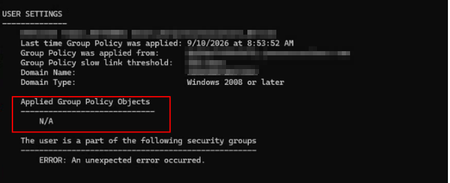
I have an environment with a Windows 10 AVD. When users sign into this environment there are no issues. I have created a new VM with Windows 11 AVD. Both Win 10 and Win 11 are domain joined. On the Win 10 the GPO's pushed have no issues but on the Win 11 AVD the GPO's are not populating. Running gpresult /r has this output: Running gpupdate /force then brings up the GPO's. So my frustration is I do not understand why the GPO's do not apply to user on sign in to their Win 11 instance. Anyone have any idea?248Views0likes2CommentsImproper AVD Host Decommissioning – A Practical Governance Framework
Hi everyone, After working with multiple production Azure Virtual Desktop environments, I noticed a recurring issue that rarely gets documented properly: Improper host decommissioning. Scaling out AVD is easy. Scaling down safely is where environments silently drift. Common issues I’ve seen in the field: Session hosts deleted before drain completion Orphaned Entra ID device objects Intune-managed device records left behind Stale registration tokens FSLogix containers remaining locked Defender onboarding objects not cleaned Host pool inconsistencies over time The problem is not technical complexity. It’s lifecycle governance. So I built a structured approach to host decommissioning focused on: Drain validation Active session verification Controlled removal from host pool VM deletion sequencing Identity cleanup validation Registration token rotation Logging and execution safety I’ve published a practical framework here: The framework is fully documented and includes validation logic and logging. https://github.com/modernendpoint/AVD-Host-Decommission-Framework The goal is simple: Not just removing a VM — but preserving platform integrity. I’m curious: How are you handling host lifecycle management in your AVD environments? Fully automated? Manual? Integrated with scaling plans? Identity cleanup included? Would love to hear how others approach this. Menahem Suissa AVD | Intune | Identity-Driven Architecture759Views0likes1CommentProblems with FSLogix 3.26 - W11 MU - 10 users per Vm
Scenario Overview We are documenting a recurring intermittent Denial of Service (DoS) regarding user profiles in an AVD multi-session environment using Azure Files Premium (SMB). The issue consistently surfaces after updating to the FSLogix 3.26 branch (v3.26.126.19110). Root Cause Analysis (Failure Logs) Through deep log analysis, we identified a "driver poisoning" pattern unique to version 3.26: SMB/Kerberos Handshake Sensitivity: Under varying storage response times (latency spikes of ~350ms vs. the usual ~40ms), version 3.26 triggers an intermittent 1326 error (Logon failure: unknown user name or bad password). Driver Execution Flow Corruption: Unlike previous versions, after this initial network/authentication glitch, the 3.26 driver fails to release execution threads or volume handles properly. Catastrophic Failure (Error 267): The system attempts to access the SecuredProfileRegData path within the mounted VHDX, but the driver returns Event ID 26: "0x10b - The directory name is invalid". Unrecoverable "Zombie" State: Once Error 267 occurs, the VM becomes "poisoned." It blocks all subsequent login attempts and even prevents a clean uninstallation of the agent (MSI Error 0x80070643 due to files being "in use"), necessitating a full VM reboot or redeployment. Has anyone else been through this? My first step was to go back to Agent Version 2506 (2210 Hotfix 4) Evidence of Success with Version 2506 (2210 Hotfix 4) After performing a clean deployment and reverting to version 3.25.626.21064, metrics from April 24, 2026, show absolute stability on the same infrastructure: Consistent Logon Times: Average profile load time of 1.6 seconds across multiple concurrent users Storage Efficiency: FindFile response times remained stable between 39ms and 45ms, with the agent successfully retrying any momentary delays. Error Resilience: Unlike v3.26, if this version encounters an authentication glitch (e.g., on a local service account), it bypasses the error and remains functional, allowing domain users to log in without collateral blockages. Concurrency Support: Seamlessly managed over 20 simultaneously mounted volumes without pointer collisions or kernel hangs.965Views1like4Comments
Windows App iOS RemoteApp Won't Reconnect
We are building a RemoteApp environment using AVD for the session hosts. On iOS, what happens is the screen powers off/device goes to sleep. When a user logs back into the iPad, the RemoteApp was still the focus, so they see buttons to reconnect or disconnect. If we press reconnect, it will either spin endlessly OR it will report an error on reconnection attempt. If we then close the error OR if we press disconnect where it drops us into the Windows App, then reopen the exact same Windows App it immediately reconnects. This does not happen in Windows at all, we have no Android deployments to test, and are trying iOS deployments on iPad and troubleshooting with iPhones. Both device types experience the issue. To troubleshoot, I've tried multiple iOS devices by multiple users; same problem. Those same users connecting to our AVD desktops, not RemoteApps, reconnect without issue. Our AVD and RemoteApp session hosts all use the same Group Policies and are, at this point, only domain joined, not Entra or Hybrid. Any thoughts on why this happens? Would logs be helpful?348Views0likes3CommentsDynamic hostpool sessions not updating
We have created a dynamic host pool in a test environment. We see that new hosts are being created based on the scaling plan. However, these are no longer being deleted. When we look at the status, we see that there are no active sessions, but when we zoom in on the session hosts, it shows that there is a session on two of the three hosts. The latter is incorrect, but it is likely the reason why scaling down is not taking place. Does anyone recognize this? Is there possibly a solution for this? Small addition: If I log in with a user and then log out properly, the current sessions in the host pool overview are updated quickly. However, if I then go to Manage, Session Hosts, the total sessions on that host remain at 1. When I now put the host in drinamode, only then are the actual sessions updated.249Views0likes1CommentUninstalling Remote Desktop client closes users' Windows App connections
We have our users working from Windows App now to meet the 3/27 out of support date. We are beginning to uninstall the Remote Desktop from their laptops and are finding it closes active Windows App connections on uninstall (of Remote Desktop). That is less than ideal. Looking to see if any way around that, but wondered if others had seen the same?428Views0likes2CommentsWindowsAppRuntime 1.4 Failures in AVD Multi-Session – Event ID 404 Production Case
We recently experienced a production issue in an Azure Virtual Desktop multi-session environment that initially looked random — but turned out to be a shared framework instability amplified by scale. Environment: AVD multi-session host pools FSLogix profile containers MSIX App Attach Intune-managed Clean golden image Everything looked healthy. Yet packaged applications started failing across multiple host pools. Symptoms observed Users reported: Error 0x80070005 AppXDeploymentServer Event ID 404 WindowsAppRuntime 1.4 marked as NeedsRemediation Failures persisted after: Reboots Host redeployments Image rebuild This was not: A profile corruption issue An App Attach packaging issue An Intune deployment failure What actually broke Under session churn conditions (logoff / new session / runtime re-validation), WindowsAppRuntime 1.4 entered a NeedsRemediation state. Event Viewer showed: AppXDeploymentServer Event ID 404 HRESULT 0x80070005 Runtime file creation failure under WindowsApps Multi-session did not cause the issue. It amplified it. Shared framework registration timing under concurrent sessions made a rare condition systemic. Why multi-session exposed it In single-session environments, runtime inconsistencies remain isolated. In multi-session: Shared framework dependencies are reused Concurrent validation occurs Host pools recycle under load Registration timing becomes critical What would be a rare edge case became recurring instability. Remediation approach Instead of periodic polling, we moved to event-driven self-healing. Detection trigger: AppXDeploymentServer Event ID 404 Remediation logic: Restart AppXSVC Re-provision WindowsAppRuntime 1.4 Prevent concurrent duplicate execution Log execution We implemented a Scheduled Task: Monitoring Operational log Triggering immediately on Event ID 404 Running under SYSTEM Deployed via Intune Win32 package Detection logic validating task presence This converted reactive troubleshooting into automated correction across host pools. Architectural takeaway Multi-session environments amplify shared dependency weaknesses. WindowsAppRuntime is not “just another component” — it is a platform dependency. If the runtime layer drifts, everything layered above it collapses: MSIX App Attach Packaged apps Registration consistency Self-healing must be part of AVD design. For the structured technical case study (including deployment pattern and remediation logic), full write-up here: https://modernendpoint.tech/avd-multi-session-failure-analysis/ Has anyone else observed WindowsAppRuntime 1.4 entering a NeedsRemediation state under multi-session load? Curious if others saw correlation with specific Windows updates. — Menahem Suissa Modern Endpoint Architect644Views1like2Comments