azure monitor
1324 Topics
Action required: PromQL regex matching in Azure Monitor Workspace is becoming spec-compliant
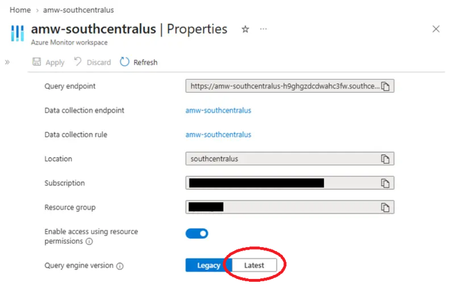
TL;DR: Bare regex matchers like pod=~"foo" will soon return only exact matches, not substring matches. If you rely on =~ for "starts with" or "contains" semantics, update your queries to add .* before the change lands. What is changing AMW's Prometheus Query Service is moving to fully-anchored regex matching, aligning with the upstream Prometheus specification. After the change, every =~ and !~ matcher is wrapped with ^…$ before evaluation. This matches the behavior of self-hosted Prometheus, Grafana Cloud Metrics, and Amazon Managed Prometheus. "Regex matches are fully anchored. A match of env=~"foo" is treated as env=~"^foo$"." Reference: Prometheus querying basics — Instant vector selectors Behavior delta Given these timeseries: kube_pod_container_status_ready{pod="grafana-otel-collector-97b6c55f4-abc12"} kube_pod_container_status_ready{pod="grafana-otel-collector-97b6c55f4-def34"} kube_pod_container_status_ready{pod="grafana-otel-collector-97b6c55f4"} Query: kube_pod_container_status_ready{pod=~"grafana-otel-collector-97b6c55f4"} Environment Effective regex Series returned AMW PQS — current grafana-otel-collector-97b6c55f4 (unanchored) 3 (all matching pods) AMW PQS — after change ^grafana-otel-collector-97b6c55f4$ 1 (exact name only) Self-hosted Prometheus, Grafana Cloud, AMP ^grafana-otel-collector-97b6c55f4$ 1 (exact name only) If your query depends on the first row, it will return fewer — often zero — series after the change. What to do Audit any query, alert rule, recording rule, or dashboard variable that uses =~ or !~. Map each to the table below. Intent Update to Exact match No change necessary; both label="value" and label=~"value" should return exact matches after updating query engine version for fully anchored regex support. Starts with label=~"value.*" Ends with label=~".*value" Contains label=~".*value.*" Set of prefixes label=~"(a\|b\|c).*" Recommendation: Where the intent is exact match, switch from =~ to = It is clearer to readers and skips per-series regex evaluation. When ready, update AMW configuration to use the latest Query engine version. This can be done via the Azure Portal UI, Azure CLI, or PowerShell. Configuring AMW to use the latest Prometheus query engine version Azure Portal In the Azure portal, open your Azure Monitor workspace. Under Settings, select Properties. Select the Latest segment of the Query engine version for the AMW. Azure CLI Run the following command to update to the latest (2.0) metrics query engine version for the AMW: Az monitor account metrics-container update --subscription <subscriptionId> -g <resourcegroupName> -w <azmonWorkspaceName> -n default --version 2.0 Azure PowerShell Run the following command to use the latest Query engine version for the AMW: $resourceId = “/subscriptions/<subscriptionId>/resourceGroups/<resourcegroupName>/providers/Microsoft.Monitor/accounts/<azureMonitorWorkspaceName>/metricsContainers/default” Az resource update --ids $resourceId --api-version 2025-10-03 --set properties.version=2.0 --force-string To confirm: Az resource show --ids $resourceId --api-version 2025-10-03 --query properties.version --output tsv Expected output: 2.0 Common pitfalls Alternation anchors the whole expression. pod=~"foo|bar" becomes ^(?:foo|bar)$, not ^foo|bar$. Add .* and parentheses for prefix sets. . matches any character, including -. pod=~"my-pod.*" will match my-pod-xyz, my-podxyz, and my-pod9xyz. Use character classes like [-] for tighter matches. Empty-label matching is unchanged. label=~"" still matches series without that label. Timeline Public Preview rollout: September 2026 In Public Preview, newly created AMWs will default to the latest metrics query version (“2.0”) which features fully anchored regex matching. AMWs created prior to September 2026 will continue using version (“1.0”) unless users take action to update. This provides users with the opportunity to verify their query intent and update accordingly prior to cutover to the latest AMW metrics query engine version. General Availability: March 2027 In General Availability, all AMWs regardless of creation date will be updated to version “2.0” for cross-workspace compatibility. Action window: Audit and update queries before the General Availability date.302Views0likes0CommentsUsage stats for Log Analytics?
Is there a way to view usage statistics for Log Analytics? Specifically, is there a way to view "when/what/who" queries have been executed in Log Analytics? I'd like to be able to generate some usage reports so that we can make sure that the service is being properly utilized by our users.966Views0likes1CommentAzure VMs host (platform) metrics (not guest metrics) to the log analytics workspace ?
Hi Team, Can some one help me how to send Azure VMs host (platform) metrics (not guest metrics) to the log analytics workspace ? Earlier some years ago I used to do it, by clicking on “Diagnostic Settings”, but now if I go to “Diagnostic Settings” tab its asking me to enable guest level monitoring (guest level metrics I don’t want) and pointing to a Storage Account. I don’t see the option to send the these metrics to Log analytics workspace. I have around 500 azure VMs whose host (platform) metrics (not guest metrics) I want to send it to the log analytics workspace.421Views0likes3CommentsUnderstanding billing for the Azure Copilot Observability Agent
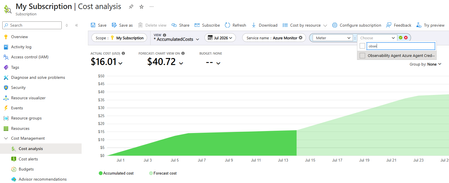
The Azure Copilot Observability Agent brings an agentic investigation experience directly into Azure Monitor. Teams can chat with their observability data, run deep investigations across application and infrastructure signals, and, in preview, use autonomous operations to correlate alerts and create issues for review. The common thread across these experiences is that the agent performs AI work on behalf of the user or configured workflow, and that work has a cost. Azure Copilot Observability Agent billing went into effect July 1, 2026. This post explains the billing model at a practical level: what is measured, which agent operations are billable today, how usage appears to users, and how this differs from the standard Azure Monitor costs customers already manage for telemetry ingestion, retention, alerting, and other monitoring capabilities. For current list pricing and the most detailed billing guidance, always refer to the official billing documentation and the Azure Monitor pricing page. A consumption-based model for agentic work The Observability Agent uses a consumption-based pricing model: customers pay for the AI work the agent performs. This consumption is measured in Azure Agent Credits, or AAC. AAC provides a consistent unit for agent work across models and tokens used. AAC is designed to reflect the amount of agentic processing required to complete a task. Simple questions, such as "what was the maximum latency of this app yesterday?", typically use few tokens. A deep investigation consumes more agent and tool work, and therefore typically incurs higher cost. Note that a single agent operation - be it a chat question or a deep investigation - is currently capped at 500 AACs. Charges are scoped to the Azure subscription of the monitored resource, or to the subscription of the named agent instance if one is used (required for autonomous operations). This keeps the cost associated with the environment where the agent is being used, and lets teams review agent consumption alongside other subscription-level Azure costs. What is billable today There are three main usage patterns to understand. Chat - the agent's chat allows users to explore and analyze their observability data through natural-language questions about their Azure resources and their logs, metrics, traces, or related telemetry, and the agent performs the work needed to answer. This is typically the lowest-cost pattern because the scope is often focused and iterative. Deep investigation - can be initiated through a number of entry points in the Azure Portal, and also through the chat (users can tell the agent to run a deep investigation). A deep investigation performs a broader analysis - it gathers signals, correlates findings, reasons across application, infrastructure, and Azure platform context, and produces an investigation report. Because this workflow runs multiple agent and tool steps, it typically consumes more AAC than chat. Autonomous operations are currently in preview. Autonomous alert processing, triage and optional correlation can run in the background to group related alerts and reduce noise. Alert correlation itself isn’t billed during preview. If autonomous operations automatically run a deep investigation on an agent-created issue, that deep investigation is billable. This is an important distinction: preview correlation and issue creation are different from the investigation work that may be triggered as part of that flow. How users see usage in the product Cost transparency is part of the experience. After the agent returns a response in chat, users can open the usage indicator (hexagon-shaped icon) located next to the thumbs-up/down icons, to see how many AACs were used to generate that response. This makes consumption visible at the point where the user sees the value of the answer, rather than only later in a billing report. This is especially useful because not all agent interactions are equal. A short question that summarizes a recent trend can require much less agent work than a long-running investigation that reviews multiple signals and hypotheses. Showing AAC usage per response helps users understand that relationship and adjust how they use the agent when needed. How costs appear in Azure Cost Management Teams can review the overall agent cost in subscription Cost Management. The product name appears as Azure Monitor Observability Agent, and the meter name appears as Observability Agent Azure Agent Credits. This gives admins a familiar place to monitor consumption. The agent cost is not a replacement for standard Azure Monitor charges. Existing Azure Monitor costs — such as logs ingestion, retention, alerting, web tests, and other metered monitoring capabilities — continue to follow their own billing models. Through Cost Analysis smart views, such as Services, users can select the Azure Monitor service and review specific entries of the Azure Monitor Observability Agent. Practical guidance for teams Start by using chat for focused exploration: ask about trends, errors, performance, anomalies, or a specific resource. Use deep investigations when you need a broader, multi-signal analysis of an incident or suspected root cause. Review the AAC usage shown after agent responses so users can build intuition about which prompts stay lightweight and which workflows require deeper analysis. Use Azure Cost Management to monitor the subscription-level cost of agent usage, and keep the Observability Agent cost distinct from standard Azure Monitor telemetry costs such as logs ingestion, retention, alerting, and web tests. For current pricing details, billable behavior, and any updates to what is billed in preview or GA experiences, use the official billing documentation as the source of truth. Coming up... Looking ahead, we plan to introduce billing caps for the Observability Agent, giving customers greater control over monthly token consumption, capacity usage, and overall costs. Learn more Billing and cost management for Azure Copilot Observability Agent Azure Copilot Observability Agent overview Chat with your observability data Deep investigations in the Azure Copilot Observability Agent Autonomous operations in the Observability Agent Azure Monitor pricing We’d love your feedback The Observability Agent continues to evolve based on real-world usage and operator feedback. Share feedback through the Give Feedback option in the product, or reach us at noakuper@microsoft.com.799Views0likes1CommentGoverning Log Analytics retention at scale
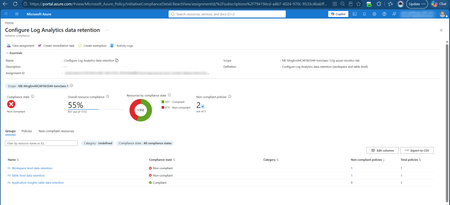
A Log Analytics workspace stores its data in tables, and data retention can be configured at two levels: Workspace level: a default interactive (Analytics) retention that applies to the whole workspace (30–730 days). Table level: each table has its own Analytics retention and its own total retention (Analytics + long-term/archive). By default a table's Analytics retention is set to "Workspace default", i.e. it inherits the workspace value. Two ideas are worth keeping in mind: Analytics vs. long-term (archive) retention. Analytics retention is the "hot", fully queryable period. Beyond that, data can be kept in cheaper long-term retention for compliance, and restored or searched when needed. See Manage data retention in a Log Analytics workspace. Tables can be configured individually: instead of configuring retention on the highest level, the workspace, this can also be done at a table level. The cost optimization opportunity Here's a concrete, very common scenario. A customer needs to retain data for 2 years. The typical reaction: set the workspace retention to 730 days. The catch: because every table's Analytics retention defaults to "Workspace default", this quietly sets the interactive (Analytics) retention of all tables to two years. Analytics retention is the expensive tier; so in many cases this drives up storage cost significantly, for data that nobody queries interactively after the first few weeks. A more cost-effective pattern is usually: Keep the workspace default retention low (for example 30 or 90 days - depending whether Sentinel and/or Application Insights are enabled). Set each table's Analytics retention to what it actually needs interactively (often 30–90 days). Use long-term (non-interactive) retention at the table level where you genuinely need to keep data longer (e.g. 2 years) for compliance, at a fraction of the Analytics cost. With a maximum of 12 years of retention. The result is the same "keep data for 2 years" outcome, but only the data you actually query interactively sits in the expensive tier. The governance opportunity Configuring this once in the portal is straightforward. The real win is making it consistent, scalable, and self-maintaining - and that's very achievable with the right approach: A single workspace can expose hundreds to well over a thousand tables, so a repeatable, automated method pays off quickly. With a central definition of your target retention model, you can apply it uniformly across many workspaces and subscriptions. Add drift detection and you'll always know when a table's retention changes - and can bring it back automatically. In other words, retention governance is a great candidate for policy-driven automation. To make it easy, I built a reusable solution and open-sourced it. The solution: law-retention-guardrails Repository: claestom/law-retention-guardrails The solution is Azure Policy, end to end. Two custom policy definitions, grouped into one initiative, both using the DeployIfNotExists effect: Definition Target What it sets Workspace retention Microsoft.OperationalInsights/workspaces the workspace default analytics retention Table retention Microsoft.OperationalInsights/workspaces/tables per-table analytics and total retention Because it's DeployIfNotExists, the policy does both jobs at once: Audit: Azure Policy → Compliance shows every workspace and table whose retention drifts from your target, fleet-wide. Remediate: new and updated resources are configured automatically, and a remediation task brings existing workspaces and tables into compliance. The assignment's managed identity (granted Log Analytics Contributor) performs the change. Keeping the free 90 days: Sentinel & Application Insights One nuance worth calling out. Enabling Microsoft Sentinel on a workspace, or using workspace-based Application Insights, grants 90 days of interactive (analytics) retention for free. A blanket 30-day target would throw that away. Application Insights is handled for you. The initiative ships a dedicated third policy that targets exactly the 11 workspace-based App Insights tables (AppRequests, AppDependencies, AppExceptions, AppTraces, ...). The general table policy excludes those same tables, so the two never overlap: a single assignment governs everything, with App Insights keeping its own values (appInsightsRetentionInDays / appInsightsTotalRetentionInDays, defaulting to 90 / 90) while the rest of your tables sit at the baseline. No second assignment, no wildcard juggling. Sentinel is a scope split. Sentinel's free 90 days apply at the workspace level, which the table exclusions don't cover. Since Sentinel usually lives in a dedicated workspace or resource group, assign 90-day values there and carve that scope out of the baseline with -NotScopes. Keep any such extra assignments mutually exclusive, two DeployIfNotExists assignments that both match the same resource will fight over it. How to deploy You need rights to create policy and role assignments at the target scope (e.g. Owner). Pick one of two paths. Option A: One click The repo ships a Deploy to Azure button backed by a subscription-scoped ARM template. It creates the three definitions, the initiative, the assignment (with a managed identity), and the Log Analytics Contributor role assignment — then you fill in the retention values in the portal form. You can optionally scope the assignment to a single resource group right in the form. Option B: The deploy script git clone https://github.com/claestom/law-retention-guardrails.git cd law-retention-guardrails ./deploy.ps1 -SubscriptionId <sub-id> ` -WorkspaceRetentionInDays 30 ` -TableRetentionInDays 30 ` -TableTotalRetentionInDays 730 ` -AppInsightsRetentionInDays 90 ` -AppInsightsTotalRetentionInDays 90 That single command creates the definitions and initiative, assigns it with a system-assigned managed identity, grants the identity Log Analytics Contributor, and starts a remediation task to fix existing resources. Scope it as narrowly or broadly as you like: # A management group ./deploy.ps1 -ManagementGroupId <mgId> # A single resource group ./deploy.ps1 -SubscriptionId <sub> -ResourceGroupName rg-monitoring # A single Log Analytics workspace ./deploy.ps1 -SubscriptionId <sub> ` -Scope /subscriptions/<sub>/resourceGroups/<rg>/providers/Microsoft.OperationalInsights/workspaces/<workspace> Prefer the portal? Paste each definition's azurepolicy.portal.json into Policy → Definitions → + Policy definition, then assign at the scope you want with a managed identity and a remediation task. A note on valid retention values Azure accepts these total retention values: 4–730 days, and beyond two years only full years: 1095, 1460, 1826, 2191, 2556, 2922, 3288, 3653, 4018, 4383. The solution validates this up front so you get a clear message instead of per-table errors. (Note: Basic/Auxiliary plan tables have a fixed analytics retention and will always report non-compliant - exempt them or treat as noise.) Wrapping up Configuring retention per table, keeping the workspace default low, trimming interactive retention, and pushing long-lived data into cheaper long-term retention, can meaningfully reduce Azure Monitor cost while still meeting compliance requirements. With law-retention-guardrails, that model is enforceable and auditable across your whole environment using nothing but Azure Policy: it tells you where you stand and fixes drift, with no Automation Account to run. I'd love your feedback and contributions on the repository. Resources Manage data retention in a Log Analytics workspace | Microsoft Learn Log Analytics workspace overview | Microsoft Learn Azure Policy documentation | Microsoft Learn Remediate non-compliant resources with Azure Policy | Microsoft Learn Azure Policy DeployIfNotExists effect | Microsoft Learn claestom/law-retention-guardrails (GitHub) Thank you!596Views2likes0CommentsAzure Monitor Health Model (Preview): What's New!
Azure Monitor Health Model is a modern observability capability that brings together telemetry, architecture, and business context of your workloads to generate health insights. It continuously aggregates signals across dependencies, producing a single, actionable health state which reduces alert noise and shifts team toward proactive operations with cohesive system view, clearer insights, and faster troubleshooting. It addresses the common operation question 'Is my system/service/app healthy?' and 'Which underlying unit / component is impacting health?' This refresh introduces flexible, workload-centric discovery (use application insights topology, Azure resource graph queries in addition to designing user and system flows) and smarter, faster health signal creation (use recommended signals, import existing alert rules, set dynamic thresholds). Expanded Discovery Scope As customers began modeling increasingly complex applications, we identified an opportunity to make discovery more flexible and intuitive. Teams naturally reason about their systems differently; some at the application level, others through infrastructure fleets or telemetry views. By expanding discovery options, we enable customers to build health models using the constructs they already use, making it easier to evolve health models as applications and architectures change. Azure Monitor health models now support multiple discovery mechanisms: Application Insights–based discovery for application-centric modelling Azure Resource Graph (ARG) discovery for scalable, query-based resource selection Continued support for Service Groups, now including nested Service Groups, as part of a broader set of discovery options This evolution reflects a shift toward loosely coupled modelling, enabling customers to define health based on application architecture rather than infrastructure-centric grouping. Learn more about Discovery Extended Health Signals Our goal has been to help customers achieve meaningful health insights faster with less manual effort. By introducing platform defaults and surfacing recommended signals, we make it easier to align health models with proven Azure best practices from day one. At the same time, we preserve support for existing alerting strategies and investments, ensuring customers can extend rather than replace what they already have. These enhancements balance simplicity, guidance, and flexibility as environments scale. Health Models now supports the following health signal capabilities: Resource Health as a default signal, ensuring every model starts with a reliable platform-provided baseline Recommended signals, automatically surfaced based on Azure service best practices and enhanced through Azure Monitor Baseline Alerts (AMBA) integration Reuse of existing signals, enabled by importing Azure Monitor alert rules as health signals Learn more about Signals Introducing Health Aggregation Rules Modern cloud applications are built for resiliency, redundancy, and tolerance of partial failure. Health Models are designed to reflect this reality by enabling customers to define what “healthy” means for their architecture. Flexible aggregation rules allow teams to model intent rather than individual component states, producing health views that better align with operational priorities and business impact. Health Models now supports advanced aggregation logic, enabling the following types of scenarios: Regional resiliency aggregation using numeric thresholds (e.g., 2 out of 4 regions must remain healthy) Cluster and fleet health aggregation using percentage thresholds (e.g., 60% of VMs in a cluster must be healthy) This enables modelling resiliency patterns, partial failures, and graceful degradation, providing a more accurate view of real business impact. Import Custom Signal Health is most valuable when it reflects both system behavior and application context. By enabling custom health inputs, customers can incorporate signals that are closest to their business logic and application state. Contextual annotations further enrich analysis, making health timelines easier to interpret and correlate with change events. To support this, Health Models now provides for: Custom health report ingestion for external application and system health signals Data annotations to overlay deployments, incidents, and configuration changes on health state Alert Experience To proactively learn about health state change, health models allow creating Alert rules and associated action group trigger automated responses sich as notifying user. It is now possible to view all the alerts on a Health Model and start troubleshooting. Alerts in Health Model Note: To avail these new capabilities, upgrade your health models to the new API version using built-in migration wizard in Azure portal for a simple, guided experience. Note: To avail these new capabilities, upgrade your health models to the new API version using built-in migration wizard in Azure portal for a simple, guided experience.1.4KViews0likes3CommentsShare Azure Monitor Logs to Microsoft Fabric (preview)
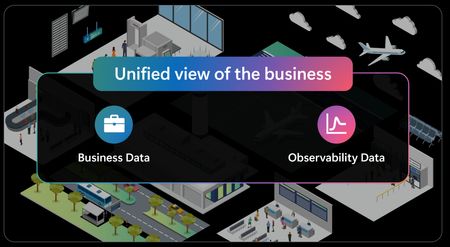
Azure Monitor Logs sharing to Microsoft Fabric is now in public preview. In just a few steps, you can share the logs you already send to a Log Analytics workspace with OneLake in Delta Parquet—the open format—without duplication, at no additional cost. This opens your observability data to all analytics, data science, and business intelligence tools available in Fabric. Today, observability, operational, and business data often live in separate silos. While Microsoft Fabric already provides a unified foundation in OneLake for business and operational data, observability data is frequently disconnected—hard to reach with the broader tools of your data estate, and disconnected from the business context needed to act. Sharing Azure Monitor data to Microsoft Fabric closes these gaps. Let's see how: Open format: your logs as Delta Parquet in OneLake In just a few steps, you can share every log you send to a Log Analytics workspace—across all tiers, including Analytics, Basic, and Auxiliary—to OneLake as Delta Parquet. Once setup completed, telemetry is available in Fabric without duplication, at no additional cost, and with near real-time availability. Because Delta Parquet is an open standard, you can read the same data with any engine that understands it—no proprietary export, no copy to maintain. Bring the full breadth of Fabric analytics to your telemetry With your logs in OneLake, you can apply the full range of Fabric analytics to your telemetry. Examples of what you can do: Build Power BI reports over long-term telemetry for trend analysis and reporting. Run Spark for large-scale processing, machine learning, and analysis across long ranges of historical telemetry. Query and correlate telemetry alongside operational and business data in one place—we'll explore this further in the next section. Going further: cross-domain intelligence The biggest shift comes when observability data is combined with business context and acted on in near real time. By bringing Azure Monitor telemetry together with business data such as ERP and CRM, organizations can reason and act across domains as events happen: Signals are evaluated with full business context, not as isolated alerts—so you can see who and what is affected, and how much it's costing. Signals turn into operational and business action—triggering the right response to mitigate the business impact of incidents before it grows. . Scenario in action: airport check-in disruption At Zava Airport, self-check-in kiosks stream telemetry into Azure Monitor. Following a deployment issue, customers are unable to complete self check-in. The Fabric Operations Agent detects the problem, enriches it with business context from ERP and CRM systems, and helps Vic, the operations manager, quickly understand that high-value loyalty customers are affected and that operational costs are rising. Based on this context, Vic approves the Operations Agent’s recommendations to open a dedicated counter to reduce customer impact and to escalate the issue to IT for faster resolution, given the high business impact. Instead of reacting after the fact, she makes decisions in the moment, based on full business context. Learn how organizations can move from operational signals to business action: So how is this powered in Fabric? Behind the scenes: how it's built in Fabric This experience runs on a simple, unified setup in Fabric: Azure Monitor data in OneLake — Telemetry from the Log Analytics workspace is brought in through a Mirrored Azure Monitor item, without duplication. Cross-domain data ready in Eventhouse — Telemetry and business data such as ERP and CRM are made available in one place, ready for real-time analysis and action. Real-time analytics and action — A Real-Time Dashboard and the Operations Agent run on this combined data, triggering automated actions across systems. Together, this creates a continuous flow from data to insight to action on a single data foundation. Learn how this solution is built in Microsoft Fabric: Key takeaways Multiple data domains, unified in OneLake — In a few steps, you can share your Azure Monitor Logs, across all tiers, to OneLake as open Delta Parquet, without duplication and at no additional cost. Full Fabric analytics — Power BI, Spark, and machine learning apply directly to your telemetry, alongside your business data. Real-time cross-domain intelligence — Observability and business data are reasoned about together in seconds, not passed sequentially between teams. Drive action, not just reports — The system detects, decides, and triggers actions based on all available context. Looking ahead... Fabric IQ and Ontology will further enrich the experience by helping organizations model business entities and relationships across domains, enabling even deeper understanding of business context. Next steps Explore how Azure Monitor data and business data come together in Microsoft Fabric to enable cross-domain intelligence, analytics, and action. We'd love to hear how this experience works for you. Drop us a comment or reach out to azmon-in-fabric@microsoft.com. Your input directly shapes what comes next.670Views2likes0CommentsPublic Preview: Advanced platform metrics in Azure Monitor
We are excited to announce the Public Preview of advanced platform metrics for Azure Monitor, delivering more granular telemetry to help customers monitor and optimize their workloads more effectively. This new capability builds on Azure Monitor platform metrics, which continue to provide broad insight into the health, activity, and consumption of Azure resources. Advanced platform metrics add finer-grained signals, helping customers pinpoint changes and trends within resources more quickly and accurately. Azure Storage is the first Azure resource to provide advanced platform metrics to customers. Today, Azure Storage users rely on platform metrics to understand overall storage account trends, but this account-level telemetry does not always show what is driving change. For example, a storage account may show steady capacity growth without revealing which specific container is responsible. That growth could be coming from one container used for backups, another storing application logs, or a staging container used by a data pipeline. Advanced platform metrics for Azure Monitor address this scenario by providing container-level visibility, helping customers quickly identify where growth is occurring, investigate unexpected consumption increases, and make more informed cost and capacity planning decisions. What is available in Public Preview? In Public Preview, the following advanced platform metrics are available for Azure Storage across all Azure public cloud regions: Container Blob Capacity: The amount of storage used by a specific container in a storage account. Container Blob Count: The number of blob objects in a specific container in a storage account. Pricing and billing Advanced platform metrics for Azure Monitor are offered as a paid capability during Public Preview. For the latest pricing details, see Azure Monitor pricing. Getting started Advanced platform metrics can be enabled per storage account through PowerShell or Azure CLI. For instructions on enabling, managing, and viewing Azure Storage advanced platform metrics, see Azure Platform Metrics for Azure Blob Storage (preview). After advanced platform metrics are enabled for a storage account, they can be queried, visualized, and used for alerts through the same existing platform metrics experiences. Container Blob Capacity and Container Blob Count will appear in the Metric dropdown menu in Metrics Explorer, alongside all existing Azure Storage platform metrics. Users can then select Apply splitting and choose Container name to view metrics for individual containers. The chart below shows container-level capacity data for three containers. Azure Storage scenarios enabled by advanced platform metrics Standard Azure Monitor platform metrics provide visibility into the storage account as a whole, such as total blob capacity or total object count. With the addition of advanced platform metrics for Azure Storage, customers can understand which individual containers are contributing to growth, object count increases, or operational issues, enabling scenarios such as: Cost analysis and internal attribution: In shared storage accounts, identify which containers are consuming the most storage so teams can better understand which applications, environments, or business functions are driving usage without building custom reporting pipelines for this scenario. Capacity planning and growth forecasting: Track storage growth at the container level to see which workloads are driving overall account growth and make more informed planning and budgeting decisions. Runaway storage growth detection: Quickly isolate individual containers experiencing unexpected increases in capacity or object count, reducing investigation time when usage changes unexpectedly. What's next? As the feature moves toward General Availability (GA) and beyond, customers can expect to see more advanced platform metrics for Azure Storage, as well as new advanced platform metrics for other Azure resources. Continue to follow the Azure Observability Blog for the latest updates. Feedback We would love to hear your feedback on advanced platform metrics, including how your teams are using the feature to optimize workloads and additional advanced platform metrics that you would like to see onboarded to Azure Monitor. Please fill out this Azure Monitor advanced platform metrics feedback form, or email advancedplatformmetrics@microsoft.com.1.2KViews1like0CommentsAzure Monitor Observability Agent goes autonomous (preview)
Autonomous operations for the Azure Copilot Observability Agent are now in public preview, alongside the agent's general availability. With autonomous operations enabled, the Observability Agent listens to your alerts as they fire, triages them in the background, and runs deep investigations on the issues it creates. Along the way, it correlates related alerts into a single issue - so your team starts from a small set of explained, investigated issues instead of a stream of raw alerts. Until now, teams invoked the agent when they needed it - an interactive assistant, ready to investigate when you pointed it at a problem. Now it also prepares triage context continuously, on its own, while people stay responsible for decisions and any change to the environment. See autonomous operations in action. The Observability Agent triages incoming alerts, correlates related ones into a single Azure Monitor issue, and runs a deep investigation automatically, with no human trigger. From alerts to answers Azure Monitor already gives you strong signals when something is wrong - across both metric and log alerts. Dynamic thresholds learn normal behavior and flag anomalies automatically, and that same anomaly detection now extends to log search alerts and, in preview, to Prometheus and OpenTelemetry metrics. Smart detection in Application Insights surfaces failures and performance anomalies without manual rules. The hard part is what happens next: connecting dozens of alerts, working out what they share, and figuring out what's actually going on - before anyone can act. That's the work that still lands on a person, often in the middle of the night. It's exactly where the Observability Agent comes in. What's in the public preview In public preview, you can enable the Observability Agent to: Promote individual prominent alerts into issues when you configure that with custom instructions. Run a deep investigation automatically on every issue it creates. Correlate related alerts into a single Azure Monitor issue, with a natural-language explanation of why they belong together. You provision the agent once as a resource in your Azure environment - a dedicated identity to scope, govern, and assign autonomous tasks to - then turn on autonomous operations and it gets to work. What it changes for your team The outcome is fewer things to look at and faster triage: Your team works from a short queue of meaningful issues, not a constant stream of alerts. Each issue arrives with context, reasoning, and an investigation already attached. Low-priority issues can be reviewed and dismissed in seconds. The assembly work that used to come first now happens before anyone is paged. People still make every decision and every change. The agent just makes sure they start with full context. How it works Your own instructions. Topology shows how services connect, but your team knows which boundaries matter: ownership, escalation paths, and the alerts that should always become issues. Custom instructions let you capture that in plain language and apply it going forward. For example: "The billing service is owned by a different team with a separate on-call rotation. Even when billing alerts fire alongside clinical service alerts, treat them as separate issues." Instructions shape how the agent correlates and creates issues. They don't grant permissions, bypass Azure RBAC, or change resources. Automatic topology discovery. Point the agent at your Application Insights resource and it maps services, dependencies, and how they relate. That map becomes persisted knowledge the agent builds and reuses - the same context that grounds both its correlation decisions and its deep investigations, so reasoning reflects your real architecture instead of starting from scratch each time. Deeper investigations. When the agent investigates a correlated issue, it starts from the whole picture: every related alert, every impacted resource, and the reasoning correlation already produced. The result is sharper root-cause hypotheses and recommendations that account for the full scope of impact. In practice A database latency spike triggers alerts across checkout, billing, and recommendation services. Without autonomous operations, each alert is triaged on its own. With autonomous operations enabled, the Observability Agent groups the related alerts into one issue, explains the shared timeline, and starts investigating automatically. Because your custom instructions define billing as a separate ownership boundary, its alerts become a distinct issue routed to that team's rotation. Responders start from two clear, ownership-aligned issues - each already investigated - instead of dozens of isolated alerts. What's next Autonomous operations mark the next step for the Observability Agent: from user-invoked analysis to continuous preparation. The agent assembles the context, explains the issue, and runs the investigation; your team reviews the evidence and decides what to do. And once issues are created, you can act on them. Azure Monitor issues connect to Action Groups, so approved actions can flow into your existing workflows - more on that in a future post. Next steps Learn how to get started with the Azure Copilot Observability Agent. Review the preview details in Autonomous operations in the Observability Agent. Explore how investigations work in Deep investigations in the Observability Agent. Learn how teams preserve context with Azure Monitor issues. Stay connected Follow this blog for ongoing deep dives, updates on current capabilities, and a preview of what's coming next. Live webinar A walkthrough of real Observability Agent scenarios, best practices, and what's available today, along with a look at what's coming next and live Q&A with the product team. Register for the Observability Agent webinar We'd love your feedback The Observability Agent continues to evolve based on real-world usage and operator feedback. Share your thoughts directly through the Give Feedback option in the experience or reach us at azureobsagent@microsoft.com. 598Views1like0Comments