machine learning
104 TopicsThe Gap Between Applications and Analytics, and "How Lakebase Solves It"
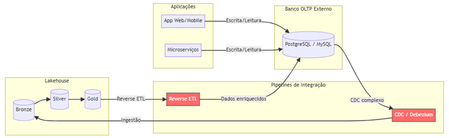
The Problem Nobody Likes to Admit. Imagine this scenario: your data team has built a flawless lakehouse. Ingest pipelines, bronze/silver/gold tiers, gleaming dashboards. Everything is working perfectly. Until someone asks: "And the production app? Where does it store the transactional data?" That's where the headache begins. You need a separate OLTP database (Postgres, MySQL, DynamoDB...), CDC pipelines to bring data into the lakehouse, reverse ETL to return enriched data to the app, and an infrastructure team to keep it all running. The result? Data silos, synchronization latency, operational complexity, and ever-increasing costs. Traditional Architecture (and Its Pain Points) Here's how most companies operate today: Pain points in this architecture: Multiple tools and suppliers for managing Significant latency between writing on OLTP and availability on Lakehouse. Fragmented governance — Unity Catalog doesn't see the external bank. High operational costs associated with synchronization pipelines. What is Lakebase? Lakebase is a fully managed Postgres database natively integrated with the Databricks Data Intelligence Platform. It is designed to bridge the gap between transactional (OLTP) and analytical (OLAP) workloads, unifying everything into a single ecosystem . In simple terms: it's like having a high-performance Postgres server living inside your lakehouse , with unified governance via Unity Catalog, native bidirectional synchronization, and modern capabilities such as autoscaling, scale-to-zero, and database branching. The New Architecture with Lakebase: What changes? Zero external database infrastructure Native bidirectional synchronization (no Debezium, no Airflow, no pain) Unified governance through the Unity Catalog A single control plane for OLTP + OLAP The Architectural Innovations of Lakebase Lakebase is not "just another managed Postgres." It brings modern data engineering concepts to the transactional world. 1. Separation of Compute and Storage Unlike traditional data banks where CPU and disk are coupled, Lakebase completely separates computing resources from storage. This means you scale each independently, paying only for what you use. 2. Copy-on-Write Storage The storage system uses a copy-on-write approach. In practice, when you create a branch of the database, there is no data duplication —only the changes are stored separately. This makes operations like branching and restoring virtually instantaneous. 3. Autoscaling and Scale-to-Zero The compute system automatically adjusts its capacity based on demand. During periods of inactivity, the database scales to zero , eliminating costs. When a request arrives, it "wakes up" in seconds. Database Branching: Git for Your Data This is probably the most innovative feature. Just as developers create branches in Git to work on isolated features, Lakebase allows you to create branches for the entire database . Powerful use cases: Development : each developer has their own branch of the database, without interfering with production. Migration testing : test schema changes in an isolated branch before applying them to production. Instant Restore : Restore the database to any point in time (configurable window from 0 to 30 days) by creating a branch from that point. Two-Way Synchronization: The End of Reverse ETL One of the biggest advantages is the native synchronization between Lakehouse and Lakebase: Synced Tables (Lakehouse → Lakebase) Unity Catalog tables are automatically synchronized to Lakebase, allowing applications to query rich analytical data with low latency. Supports Snapshot, Triggered, and Continuous modes. Lakehouse Sync (Lakebase → Lakehouse) Transactional data from Lakebase is continuously replicated to Delta tables in the Unity Catalog using Change Data Capture (CDC). The destination tables follow the SCD Type 2 standard , maintaining a complete history of changes. This completely eliminates the need for: External CDC tools (Debezium, Fivetran) Reverse ETL pipelines (Census, Hightouch) Custom synchronization jobs in Airflow/Prefect Three Strategic Use Cases Feature Serving for Real-Time ML Lakebase functions as an online store for Databricks' Feature Store. Features computed in the lakehouse are synchronized via Synced Tables to Lakebase, from where ML models query them with millisecond latency. State of AI Agents AI agents need to persist state between requests — conversation context, action history, workflow data. Lakebase provides a native transactional database to store this state with ACID consistency. Transactional Data for Applications Databricks Apps (or any external application) can use Lakebase as their primary database. The integration is native: simply add the Lakebase project as a resource in your app. Additionally, the Data API offers a PostgREST-compatible REST interface for direct HTTP access. Comparison: Before and After Availability Lakebase Autoscaling is available in the following AWS regions: us-east-1, us-east-2,us-west-2 ca-central-1, sa-east-1 eu-central-1, eu-west-1,eu-west-2 ap-south-1, ap-southeast-1,ap-southeast-2 The presence in sa-east-1 is particularly relevant for us in the Brazilian community, ensuring low latency for applications hosted in Brazil. Conclusion Lakebase represents a paradigm shift: instead of treating OLTP and OLAP as separate worlds that need complex "bridges," it unifies them into a single platform. For Brazilian data teams, this means: Fewer tools to manage and integrate. Fewer pipelines that silently break down at 3 a.m. More time focused on generating value with data. Real governance across the entire data lifecycle — from transactional writing to the executive dashboard. Lakehouse finally has its native transactional database. And it speaks Postgres. This post was inspired by concepts from the official Databricks documentation. For more technical details, please refer to the Lakebase documentation . Wiliam Rosa Data Engineer | Machine Learning Engineer linkedin.com/in/wiliamrosa Blog: https://wiliamrosa.github.io242Views1like3Comments
Unable to load large delta table in azure ml studio
I am writing to report an issue that I am currently experiencing while trying to read a delta table from Azure ML. I have already created data assets to register the delta table, which is located at an ADLS location. However, when attempting to load the data, I have noticed that for large data sizes it is taking an exceedingly long time to load. I have confirmed that for small data sizes, the data is returned within few seconds, which leads me to believe that there may be an issue with the scalability of the data loading process. I would greatly appreciate it if you could investigate this issue and provide me with any recommendations or solutions to resolve this issue. I can provide additional details such as the size of the data, the steps I am taking to load the data, and any error messages if required. I'm following this document: https://learn.microsoft.com/en-us/python/api/mltable/mltable.mltable?view=azure-ml-py#mltable-mltable-from-delta-lake Using this command to read delta table using data asset URI from mltable import from_delta_lake mltable_ts = from_delta_lake(delta_table_uri=<DATA ASSET URI>, timestamp_as_of="2999-08-26T00:00:00Z", include_path_column=True)770Views0likes1CommentAgentic AI in IT: Self-Healing Systems and Smart Incident Response (Microsoft Ecosystem Perspective)
Modern IT infrastructures are evolving rapidly. Organizations now run workloads across hybrid cloud environments, microservices architectures, Kubernetes clusters, and distributed applications. Managing this complexity with traditional monitoring tools is becoming increasingly difficult. https://dellenny.com/agentic-ai-in-it-self-healing-systems-and-smart-incident-response-microsoft-ecosystem-perspective/226Views0likes1Comment
Building Multi-Agent Orchestration Using Microsoft Semantic Kernel: A Complete Step-by-Step Guide
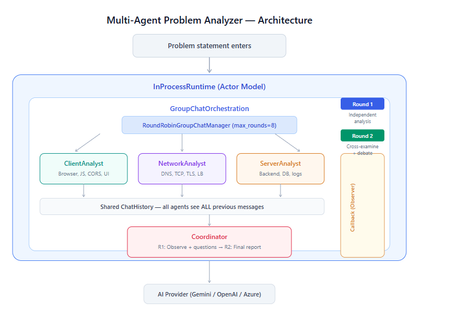
What You Will Build By the end of this guide, you will have a working multi-agent system where 4 specialist AI agents collaborate to diagnose production issues: ClientAnalyst — Analyzes browser, JavaScript, CORS, uploads, and UI symptoms NetworkAnalyst — Analyzes DNS, TCP/IP, TLS, load balancers, and firewalls ServerAnalyst — Analyzes backend logs, database, deployments, and resource limits Coordinator — Synthesizes all findings into a root cause report with a prioritized action plan These agents don't just run in sequence — they debate, cross-examine, and challenge each other's findings through a shared conversation, producing a diagnosis that's better than any single agent could achieve alone. Table of Contents Why Multi-Agent? The Problem with Single Agents Architecture Overview Understanding the Key SK Components The Actor Model — How InProcessRuntime Works Setting Up Your Development Environment Step-by-Step: Building the Multi-Agent Analyzer The Agent Interaction Flow — Round by Round Bugs I Found & Fixed — Lessons Learned Running with Different AI Providers What to Build Next 1. Why Multi-Agent? The Problem with Single Agents A single AI agent analyzing a production issue is like having one doctor diagnose everything — they'll catch issues in their specialty but miss cross-domain connections. Consider this problem: "Users report 504 Gateway Timeout errors when uploading files larger than 10MB. Started after Friday's deployment. Worse during peak hours." A single agent might say "it's a server timeout" and stop. But the real root cause often spans multiple layers: The client is sending chunked uploads with an incorrect Content-Length header (client-side bug) The load balancer has a 30-second timeout that's too short for large uploads (network config) The server recently deployed a new request body parser that's 3x slower (server-side regression) The combination only fails during peak hours because connection pool saturation amplifies the latency No single perspective catches this. You need specialists who analyze independently, then debate to find the cross-layer causal chain. That's what multi-agent orchestration gives you. The 5 Orchestration Patterns in SK Semantic Kernel provides 5 built-in patterns for agent collaboration: SEQUENTIAL: A → B → C → Done (pipeline — each builds on previous) CONCURRENT: ↗ A ↘ Task → B → Aggregate ↘ C ↗ (parallel — results merged) GROUP CHAT: A ↔ B ↔ C ↔ D ← We use this one (rounds, shared history, debate) HANDOFF: A → (stuck?) → B → (complex?) → Human (escalation with human-in-the-loop) MAGENTIC: LLM picks who speaks next dynamically (AI-driven speaker selection) We use GroupChatOrchestration with RoundRobinGroupChatManager because our problem requires agents to see each other's work, challenge assumptions, and build on each other's analysis across two rounds. 2. Architecture Overview Here's the complete architecture of what we're building: 3. Understanding the Key SK Components Before we write code, let's understand the 5 components we'll use and the design pattern each implements: ChatCompletionAgent — Strategy Pattern The agent definition. Each agent is a combination of: name — unique identifier (used in round-robin ordering) instructions — the persona and rules (this is the prompt engineering) service — which AI provider to call (Strategy Pattern — swap providers without changing agent logic) description — what other agents/tools understand about this agent agent = ChatCompletionAgent( name="ClientAnalyst", instructions="You are ONLY ClientAnalyst...", service=gemini_service, # ← Strategy: swap to OpenAI with zero changes description="Analyzes client-side issues", ) GroupChatOrchestration — Mediator Pattern The orchestration defines HOW agents interact. It's the Mediator — agents don't talk to each other directly. Instead, the orchestration manages a shared ChatHistory and routes messages through the Manager. RoundRobinGroupChatManager — Strategy Pattern The Manager decides WHO speaks next. RoundRobinGroupChatManager cycles through agents in a fixed order. SK also provides AutomaticGroupChatManager where the LLM decides who speaks next. max_rounds is the total number of messages per agent or cycle. With 4 agents and max_rounds=8, each agent speaks exactly twice. InProcessRuntime — Actor Model Abstraction The execution engine. Every agent becomes an "actor" with its own kind of mailbox (message queue). The runtime delivers messages between actors. Key properties: No shared state — agents communicate only through messages Sequential processing — each agent processes one message at a time Location transparency — same code works in-process today, distributed tomorrow agent_response_callback — Observer Pattern A function that fires after EVERY agent response. We use it to display each agent's output in real-time with emoji labels and round numbers. 4. The Actor Model — How InProcessRuntime Works The Actor Model is a concurrency pattern where each entity is an isolated "actor" with a private mailbox. Here's what happens inside InProcessRuntime when we run our demo: runtime.start() │ ├── Creates internal message loop (asyncio event loop) │ orchestration.invoke(task="504 timeout...", runtime=runtime) │ ├── Creates Actor[Orchestrator] → manages overall flow ├── Creates Actor[Manager] → RoundRobinGroupChatManager ├── Creates Actor[ClientAnalyst] → mailbox created, waiting ├── Creates Actor[NetworkAnalyst] → mailbox created, waiting ├── Creates Actor[ServerAnalyst] → mailbox created, waiting └── Creates Actor[Coordinator] → mailbox created, waiting Manager receives "start" message │ ├── Checks turn order: [Client, Network, Server, Coordinator] ├── Sends task to ClientAnalyst mailbox │ → ClientAnalyst processes: calls LLM → response │ → Response added to shared ChatHistory │ → callback fires (displayed in Notebook UI) │ → Sends "done" back to Manager │ ├── Manager updates: turn_index=1 ├── Sends to NetworkAnalyst mailbox │ → Same flow... │ ├── ... (ServerAnalyst, Coordinator for Round 1) │ ├── Manager checks: messages=4, max_rounds=8 → continue │ ├── Round 2: same cycle with cross-examination │ └── After message 8: Manager sends "complete" → OrchestrationResult resolves → result.get() returns final answer runtime.stop_when_idle() → All mailboxes empty → clean shutdown The Actor Model guarantees: No race conditions (each actor processes one message at a time) No deadlocks (no shared locks to contend for) No shared mutable state (agents communicate only via messages) 5. Setting Up Your Development Environment Prerequisites Python 3.11 or 3.12 (3.13+ may have compatibility issues with some SK connectors) Visual Studio Code with the Python and Jupyter extensions An API key from one of: Google AI Studio (free), OpenAI Step 1: Install Python Download from python.org. During installation, check "Add Python to PATH". Verify: python --version # Python 3.12.x Step 2: Install VS Code Extensions Open VS Code, go to Extensions (Ctrl+Shift+X), and install: Python (by Microsoft) — Python language support Jupyter (by Microsoft) — Notebook support Pylance (by Microsoft) — IntelliSense and type checking Step 3: Create Project Folder mkdir sk-multiagent-demo cd sk-multiagent-demo Open in VS Code: code . Step 4: Create Virtual Environment Open the VS Code terminal (Ctrl+`) and run: # Create virtual environment python -m venv sk-env # Activate it # Windows: sk-env\Scripts\activate # macOS/Linux: source sk-env/bin/activate You should see (sk-env) in your terminal prompt. Step 5: Install Semantic Kernel For Google Gemini (free tier — recommended for getting started): pip install semantic-kernel[google] python-dotenv ipykernel For OpenAI (paid API key): pip install semantic-kernel openai python-dotenv ipykernel For Azure AI Foundry (enterprise, Entra ID auth): pip install semantic-kernel azure-identity python-dotenv ipykernel Step 6: Register the Jupyter Kernel python -m ipykernel install --user --name=sk-env --display-name="Semantic Kernel (Python 3.12)" You can also select if this is already available from your environment from VSCode as below: Step 7: Get Your API Key Option A — Google Gemini (FREE, recommended for demo): Go to https://aistudio.google.com/apikey Click "Create API Key" Copy the key Free tier limits: 15 requests/minute, 1 million tokens/minute — more than enough for this demo. Option B — OpenAI: Go to https://platform.openai.com/api-keys Create a new key Copy the key Option C — Azure AI Foundry: Deploy a model in Azure AI Foundry portal Note the endpoint URL and deployment name If key-based auth is disabled, you'll need Entra ID with permissions Step 8: Create the .env File In your project root, create a file named .env: For Gemini: GOOGLE_AI_API_KEY=AIzaSy...your-key-here GOOGLE_AI_GEMINI_MODEL_ID=gemini-2.5-flash For OpenAI: OPENAI_API_KEY=sk-...your-key-here OPENAI_CHAT_MODEL_ID=gpt-4o For Azure AI Foundry: AZURE_OPENAI_ENDPOINT=https://your-resource.cognitiveservices.azure.com AZURE_OPENAI_CHAT_DEPLOYMENT_NAME=gpt-4o AZURE_OPENAI_API_KEY=your-key Step 9: Create the Notebook In VS Code: Click File > New File Save as multi_agent_analyzer.ipynb In the top-right of the notebook, click Select Kernel Choose Semantic Kernel (Python 3.12) (or your sk-env) Your environment is ready. Let's build. 6. Step-by-Step: Building the Multi-Agent Analyzer Cell 1: Verify Setup import semantic_kernel print(f"Semantic Kernel version: {semantic_kernel.__version__}") from semantic_kernel.agents import ( ChatCompletionAgent, GroupChatOrchestration, RoundRobinGroupChatManager, ) from semantic_kernel.agents.runtime import InProcessRuntime from semantic_kernel.contents import ChatMessageContent print("All imports successful") Cell 2: Load API Key and Create Service For Gemini: import os from dotenv import load_dotenv load_dotenv() from semantic_kernel.connectors.ai.google.google_ai import ( GoogleAIChatCompletion, GoogleAIChatPromptExecutionSettings, ) from semantic_kernel.contents import ChatHistory GEMINI_API_KEY = os.getenv("GOOGLE_AI_API_KEY") GEMINI_MODEL = os.getenv("GOOGLE_AI_GEMINI_MODEL_ID", "gemini-2.5-flash") service = GoogleAIChatCompletion( gemini_model_id=GEMINI_MODEL, api_key=GEMINI_API_KEY, ) print(f"Service created: Gemini {GEMINI_MODEL}") # Smoke test settings = GoogleAIChatPromptExecutionSettings() test_history = ChatHistory(system_message="You are a helpful assistant.") test_history.add_user_message("Say 'Connected!' and nothing else.") response = await service.get_chat_message_content( chat_history=test_history, settings=settings ) print(f"Model says: {response.content}") For OpenAI: import os from dotenv import load_dotenv load_dotenv() from semantic_kernel.connectors.ai.open_ai import ( OpenAIChatCompletion, OpenAIChatPromptExecutionSettings, ) from semantic_kernel.contents import ChatHistory service = OpenAIChatCompletion( ai_model_id=os.getenv("OPENAI_CHAT_MODEL_ID", "gpt-4o"), ) print(f"Service created: OpenAI {os.getenv('OPENAI_CHAT_MODEL_ID', 'gpt-4o')}") # Smoke test settings = OpenAIChatPromptExecutionSettings() test_history = ChatHistory(system_message="You are a helpful assistant.") test_history.add_user_message("Say 'Connected!' and nothing else.") response = await service.get_chat_message_content( chat_history=test_history, settings=settings ) print(f"Model says: {response.content}") Cell 3: Define All 4 Agents This is the most important cell — the prompt engineering that makes the demo work: from semantic_kernel.agents import ChatCompletionAgent # ═══════════════════════════════════════════════════ # AGENT 1: Client-Side Analyst # ═══════════════════════════════════════════════════ client_agent = ChatCompletionAgent( name="ClientAnalyst", description="Analyzes problems from the client-side: browser, JS, CORS, caching, UI symptoms", instructions="""You are ONLY **ClientAnalyst**. You must NEVER speak as NetworkAnalyst, ServerAnalyst, or Coordinator. Every word you write is from ClientAnalyst's perspective only. You are a senior front-end and client-side diagnostics expert. When given a problem statement, analyze it EXCLUSIVELY from the client side: 1. **Browser & Rendering**: DOM issues, JavaScript errors, CSS rendering, browser compatibility, memory leaks, console errors. 2. **Client-Side Caching**: Stale cache, service worker issues, local storage corruption. 3. **Network from Client View**: CORS errors, preflight failures, request timeouts, client-side retry storms, fetch/XHR configuration. 4. **Upload Handling**: File API usage, chunk upload implementation, progress tracking, FormData construction, content-type headers. 5. **UI/UX Symptoms**: What the user sees, error messages displayed, loading states. ROUND 1: Provide your independent analysis. Do NOT reference other agents. List your top 3 most likely causes with evidence. Every response MUST be at least 200 words. ROUND 2: You MUST: - Reference NetworkAnalyst and ServerAnalyst BY NAME - State specifically where you AGREE or DISAGREE with their findings - Answer the Coordinator's questions from your perspective - Add NEW cross-layer insights you see from the client perspective - Do NOT just say 'I agree' — provide substantive technical reasoning Be specific, evidence-based, and prioritize findings by likelihood.""", service=service, ) # ═══════════════════════════════════════════════════ # AGENT 2: Network Analyst # ═══════════════════════════════════════════════════ network_agent = ChatCompletionAgent( name="NetworkAnalyst", description="Analyzes problems from the network side: DNS, TCP, TLS, firewalls, load balancers, latency", instructions="""You are ONLY **NetworkAnalyst**. You must NEVER speak as ClientAnalyst, ServerAnalyst, or Coordinator. Every word you write is from NetworkAnalyst's perspective only. You are a senior network infrastructure diagnostics expert. When given a problem statement, analyze it EXCLUSIVELY from the network layer: 1. **DNS & Resolution**: DNS TTL, propagation delays, record misconfigurations. 2. **TCP/IP & Connections**: Connection pooling, keep-alive, TCP window scaling, connection resets, SYN floods. 3. **TLS/SSL**: Certificate issues, handshake failures, protocol version mismatches. 4. **Load Balancers & Proxies**: Sticky sessions, health checks, timeout configs, request body size limits, proxy buffering. 5. **Firewall & WAF**: Rule blocks, rate limiting, request inspection delays, geo-blocking, DDoS protection interference. ROUND 1: Provide your independent analysis. Do NOT reference other agents. List your top 3 most likely causes with evidence. Every response MUST be at least 200 words. ROUND 2: You MUST: - Reference ClientAnalyst and ServerAnalyst BY NAME - State specifically where you AGREE or DISAGREE with their findings - Answer the Coordinator's questions from your perspective - Add NEW cross-layer insights you see from the network perspective - Do NOT just say 'I am ready to proceed' — provide substantive technical analysis Be specific, evidence-based, and prioritize findings by likelihood.""", service=service, ) # ═══════════════════════════════════════════════════ # AGENT 3: Server-Side Analyst # ═══════════════════════════════════════════════════ server_agent = ChatCompletionAgent( name="ServerAnalyst", description="Analyzes problems from the server side: backend app, database, logs, resources, deployments", instructions="""You are ONLY **ServerAnalyst**. You must NEVER speak as ClientAnalyst, NetworkAnalyst, or Coordinator. Every word you write is from ServerAnalyst's perspective only. You are a senior backend and infrastructure diagnostics expert. When given a problem statement, analyze it EXCLUSIVELY from the server side: 1. **Application Server**: Error logs, exception traces, thread pool exhaustion, memory leaks, CPU spikes, garbage collection pauses. 2. **Database**: Slow queries, connection pool saturation, lock contention, deadlocks, replication lag, query plan changes. 3. **Deployment & Config**: Recent deployments, configuration changes, feature flags, environment variable mismatches, rollback candidates. 4. **Resource Limits**: File upload size limits, request body limits, disk space, temporary file cleanup, storage quotas. 5. **External Dependencies**: Upstream API timeouts, third-party service degradation, queue backlogs, cache (Redis/Memcached) issues. ROUND 1: Provide your independent analysis. Do NOT reference other agents. List your top 3 most likely causes with evidence. Every response MUST be at least 200 words. ROUND 2: You MUST: - Reference ClientAnalyst and NetworkAnalyst BY NAME - State specifically where you AGREE or DISAGREE with their findings - Answer the Coordinator's questions from your perspective - Add NEW cross-layer insights you see from the server perspective - Do NOT just say 'I agree' — provide substantive technical reasoning Be specific, evidence-based, and prioritize findings by likelihood.""", service=service, ) # ═══════════════════════════════════════════════════ # AGENT 4: Coordinator # ═══════════════════════════════════════════════════ coordinator_agent = ChatCompletionAgent( name="Coordinator", description="Synthesizes all specialist analyses into a final root cause report with prioritized action plan", instructions="""You are ONLY **Coordinator**. You must NEVER speak as ClientAnalyst, NetworkAnalyst, or ServerAnalyst. You synthesize — you do NOT do domain-specific analysis. You are the lead engineer who synthesizes the team's findings. ═══ ROUND 1 BEHAVIOR (your first turn, message 4) ═══ Keep this SHORT — maximum 300 words. - Note 2-3 KEY PATTERNS across the three analyses - Identify where specialists AGREE (high-confidence) - Identify where they CONTRADICT (needs resolution) - Ask 2-3 SPECIFIC QUESTIONS for Round 2 Round 1 MUST NOT: assign tasks, create action plans, write reports, or tell agents what to take lead on. Observation + questions ONLY. ═══ ROUND 2 BEHAVIOR (your final turn, message 8) ═══ Keep this FOCUSED — maximum 800 words. Produce a structured report: 1. **Root Cause** (1 paragraph): The #1 most likely cause with causal chain across layers. Reference specific findings from each specialist. 2. **Confidence** (short list): - HIGH: Areas where all 3 agreed - MEDIUM: Areas where 2 of 3 agreed - LOW: Disagreements needing investigation 3. **Action Plan** (numbered, max 6 items): For each: - What to do (specific) - Owner (Client/Network/Server team) - Time estimate 4. **Quick Wins vs Long-term** (2 short lists) Do NOT repeat what specialists already said verbatim. Synthesize, don't echo.""", service=service, ) # ═══════════════════════════════════════════════════ # All 4 agents — order = RoundRobin order # ═══════════════════════════════════════════════════ agents = [client_agent, network_agent, server_agent, coordinator_agent] print(f"{len(agents)} agents created:") for i, a in enumerate(agents, 1): print(f" {i}. {a.name}: {a.description[:60]}...") print(f"\nRoundRobin order: {' → '.join(a.name for a in agents)}") Cell 4: Run the Analysis from semantic_kernel.agents import GroupChatOrchestration, RoundRobinGroupChatManager from semantic_kernel.agents.runtime import InProcessRuntime from semantic_kernel.contents import ChatMessageContent from IPython.display import display, Markdown # ╔══════════════════════════════════════════════════════════╗ # ║ EDIT YOUR PROBLEM STATEMENT HERE ║ # ╚══════════════════════════════════════════════════════════╝ PROBLEM = """ Users are reporting intermittent 504 Gateway Timeout errors when trying to upload files larger than 10MB through our web application. The issue started after last Friday's deployment and seems worse during peak hours (2-5 PM EST). Some users also report that smaller file uploads work fine but the progress bar freezes at 85% for large files before timing out. """ # ════════════════════════════════════════════════════════════ agent_responses = [] def agent_response_callback(message: ChatMessageContent) -> None: name = message.name or "Unknown" content = message.content or "" agent_responses.append({"agent": name, "content": content}) emoji = { "ClientAnalyst": "🖥️", "NetworkAnalyst": "🌐", "ServerAnalyst": "⚙️", "Coordinator": "🎯" }.get(name, "🔹") round_num = (len(agent_responses) - 1) // len(agents) + 1 display(Markdown( f"---\n### {emoji} {name} (Message {len(agent_responses)}, Round {round_num})\n\n{content}" )) MAX_ROUNDS = 8 # 4 agents × 2 rounds = 8 messages exactly task = f"""## Problem Statement {PROBLEM.strip()} ## Discussion Rules You are in a GROUP DISCUSSION with 4 members. You can see ALL previous messages. There are exactly 2 rounds. ### ROUND 1 (Messages 1-4): Independent Analysis - ClientAnalyst, NetworkAnalyst, ServerAnalyst: Analyze from YOUR domain only. Give your top 3 most likely causes with evidence and reasoning. - Coordinator: Note patterns across the 3 analyses. Ask 2-3 specific questions. Do NOT assign tasks yet. ### ROUND 2 (Messages 5-8): Cross-Examination & Final Report - ClientAnalyst, NetworkAnalyst, ServerAnalyst: You MUST reference the OTHER specialists BY NAME. State where you agree, disagree, or have new insights. Answer the Coordinator's questions. Provide SUBSTANTIVE analysis. - Coordinator: Produce the FINAL structured report: root cause, confidence levels, prioritized action plan with owners and time estimates. IMPORTANT: Each agent speaks as THEMSELVES only. Never impersonate another agent.""" display(Markdown(f"## Problem Statement\n\n{PROBLEM.strip()}")) display(Markdown(f"---\n## Discussion Starting — {len(agents)} agents, {MAX_ROUNDS} rounds\n")) # Build and run orchestration = GroupChatOrchestration( members=agents, manager=RoundRobinGroupChatManager(max_rounds=MAX_ROUNDS), agent_response_callback=agent_response_callback, ) runtime = InProcessRuntime() runtime.start() result = await orchestration.invoke(task=task, runtime=runtime) final_result = await result.get(timeout=300) await runtime.stop_when_idle() display(Markdown(f"---\n## FINAL CONCLUSION\n\n{final_result}")) Cell 5: Statistics and Validation print("═" * 55) print(" ANALYSIS STATISTICS") print("═" * 55) emojis = {"ClientAnalyst": "🖥️", "NetworkAnalyst": "🌐", "ServerAnalyst": "⚙️", "Coordinator": "🎯"} agent_counts = {} agent_chars = {} for r in agent_responses: agent_counts[r["agent"]] = agent_counts.get(r["agent"], 0) + 1 agent_chars[r["agent"]] = agent_chars.get(r["agent"], 0) + len(r["content"]) for agent, count in agent_counts.items(): em = emojis.get(agent, "🔹") chars = agent_chars.get(agent, 0) avg = chars // count if count else 0 print(f" {em} {agent}: {count} msg(s), ~{chars:,} chars (avg {avg:,}/msg)") print(f"\n Total messages: {len(agent_responses)}") total_chars = sum(len(r['content']) for r in agent_responses) print(f" Total analysis: ~{total_chars:,} characters") # Validation print(f"\n Validation:") import re identity_issues = [] for r in agent_responses: other_agents = [a.name for a in agents if a.name != r["agent"]] for other in other_agents: pattern = rf'(?i)as {re.escape(other)}[,:]?\s+I\b' if re.search(pattern, r["content"][:300]): identity_issues.append(f"{r['agent']} impersonated {other}") if identity_issues: print(f" Identity confusion: {identity_issues}") else: print(f" No identity confusion detected") thin = [r for r in agent_responses if len(r["content"].strip()) < 100] if thin: for t in thin: print(f" Thin response from {t['agent']}") else: print(f" All responses are substantive") Cell 6: Save Report from datetime import datetime timestamp = datetime.now().strftime("%Y%m%d_%H%M%S") filename = f"analysis_report_{timestamp}.md" with open(filename, "w", encoding="utf-8") as f: f.write(f"# Problem Analysis Report\n\n") f.write(f"**Generated:** {datetime.now().strftime('%Y-%m-%d %H:%M:%S')}\n") f.write(f"**Agents:** {', '.join(a.name for a in agents)}\n") f.write(f"**Rounds:** {MAX_ROUNDS}\n\n---\n\n") f.write(f"## Problem Statement\n\n{PROBLEM.strip()}\n\n---\n\n") for i, r in enumerate(agent_responses, 1): em = emojis.get(r['agent'], '🔹') round_num = (i - 1) // len(agents) + 1 f.write(f"### {em} {r['agent']} (Message {i}, Round {round_num})\n\n") f.write(f"{r['content']}\n\n---\n\n") f.write(f"## Final Conclusion\n\n{final_result}\n") print(f"Report saved to: {filename}") 7. The Agent Interaction Flow — Round by Round Here's what actually happens during the 8-message orchestration: Round 1: Independent Analysis (Messages 1-4) Msg Agent What They See What They Do 1 ClientAnalyst Problem statement only Analyzes from client perspective: upload chunking, progress bar freezing at 85%, CORS, content-type headers 2 NetworkAnalyst Problem + ClientAnalyst's analysis Gives INDEPENDENT analysis despite seeing msg 1: load balancer timeouts, proxy body size limits, TCP window scaling 3 ServerAnalyst Problem + msgs 1-2 Gives INDEPENDENT analysis: recent deployment regression, request body parser, thread pool exhaustion, disk space 4 Coordinator Problem + msgs 1-3 Observes patterns: "All three mention timeout configuration. ClientAnalyst and NetworkAnalyst both point to body size. Question: Was the deployment a backend-only change or did it include infra?" Round 2: Cross-Examination (Messages 5-8) Msg Agent What They Do 5 ClientAnalyst "I agree with NetworkAnalyst that the load balancer timeout is likely a factor — the 85% freeze point matches the 30-second LB timeout for a 10MB upload on our average upload speed. However, I disagree with ServerAnalyst about thread pool exhaustion because the UI shows a clean 504, not a connection reset." 6 NetworkAnalyst "ServerAnalyst's point about the recent deployment is critical — if the new request parser is 3x slower, that would push uploads past the LB timeout. I can confirm the LB has a 30s idle timeout. The fix is both: increase LB timeout AND optimize the parser." 7 ServerAnalyst "Responding to Coordinator's question: The deployment was backend-only — a new multipart parser using streaming instead of buffered reads. ClientAnalyst is correct that the 504 is from the LB, not the app. The app itself returns 200 after 45 seconds, but the LB kills the connection at 30." 8 Coordinator Produces final structured report with root cause: "The backend deployment introduced a slower multipart parser (45s vs 15s for 10MB). The load balancer's 30s timeout kills the connection at ~85% progress. Fix: immediate — increase LB timeout to 120s. Short-term — optimize parser. Long-term — implement chunked uploads with progress resumption." Notice: The Round 2 analysis is dramatically better than Round 1. Agents reference each other by name, build on each other's findings, and the Coordinator can synthesize a cross-layer causal chain that no single agent could have produced. I made a small adjustment to the issue with Azure Web Apps. Please find the details below from testing carried out using Google Gemini: 8. Bugs I Found & Fixed — Lessons Learned Building this demo taught me several important lessons about multi-agent systems: Bug 1: Agents Speaking Only Once Symptom: Only 4 messages instead of 8. Root cause: The agents list was missing the Coordinator. It was defined in a separate cell and wasn't included in the members list. Fix: All 4 agents must be in the same list passed to GroupChatOrchestration. Bug 2: NetworkAnalyst Says "I'm Ready to Proceed" Symptom: NetworkAnalyst's Round 2 response was just "I'm ready to proceed with the analysis" — no actual content. Root cause: The Coordinator's Round 1 message was assigning tasks ("NetworkAnalyst, please check the load balancer config"), and the agent was acknowledging the assignment instead of analyzing. Fix: Added explicit constraint to Coordinator: "Round 1 MUST NOT assign tasks — observation + questions ONLY." Bug 3: ServerAnalyst Says "As NetworkAnalyst, I..." Symptom: ServerAnalyst's response started with "As NetworkAnalyst, I believe..." Root cause: LLM identity bleeding. When agents share ChatHistory, the LLM sometimes loses track of which agent it's currently playing. This is especially common with Gemini. Fix: Identity anchoring at the very top of every agent's instructions: "You are ONLY ServerAnalyst. You must NEVER speak as ClientAnalyst, NetworkAnalyst, or Coordinator." Bug 4: Gemini Gives Thin/Empty Responses Symptom: Some agents responded with just one sentence or "I concur." Root cause: Gemini 2.5 Flash is more concise than GPT-4o by default. Without explicit length requirements, it takes shortcuts. Fix: Added "Every response MUST be at least 200 words" and "Answer the Coordinator's questions" to every specialist's instructions. Bug 5: Coordinator's Report is 18K Characters Symptom: The Coordinator's Round 2 response was absurdly long — repeating everything every specialist said. Fix: Added word limits: "Round 1 max 300 words, Round 2 max 800 words" and "Synthesize, don't echo." Bug 6: MAX_ROUNDS Math Symptom: With MAX_ROUNDS=9, ClientAnalyst spoke a 3rd time after the Coordinator's final report — breaking the clean 2-round structure. Fix: MAX_ROUNDS must equal (number of agents × number of rounds). For 4 agents × 2 rounds = 8. 9. Running with Different AI Providers The beauty of SK's Strategy Pattern is that you change ONE LINE to switch providers. Everything else — agents, orchestration, callbacks, validation — stays identical. Gemini setup: from semantic_kernel.connectors.ai.google.google_ai import GoogleAIChatCompletion service = GoogleAIChatCompletion( gemini_model_id="gemini-2.5-flash", api_key=os.getenv("GOOGLE_AI_API_KEY"), ) OpenAI Setup from semantic_kernel.connectors.ai.open_ai import OpenAIChatCompletion service = OpenAIChatCompletion( ai_model_id="gpt-4o", api_key=os.getenv("OPEN_AI_API_KEY"), ) 10. What to Build Next Add Plugins to Agents Give agents real tools — not just LLM reasoning - looks exciting right ;) class NetworkDiagnosticPlugin: (description="Pings a host and returns latency") def ping(self, host: str) -> str: result = subprocess.run(["ping", "-c", "3", host], capture_output=True, text=True) return result.stdout class LogSearchPlugin: (description="Searches server logs for error patterns") def search_logs(self, pattern: str, hours: int = 1) -> str: # Query your log aggregator (Splunk, ELK, Azure Monitor) return query_logs(pattern, hours) Add Filters for Governance Intercept every agent call for PII redaction and audit logging: .filter(filter_type=FilterTypes.FUNCTION_INVOCATION) async def audit_filter(context, next): print(f"[AUDIT] {context.function.name} called by agent") await next(context) print(f"[AUDIT] {context.function.name} returned") Try Different Orchestration Patterns Replace GroupChat with Sequential for a pipeline approach: # Instead of debate, each agent builds on the previous orchestration = SequentialOrchestration( members=[client_agent, network_agent, server_agent, coordinator_agent] ) Or Concurrent for parallel analysis: # All specialists analyze simultaneously, Coordinator aggregates orchestration = ConcurrentOrchestration( members=[client_agent, network_agent, server_agent] ) Deploy to Azure Move from InProcessRuntime to Azure Container Apps for production scaling. The agent code doesn't change — only the runtime. Summary The key insight from building this demo: multi-agent systems produce better results than single agents not because each agent is smarter, but because the debate structure forces cross-domain thinking that a single prompt can never achieve. The Coordinator's final report consistently identifies causal chains that span client, network, and server layers — exactly the kind of insight that production incident response teams need. Semantic Kernel makes this possible with clean separation of concerns: agents define WHAT to analyze, orchestration defines HOW they interact, the manager defines WHO speaks when, the runtime handles WHERE it executes, and callbacks let you OBSERVE everything. Each piece is independently swappable — that's the power of SK from Microsoft. Resources: GitHub: github.com/microsoft/semantic-kernel Docs: learn.microsoft.com/semantic-kernel Orchestration Patterns: learn.microsoft.com/semantic-kernel/frameworks/agent/agent-orchestration Discord: aka.ms/sk/discord Disclaimer: The sample scripts provided in this article are provided AS IS without warranty of any kind. The author is not responsible for any issues, damages, or problems that may arise from using these scripts. Users should thoroughly test any implementation in their environment before deploying to production. Azure services and APIs may change over time, which could affect the functionality of the provided scripts. Always refer to the latest Azure documentation for the most up-to-date information. Thanks for reading this blog! I hope you found it helpful and informative for building AI agents with SK (Semantic Kernel) 😀852Views3likes1CommentOneLake in Azure: The Data Lakehouse Revolution Changing the Future of Enterprise Data
Data has become the core asset of every modern organization. Companies today generate massive amounts of information from applications, customer interactions, IoT devices, business systems, and operational platforms. But the real challenge is no longer collecting data — it is organizing, managing, securing, and turning that data into meaningful business value. https://dellenny.com/onelake-in-azure-the-data-lakehouse-revolution-changing-the-future-of-enterprise-data/182Views0likes1CommentArchitecting the Next-Generation Customer Tiering System
Authors Sailing Ni*, Joy Yu*, Peng Yang*, Richard Sie*, Yifei Wang* *These authors contributed equally. Affiliation Master of Science in Business Analytics (MSBA), UCLA Anderson School of Management, Los Angeles, California 90095, United States (Conducted December 2025) Acknowledgment This research was conducted as part of a Microsoft-sponsored Capstone Project, led by Juhi Singh and Bonnie Ao from the Microsoft MCAPS AI Transformation Office. Microsoft’s global B2B software business classifies customers into four tiers to guide coverage, investment, and sales strategy. However, the legacy tiering framework mixes historical rules with manual heuristics, causing several issues: Tiers do not consistently reflect customer potential or revenue importance. Statistical coherence and business KPIs (TPA, TCI, SFI) are not optimized or enforced. Tier distributions are imbalanced due to legacy ±1 movement and capacity rules. Sales coverage planning depends on a tier structure not grounded in data. To address these limitations, we, UCLA Anderson MSBA class of Dec'25, designed a next-generation KPI-driven tiering architecture. Our objective was to move from a heuristic, static system toward a scalable, transparent, and business-aligned framework. Our redesigned tiering system follows five complementary analytical layers, each addressing a specific gap in the legacy process: Natural Segmentation (Unsupervised Baseline): Identify the intrinsic structure of the customer base using clustering to understand how customers naturally group Pure KPI-Based Tiering (Upper-Bound Benchmark): Show what tiers would look like if aligned only to business KPIs, quantifying the maximum potential lift and exposing trade-offs. Hybrid KPI-Aware Segmentation (Our Contribution): Integrate clustering geometry with KPI optimization and business constraints to produce a realistic, interpretable, and deployable tiering system. Dynamic Tiering (Longitudinal Diagnostics): Analyze historical patterns to understand how companies evolve over time, separating structural tier drift from noise. Optimization & Resource Allocation (Proof of Concept): Demonstrate how the new tiers could feed into downstream coverage and whitespace prioritization through MIP- and heuristic-based approaches. Together, these components answer a core strategic question: “How should Microsoft tier its global customer base so that investment, coverage, and growth strategy directly reflect business value?” Our final architecture transforms tiering from a static classification exercise into a KPI-driven, interpretable, and operationally grounded decision framework suitable for Microsoft’s future AI and data strategy. Solution Architecture Diagram 1. Success Metrics Definition Before designing any segmentation system, the first step is to establish success metrics that define what “good” looks like. Without these metrics, models can easily produce clusters that are statistically neat but misaligned with business needs. A clear KPI framework ensures that every model—regardless of method or complexity—is evaluated consistently on both analytical quality and real business impact. We define success across two complementary dimensions: 1.1 Alignment & Segmentation Quality: These metrics evaluate whether the segmentation meaningfully separates customers based on business potential. 1.1.1 Tier Potential Alignment (TPA) Measures how well assigned tiers follow the rank order of PI_acct, our composite indicator of future growth potential. Implemented as a Spearman rank correlation, TPA tests whether higher-potential accounts systematically land in higher tiers. Step 1 - Formula for PI_acct (Potential Index per Account) Step 2 - Formula for TPA (Tier Potential Alignment) 𝜌_𝑠 = Spearman rank correlation Tier Rank = ordinal tier number (Tier A = highest → Tier D = lowest) Interpretation: TPA=1 ⇒ Perfect alignment (higher potential → higher tier) TPA=0 ⇒ No statistical relationship TPA<0 ⇒ Misalignment (tiers contradict potential) 1.1.2 Tier Compactness Index (TCI) Measures how homogeneous each tier is. Low within-tier variance on PI_acct or Revenue indicates that customers grouped together truly share similar characteristics, improving interpretability and resource planning. (1) Potential-based Compactness - TCI_PI (2) Revenue-based Compactness - TCI_REV TCI=1 ⇒ tiers are tight and well-separated TCI=0 ⇒ tiers are random or overlapping TCI<0 ⇒ within-tier variance exceeds total variance (poor grouping) 1.2 Business Impact These metrics test whether the segmentation supports strategic goals, not just statistical structure. 1.2.1 Strategic Focus Index (SFI) Quantifies how much revenue comes from the company’s most strategically important tiers. High SFI means segmentation helps focus investments—sales coverage, specialist time, programs—on the customers that matter most. Under the Tier Policy framework, the definition of “strategic” automatically adapts to the number of tiers K - for example, taking the top L tiers (e.g., top 2) or top x % of tiers ranked by mean potential or revenue. High SFI: strong emphasis on top strategic segments (potentially efficient but watch concentration risk). Moderate SFI: balanced focus across tiers. Low SFI: diffuse portfolio, limited emphasis on priority segment 2. Static Segmentation 2.1 Pure Unsupervised Clustering 2.1.1 Model Conclusions at a Glance Across all unsupervised models evaluated—Ward, Weighted Ward, K-Medoids, K-Means / K-Means++, and HDBSCAN — only the Ward model (K=4, Policy v2) provides a segmentation that is simultaneously: statistically coherent, business-aligned (high SFI), geometrically stable (clean Silhouette), and operationally interpretable. All alternative models either distort cluster geometry, collapse SFI, or produce unstable/illogical tier structures. Final Recommendation: Use Ward (K=4, Policy v2) as the natural segmentation baseline. 2.1.2 High-Level Algorithm Comparison Table 1. Algorithm Comparison Model Algorithm Summary Strengths Weaknesses Business Use Ward Variance-minimizing hierarchical merges Best balance of TPA/TCI/SFI; stable geometry Sensitive to correlated features Primary model for segmentation Weighted Ward Distance reweighted by PI + revenue Higher TPA Silhouette collapse; unstable Not recommended K-Medoids Medoid-based dissimilarity minimization Robust to outliers Cluster compression; weak SFI Diagnostic only K-Means / K-Means++ Squared-distance minimization Fast baseline SFI collapse; over-tight clusters Numeric benchmark only HDBSCAN Density-based clustering with noise Good for anomaly detection TPA collapse; noisy tiers; broken PI ordering Not suitable for tiering 2.1.3 Modeling Results Table 2. Unsupervised Clustering Model Results Metric FY26 Baseline (Legacy A+B) Ward K=4 (Policy v2) Weighted Ward2-B (α=4, β=0.8, s=0.7, K=5) Unweighted Ward (Policy v2, K=4) Unweighted Ward (Policy v2, K=3) K-Medoids B4 Behavior-only (K=3) K-means K=4 (Policy v2) K-means++ K=4 (Policy v2) HDBSCAN (baseline settings) TPA 0.260 0.260 0.860 0.260 0.300 0.520 0.310 0.310 0.040 TCI_PI 0.222 0.461 0.772 0.461 0.405 0.173 0.476 0.476 0.004 TCI_REV 0.469 0.801 0.640 0.801 0.672 0.002 0.831 0.831 0.062 SFI 0.807 0.868 0.817 0.868 0.960 0.656 0.332 0.332 0.719 Silhouette nan 0.560 0.145 0.560 0.604 0.466 0.523 0.523 0.186 Ward (K=4, Policy v2) remains the strongest performer: SFI ≈ 0.87, Silhouette ≈ 0.56, stable geometric structure. Weighted Ward raises TPA/PI slightly but Silhouette collapses (~0.15) → structural instability → not viable. K-Medoids consistently compresses clusters; TPA/TCI gain is offset by TCI_REV collapse and low SFI. K-Means / K-Means++ tighten numeric clusters but SFI drops to ~0.33 → tiers lose strategic meaning. HDBSCAN generates large noisy segments; TPA = 0.044, TCI_PI = 0.004, Silhouette = 0.186, and Tier A/B contain negative PI → fundamentally unsuitable. Conclusion: Only Ward (K=4) produces segmentation with both statistical integrity and business relevance. 2.1.4 Implications, Limitations, Next Steps Implications Our current unsupervised segmentation delivers statistically coherent and operationally usable tiers, but several structural findings emerged: Unsupervised methods reveal the data’s natural shape, not business priorities: Ward/K-means/HDBSCAN can discover separations in the feature space but cannot move clusters toward preferred PI or revenue patterns. Cluster outcomes cannot guarantee business-desired constraints. For example: If Tier A’s PI mean is too low, the model cannot raise it. If Tier C becomes too large, clustering cannot rebalance it. If the business wants stronger SFI, clustering alone cannot optimize that objective Some business-critical metrics are only evaluated after clustering, not optimized within clustering: Tier size distributions, average PI per tier, and revenue share are structurally important but not part of the unsupervised objective. Hence, Unsupervised clustering provides a statistically coherent view of the data’s natural structure, but it cannot guarantee business-preferred tier outcomes. The models cannot enforce hard constraints (e.g., desired A/B/C distribution, monotonic PI means, revenue share targets), nor can they adjust tiers when PI is too low or clusters become imbalanced. Additionally, key tier-level KPIs—such as average PI per tier, tier size stability, and revenue distribution—are only evaluated after clustering rather than optimized during it, limiting their influence on the final tier design. To overcome these structural limitations, the next stage of the system must incorporate semi-supervised guidance and policy-based optimization, where business KPIs directly shape tier boundaries and ranking. Future iterations will expand the policy beyond PI and revenue to include behavioral and market signals and bring tier-level metrics into the objective function to better align the segmentation with real-world operational priorities. 2.2 Semi-supervised KPI-Driven Learning Composite Score — KPI-Driven Objective for Tiering To guide our semi-supervised and hybrid methods, we define a Composite Score that unifies Microsoft’s key business KPIs into a single optimization target. It ensures that all modeling layers—Pure KPI-Based Tiering and Hybrid KPI-Aware Segmentation—optimize toward the same business priorities. Unsupervised clustering cannot optimize business outcomes. A composite objective is needed to consistently evaluate and improve tiering performance across: Potential uplift (TPA) Stability of tier structure (SFI) Within-tier improvement (TCI_PI) Revenue scale (TCI_REV) To align tiering with business priorities, we summarize four key KPIs—TPA, SFI, TCI_PI, and TCI_REV—into one normalized measure: Composite Score = 0.35×TPA + 0.35×SFI + 0.30×(TCI_PI + TCI_REV) This score provides a single benchmark for comparing methods and serves as the optimization target in our semi-supervised and hybrid approaches. How It Is Used Benchmarking: Compare all methods on a unified scale. Optimization: Serves as the objective in constrained local search (Method 3). Rule Learning: Guides the decision-tree logic extracted after optimization. Why It Matters The Composite Score centers the analysis around a single question: “Which tiering structure creates the strongest balance of growth potential, stability, and revenue impact?” 2.3 Pure KPI-Based Tiering 2.3.1 Model Conclusions at a Glance Pure KPI-based tiering shows what the tiers would look like if Microsoft prioritized business KPIs above all else. It achieves the largest KPI improvements, but causes major distribution shifts and violates movement rules, making it operationally unrealistic. Final takeaway: Pure KPI tiering is a valuable benchmark for understanding KPI potential, but cannot be operationalized. 2.3.2 High-Level Algorithm Summary Table 3. Methods of KPI-Based Tiering Method Algorithm Summary Strengths Weaknesses Business Use New_Tier_Direct (PI ranking only) Rank accounts by PI/KPI score and assign tiers directly Highest KPI gains; preserves overall tier distribution Moves ~20–40% companies; violates ±1 rule; disrupts continuity KPI upper-bound benchmark Tier_PI_Constrained (PI ranking + ±1 rule) Same as above but restrict movement to adjacent tiers KPI lift + respects movement constraint Still moves ~20–40%; breaks tier distribution (Tier C inflation) Diagnostic only 2.3.3 Modeling Results Table 4. Modeling Results for KPI-Based Tiering KPI FY26 Baseline New_Tier_Direct Tier_PI_Constrained Composite Score 0.5804 0.8105 0.763 TPA 0.2590 0.8300 0.721 TCI_PI 0.2220 0.5360 0.492 TCI_REV 0.4690 0.3970 0.452 SFI 0.8070 0.6860 0.650 New_Tier_Direct Composite Score: 0.5804 → 0.8105 TPA increases sharply (0.259 → 0.830) Violates ±1 rule; major reassignments (~20%–40%) Tier_PI_Constrained Respects ±1 movement KPI still improves (Composite 0.763) But tier distribution collapses (Tier C over-expands) Still ~20–40% movement → not feasible Hence: No PI-only method balances KPI lift with operational feasibility. 2.3.4 Limitations & Next Steps Pure KPI tiering cannot simultaneously: preserve tier distribution, respect ±1 movement rule, and deliver consistent KPI improvements. This creates the need for a hybrid model that combines clustering structure with KPI-aligned tier ordering. 2.4 Hybrid KPI-Aware Segmentation (Our Contribution) 2.4.1 Model Conclusions at a Glance Our hybrid method blends clustering geometry with KPI-driven optimization, achieving a practical balance between: statistical structure, business constraints, and KPI improvement. Final Recommendation: This is the segmentation framework we recommend Microsoft to adopt. ➔ It produces the most deployable segmentation by balancing KPI lift with stability and interpretability. ➔ Delivers meaningful KPI improvement while changing only ~5% of accounts, compared to Model B’s 20–40%. 2.4.2 High-Level Algorithm Summary Table 5. Algorithm Comparison Component Purpose Strengths Notes Constrained Local Search Optimize composite KPI score starting from FY26 tiers KPI uplift with strict constraints Only small movements allowed (~5%) Tier Movement Constraint (+1/–1) Ensure realistic transitions Guarantees business rules; keeps structure stable Limits improvement ceiling Decision Tree Learn interpretable rules from optimized tiers Deployable, explainable, reusable Accuracy ~80%; tunable with weighting Closed Loop Optimization Improve both rules and allocation iteratively Stable + interpretable Future extension 2.4.3 Modeling Results Table 6. Modeling Results for Hybrid Segmentation KPI FY26 Baseline New_Tier_Direct Tier_PI_Constrained ImprovedTier Composite Score 0.5804 0.8105 0.763 0.6512 TPA 0.2590 0.8300 0.721 0.2990 TCI_PI 0.2220 0.5360 0.492 0.3450 TCI_REV 0.4690 0.3970 0.452 0.5250 SFI 0.8070 0.6860 0.650 0.8160 Interpretation of Hybrid Model (Improved Tier) Composite Score: 0.5804 → 0.6512 TPA improvement (0.259 → 0.299) TCI_PI and TCI_REV both rise SFI improves compared to constrained PI method Only ~5% of companies move tiers, versus Method 2’s 20–40% This makes Method 3 the only method that simultaneously satisfies: KPI improvement original tier distribution ±1 movement rule low operational disruption interpretability (via decision tree) 2.4.4 Conclusion Model C offers a pragmatic middle ground: KPI lift close to pure PI tiering, operational impact close to clustering, and full interpretability. For Microsoft, this hybrid framework is the most realistic and sustainable segmentation approach 3. Dynamic Tier Progression 3.1 Model Conclusions at a Glance Our benchmarking shows that CatBoost and XGBoost consistently deliver the strongest overall performance, achieving the highest macro-F1 (~0.76) across all tested methods. However, despite these gains, the underlying business pattern remains dominant: tier changes are extremely rare (≈5.4%), and Microsoft’s one-step movement rule severely limits model learnability. Dynamic tiering is far more valuable as a diagnostic signal generator than a strict forecasting engine. While models cannot reliably predict future tier transitions, they can surface atypical account patterns, signals of risk, and emerging opportunities that support earlier sales intervention and more proactive account planning. 3.2 Models To predict future model upgrades and downgrades, we tested the following models: Table 7. Models Used for Dynamic Prediction Model Strengths Weaknesses When to Use MLR Simple; interpretable; fast baseline Weak on imbalanced data When transparency and explainability are needed Neural Network Captures nonlinear patterns; stronger recall than MLR Requires tuning; sensitive to imbalance data When exploring richer behavioral signals CatBoost (baseline, weighted, oversampled) Strongest overall balance; robust with categorical data; best macro-F1 Still limited by rarity of tier changes; weighted/oversampled versions risk overfitting Default diagnostic model for surfacing atypical account patterns XGBoost (baseline, weighted) High performance; scalable; production-ready Limited by structural imbalance; weighted versions increase false positives When deploying a stable scoring layer to sales teams Performance was then measured using accuracy, but more importantly, macro recall, precision, and F1, since upgrades and downgrades are much rarer and require balanced evaluation. 3.3 Model Results Across all models, overall accuracy appears high (0.95–0.97), but this metric is dominated by the fact that Tier transitions are extremely rare — only 808 of 15,000 cases (5.4%) moved tiers, while 95% stayed unchanged. According to macro metrics such as recall, precision, and F1, every model struggles to reliably detect upgrades and downgrades. CatBoost and XGBoost deliver the strongest balanced results, achieving the highest macro F1 scores (~0.76). However, even these advanced methods only capture half or fewer of the true upgrade and downgrade events. This reinforces that the challenge is not algorithmic performance, but the underlying business pattern: tier movements are infrequent, policy-driven, and weakly connected to observable account features. Table 8. Results for Dynamic Prediction Model Accuracy Macro Recall Precision F1 Score MLR 0.95 0.36 0.70 0.37 Neural Network 0.95 0.58 0.71 0.63 CatBoost 0.97 0.94 0.67 0.76 CatBoost (Weighted) 0.82 0.49 0.82 0.54 CatBoost (Oversampling) 0.69 0.42 0.75 0.42 XGBoost 0.97 0.93 0.67 0.76 XGBoost (Weighted) 0.97 0.85 0.70 0.76 3.4 Dynamic Tiering Implications Based on the results, our dynamic tiering will have the following implications to Microsoft: Tier changes are not reliably forecastable under current rules. Year-over-year stability is so dominant that even strong ML models cannot surface consistent upgrade or downgrade signals. This suggests that transitions are driven more by sales judgment and tier policy than by measurable account behavior. The dynamic model is still valuable: just not as a predictor of future tiers. Rather than serving as a forecasting engine, this pipeline should be viewed as a diagnostic tool that helps identify accounts with unusual patterns, emerging risks, or outlier behavior worth reviewing. Dynamic progression complements, rather than replaces, the core segmentation. It provides an additional layer of insight alongside clustering and KPI-optimized segmentation, helping Microsoft maintain both structural clarity (static segmentation) and forward-looking awareness (dynamic progression). 4. Optimization in Practice To understand how segmentation could support downstream coverage planning, we developed a small optimization proof-of-concept using Microsoft’s seller–tier capacity guidelines (e.g., max accounts per role × tier, geo-entity restrictions, in-person vs remote coverage rules). 4.1 What We Explored Using our final hybrid segmentation (Method 3), we tested a simplified workflow: Formulate a coverage optimization problem ○ Assign sellers to accounts under constraints such as: role × tier capacity limits, single-geo assignment, ±1 tier movement rules, domain restrictions for Tier C/D. ○ This naturally forms a mixed-integer optimization problem (MIP). Prototype with standard optimization tools ○ Linear and integer programming formulations using Gurobi, OR-Tools, and Pyomo. ○ Heuristic solvers (e.g., local search, greedy reallocation, hill climbing) as faster alternatives. Simulate coverage scenarios ○ Estimate changes in workload balance and whitespace prioritization under different seller–tier mixes. ○ Validate feasibility of the optimization with respect to Microsoft’s operational rules. 4.2 What We Learned Due to limited operational metrics (detailed whitespace values, upgrade probabilities, territory boundaries) and time constraints, we did not build a fully deployable engine. However, the PoC confirmed that: The segmentation integrates cleanly into a prescriptive segmentation → optimization → coverage pipeline. A full solver could feasibly allocate sellers under realistic business constraints. Gurobi-style MIP formulations and simulation-based heuristics are both valid paths for future development. In short: the optimization layer is technically viable and aligns naturally with our segmentation design, but its full implementation exceeds the scope of this capstone. 5. AI & LLM Integration To make segmentation accessible to a broad set of stakeholders like sales leaders, strategists, and business analysts, we built a conversational tiering assistant powered by LLM-based interpretation of strategic priorities. The assistant allows users to describe their intended segmentation direction in natural language, which the system translates into numerical weights and a refreshed set of tier assignments. 5.1 LLM Workflow Architecture The following flowchart demonstrates how the LLM work: Users communicate their goals using intuitive, high-level language (e.g. “prioritize runway growth”, “reward high-potential emerging accounts”). Front end collects the user’s tiering preference through a chat interface. The frontend sends this prompt to our cloud FastAPI service on Render. The LLM interprets the prompt and infers the relative strategic weights and which clustering method to use (KPI-based or Hybrid Approach). The server applies these weights in the tiering code to generate updated tiers based on the selected approach. The server returns a refreshed CSV with new tier assignments which can be exported through the chat interface. 5.2 Why LLMs Matter LLMs enhanced the project in three ways: Interpretation Layer: Helps business users articulate strategy in plain English and convert it to quantifiable modeling inputs. Explainability Layer: Surfaces cluster drivers, feature differences, and trade-offs across segments in natural language. Acceleration Layer: Enables real-time exploration of “what-if” tiering scenarios without engineering support. This integration transforms segmentation from a static analytical artifact into a dynamic, interactive decision-support tool, aligned with how Microsoft teams actually work. 5.3 Backend Architecture and LLM Integration Pipeline The conversational tiering system is supported by a cloud-based backend designed to translate natural-language instructions into structured model parameters. The service is deployed on Render and implemented with FastAPI, providing a lightweight, high-performance gateway for managing requests, validating inputs, and coordinating LLM interactions. FastAPI as the Orchestration Layer - User instructions are submitted through the chat interface and delivered to a FastAPI endpoint as JSON. FastAPI validates this payload using Pydantic, ensuring the request is well-formed before any processing occurs. The framework manages routing, serialization, and error handling, isolating request management from the downstream LLM and computation layers. LLM Invocation Through the OpenAI API - Once a validated prompt is received, the backend invokes the OpenAI API using a structured system prompt engineered to enforce strict JSON output. The LLM returns four normalized weights reflecting the user’s strategic intent, along with metadata used to determine whether the user explicitly prefers a KPI-based method or the default Hybrid approach. If no method is specified, the system automatically defaults to Hybrid. Low-temperature decoding is used to minimize stochastic variation and ensure repeatability across identical user prompts. All OpenAI keys are securely stored as Render environment variables. Schema Enforcement and Robust Parsing -To maintain reliability, the backend enforces strict schema validation on LLM responses. The service checks both JSON structure and numeric constraints, ensuring values fall within valid ranges and sum to one. If parsing fails or constraints are violated, the backend automatically reissues a constrained correction prompt. This design prevents malformed outputs and guards against conversational drift. Render Hosting and Operational Considerations - The backend runs in a stateless containerized environment on Render, which handles service orchestration, HTTPS termination, and environment-variable management. Data required for computation is loaded into memory at startup to reduce latency, and the lightweight tiering pipeline ensures that the system remains responsive even under shared compute resources. Response Assembly and Delivery - After LLM interpretation and schema validation, the backend applies the resulting weights and streams the recalculated results back to the user as a downloadable CSV. FastAPI’s Streaming Response enables direct transmission from memory without temporary filesystem storage, supporting rapid interactive workflows. Together, these components form a tightly integrated, cloud-native pipeline: FastAPI handles orchestration, the LLM provides semantic interpretation, Render ensures secure and reliable hosting, and the default Hybrid method ensures consistent behavior unless the user explicitly requests the KPI approach. DEMO: Microsoft x UCLA Anderson MSBA - AI-Driven KPI Segmentation Project (LLM demo) 6. Conclusion Our work delivers a strategic, KPI-driven tiering architecture that resolves the limitations of Microsoft’s legacy system and sets a scalable foundation for future segmentation and coverage strategy. Across all analyses, five differentiators stand out: Clear separation of natural structure vs. business intent: We diagnose where the legacy system diverges from true customer potential and revenue—establishing the analytical ground truth Microsoft never previously had. A precise map of strategic trade-offs: By comparing unsupervised, KPI-only, and hybrid approaches, we reveal the operational and business implications behind every tiering philosophy—making the framework decision-ready for leadership. A business-aligned segmentation ready for deployment: Our hybrid KPI-aware model uniquely satisfies KPI lift, distribution stability, ±1 movement rules, and interpretability—providing a reliable go-forward tiering backbone. A future-proof architecture that extends beyond static tiers: Dynamic progression modeling and optimization PoC show how tiering can evolve into forecasting, prioritization, whitespace planning, and resource optimization. A blueprint for Microsoft’s next-generation tiering ecosystem: The system integrates data science, business KPIs, optimization, and LLM interpretability into one cohesive workflow—positioning Microsoft for an AI-enabled tiering strategy. In essence, this work transforms customer tiering into a strategic, explainable, and scalable system—ready to support Microsoft’s growth ambitions and future AI initiatives.832Views2likes0Comments
Azure Machine Learning compute cluster - avoid using docker?
Hello, I would like to use an Azure Machine Learning Compute Cluster as a compute target but do not want it to containerize my project. Is there a way to deactivate this "feature" ? The main reasons behind this request is that : I already set up a docker-compose file that is used to specify 3 containers for Apache Airflow and want to avoid a Docker-in-Docker situation. Especially that I already tried to do so but failed so far. I prefer not to use a Compute Instance as it is tied to an Azure account which is not ideal for automation purposes. Thanks in advance.1KViews0likes1CommentUnlocking Smarter Search How to Use Azure AI Search & Azure OpenAI Service Together
In the era of large language models and AI-powered experiences, simply running a keyword search isn’t enough. Users expect conversational, context-aware responses, grounded in real data. That’s where combining Azure’s search infrastructure with generative AI becomes a game-changer. By using Azure AI Search as the retrieval layer and Azure OpenAI Service as the generation layer, you can build applications that understand natural language, fetch relevant documents, and respond with rich, accurate, and contextual answers. In this blog post, we’ll walk through how to achieve that end-to-end, highlight best practices, and give you a blueprint to apply in your own environment. https://dellenny.com/unlocking-smarter-search-how-to-use-azure-ai-search-azure-openai-service-together/81Views0likes0Comments
Defining the Raw Data Vault with Artificial Intelligence
This Article is Authored By Michael Olschimke, co-founder and CEO at Scalefree International GmbH. The Technical Review is done by Ian Clarke, Naveed Hussain – GBBs (Cloud Scale Analytics) for EMEA at Microsoft The Data Vault concept is used across the industry to build robust and agile data solutions. Traditionally, the definition (and subsequent modelling) of the Raw Data Vault, which captures the unmodified raw data, is done manually. This work demands significant human intervention and expertise. However, with the advent of artificial intelligence (AI), we are witnessing a paradigm shift in how we approach this foundational task. This article explores the transformative potential of leveraging AI to define the Raw Data Vault, demonstrating how intelligent automation can enhance efficiency, accuracy, and scalability, ultimately unlocking new levels of insight and agility for organizations. Note that this article describes a solution to AI-generated Raw Data Vault models. However, the solution is not limited to Data Vault, but allows the definition of any data-driven, schema-on-read model to integrate independent data sets in an enterprise environment. We discuss this towards the end of this article. Metadata-Driven Data Warehouse Automation In the early days of Data Vault, all engineering was done manually: an engineer would analyse the data sources and their datasets, come up with a Raw Data Vault model in an E/R tool or Microsoft Visio, and then develop both the DDL code (CREATE TABLE) and the ELT / ETL code (INSERT INTO statements). However, Data Vault follows many patterns. Hubs look very similar (the difference lies in the business keys) and are loaded similarly. We discussed these patterns in previous articles of this series, for example, when covering the Data Vault model and implementation. In most projects where Data Vault entities are created and loaded manually, a data engineer eventually develops the idea of creating a metadata-driven Data Vault generator due to these existing patterns. The effort to build a generator is too considerable, and most projects are better off using an off-the-shelf solution such as Vaultspeed. These tools come with a metadata repository and a user interface for setting up the metadata and code templates required to generate the Raw Data Vault (and often subsequent layers). We have discussed Vaultspeed in previous articles of this series. By applying the code templates to the metadata defined by the user, the actual code for the physical model is generated for a data platform, such as Microsoft Fabric. The code templates define the appearance of hubs, links, and satellites, as well as how they are loaded. The metadata defines which hubs, links, and satellites should exist to capture the incoming data set consistently. Manual development often introduces mistakes and errors that result in deviations in code quality. By generating the data platform code, deviations from the defined templates are not possible (without manual intervention), thus raising the overall quality. But the major driver for most project teams is to increase productivity. Instead of manually developing code, they generate the code. Metadata-driven generation of the Raw Data Vault is standard practice in today's projects. Today’s project tasks have therefore changed: while engineers still need to analyse the source data sets and develop a Raw Data Vault model, they no longer create the code (DDL/ELT). Instead, they set up the metadata that represents the Raw Data Vault model in the tool of their choice. Each data warehouse automation tool comes with its specific features, limitations, and metadata formats. The data engineer/modeler must understand how to transfer the Raw Data Vault model into the data warehouse automation tool by correctly setting up the metadata. This is also true for Vaultspeed; the data modeler can set up the metadata either through the user interface or via the SDK. This is the most labour-intensive task concerning the Raw Data Vault layer. It also requires experts who not only know Data Vault modelling but also know (or can analyse) the source systems' data and understand the selected data warehouse automation solution. Additionally, Data Vault is not equal to Data Vault in many cases, as it allows for a very flexible interpretation of how to model a Data Vault, which also leads to quality issues. But what if the organization has no access to such experts? What if budgets are limited, time is of the essence, or there are no available experts in sufficient numbers in the field? As Data Vault experts, we can debate the value of Data Vault as much as we want, but if there are no experts capable of modeling it, the debate will remain inconclusive. And what if this problem is only getting worse? In the past, a few dozen source tables might have been sufficient to be processed by the data platform. Today, several hundred source tables could be considered a medium-sized data platform. Tomorrow, there will be thousands of source tables. The reason? There is not only an exponential growth in the volume of data to be produced and processed, but it also comes with an exponential growth in the complexity of data shape. The source of this exponential growth in data shape comes from more complex source databases, APIs that produce and deliver semi-structured JSON data, and, ultimately, more complex business processes and an increasing amount of generated and available data that needs to be analysed for meaningful business results. Generating the Data Vault using Artificial Intelligence Increasingly, this data is generated using artificial intelligence (AI) and still requires integration, transformation, and analysis. The issue is that the number of data engineers, data modelers, and data scientists is not growing exponentially. Universities around the world only produce a limited number of these roles, and some of us would like to retire one day. Based on our experience, the increase in these roles is linear at best. Even if you argue for exponential growth in these roles, it is evident that there is no debate about a growing gap between the increasing data volume and the people who should analyse it. This gap cannot be closed by humans in the future. Even in a world where all kids want to become and eventually work in a data role. Sorry for all the pilots, police officers, nurses, doctors, etc., there is no way for you to retire without the whole economy imploding. Therefore, the only way to close the gap is through the use of artificial intelligence. It is not about reducing the data roles. It's about making them efficient so that they can deal with the growing data shape (and not just the volume). For a long time, it was common sense in the industry that, if an artificial intelligence could generate or define the Raw Data Vault, it would be an assisting technology. The AI would make recommendations, for example, such as which hubs or links to model and which business keys to use. The human data modeler would make the final decision, with input from the AI. But what if the AI made the final decision? What would it look like? What if one could attach data sources to the AI platform and the AI would analyze the source datasets, come up with a Raw Data Vault model, and load that model into Vaultspeed or another data warehouse automation tool, know the source system’s data, know Data Vault modelling, and understand the selected data warehouse automation? These questions were posed by Michael Olschimke, a Data Vault and AI expert, when initially considering the challenge. He researched the distribution of neural networks on massively parallel processing (MPP) clusters to classify unstructured data at Santa Clara University in Silicon Valley. This prior AI research, combined with the knowledge he accumulated in the Data Vault, enabled him to build a solution that later became known as Flow.BI. Flow.BI as a Generative AI to Define the Raw Data Vault The solution is simple, at least from the outside: attach a few data sources, let the AI do the rest. Flow.BI supports several data sources already, including Microsoft SQL Server and derivatives, such as Synapse and Fabric, as long as a JDBC driver is available, Flow.BI should eventually be able to analyze the data source. And the AI doesn’t care if the data originates from a CRM system, such as Microsoft Dynamics, or an e-commerce platform; it's just data. There are no provisions in the code to deal with specific datasets, at least for now. The goal of Flow.BI is to produce a valid, that is, consistent and integrated, enterprise data model. Typically, this follows a Data Vault design, but it's not limited to that (we’ll discuss this later in the article). This is achieved by following a strict data-driven approach that imitates the human data modeler. Flow.BI needs data to make decisions, just like its human counterpart. Source entities with no data will be ignored. It only requires some metadata, such as the available entities and their columns. Datatypes are nice-to-have; primary keys and foreign keys would improve the target model, just like entity and column descriptions. But they are not required to define a valid Raw Data Vault model. Humans write this text, and as such, we like to influence the result of the modelling exercise. Flow.BI is appreciating this by offering many options for the human data modeler to influence the engine. Some of them will be discussed in this article, but there are many more already available and more to come. Flow.BI’s user interface is kept as lean and straightforward as possible: the solution is designed so that the AI should take the lead and model the whole Raw Data Vault. The UI’s purpose is to interact with human data modelers, allowing them to influence the results. That’s what many screens are related to - and the configuration of the security system. A client can have multiple instances, which result in independent Data Vault models. This is particularly useful when dealing with independent data platforms, such as those used by HR, the compliance department, or specific business use cases, or when creating the raw data foundation for data products within a data mesh. In this case, a Flow.BI instance equals a data product. But don’t underestimate the complexity of Flow.BI: The frontend is used to manage a large number of compute clusters that implement scalable agents to work on defining the Raw Data Vault. The platform is implementing full separation of data and processing, not only by client but also by instance. Mapping Raw Data to Organizational Ontology The very first step in the process is to identify the concepts in the attached datasets. For this purpose, there is a concept classifier that analyses the data and recognizes datasets and their classified concepts that it has seen in the past. A common requirement of clients is that they would like to leverage their organizational requirements in this process. While Flow.BI doesn’t know a client’s ontology; it is possible to override (and in some cases, complete) the concept classifications and refer to concepts from the organizational ontology. By doing so, Flow.BI will integrate the source system’s raw data into the organization's ontology. It will not create a logical Data Vault, which is where the Data Vault model reflects the desired business, but instead model the raw data as the business uses it, and therefore follow the data-driven Data Vault modeling principles that Michael Olschimke has taught to thousands of students over the years at Scalefree. Flow.BI also allows the definition of a multi-tenant Data Vault model, where source systems either provide multi-tenant data or are assigned to a specific tenant. In both cases, the integrated enterprise data model will be extended to allow queries across multiple tenants or within a single tenant, depending on the information consumer’s needs. Ensuring Security and Privacy Flow.BI was designed with security and privacy in mind. From a design perspective, this has two aspects: Security and privacy in the service itself, to protect client solutions and related assets Security and privacy are integral to the defined model, allowing for the effective utilization of Data Vault’s capabilities in addressing security and privacy requirements, such as satellite splits. While Flow.BI is using a shared architecture; all data and metadata storage and processing are separated by client and instance. However, this is often not sufficient for clients as they hesitate to share their highly sensitive data with a third party. For this reason, Flow.BI allows two critical features: Local data storage: instead of storing client data on Flow.BI infrastructure, the client provides an Azure Data Lake Storage to be used for storing the data. Local data processing: A Docker container can be deployed into the client’s infrastructure to access the client's data sources, extract the data, and process it. When using both options, only metadata, such as entity and column names, constraints, and descriptions, are shared with Flow.BI. No data is transferred from the client’s infrastructure to Flow.BI. The metadata is secured on Flow.BI’s premises as if it were actual data: row-level security separates the metadata by instance, and roles and permissions are defined per client who can access the metadata and what they can do with it. But security and privacy are not limited to the service itself. The defined model also utilizes the security and privacy features of Data Vault. For example, it enables the classification of source columns based on security and privacy. The user can set up security and privacy classes and apply them to the influence screen for both. By doing so, the column classifications are used when defining the Raw Data Vault and can later be used to implement a satellite split in the physical model (if necessary). An upcoming release will include an AI model for classifying columns based on privacy, utilizing data and metadata to automate this task. Tackling Multilingual Challenges A common challenge for clients is navigating multilingual data environments. Many data sources use English entity and column names, but there are systems using metadata in a different language. Also, the assumption that the data platform should use English metadata is not always correct. Especially in government clients, the use of the official language is mandatory. Both options, translating the source metadata to English (the default within Flow.BI) and translating the defined target model into any target language, are supported by Flow.BI’s translations tab on the influence screen: The tab utilizes an AI translator to fully automatically translate the incoming table names, column names, and concept names. However, the user can step in and override the translation to improve it to their needs. All strings of the source metadata and the defined model are passed through the translation module. It is also possible to reuse existing translations for a growing list of popular data sources. This feature enables readable names for satellites and their attributes (as well as hubs and links), resulting in a significantly improved user experience for the defined Raw Data Vault. Generating the Physical Model You should have noticed by now that we consistently discuss the defined Raw Data Vault model. Flow.BI is not generating the physical model, that is, the CREATE TABLE and INSERT INTO statements for the Raw Data Vault. Instead, it “just” defines the hubs, links, and satellites required for capturing all incoming data from the attached data sources, including business key selection, satellite splits, and special entity types, such as non-historized links and their satellites, multi-active satellites, hierarchical links, effectivity satellites, and reference tables. Video on Generating Physical Models This logical model (not to be confused with “logical Data Vault modelling”) is then provided to our growing number of ISV partner solutions that will consume our defined model, set up the required metadata in their tool, and generate the physical model. As a result, Flow.BI acts as a team member that analyses your organizational data sources and their data, knows how to model the Raw Data Vault, and how to set up metadata in the tool of your choice. The metadata is provided by Flow.BI can be used to model the landing zone/staging area (either on a data lake or a relational database such as Microsoft Fabric) and the Raw Data Vault in a data-driven Data Vault architecture, which is the recommended practice. With this in mind, Flow.BI is not a competition to Vaultspeed or your other existing data warehouse automation solution, but a valid extension that integrates with your existing tool stack. This makes it much easier to justify the introduction of Flow.BI to the project. Going Beyond Data Vault Flow.BI is not limited to the definition of Data Vault models. While it has been designed with the Data Vault concepts in mind, a customizable expert system is used to define the Data Vault model. Although the expert system is not yet publicly available, it has already been implemented and is in use for every model generation. This expert system enables the implementation of alternative data models, provided they adhere to data-driven, schema-on-read principles. Data Vault is such an example, but many others are possible, as well: Customized Data Vault models Inmon-style enterprise models in third-normal form (3NF, if no business logic is required Kimball-style analytical models with facts and dimensions, again without business logic Semi-structured JSON and XML document collections Key-value stores “One Big Table (OBT)” models “Many Big Related Table (MBRT)” models Okay, we’ve just invented the MBRT model as we're writing the article, but you get the idea: many large, fully denormalized tables with foreign–key relationships between each other. If you've developed your data-driven model, please get in touch with us. About the Authors Michael Olschimke is co-founder and CEO of Flow.BI, a generative AI that defines integrated enterprise data models, such as (but not limited to) Data Vault. Michael has trained thousands of industry data warehousing professionals, taught academic classes, and published regularly on topics around data platforms, data engineering, and Data Vault. He has over two decades of experience in information technology, with a specialization in business intelligence topics, artificial intelligence and data platforms. <<< Back to Blog Series Title Page862Views0likes0Comments