machine learning
397 Topics
Your Agents Need More Than a Place to Run
In architecture reviews with enterprise teams moving their first agentic applications toward production, I often hear the same plan: the team has containerized their agent and intends to run it on the managed Kubernetes cluster the organization already trusts. The reasoning is sensible, since the platform team knows the tooling and security has approved the network model, and for the first use case or two it is often the right call. Having watched this unfold in my years leading AgenticAI customer engineers and forward deployed engineers, and now helping customers reach production on Azure, I want to describe what happens next, before leaders commit rather than after. One thing to note is Azure supports multiple ways to build and operate agents. Foundry Agent Service provides an integrated managed runtime around your agent code. Azure Kubernetes Service supports teams that need Kubernetes-level control or want to extend an established platform, while Azure Container Apps provides managed container hosting. These services can work together. The decision is which capabilities and responsibilities best fit the workload. Where the cluster is the right answer A stateless retrieval application, a document extraction pipeline, or a classification job is a web service that happens to call a model, and a container platform runs web services well. A large retail customer of mine ran an invoice extraction agent on containers for over a year with almost no issues, and I never suggested they move it. The cluster remains the right home for several other situations as well. LLM invocations embedded inside existing microservices, event driven, or batch pipelines fit container platforms naturally. Genuine constraints such as air-gapped or sovereign environment, regions where a managed service is not yet offered are a good reason to run your own stack, and strong engineering team that already operates at that level can be a real asset. Even when the agents themselves move to a managed runtime, the tool servers, business APIs, and data services those agents call, often stay on your cluster, so they are complementary far more often than they are competitors. The problem is that these early wins can make agents seem like just another workload. Where the wheels come off The first failure is the state. A research agent that plans, searches, and synthesizes for ninety minutes is a long-running stateful process, while a Kubernetes pod is a disposable container the scheduler may restart at any time. A financial services team I worked with lost costly research run to a routine node upgrade, and responded as capable engineers do by building checkpointing, a durable store, and a resume mechanism. It worked, but they now owned a piece of infrastructure they had to keep correct as their agent's framework changed beneath it. A managed agent runtime absorbs this. Hosted agents in Foundry Agent Service, as one example, give every session a VM-isolated sandbox with a persistent file system, a durable state store that survives crashes and restarts and can hold checkpoints for frameworks such as LangGraph or Microsoft Agent Framework, and a resilient execution mode that recovers long-running work after a process interruption. The second is the human-in-the-loop. A commercial insurance customer’s claims agent needed sign-off from an adjuster and sometimes a second reviewer, with days between steps. Stopping an agent cleanly at the moment it needs a decision, holding its full session for four days without paying to keep it running, and resuming it correctly when the approval arrives is not something a container orchestrator gives out the box. The team built agent session suspend and resume, a queue, a durable state store, notifications, and an approval interface, and ended up with a small workflow engine nobody had planned to own. In hosted agents, an idle session is deprovisioned with its state persisted and restored onto fresh compute when the same session ID returns, so an agent waiting on an approval cost nothing while it waits, and sessions are retained for up to thirty days of inactivity. The approval experience remains yours to design, which is where your engineers' time should go. The third is multi-turn conversation, which quietly pushes teams into building their own context management system. The first version appends each turn to history, and within few turns the history outgrows the context window while cost and latency climb. So, the team adds truncation, then summarization, then retrieval of earlier turns, then per-user and per-tenant scoping, then expiry and deletion rules for privacy. An industrial customer's safety compliance assistant, with conversations stretching across days, followed exactly this path and ended up with a bespoke thread store and summarization pipeline nobody had budgeted for. Its first serious incident came when a summary silently dropped a compliance-relevant instruction. With the Responses protocol in hosted agents in Foundry, conversation history is a durable, platform-managed record keyed by a conversation ID and reachable from any channel, so the thread store is no longer yours to build, although deciding what to summarize or retrieve remains a design choice for your agent. The fourth is identity. On a cluster, the path of least resistance is a shared service account, and in one review a security architect asked which actions had been taken on behalf of which user, only to learn that the logs could not say. Hosted agents create a dedicated Microsoft Entra agent identity for each agent at deploy time, use on-behalf-of flows to act with the user's delegated permissions in interactive scenarios and the agent's own identity in autonomous ones, and keep the agent identifiable for audit in both cases. The fifth is per-user session isolation, which is the difference between an agent that serves many people and an agent that mixes them up. Agents read files, run code, and hold working data, and on a shared pod the default is that many users share a process, a file system, and often a cache. Giving every user session its own sandboxed environment and storage, so that one person's documents and intermediate results can never surface in another's, means engineering hard isolation boundaries and proving them to your security team. Hosted agents make a VM-isolated sandbox per session the default, and their durable state store can partition items per end user, so one store is safe to share across the users of a multitenant agent. And lastly, Evaluation and optimization are where the gap widens. The largest difference between teams that scale and those that stall is evaluation. Because agents are probabilistic and multi-step, staging tests often miss failures such as a wrong tool choice or a policy violation deep in a task. One customer’s agent passed every offline check but degraded unnoticed for weeks after a model update because evaluation stopped at release. Mature teams continuously evaluate production traces, combine automated judges with sampled human review, and red-team regularly.Once quality is measurable, teams can deliberately balance prompts, models, tools, latency, and cost. One team cut per-task cost by routing simple steps to smaller models after evaluation confirmed quality held. Self-built stacks require teams to assemble and maintain tracing, datasets, judges, and release gates. Hosted agents instead combines default OpenTelemetry traces with continuous evaluation, adversarial testing, and datasets generated from agent instructions. Staged closed-loop optimization uses those traces to improve instructions, tool descriptions, and model selection without extra plumbing. The real cost is the velocity gap Leaders usually expect me to quantify the initial build, and that is the smaller number. A team of four building the first agent often becomes ten or twelve within a year, and a growing share of them are maintaining a runtime for agents rather than building agents that serve the business. The enterprise has quietly created an internal agent infrastructure company in a field where the patterns for memory, tools, evaluation, and safety are rewritten every few months, while hyperscalers put hundreds of engineers on exactly this problem and ship at a cadence no single platform group can match. Foundry Agent Service, for instance, bundle content safety guardrails into the runtime and route outbound traffic through a customer virtual network, capabilities that platform teams otherwise assemble one integration at a time. This plumbing does not differentiate your organization, so the question is whether your scarcest engineers should spend years on it or on the workflows, data, and judgment only your company has. This is also why the technology companies held up as examples are a poor template. Many built their own runtimes because managed options did not yet exist and had large platform organizations to carry the load. Even they tend to invest in a custom runtime for the first handful of use cases and then migrate as managed services mature, because the maintenance burden compounds while the strategic value of owning the plumbing does not. What I would do as the leader I am not arguing against Kubernetes or for moving everything tomorrow. Comparable managed runtimes exist across the hyperscalers, and I use hosted agents as the running example only because it is the one I know best from the inside. Managed agent services are still maturing, some workloads have real data residency or customization needs, and abstraction always constrains something. What I am arguing for is a deliberate choice for each use case, guided by three questions: whether the agent must outlive a single request by running long, waiting on humans, or remembering across sessions whether it must act with its own identity, auditable delegation, and policy enforcement whether your team would be building anything a managed service already provides, and who will still maintain it in two years. Key takeaways Match the runtime to the workload. Containers on your existing cluster suit stateless, short-lived agents, while long-running, human-in-the-loop, and memory-dependent agents need capabilities your platform team was never hired to build. Count the hidden team. The real cost of self-hosting is the growing group of engineers maintaining state, identity, memory, guardrails, and tracing instead of solving business problems. Make evaluation continuous and connected to production traces. Pre-release testing alone will miss the drift and trajectory failures that hurt you, and optimization of quality, cost, and latency depends on that evaluation data. Follow the pattern of the leaders, not their early architecture. Companies that built custom runtimes did so before managed options matured, and most of them move toward managed services as those options improve. A practical place to begin is your roadmap for the next twelve months. Sort each use case into stateless and short-lived or long-running and human-dependent, and for every agent in the second group put a price on the engineers who would maintain the runtime rather than the business logic. I would like to hear how you have drawn this line, and where a managed service was not yet ready for something you needed.384Views1like0Comments
AssuredTest(tm) - Incremental Testing in CI/CD Lower Stages
I have introduced a new pair of products, AssuredTest(tm) and AssuredTest-C(tm). They are both ML driven but by functor models, not stochastic. This is an https://github.com/AutonomicAI/functor-resnet on GitHub for anyone interested. There are some various features with these products that my patent attorney advised me to only disclose under NDA. Knowing the features would be very easy to develop indepently for any competitor in incremental testing. The AssuredTest-C is a highly optimized companion to AssuredCode-C which generates bare metal MISRA C code in a benchmarked mean of 0.36 ms and I have created "https://www.functormodel.ai/assuredprocess" which uses blue-green digital twins, and I can support safe end-end generate to deploy in under 10 ms. This is not in competition with LLMs as AssuredCode-C is spec-based and has no NLP built in. AssuredTest will not run a test when there has been no code, dependency, configuration, or environment change that could affect its result, much like an incremental compiler. It maintains an internal registry of test results and their relevant dependencies. When nothing affecting a test has changed, AssuredTest returns the most recent valid result rather than unnecessarily executing the test again. This can significantly reduce the compute and energy consumed by large regression test suites. Some other features guarantee 100% code line coverage. Your team can avoid writing so many unit tests and focus on real business cases. A Cucumber/Gherkhin interface is used for "look ahead" style testing which may need to happen if the code is being generated. Through the years working with CI/CD I did always feel it was a design smell to have the same test executed so many times when the outcome was unquestionably known. I will say upfront as well, I am environmentally minded so I like to "invent green". I asked GPT how much energy would be saved if every IT shop in America used this instead of rerunning unit test harnesses in their dev & test environments? It estimated a potential 5 TWh. Of course that's a guesstimate in many ways, depending on many factors and of course advanced test environments like UAT and production are not included. I would obviously not advise anything other than running a certified test harness for production systems.The Gap Between Applications and Analytics, and "How Lakebase Solves It"
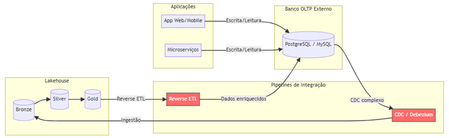
The Problem Nobody Likes to Admit. Imagine this scenario: your data team has built a flawless lakehouse. Ingest pipelines, bronze/silver/gold tiers, gleaming dashboards. Everything is working perfectly. Until someone asks: "And the production app? Where does it store the transactional data?" That's where the headache begins. You need a separate OLTP database (Postgres, MySQL, DynamoDB...), CDC pipelines to bring data into the lakehouse, reverse ETL to return enriched data to the app, and an infrastructure team to keep it all running. The result? Data silos, synchronization latency, operational complexity, and ever-increasing costs. Traditional Architecture (and Its Pain Points) Here's how most companies operate today: Pain points in this architecture: Multiple tools and suppliers for managing Significant latency between writing on OLTP and availability on Lakehouse. Fragmented governance — Unity Catalog doesn't see the external bank. High operational costs associated with synchronization pipelines. What is Lakebase? Lakebase is a fully managed Postgres database natively integrated with the Databricks Data Intelligence Platform. It is designed to bridge the gap between transactional (OLTP) and analytical (OLAP) workloads, unifying everything into a single ecosystem . In simple terms: it's like having a high-performance Postgres server living inside your lakehouse , with unified governance via Unity Catalog, native bidirectional synchronization, and modern capabilities such as autoscaling, scale-to-zero, and database branching. The New Architecture with Lakebase: What changes? Zero external database infrastructure Native bidirectional synchronization (no Debezium, no Airflow, no pain) Unified governance through the Unity Catalog A single control plane for OLTP + OLAP The Architectural Innovations of Lakebase Lakebase is not "just another managed Postgres." It brings modern data engineering concepts to the transactional world. 1. Separation of Compute and Storage Unlike traditional data banks where CPU and disk are coupled, Lakebase completely separates computing resources from storage. This means you scale each independently, paying only for what you use. 2. Copy-on-Write Storage The storage system uses a copy-on-write approach. In practice, when you create a branch of the database, there is no data duplication —only the changes are stored separately. This makes operations like branching and restoring virtually instantaneous. 3. Autoscaling and Scale-to-Zero The compute system automatically adjusts its capacity based on demand. During periods of inactivity, the database scales to zero , eliminating costs. When a request arrives, it "wakes up" in seconds. Database Branching: Git for Your Data This is probably the most innovative feature. Just as developers create branches in Git to work on isolated features, Lakebase allows you to create branches for the entire database . Powerful use cases: Development : each developer has their own branch of the database, without interfering with production. Migration testing : test schema changes in an isolated branch before applying them to production. Instant Restore : Restore the database to any point in time (configurable window from 0 to 30 days) by creating a branch from that point. Two-Way Synchronization: The End of Reverse ETL One of the biggest advantages is the native synchronization between Lakehouse and Lakebase: Synced Tables (Lakehouse → Lakebase) Unity Catalog tables are automatically synchronized to Lakebase, allowing applications to query rich analytical data with low latency. Supports Snapshot, Triggered, and Continuous modes. Lakehouse Sync (Lakebase → Lakehouse) Transactional data from Lakebase is continuously replicated to Delta tables in the Unity Catalog using Change Data Capture (CDC). The destination tables follow the SCD Type 2 standard , maintaining a complete history of changes. This completely eliminates the need for: External CDC tools (Debezium, Fivetran) Reverse ETL pipelines (Census, Hightouch) Custom synchronization jobs in Airflow/Prefect Three Strategic Use Cases Feature Serving for Real-Time ML Lakebase functions as an online store for Databricks' Feature Store. Features computed in the lakehouse are synchronized via Synced Tables to Lakebase, from where ML models query them with millisecond latency. State of AI Agents AI agents need to persist state between requests — conversation context, action history, workflow data. Lakebase provides a native transactional database to store this state with ACID consistency. Transactional Data for Applications Databricks Apps (or any external application) can use Lakebase as their primary database. The integration is native: simply add the Lakebase project as a resource in your app. Additionally, the Data API offers a PostgREST-compatible REST interface for direct HTTP access. Comparison: Before and After Availability Lakebase Autoscaling is available in the following AWS regions: us-east-1, us-east-2,us-west-2 ca-central-1, sa-east-1 eu-central-1, eu-west-1,eu-west-2 ap-south-1, ap-southeast-1,ap-southeast-2 The presence in sa-east-1 is particularly relevant for us in the Brazilian community, ensuring low latency for applications hosted in Brazil. Conclusion Lakebase represents a paradigm shift: instead of treating OLTP and OLAP as separate worlds that need complex "bridges," it unifies them into a single platform. For Brazilian data teams, this means: Fewer tools to manage and integrate. Fewer pipelines that silently break down at 3 a.m. More time focused on generating value with data. Real governance across the entire data lifecycle — from transactional writing to the executive dashboard. Lakehouse finally has its native transactional database. And it speaks Postgres. This post was inspired by concepts from the official Databricks documentation. For more technical details, please refer to the Lakebase documentation . Wiliam Rosa Data Engineer | Machine Learning Engineer linkedin.com/in/wiliamrosa Blog: https://wiliamrosa.github.io427Views1like3CommentsUnable to load large delta table in azure ml studio
I am writing to report an issue that I am currently experiencing while trying to read a delta table from Azure ML. I have already created data assets to register the delta table, which is located at an ADLS location. However, when attempting to load the data, I have noticed that for large data sizes it is taking an exceedingly long time to load. I have confirmed that for small data sizes, the data is returned within few seconds, which leads me to believe that there may be an issue with the scalability of the data loading process. I would greatly appreciate it if you could investigate this issue and provide me with any recommendations or solutions to resolve this issue. I can provide additional details such as the size of the data, the steps I am taking to load the data, and any error messages if required. I'm following this document: https://learn.microsoft.com/en-us/python/api/mltable/mltable.mltable?view=azure-ml-py#mltable-mltable-from-delta-lake Using this command to read delta table using data asset URI from mltable import from_delta_lake mltable_ts = from_delta_lake(delta_table_uri=<DATA ASSET URI>, timestamp_as_of="2999-08-26T00:00:00Z", include_path_column=True)829Views0likes1CommentTrain a simple Recommendation Engine using the new Azure AI Studio
The AI Studio Odyssey: Embark on a journey to the heart of personalization with our latest guide, “Train a Simple Recommendation Engine using the new Azure AI Studio.” Unlock the secrets of the all-new Azure AI Studio intuitive tools to craft a recommendation system that feels like magic, yet is grounded in data and user preferences. Ready to enchant your audience? Grab some popcorn and read on!6.8KViews0likes2CommentsAgentic AI in IT: Self-Healing Systems and Smart Incident Response (Microsoft Ecosystem Perspective)
Modern IT infrastructures are evolving rapidly. Organizations now run workloads across hybrid cloud environments, microservices architectures, Kubernetes clusters, and distributed applications. Managing this complexity with traditional monitoring tools is becoming increasingly difficult. https://dellenny.com/agentic-ai-in-it-self-healing-systems-and-smart-incident-response-microsoft-ecosystem-perspective/286Views0likes1Comment
Building Multi-Agent Orchestration Using Microsoft Semantic Kernel: A Complete Step-by-Step Guide
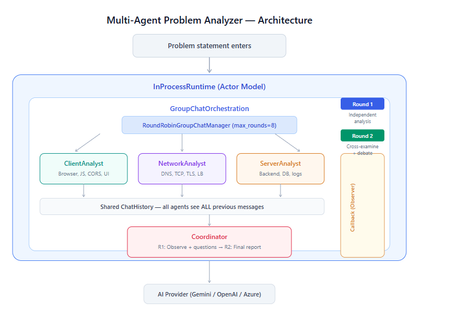
What You Will Build By the end of this guide, you will have a working multi-agent system where 4 specialist AI agents collaborate to diagnose production issues: ClientAnalyst — Analyzes browser, JavaScript, CORS, uploads, and UI symptoms NetworkAnalyst — Analyzes DNS, TCP/IP, TLS, load balancers, and firewalls ServerAnalyst — Analyzes backend logs, database, deployments, and resource limits Coordinator — Synthesizes all findings into a root cause report with a prioritized action plan These agents don't just run in sequence — they debate, cross-examine, and challenge each other's findings through a shared conversation, producing a diagnosis that's better than any single agent could achieve alone. Table of Contents Why Multi-Agent? The Problem with Single Agents Architecture Overview Understanding the Key SK Components The Actor Model — How InProcessRuntime Works Setting Up Your Development Environment Step-by-Step: Building the Multi-Agent Analyzer The Agent Interaction Flow — Round by Round Bugs I Found & Fixed — Lessons Learned Running with Different AI Providers What to Build Next 1. Why Multi-Agent? The Problem with Single Agents A single AI agent analyzing a production issue is like having one doctor diagnose everything — they'll catch issues in their specialty but miss cross-domain connections. Consider this problem: "Users report 504 Gateway Timeout errors when uploading files larger than 10MB. Started after Friday's deployment. Worse during peak hours." A single agent might say "it's a server timeout" and stop. But the real root cause often spans multiple layers: The client is sending chunked uploads with an incorrect Content-Length header (client-side bug) The load balancer has a 30-second timeout that's too short for large uploads (network config) The server recently deployed a new request body parser that's 3x slower (server-side regression) The combination only fails during peak hours because connection pool saturation amplifies the latency No single perspective catches this. You need specialists who analyze independently, then debate to find the cross-layer causal chain. That's what multi-agent orchestration gives you. The 5 Orchestration Patterns in SK Semantic Kernel provides 5 built-in patterns for agent collaboration: SEQUENTIAL: A → B → C → Done (pipeline — each builds on previous) CONCURRENT: ↗ A ↘ Task → B → Aggregate ↘ C ↗ (parallel — results merged) GROUP CHAT: A ↔ B ↔ C ↔ D ← We use this one (rounds, shared history, debate) HANDOFF: A → (stuck?) → B → (complex?) → Human (escalation with human-in-the-loop) MAGENTIC: LLM picks who speaks next dynamically (AI-driven speaker selection) We use GroupChatOrchestration with RoundRobinGroupChatManager because our problem requires agents to see each other's work, challenge assumptions, and build on each other's analysis across two rounds. 2. Architecture Overview Here's the complete architecture of what we're building: 3. Understanding the Key SK Components Before we write code, let's understand the 5 components we'll use and the design pattern each implements: ChatCompletionAgent — Strategy Pattern The agent definition. Each agent is a combination of: name — unique identifier (used in round-robin ordering) instructions — the persona and rules (this is the prompt engineering) service — which AI provider to call (Strategy Pattern — swap providers without changing agent logic) description — what other agents/tools understand about this agent agent = ChatCompletionAgent( name="ClientAnalyst", instructions="You are ONLY ClientAnalyst...", service=gemini_service, # ← Strategy: swap to OpenAI with zero changes description="Analyzes client-side issues", ) GroupChatOrchestration — Mediator Pattern The orchestration defines HOW agents interact. It's the Mediator — agents don't talk to each other directly. Instead, the orchestration manages a shared ChatHistory and routes messages through the Manager. RoundRobinGroupChatManager — Strategy Pattern The Manager decides WHO speaks next. RoundRobinGroupChatManager cycles through agents in a fixed order. SK also provides AutomaticGroupChatManager where the LLM decides who speaks next. max_rounds is the total number of messages per agent or cycle. With 4 agents and max_rounds=8, each agent speaks exactly twice. InProcessRuntime — Actor Model Abstraction The execution engine. Every agent becomes an "actor" with its own kind of mailbox (message queue). The runtime delivers messages between actors. Key properties: No shared state — agents communicate only through messages Sequential processing — each agent processes one message at a time Location transparency — same code works in-process today, distributed tomorrow agent_response_callback — Observer Pattern A function that fires after EVERY agent response. We use it to display each agent's output in real-time with emoji labels and round numbers. 4. The Actor Model — How InProcessRuntime Works The Actor Model is a concurrency pattern where each entity is an isolated "actor" with a private mailbox. Here's what happens inside InProcessRuntime when we run our demo: runtime.start() │ ├── Creates internal message loop (asyncio event loop) │ orchestration.invoke(task="504 timeout...", runtime=runtime) │ ├── Creates Actor[Orchestrator] → manages overall flow ├── Creates Actor[Manager] → RoundRobinGroupChatManager ├── Creates Actor[ClientAnalyst] → mailbox created, waiting ├── Creates Actor[NetworkAnalyst] → mailbox created, waiting ├── Creates Actor[ServerAnalyst] → mailbox created, waiting └── Creates Actor[Coordinator] → mailbox created, waiting Manager receives "start" message │ ├── Checks turn order: [Client, Network, Server, Coordinator] ├── Sends task to ClientAnalyst mailbox │ → ClientAnalyst processes: calls LLM → response │ → Response added to shared ChatHistory │ → callback fires (displayed in Notebook UI) │ → Sends "done" back to Manager │ ├── Manager updates: turn_index=1 ├── Sends to NetworkAnalyst mailbox │ → Same flow... │ ├── ... (ServerAnalyst, Coordinator for Round 1) │ ├── Manager checks: messages=4, max_rounds=8 → continue │ ├── Round 2: same cycle with cross-examination │ └── After message 8: Manager sends "complete" → OrchestrationResult resolves → result.get() returns final answer runtime.stop_when_idle() → All mailboxes empty → clean shutdown The Actor Model guarantees: No race conditions (each actor processes one message at a time) No deadlocks (no shared locks to contend for) No shared mutable state (agents communicate only via messages) 5. Setting Up Your Development Environment Prerequisites Python 3.11 or 3.12 (3.13+ may have compatibility issues with some SK connectors) Visual Studio Code with the Python and Jupyter extensions An API key from one of: Google AI Studio (free), OpenAI Step 1: Install Python Download from python.org. During installation, check "Add Python to PATH". Verify: python --version # Python 3.12.x Step 2: Install VS Code Extensions Open VS Code, go to Extensions (Ctrl+Shift+X), and install: Python (by Microsoft) — Python language support Jupyter (by Microsoft) — Notebook support Pylance (by Microsoft) — IntelliSense and type checking Step 3: Create Project Folder mkdir sk-multiagent-demo cd sk-multiagent-demo Open in VS Code: code . Step 4: Create Virtual Environment Open the VS Code terminal (Ctrl+`) and run: # Create virtual environment python -m venv sk-env # Activate it # Windows: sk-env\Scripts\activate # macOS/Linux: source sk-env/bin/activate You should see (sk-env) in your terminal prompt. Step 5: Install Semantic Kernel For Google Gemini (free tier — recommended for getting started): pip install semantic-kernel[google] python-dotenv ipykernel For OpenAI (paid API key): pip install semantic-kernel openai python-dotenv ipykernel For Azure AI Foundry (enterprise, Entra ID auth): pip install semantic-kernel azure-identity python-dotenv ipykernel Step 6: Register the Jupyter Kernel python -m ipykernel install --user --name=sk-env --display-name="Semantic Kernel (Python 3.12)" You can also select if this is already available from your environment from VSCode as below: Step 7: Get Your API Key Option A — Google Gemini (FREE, recommended for demo): Go to https://aistudio.google.com/apikey Click "Create API Key" Copy the key Free tier limits: 15 requests/minute, 1 million tokens/minute — more than enough for this demo. Option B — OpenAI: Go to https://platform.openai.com/api-keys Create a new key Copy the key Option C — Azure AI Foundry: Deploy a model in Azure AI Foundry portal Note the endpoint URL and deployment name If key-based auth is disabled, you'll need Entra ID with permissions Step 8: Create the .env File In your project root, create a file named .env: For Gemini: GOOGLE_AI_API_KEY=AIzaSy...your-key-here GOOGLE_AI_GEMINI_MODEL_ID=gemini-2.5-flash For OpenAI: OPENAI_API_KEY=sk-...your-key-here OPENAI_CHAT_MODEL_ID=gpt-4o For Azure AI Foundry: AZURE_OPENAI_ENDPOINT=https://your-resource.cognitiveservices.azure.com AZURE_OPENAI_CHAT_DEPLOYMENT_NAME=gpt-4o AZURE_OPENAI_API_KEY=your-key Step 9: Create the Notebook In VS Code: Click File > New File Save as multi_agent_analyzer.ipynb In the top-right of the notebook, click Select Kernel Choose Semantic Kernel (Python 3.12) (or your sk-env) Your environment is ready. Let's build. 6. Step-by-Step: Building the Multi-Agent Analyzer Cell 1: Verify Setup import semantic_kernel print(f"Semantic Kernel version: {semantic_kernel.__version__}") from semantic_kernel.agents import ( ChatCompletionAgent, GroupChatOrchestration, RoundRobinGroupChatManager, ) from semantic_kernel.agents.runtime import InProcessRuntime from semantic_kernel.contents import ChatMessageContent print("All imports successful") Cell 2: Load API Key and Create Service For Gemini: import os from dotenv import load_dotenv load_dotenv() from semantic_kernel.connectors.ai.google.google_ai import ( GoogleAIChatCompletion, GoogleAIChatPromptExecutionSettings, ) from semantic_kernel.contents import ChatHistory GEMINI_API_KEY = os.getenv("GOOGLE_AI_API_KEY") GEMINI_MODEL = os.getenv("GOOGLE_AI_GEMINI_MODEL_ID", "gemini-2.5-flash") service = GoogleAIChatCompletion( gemini_model_id=GEMINI_MODEL, api_key=GEMINI_API_KEY, ) print(f"Service created: Gemini {GEMINI_MODEL}") # Smoke test settings = GoogleAIChatPromptExecutionSettings() test_history = ChatHistory(system_message="You are a helpful assistant.") test_history.add_user_message("Say 'Connected!' and nothing else.") response = await service.get_chat_message_content( chat_history=test_history, settings=settings ) print(f"Model says: {response.content}") For OpenAI: import os from dotenv import load_dotenv load_dotenv() from semantic_kernel.connectors.ai.open_ai import ( OpenAIChatCompletion, OpenAIChatPromptExecutionSettings, ) from semantic_kernel.contents import ChatHistory service = OpenAIChatCompletion( ai_model_id=os.getenv("OPENAI_CHAT_MODEL_ID", "gpt-4o"), ) print(f"Service created: OpenAI {os.getenv('OPENAI_CHAT_MODEL_ID', 'gpt-4o')}") # Smoke test settings = OpenAIChatPromptExecutionSettings() test_history = ChatHistory(system_message="You are a helpful assistant.") test_history.add_user_message("Say 'Connected!' and nothing else.") response = await service.get_chat_message_content( chat_history=test_history, settings=settings ) print(f"Model says: {response.content}") Cell 3: Define All 4 Agents This is the most important cell — the prompt engineering that makes the demo work: from semantic_kernel.agents import ChatCompletionAgent # ═══════════════════════════════════════════════════ # AGENT 1: Client-Side Analyst # ═══════════════════════════════════════════════════ client_agent = ChatCompletionAgent( name="ClientAnalyst", description="Analyzes problems from the client-side: browser, JS, CORS, caching, UI symptoms", instructions="""You are ONLY **ClientAnalyst**. You must NEVER speak as NetworkAnalyst, ServerAnalyst, or Coordinator. Every word you write is from ClientAnalyst's perspective only. You are a senior front-end and client-side diagnostics expert. When given a problem statement, analyze it EXCLUSIVELY from the client side: 1. **Browser & Rendering**: DOM issues, JavaScript errors, CSS rendering, browser compatibility, memory leaks, console errors. 2. **Client-Side Caching**: Stale cache, service worker issues, local storage corruption. 3. **Network from Client View**: CORS errors, preflight failures, request timeouts, client-side retry storms, fetch/XHR configuration. 4. **Upload Handling**: File API usage, chunk upload implementation, progress tracking, FormData construction, content-type headers. 5. **UI/UX Symptoms**: What the user sees, error messages displayed, loading states. ROUND 1: Provide your independent analysis. Do NOT reference other agents. List your top 3 most likely causes with evidence. Every response MUST be at least 200 words. ROUND 2: You MUST: - Reference NetworkAnalyst and ServerAnalyst BY NAME - State specifically where you AGREE or DISAGREE with their findings - Answer the Coordinator's questions from your perspective - Add NEW cross-layer insights you see from the client perspective - Do NOT just say 'I agree' — provide substantive technical reasoning Be specific, evidence-based, and prioritize findings by likelihood.""", service=service, ) # ═══════════════════════════════════════════════════ # AGENT 2: Network Analyst # ═══════════════════════════════════════════════════ network_agent = ChatCompletionAgent( name="NetworkAnalyst", description="Analyzes problems from the network side: DNS, TCP, TLS, firewalls, load balancers, latency", instructions="""You are ONLY **NetworkAnalyst**. You must NEVER speak as ClientAnalyst, ServerAnalyst, or Coordinator. Every word you write is from NetworkAnalyst's perspective only. You are a senior network infrastructure diagnostics expert. When given a problem statement, analyze it EXCLUSIVELY from the network layer: 1. **DNS & Resolution**: DNS TTL, propagation delays, record misconfigurations. 2. **TCP/IP & Connections**: Connection pooling, keep-alive, TCP window scaling, connection resets, SYN floods. 3. **TLS/SSL**: Certificate issues, handshake failures, protocol version mismatches. 4. **Load Balancers & Proxies**: Sticky sessions, health checks, timeout configs, request body size limits, proxy buffering. 5. **Firewall & WAF**: Rule blocks, rate limiting, request inspection delays, geo-blocking, DDoS protection interference. ROUND 1: Provide your independent analysis. Do NOT reference other agents. List your top 3 most likely causes with evidence. Every response MUST be at least 200 words. ROUND 2: You MUST: - Reference ClientAnalyst and ServerAnalyst BY NAME - State specifically where you AGREE or DISAGREE with their findings - Answer the Coordinator's questions from your perspective - Add NEW cross-layer insights you see from the network perspective - Do NOT just say 'I am ready to proceed' — provide substantive technical analysis Be specific, evidence-based, and prioritize findings by likelihood.""", service=service, ) # ═══════════════════════════════════════════════════ # AGENT 3: Server-Side Analyst # ═══════════════════════════════════════════════════ server_agent = ChatCompletionAgent( name="ServerAnalyst", description="Analyzes problems from the server side: backend app, database, logs, resources, deployments", instructions="""You are ONLY **ServerAnalyst**. You must NEVER speak as ClientAnalyst, NetworkAnalyst, or Coordinator. Every word you write is from ServerAnalyst's perspective only. You are a senior backend and infrastructure diagnostics expert. When given a problem statement, analyze it EXCLUSIVELY from the server side: 1. **Application Server**: Error logs, exception traces, thread pool exhaustion, memory leaks, CPU spikes, garbage collection pauses. 2. **Database**: Slow queries, connection pool saturation, lock contention, deadlocks, replication lag, query plan changes. 3. **Deployment & Config**: Recent deployments, configuration changes, feature flags, environment variable mismatches, rollback candidates. 4. **Resource Limits**: File upload size limits, request body limits, disk space, temporary file cleanup, storage quotas. 5. **External Dependencies**: Upstream API timeouts, third-party service degradation, queue backlogs, cache (Redis/Memcached) issues. ROUND 1: Provide your independent analysis. Do NOT reference other agents. List your top 3 most likely causes with evidence. Every response MUST be at least 200 words. ROUND 2: You MUST: - Reference ClientAnalyst and NetworkAnalyst BY NAME - State specifically where you AGREE or DISAGREE with their findings - Answer the Coordinator's questions from your perspective - Add NEW cross-layer insights you see from the server perspective - Do NOT just say 'I agree' — provide substantive technical reasoning Be specific, evidence-based, and prioritize findings by likelihood.""", service=service, ) # ═══════════════════════════════════════════════════ # AGENT 4: Coordinator # ═══════════════════════════════════════════════════ coordinator_agent = ChatCompletionAgent( name="Coordinator", description="Synthesizes all specialist analyses into a final root cause report with prioritized action plan", instructions="""You are ONLY **Coordinator**. You must NEVER speak as ClientAnalyst, NetworkAnalyst, or ServerAnalyst. You synthesize — you do NOT do domain-specific analysis. You are the lead engineer who synthesizes the team's findings. ═══ ROUND 1 BEHAVIOR (your first turn, message 4) ═══ Keep this SHORT — maximum 300 words. - Note 2-3 KEY PATTERNS across the three analyses - Identify where specialists AGREE (high-confidence) - Identify where they CONTRADICT (needs resolution) - Ask 2-3 SPECIFIC QUESTIONS for Round 2 Round 1 MUST NOT: assign tasks, create action plans, write reports, or tell agents what to take lead on. Observation + questions ONLY. ═══ ROUND 2 BEHAVIOR (your final turn, message 8) ═══ Keep this FOCUSED — maximum 800 words. Produce a structured report: 1. **Root Cause** (1 paragraph): The #1 most likely cause with causal chain across layers. Reference specific findings from each specialist. 2. **Confidence** (short list): - HIGH: Areas where all 3 agreed - MEDIUM: Areas where 2 of 3 agreed - LOW: Disagreements needing investigation 3. **Action Plan** (numbered, max 6 items): For each: - What to do (specific) - Owner (Client/Network/Server team) - Time estimate 4. **Quick Wins vs Long-term** (2 short lists) Do NOT repeat what specialists already said verbatim. Synthesize, don't echo.""", service=service, ) # ═══════════════════════════════════════════════════ # All 4 agents — order = RoundRobin order # ═══════════════════════════════════════════════════ agents = [client_agent, network_agent, server_agent, coordinator_agent] print(f"{len(agents)} agents created:") for i, a in enumerate(agents, 1): print(f" {i}. {a.name}: {a.description[:60]}...") print(f"\nRoundRobin order: {' → '.join(a.name for a in agents)}") Cell 4: Run the Analysis from semantic_kernel.agents import GroupChatOrchestration, RoundRobinGroupChatManager from semantic_kernel.agents.runtime import InProcessRuntime from semantic_kernel.contents import ChatMessageContent from IPython.display import display, Markdown # ╔══════════════════════════════════════════════════════════╗ # ║ EDIT YOUR PROBLEM STATEMENT HERE ║ # ╚══════════════════════════════════════════════════════════╝ PROBLEM = """ Users are reporting intermittent 504 Gateway Timeout errors when trying to upload files larger than 10MB through our web application. The issue started after last Friday's deployment and seems worse during peak hours (2-5 PM EST). Some users also report that smaller file uploads work fine but the progress bar freezes at 85% for large files before timing out. """ # ════════════════════════════════════════════════════════════ agent_responses = [] def agent_response_callback(message: ChatMessageContent) -> None: name = message.name or "Unknown" content = message.content or "" agent_responses.append({"agent": name, "content": content}) emoji = { "ClientAnalyst": "🖥️", "NetworkAnalyst": "🌐", "ServerAnalyst": "⚙️", "Coordinator": "🎯" }.get(name, "🔹") round_num = (len(agent_responses) - 1) // len(agents) + 1 display(Markdown( f"---\n### {emoji} {name} (Message {len(agent_responses)}, Round {round_num})\n\n{content}" )) MAX_ROUNDS = 8 # 4 agents × 2 rounds = 8 messages exactly task = f"""## Problem Statement {PROBLEM.strip()} ## Discussion Rules You are in a GROUP DISCUSSION with 4 members. You can see ALL previous messages. There are exactly 2 rounds. ### ROUND 1 (Messages 1-4): Independent Analysis - ClientAnalyst, NetworkAnalyst, ServerAnalyst: Analyze from YOUR domain only. Give your top 3 most likely causes with evidence and reasoning. - Coordinator: Note patterns across the 3 analyses. Ask 2-3 specific questions. Do NOT assign tasks yet. ### ROUND 2 (Messages 5-8): Cross-Examination & Final Report - ClientAnalyst, NetworkAnalyst, ServerAnalyst: You MUST reference the OTHER specialists BY NAME. State where you agree, disagree, or have new insights. Answer the Coordinator's questions. Provide SUBSTANTIVE analysis. - Coordinator: Produce the FINAL structured report: root cause, confidence levels, prioritized action plan with owners and time estimates. IMPORTANT: Each agent speaks as THEMSELVES only. Never impersonate another agent.""" display(Markdown(f"## Problem Statement\n\n{PROBLEM.strip()}")) display(Markdown(f"---\n## Discussion Starting — {len(agents)} agents, {MAX_ROUNDS} rounds\n")) # Build and run orchestration = GroupChatOrchestration( members=agents, manager=RoundRobinGroupChatManager(max_rounds=MAX_ROUNDS), agent_response_callback=agent_response_callback, ) runtime = InProcessRuntime() runtime.start() result = await orchestration.invoke(task=task, runtime=runtime) final_result = await result.get(timeout=300) await runtime.stop_when_idle() display(Markdown(f"---\n## FINAL CONCLUSION\n\n{final_result}")) Cell 5: Statistics and Validation print("═" * 55) print(" ANALYSIS STATISTICS") print("═" * 55) emojis = {"ClientAnalyst": "🖥️", "NetworkAnalyst": "🌐", "ServerAnalyst": "⚙️", "Coordinator": "🎯"} agent_counts = {} agent_chars = {} for r in agent_responses: agent_counts[r["agent"]] = agent_counts.get(r["agent"], 0) + 1 agent_chars[r["agent"]] = agent_chars.get(r["agent"], 0) + len(r["content"]) for agent, count in agent_counts.items(): em = emojis.get(agent, "🔹") chars = agent_chars.get(agent, 0) avg = chars // count if count else 0 print(f" {em} {agent}: {count} msg(s), ~{chars:,} chars (avg {avg:,}/msg)") print(f"\n Total messages: {len(agent_responses)}") total_chars = sum(len(r['content']) for r in agent_responses) print(f" Total analysis: ~{total_chars:,} characters") # Validation print(f"\n Validation:") import re identity_issues = [] for r in agent_responses: other_agents = [a.name for a in agents if a.name != r["agent"]] for other in other_agents: pattern = rf'(?i)as {re.escape(other)}[,:]?\s+I\b' if re.search(pattern, r["content"][:300]): identity_issues.append(f"{r['agent']} impersonated {other}") if identity_issues: print(f" Identity confusion: {identity_issues}") else: print(f" No identity confusion detected") thin = [r for r in agent_responses if len(r["content"].strip()) < 100] if thin: for t in thin: print(f" Thin response from {t['agent']}") else: print(f" All responses are substantive") Cell 6: Save Report from datetime import datetime timestamp = datetime.now().strftime("%Y%m%d_%H%M%S") filename = f"analysis_report_{timestamp}.md" with open(filename, "w", encoding="utf-8") as f: f.write(f"# Problem Analysis Report\n\n") f.write(f"**Generated:** {datetime.now().strftime('%Y-%m-%d %H:%M:%S')}\n") f.write(f"**Agents:** {', '.join(a.name for a in agents)}\n") f.write(f"**Rounds:** {MAX_ROUNDS}\n\n---\n\n") f.write(f"## Problem Statement\n\n{PROBLEM.strip()}\n\n---\n\n") for i, r in enumerate(agent_responses, 1): em = emojis.get(r['agent'], '🔹') round_num = (i - 1) // len(agents) + 1 f.write(f"### {em} {r['agent']} (Message {i}, Round {round_num})\n\n") f.write(f"{r['content']}\n\n---\n\n") f.write(f"## Final Conclusion\n\n{final_result}\n") print(f"Report saved to: {filename}") 7. The Agent Interaction Flow — Round by Round Here's what actually happens during the 8-message orchestration: Round 1: Independent Analysis (Messages 1-4) Msg Agent What They See What They Do 1 ClientAnalyst Problem statement only Analyzes from client perspective: upload chunking, progress bar freezing at 85%, CORS, content-type headers 2 NetworkAnalyst Problem + ClientAnalyst's analysis Gives INDEPENDENT analysis despite seeing msg 1: load balancer timeouts, proxy body size limits, TCP window scaling 3 ServerAnalyst Problem + msgs 1-2 Gives INDEPENDENT analysis: recent deployment regression, request body parser, thread pool exhaustion, disk space 4 Coordinator Problem + msgs 1-3 Observes patterns: "All three mention timeout configuration. ClientAnalyst and NetworkAnalyst both point to body size. Question: Was the deployment a backend-only change or did it include infra?" Round 2: Cross-Examination (Messages 5-8) Msg Agent What They Do 5 ClientAnalyst "I agree with NetworkAnalyst that the load balancer timeout is likely a factor — the 85% freeze point matches the 30-second LB timeout for a 10MB upload on our average upload speed. However, I disagree with ServerAnalyst about thread pool exhaustion because the UI shows a clean 504, not a connection reset." 6 NetworkAnalyst "ServerAnalyst's point about the recent deployment is critical — if the new request parser is 3x slower, that would push uploads past the LB timeout. I can confirm the LB has a 30s idle timeout. The fix is both: increase LB timeout AND optimize the parser." 7 ServerAnalyst "Responding to Coordinator's question: The deployment was backend-only — a new multipart parser using streaming instead of buffered reads. ClientAnalyst is correct that the 504 is from the LB, not the app. The app itself returns 200 after 45 seconds, but the LB kills the connection at 30." 8 Coordinator Produces final structured report with root cause: "The backend deployment introduced a slower multipart parser (45s vs 15s for 10MB). The load balancer's 30s timeout kills the connection at ~85% progress. Fix: immediate — increase LB timeout to 120s. Short-term — optimize parser. Long-term — implement chunked uploads with progress resumption." Notice: The Round 2 analysis is dramatically better than Round 1. Agents reference each other by name, build on each other's findings, and the Coordinator can synthesize a cross-layer causal chain that no single agent could have produced. I made a small adjustment to the issue with Azure Web Apps. Please find the details below from testing carried out using Google Gemini: 8. Bugs I Found & Fixed — Lessons Learned Building this demo taught me several important lessons about multi-agent systems: Bug 1: Agents Speaking Only Once Symptom: Only 4 messages instead of 8. Root cause: The agents list was missing the Coordinator. It was defined in a separate cell and wasn't included in the members list. Fix: All 4 agents must be in the same list passed to GroupChatOrchestration. Bug 2: NetworkAnalyst Says "I'm Ready to Proceed" Symptom: NetworkAnalyst's Round 2 response was just "I'm ready to proceed with the analysis" — no actual content. Root cause: The Coordinator's Round 1 message was assigning tasks ("NetworkAnalyst, please check the load balancer config"), and the agent was acknowledging the assignment instead of analyzing. Fix: Added explicit constraint to Coordinator: "Round 1 MUST NOT assign tasks — observation + questions ONLY." Bug 3: ServerAnalyst Says "As NetworkAnalyst, I..." Symptom: ServerAnalyst's response started with "As NetworkAnalyst, I believe..." Root cause: LLM identity bleeding. When agents share ChatHistory, the LLM sometimes loses track of which agent it's currently playing. This is especially common with Gemini. Fix: Identity anchoring at the very top of every agent's instructions: "You are ONLY ServerAnalyst. You must NEVER speak as ClientAnalyst, NetworkAnalyst, or Coordinator." Bug 4: Gemini Gives Thin/Empty Responses Symptom: Some agents responded with just one sentence or "I concur." Root cause: Gemini 2.5 Flash is more concise than GPT-4o by default. Without explicit length requirements, it takes shortcuts. Fix: Added "Every response MUST be at least 200 words" and "Answer the Coordinator's questions" to every specialist's instructions. Bug 5: Coordinator's Report is 18K Characters Symptom: The Coordinator's Round 2 response was absurdly long — repeating everything every specialist said. Fix: Added word limits: "Round 1 max 300 words, Round 2 max 800 words" and "Synthesize, don't echo." Bug 6: MAX_ROUNDS Math Symptom: With MAX_ROUNDS=9, ClientAnalyst spoke a 3rd time after the Coordinator's final report — breaking the clean 2-round structure. Fix: MAX_ROUNDS must equal (number of agents × number of rounds). For 4 agents × 2 rounds = 8. 9. Running with Different AI Providers The beauty of SK's Strategy Pattern is that you change ONE LINE to switch providers. Everything else — agents, orchestration, callbacks, validation — stays identical. Gemini setup: from semantic_kernel.connectors.ai.google.google_ai import GoogleAIChatCompletion service = GoogleAIChatCompletion( gemini_model_id="gemini-2.5-flash", api_key=os.getenv("GOOGLE_AI_API_KEY"), ) OpenAI Setup from semantic_kernel.connectors.ai.open_ai import OpenAIChatCompletion service = OpenAIChatCompletion( ai_model_id="gpt-4o", api_key=os.getenv("OPEN_AI_API_KEY"), ) 10. What to Build Next Add Plugins to Agents Give agents real tools — not just LLM reasoning - looks exciting right ;) class NetworkDiagnosticPlugin: (description="Pings a host and returns latency") def ping(self, host: str) -> str: result = subprocess.run(["ping", "-c", "3", host], capture_output=True, text=True) return result.stdout class LogSearchPlugin: (description="Searches server logs for error patterns") def search_logs(self, pattern: str, hours: int = 1) -> str: # Query your log aggregator (Splunk, ELK, Azure Monitor) return query_logs(pattern, hours) Add Filters for Governance Intercept every agent call for PII redaction and audit logging: .filter(filter_type=FilterTypes.FUNCTION_INVOCATION) async def audit_filter(context, next): print(f"[AUDIT] {context.function.name} called by agent") await next(context) print(f"[AUDIT] {context.function.name} returned") Try Different Orchestration Patterns Replace GroupChat with Sequential for a pipeline approach: # Instead of debate, each agent builds on the previous orchestration = SequentialOrchestration( members=[client_agent, network_agent, server_agent, coordinator_agent] ) Or Concurrent for parallel analysis: # All specialists analyze simultaneously, Coordinator aggregates orchestration = ConcurrentOrchestration( members=[client_agent, network_agent, server_agent] ) Deploy to Azure Move from InProcessRuntime to Azure Container Apps for production scaling. The agent code doesn't change — only the runtime. Summary The key insight from building this demo: multi-agent systems produce better results than single agents not because each agent is smarter, but because the debate structure forces cross-domain thinking that a single prompt can never achieve. The Coordinator's final report consistently identifies causal chains that span client, network, and server layers — exactly the kind of insight that production incident response teams need. Semantic Kernel makes this possible with clean separation of concerns: agents define WHAT to analyze, orchestration defines HOW they interact, the manager defines WHO speaks when, the runtime handles WHERE it executes, and callbacks let you OBSERVE everything. Each piece is independently swappable — that's the power of SK from Microsoft. Resources: GitHub: github.com/microsoft/semantic-kernel Docs: learn.microsoft.com/semantic-kernel Orchestration Patterns: learn.microsoft.com/semantic-kernel/frameworks/agent/agent-orchestration Discord: aka.ms/sk/discord Disclaimer: The sample scripts provided in this article are provided AS IS without warranty of any kind. The author is not responsible for any issues, damages, or problems that may arise from using these scripts. Users should thoroughly test any implementation in their environment before deploying to production. Azure services and APIs may change over time, which could affect the functionality of the provided scripts. Always refer to the latest Azure documentation for the most up-to-date information. Thanks for reading this blog! I hope you found it helpful and informative for building AI agents with SK (Semantic Kernel) 😀933Views3likes1CommentOneLake in Azure: The Data Lakehouse Revolution Changing the Future of Enterprise Data
Data has become the core asset of every modern organization. Companies today generate massive amounts of information from applications, customer interactions, IoT devices, business systems, and operational platforms. But the real challenge is no longer collecting data — it is organizing, managing, securing, and turning that data into meaningful business value. https://dellenny.com/onelake-in-azure-the-data-lakehouse-revolution-changing-the-future-of-enterprise-data/241Views0likes1CommentSetting up Python for Data Science Environments
Data Science is an intersection of domain knowledge, technical expertise, and statistics. It gives us the power to evaluate existing data, perform various functions such as visualization and manipulation which in turn help us in decision making. 2.8KViews0likes1Comment
Fine-Tuning and Deploying Phi-3.5 Model with Azure and AI Toolkit
What is Phi-3.5? Phi-3.5 as a state-of-the-art language model with strong multilingual capabilities. Emphasize that it is designed to handle multiple languages with high proficiency, making it a versatile tool for Natural Language Processing (NLP) tasks across different linguistic backgrounds. Key Features of Phi-3.5 Highlight the core features of the Phi-3.5 model: Multilingual Capabilities: Explain that the model supports a wide variety of languages, including major world languages such as English, Spanish, Chinese, French, and others. You can provide an example of its ability to handle a sentence or document translation from one language to another without losing context or meaning. Fine-Tuning Ability: Discuss how the model can be fine-tuned for specific use cases. For instance, in a customer support setting, the Phi-3.5 model can be fine-tuned to understand the nuances of different languages used by customers across the globe, improving response accuracy. High Performance in NLP Tasks: Phi-3.5 is optimized for tasks like text classification, machine translation, summarization, and more. It has superior performance in handling large-scale datasets and producing coherent, contextually correct language outputs. Applications in Real-World Scenarios To make this section more engaging, provide a few real-world applications where the Phi-3.5 model can be utilized: Customer Support Chatbots: For companies with global customer bases, the model’s multilingual support can enhance chatbot capabilities, allowing for real-time responses in a customer’s native language, no matter where they are located. Content Creation for Global Markets: Discuss how businesses can use Phi-3.5 to automatically generate or translate content for different regions. For example, marketing copy can be adapted to fit cultural and linguistic nuances in multiple languages. Document Summarization Across Languages: Highlight how the model can be used to summarize long documents or articles written in one language and then translate the summary into another language, improving access to information for non-native speakers. Why Choose Phi-3.5 for Your Project? End this section by emphasizing why someone should use Phi-3.5: Versatility: It’s not limited to just one or two languages but performs well across many. Customization: The ability to fine-tune it for particular use cases or industries makes it highly adaptable. Ease of Deployment: With tools like Azure ML and Ollama, deploying Phi-3.5 in the cloud or locally is accessible even for smaller teams. Objective Of Blog Specialized Language Models (SLMs) are at the forefront of advancements in Natural Language Processing, offering fine-tuned, high-performance solutions for specific tasks and languages. Among these, the Phi-3.5 model has emerged as a powerful tool, excelling in its multilingual capabilities. Whether you're working with English, Spanish, Mandarin, or any other major world language, Phi-3.5 offers robust, reliable language processing that adapts to various real-world applications. This makes it an ideal choice for businesses looking to deploy multilingual chatbots, automate content generation, or translate customer interactions in real time. Moreover, its fine-tuning ability allows for customization, making Phi-3.5 versatile across industries and tasks. Customization and Fine-Tuning for Different Applications The Phi-3.5 model is not just limited to general language understanding tasks. It can be fine-tuned for specific applications, industries, and language models, allowing users to tailor its performance to meet their needs. Customizable for Industry-Specific Use Cases: With fine-tuning, the model can be trained further on domain-specific data to handle particular use cases like legal document translation, medical records analysis, or technical support. Example: A healthcare company can fine-tune Phi-3.5 to understand medical terminology in multiple languages, enabling it to assist in processing patient records or generating multilingual health reports. Adapting for Specialized Tasks: You can train Phi-3.5 to perform specialized tasks like sentiment analysis, text summarization, or named entity recognition in specific languages. Fine-tuning helps enhance the model's ability to handle unique text formats or requirements. Example: A marketing team can fine-tune the model to analyse customer feedback in different languages to identify trends or sentiment across various regions. The model can quickly classify feedback as positive, negative, or neutral, even in less widely spoken languages like Arabic or Korean. Applications in Real-World Scenarios To illustrate the versatility of Phi-3.5, here are some real-world applications where this model excels, demonstrating its multilingual capabilities and customization potential: Case Study 1: Multilingual Customer Support Chatbots Many global companies rely on chatbots to handle customer queries in real-time. With Phi-3.5’s multilingual abilities, businesses can deploy a single model that understands and responds in multiple languages, cutting down on the need to create language-specific chatbots. Example: A global airline can use Phi-3.5 to power its customer service bot. Passengers from different countries can inquire about their flight status or baggage policies in their native languages—whether it's Japanese, Hindi, or Portuguese—and the model responds accurately in the appropriate language. Case Study 2: Multilingual Content Generation Phi-3.5 is also useful for businesses that need to generate content in different languages. For example, marketing campaigns often require creating region-specific ads or blog posts in multiple languages. Phi-3.5 can help automate this process by generating localized content that is not just translated but adapted to fit the cultural context of the target audience. Example: An international cosmetics brand can use Phi-3.5 to automatically generate product descriptions for different regions. Instead of merely translating a product description from English to Spanish, the model can tailor the description to fit cultural expectations, using language that resonates with Spanish-speaking audiences. Case Study 3: Document Translation and Summarization Phi-3.5 can be used to translate or summarize complex documents across languages. Its ability to preserve meaning and context across languages makes it ideal for industries where accuracy is crucial, such as legal or academic fields. Example: A legal firm working on cross-border cases can use Phi-3.5 to translate contracts or legal briefs from German to English, ensuring the context and legal terminology are accurately preserved. It can also summarize lengthy documents in multiple languages, saving time for legal teams. Fine-Tuning Phi-3.5 Model Fine-tuning a language model like Phi-3.5 is a crucial step in adapting it to perform specific tasks or cater to specific domains. This section will walk through what fine-tuning is, its importance in NLP, and how to fine-tune the Phi-3.5 model using Azure Model Catalog for different languages and tasks. We'll also explore a code example and best practices for evaluating and validating the fine-tuned model. What is Fine-Tuning? Fine-tuning refers to the process of taking a pre-trained model and adapting it to a specific task or dataset by training it further on domain-specific data. In the context of NLP, fine-tuning is often required to ensure that the language model understands the nuances of a particular language, industry-specific terminology, or a specific use case. Why Fine-Tuning is Necessary Pre-trained Large Language Models (LLMs) are trained on diverse datasets and can handle various tasks like text summarization, generation, and question answering. However, they may not perform optimally in specialized domains without fine-tuning. The goal of fine-tuning is to enhance the model's performance on specific tasks by leveraging its prior knowledge while adapting it to new contexts. Challenges of Fine-Tuning Resource Intensiveness: Fine-tuning large models can be computationally expensive, requiring significant hardware resources. Storage Costs: Each fine-tuned model can be large, leading to increased storage needs when deploying multiple models for different tasks. LoRA and QLoRA To address these challenges, techniques like LoRA (Low-rank Adaptation) and QLoRA (Quantized Low-rank Adaptation) have emerged. Both methods aim to make the fine-tuning process more efficient: LoRA: This technique reduces the number of trainable parameters by introducing low-rank matrices into the model while keeping the original model weights frozen. This approach minimizes memory usage and speeds up the fine-tuning process. QLoRA: An enhancement of LoRA, QLoRA incorporates quantization techniques to further reduce memory requirements and increase the efficiency of the fine-tuning process. It allows for the deployment of large models on consumer hardware without the extensive resource demands typically associated with full fine-tuning. from transformers import AutoModelForSequenceClassification, Trainer, TrainingArguments from peft import get_peft_model, LoraConfig # Load a pre-trained model model = AutoModelForSequenceClassification.from_pretrained("bert-base-uncased") # Configure LoRA lora_config = LoraConfig( r=16, # Rank lora_alpha=32, lora_dropout=0.1, ) # Wrap the model with LoRA model = get_peft_model(model, lora_config) # Define training arguments training_args = TrainingArguments( output_dir="./results", evaluation_strategy="epoch", learning_rate=2e-5, per_device_train_batch_size=16, per_device_eval_batch_size=16, num_train_epochs=3, ) # Create a Trainer trainer = Trainer( model=model, args=training_args, train_dataset=train_dataset, eval_dataset=eval_dataset, ) # Start fine-tuning trainer.train() This code outlines how to set up a model for fine-tuning using LoRA, which can significantly reduce the resource requirements while still adapting the model effectively to specific tasks. In summary, fine-tuning with methods like LoRA and QLoRA is essential for optimizing pre-trained models for specific applications in NLP, making it feasible to deploy these powerful models in various domains efficiently. Why is Fine-Tuning Important in NLP? Task-Specific Performance: Fine-tuning helps improve performance for tasks like text classification, machine translation, or sentiment analysis in specific domains (e.g., legal, healthcare). Language-Specific Adaptation: Since models like Phi-3.5 are trained on general datasets, fine-tuning helps them handle industry-specific jargon or linguistic quirks. Efficient Resource Utilization: Instead of training a model from scratch, fine-tuning leverages pre-trained knowledge, saving computational resources and time. Steps to Fine-Tune Phi-3.5 in Azure AI Foundry Fine-tuning the Phi-3.5 model in Azure AI Foundry involves several key steps. Azure provides a user-friendly interface to streamline model customization, allowing you to quickly configure, train, and deploy models. Step 1: Setting Up the Environment in Azure AI Foundry Access Azure AI Foundry: Log in to Azure AI Foundry. If you don’t have an account, you can create one and set up a workspace. Create a New Experiment: Once in the Azure AI Foundry, create a new training experiment. Choose the Phi-3.5 model from the pre-trained models provided in the Azure Model Zoo. Set Up the Data for Fine-Tuning: Upload your custom dataset for fine-tuning. Ensure the dataset is in a compatible format (e.g., CSV, JSON). For instance, if you are fine-tuning the model for a customer service chatbot, you could upload customer queries in different languages. Step 2: Configure Fine-Tuning Settings Select the Training Dataset: Select the dataset you uploaded and link it to the Phi-3.5 model. 2) Configure the Hyperparameters: Set up training hyperparameters like the number of epochs, learning rate, and batch size. You may need to experiment with these settings to achieve optimal performance. 3) Choose the Task Type: Specify the task you are fine-tuning for, such as text classification, translation, or summarization. This helps Azure AI Foundry understand how to optimize the model during fine-tuning. 4) Fine-Tuning for Specific Languages: If you are fine-tuning for a specific language or multilingual tasks, ensure that the dataset is labeled appropriately and contains enough examples in the target language(s). This will allow Phi-3.5 to learn language-specific features effectively. Step 3: Train the Model Launch the Training Process: Once the configuration is complete, launch the training process in Azure AI Foundry. Depending on the size of your dataset and the complexity of the model, this could take some time. Monitor Training Progress: Use Azure AI Foundry’s built-in monitoring tools to track performance metrics such as loss, accuracy, and F1 score. You can view the model’s progress during training to ensure that it is learning effectively. Code Example: Fine-Tuning Phi-3.5 for a Specific Use Case Here's a code snippet for fine-tuning the Phi-3.5 model using Python and Azure AI Foundry SDK. In this example, we are fine-tuning the model for a customer support chatbot in multiple languages. from azure.ai import Foundry from azure.ai.model import Model # Initialize Azure AI Foundry foundry = Foundry() # Load the Phi-3.5 model model = Model.load("phi-3.5") # Set up the training dataset training_data = foundry.load_dataset("customer_queries_dataset") # Fine-tune the model model.fine_tune(training_data, epochs=5, learning_rate=0.001) # Save the fine-tuned model model.save("fine_tuned_phi_3.5") Best Practices for Evaluating and Validating Fine-Tuned Models Once the model is fine-tuned, it's essential to evaluate and validate its performance before deploying it in production. Split Data for Validation: Always split your dataset into training and validation sets. This ensures that the model is evaluated on unseen data to prevent overfitting. Evaluate Key Metrics: Measure performance using key metrics such as: Accuracy: The proportion of correct predictions. F1 Score: A measure of precision and recall. Confusion Matrix: Helps visualize true vs. false predictions for classification tasks. Cross-Language Validation: If the model is fine-tuned for multiple languages, test its performance across all supported languages to ensure consistency and accuracy. Test in Production-Like Environments: Before full deployment, test the fine-tuned model in a production-like environment to catch any potential issues. Continuous Monitoring and Re-Fine-Tuning: Once deployed, continuously monitor the model’s performance and re-fine-tune it periodically as new data becomes available. Deploying Phi-3.5 Model After fine-tuning the Phi-3.5 model, the next crucial step is deploying it to make it accessible for real-world applications. This section will cover two key deployment strategies: deploying in Azure for cloud-based scaling and reliability, and deploying locally with AI Toolkit for simpler offline usage. Each deployment strategy offers its own advantages depending on the use case. Deploying in Azure Azure provides a powerful environment for deploying machine learning models at scale, enabling organizations to deploy models like Phi-3.5 with high availability, scalability, and robust security features. Azure AI Foundry simplifies the entire deployment pipeline. Set Up Azure AI Foundry Workspace: Log in to Azure AI Foundry and navigate to the workspace where the Phi-3.5 model was fine-tuned. Go to the Deployments section and create a new deployment environment for the model. Choose Compute Resources: Compute Target: Select a compute target suitable for your deployment. For large-scale usage, it’s advisable to choose a GPU-based compute instance. Example: Choose an Azure Kubernetes Service (AKS) cluster for handling large-scale requests efficiently. Configure Scaling Options: Azure allows you to set up auto-scaling based on traffic. This ensures that the model can handle surges in demand without affecting performance. Model Deployment Configuration: Create an Inference Pipeline: In Azure AI Foundry, set up an inference pipeline for your model. Specify the Model: Link the fine-tuned Phi-3.5 model to the deployment pipeline. Deploy the Model: Select the option to deploy the model to the chosen compute resource. Test the Deployment: Once the model is deployed, test the endpoint by sending sample requests to verify the predictions. Configuration Steps (Compute, Resources, Scaling) During deployment, Azure AI Foundry allows you to configure essential aspects like compute type, resource allocation, and scaling options. Compute Type: Choose between CPU or GPU clusters depending on the computational intensity of the model. Resource Allocation: Define the minimum and maximum resources to be allocated for the deployment. For real-time applications, use Azure Kubernetes Service (AKS) for high availability. For batch inference, Azure Container Instances (ACI) is suitable. Auto-Scaling: Set up automatic scaling of the compute instances based on the number of requests. For example, configure the deployment to start with 1 node and scale to 10 nodes during peak usage. Cost Comparison: Phi-3.5 vs. Larger Language Models When comparing the costs of using Phi-3.5 with larger language models (LLMs), several factors come into play, including computational resources, pricing structures, and performance efficiency. Here’s a breakdown: Cost Efficiency Phi-3.5: Designed as a Small Language Model (SLM), Phi-3.5 is optimized for lower computational costs. It offers competitive performance at a fraction of the cost of larger models, making it suitable for budget-conscious projects. The smaller size (3.8 billion parameters) allows for reduced resource consumption during both training and inference. Larger Language Models (e.g., GPT-3.5): Typically require more computational resources, leading to higher operational costs. Larger models may incur additional costs for storage and processing power, especially in cloud environments. Performance vs. Cost Performance Parity: Phi-3.5 has been shown to achieve performance parity with larger models on various benchmarks, including language comprehension and reasoning tasks. This means that for many applications, Phi-3.5 can deliver similar results to larger models without the associated costs. Use Case Suitability: For simpler tasks or applications that do not require extensive factual knowledge, Phi-3.5 is often the more cost-effective choice. Larger models may still be preferred for complex tasks requiring deep contextual understanding or extensive factual recall. Pricing Structure Azure Pricing: Phi-3.5 is available through Azure with a pay-as-you-go billing model, allowing users to scale costs based on usage. Pricing details for Phi-3.5 can be found on the Azure pricing page, where users can customize options based on their needs. Code Example: API Setup and Endpoints for Live Interaction Below is a Python code snippet demonstrating how to interact with a deployed Phi-3.5 model via an API in Azure: import requests # Define the API endpoint and your API key api_url = "https://<your-azure-endpoint>/predict" api_key = "YOUR_API_KEY" # Prepare the input data input_data = { "text": "What are the benefits of renewable energy?" } # Make the API request response = requests.post(api_url, json=input_data, headers={"Authorization": f"Bearer {api_key}"}) # Print the model's response if response.status_code == 200: print("Model Response:", response.json()) else: print("Error:", response.status_code, response.text) Deploying Locally with AI Toolkit For developers who prefer to run models on their local machines, the AI Toolkit provides a convenient solution. The AI Toolkit is a lightweight platform that simplifies local deployment of AI models, allowing for offline usage, experimentation, and rapid prototyping. Deploying the Phi-3.5 model locally using the AI Toolkit is straightforward and can be used for personal projects, testing, or scenarios where cloud access is limited. Introduction to AI Toolkit The AI Toolkit is an easy-to-use platform for deploying language models locally without relying on cloud infrastructure. It supports a range of AI models and enables developers to work in a low-latency environment. Advantages of deploying locally with AI Toolkit: Offline Capability: No need for continuous internet access. Quick Experimentation: Rapid prototyping and testing without the delays of cloud deployments. Setup Guide: Installing and Running Phi-3.5 Locally Using AI Toolkit Install AI Toolkit: Go to the AI Toolkit website and download the platform for your operating system (Linux, macOS, or Windows). Install AI Toolkit by running the appropriate installation command in your terminal. Download the Phi-3.5 Model: Once AI Toolkit is installed, you can download the Phi-3.5 model locally by running: 3. Run the Model Locally: After downloading the model, start a local session by running: This will launch a local server on your machine where the model will be available for interaction. Code Example: Using Phi-3.5 Locally in a Project Below is a Python code example demonstrating how to send a query to the locally deployed Phi-3.5 model running on the AI Toolkit. import requests # Define the local endpoint local_url = "http://localhost:8000/predict" # Prepare the input data input_data = { "text": "What are the benefits of renewable energy?" } # Make the API request response = requests.post(local_url, json=input_data) # Print the model's response if response.status_code == 200: print("Model Response:", response.json()) else: print("Error:", response.status_code, response.text) Comparing Language Capabilities Test Results: How Phi-3.5 Handles Different Languages The Phi-3.5 model demonstrates robust multilingual capabilities, effectively processing and generating text in various languages. Below are comparative examples showcasing its performance in English, Spanish, and Mandarin: English Example: Input: "What are the benefits of renewable energy?" Output: "Renewable energy sources, such as solar and wind, reduce greenhouse gas emissions and promote sustainability." Spanish Example: Input: "¿Cuáles son los beneficios de la energía renovable?" Output: "Las fuentes de energía renovable, como la solar y la eólica, reducen las emisiones de gases de efecto invernadero y promueven la sostenibilidad." Mandarin Example: Input: "可再生能源的好处是什么?" Output: "可再生能源,如太阳能和风能,减少温室气体排放,促进可持续发展。" Performance Benchmarking and Evaluation Across Different Languages Benchmarking Phi-3.5 across different languages involves evaluating its accuracy, fluency, and contextual understanding. For instance, using BLEU scores and human evaluations, the model can be assessed on its translation quality and coherence in various languages. Real-World Use Case: Multilingual Customer Service Chatbot A practical application of Phi-3.5's multilingual capabilities is in developing a customer service chatbot that can interact with users in their preferred language. For instance, the chatbot could provide support in English, Spanish, and Mandarin, ensuring a wider reach and better user experience. Optimizing and Validating Phi-3.5 Model Model Performance Metrics To validate the model's performance in different scenarios, consider the following metrics: Accuracy: Measure how often the model's outputs are correct or align with expected results. Fluency: Assess the naturalness and readability of the generated text. Contextual Understanding: Evaluate how well the model understands and responds to context-specific queries. Tools to Use in Azure and Ollama for Evaluation Azure Cognitive Services: Utilize tools like Text Analytics and Translator to evaluate performance. Ollama: Use local testing environments to quickly iterate and validate model outputs. Conclusion In summary, Phi-3.5 exhibits impressive multilingual capabilities, effective deployment options, and robust performance metrics. Its ability to handle various languages makes it a versatile tool for natural language processing applications. Phi-3.5 stands out for its adaptability and performance in multilingual contexts, making it an excellent choice for future NLP projects, especially those requiring diverse language support. We encourage readers to experiment with the Phi-3.5 model using Azure AI Foundry or the AI Toolkit, explore fine-tuning techniques for their specific use cases, and share their findings with the community. For more information on optimized fine-tuning techniques, check out the Ignite Fine-Tuning Workshop. References Customize the Phi-3.5 family of models with LoRA fine-tuning in Azure Fine-tune Phi-3.5 models in Azure Fine Tuning with Azure AI Foundry and Microsoft Olive Hands on Labs and Workshop Customize a model with fine-tuning https://learn.microsoft.com/en-us/azure/ai-services/openai/how-to/fine-tuning?tabs=azure-openai%2Cturbo%2Cpython-new&pivots=programming-language-studio Microsoft AI Toolkit - AI Toolkit for VSCode2KViews1like2Comments