containers
224 TopicsAzure Red Hat OpenShift with hosted control planes now available in public preview
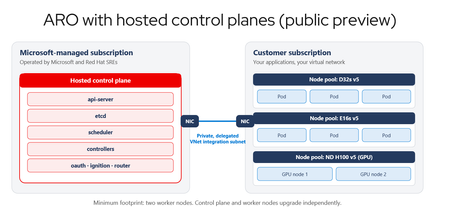
Red Hat OpenShift momentum on Azure keeps building, driven by teams standardizing on Kubernetes for application modernization and, increasingly, by AI-enabled applications that need a consistent platform for the services around them. Azure Red Hat OpenShift gives those teams a jointly engineered, first-party Azure service, and today's announcement adds a new way to run it. Today we are excited to announce the public preview of Azure Red Hat OpenShift with hosted control planes. Hosted control planes is a new deployment option that runs the OpenShift control plane as a fully managed service in a Microsoft-managed Azure subscription, operated by Microsoft and Red Hat site reliability engineers (SREs), separate from the worker nodes that run your applications. This deployment option helps organizations accelerate application modernization, increase developer velocity, streamline operations, and strengthen security while maintaining the familiar OpenShift experience jointly engineered and supported by Microsoft and Red Hat. Azure Red Hat OpenShift with standard architecture remains fully supported and actively developed. Azure Red Hat OpenShift provides a unified platform for managing different workloads such as AI-enabled applications alongside VMs and containers, offloading ongoing infrastructure management to a team of Red Hat SREs, giving you a robust foundation to build, deploy and manage applications at scale. One service, two places the control plane can live The two deployment models compare like this: Dimension Control plane in your subscription Hosted control plane Control-plane location Your Azure subscription Microsoft-managed Azure subscription Who operates it Red Hat SREs, in a single-tenant control plane. You pay for control-plane nodes on every cluster Red Hat SREs, in a multi-tenant hosted control plane Upgrade coupling Control plane and workers move as one Independent; Control plane can run on 2 minor versions ahead of worker node pools. Nodepools can also be on different versions with each other. Minimum cluster footprint 3 Control-plane nodes plus 3 worker nodes Two worker nodes Figure 1. Today the control plane runs in your subscription alongside your workers. With a hosted control plane, it moves into a Microsoft-managed Azure subscription operated by Red Hat SREs, and the two planes meet through a delegated VNet integration subnet. Key benefits of Azure Red Hat Openshift with hosted control planes Organizations can modernize at their own pace and run virtual machines, containers, and cloud-native applications on a single platform while extending existing applications for AI-ready workloads. Hosted control planes also help developers move faster. Clusters provision in minutes, and development and test environments can scale down during idle periods and scale back up when needed. This enables teams to accelerate experimentation, shorten testing cycles, and bring applications to production more quickly while optimizing infrastructure spend. To support growing multi-cluster environments, hosted control planes simplify platform operations and provide greater flexibility and control. Independent control plane and worker node lifecycles give organizations more control over application upgrade timing while Microsoft and Red Hat manage the underlying platform. Organizations can scale clusters across teams, environments, and regions, customize networking with bring-your-own container network interface (CNI), and maintain operational consistency without increasing management complexity. What the Azure platform adds What sets Azure Red Hat OpenShift apart is how deeply it integrates with the broader Azure platform, helping organizations simplify operations, accelerate adoption of OpenShift, and reduce the complexity of running cloud-native applications at scale. Customers gain access to Azure's global infrastructure, enterprise security capabilities, and rich portfolio of data and AI services, accelerating modernization and innovation without requiring changes to familiar OpenShift tools and workflows. For organizations already invested in Azure, Azure Red Hat OpenShift operates as a first-party Azure service that fits naturally into existing cloud operations. Clusters can be managed, governed, secured, and monitored using the same Azure tools, policies, and automation practices already used across the broader Azure estate. Customers also benefit from a unified commercial model, integrated billing, and Azure-native management experience, while Azure Red Hat OpenShift consumption contributes toward Microsoft Azure Consumption Commitment, helping maximize the value of existing cloud investments. Customers are already building on that foundation. Banco Bradesco, one of the largest financial institutions in Latin America, runs its enterprise AI platform on Azure Red Hat OpenShift, using integration with Azure identity, security, and policy capabilities to unify governance across more than 200 AI initiatives in a highly regulated environment. Topicus runs its Akkuro lending platform on Azure Red Hat OpenShift and deploys in Switzerland North to keep financial data in-country, using the same Azure-native controls to maintain a repeatable deployment model across regions. Both illustrate what the Azure platform adds: a consistent operating model, enterprise-grade security and compliance, and native access to Azure data and AI services on a service jointly operated by Microsoft and Red Hat. Figure 2. The Azure platform around the service: Microsoft Entra ID managed and workload identities, a customer-managed key in Azure Key Vault for etcd encryption, Azure Monitor diagnostic settings for control-plane logs, Customer Lockbox for Microsoft Azure for support-access approval, portal (upcoming), CLI, REST API and Bicep self-service, and native integration with Azure compute, database, analytics, and machine learning services. Secure by design Azure Red Hat OpenShift with hosted control planes is secure by design, helping you run sensitive and regulated workloads with confidence without adding operational complexity. By running the control plane in a Microsoft-managed subscription, the platform reduces infrastructure exposure while maintaining secure access to applications through managed ingress. Identity management is seamless. Cluster operators and applications use managed identities and workload identities that authenticate with short-lived, automatically rotated tokens, eliminating the need to manage service principals or long-lived credentials. Organizations can also integrate with their existing identity providers, preserving established authentication and access management practices. Azure-native protections help safeguard data and support compliance requirements. Data is encrypted by default with etcd encryption, with the option to use customer-managed keys through Azure Key Vault for additional control. Confidential and sandboxed containers provide additional protection for data in use, helping organizations address stringent security, data residency, and digital sovereignty requirements without deploying a separate cloud environment. The platform is backed by enterprise-grade compliance and support. Azure Red Hat OpenShift (with standard architecture) is pre-certified for HIPAA, FedRAMP, DoD IL4, PCI-DSS, ISO, and SOC standards, supported by joint Microsoft and Red Hat incident response. Customer Lockbox for Microsoft Azure adds another layer of control by requiring explicit customer approval before Microsoft support personnel can access cluster resources. Get started now Availability is expanding, with UK South, Canada Central, Australia East, Switzerland North, Brazil South, Central India, US East 2, and West Europe among the regions supported at public preview launch. The fastest way to get started is to create three resources: a cluster, a node pool, and an external authentication provider, using either the Azure CLI extension or a Bicep template. From there, deploy a single application using workload identity to see the full flow end to end, signing in with your existing identity provider, and an application reaching Azure services with no stored credentials. See the Azure Red Hat OpenShift documentation for the current region list, supported versions, and the deployment reference, and tell us in the comments what you would like covered next. What it costs Component Price Purchasing Options OpenShift license (per worker core) $0.171 per hour per 4 worker vCPUs. The same flat rate applies to every VM series, size, and generation. Pay-as-you-go, or a 1- or 3-year reservation on the OpenShift license (available at GA) Azure infrastructure (worker VMs, storage, networking, plus control-plane nodes) Billed separately at standard Azure rates for Linux VMs. Standard clusters are also billed for the control-plane deployment; clusters with a hosted control plane are not. Pay-as-you-go, reservations, or Azure savings plan for compute Cluster management (only applicable to Azure Red Openshift with hosted control planes) A flat $0.25 per cluster per hour. Applies only to clusters with a hosted control plane. Pay-as-you-go A hosted control plane takes control-plane node cost off your bill and replaces it with a single, predictable cluster management fee. Pricing for hosted control planes is not yet reflected on the Azure Red Hat OpenShift pricing page; pricing calculator support is coming soon. Azure Red Hat OpenShift with hosted control planes is in public preview, and this pricing is preliminary and subject to change prior to general availability.702Views2likes0CommentsStop restricting the agent. Start restricting its environment.
Human review improves safety but limits autonomy. Standing credentials preserve autonomy but increase risk. With Azure SRE Agent, we found a safer middle by moving control out of the model and into the runtime around it.967Views1like1CommentAzure Container Apps Sandboxes (Preview): Giving AI Agents a Safe Place to Work
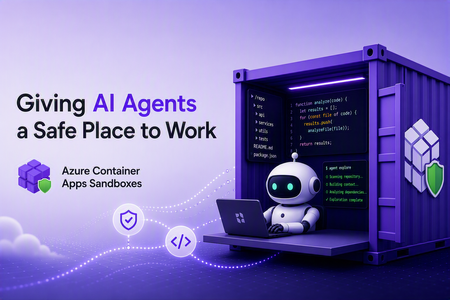
Co-written by Nikoloz Buligini, Front End Developer at Templafy, and Jan Kalis, Azure Container Apps Sandboxes, Core AI, Microsoft Every team building with multi-tenant AI agent platforms hits the same wall. The agent is smart enough to read your code, reason about a bug, and propose a fix. But the moment it needs to take an action - clone a repo, install tooling, run a command, hit an internal endpoint - you have to answer some uncomfortable questions: where does it run, what permissions does it have and what can it access? Run it on your own infrastructure and inherit the blast radius. Give it broad network access and you have handed an autonomous process the keys to your environment. Lock it down too hard and the agent cannot do its job. This is exactly the problem Azure Container Apps Sandboxes was built to solve. And it is exactly the problem the team at Templafy solved in production. This post walks through what Sandboxes are, the features that make them a good fit for agentic workloads and how Templafy put ACA Sandboxes to work. What are Azure Container Apps Sandboxes? Azure Container Apps Sandboxes (Preview) are secure, isolated compute environments that start in seconds, scale to thousands, and do not charge you for compute while stopped. Each sandbox runs inside its own hardware-isolated microVM, fully separated from the host, the platform, and every other sandbox. Bring your own container image or use an included one, and Sandboxes handle provisioning, isolation, and lifecycle. This is the same compute fabric behind products like Cloud sandboxes in GitHub Copilot, Foundry Hosted Agents, and Azure Container Apps Express, and now you can build directly on it. For platform builders, that means enterprise-grade, multi-tenant isolation as a building block you would otherwise spend years creating. For AI agents, a sandbox becomes a self-configurable tool: spin up a fresh environment in seconds, run untrusted code, compile a project, or explore a codebase, then throw it away. On one side you empower humans to build platforms. On the other you empower agents to extend their own capabilities. The features that make Sandboxes fit agentic work A fast microVM is table stakes. What makes Sandboxes practical for real agent workloads is the control around them. Snapshots capture a fully configured environment and resume from it, ideal for long-running tasks or cloning setups. Egress controls declare exactly what a sandbox may reach, so an agent can pull from source control and package registries but nothing you did not approve. Managed identities authenticate to Azure with no secrets in the image. Automatic suspend and resume map cleanly onto how conversational agents behave, warming back up with full context when a conversation continues. Ports give your orchestrator a channel to a long-running agent process inside the sandbox. Two newer capabilities go further: virtual network integration puts an agent workspace inside your own Azure VNet with access to private endpoints, and bring your own storage lets data and artifacts outlive a session under your compliance rules. Together these turn a fast disposable VM into something you can hand to an autonomous agent in production. Which brings us to Templafy. How Templafy uses Sandboxes, in their own words The following section is written by Nikoloz, Front End Developer at Templafy. At Templafy we built an AI agent that helps our teams by doing longer-running source-code exploration on their behalf. Someone asks a question in a Slack thread, and behind the scenes the agent needs a real, isolated workspace where it can clone repositories, run tooling, and dig through code without touching anything it should not. It started as an engineer-facing tool for deep technical questions, but we recently opened it up to our product team for questions about undocumented product behavior. There, the agent first checks our Help Center through Azure AI Search with no sandbox required and only spins up a sandbox to explore the code when the docs come up short. Since these users aren't engineers, we summarize what the exploration finds into something more approachable. Funnily enough, the product team has been using it more than engineering does, and the feedback since launch has been great. We needed strong isolation, fast startup, and tight control over what each workspace could reach. Azure Container Apps Sandboxes gave us exactly that. We were sold on the model early enough that we built our own TypeScript SDK for Sandboxes before there was an official one, so we could drive the whole lifecycle from our Node stack. Here is what happens when the AI decides to start a workflow for a Slack thread: Create a sandbox from the public node-24 image. Install Git and other development tools. Clone our repositories and configure OpenCode. Restrict egress to only the Azure DevOps, package registry, and service endpoints the agent actually needs. Expose a port used to communicate with the agent runtime. Create and reuse snapshots so we do not repeat the bootstrap process on every run. Associate successful sessions with their Slack threads for a short period, so users can make follow-up requests against the same warm workspace. Stop or suspend idle sandboxes and resume them when a conversation continues. Delete failed or expired sessions. To do all of this we lean on the SDK for the full surface area: sandbox lifecycle operations, command execution, files, snapshots, ports, egress policies, public disk-image inspection, and sandbox state. Two features carry most of the weight for us. The first is restricted egress. Our agent is autonomous and works with our source code, so we are not comfortable letting it talk to the open internet. Declaring a narrow allow-list of endpoints means the workspace can do its job and nothing more, and that control is what let us ship this with confidence. The second is snapshots. Cloning repositories and configuring the toolchain is not free and doing it on every Slack message would make the agent feel slow. With snapshots we pay that cost once and resume from a ready-to-work state, so follow-ups in a thread start fast. This is only the first workflow. We are already looking at background investigations using Application Insights and eventually letting the agent open pull requests for quick bug fixes. The same isolated-workspace pattern extends cleanly to all of it. Who this is for If you are building an AI agent that needs to run code, explore a repository, or reach into your systems, and you have been nervous about where that runs, ACA Sandboxes is for you. You do not have to choose between a capable agent and a safe one. Give it a hardware-isolated workspace, declare exactly what it can touch, snapshot the setup, and let it work. Templafy went from "how do we let an agent safely explore our source code" to a production workflow running out of Slack threads, on infrastructure they controlled end to end. The building blocks are the same ones you can pick up today. Next steps Create your first sandbox - https://sandboxes.azure.com/ Explore Azure Container Apps Sandboxes documentation - https://sandboxes.azure.com/docs/sandboxes/ Start with Azure Container Apps Sandboxes samples - https://github.com/azure-samples/azure-container-apps-sandboxes/1.3KViews3likes0CommentsIPv6 Dual-Stack Endpoints for Azure Container Registry (Public Preview)
By Johnson Shi, Aviral Takkar, Bin Du Introduction Two of the most common networking questions we hear from teams running Azure Container Registry (ACR) are: "Can my registry serve clients on IPv6 networks?" — Teams operating IPv6-only or dual-stack networks need their container registry reachable over IPv6. "How do we start moving registry traffic toward IPv6 without breaking anything?" — Organizations guarding against IPv4 address exhaustion, or operating under IPv6 transition mandates, want a migration path that doesn't disrupt existing IPv4 clients. Today, we're announcing the public preview of IPv6 dual-stack endpoints for Azure Container Registry for public endpoints and firewall rules, with IPv6 over private endpoints planned for GA. Set your registry's endpoint protocol to IPv4AndIPv6 , and its endpoints become reachable over both IPv4 and IPv6 — so IPv4-only, dual-stack, and IPv6-capable clients all connect to the same registry, each over whichever protocol their network stack selects. Key Takeaways ACR registries now support an endpointProtocol setting with two values: IPv4 (default) and IPv4AndIPv6 (dual stack, preview). Dual stack is additive — your registry continues serving IPv4 clients exactly as before. There is no IPv6-only mode. Dual stack requires dedicated data endpoints to be enabled ( --data-endpoint-enabled true ), and dedicated data endpoints require the Premium SKU. The service enforces this requirement. You can enable it today with Azure CLI 2.87.0 via az acr update --endpoint-protocol IPv4AndIPv6 . FQDN-based client firewall rules keep working unchanged; IP-based allowlists need to account for IPv6 traffic. Limitation: This public preview covers IPv6 for the registry's public endpoints and firewall rules only. IPv6 over private endpoints is planned for a future release. Limitation: ACR Tasks isn't supported on a registry that has IPv6 dual-stack enabled. Tasks does not work when the endpoint protocol isIPv6 dual-stack, including quick builds (with az acr build) and quick task runs (with az acr run). Support is planned for a future release. How to enable it On an existing registry (Azure CLI 2.87.0 or later) Dual stack requires dedicated data endpoints, so enable both in a single update: az acr update --name <your-registry> --data-endpoint-enabled true --endpoint-protocol IPv4AndIPv6 If dedicated data endpoints are already enabled, set the endpoint protocol on its own: az acr update --name <your-registry> --endpoint-protocol IPv4AndIPv6 Verify the configuration: az acr show --name <your-registry> --query "{endpointProtocol:endpointProtocol, dataEndpointEnabled:dataEndpointEnabled}" { "dataEndpointEnabled": true, "endpointProtocol": "IPv4AndIPv6" } Note: If your clients sit behind a firewall and you're enabling dedicated data endpoints for the first time, add firewall rules for <your-registry>.<region>.data.azurecr.io before enabling — switching from *.blob.core.windows.net to dedicated data endpoints changes where layer blobs are downloaded from. See Dedicated data endpoints for details. Reverting to IPv4 Dual stack is reversible at any time: az acr update --name <your-registry> --endpoint-protocol IPv4 Reverting the endpoint protocol leaves dedicated data endpoints enabled; disable them separately if desired. Scope of this preview This public preview enables IPv6 for the registry's public endpoints — the login server, dedicated data endpoints, and regional endpoints (if enabled). IPv6 over private endpoints isn't part of this preview. Support is planned for a future release. Until then, registries reached through a private endpoint continue to use IPv4. Additionally, IPv6 dual-stack support for ACR Tasks, including support for `az acr build` and `az acr run`, are not supported in the public preview. Support is planned for a future release. Requirements and how features compose Requirement Why Premium SKU Dedicated data endpoints are a Premium feature. Dedicated data endpoints enabled IPv4AndIPv6 requires dataEndpointEnabled: true ; the service rejects the setting otherwise. Azure CLI 2.87.0+ Adds --endpoint-protocol to az acr update . For geo-replicated registries, the endpoint protocol is a registry-level setting, and dedicated data endpoints exist in every replica region. Firewall guidance: rules based on registry FQDNs — the login server, dedicated data endpoints, and regional endpoints (if enabled) — continue to work unchanged for dual-stack registries; only IP-address-based allowlists need updating for IPv6. To learn more, see IPv6 dual-stack endpoints in Azure Container Registry (preview) and the ACR endpoint reference. If you have further questions about IPv6 dual-stack endpoints or dedicated data endpoints, reach out to us on the Azure Container Registry GitHub repository or file feedback through the Azure portal.288Views1like0Comments
How Many Copies of Each Layer Does Your Container Registry Actually Need?
Authors: Payal Mahesh and Vicky Lin Azure Container Registry team: Jeanine Burke and Johnson Shi Introduction It's Monday morning. You spin up a fresh 1,000-node AKS cluster for a big training run or a fleet-wide rollout. Every node reaches for the same large container image at the same instant. What actually happens in the next ten minutes - and whether your pods reach Ready in 9 minutes or 14 - turns out to depend on a single number you've probably never thought about: how many copies of each image layer exist behind your registry. At the surface, you see a single capacity number for your registry size - but behind that abstraction, Azure Container Registry maintains copies of your layer data to optimize pull performance. That number of copies directly determines the read throughput available per layer. Each copy can serve requests independently, so distributing the layer across storage allows it to be read in parallel. More copies mean more independent readers - and higher aggregate throughput when thousands of nodes pull at once. The intuitive answer is that more is better: add copies, get faster pulls. When we actually tested it at 1,000-node scale, the truth turned out to be more interesting: A few extra copies helped a little. A moderate number helped a lot, and eliminated storage throttling entirely. A large number helped no more than the moderate one. A huge number actually made pulls slower again. Think of it like opening checkout lanes at a grocery store. Opening a few more lanes when the store is slammed cuts the line dramatically. Past a certain point, though, extra lanes barely help, because by then it's the customers, not the cashiers, who are the bottleneck. And open too many? Now the staff is spread thin and tripping over each other, and the line moves worse than it did at the sweet spot. This post walks through what we measured, why the curve bends where it does, and what we're building next so finding that sweet spot isn't something anyone has to do by hand. Key Takeaways There's a sweet spot, not a slope. Adding copies per layer cut pod-startup P99 by 27% and raised P50 per-node egress throughput by 244%, but only up to a point. Past that, the returns vanish, and far past it, latency actually regresses. Storage throttling is the real enemy. The win comes from spreading load across enough storage backends that no single backend gets pinned at its egress ceiling. Once throttling is gone, more copies stop helping. Storage scale alone has a ceiling. Even at the sweet spot, the per-backend egress limit caps total throughput. The next jump in performance has to come from somewhere else, which is exactly what we're building (see What's Next). This isn't something customers should need to manage. We're building a proactive, on-demand storage scaling capability that automatically grows the footprint before throttling happens and shrinks it back when the burst is over. A quick bit of background Within a region, the layer data behind your container images is backed by Azure storage. The number of copies ACR maintains per layer determines how many independent storage backends a concurrent-pull workload can spread its reads across. That's what matters, because each backend has a finite egress ceiling. Once concurrent reads against one backend get close to that ceiling, requests start getting throttled, and your pulls slow down in proportion. The principle is simple: more copies per layer means more backends serving the same data, which means more total egress headroom and fewer throttled requests. What we wanted data on was how many, and where it stops helping. How we tested We ran a controlled series of large-scale pull tests against ACR Premium on a roughly 1,000-node cluster, with every node pulling the same large image cold at the same time (no local cache on any node). The only thing we changed between runs was the number of per-layer copies behind a single registry endpoint. Everything else, including rate limits, the image, node count, and concurrency, stayed constant. For each run we measured pod-startup latency (P50/P90/P99), end-to-end storage read latency, egress throughput distributions (P50-P99.9), and storage throttling events. Pod-startup latency is our headline metric, because it's the one number that reflects the actual customer experience no matter where the bottleneck happens to be. Per-node egress throughput matters too, though. It tells you directly how much pull bandwidth ACR delivers to your fleet, and it's usually what customers have in mind when they ask how much faster extra copies will make their pulls. We report egress as a distribution rather than a single average, since per-request and per-time-window views can tell very different stories about the same set of pulls. These are observations from a single controlled environment, not a service guarantee. Absolute numbers will move with image size, node count, layer composition, network topology, and concurrency. What we found We tested five configurations, sweeping from a low baseline number of per-layer copies up to a very high one. We name them by relative copy count rather than exact instance counts: Baseline: the lowest level, our reference point. Low: a modest step up from Baseline. Mid: a meaningful step up from Low. Higher: a further step up from Mid. Very high: the largest configuration we tested, well above Higher. Here are the numbers. All percent changes are relative to Baseline. Configuration Pod startup P50 Pod startup P90 Pod startup P99 Storage throttling events Peak per-backend egress Baseline (fewest copies) 9m 36s 11m 0s 14m 16s Many; all top backends above the egress ceiling Highest Low 9m 27s (−2%) 10m 14s (−7%) 12m 59s (−9%) Some; one backend still above the ceiling High Mid 9m 25s (−2%) 9m 45s (−11%) 10m 22s (−27%) Zero Below the ceiling Higher 9m 20s (−3%) 9m 37s (−13%) 10m 22s (−27%) Zero Well below the ceiling Very high 9m 28s (−1%) 10m 31s (−4%) 13m 48s (−3%) Zero Lowest Look at the P99 pod-startup column from top to bottom: 14m 16s, 12m 59s, 10m 22s, 10m 22s, 13m 48s. It improves, flattens out, then climbs back up. Three things explain that shape: 1. The win: Throttling falls off a cliff at the Mid configuration As we added copies per layer, per-backend egress fell and storage-side throttling decreased. At the Mid configuration, throttling errors hit zero, and they stayed at zero for every configuration above it. The upside isn't just that the errors went away, though. It's raw pull bandwidth. At the Mid sweet spot, the typical node saw its P50 egress throughput jump 244% over Baseline. With load spread across enough copies, each node pulled its layers off storage much faster, not just without stalling. For a workload owner, that's the difference between watching pods come up in a steady stream and watching them stall for tens of seconds at a time while throttling clears. Same image, same node count, same registry, very different experience. To put it in concrete terms: if your team runs a daily AI training kickoff that needs all 1,000 nodes pulling before the job can start, this is the difference between starting on time and starting four minutes late every day. Over a quarter of training runs, that adds up. 2. The surprise: more copies made pulls slower This is the finding that genuinely surprised us. Going from Higher to Very high, the largest configuration we tested, cost us 3 minutes and 26 seconds at P99: 10m 22s climbing back up to 13m 48s. That gave back almost the entire benefit we'd built up over the previous four configurations. Tail storage-read latency at Very high actually came out worse than Baseline. The Very high run is where the wheels came off, and the reason is the trade-off underneath. Once storage throttling is gone, more copies stop buying you anything, and the cost of fanning reads across that many backends starts to take over. The throughput distribution shows it clearly. P50 and P75 throughput had been climbing steadily and getting smoother through Mid and Higher, then dropped sharply at Very high while the peak P99/P99.9 spikes came back. Spread the same load across too many backends and it fragments into smaller, less consistent bursts. The takeaway is that "more is better" stops being true past the sweet spot, and the failure mode is quiet. You won't see throttling errors. You'll just see your pulls get slower. 3. What we didn't expect: at few copies, the hottest backend is what hurts you At the lowest copy counts, pull traffic wasn't spread evenly across the underlying storage footprint. Some backends absorbed far more traffic than others. As we added copies, that distribution evened out and the hottest backends cooled down. The implication is sharp. You can saturate the busiest backend, and trigger throttling, even when the total headroom across all your backends is large in aggregate. What matters is the load on the hottest backend, not the average. That's exactly the failure mode that demand-driven, proactive scaling (described below) is meant to head off before it happens. So how should you think about this? You don't size copies yourself; ACR manages the storage footprint behind your registry. Still, it helps to understand what moves the sweet spot, because the shape of your own workload is what decides where it lands. The bigger your worst-case concurrent burst (more nodes, larger images, higher concurrency), the more copies per layer it takes to keep pulls off the throttling ceiling, and the further out the sweet spot sits. Smaller workloads may already be sitting on the flat part of the curve. One thing is worth saying plainly. The storage footprint underneath is managed by ACR and shared across many registries, so there's no fixed, private storage budget that maps one-to-one to your workload. The sweet spot isn't a number you compute and provision; it's a behavior the platform has to land on for you, which is exactly why we're moving toward demand-driven scaling that handles it automatically. That's what brings us to what we're building next. What's next: proactive, on-demand storage scaling and a caching layer The fixed-copy tests above answer the question "how many should the ACR system provision?" but they assume a single, static answer. Real workloads aren't static. A 1,000-node burst happens at deploy time, not at 3 a.m. on a Tuesday. And no matter how many copies are provisioned, the per-backend storage ceiling still bounds peak deliverable throughput. So we're investing along two complementary directions. 1. Proactive, demand-driven storage scaling We're building a capability that adjusts the number of per-layer copies automatically based on real-time pull demand: Proactive, not reactive. The system scales the storage footprint before concurrent pull pressure pushes any single backend near the throttling threshold, so throttling is prevented before it forms rather than cleaned up after the fact. On-demand scale-out. The footprint expands automatically as sustained pull demand grows. Scale-in when demand subsides. The footprint contracts so you're not paying for steady-state capacity you only needed during a burst. Tiering for cold content. Long-tail, rarely-pulled content can sit on colder storage, so the redundant footprint of frequently-pulled content doesn't pay full hot-storage cost everywhere. The benefit to customers is straightforward: smoother pulls under burst, higher delivered throughput on average, no permanent over-provisioning, and no manual re-tuning as workloads grow. 2. A caching layer to absorb burst beyond the storage ceiling Even a perfectly scaled storage footprint runs into the per-backend egress ceiling at extreme scale. To push past it, we're investing in a caching layer in the registry service that absorbs burst traffic before it ever reaches storage. A pull surge that hits the same set of layers, which is the common case for fleet-wide deployments, can be served largely from cache. That takes a lot of load off any single storage backend and complements the storage scaling above. We'll share results from this work in follow-up posts. If you have questions about scaling ACR for your workload, or about how we measure storage performance, reach out on the Azure Container Registry GitHub repository. Note: All results in this post are based on controlled internal testing configurations and are intended to illustrate general scaling behavior rather than prescribe exact configurations.328Views0likes0Comments
Tutorial:A graceful process to develop and deploy Docker Containers to Azure with Visual Studio Code
Creating and deploying Docker containers to Azure resources manually can be a complicated and time-consuming process. This tutorial outlines a graceful process for developing and deploying a Linux Docker container on your Windows PC, making it easy to deploy to Azure resources. This tutorial emphasizes using the user interface to complete most of the steps, making the process more reliable and understandable. While there are a few steps that require the use of command lines, the majority of tasks can be completed using the UI. This focus on the UI is what makes the process graceful and user-friendly. In this tutorial, we will use a Python Flask application as an example, but the steps should be similar for other languages such as Node.js. Prerequisites: Before you begin, you'll need to have the following prerequisites set up: WSL 2 installation WSL provides a great way to develop your Linux application on a Windows machine, without worrying about compatibility issues when running in a Linux environment. We recommend installing WSL 2 as it has better support with Docker. To install WSL 2, open PowerShell or Windows Command Prompt in administrator mode, enter below command: wsl --install And then restart your machine. You'll also need to install the WSL extension in your Visual Studio Code. Python 3 installation Run “wsl” in your command prompt. Then run following commands to install python 3.10 (if you use Python 3.5 or a lower version, you may need to install venv by yourself): sudo apt-get update sudo apt-get upgrade sudo apt install python3.10 Docker for Linux You'll need to install Docker in your Linux environment. For Ubuntu, please refer to below official documentation: https://docs.docker.com/engine/install/ubuntu/ Docker for Windows To create an image for your application in WSL, you'll need Docker Desktop for Windows. Download the installer from below Docker website and run the downloaded file to install it. https://www.docker.com/products/docker-desktop/ Steps for Developing and Deployment 1. Connect Visual Studio Code to WSL To develop your project in Visual Studio Code in WSL, you need to click the bottom left blue button: Then select “Connect to WSL” or “Connect to WSL using Distro”: 2. Install some extensions for Visual Studio Code Below two extensions have to be installed after you connect Visual Studio Code to WSL. The Docker extension can help you create Dockerfile automatically and highlight the syntax of Dockerfile. Please search and install via Visual Studio Code Extension. To deploy your container to Azure in Visual Studio Code, you also need to have Azure Tools installed. 3. Create your project folder Click "Terminal" in menu, and click "New Terminal": Then you should see a terminal for your WSL. I use a quick simple Flask application here for example, so I run below command to clone its git project: git clone https://github.com/Azure-Samples/msdocs-python-flask-webapp-quickstart 4. Python Environment setup (optional) After you install Python 3 and create project folder. It is recommended to create your own project python environment. It makes your runtime and modules easy to be managed. To setup your Python Environment in your project, you need to run below commands in the terminal: cd msdocs-python-flask-webapp-quickstart python3 -m venv .venv Then after you open the folder, you will be able to see some folders are created in your project: Then if you open the app.py file, you can see it used the newly created python environment as your python environment: If you open a new terminal, you also find the prompt shows that you are now in new python environment as well: Then run below command to install the modules required in the requirement.txt: pip install -r requirements.txt 5. Generate a Dockerfile for your application To create a docker image, you need to have a Dockerfile for your application. You can use Docker extension to create the Dockerfile for you automatically. To do this, enter ctrl+shift+P and search "Dockerfile" in your Visual Studio Code. Then select “Docker: Add Docker Files to Workspace” You will be required to select your programming languages and framework(It also supports other language such as node.js, java, node). I select “Python Flask”. Firstly, you will be asked to select the entry point file. I select app.py for my project. Secondly, you will be asked the port your application listens on. I select 80. Finally, you will be asked if Docker Compose file is included. I select no as it is not multi-container. A Dockefile like below is generated: Note: If you do not have requirements.txt file in the project, the Docker extension will create one for you. However, it DOES NOT contain all the modules you installed for this project. Therefore, it is recommended to have the requirements.txt file before you create the Dockerfile. You can run below command in the terminal to create the requirements.txt file: pip freeze > requirements.txt After the file is generated, please add “gunicorn” in the requirements.txt if there is no "gunicorn" as the Dockerfile use it to launch your application for Flask application. Please review the Dockerfile it generated and see if there is anything need to modify. You will also find there is a .dockerignore file is generated too. It contains the file and the folder to be excluded from the image. Please also check it too see if it meets your requirement. 6. Build the Docker Image You can use the Docker command line to build image. However, you can also right-click anywhere in the Dockefile and select build image to build the image: Please make sure that you have Docker Desktop running in your Windows. Then you should be able to see the docker image with the name of the project and tag as "latest" in the Docker extension. 7. Push the Image to Azure Container Registry Click "Run" for the Docker image you created and check if it works as you expected. Then, you can push it to the Azure Container Registry (ACR). Click "Push" and select "Azure". You may need to create a new registry if there isn't one. Answer the questions that Visual Studio Code asks you, such as subscription and ACR name, and then push the image to the ACR. 8. Deploy the image to Azure Resources Follow the instructions in the following documents to deploy the image to the corresponding Azure resource: Azure App Service or Azure Container App: Deploy a containerized app to Azure (visualstudio.com) Opens in new window or tab Container Instance: Deploy container image from Azure Container Registry using a service principal - Azure Container Instances | Microsoft Learn Opens in new window or tab7KViews4likes1CommentIntroducing Azure Container Apps Sandboxes: Secure Infrastructure for Agentic Workloads
Today we are announcing the public preview of Azure Container Apps Sandboxes - a new first-class resource type that gives you fast, secure, ephemeral compute environments with built-in suspend and resume. This is the underlying infrastructure on which products like Cloud sandboxes in GitHub Copilot, Foundry Hosted Agents, and Azure Container Apps Express are built, you now have the opportunity to build your solutions leveraging this infrastructure. Azure Container Apps Sandboxes unlocks two massive opportunities. For platform developers and ISVs, sandboxes give you the same isolated compute fabric that powers many Microsoft products. You get the building blocks to create your own multi-tenant platform on proven, enterprise-scale infrastructure. For AI agents, sandboxes become a self-configurable tool that lets agents extend their own capabilities on the fly. An agent can spin up a fresh sandbox in milliseconds and use it to execute untrusted code, compile source, test HTTP requests against a live app, launch a browser session, or tackle whatever needs a quick and scalable infrastructure. On one side it empowers humans to build platforms, on the other it empowers agents to build their own capabilities. Both get enterprise-grade isolation, instant startup, and snapshot-based persistence out of the box. We'll walk through the resource model, sandbox lifecycle, the features that set Sandboxes apart - like snapshots, lifecycle policies, network egress controls, volumes, and managed identities - and show you how to get started with the portal and CLI. What Are Container Apps Sandboxes? Container Apps Sandboxes are secure, isolated compute environments that start in sub-second time, scale to thousands, and cost nothing when idle. Each sandbox runs in its own hardware-isolated microVM boundary - fully separated from the host, the platform, and every other sandbox. You bring your own Open Container Initiative (OCI) image, and Sandboxes handle the rest: provisioning from prewarmed pools, strong multi-tenant isolation, and snapshot-based suspend/resume that preserves full memory and disk state across sessions. There are many ways Sandboxes can help you build your next project - here are a few: Your own build & test systems - wire a Sandbox into your CI/CD flow to run builds while your laptop stays cool. Agents that can run anything safely - an agent spawns a sandbox, executes work inside it, and returns the output with no agent host privileges required. Agent swarms - decompose a research question, spawn N sandbox workers in parallel (each pinned to its own image and egress policy), and synthesize the result. Early access customers are already unlocking significant benefits by leveraging Azure Container Apps Sandboxes. "With Azure Container Apps sandboxes, SitecoreAI can safely enable agents to take real action. The combination of multi-tenant isolation, rapid scale-out, and full automation allows Sitecore to run long-lived, autonomous agents that securely execute code, manage workflows, and interact with enterprise systems within secure, governed environments. With this foundation, we can build agents that do real work: assembling content, personalizing experiences, and optimizing campaigns in production. Agents that operate continuously, learn from results, and improve over time, so our customers get better outcomes without giving up control." - Mo Cherif, VP of AI and Innovation, Sitecore "We got early access to Azure Container Apps Sandboxes, and got the first prototype integrated with Atlas AI in hours, and it's already shaping a new Atlas AI capability that we plan to launch in preview in Q3. It gives every Atlas AI agent a safe, sandboxed workspace (file system, terminal, code execution) on a customer's live data in Cognite Data Fusion. The value: Industrial process, reliability, and production engineers spend days and weeks on questions like "which wells are underperforming and why?" These questions are tractable but expensive, so they are asked rarely and decisions are made on gut feel. With this, an agent pulls the data, runs the analysis, cross-references maintenance and inspection records, and returns a cited draft in minutes. Sandboxes make it practical: Aligned feature set, per-customer isolation, pause/resume across multi-day investigations, scale-to-zero economics." - Kelvin Sundli, Product manager, Atlas AI, Cognite Resource Model: Sandbox Groups and Sandboxes The top-level ARM resource is Microsoft.App/SandboxGroups. A Sandbox Group is the management boundary for a collection of sandboxes that share configuration - think of it like a Container Apps Environment, but purpose-built for sandboxes. When you create a Sandbox Group, you specify: Subscription, Resource Group, and Region Sandbox defaults (optional): default CPU, memory, disk, max sandbox count, and default idle timeout Networking: optionally deploy into a custom VNet with a dedicated subnet for private networking Identity: System or user assigned Entra identity. Individual sandboxes are created within a Sandbox Group. Each sandbox has its own source (disk image or snapshot), resource tier, lifecycle policy, network egress policy, environment variables, ports, volumes, and connections. Sandbox Lifecycle Sandboxes have a well-defined lifecycle with the following states: State Description Creating Provisioning the sandbox from a disk image or snapshot Running Actively executing - backed by a live microVM Idle System-suspended after inactivity; can auto-resume on the next request Suspended Full state (memory + disk) preserved as a snapshot; no compute costs Resuming Restoring from a suspended or idle state - sub-second for most workloads Stopped User-initiated stop; can be resumed Stopping Graceful shutdown in progress Deleting Teardown in progress The key insight here is the distinction between Idle and Suspended. When a sandbox goes idle (e.g., no traffic for a configured timeout), the system can automatically suspend it and capture a snapshot. When a new request arrives, the sandbox resumes transparently. This gives you scale-to-zero economics with stateful compute - something that wasn't possible before without significant custom engineering. Disk Images: Bring Your Own Container Sandboxes boot from Disk Images - Open Container Initiative (OCI) images converted into an optimized root filesystem format. You point to any OCI image (public or private registry), and the platform builds a bootable disk image from it. You can start with public, pre-built images maintained by the platform (for example, Ubuntu base images), or bring your own private images. For private registries, you can authenticate with username/token or use a user-assigned managed identity for Azure Container Registry (ACR) – integrated with Azure as you expect. Snapshots: Full-State Persistence Snapshots capture the complete state of a running sandbox - memory, disk, and all running processes. When you resume a sandbox from a snapshot, every process, open file handle, and in-memory data structure is restored exactly as it was. A snapshot captures the full state of a running sandbox: memory pages, disk, processes. Two ways to make one - automatically on suspend, or manually on demand. Three things they're great for: Checkpointing mid-task so a long-running agent can resume exactly where it left off Cloning an environment that's already warm - dependencies installed, caches populated, services running Shipping a "ready-to-go" state that resumes in sub-second instead of cold-booting Snapshots are free during the preview, after which they will be stored as Azure Blob Storage at standard rates. Each snapshot records the source sandbox, resource allocation (CPU, memory, disk), and container metadata - so what you get back is exactly what you snapshotted. Resource Tiers Every sandbox is assigned to a resource tier that determines its CPU, memory, and disk allocation: Tier CPU Memory Disk XS 0.25 vCPU 0.5 GB 5 GB S 0.5 vCPU 1 GB 10 GB M (default) 1vCPU 2 GB 20 GB L 2 vCPU 4 GB 40 GB XL 4 vCPU 8 GB 80 GB When creating a sandbox from a snapshot, the resource tier is inherited from the snapshot and cannot be changed - this ensures the restored environment has the exact resources it was running with when the snapshot was taken. Lifecycle Policies: Auto-Suspend and Auto-Delete Every sandbox can be configured with lifecycle policies that automate state transitions and cleanup: Auto-Suspend Idle timeout: How long a sandbox can sit idle before being suspended (configurable: 1m, 2m, 5m, 10m, 30m, 60m) Suspend mode: Disk + Memory (default): Full snapshot including memory state - resume picks up exactly where you left off, with all processes and in-memory data intact. Disk: Only the disk is preserved; the VM restarts fresh on resume. Useful when you only need file persistence, not process continuity. Auto-Delete Automatically delete sandboxes after a configurable number of days of inactivity Prevents accumulation of abandoned sandboxes that consume snapshot storage These lifecycle policies are what make Sandboxes economically viable at scale. A platform serving thousands of tenants can configure aggressive idle timeouts (say, 60 seconds) with Memory suspend mode, and each tenant's sandbox disappears from the billing meter almost immediately - but resumes in sub-second time the moment they return. Network Egress Policy For scenarios involving untrusted code - AI agents executing LLM-generated scripts, multi-tenant SaaS with user-submitted workloads - controlling outbound network access is critical. Sandboxes provide a per-sandbox Network Egress Policy: Default action: Allow or Deny all outbound traffic Host rules: Domain-pattern rules (e.g., *.github.com → Allow) to permit specific destinations Custom CIDR rules: Network-level rules for IP ranges (e.g., 10.0.0.0/8 → Deny) Skip egress proxy: Option to bypass the egress proxy entirely when custom VNet routing handles policy enforcement This means you can run a sandbox in a deny-by-default posture and allowlist only the specific endpoints it needs (your API server, a package registry, etc.) - without setting up NSGs or firewall appliances. Managed Volumes: Persistent and Shared Storage Sandboxes support two types of mountable volumes, both managed by Microsoft: Volume Type Backed By Best For Managed Azure Blob Azure Blob Storage Shared data across sandboxes, file uploads/downloads, persistent artifacts Managed Data Disk Azure Disk Storage High-performance storage for databases, build caches, large working sets - only available to one sandbox at a time Blob volumes come with a built-in file explorer in the portal - you can browse, upload, download, create folders, and drag-and-drop files directly. Data Disk volumes provide dedicated block storage with configurable sizes. Secrets and Identity Secrets Sandbox Groups support key-value secrets scoped to the group. Secrets can be created, edited, and referenced by sandboxes within the group. These secrets can be used in egress policies to modify requests with transform or header-injection rules, without exposing the secrets to code running inside the sandbox. Managed Identity Sandbox Groups support both system-assigned and user-assigned managed identities, with full RBAC role assignment management. This means your sandboxes can authenticate to Azure services (Key Vault, Storage, Cosmos DB, etc.) without managing credentials - the same identity model you use everywhere else in Azure. MCP Connectors and Triggers ACA Sandboxes now supports managed connectors through the Model Context Protocol (MCP), giving sandboxes access to external APIs - including Microsoft 365, Salesforce, ServiceNow, GitHub, and 1,400+ other systems - without managing credentials directly. Attach a Connector Gateway to your sandbox group, and every sandbox in the group can call external APIs through a standardized MCP interface at runtime. Pair connectors with triggers to build event-driven automation: route an Outlook email to a sandbox that triages it with an AI agent, or react to a SharePoint file upload by extracting and processing the document all without writing glue code. Triggers can fire a shell command inside a sandbox or invoke an HTTP endpoint the sandbox exposes, so your automation shapes fit naturally around your workload. The integration is built on the new Connector Namespace service (az connector-namespace), the same runtime behind Logic Apps and Power Platform connectors, now available as a programmable layer for sandboxes. See the end-to-end samples for runnable azd up-deployable examples covering email triage and document automation scenarios. The Portal Experience Azure Container Apps Sandboxes are only available in the new Azure Container Apps portal that provides a rich, IDE-like experience for working with sandboxes. Creating a Sandbox The portal offers multiple creation paths: Standard Sandbox - full configuration control over source, resources, lifecycle, networking, and volumes GitHub Copilot Sandbox - preset, Copilot CLI ready to go, GitHub credentials can be wired through the Access Token before the sandbox is created Claude Sandbox - Claude CLI pre-installed, ready for agentic coding inside the sandbox Using Coding Agents (Copilot CLI / Claude Code) If you live inside Copilot CLI or Claude Code, you don't need to learn a new CLI. Install the azure-sandbox skill once and your agent picks up the right skills: # GitHub Copilot CLI # Add as a plugin marketplace /plugin marketplace add microsoft/azure-container-apps # Install all skills /plugin install sandboxes@Azure-Container-Apps # Claude Code claude plugin add microsoft/azure-container-apps The skill runs prerequisite checks silently (az --version, az account show, node --version, aca --version), prompts only if something's missing, and maps natural-language asks to the right aca commands. Bundled runbooks cover Copilot CLI BYOK (bring your own Azure OpenAI key), the deploy-a-web-app walkthrough, and shell setup. Sandbox Detail Page Once your sandbox is running, the detail page gives you immediate access to the sandbox terminal and additional details, such as - Network Audit - real-time egress traffic log showing allowed and denied requests Monitor - live CPU, memory, disk, and network utilization charts Connectors - attached connections with an "Add" action Volumes - mounted volumes with an "Add" action Log Stream - streaming container logs Processes - running process list inside the sandbox Files - file explorer to browse the sandbox filesystem The toolbar actions let you manage the state of the sandbox - Resume or Stop. In the Ellipsis menu (⁝) you can find additional settings to manage network Egress Policy and ingress (Add port), take a Snapshot of the sandbox, Commit (save disk state as a new disk image), set Lifecycle Policy or permanently Delete the sandbox. Finally, you can see additional Details in a side panel. Getting Started with the CLI and Python SDK All sandbox and sandbox-group operations go through the aca CLI. There are no az containerapp sandbox commands, - az is only used for az login, az account show, and resource-group management. Install (CLI) # Mac, Linux curl -fsSL https://aka.ms/aca-cli-install | sh # Windows irm https://aka.ms/aca-cli-install-ps | iex Run aca --help to get started. Install (Python SDK) pip install azure-containerapps-sandbox For more details, quick start and examples on ACA CLI and Python SDK, please go to https://sandboxes.azure.com Evolution from Dynamic Sessions If you've used Azure Container Apps Dynamic Sessions, Sandboxes are the next evolution of that capability. Everything Sessions can do, Sandboxes can do - and significantly more: Capability Dynamic Sessions Sandboxes Sub-second startup ✓ ✓ Strong isolation ✓ ✓ Custom container images ✓ ✓ Custom VNet integration ✓ (Partial) ✓ Suspend/resume with Memory and Disk snapshots - ✓ Lifecycle policies (auto-suspend, auto-delete) - ✓ Network egress policy (per-sandbox) - ✓ Persistent managed volumes (Blob, Data Disk) - ✓ Managed identity (system + user-assigned) - ✓ Secrets management - ✓ Configurable resource tiers - ✓ Direct access to sandbox in Portal experience - ✓ We will continue to support Dynamic Sessions, but all new investment goes into Sandboxes. If you're building new workloads on isolated ephemeral compute, start with Sandboxes. How It All Fits Together ACA Sandboxes is a platform primitive. It's the foundation on which multiple Microsoft products are already built - including ACA Express, Cloud sandboxes in GitHub Copilot, and Foundry Hosted Agents. When you build on Sandboxes, you're building on the same infrastructure that powers Microsoft's own portfolio. This is the evolution of what we shared with Project Legion in 2024. Legion described the internal infrastructure; Sandboxes exposes it as a customer-facing primitive that you can use directly. What's Next • Deeper Azure integrations - first-class connectivity with Azure networking, identity, storage, and AI services • Enhanced SDK and CLI - richer programmatic experiences for managing sandboxes at scale • More Microsoft services built on Sandboxes - this is just the beginning Get Started Today • Portal: https://sandboxes.azure.com/ • Documentation: Azure Container Apps Sandboxes • Pricing: Azure Container Apps Pricing (per-second vCPU/memory billing, scale-to-zero, snapshots at Blob Storage rates) We'd love to hear your feedback. You can ask questions, or file issues on the Azure Container Apps GitHub (prefix with [Sandbox] for Sandboxes-specific issues).8.4KViews3likes1CommentReference Architecture for a High Scale Moodle Environment on Azure
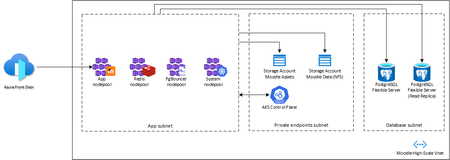
Introduction Moodle is an open-source learning platform that was developed in 1999 by Martin Dougiamas, a computer scientist and educator from Australia. Moodle stands for Modular Object-Oriented Dynamic Learning Environment, and it is written in PHP, a popular web programming language. Moodle aims to provide educators and learners with a flexible and customizable online environment for teaching and learning, where they can create and access courses, activities, resources, and assessments. Moodle also supports collaboration, communication, and feedback among users, as well as various plugins and integrations with other systems and tools. Moodle is widely used around the world by schools, universities, businesses, and other organizations, with over 100 million registered users and 250,000 registered sites as of 2020. Moodle is also supported by a large and active community of developers, educators, and users, who contribute to its development, documentation, translation, and support. [URL] is the official website of the Moodle project, where anyone can download the software, join the forums, access the documentation, participate in events, and find out more about Moodle. Goal The goal for this architecture is to have a Moodle environment that can handle 400k concurrent users and scale in and out its application resources according to usage. Using Azure managed services to minimize operational burden was a design premise because standard Moodle reference architectures are based on Virtual Machines that comes with a heavy operational cost. Challenges Being a monolith application, scaling Moodle in a modern cloud native environment is challenging. We choose to use Kubernetes as its computing provider due to the fact that it allow us to build a Moodle artifact in an immutable way that allows it to scale out and in when needed in a fast and automatic way and also recover from potential failures by simply recreating its Deployments without the need to maintain Virtual Machine resources, introducing the concept of pets vs cattle[1] to a scenario that at first glance wouldn't be feasible. Since Moodle is written in PHP it has no concept of database polling, creating a scenario where its underlying database is heavily impacted by new client requests, making it necessary to use an external database pooling solution that had to be custom tailored in order to handle the amount of connections for a heavy-traffic setup like this instead of using Azure Database for PostgreSQL's built-in pgbouncer. The same effect is also observed in its Redis implementation, where a custom Redis cluster had to be created, whereas using Azure Cache for Redis would incur prohibitive costs due to the way it is set up for a more general usage. 1 - https://learn.microsoft.com/en-us/dotnet/architecture/cloud-native/definition#the-cloud Architecture This architecture uses Azure managed (PaaS) components to minimize operational burden by using Azure Kubernetes Service to run Moodle, Azure Storage Account to host course content, Azure Database for PostgreSQL Flexible Server as its database and Azure Front Door to expose the application to the public as well as caching commonly used assets. The solution also leverages Azure Availability Zones to distribute its component across different zones in the region to optimize its availability. Provisioning the solution The provisioning has two parts: setting up the infrastructure and the application. The first part uses Terraform to deploy easily. The second part involves creating Moodle's database and configuring the application for optimal performance based on the templates, number of users, etc. and installing templates, courses, plugins etc. The following steps walk you through all tasks needed to have this job done. Clone the repository $ git clone https://github.com/Azure-Samples/moodle-high-scale Provision the infrastructure $ cd infra/ $ az login $ az group create --name moodle-high-scale --location <region> $ terraform init $ terraform plan -var moodle-environment=production $ terraform apply -var moodle-environment=production $ az aks get-credentials --name moodle-high-scale --resource-group moodle-high-scale Provision the Redis Cluster $ cd ../manifests/redis-cluster $ kubectl apply -f redis-configmap.yaml $ kubectl apply -f redis-cluster.yaml $ kubectl apply -f redis-service.yaml Wait for all the replicas to be running $ ./init.sh Type 'yes' when prompted. Deploy Moodle and its services Change image in moodle-service.yaml and also adjust the moodle data storage account name in the nfs-pv.yaml (see commented lines in the files) $ cd ../../images/moodle $ az acr build --registry moodlehighscale<suffix> -t moodle:v0.1 --file Dockerfile . $ cd ../../manifests $ kubectl apply -f pgbouncer-deployment.yaml $ kubectl apply -f nfs-pv.yaml $ kubectl apply -f nfs-pvc.yaml $ kubectl apply -f moodle-service.yaml $ kubectl -n moodle get svc –watch Provision the frontend configuration that will be used to expose Moodle and its assets publicly $ cd ../frontend $ terraform init $ terraform plan $ terraform apply Approve the private endpoint connection request from Frontdoor in moodle-svc-pls resource. Private Link Services > moodle-svc-pls > Private Endpoint Connections > Select the request from Front Door and click on Approve. Install database $ kubectl -n moodle exec -it deployment/moodle-deployment -- /bin/bash $ php /var/www/html/admin/cli/install_database.php --adminuser=admin_user --adminpass=admin_pass --agree-license Deploy Moodle Cron Change image in moodle-cron.yaml $ cd ../manifests $ kubectl apply -f moodle-cron.yaml Your Moodle installation is now ready to use! Conclusion You can create a Moodle environment that is scalable and reliable in minutes with a very simple approach, without having to deal with the hassle of operating its parts that normally comes with standard Moodle installations.2KViews8likes1Comment