
Forum Widgets
Latest Discussions

New Outlook: This message can't be saved right now. Please try again
We are having an issue in New Outlook with shared mailboxes. This issue just started happening. User replies to an email in a shared mailbox. User changes the "from" field to her email. User tries to send the email but receives an alert "This message can't be saved right now. Please try again later." The message then closes and a copy of the email is saved to the Drafts folder. No permissions have changed. If user tries the same actions in the Outlook Web Client or Classic Outlook, the user is able to send the email without issue. We've tried resetting New Outlook, restarting Windows, behavior persists. Again, this function was working up until recently. Microsoft Outlook Version: 1.2026.317.100 WebView2 Version: 146.0.3856.84 (Stable) Please advise how we can resolve this issue.peter-supplyApr 03, 2026Brass Contributor65Views1like1Comment
Deleted folders
Hello, I have had an older and a new email account registered in outlook. Since the old account wasn’t connected to a server anymore, Outlook showed always some download errors. I have therefore decided to remove that account from Outlook. The problem is that I have apparently been using some folders related to that account for emails from the other and removing it made disappear, without significant warnings, all my emails. What can I do to get them back? …and there don’t seem to be any folders or files in Outlook from where to recover something, like described on some pages on the internet.SimNEcApr 02, 2026Copper Contributor35Views0likes5Comments
outlook says storage is full but its not.
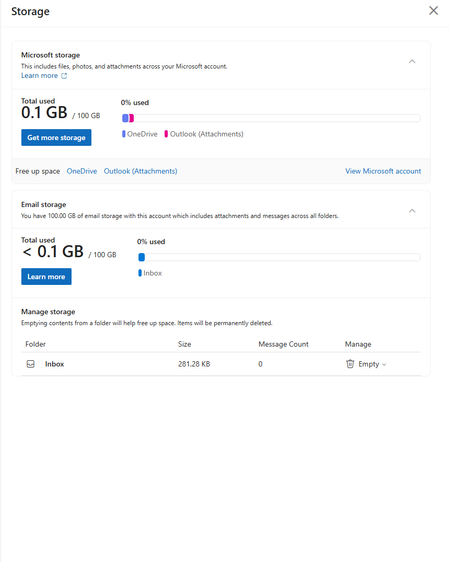
can someone explain how im paying for a service from a multibillion dollar company but yet it says i only have 5gb for email then says i have 100gb of storage but cant send or receive emails. support is no help and they only submit tickets to my email but guess what i cant receive them.PoorMansAcidApr 02, 2026Copper Contributor13Views0likes0Comments
"New" Outlook is not great
I was forced to switch to the new version of Outlook. I have to have it for my job so I have no choice. So many things wrong when compared to the classic version. You would think that MS would migrate all the settings, views, etc. to the new version. But they didn't. -Event/reminder snooze options - now limited to two hours? Now I get reminders every two hours for something I need to snooze for days or weeks like I was able to before. -Contact views - can't view my contacts in the classic table format where I can filter/sort by company name or last name, etc. -Spell check now cleared by left mouse click instead of the usual right click like all other apps have. -No longer can select multiple email attachments like the classic version -Email folders cannot be sorted anymore Again...love Outlook but this new version is not a winner. MS...please bring back all the classic options!Rockeye12Apr 02, 2026Brass Contributor820Views6likes18Comments
How to resolve continous threat (spam) emails on my android app?
Dear Awesome Community Members, I am having problems with scams on my phone's outlook app. I am recieving through my own email address addressed to me. I delete them all and also I have tried to block them but they are red flagged and says you are hacked. Please help me how to fix this issue on my phone at your earliest. Thanks and Regards, Muhammad Aquilur RahmanKashif61Apr 01, 2026Copper Contributor15Views0likes0CommentsDesktop Outlook from Office 365 suddenly displaying only 2 months emails in folder.
... but Searching the folder for a known item finds all the emails I expect to be there, in that particular folder. - Affects just one particular folder (a POP3 account Inbox). - No filters. - Not archived. - No options changed. - Apparently it just decided to not display them. - Online suggestions when searching only seem to mention suggestions relevant to Outlook Clients on Exchange or Outlook.com.geoffwoodMar 31, 2026Copper Contributor25Views0likes2CommentsOutlook servers trouble with 3rd party Mail such as Fairmail due to broken Oauth handling?
Regarding access via FAIRMAIL app / Android (including other mail programs equally affected by this recurring issue microsoft throws at people and which sometimes they take MONTHS to fix) Authentication now throws errors for the last 24 hours approx., despite being properly accessible via outlook itself and also having proper credentials and on trying to reestablish Oauth throws absolutely weird errors envolving Jakarta which has nothing to do with my endpoint or even microsofts side? (can just assume these are totally bogus replies of microsofts mail server)S4bre_MaxMar 31, 2026Copper Contributor39Views0likes2Comments



Tags
- outlook for windows1,300 Topics
- office 365704 Topics
- outlook on the web495 Topics
- outlook for mac312 Topics
- exchange276 Topics
- outlook for ios165 Topics
- outlook for android160 Topics
- Outlook Customer Manager65 Topics
- groups58 Topics
- community43 Topics