outlook for android
172 Topics
Outlook Android shows different date on shared recurring appointments
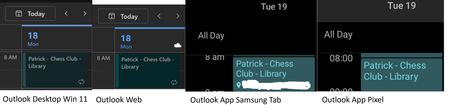
My wife and I share our hotmail calendars with each other For recurring appointments that she creates only, on any Android device using the Outlook app, the appointment is always 1 day later. It is consistent The time is correct so it doesn't seem to be a timezone issue. In Windows settings, Android settings, and outlook.com settings the time zone is Sydney AEST I've resynced the android apps. But tbh it has affected me for years, and has followed me across devices Any ideas? Pixel Outlook v5.2618.2 Samsung Outlook v5.2618.2 ty!129Views0likes2CommentsNew Outlook Comes With New Workflows: What Is Still Missing for You?
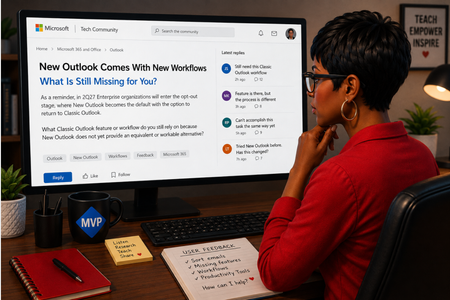
As a reminder, in March 2027, Enterprise organizations will enter the opt-out stage (Message ID 949965), where New Outlook becomes the default with the option to return to Classic Outlook. That is not too far away, especially if you need time to get your workflows and systems in place. That is why I keep coming back to this: New Outlook comes with new workflows. So I’m curious about where New Outlook workflows still fall short for you. A lot has changed. Users now have mail merge, Quick Parts, Unified Inbox, and partial PST support, with Advanced Mail Merge also on the way. New Outlook also has 30+ features and capabilities that are not available in Classic Outlook. What do you still do in Classic Outlook that you cannot accomplish, or cannot accomplish well, in New Outlook today? And if you tried New Outlook a year or two ago and went back to Classic Outlook, I’d be especially interested in what is still keeping you there now. I’m not looking for “I hate New Outlook.” I already know plenty of people do. I want to know the specific feature or workflow that still matters to you. PS: And be kind to me. I don’t work for Microsoft. I’m an MVP who teaches their products. 😉 traccreations4e-p26 8/26/2026322Views1like2Comments
Issues signing on to outlook.com
Hello, I'm having issues signing on to outlook.com. Either through the app or web, keep getting an error. On the Outlook Mobile app, I get "An error occured during authentication". On the web I get the error below. Any suggestions appreciated. UTC Date: 2026-05-12T19:49:17.826Z Client Id: Session Id: Client Version: 20260501001.13 BootResult: fail Back Filled Errors: Unhandled Rejection: SyntaxError: Failed to execute 'json' on 'Response': Unexpected end of JSON input:undefined|undefined:undefined|undefined:undefined|undefined:undefined|undefined:undefined|undefined:undefined|undefined:undefined|undefined:undefined|Unhandled Rejection: SyntaxError: Failed to execute 'json' on 'Response': Unexpected end of JSON input:undefined|undefined:undefined|undefined:undefined|undefined:undefined|undefined:undefined|undefined:undefined|undefined:undefined|undefined:undefined|undefined:undefined|undefined:undefined|undefined:undefined|undefined:undefined|undefined:undefined|undefined:undefined|undefined:undefined|undefined:undefined|undefined:undefined|undefined:undefined|undefined:undefined|undefined:undefined|undefined:undefined|undefined:undefined|undefined:undefined|undefined:undefined|undefined:undefined|undefined:undefined|undefined:undefined|undefined:undefined err: COMException esrc: StartupData et: ServerError estack: Error: 401 at Object.w [as createStatusErrorMessage] (https://res.public.onecdn.static.microsoft/owamail/hashed-v1/scripts/owa.mailindex.06641a1a.js:1:806) at https://res.public.onecdn.static.microsoft/owamail/hashed-v1/scripts/owa.mailindex.06641a1a.js:1:183650 st: 401 ehk: X-OWA-Error efe: MW4PR03CA0157 reqid: a64783dc-2fed-f293-3a10-efba70b9cc2e cv: BDANTiCGGDAkhZfLh5/96J.3.1621Views0likes2Comments
Microsoft Authenticator - after toggling Screen Lock on Phone
Hello all, I am going crazy over this and really need help urgently. I made my account 'passwordless' and depended on 'MS Authenticator App' to login. I was trying to take back up of my phone and thus turned off screen lock temporarily. When I turned it On again, MS Auth app won't let me sign-in. So, I tried to use the copilot and it asked me to use my 'account recovery code'... which I did and then this is the message I get: ---------------------------------------------------- Because you turned on two-step verification, you need up-to-date security info to sign in to your account. During the waiting period you will not be able to sign in to sites or services with your Microsoft account, but will be able to sign in to devices or use your existing app passwords. You can avoid the wait by: Using a trusted device. If you have a device that doesn't require codes, use it now and update your security info. Finding your security info. Any chance it isn't entirely lost? [I just need to reattach/re-enable phone auth/my account using a QR scan] ------------------------------------------------------- Copilot also asked me to remove the hotmail account from my auth-app, restart the phone and try to access the security page to scan the QR code and re-enable the auth through phone. Now here's the thing. Although I am in my email account [it was already open in my browser - and it did not log-off automatically] I am unable to access the security page on my microsoft account unless I approve it via my Auth App. And my Auth App doesn't have the Hotmail account, because Copilot asked me to remove it and re-attach it. I'm stuck in a loop. Text Messages are limited to few attempts, so no luck there either.253Views0likes2CommentsAptos preset font size in new installations
Hi, Can anyone confirm what the default Aptos font size in Outlook should be on first use, before any user changes are made to the settings? I’m seeing different default sizes depending on the application: 11 pt — Microsoft 365 Outlook for Windows (Classic) 12 pt — Microsoft 365 Outlook for Windows (New Outlook) 12 pt — Outlook for iOS 12 pt — Outlook for Android Based on the above, it appears that 12 pt may be the current standard default across most Outlook clients, with Classic Outlook for Windows being the exception. However, I haven’t been able to find any definitive Microsoft documentation confirming what the intended default Aptos font size should be. Can anyone confirm whether 12 pt is the official/default size?198Views0likes1CommentAndroid Outlook using outlook proxy email address for primary account, can't receive emails
Longtime, fairly contented user of Outlook in Microsoft 365 here. Yesterday I tried to set up Outlook on my Samsung phone. I was not able to start by incorporating my primary email account, based at my ISP, even though Outlook spotted that account and offered to include it. (I was confused about the proper IMAP port number.) I then took the route of bringing in a gmail account used as a secondary. That worked well. However, Microsoft required me to set up an outlook.com email. Now my phone Outlook nominally has my ISP account as primary, but when I begin a new message, it lists my outlook.com address and my gmail address as sending options, not my ISP address. Emails I send from the account show as having been sent from the outlook.com account -- mailto:email address removed for privacy reasons --, although when I reply to them, my correct ISP address shows up as the prospective recipient in the email draft. I might be able to put up with this -- not sure about people I correspond with, however -- but the ISP account on my phone outlook is not receiving any emails. (Oddly, there is one email from 2015 from the Outlook.com team about getting started.) I can't find a way to adjust what I assume might be incorrect settings for the ISP server. I'm wondering if I should uninstall the current phone Outlook and try again. A side question: what is the purpose of requiring me to set up an outlook.com email? Thanks for any help you can provide.Solved127Views0likes2CommentsShared Calendars No Longer Visible
For years, I've shared Outlook calendars between my Outlook accounts and with my husband's, without any issues. However, since mid-June the shared calendars have disappeared for no apparent reason. The sharing permissions are still in place, but the calendars are no longer visible or available to add on Android, in the Outlook desktop app, or on Outlook on the web. I've spent hours Googling and tried all the usual troubleshooting steps, but nothing has worked! As a workaround, I now have to invite all @outlook.com accounts to calendar events just so everyone can see them and avoid double bookings. Has anyone come across this before and found a fix that isn't one of the standard "how-to" suggestions? Note: these are personal paid Microsoft accounts.959Views0likes3Comments
When will Microsoft fix the IMAP Search BUG in Outlook for Android?
There has been a BUG with Outlook For Android Search and IMAP email accounts for many years. If you use an Outlook or Gmail email address all seems Ok. But if you use a different IMAP email provider, and use Folders to save read emails in, the Outlook Search function will never find those emails in the folders. It will find emails within the Inbox, but the moment you move them to another folder nothing will ever be found. I have reported this to Microsoft many times, and have had confirmation from them there is a BUG and they are aware of it... But the BUG never gets fixed, and the next time I report the BUG they start all over again saying they have never heard of such a BUG and it must be my phone, etc., etc... But a quick Google finds many users have issues with the exact same BUG - I guess Microsoft Support don't know how to use Google??? Anyway, I am stuck in this loop with Outlook For Android Support yet again! So I have a request: CAN EVERYONE PLEASE REPORT THIS BUG TO OUTLOOK FOR ANDROID SUPPORT??? Please use the "Settings/Help & feedback/Contact Outlook mobile support" option within the app, and report you have the "IMAP Folder Search BUG". Maybe, just maybe we can get Microsoft to take this years old bug seriously! (I have found reports of the BUG back to 2019...)191Views0likes1Comment
Outlook Mobile 5.2623.0 Android - Addins hang whilst loading
I develop and addin and have been testing it, only recently after update to latest Outlook Mobile on Android, it hangs during Office.onReady() I've tested it on 2 different devices and also tried other addins which also fail to load. Outlook Mobile 5.2623.0 on Android Office.context.mailbox is null, Office.onReady() never resolves Reproducible with multiple vendors (my own adding and two Zoho add-ins) Two devices, different OS versions - Samsung One UI 8.0 and 8.5 (Android 16) Regression: add-ins worked prior to this update Appreciate any help. Thanks164Views0likes2Comments
Outlook Android “Sync Contacts” disabled for Microsoft 365 Business Standard tenant
I am the Microsoft 365 tenant administrator. Outlook and Authenticator work correctly on Android. The “Sync Contacts” toggle inside Outlook is disabled/greyed out. Native Exchange setup hangs on “Retrieving account information”. No Intune license available (Business Standard tenant). How can I enable Outlook contact synchronization with Android Contacts?376Views0likes5Comments