outlook for android
206 Topics
Outlook Support
Hey everyone. Is there a way to contact the Outlook Support directly per Email. I cant do the restoration form and i need to contact the Support. I have my old Account's Login Information (Password and Id) but i dont have my old phone number. I also cant do the recovery stuff :/94Views0likes2Comments
Outlook for Android support chat fails with ChatConfigRetrievalFailure
a { text-decoration: none; color: #464feb; } tr th, tr td { border: 1px solid #e6e6e6; } tr th { background-color: #f5f5f5; } Outlook for Android "Contact Support" opens the conversation screen but after submitting a question displays a spinner for an extended period and then fails with: "An error occurred while loading the Chat Widget. Please try again later. Error: ChatConfigRetrievalFailure" Issue reproduced on: Google Pixel 11 Samsung Galaxy A56 5G Tested on: Home Wi‑Fi Mobile data Outlook mail functions normally. Only the support chat feature fails. Screenshot attached.100Views1like5CommentsI cant login
Okay here is the problem. I know my email and the password, i can login into it but i dont have my old phone number anymore. I pick the option that i dont have the code but then it continues to the recovery form. Here begins the problem...Its an very old account that i created when i was a teen und i dont remember what birthday etc i typed in back in the day. I can only remember my email and the password. I was always logged in on my phone but now i changed the phone and i cant login because of the problem with my old phone number and the recovery form. Please help me!!!149Views0likes3CommentsShared Calendars No Longer Visible
For years, I've shared Outlook calendars between my Outlook accounts and with my husband's, without any issues. However, since mid-June the shared calendars have disappeared for no apparent reason. The sharing permissions are still in place, but the calendars are no longer visible or available to add on Android, in the Outlook desktop app, or on Outlook on the web. I've spent hours Googling and tried all the usual troubleshooting steps, but nothing has worked! As a workaround, I now have to invite all @outlook.com accounts to calendar events just so everyone can see them and avoid double bookings. Has anyone come across this before and found a fix that isn't one of the standard "how-to" suggestions? Note: these are personal paid Microsoft accounts.3KViews0likes5Comments
New Account is blocked
Hi everyone, I wanted to create a new email address because I changed my lastname. Unfortunately, the process is being blocked due to alleged unusual activity. ?! I’ve already tried using other devices and networks. The technical support agent cannot help me in the Chat. Please help me. Thanks...365Views0likes3Comments
Issues signing on to outlook.com
Hello, I'm having issues signing on to outlook.com. Either through the app or web, keep getting an error. On the Outlook Mobile app, I get "An error occured during authentication". On the web I get the error below. Any suggestions appreciated. UTC Date: 2026-05-12T19:49:17.826Z Client Id: Session Id: Client Version: 20260501001.13 BootResult: fail Back Filled Errors: Unhandled Rejection: SyntaxError: Failed to execute 'json' on 'Response': Unexpected end of JSON input:undefined|undefined:undefined|undefined:undefined|undefined:undefined|undefined:undefined|undefined:undefined|undefined:undefined|undefined:undefined|Unhandled Rejection: SyntaxError: Failed to execute 'json' on 'Response': Unexpected end of JSON input:undefined|undefined:undefined|undefined:undefined|undefined:undefined|undefined:undefined|undefined:undefined|undefined:undefined|undefined:undefined|undefined:undefined|undefined:undefined|undefined:undefined|undefined:undefined|undefined:undefined|undefined:undefined|undefined:undefined|undefined:undefined|undefined:undefined|undefined:undefined|undefined:undefined|undefined:undefined|undefined:undefined|undefined:undefined|undefined:undefined|undefined:undefined|undefined:undefined|undefined:undefined|undefined:undefined|undefined:undefined err: COMException esrc: StartupData et: ServerError estack: Error: 401 at Object.w [as createStatusErrorMessage] (https://res.public.onecdn.static.microsoft/owamail/hashed-v1/scripts/owa.mailindex.06641a1a.js:1:806) at https://res.public.onecdn.static.microsoft/owamail/hashed-v1/scripts/owa.mailindex.06641a1a.js:1:183650 st: 401 ehk: X-OWA-Error efe: MW4PR03CA0157 reqid: a64783dc-2fed-f293-3a10-efba70b9cc2e cv: BDANTiCGGDAkhZfLh5/96J.3.11.2KViews0likes3CommentsNeue Kontoerstellung wird blockiert
Hallo zusammen, Wegen meiner Namensänderung wollte ich eine neue Mailadresse erstellen. Leider wird die Erstellung wegen angeblicher ungewöhnlicher Aktivitäten blockiert. Ich habe es schon über andere Geräte und Netzwerke probiert. Bitte helft mir. Danke...124Views0likes0CommentsOutlook Android shows different date on shared recurring appointments
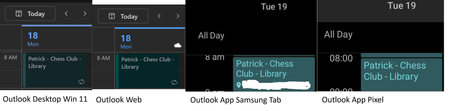
My wife and I share our hotmail calendars with each other For recurring appointments that she creates only, on any Android device using the Outlook app, the appointment is always 1 day later. It is consistent The time is correct so it doesn't seem to be a timezone issue. In Windows settings, Android settings, and outlook.com settings the time zone is Sydney AEST I've resynced the android apps. But tbh it has affected me for years, and has followed me across devices Any ideas? Pixel Outlook v5.2618.2 Samsung Outlook v5.2618.2 ty!334Views0likes2CommentsNew Outlook Comes With New Workflows: What Is Still Missing for You?
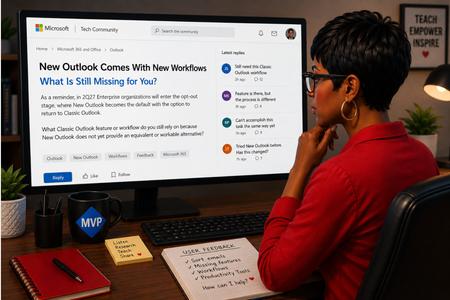
As a reminder, in March 2027, Enterprise organizations will enter the opt-out stage (Message ID 949965), where New Outlook becomes the default with the option to return to Classic Outlook. That is not too far away, especially if you need time to get your workflows and systems in place. That is why I keep coming back to this: New Outlook comes with new workflows. So I’m curious about where New Outlook workflows still fall short for you. A lot has changed. Users now have mail merge, Quick Parts, Unified Inbox, and partial PST support, with Advanced Mail Merge also on the way. New Outlook also has 30+ features and capabilities that are not available in Classic Outlook. What do you still do in Classic Outlook that you cannot accomplish, or cannot accomplish well, in New Outlook today? And if you tried New Outlook a year or two ago and went back to Classic Outlook, I’d be especially interested in what is still keeping you there now. I’m not looking for “I hate New Outlook.” I already know plenty of people do. I want to know the specific feature or workflow that still matters to you. PS: And be kind to me. I don’t work for Microsoft. I’m an MVP who teaches their products. 😉 traccreations4e-p26 8/26/2026795Views1like2Comments