
Forum Widgets
Latest Discussions

Account Locked: Recovery Form Automatically Rejected (Need Human Assistance)
Hello, I am trying to regain access to my old Microsoft account, br**mailto:email address removed for privacy reasons. Unfortunately, I have forgotten the password and I no longer have access to the phone number linked to the account. I completed the Microsoft account recovery form and provided as much information as possible. However, I received a message saying that the information I provided was insufficient to verify that I own the account. I understand the importance of account security, but I am not sure what else I can do to prove that the account belongs to me. Is there another way to verify my identity or contact Microsoft Support for help? Thank you for your assistance.BrunagoAug 12, 2026Occasional Reader19Views0likes0Comments
Outlook new doesn't allow to reorder folders created on pst file
Hi, when i create a new folder on a pst file, the new folder appears at the end of folder list. Although i can move the new folder to any other position in the folder list, when pst or outlook new is closed, folder appears again at the bottom of the folder list.luisfalonsoAug 12, 2026Occasional Reader10Views0likes0Comments
Phone verification is not working
Hello. I was logged out of my accounts when I opened Outlook on Windows. I managed to log into the first one, but I forgot my password of the other one. I am struggling to log into that account. That account is not connected to an authenticator app, but is connected to my phone number. I tried resetting my password using my phone and entered last 4 digits of my phone number, but the method is NOT WORKING for some reason. I also tried verifying my account with my phone number, but I didn't get any code from Microsoft. All the accounts that I buy online with use this email account. Please help.IgorArnautAug 10, 2026Copper Contributor44Views0likes3Comments
Outlook refused a valid email address
When I try to add a mailto:email address removed for privacy reasons address to my Classic Outlook account, Outlook refuses to recognise btopenworld.com as a good email domain. Everyone else does, why doesn't Microsoft? It is a synonym of btinternet.com, so what's going on?DavidNicolAug 07, 2026Copper Contributor70Views0likes1Comment
The advertising choices...
Ramming advertisements into Outlook was always weird, but actively doing this is just straight up messed up. While I cant fathom how people fall for these or other scammy behavior.... People do and its in poor taste to basically host click bait adverts. But I know microsoft dont give a a frick. Also who even uses McAfee!? Do they simply still exist through these practices?MeronJayAug 06, 2026Copper Contributor9Views0likes0Comments
550 5.7.515 Access denied
I just started getting (100%): "550 5.7.515 Access denied, sending domain xxxxx.xx doesn't meet the required authentication level" when sending emails to hotmail addresses using Outlook desktop for Windows ("classic", 365 MSO - Version 2607 Build 16.0.20228.20124) 64-bit). This was working just fine up until some time ago. Other email domains works just fine. Using the same ISP. Other email clients (Gmail, webmail) works fine. It only fails when using Outlook to send. Spf= Pass , Dkim= Fail , DMARC= Pass I am using SMTP, have tried both port 465 and 587 (STARTTLS and SSL/TLS). Using the same credentials as for sending emails (POP) as required by the ISP (no changes here). Any way to fix this?SolvedjjohansonAug 06, 2026Copper Contributor52Views0likes2CommentsConfusing, extra "cursor", in Outlook Calendar Appointment body
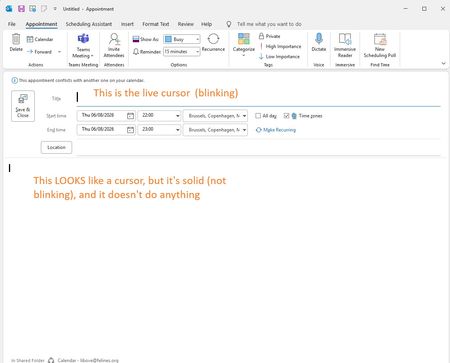
For some time now, across machines, and over at least a small number of Microsoft Office version updates (all from Microsoft 365 subscriptions), [Windows 11 desktop, current Office version Microsoft® Outlook® for Microsoft 365 MSO (Version 2606 Build 16.0.20131.20152) 64-bit] when I click to create a new Outlook Calendar entry, a thing that looks like a cursor appears at the top-left of the new Calendar appointment Body pane (non-blinking), while the real cursor (blinking, but somehow very slightly less eye-catching) is in some other field (usually Location, but sometimes Title). This happens, too, sometimes, when just opening an existing Outlook Calendar entry. The result, often, is that I inadvertently start typing into the Location field what I mean to put into the Body, or, worse, with existing Calendar entries, I clobber the existing Location field contents. Screenshot: I do not use any cursor accessibility settings; I just have the cursor size set one up from the default (I think). How to get rid of this confusing extra not-cursor in Outlook Calendar Appointment windows? (n.b. Outlook Classic; I don't use the "new" Outlook). thank you, -JayJay_Libove_FeAug 06, 2026Brass Contributor37Views0likes2Comments
How to Permanently Remove the Wunderlist Add-in from Outlook Classic (2026 Fix)
How to Permanently Remove the Obsolete Wunderlist Add-in from Outlook Classic Validated workaround for Windows and Outlook Classic Important: This workaround was successfully validated on Outlook Classic with Office Home & Business 2024, Windows 11 and a personal Microsoft account. Other Outlook or account types may behave differently. At a glance Item Details Estimated time 10–15 minutes Difficulty Intermediate Risk Low Outlook restart required Yes Windows restart required Yes Tested environment Outlook Classic, Office Home & Business 2024, Windows 11, personal Microsoft account When to use this guide • Wunderlist and Quick Add appear on the Message tab when an email is opened. • Clicking Wunderlist produces an add-in loading error. • Removing Wunderlist from Customize Ribbon only works temporarily. • Clearing or renaming the Office WEF cache does not permanently remove it. • Wunderlist does not appear as a normal COM add-in. Before you start Close Outlook and every other Microsoft Office application. Open Task Manager and confirm that OUTLOOK.EXE is not running. Step 1 – Open PowerShell Open Windows PowerShell or PowerShell 7. Administrator rights are not normally required. Step 2 – Locate the cached Wunderlist manifest Copy and paste the complete command below into PowerShell, then press Enter: $matches = Get-ChildItem "$env:LOCALAPPDATA\Microsoft\Office\16.0\Wef" -Recurse -File | Where-Object { $_.Name -notlike "*.metadata" } | Select-String -Pattern "Wunderlist" -SimpleMatch $matches | Select-Object -ExpandProperty Path -Unique | ForEach-Object { Write-Host "`nFILE: $_" Get-Content -LiteralPath $_ -TotalCount 25 } Expected result: PowerShell should show a manifest containing entries similar to: <Id>56d1645a-c00a-4c3b-b676-63bde48359c3</Id> <Version>1.7</Version> <ProviderName>Wunderlist</ProviderName> <DisplayName DefaultValue="Wunderlist" /> If PowerShell returns no result, stop here. Open Outlook once, open an email, close Outlook completely and then repeat Step 2 so Outlook has an opportunity to rebuild the web-add-in cache. Step 3 – Copy the manifest to the Desktop Run the following PowerShell command. It automatically finds the Wunderlist manifest and copies it to the Desktop as Wunderlist-manifest.xml: $source = Get-ChildItem "$env:LOCALAPPDATA\Microsoft\Office\16.0\Wef" -Recurse -File | Where-Object { $_.Name -notlike "*.metadata" -and (Select-String -LiteralPath $_.FullName -Pattern "<ProviderName>Wunderlist</ProviderName>" -SimpleMatch -Quiet -ErrorAction SilentlyContinue) } | Select-Object -First 1 if (-not $source) { Write-Error "The Wunderlist manifest could not be found. Re-run Step 2 and confirm that the manifest exists." } else { $destination = Join-Path $env:USERPROFILE "Desktop\Wunderlist-manifest.xml" Copy-Item -LiteralPath $source.FullName -Destination $destination -Force Write-Host "Wunderlist manifest copied to: $destination" } Expected result: a file named Wunderlist-manifest.xml appears on the Windows Desktop. Step 4 – Add the manifest as a custom Outlook add-in 1. Open Outlook Classic. 2. Go to Home > Get Add-ins. In some versions, use Home > All Apps > Get Add-ins. 3. Select My Add-ins. 4. Scroll to Custom Add-ins. 5. Choose Add a custom add-in > Add from file. 6. Select Wunderlist-manifest.xml from the Desktop. 7. Accept the warning if Outlook asks whether the add-in should be trusted. Expected result: Wunderlist appears under Custom Add-ins and is marked Added. Step 5 – Remove the custom add-in 1. Under Custom Add-ins, locate Wunderlist. 2. Click the three-dot menu beside Wunderlist. 3. Choose Remove. 4. Confirm the removal. This is the critical step. Adding the cached manifest as a custom add-in exposes a working Remove option for the otherwise orphaned Wunderlist registration. Step 6 – Verify the fix 1. Close every Outlook window. 2. Use Task Manager to confirm OUTLOOK.EXE has stopped. 3. Reopen Outlook and open an email. 4. Check that Wunderlist and Quick Add are absent from the Message ribbon. 5. Close and reopen Outlook a second time and check again. 6. Reboot Windows, open Outlook and open an email one final time. Success criteria • Wunderlist no longer appears on the Message ribbon. • Quick Add has disappeared. • The add-in remains absent after two Outlook restarts. • The add-in remains absent after a full Windows reboot. Optional cleanup • Delete Wunderlist-manifest.xml from the Desktop after the fix is confirmed. • If you previously renamed the WEF folder to Wef.old and Outlook has created a new working Wef folder, you may delete Wef.old after confirming all add-ins work normally. Do not delete individual manifest files from the active WEF folder. It contains manifests and resources for several Office add-ins, not only Wunderlist. Why ordinary removal methods failed Removing the ribbon group only hid the visible command. Clearing the WEF folder removed the local cache, but Outlook recreated the cache and restored the obsolete Wunderlist manifest. Temporarily importing that same cached manifest as a Custom Add-in allowed Outlook to expose a valid Remove command for the orphaned registration. On the tested system, removing it this way survived multiple Outlook restarts and a full Windows reboot. Technical reference Property Value Provider Wunderlist Manifest ID 56d1645a-c00a-4c3b-b676-63bde48359c3 Manifest version observed 1.7 Temporary filename Wunderlist-manifest.xml Troubleshooting The search command finds no Wunderlist manifest Open Outlook, open an email containing the Wunderlist ribbon command, close Outlook fully and repeat the search. Also confirm that the folder %LOCALAPPDATA%\Microsoft\Office\16.0\Wef exists. Outlook refuses to add the XML file Confirm that the copied file contains <ProviderName>Wunderlist</ProviderName> and that the filename ends in .xml. Re-run Step 3 rather than manually renaming a different file. The Remove option is missing Confirm that Wunderlist appears under Custom Add-ins and is marked Added. If it appears only in the general catalogue with an Add button, it has not yet been imported from the XML file. Wunderlist returns after the reboot Repeat Steps 4 and 5 and confirm that the custom add-in was removed through its three-dot menu. If it still returns, the account may be reprovisioning the add-in and Microsoft Support may need to remove the server-side registration.Bibbo1966Aug 05, 2026Copper Contributor57Views0likes0Comments
New Outlook: 'To' field not auto populating as I type address in new email
Hi everyone, When using 'new' Outlook, when I create a new email and start typing a recipient in the 'To' field (or CC, or BCC), it doesn't display a list of potential recipients at all. Rather I have to type the entire email address (the same if I create a new calendar event). If I revert back to Classic Outlook, all works perfectly and I can select the recipient having only typed the first letter. I have been using new Outlook for a while and this issue has only started in the past 24 hours. Anyone seeing the same, or have any suggestions on a possible fix? ThanksTheB00kAug 05, 2026Copper Contributor34Views0likes1Comment

Tags
- outlook for windows1,356 Topics
- office 365725 Topics
- outlook on the web518 Topics
- outlook for mac319 Topics
- exchange292 Topics
- outlook for android169 Topics
- outlook for ios167 Topics
- Outlook Customer Manager67 Topics
- groups58 Topics
- community47 Topics