community
48 Topics
Managing Outlook Signatures Across Microsoft 365 Devices
We recently faced an issue with Outlook signatures displaying differently across Outlook desktop, OWA, and mobile clients in Microsoft 365. Desktop signatures looked fine, but mobile devices showed inconsistent image scaling and font formatting. A few things that helped improve consistency: Using simpler HTML formatting Reducing logo/image sizes Keeping fonts and colors minimal Testing signatures across desktop, web, and mobile clients We’re currently comparing native Microsoft 365 options with third-party signature management tools. How are others handling signature management across different Outlook clients?513Views1like4Comments
MS Teams add in not working on Outlook Classic
This has got me stumped. So far we've changed registry keys: HKEY_CURRENT_USER\Software\Microsoft\Office\16.0\Outlook\Resiliency\DoNotDisableAddinList Name: TeamsAddin.FastConnect Amend name to: TeamsAddin.FastConnect Ran commands: %SystemRoot%\System32\regsvr32.exe /s /n /i:user %LocalAppData%\Microsoft\TeamsMeetingAddin\Current\x64\Microsoft.Teams.AddinLoader.dll Deleted files: Press Windows Key + R to open the Run dialog box.Type %localappdata%\Microsoft and hit Enter.Find and delete the folders named TeamsMeetingAddin, TeamsPresenceAddin, and SquirrelTemp (if they exist) Ran the following: Close Outlook and Teams. Open Windows Settings > Apps > Installed Apps (or Programs and Features). Search for Teams Meeting Add-in or Microsoft Teams Meeting Add-in for Microsoft Office. Click the three dots (or right-click) and select Uninstall. Re-open Teams, which will automatically prompt the reinstallation of the add-in, then open Outlook We've uninstalled and reinstalled Teams. Also Skype is uninstalled. The RDS Boxes are 2016 And we're stumped as to why MS Teams won't work, and the add-in on the ribbon for Outlook classic also won't enable MS Teams. Any ideas? Please help!371Views0likes1CommentSynchronization issue in New Outlook for Mac – ״Failed to refresh subscriptions.״
Hello, I am using Microsoft 365 (Exchange Online) on Mac, running macOS 26.1 (Tahoe). My Outlook client is: Outlook for Mac Version 16.103.3 (25113013), with a Microsoft 365 Subscription license. Since yesterday morning, in the New Outlook interface, my inbox has suddenly appeared empty, and I constantly receive the following error message: “Failed to refresh subscriptions.” It’s important to note: In Legacy Outlook, everything works perfectly. The web version and the Outlook app on my mobile phone also work well. The issue persists regardless of the network I am on (home, office, cellular, etc.). Troubleshooting steps I already tried: • Updating Outlook to the latest version • Removing and re‑adding the account • Clearing cache and preferences • Formatting my Mac and reinstalling everything from scratch Unfortunately, none of these steps has resolved the issue. Is this a known bug, and is there a recommended workaround or an upcoming fix? Appreciate assistance on that issue.1.8KViews1like6CommentsCan I please get some help?
Hi, I have been trying to get access to two emails (hotmails, yes that old) I was using as a kid and over the course of time, I forgot their passwords. Ihave tried sending forms but they always instantly deny me because I cant remember any emails I sent. Because I was a kid and the only reason for having an email was to sign in to stuff. I really would like access so I can recover some accounts and finally switch emails on steam. Thank you to whoever read this188Views0likes2Comments
Problem with Outlook classic
Hello, how do I ask for help in this forum about a problem that the support desk seems to have no idea how to fix? My Outlook Classic on my desktop will not open 3rd party links and tells me that my organisation has a policy preventing it happening and to contact my Help Desk but I have a family subscription and no help desk. Even when a person rang me to talk to me after multiple reports, part way through our conversation he just disappeared. I am in Australia so the time difference may be an issue. An example of the problem is that I received a retail company email featuring a link to view their catalogues and my Outlook won't open it because of a policy I never asked for. I don't know if this is the right forum but it's the only one I could find to ask a question on.291Views1like4Comments
MS Office 2024 LTSC- Repeated credential prompts when adding delegated mail box
We are facing issue in MS office 2024 LTSC where primary mailbox works normally but repeated credential prompts when adding delegated mailbox. Outlook opens but keep asking for username/password. MS office 2024 LTSC is installed as On-premises exchange environment.285Views0likes1CommentOutlook Templates Using Content Controls
Hello, Is it possible to create an Outlook email template that includes content controls, much like the forms/templates we can create in Word? I'm able to create an email template, but not clear on how to include controls within the template. Thank you, Sue115Views0likes1Comment
Microsoft Outlook (classic) search suddenly not working
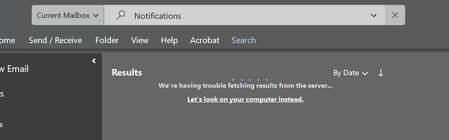
Hi, many users in my company experienced same issue today, when trying to search anything/any word but get no results and same symptom (We're having trouble fetching results from the server). The application version is 16.0.19328.20244 I tried switching to 3 different internet providers still not fix Repair outlook still not fix Update office application still not fix The problem is we found 4 users get this issue, so I think it is not indexing issue. Please share if anyone have a resolution or experience this currently. Thank you.2.9KViews0likes4CommentsHow Does Outlook Profile Information Work for Custom Domain Email Accounts?
Hi everyone, I am using Outlook with a professional email address connected to my website/domain, and I want to better understand how profile information works for this type of account. I am specifically trying to know: Where Outlook pulls profile details from for a custom domain email Whether profile information is managed in Outlook, Microsoft account settings, or Microsoft 365 admin settings Which profile details are visible to recipients when sending emails Whether there is a way to personalize the account profile for a more professional appearance I am looking for guidance especially for accounts using a domain-based business/professional email rather than a regular personal Outlook address. Thanks in advance.196Views0likes3Comments
Outlook and verizon email account
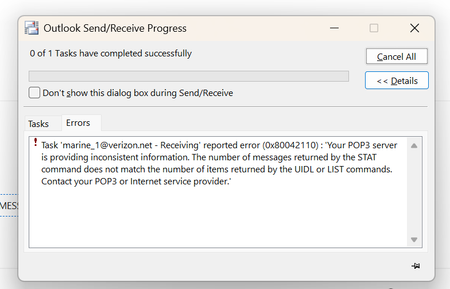
I've run into an issue this past week where I've tried changing my Verizon email account from IMAP to Pop3. I get errors like this; Task 'email address removed for privacy reasons - Receiving' reported error (0x80042110) : 'Your POP3 server is providing inconsistent information. The number of messages returned by the STAT command does not match the number of items returned by the UIDL or LIST commands. Contact your POP3 or Internet service provider.' I've created a new profile, I've done SCANPST probably more than 5 times, regenerated my third party password on AOL and it consistently fails for the same error. I've run the same version of Outlook on a different machine with th same results. My pop settings are pop.verizon.net, port 995, ssl/tls. The progress window shows that it's downloading messages but it sits there for a couple of minutes and then pops the error up; AOL adimmently says that it's got to do with Outlook because it works fine on there webmail. I can't seem to find an email alternative that creates a pst database so that I could rule one or the other out. Getting extremely frustrated. I would get completely away from the Verizon email but I have had it for so long; it's established everywhere I've done business, contacts, credit cards, etc. Any help would be greatly appreciated. PS I've even tried just creating a whole new pst, no luck. TIASolved203Views0likes2Comments