outlook for ios
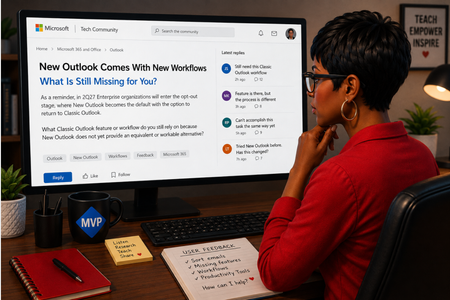
170 TopicsNew Outlook Comes With New Workflows: What Is Still Missing for You?
As a reminder, in March 2027, Enterprise organizations will enter the opt-out stage (Message ID 949965), where New Outlook becomes the default with the option to return to Classic Outlook. That is not too far away, especially if you need time to get your workflows and systems in place. That is why I keep coming back to this: New Outlook comes with new workflows. So I’m curious about where New Outlook workflows still fall short for you. A lot has changed. Users now have mail merge, Quick Parts, Unified Inbox, and partial PST support, with Advanced Mail Merge also on the way. New Outlook also has 30+ features and capabilities that are not available in Classic Outlook. What do you still do in Classic Outlook that you cannot accomplish, or cannot accomplish well, in New Outlook today? And if you tried New Outlook a year or two ago and went back to Classic Outlook, I’d be especially interested in what is still keeping you there now. I’m not looking for “I hate New Outlook.” I already know plenty of people do. I want to know the specific feature or workflow that still matters to you. PS: And be kind to me. I don’t work for Microsoft. I’m an MVP who teaches their products. 😉 traccreations4e-p26 8/26/2026322Views1like2Comments
Aptos preset font size in new installations
Hi, Can anyone confirm what the default Aptos font size in Outlook should be on first use, before any user changes are made to the settings? I’m seeing different default sizes depending on the application: 11 pt — Microsoft 365 Outlook for Windows (Classic) 12 pt — Microsoft 365 Outlook for Windows (New Outlook) 12 pt — Outlook for iOS 12 pt — Outlook for Android Based on the above, it appears that 12 pt may be the current standard default across most Outlook clients, with Classic Outlook for Windows being the exception. However, I haven’t been able to find any definitive Microsoft documentation confirming what the intended default Aptos font size should be. Can anyone confirm whether 12 pt is the official/default size?198Views0likes1Comment
Thousands of Sent Items moved to Deleted Items, no rules, no retention
Hello everyone, I'm investigating a very unusual Exchange Online mailbox issue and would appreciate any insights from anyone who has seen something similar. Environment Exchange Online (Microsoft 365) Mailbox: User mailbox Outlook for Mac Outlook for iOS Outlook Web (OWA) Incident Summary On August 13, 2026, approximately 4,997 messages were moved from: The activity occurred over roughly a 3-hour period. Mailbox audit logs show thousands of: Operation: MoveToDeletedItems events. Hourly breakdown: 01:00 - 2,046 events 02:00 - 1,540 events 03:00 - 1,408 events Audit Findings All sampled audit events show: LogonType = 0 (Owner) UserId = affected mailbox owner Result = Succeeded I sampled 5,000 records and all of them were: LogonType = 0 No events were recorded as: LogonType = 1 (Admin) LogonType = 2 (Delegate) Source and Destination Folders Examples from mailbox audit records: Folder : \Sent Items Destination : \Deleted Items Operation : MoveToDeletedItems Message Trace Findings Extended Message Trace was performed on one of the affected emails. The trace confirmed: CopiedToSentItems=True DeleteAfterSubmit=False which indicates: The email was successfully sent. The email was copied to Sent Items. Exchange did not delete the message during transport. So the message existed in Sent Items and was later moved to Deleted Items by a mailbox operation. Rules Investigation Checked: Get-InboxRule -Mailbox <mailbox> -IncludeHidden Findings: No Inbox Rules targeting Sent Items. No hidden Inbox Rules targeting Sent Items. Only two legitimate rules that delete messages from specific Jira/Confluence senders. Delegation Investigation Mailbox permissions reviewed. Known permissions exist, but mailbox audit logs show: 5000/5000 sampled events = LogonType 0 Therefore: No evidence of delegate activity. No evidence of administrative activity. Retention / Compliance Investigation Checked: Get-Mailbox Get-RetentionPolicy Get-RetentionPolicyTag Get-RetentionCompliancePolicy Get-RetentionComplianceRule Findings: No Sent Items retention tag. No retention policy targeting Sent Items. No Purview retention/compliance policy appears to explain this behavior. Activity pattern does not resemble normal retention processing. Add-ins Investigation Mailbox add-ins: Polls Share to Teams Send to OneNote Action Items Bing Maps My Templates Unsubscribe No third-party mailbox-management or archiving add-ins found. Client Information Seen During Investigation Examples observed in mailbox audit logs: Client=OutlookService;MacOutlook/16.112 a { text-decoration: none; color: #464feb; } tr th, tr td { border: 1px solid #e6e6e6; } tr th { background-color: #f5f5f5; } What Has Been Ruled Out ✅ Admin activity ✅ Delegate activity ✅ Inbox Rules ✅ Hidden Inbox Rules ✅ Outlook add-ins ✅ MRM retention policies ✅ Sent Items retention tags ✅ Purview compliance retention policies ✅ Exchange transport deleting the messages Question Has anyone encountered a similar case where: Thousands of messages were moved from Sent Items to Deleted Items Operation = MoveToDeletedItems LogonType = 0 (Owner) No rules No retention policy No delegate activity particularly involving: Outlook for iOS Outlook for Mac Client=OutlookService Any similar experiences, findings, or recommendations would be greatly appreciated. As we need to know the root cause for this issue. Thanks191Views0likes2CommentsCannot reset account password
I created an email address for RSVP purposes. I do not remember the password, and cannot find what I wrote it down on, and have never sent an email from it so I cannot provide enough information to recover the account. I have phoned support and all the bot does is refer me to the website reset which does not work. How can I talk to a real person or recover this account?138Views0likes1Comment
Sync New Outlook with iCloud Calendar
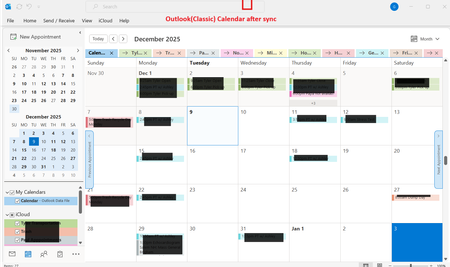
I just got a new laptop and am trying to sync the New Outlook Calendar with my iCloud Calendar. The intent is to have any Calendar changes made on one device (iPad, iPhone, laptop) to sync to all device Calendars. The problem I'm having is that iCloud Calendar only synchs with Outlook (Classic) and I want to sync with New Outlook. The Outlook version is 1.2025.1121.100 ; the Outlook Client Version is 20251128003.09 The list of Apps that comes up after clicking on Start shows both Outlook and Outlook (Classic). If I right click on Outlook (Classic) and click on uninstall (thought that might help fix this), the only Outlook listed in Apps > Installed Apps is Outlook. I did not uninstall Outlook. To set-up Calendar synching I opened iCloud > Calendars and Contacts > Calendars and Contacts Settings. I turned on "Automatically sync your iCloud calendars and contacts to Microsoft Outlook". After syncing completes, all iCloud Calendar entries appear in the Outlook (Classic) Calendar, but nothing syncs to the New Outlook calendar. I'm assuming this is an Outlook issue, not an iCloud issue. Any ideas on how to fix this? Thanks2KViews1like5Comments
New Outlook autocompletes an address that is no longer in use and I can't seem to delete it
Topic says it all, really. Client of mine has a new company and when I type the start of his name Outlook autocompletes for his old company even though it is no longer in my address book and his contact is updated with new information. I seem to recall there used to be an "x" that would let me delete incorrect autocompletes, but I can't find anything and Copilot has no useful suggestions. The autocomplete comes up in both the web version of Outlook--I basically never use this--on my PC which I primarily use, and IOS.2.2KViews3likes3Comments
Synchronization issue in New Outlook for Mac – ״Failed to refresh subscriptions.״
Hello, I am using Microsoft 365 (Exchange Online) on Mac, running macOS 26.1 (Tahoe). My Outlook client is: Outlook for Mac Version 16.103.3 (25113013), with a Microsoft 365 Subscription license. Since yesterday morning, in the New Outlook interface, my inbox has suddenly appeared empty, and I constantly receive the following error message: “Failed to refresh subscriptions.” It’s important to note: In Legacy Outlook, everything works perfectly. The web version and the Outlook app on my mobile phone also work well. The issue persists regardless of the network I am on (home, office, cellular, etc.). Troubleshooting steps I already tried: • Updating Outlook to the latest version • Removing and re‑adding the account • Clearing cache and preferences • Formatting my Mac and reinstalling everything from scratch Unfortunately, none of these steps has resolved the issue. Is this a known bug, and is there a recommended workaround or an upcoming fix? Appreciate assistance on that issue.1.6KViews1like6CommentsiOS Calendar & Outlook - All Day events "On day of event" alert not working as expected
Using iOS Calendar (iOS 18.4.1) to display Outlook Calendars, if creating an All Day event using iOS Calendar I'm unable to select "On day of event (09:00)" as an alert time, it keeps resetting back to "None". If I create the All Day event in Outlook on the phone, and select remind me "Day of event (09:00)", this works within Outlook, but when viewing the event in iOS Calendar it displays "On day of event (00:00)". If I create the All Day event in Outlook on the web, and again select remind me "Day of event (09:00)", this works and is displayed in both Outlook (phone) and iOS Calendar as correct "On day of event (09:00)". End result is that using iOS Calendar to create All Day events I'm unable to select "On day of event" as an alert, I have to use Outlook on the phone, but this creates the alert (in iOS Calendar) for midnight, or if I do want to be notified at 9AM then I need to use Outlook on the web. Has anybody else experienced the same or is it a quirk of settings somewhere?507Views1like2CommentsTwo Linked Outlook Issues Causing Accidental Emails to Wrong Clients Feature Request + Bug Report
Hi Outlook Community, I'm posting this after a real incident at work where I accidentally sent a confidential email to the wrong client. After reflecting on what went wrong, I've identified two separate but related Outlook issues that compounded the mistake and I want to raise both here so they reach the right people. Bug: Autocomplete Recipient Changes After You Press Enter This one is subtle but dangerous. When you start typing a name in the To/CC/BCC field, Outlook shows an initial autocomplete suggestion. If you press Enter before the search fully resolves, the dropdown refreshes mid-selection and the contact that actually gets added is *different* from the one that was highlighted when you hit Enter. You don't get any warning. You believe you've selected the right person. You haven't. I've submitted this via the Feedback Portal here: https://feedbackportal.microsoft.com/feedback/idea/9a32197e-5424-f111-9730-0022485314bc Suggested fix: Freeze the highlighted contact reference at the moment Enter/Tab is pressed, independent of any ongoing background search refresh. --- Feature Request: Cross-Domain Recipient Warning (like the missing-attachment check) Outlook already warns you before sending if it detects you may have forgotten an attachment. I'd love to see a similar pre-send check for this scenario: You are about to send an email to recipients across 3 different organisations. Did you mean to do this? In consulting, legal, finance, and any client-facing role, it's very easy to accidentally include someone from Client B on an email meant only for Client A especially when contacts share similar names. A configurable domain-count threshold (default: 2 external domains) with a soft confirmation prompt would catch this class of mistake before it becomes a compliance incident. Key asks: - Configurable threshold (user-level) - Domain whitelist support (e.g., always allow your own org + a known partner) - Covers To, CC, and BCC combined - Non-blocking same UX pattern as the attachment warning I've submitted this as a feature request here: https://feedbackportal.microsoft.com/feedback/idea/9a32197e-5424-f111-9730-0022485314bc --- Has anyone else run into either of these? Would love to know if the autocomplete bug is reproducible for others that would help push it up the priority queue. Thanks for reading. Sudharm P309Views0likes2CommentsEmail from “Kenzie Brooks” in my inbox but the email is …
mailto:email address removed for privacy reasons an email address “outlook_6720859FBEB7B349@outlook.c0️⃣m” I cannot reply to the email. I would like to know if anyone knows what/how this person was able to email me with such a bizarre email, yet maintained her name for the header. is this a hack or something more nefarious?80Views0likes2Comments