
Forum Widgets
Latest Discussions

Lost access to old Microsoft hotmail after alias change
Hello, I had an old Microsoft email address (hotmail) that I used to register my Microsoft account here. I have just logged in here using the new alias email address. So, I added a new alias email address and made it primary. After that, I somehow removed or lost access to my old email address. Cant see it or make it primary. Microsoft Authenticator on my phone still shows my old email on top but works for this new e-mail address. However, external websites (for example Booking.com) probably still send login verification codes to my old email address, which I no longer have access to. I need assistence with restoring access to my old Microsoft email address, or re-activating it as an alias, or getting official confirmation that the old address is permanently deleted. Please advise on what can be done. Thank you.Andrej_JMar 03, 2026Copper Contributor4Views0likes0Comments
Support for auto-filing sent emails
I am looking for a solution to this scenario in the New Outlook: I send tens of emails per day The sent emails are stored in the Sent Items folder I need to manually move each of them into the sub-folders in my Archive folder - e.g. one for support cases Is there any way to automate the step (3) - i.e. to automatically file the sent emails into the folders they belong to? The Classic Outlook had "When replying to a message that is not in the Inbox, save the reply in the same folder" which is not present in the New Outlook. Maybe the New Outlook should have something even more powerful? In addition to this feature, a button suggesting into which folder each message should be filed? Finally, the Outlook Rules are very powerful but they do not apply to the sent emails. Maybe time to generalize these?PurpleMacha25Mar 02, 2026Copper Contributor488Views1like9Comments
Can Outlook email be corrupt on the Microsoft Server
Good day, I am not sure where to post this, hopefully this is the right spot. I have a free Outlook email address that has server as my primary personal email since day dot. Today it has stopped sending and receiving email. I have tried on my mobile via the Outlook email client and another non Microsoft client and also on my computer using Outlook app. When I try to access it via web browser it either displays an http 500 error or just sits there doing nothing. I have setup another outlook email account and this works fine in all clients and browser. I have tried calling Microsoft on the support line and the automated bot asked me what device I am using, I said Microsoft PC, she said she didn't understand me, so I said android mobile, she said she didn't understand me, kindly suggested I ask support via the web and hung up on me. I can't get onto chat, the web sends me around in circles. Hmm, but I digress. I guess my question is whether it is possible there could be corruption at Microsoft server end and, if so, how would I go about getting it corrected so that I can send and receive emails again? I also noticed checking for subscriptions in Outlook Desktop it just hangs, it doesn't show Microsoft 365, which it does with the other email address I created. Any help whatsoever would be greatly appreciated. PS I have tried repairing the Outlook file but as suspected that's not the issue as it is I can't connect via web browser access directly to the outlook server either or on another client email app. Thank you.AlVas29Mar 02, 2026Copper Contributor8Views0likes1Commentsetting up gmail in classic outlook
I have purchased a new laptop and am having trouble setting up gmail in classic outlook. I am receiving a message "we weren't able to set up your Google account with IMAP. You may need to make changes to your Gmail settings" any advice?jm821607Mar 02, 2026Copper Contributor53Views0likes2Comments
Office outlook 365 .. where are emails saved?
I have office outlook (not the desktop version), i.e. https://outlook.office.com/mail/ After hours of searching I have found no way to save/export all my emails to a new computer. The office outlook does not have any export function even for the archive folder. The new computer has a 365 desktop outlook.fopeteslMar 02, 2026Copper Contributor120Views0likes10CommentsOutlook lock screen widgets not available on iOS
Hoping that someone can point me towards a forward looking statement / roadmap insight that shows that Microsoft will bring lock screen widgets for iOS to Outlook. This has been an odd oversight for more years than it should, more specifically it’s the lack of a calendar widget that is most frustrating. Apple Mail, Spark, Fantastical, Calendar 5, Widget Smith & many more all offer this core experience feature. What is most surprising, even Excel and PowerPoint, both have Lock Screen widgets (as does Edge, Co Pilot and To Do), so surely the main calendar app should? Sadly I can’t use the setup my M365 account in native mail or other calendar apps, because of corporate security policy forcing only Outlook, else I’d use the native Calendar.App widgets. Any other work arounds that folks have found? Thanks in advance.SteveMacMar 02, 2026Occasional Reader27Views0likes1Comment
Failed to send emails to outlook/hotmail recipients, returns error 550 5.7.515
We are supporting vendor of a public service, the system sends email notifications to patrons every day. The volume is around 20000-25000 emails per day. Recently, our mail server got large amount of bounced back emails (around 25%) that were not able to deliver to patrons with hotmail/outlook/live/msn email account. From the returned "Diagnostic-Code: smtp;550 5.7.515", understand that it's because of the requirement of SPF (Pass), DKIM (Fail) and DMARC (Pass) authentication. However, currently our email infrastructure can't support the change of DKIM configuration. Can we request Microsoft to add our domain in whitelist and allow us to send emails to notify our patrons? Any way to contact hotmail/outlook/live/msn postmaster? Please advise, thanks.kho_dxcMar 02, 2026Occasional Reader23Views0likes1Comment
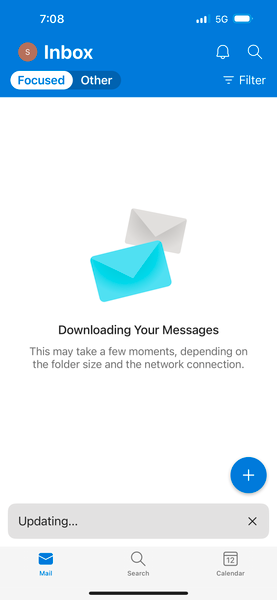
iOS Outlook app forever stuck saying "Downloading your messages" I tried EVERYTHING! Please help! :(
Hello, My Outlook iOS issue started on Wednesday (1/11/2023) when I noticed that my mobile app stopped syncing email. Things I tried: - Reset (via the app) - Kill the app by swiping up - Restart the phone - Sign out and sign back into the app No luck. Still was not syncing. So I uninstalled the app and reinstalled it. And then the problem got worse. Now no matter what I do it's FOREVER stuck at displaying "Downloading your messages" and I have left it like this for hours even couple days. Help! 😞 I also tried logging into 2 other iPhones and the SAME exact issue. It just displays "Downloading your messages" Little background: We are using GCC High licenses and Intune if that helps. But this issue is only happening to me! 😞 My Outlook and iOS is up-to-date as well.yakuzabentoMar 01, 2026Copper Contributor6.6KViews0likes5CommentsCan no longer clear Outlook calendar
I use Outlook on my laptop (not the web version) and recently have been trying the new Outlook desktop, although I still use both. I like to send my calendar from work (on a work laptop) to myself at home as an exported *.csv so that I can see my work calendar events on my personal calendar, and I use the outlook.com service for my personal calendar and email. I used to be able to clear my old calendar on old outlook by switching to list view, selecting everything with ctrl A and then deleting. I could then import the *.csv file and create my entire calendar at home. This isn't working at all well anymore. I can still do this with classic Outlook, but somehow this has set a "different" calendar in the new Outlook. In other words, I see a calendar in the New Outlook that I don't see in Outlook classic (for the exact same account at outlook.com). It's just all fouled up. Does Microsoft have any sort of support for their outlook.com service whatsoever because it just seems like they don't remotely care or support it. GeneGene_KlamerusFeb 28, 2026Copper Contributor38Views0likes1CommentThere needs to be a way to disable the Editor for Outlook.
Let me first offer a preemptive apology about the tone of this post. I rarely get this aggravated over a feature. The Editor, which provides "refinements" like conciseness, clarity, etc., is possibly the most infuriating, useless, piece of garbage I've ever had to experience. Let us walk through this experience. - Ahh, time to respond to an email. As a human who has interacted with this human I am responding to and understand our rapport and level of formality, and as someone with a modicum of brain power, I know how to address this person! I know the type of language this person and I use, and I use this to inform how I speak to this person, as I do with anyone. Hmm, type type type. I tell this person, "Alright, looks-" - SOUND THE ALARM. SOUND THE ALARM. Why not "all right"? That's more formal! Enjoy a purple underline. - Uh, I'm fine, thank you. Let me click "Ignore". - Okay, I'll remove the purple underline! *2 seconds later* Why not "all right"? That's more formal! Enjoy a purple underline. - I said I'm fine, thank you. "Ignore". - Okay, I'll remove the purple underline! *2 seconds later* Why not "all right"? That's more formal! Enjoy a purple underline. - PLEASE STOP. Let me click "more options". Oh! Let's click "Stop checking for this." - What? I didn't hear you. I can't stop checking for this, you've committed a cardinal sin in email etiquette! Keep the purple underline to remind yourself what a terrible emailer you are. - Goodness, okay. I'll just keep writing then. - You IDIOT! Did you mean "investigated" instead of "looked into"? It's more letters and syllables, but its less words, and we CANNOT have two words when we could have one! - No, stop doi- - "Play things by ear"? Did you mean "playthings", moron? Playthings is one word! I bet after you send this email you'll go back to your playthings because you're a stupid child that can't write! I have seen elsewhere that there are certain aspects of this under my control (such as the tone of writing casual/formal, although I can't find this fix on Outlook). But from my searching, there is absolutely no way to turn these off or permanently remove the underlines. And even if there is, the product is terrible enough whether or not it is optional. As someone with ADHD and OCD, this is beyond distracting, and at times genuinely debilitating to my productivity when my email is littered with useless underlines. It is also extremely insulting to the user to assume that they MUST have their hand held, and to assume that these automatic, often terrible, suggestions should take precedence over their human judgement. I cannot fathom why people would create a product so revolting and FORCE it upon users. It has created such a hostile email writing environment that I now have to just draft emails in a notepad and paste them into Outlook. If you want this much control over what I write, why not just let an AI summarize everything I write after I send and spit it out in your sanitized Copilot writing style of preference? Let's just remove the human from everything.hk2Feb 28, 2026Copper Contributor79Views1like3Comments
Tags
- outlook for windows1,290 Topics
- office 365700 Topics
- outlook on the web492 Topics
- outlook for mac307 Topics
- exchange275 Topics
- outlook for ios163 Topics
- outlook for android159 Topics
- Outlook Customer Manager65 Topics
- groups57 Topics
- community40 Topics