
Forum Widgets
Latest Discussions
Phishing Simulation Training with Teams?
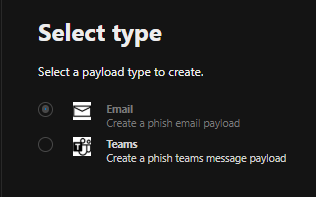
Hey all, while setting up some Exchange Online Phishing Simulation Training, I saw the (greyd-out) option to use a teams payload when it comes to setting up a phishing simulation. I didnt find any very useful articles, why this is greyed out. Business Premium+ Defender and Purview Suite for BP is licensed. How do I set this up and configure it? Does this also support all types of attacks (Credital harvest, ...) I'd be happy for any recommendations! BR SchnittlauchSchnittlauchApr 23, 2026Steel Contributor8Views0likes0CommentsWhats the best Practise for on-call duty via teams external calling?
Hey community, I'm a bit in a struggle when setting up our Teams Operator Connect Phone system. We have an Auto attendence which is offering different menus (Press 1..., etc) We're planning on setting up a twentyfour x seven on-call duty where customers can call and are getting redirected to the mobile phones of our technician. I saw the option to forward to one number, but there isn't an option to forward to multiple numbers. How do you guys solve such a scenario, where you have to wake up colleagues mid night? We are changing shifts weekly, always 2 guys, sometimes 3 ppl. on shift. Thank in advance, SchnittlauchSolvedSchnittlauchApr 23, 2026Steel Contributor126Views0likes3Comments
Teams Transcription (Licensing / Button greyed out for some users)
Hello, i have questions regarding transcription in Teams. Our org has Microsoft 365 Business Standard licenses, two users have icrosoft 365 Copilot Business on top of that. First question: is transcription possible for users without Copilot Business License? If the meeting policy is specified as something other than "off", some people can start the transcription, even if all participants of the meeting have no Copilot Business License. Is this on purpose or am i using a loophole and am i violating my license agreement in any way? Second question: some users can start the transcriptions, while others with the same teams version, license and meeting policy can not I read that having the personal setting disabled to identify yourself automatically in meetings will prevent you from starting the transcription, but that setting is enabled for every participant. On the teams app for android, one participant can enable the transcription, in the same meeting in the desktop app it is not available (disabled by Administrator per Policy) Teams version is 26072.519.4556.7438. Any pointers how i can locate the user specific difference, that is responsible for the transcription? I checked the assigned meeting policy and it is the same. Thanks for your time and help! Best regards, AndiYAndiYApr 22, 2026Copper Contributor34Views0likes1Comment
Option to change default recording & transcription settings?
I've been asked to look at changing the default settings for recordings & transcriptions, specifically the “Who has access to the recording or transcript.” setting, changing it from "Everyone" to "Specific people". I've looked through Meeting Policies in Teams Admin Center but can't see an option that governs this behaviour. Although we've advised users to change this setting if needed, we have had instances where the user has forgotten to change the default and has inadvertently allowed guest/temporary participants (who may have only been in attendance for a specific item) to see the whole meeting transcript. Many thanks, Ollyolly_riceApr 22, 2026Copper Contributor387Views2likes2Comments
Continuous feedback in Teams without it getting lost in chat?
Our company is trying to move from annual reviews to continuous feedback. The idea is that managers and peers give quick feedback throughout the year and it all gets captured somewhere. Right now people just send feedback in Teams chat or email and it vanishes. By the time reviews come around nobody remembers what was said 6 months ago. Is there a structured way to give and receive feedback inside Teams that actually saves it and makes it retrievable later?ElisaDelaneyApr 21, 2026Brass Contributor19Views0likes0Comments
Struggling to keep 1:1 meeting notes organized across weeks in Teams
I have 8 direct reports and we do weekly 1:1s. Right now I'm keeping notes in OneNote but theres no easy way to carry over action items from last week or see what we talked about 3 months ago without scrolling forever. Teams meeting notes are even worse because each meeting creates a separate note. Someone in my company suggested using a Loop page but that still doesnt solve the continuity problem. How are other managers keeping a running history of 1:1 conversations thats actually searchable and organized?ClaireBApr 21, 2026Copper Contributor45Views2likes1CommentImages compressing and sending on team.
Hey everyone, I'm facing an issue with Team. When I try to send over 20 images, each around 20MB to 10MB in size, they won't go through. I've tried using online tool such as https://jpegcompressor.com/ to compress them, but it only supports up to 10MB images. I need a solution or software that can compress them easily so I can share them with my colleagues hassle free. Thanks, and regards, Jiya Hana.JiyahanaApr 21, 2026Copper Contributor695Views0likes1CommentDisplay Teams chat message with date stamp rather than relative day
Is there a way to force Teams Chat messages to display the date of a message rather than "yesterday" or "today"? e.g. display "27/08/2024" instead of displaying "yesterday 2:12 pm". (I'm creating this post on 28/08.) We use screenshots of Teams messages in our processes, and having to wait for the actual date to displayed invariably means taking the screenshot is forgotten. Immersive reader always shows the actual date, but not the recipient of the message. No help there.KarenJones2667Apr 21, 2026Brass Contributor7.5KViews16likes16Comments
Making Teams start on Secondary Monitor
Is there a way to force Teams to start on my secondary monitor (Screen 2)? Every morning I start Teams, it comes up on Screen 1 and I have to move it over to Screen 2 so I can do my work while still seeing the chat/calls windows. I checked settings in Teams as well as looking in Windows (Apps & Features, and Properties) but can't find anything that can set it to start on the secondary monitor instead of primary. It does not appear to retain the last screen position on exit.SolvedSteven_613Apr 21, 2026Copper Contributor43KViews2likes8Comments


Tags
- microsoft teams13,493 Topics
- How-to2,941 Topics
- Administrator2,651 Topics
- meetings2,559 Topics
- Settings2,301 Topics
- User Interface1,654 Topics
- tips & tricks1,497 Topics
- calling1,253 Topics
- teams1,038 Topics
- best practices993 Topics