Forum Widgets
Latest Discussions

Entra MFA for seniors using W365 Biz Basic
Entra MFA for seniors using W365 Biz Basic, these folks cannot and will not deal with mobile auth apps or keyfobs. This is a Historical Society. Need MFA bypass or non-technical solution that Senior Citizens with only enough knowlege to work MS Word can handle. There is zero risk of data loss or hackers or the like. We have nothing to lose as all is websearch and simple word docs. MFA without SMS or voice is going to put a lot of non-tech seniors out of their livelihoods. Need a simple non-tech solution. MS is so worried about CYA with regard to security, that they are pushing people out of technology. Do I have to go to Google Docs for a solution? Libre? It's not MS responsibility to remove all possibilities for poor decisions. Give us the tools for wise decisions, but quit binding us up. I need a solution or I'll have to move these folks off M365.stewartewing7881Aug 25, 2026Copper Contributor57Views0likes1Comment
Security Admin Center Tenant Allow/Block List Not Able to Block IPv4?
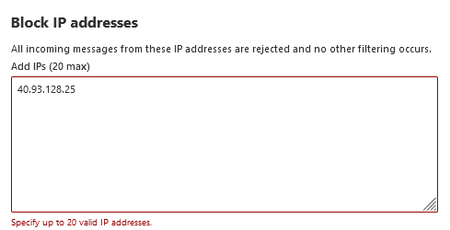
While using the Security Admin Center Tenant Allow/Block List we have been able to block specific email addresses and IPv6 IP addresses but are unable to block IPv4 IP addresses. We have tried both using the console and the CLI but have turned up unsuccessful both times when it comes to IPv4. A large majority of the phishing attempts that we encounter come from IPv4 addresses but we have been unable to block any of these. Will there ever be functionality for IPv4 within the Tenant Allow/Block list or is the only option to use conditional access policies? Also why is this enterprise tool only functional with IPv6 and without documentation stating that it does not work for IPv4?tpmaxAug 24, 2026Copper Contributor1.9KViews4likes6CommentsAI agent ownership change
I was just in the M365 Admin Center because I needed to transfer ownership of an agent for a colleague – but it now suddenly looks like Microsoft has changed something in their permission structure. As a result, I can no longer transfer ownership of agents, and the system tells me that I don't have permission to manage that particular app. So, the question is: do I now also need the Application Administrator role in order to continue managing this? I get this message:FeldborgAug 22, 2026Copper Contributor148Views1like2Comments
File Sharing between licensed account holders
From a starting point of this year, we have been finding that any to most file shares that happened between licensed MS account users are being flagged and quarantined by the anti-malware policy. This should be, we are looking to resolve this issue. Has anyone else experienced this issue and what was your resolve. At the moment we have to monitor the quarantines and manually go in to release the share notifications.186Views0likes4Comments
Not For Profit Licence suddenly disappeared and then deleted
Hi All Have a big issue. Have a not for profit account for our charity. Renewed licence earlier in the year and all was ok and working. Then a few days ago I had reports of not being able to access data. After much hunting I found the below. Seems account was suddenly and without warning disabled and then reported as deleted a few days later. What do I do? I desperately need to recover the files that were on the associated teams? Any help would be much appreciated642Views0likes15Comments
Where does Teams get its user list from? I can't make sense of which accounts I see vs which I can't
OK, so I have a currently rather unusual situation. I am looking at a 365 Tenant. A number of users have four accounts on the same tenant (let's not even get into why, cleaning things up is part of the reason I got called in). When you start typing their name into teams it comes up with three of them as a suggestion (I only want one) Account 1: has just been used for ActiveDirectory for permissions to the company's Distributed File System (stored in on on premises servers in various locations). This account has to the best of my knowledge never had a license or mailbox associated with it, and so has never been on the global address list, it's also never had the teams app enabled for it. I don't want this one to show, but it does Account 2: A now defunct account which used to have a Business Standard license assigned to it, but has now had the licensed removed. Before the license was removed this account was hidden from the GAL and its teams app disabled. I don't want this one to show, but it does Account 3: An now defunct account which still has a Business Standard license, but with Teams deselected in the Apps. I don't want this one to show... and it doesn't Account 4: An account shared via a multi tenant organization (the users in question have been migrated to a new tenant). So these are members (not guests) but external ones. I want this to show, and it does. Now, accounts 2 and 3 will be deleted soon, whether we can get rid of account 1 depends on whether the necessary access to the DFS can be done using account 4 (which I need to look into next). However for the time being they are all there so I was trying to hide accounts I don't want users trying to message on teams from teams, and I cannot make any sense of which I see which I don't. To sum up. Account that has never been on the Global Address List and never been activated for Teams - Shows Account that used to have a license and was on the GAL, and used in teams - Shows Account that still has a license, but has been removed from GAL and had teams app disabled - Doesn't show Account that has no license and is not on the GAL, but has teams on it's host tenant - Shows After a previous inquiry I set "Scope directory search using an Exchange address book policy" in the teams setup, but I have not set up any specific address book policy as yet. I have tried showing and hiding people from the global address list, and also the "ShowInAddressList" setting in Entra (which seems to only be available through graph?). Nothing seems to make a difference (it doesn't help that Teams takes forever to update its local cache for this stuff, so maybe a change DID make a difference at some point and I missed it). I cannot find any logic as to which of these accounts is showing in the auto suggests and which not, most notably that account 1 shows but account 3 doesn't. So, where is Teams getting its list of contacts from?LeftyAug 13, 2026Tin Contributor2.7KViews0likes4Comments
Microsoft Customer Agreement created without Billing Profile after CSP deauthorization
I am the Global Administrator of a Microsoft 365 tenant that previously had an Exchange Online Plan 1 subscription supplied through Endurance International Holding B.V. (Bluehost). This is not a mailbox migration issue. My mailbox already resides in Exchange Online within my existing Microsoft 365 tenant. The only intended change is to move from the former Cloud Solution Provider (CSP) to direct Microsoft billing after the CSP was deauthorized. The Partner Relationships page now displays: Endurance International Holding B.V. (Netherlands)'s account is closed. Find a new partner using Partner app finder or buy from Microsoft directly. Following Microsoft's guidance, I have: Created a Microsoft Customer Agreement (MCA) Created a Billing Account ("Pecten Development") Added and verified a SEPA payment method Updated the Sold-to and Technical Contact details However: Purchasing Exchange Online Plan 1 continually requests a Billing Profile. Completing the Billing Profile workflow never creates one. My Billing Account contains no Billing Profile or Billing Scope. Azure Cost Management reports that there is no supported billing account or subscription. I therefore cannot purchase Exchange Online Plan 1 directly from Microsoft before the existing subscription expires. I have also confirmed that: The former reseller account is closed. There are no delegated partner roles remaining. Microsoft support repeatedly directs me back to the former CSP. Bluehost have confirmed they can no longer escalate through Microsoft CSP channels because their reseller relationship has ended. My current diagnosis is that the Microsoft Customer Agreement has been created successfully, but the associated Billing Profile/Billing Scope was never provisioned. This leaves the tenant unable to purchase services directly from Microsoft despite the former CSP relationship having been closed. Has anyone encountered this after a CSP deauthorization? Does this require intervention by the Microsoft Commerce team, or is there another way to force creation of the missing Billing Profile? If a Microsoft moderator requires my tenant ID or billing account details, I would be happy to provide them by private message. Thank you.IanBartlettAug 07, 2026Copper Contributor94Views0likes1Comment
How to move user from a CSP Exchange Online licence to a Microsoft direct licence in the same tenant
I have an existing Microsoft 365 tenant with a single Exchange Online (Plan 1) licence that was purchased through Bluehost (Endurance International Holding B.V. CSP). Microsoft notified me that Endurance is no longer authorised as a Direct Bill CSP, so I decided to purchase a new Exchange Online (Plan 1) subscription directly from Microsoft My current situation is: Exchange Online (Plan 1) purchased through Bluehost/Endurance Exchange Online (Plan 1) purchased directly from Microsoft Both subscriptions are now active The problem is that Microsoft 365 appears to pool the licences together. Under Users → Active users → Licences and apps I only see Exchange Online (Plan 1) and there is no way to choose which subscription the user is assigned to. The licensing page simply shows: Licences assigned from all subscriptions: 1 / 2 The two subscriptions are only distinguishable by their billing profiles (one is the Bluehost/Endurance CSP subscription and the other is my new Microsoft direct subscription). I want to make sure my mailbox is consuming the Microsoft direct licence. How can I determine which subscription my user is currently licensed from? If the user is still consuming the CSP licence, what is the supported way to move them onto the Microsoft direct subscription? Is the licence automatically reassigned if the CSP subscription is cancelled, or is there a manual process that should be followed? I want to keep the existing tenant, mailbox, domain and email data and only change the billing source for the licence. Any guidance from anyone who has completed this transition would be greatly appreciated.Mike_SoulbyAug 06, 2026Copper Contributor65Views0likes2CommentsMake Your Test Data Less Boring with M365Mutator
Testing Microsoft 365 scenarios often involves test data. If the data is stale or always the same, it might not generate good results or help to identify lurking problems. The M365Mutator app helps to solve the problem by mixing things up in your test data. The app can change properties of Entra ID accounts, send email, update calendars, and generally make sure that whatever you’re testing has fresh information to run against. https://office365itpros.com/2026/07/10/m365mutator-test-data/25Views0likes0CommentsMake Your Test Data Less Boring with M365Mutator
Testing Microsoft 365 scenarios often involves test data. If the data is stale or always the same, it might not generate good results or help to identify lurking problems. The M365Mutator app helps to solve the problem by mixing things up in your test data. The app can change properties of Entra ID accounts, send email, update calendars, and generally make sure that whatever you’re testing has fresh information to run against. https://office365itpros.com/2026/07/10/m365mutator-test-data/32Views0likes0Comments



Tags
- microsoft 365 admin center696 Topics
- admin651 Topics
- office 365436 Topics
- Microsoft 365 Admin app93 Topics
- microsoft 36583 Topics
- exchange58 Topics
- security55 Topics
- Exchange admin center52 Topics
- Reports47 Topics
- azure active directory47 Topics