microsoft 365 admin app
93 Topics
M365 only admin locked out MFA error 53003
I am learning this the hard way....so here it goes. Currently I am locked out of as the only admin on the tenant with error 53003. I was updating some Microsoft MFA default policy settings in Entra and mistakenly deleted the admin user from the exclusions list, and got locked out. Thankfully I have another tenant, not as big the one locked out. Initiated several support tickets for which everyone calls, and despite of subline mentioning the issue says that they have to assign this ticket to Entra. Then the ticket gets updated and noone has been assigned every since. I have initiated severity A support tickets from Azure portal but no one has called in last 24 hours to help. We area business with Business Premium licenses with over 20 users, and now completely locked out. I have looked almost everywhere online. There is no phone number that takes you to a support agent - PLEASE HELP........592Views0likes3Comments
Entra MFA for seniors using W365 Biz Basic
Entra MFA for seniors using W365 Biz Basic, these folks cannot and will not deal with mobile auth apps or keyfobs. This is a Historical Society. Need MFA bypass or non-technical solution that Senior Citizens with only enough knowlege to work MS Word can handle. There is zero risk of data loss or hackers or the like. We have nothing to lose as all is websearch and simple word docs. MFA without SMS or voice is going to put a lot of non-tech seniors out of their livelihoods. Need a simple non-tech solution. MS is so worried about CYA with regard to security, that they are pushing people out of technology. Do I have to go to Google Docs for a solution? Libre? It's not MS responsibility to remove all possibilities for poor decisions. Give us the tools for wise decisions, but quit binding us up. I need a solution or I'll have to move these folks off M365.206Views0likes1Comment
Booking not available for everyone
Dear Community, We are currently experiencing an issue within our tenant related to the Microsoft Bookings App. While the app is enabled and accessible via browser for users in a specific group, some users are unable to add the app directly to their Teams interface without submitting a request. At this point, we have not been able to identify the root cause of the issue. I might be a policy issues that only we can solve. Has anyone encountered a similar problem or could suggest possible solution? Thank you :)359Views0likes2CommentsExtend M365 Archive Quota capacity
In my organization, we are currently on the O365 E5 License with default 100GB mailbox size per user and 1.5TB archive quota. However, due to organizational policy and regulatory requirements, we are expected to keep all the data from inception. Hence, the requirement for a solution to extend our archive size from 1.5TB. From the official Microsoft documentation, https://learn.microsoft.com/en-us/office365/servicedescriptions/exchange-online-archiving-service-description/exchange-online-archiving-service-description#archive-storage-quota the maximum expansion of the archive mailbox is 1.5TB. Is it possible to extend the archive storage to an Azure blob? Like an automated script that moves the data from the Archive mailbox for each user to the Azure blob or any other storage service that does not have storage size limitation. I am open to suggestions. Thanks1KViews1like2Comments
Request to Reactivate Microsoft 365 E5 Developer Subscription (Subscription ID: sparkyy)
Dear Microsoft Support Team, My Microsoft 365 E5 Developer Subscription recently expired(2/22/2025 (UTC) due to an oversight during a busy work period. However, the subscription has been actively used for the following development activities: Microsoft Graph API Integration: Developed internal collaboration tools leveraging Microsoft Graph API . Critical Project Files: Stored core project documents, including key deliverables, in OneDrive/SharePoint. Automation Workflows: Utilized Power Automate for data synchronization tasks. I kindly request the reactivation of my subscription and commit to implementing automated renewal tools (e.g., GitHub Actions) to ensure compliance moving forward. I have use it over 4years that is very helpful for my work and Team, hope it 's able to back, I tried to send mail support@email address removed for privacy reasons, but didn't any message back.due to now already close 30days, I worry my project and files will be delete,Would you please help to me for the E5 account,Thanks for you all help. my admin account email address removed for privacy reasons my domain admin account email address removed for privacy reasons Subscription domain name: sparkyy Best Regards, Spark.Yuan343Views0likes0CommentsDLP Exception for "Permission Controlled" Not Working (Microsoft Purview | RMS Template | Encrypt)
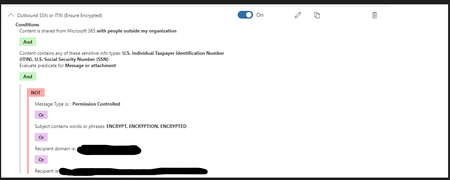
Hello, We are in the process of moving some of our mail-flow / transport rules over to Microsoft Purview. We don't want the DLP policy to apply when people click their "Encrypt" or "Do not Forward" buttons (RMS templates; OME encryption.) Putting "Permission Controlled" in the exceptions group should theoretically let the emails go through. The exception we have for when people put "Encrypt" in the subject line works (we have a mail-flow rule that encrypts those emails.) But actually clicking "Options" > "Set permissions on this item" > "Encrypt" doesn't remove the policy tip on an email draft, and people are unable to send the emails. Can someone verify that this rule is constructed properly? If so, we may have to reach out to Microsoft Support. Thank you so much for your time and help!Solved868Views1like6Comments
Safelinks - is there a way to mark a site as safe to bypass?
Hey All: We use a 3rd party SaaS service in healthcare. When users need to reset their PW, they can use a PW reset form. An email comes in with a one time use URL. We figured out that Outlook Webmail users, when they click on it, the SAFELINKS feature intercepts/scans which invalidates the one time use of the URL. When the users ultimately get the web page, it says that the LINK has already expired. Is there a way to configure the M365/O365 tenancy somewhere, (Windows Defender policy?) to add a domain as safe to that the sa1.5KViews0likes1Comment
I am unable to get the User Usage details for the Microsoft VISIO and Microsoft Project
In my Organization we have purchased the Microsoft VISIO and Microsoft Project licensed version and my management wants to know the users usage details of those apps but I am unable to get those details in audit log and anywhere. Please advise where will I get those details.3.2KViews0likes5Comments