microsoft 365 admin center
702 Topics
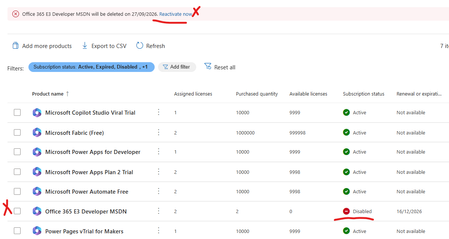
Error office 365 e3 developer license will be deleted on XXXXX. Currently disabled
My Office 365 E3 Developer has been marked for deletion and disabled today. No earlier comms from Micrsoft or any sort of messages.It just locked our my E3 Developer license has there a not supporting it any more. I wanted to try and backup/export my mail box and no luck - the option is greyed out. My SharePoint admin center has been blocked also can't backup any of my files. I'm just helpless.What a shame Microsoft What other plans can i move to and what should i do now since Teams and mail is not working. Can I at least get a a grace period. Any resources or advice would be appreciatedSolved1.3KViews1like17Comments
Changing Microsoft 365 billing frequency from monthly to yearly unexpectedly increased the price
Hello everyone, I would like to raise an issue with Microsoft 365 Business Standard that I find very difficult to understand and even harder to explain to my customer. I manage two Microsoft 365 Business Standard licenses for a customer. The pricing history was as follows: Until May 2026: €23.40/month total for 2 users From June 2026: €21.66/month total for 2 users This means the annual cost at the latest monthly rate was €259.92/year On September 28, 2026, I changed only the billing frequency from monthly to yearly. During this process, I was not shown any clear warning that the actual subscription price would increase. After the change, Microsoft created a new annual subscription with: €145.56 per user/year €291.12/year for 2 users So simply changing from monthly billing to yearly billing increased the annual subscription price from the equivalent of €259.92 to €291.12. This is particularly confusing because the Microsoft website normally presents annual billing as the cheaper option. I contacted Microsoft Support today. According to the support agent: this behavior is the same worldwide the billing change cannot be reverted the agent cannot revert it it cannot be escalated to a supervisor who could revert it there is apparently no email address or written complaint channel where I can formally dispute the change What concerns me most is not only the price increase itself, but the fact that I was apparently moved to a higher price simply by changing the billing frequency, without a clear indication during the process that the subscription price itself would change. I now also have to explain to my customer why their Microsoft 365 costs suddenly increased, even though no additional licenses or services were requested. From my perspective, changing how often a subscription is billed should not silently result in a different commercial price without a very clear confirmation beforehand. Has anyone else experienced this? I would especially like to know: Is this expected Microsoft behavior? Why does changing the billing frequency trigger a new, higher price? Is there any official escalation or written complaint process for Microsoft 365 billing issues? Is there really no way to revert such a billing-frequency change shortly after it was made? I would appreciate clarification from Microsoft, because at the moment this leaves both the reseller/admin and the customer in a very poor position. Regards139Views0likes0Comments
DNS connections
In 2021, I bought a domain and connected it to a Microsoft 365 account at the time. Over the years, I did not renew the domain and the 365 membership. Luckily last month, the domain was still available so I bought it back. Now, I can’t connect it to my new 365 account because it is still connected with the old one. I don’t have the username so I’m stuck at the moment114Views0likes0Comments
MC1269241 - Can't turn off antropic for agentmode
Hi, I’m trying to figure out how to turn off the new feature where Anthropic is enabled by default for everyone in the EU for agent mode in excel and powerpoint, as described in the Message Center news in the title. It is not possible to press Save when you have unchecked the setting unless you also consent to the terms of use, it is greyed out. Since we want the feature turned off, we do not want to agree to any terms of use. Has anyone found a solution? This seems to be misconfigured.361Views0likes3CommentsMicrosoft SSO SAML Assertion Claims
While getting the assertions back from SAML Assertion Claims, I have configured the user.country & assigned some value in the field. But while getting the claim we are reading the some different value like "IN" ? can I know does the user.country claim supports or not during the claim?416Views0likes4Comments
MS support "unable to reach you loop" for locating only GA account.
For 5 day in a row I've received this response to my support case "I am writing this email in reference to case ID 2609070010000261. I was unable to reach you at your contact phone number provided. Please let me know the best time frame and phone number to call you back by replying to this email. " I do not have any missed calls on my phone, I have provided an alternative number, I have stated what I'm looking for in the email response, I have tried calling the number in the email but get to a " provide an update online " and hung up prompt. I have a tenant Ive paid for. I'm trying to attach a domain that is my mostly unique last name to it that I forgot I had on another tenant ( that wasn't paid for yet and has my first name last name) and I dont know the GA username on the tenant, I've tried every iteration I can think of for a username. I'd just love for a password reset email be sent from that tenant and I think I would get the email, reset it, release the domain, and move on. however I dont see that tenant's onmicrosoft url in any of my emails either if that's a possible secondary issue. If anyone has suggestions for getting into the tenant or getting something more than " unable to reach you" I'd greatly appreciate it!215Views0likes1CommentAI agent ownership change
I was just in the M365 Admin Center because I needed to transfer ownership of an agent for a colleague – but it now suddenly looks like Microsoft has changed something in their permission structure. As a result, I can no longer transfer ownership of agents, and the system tells me that I don't have permission to manage that particular app. So, the question is: do I now also need the Application Administrator role in order to continue managing this? I get this message:603Views1like3CommentsHelp on MS365 Business Std license issue
Hi Community - Issue with MS365 Business Standard license I have a ms365 biz standard subscription/license attached to my email (email address removed for privacy reasons) - Australian subscription. I am global admin to the account. It expired on 5/9/26. I bought a new one on 5/9/26 from a office supplies store (Officeworks, a large chain in Australia) I took help of MS telephone support to add the new product key. so far so good. However, it appears that the new subscription's license is not attaching to my id. under my id, Under 'Your Products' - it is showing both the expired subscription; and the new subscription. Under the 'Licenses' - it is showing MS 365 Biz Standard - 'Available licenses - 1' and 'Assigned licenses - 1/2' - if i click on MS 365 Biz Std - it tells me - 'Licenses - 2 purchased' - under Assigned Licenses - 1 ; and under its drop down - 'user's name' - 'Type' -> 'user' / Assigned licenses - blank / email - user's email. Under 'active users' -> my id -> 'licenses and apps' - it is showing MS 365 Biz Std - check - and 1 of 2 licenses available. After much engagement with MS telephone support; I am assured that everything that needs to be done has been done; the expired subscription will simply disappear after a time; and licenses has been properly applied. We did much poking around over Quick Assist - including unassign / assign license. However, the fact that that the account continues to show an expired subscription and active subscription at the same time; and the fact that there seems to be one license still available (there should technically be no extra license available - as old has expired and new one should be in use) is kinda bothering me. This is an id for my business, and I am naturally concerned of any abrupt disruption / data loss etc. Can someone please help to clarify / give suggestions that whether all is well, and i should have a peaceful sleep, as MS tele support suggests; or is there a cause for concern? Kind regards Manish238Views0likes1Comment
Entra MFA for seniors using W365 Biz Basic
Entra MFA for seniors using W365 Biz Basic, these folks cannot and will not deal with mobile auth apps or keyfobs. This is a Historical Society. Need MFA bypass or non-technical solution that Senior Citizens with only enough knowlege to work MS Word can handle. There is zero risk of data loss or hackers or the like. We have nothing to lose as all is websearch and simple word docs. MFA without SMS or voice is going to put a lot of non-tech seniors out of their livelihoods. Need a simple non-tech solution. MS is so worried about CYA with regard to security, that they are pushing people out of technology. Do I have to go to Google Docs for a solution? Libre? It's not MS responsibility to remove all possibilities for poor decisions. Give us the tools for wise decisions, but quit binding us up. I need a solution or I'll have to move these folks off M365.302Views0likes1CommentNot For Profit Licence suddenly disappeared and then deleted
Hi All Have a big issue. Have a not for profit account for our charity. Renewed licence earlier in the year and all was ok and working. Then a few days ago I had reports of not being able to access data. After much hunting I found the below. Seems account was suddenly and without warning disabled and then reported as deleted a few days later. What do I do? I desperately need to recover the files that were on the associated teams? Any help would be much appreciated1.5KViews0likes15Comments