Recent Discussions

Web-signin 3rd party IDP not working
We have a working Entra ID SAML federation to a third-party IdP that uses FIDO2/WebAuthn (IdP as Relying Party) for browser sign-in, and we are trying to use the same federation through Windows Web sign-in on an Entra-joined Windows 11 device — but the IdP page loads blank in the WebView and Microsoft-Windows-WebAuthN/Operational records zero events, while the same security key works fine for FIDO2 sign-in with login.microsoft.com as RP on the same device. Questions: - Is WebAuthn brokering to third-party Relying Parties inside the Web sign-in WebView supported? - If not, is it on the roadmap? - What is the supported architectural path for delivering passwordless Windows sign-in using a federated IdP's own FIDO2/WebAuthn credentials, given Graph API passkey provisioning is Beta-only?9Views0likes1Comment
Cannot turn off Copilot in MS Word for Windows as "Enable Copilot" is missing...
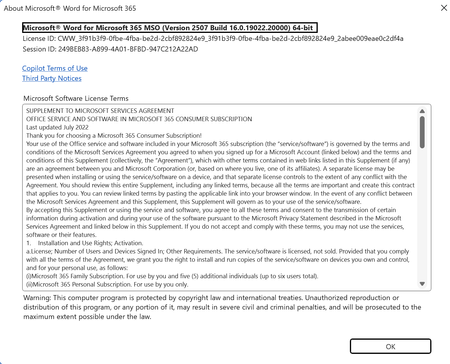
This is ridiculous. I have spent over 2 hours trying to turn off Copilot in MS Word O365 version. I am running MS Word in I I Windows 11 (updated) and running what I believe is the most current version. I have been able to go into Excel => Options and uncheck the "Enable Copilot". I do not see such a box in Powerpoint (thank God - I don't see it in the app at all) and have been able to turn it off on my Mac Office Apps. I have an O365 account. When I open Word in Windows and then select the Options I get what is displayed below. Do not see the enable coPilot option, but CoPilot is on. This is ridiculous. I have cleaned the registry and I have seen hacks on how to turn off coPilot by butchering the registry, which I refuse to do. I even removed the coPolite App. MS, I DO NOT WANT TO USE AI TO WRITE. How do I get rid of this? I am EXTREMELY frustrated with this. Bryan3.4KViews2likes6Comments
O365 Email Migration to Another Tenant while Deferring Migration of Sharepoint files
Hi, This is the context: ChildCompany has O365 and it has an Azure AD in hybrid mode synchronizing to a on-prem AD server. They have an internal domain ChildCompany.com, and an external domain ChildCompany.com where they also receive and send email using O365. ParentCompany is going absorb the ChildCompany some time in next year, and I was asked about the integration options. According to this https://download.microsoft.com/download/b/a/1/ba19dfe7-96e2-4983-8783-4dcff9cebe7b/microsoft-365-tenant-to-tenant-migration.pdf I could do a phased migration, where the end state is that they decomm their onprem AD and that they only use our ParentCompany systems. The business requirement is to start their integration with Email, and then in later phases do the Sharepoint integration as that requires way more analysis on their data sources, as they also have wikis and many other on prem legacy stuff. They are less than 50 users, so I can use Quest migration tools for the email part, but I wonder what needs to happen in what order. This is what I have in mind: Migrate their current O365 into our ParentCompany Office 365 subscription, so that they can continue logging in into their domain joined windows machines using childCompany.co, so they start using ParentCompany.com email addresses, but the problem then is how can they continue using their sharepoint and onedrive resources associated with the Azure and local domain at ChildCompany.com? This is more or less what I have in mind, for the intermediate step, the cutover: Child Company ParentCompany --------------------- ---------------- On-Prem | MS Cloud: | MS Cloud: ---------------|----------------------|-------------- Local AD (ADFS)| Azure Subscription | Azure Sub | Azure AD | Azure AD |--------------------- |--------------------- | O365 Sub -> | O365 Sub | Exchange mailboxes-> | Exchange mailboxes | Sharepoint? -> | ??? | -------------------- |--------------------- I wonder how could it be possible to defer the sharepoint and onedrive migration, so that the child company users can still work on their sharepoint files using their normal auth methods, while disabling childcompany.com as MX so they start using ParentCompany.com mailboxes.Is that even possible? Would make more sense to try to migrate everything at once? That is way more work, but I'm weighting my options.1.3KViews0likes7Comments
MS Word and Excel Mail Merge Certificates (advanced)
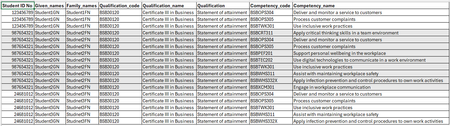
I need to run a mail merge (using Word and Excel) for certificates where per Course each student has a unique number of competencies they have achieved, example code attached. I cant manipulate or add data to the excel content with additional columns. I need one certificate per student each with their related competency achievement(s). Has anyone else found a solution without having to use an add in? Ive seen a template where the creator used the "next if" rule and the "if" condition is if the student ID is equal to, but i cant recreate it.6Views0likes0Comments
Re-install Office Home & Student 2013
Hello, I have recently updated my laptop from Win 10 to 11, however i cannot reinstall from my MS account subscriptions my Office Home & Student 2013. I receive this message. “ Hello, I have recently updated my laptop from Win 10 to 11, however i cannot reinstall from my MS account subscriptions my Office Home & Student 2013. I receive this message. “Office (64-bit or 32-bit) couldn’t be installed” error when trying to install Applies To If you tried to install a 64-bit or 32-bit version of the Microsoft 365 or Office, or a standalone application such as Visio on a computer that already has either the 32-bit or 64-bit version of Microsoft 365 or Office, you could see an error message similar to the one below. This occurs because you can't mix 64-bit and 32-bit versions of Microsoft 365 or Office. "What to do" To fix this error and switch from 32-bit to 64-bit (or vice-versa), you must do the following in this order. Uninstall Microsoft 365 or Office Go to Uninstall Office from a PC and follow the steps to uninstall the version of Microsoft 365 or Office (or stand-alone Microsoft 365 or Office application, such as Visio or Project) you don't want. I have used the tool and Office cannot be found, but if i try again to re install i get the same message. What am i missing in order to complete the re-install ?? Thx48Views0likes1Comment
Office Scripts
i have a business microsoft office account and am signed in with it. when i try running a script in excel i keep getting the error saying it requires a work or school account. my microsoft account says the following: your work or school account belongs to your home organisation. what do i need to do to get scripts working.99Views1like1Comment
Export mixed text and tabular Excel to PDF
I have a sheet that I need to export from Excel to PDF. The sheet contains text and tabular data. Ideally, I'd like large bold text to export as heading tags, text as paragraph tags, and the tabular data as a table. Currently, any group of cells containing data that are surrounded with blank cells export as a table, even if they don't contain what a human would consider tabular data. I haven't selected the tabular data and chosen Import > Table. I'm not sure if that would help or not. How can I export mixed text and tabular data from Excel and have it be tagged as desired in the resulting PDF?109Views0likes1CommentWhy are documents now displaying tiny cells and none of my cell text is visible.
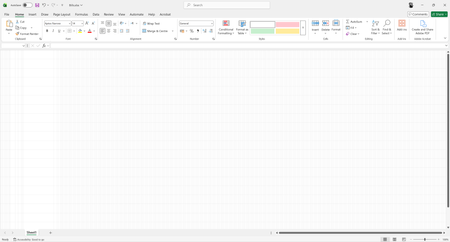
Opened this application today to find this. The view is damaged or corrupted so that there are hundreds or thousands of cells visible in the viewport at 100% view scale. Zooming in does nothing to improve this. Zooming out to 10% then appears to show some of the text very small in the top left of the viewport, until zoomed in again at which point the text disappears once more. What is visible is very clear in the screenshots attached to this post. We have attempted an online repair of microsoft 365. this has done nothing. All existing documents persist in showing this. All new documents persist in showing this. We do not know what windows updates have been done. Nothing has been done by us. We do not know if any changes to drivers has occurred. Nothing has been done by us. We are looking for advice or knowledge from any user/s who have seen this specific issue before.100Views0likes1CommentDelete a print area label on a worksheet
Hi, I would like to delete the print area labels on a worksheet. I find that the labels I used are not descriptive enough. Excel names the first print area as Print_Area. The next area would be labeled Print_Area_1. I would like to delete all of the labels or perhaps selected labels so I can enter a label name such as Print_Area_1_SUN. Would appreciate your help with this. Joe805Views0likes2CommentsUsing the Microsoft Graph PowerShell SDK to Update User Profiles
Now rolling out to Microsoft 365 tenants is the ability to update user profile cards with details of awards and certifications held by users. Usually, HR departments would provide the source data and probably arrange for the data to be ingested into the Graph through a Copilot connector, but it’s possible to add awards and certifications for individual users using Microsoft Graph PowerShell SDK cmdlets. All explained in great detail with working examples here. https://office365itpros.com/2026/05/08/user-profile-card-awards/20Views0likes0Comments
Using average
I keep a golf spread sheet that has all the points of each round. For handicapping purposes, we use the average of the last six scores. Since not every player plays each week, the six scores needed for the average will be different cells. I need a formula that will average the last 6 entries that have a score entered. Each week I will add another column and would like it to update the average of the last six rounds with a score.1.7KViews1like7CommentsMicrosoft Releases Cmdlet to Retrieve Disposition Review Items
The Get-ReviewItems cmdlet (in the Exchange Online management module) is available to export details about disposition review items in either a pending or disposed state. It’s possible that you don’t care very much about records management, retention labels, or disposition processing, but if you do, you’ll be glad that the new cmdlet exists. https://office365itpros.com/2023/04/10/disposition-review-items-export/3.7KViews1like10Comments
Prevent Microsoft 365 meeting invites from automatically appearing in users’ calendars
Hi All, We are trying to prevent Microsoft 365 meeting invites from automatically appearing in users’ calendars as Tentative until the user explicitly accepts the invite. Setting for Outlook Classic, New Outlook and Windows or Outlook Web. Need Microsoft recommendation on this one.56Views1like3CommentsData Loss: automatic safety labels in a file opened from WhatsApp
Hi everyone! I made a huge mistake... I sent myself a word file from WhatsApp, I opened it (without saving it, dumb I know) and started working on that file. I didn't know that Word couldn't save the file due to safety labels, I mean there was no pop up, no Alert, nothing, I just continued pushing the button save and then when I closed the window there was no special alert, no message, so I thought it was all fine... My file disappeared, I couldn't find any .TMP to restore, it wasn't in the driver or somewhere else. I swear it was like writing with invisible ink! Of course I spent this night writing everything again, but I was wondering if there's a way to suggest adding a message to make the user aware of the label. I really don't know why there wasn't any message when I pushed X button even if the file wasn't really saved.40Views0likes1CommentCan't save MS Word files anymore on my Mac
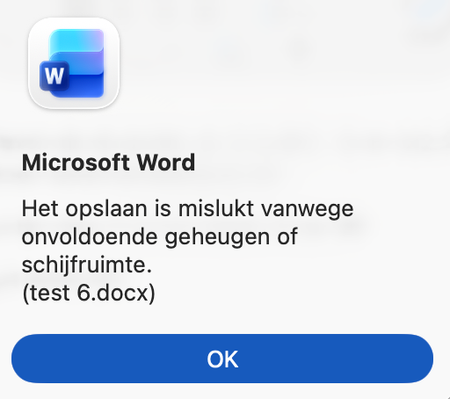
Hi all, I have a macbook air 2020 version with an Intel chip. I'm using OS Sequioa 15.7.4 Microsoft Word version 16.107.1 Since this week I'm having issues with saving Microsoft Word files on my Mac. When I'm trying to save a file I'm getting the following message (translated from Dutch): "saving has failed because of insufficient memory or space on the hard disk" My hard disk is using 133 GB out of 500 GB. So that can't be the issue. I've tried already the following things: Reinstall MacOS (via cmnd R) Reinstall Word Log off out of word, restart, and log on into word. Reset Office 365 on mac via Office-Reset.com Saving the file in another folder / external disk Transfering all my files to a new Mac with OS Tahoe 26.3.1 and start working from there On both Macs I'm investigating deeper what goes wrong and this is what I've noticed so far I can open a new word file, typ in it and save that file. But the moment that I start pasting things from certain (a lot but not all) other files the problems start. I can't undo previous actions anymore I can't save the file I'm working on anymore (USB / Mac / onedrive) These issues occur on both MacOS. These issues occur often when I'm pasting pictures or formulas from those certain word-files. Does anyone has any idea how to fix this? Many thanks in advance. Kind regards, Stephan1.1KViews3likes6CommentsRunning engagement surveys through M365 without buying another tool?
HR asked me if we can run quarterly employee engagement surveys using our existing M365 stack. We have E3 licenses. I tried setting up something with Forms but the analytics are super basic and theres no way to track trends over time or slice by department without a bunch of manual Excel work. Before I go back to HR and tell them we need to buy a dedicated survey tool, has anyone gotten something workable going with just M365?23Views0likes1CommentAn Explosion of Audit Events for Legacy SharePoint Online Authentication
Microsoft phased out the legacy IDCRL authentication mechanism from SharePoint Online on May 1, 2026. Sounds good, until you notice the explosion of IDCRLBlockedDueToSoftEnforcement events created by SharePoint Online in the unified audit log. The events are associated with Microsoft Office apps like Word, which SharePoint appears to think are still using IDCRL. For whatever reason, the audit log is now cluttered with unwanted events generated by the interaction between SharePoint and Office. https://office365itpros.com/2026/05/07/idcrl-audit-events/43Views0likes0CommentsCross Referencing Data in Excel
Hello, I have a spreadsheet that lists document numbers that are stored in a document management system. I have to cross reference the documents in that management system, which means I have to go into each individual document in the management system and add in all the documents where that individual document is referenced. The attached spreadsheet lists all the documents in our system (column B) and each document where they are referenced (columns C-AP). Is there a way to have Excel search columns C-AP, find a specific value, and provide me with a list from column B where that value is found in columns C-AP?846Views0likes10CommentsAdding measures in a data model at a summary level - how ?
I'm probably not going to describe this very well - but here goes 🙂 I am new to data modeling and am trying to convert old files / pivot tables to new table design/data model structures and at the same time develop some new reports for key stakeholders. The attached file has a table (I know its not optimal in terms of structure - but way better than it was). This table (called Hours_New) collects employee time daily. The time is regular, ot or unpaid. It is also chargeable or non-chargeable (as determined by the column in the table titled SC & CD Combo. There are productivity targets (50% for labourers, 75% for other trades). What I want to be able to do is report the productivity % at various levels (Foreman, Trade, Time Period etc etc etc). When I build pivot tables to try and do this I'm not able to get the results presented as I want them - I've taken a couple of stabs at it, but the results are way too busy & I want to be able to highlight when targets are being missed (on both upper and lower ends). I'm sure its not all that tough to do but I'm spinning my wheels - grrr. The attached file has multiple tabs and I've trimmed the dataset down - its actually close to 500,000 rows and removed most of the other pivot tables not related to what I'm trying to do - any help would be most appreciated !!760Views0likes2Comments


Events

in 21 hours
Agent 365--generally available May 1, 2026--is a control plane that empowers IT admins, Security Operations analysts, Identity and Network Security admins, and Data Security & Compliance admins to ob...
Tuesday, May 12, 2026, 09:00 AM PDTOnline
2likes
120Attendees
2Comments
Recent Blogs
- The ability for Copilot to better connect to your content when using a keyboard and screen readers has evolved.May 11, 2026112Views0likes0Comments
- Microsoft continues to power the digital transformation of customers with cutting edge, AI-enhanced productivity and collaboration tools. That's why we're excited to announce new investments to make ...May 11, 202664Views1like0Comments