2016
297 Topics
Word Document Disappeared During Copy/Paste
I experienced an unusual data-loss issue in Windows File Explorer. While copying and pasting a Microsoft Word document within the same folder on my D: drive, the original document suddenly disappeared and was not available in the Recycle Bin. A related Word temporary file (~wrl2248.tmp, 178 KB) was initially visible but subsequently disappeared as well. I restarted the computer, enabled hidden/system files, searched the drive, and checked Word recovery locations without success. I then used Microsoft Windows File Recovery in both Regular and Extensive modes. The document was recovered, but Word reported unreadable content and could not repair or open it. I would appreciate guidance on the cause and any further Microsoft-supported recovery options.258Views0likes3Comments
Access 2608 Build 20326: Line controls disappear in Print Preview
I believe there may be a regression in Microsoft Access Build 16.0.20326.20034 (64-bit) affecting Line controls in reports. I can reproduce the problem even with a completely new blank MDB database, so it does not appear to be related to an existing application. Steps to reproduce: 1.Start Microsoft Access 64-bit Build 16.0.20326.20034. 2.Create a new blank MDB database. 3.Create a new report in Design View. 4.Add a Line control to the Detail section. 5.Add a Rectangle control to the same section. 6.No VBA code or special event handling is required. 7.Select Microsoft Print to PDF as the printer. 8.Open Print Preview. Actual result: The Rectangle control is displayed correctly, but the Line control disappears in Print Preview. The problem is not specific to a particular printer. We have reproduced it with multiple printers. Expected result: Both the Line and Rectangle controls should appear in Print Preview and in the printed output. Workaround: Rolling Microsoft Access back to an earlier build immediately resolves the problem. The same MDB file and the same report then display and print the Line control correctly. We have also reproduced the issue with Build 16.0.20326.20044 (64-bit). Has anyone else been able to reproduce this with Version 2608 / Build 20326?2.4KViews3likes13Comments
Microsoft Word "Save as PDF" - fonts not rendering
Hi all, I have a Word document which uses the Readex Pro family of fonts: https://github.com/ThomasJockin/readexpro I have all fonts installed locally and when I view it in Word, it appears as rendered: the main font used is Readex Pro Deca Light, while headings used Readex Pro Deca SemiBold. However, when I use "Save a Copy > PDF" in Word, everything is rendered as Readex Pro Deca Light. (That happens with the "Bitmap text..." in the options either on or off. If I use Print > Print to PDF, the headings are rendered in the right font. But of course I don't get features that way such as a left-hand navigation pane of headings in the resulting PDF. Does anyone know why Microsoft Word's "Save a Copy > PDF" seems not to use font families correctly? Is there a workaround here?4.9KViews3likes5Comments
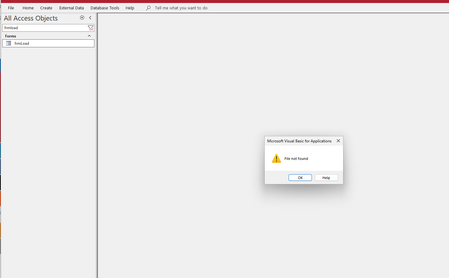
"File not found" error (Error 53) when opening Access database
I'm getting a "File not found" (Error 53) error when trying to open an Access database (.accdb file). The error appears during the database startup process and points to a VBA subroutine declaration line: The error message mentions "The file was not found where specified" which suggests VBA is looking for a file during project compilation, but I can't identify what file it's looking for. Has anyone encountered this issue where the same Access file works with some SQL Server backends but fails to even open with others?405Views0likes2Comments
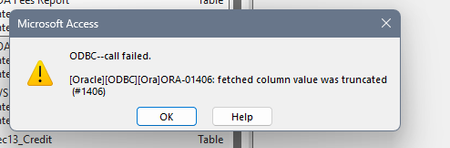
ODBC call failed. ORA-01406
Trying to link to tables on our server which has never been an issue. ODBC connection is fine, using Driver Oracle in OraClient 11g_home 1. Selecting Data Source ODBC Database and selecting Link to the data source by creating a linked table. At this point it asks for a password which is typical, next it would normally bring up the list of tables in the Oracle database to link to. Instead I get the error which states "fetched column value was truncated", once I hit OK to clear the error the usual window appears where I would see all the available tables to link to but no tables are listed, it's blank.386Views0likes3CommentsDatabase in an "inconsistent state" and other errors
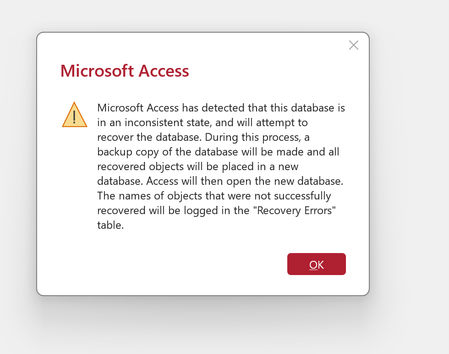
Hello. I was directed here for help by Microsoft Tech Support because the problem is "file specific" and not at the app level. I am not computer savvy and have never used a forum like this. Tech support just kind of dumped me here and said "have at it," so any guidance, help, etc. would be appreciated. I use Microsoft Office 365 as a personal/individual subscriber and my Access program started issuing error message over the past week. The biggest concern and problem is around db called Comic Books and I've attached the error message. When I click OK, it attempts to repair, fails and issues the second message. Another database--an earlier copy of Comic Books from mid December-- opens OK, but has its own problems, such as when I attempt to simply copy a table (see third error message). I don't know if these are related. Can anyone help me? Is there any hope for me ever regaining access to the Comic Books database which was last accessible and working on January 4? Thank you.796Views0likes2CommentsEm Dash short cut not working in Word
I am using Windows 11 Pro on my Lenovo P14 laptop, and Windows 11 on my HP Pavillion x360. I often write in Word and insert Em dashes. CTRL+ALT+"-" (shortcut). Both machines have this setting automatically in Word's built-in shortcuts, however the Lenovo machine ignores the shortcut sequence and inserts nothing (the HP works fine). I have reinstalled the OS and Office Pro 16 MS Word on Lenovo, and nothing helps. Any suggestions?55KViews0likes6Comments
How do I reference query data from an Access Macro
I have a simple Select query that returns a number of records. In my Access macro (just for clarification, I do mean Access Macro and not VBA) I want to check how many records the query returns in an IF statement. In this specific case the check would be on zero returned records, but being able to check non-zero in the future might be useful. I have tried various internet searches but the only results I found relate to VBA. Suggestions on how to do this check would be appreciated. Thank You195Views0likes2Comments
ver2507 bug
I got an Access 2016, it updated itself to version 2507 (build: 19029.20156). Since then I can't use the linked table management interface. I can't refresh linked Excel sheets. The Version 2507 (Build 19029.20136) was still OK, but I can't downgrade my Office 2016. Is there any solution?579Views0likes8Comments