Recent Discussions

VBA events stop working for one user when another user opens the shared workbook
Hi, I’m experiencing a strange issue with VBA in Excel. We use several Excel files as a CRM system, all with VBA (mainly worksheet events). The files are shared so that my employee and I can work on them. Recently, VBA events stopped working only on my computer in some of the files. Important observations: For my employee, everything works normally. Manual macros run correctly on my machine. Worksheet events (like Worksheet_Change) do not fire. Application.EnableEvents returns True. Macro security and Trusted Locations are already configured. The files are almost identical (same structure and VBA code). What makes it even stranger: A file that worked for me yesterday stopped working today immediately after my employee opened it. Since then, the VBA events no longer trigger on my computer in that file, while they still work perfectly for him. So it seems that when another user opens the shared workbook, VBA events stop working only on my machine. Has anyone seen something like this before? Thanks.13Views0likes0Comments
Limited to 200 submissions
The helpdesk has confirmed that I have an m365 family subscription. This would allow me to receive 1000 responses in Forms. However, when I log in to Forms with my details, only 200 answers are accepted. In addition, I get a "buy button" on the screen. In other words, Forms "thinks" that I have a free plan. Who can solve this for me?17Views0likes0CommentsNeed help autofilling.
Good morning all, Thought I posted this but I am not seeing it anywhere so I apologize if this is a repeat. I was tasked with filling in a spreadsheet with data including; Our part number, our description, supplier name, supplier number assigned by us, and supplier part number. I noticed that a lot of the part numbers repeat so I am trying to find a way so that when the column with our part number repeats it will auto fill the columns with the supplier name, supplier number and supplier part number automatically when I enter a repeating part number if possible. I am very much not excel savvy but I am pretty computer literate. I have attached the document I am working on, there is no customer data what so ever and all part numbers are internal so are not proprietary. https://gpcompinc-my.sharepoint.com/:x:/g/personal/zachv_gpcompanies_com/IQCj4grl62sHQYohshZJ9Mb2AX7_MknXYW1QiMk8wv2sdfQ?e=duyOxL6Views0likes0CommentsHow do I get repeating part numbers (data) to auto fill data.
Sorry I am not very Excel savy but I was tasked with filling a spreadsheet with data of our part numbers, their description, the supplier we get them from, our assigned supplier numbers, and our suppliers part number for kits we make in our company, there are over 9000 but I have noticed that there are a lot of repeating part numbers so I was hoping there was a way so that I could have that data auto fill. I can post a link to the document it does not have any proprietary data that I can see. https://gpcompinc-my.sharepoint.com/:x:/g/personal/zachv_gpcompanies_com/IQAYSdPfHYQvRp6TRW4hg_xjAYh_4Jjl2Z_aCXX_64zMf50?e=MKDtrR8Views0likes0CommentsHow to Test a File Against DLP Sensitive Information Types
Sensitive Information types (SITs) are definitions of data like credit card numbers used by DLP rules to detect potential external sharing violations. Knowing what SIT to use in a DLP rule is often difficult, which is why the Purview developers have added a test option to allow tenants to test files against individual SITs or all SITs to see what happens. https://office365itpros.com/2026/03/04/sensitive-information-type-test/17Views0likes0CommentsInvitation to March 9 Frontier Transformation event
Join us for a special event with Jared Spataro, Charles Lamanna, and Sumit Chauhan to learn how Microsoft delivers AI built for work. The live stream starts at 8 AM Pacific Time on March 9. aka.ms/MicrosoftFrontierTransformation2026112Views0likes0CommentsMicrosoft Celebrates SharePoint 25th Anniversary with a Bunch of Announcements
Microsoft celebrated the 25th anniversary of SharePoint with a batch of announcements, including AI in SharePoint, intended to help administrators to manage all aspects of SharePoint Online through natural language. Other interesting announcements included department-level payments for Microsoft 365 Backup and the renaming of the Connections app in Teams as the SharePoint app. Well, the last wasn’t that interesting… https://office365itpros.com/2026/03/03/ai-in-sharepoint/32Views0likes0CommentsSharePoint 2013 Workflow Retirement: What It Means for Your Business
Microsoft has officially entered the final chapter of SharePoint 2013 workflows, and for many organizations, this update is more than just another lifecycle announcement — it’s a wake-up call. The retirement of SharePoint 2013 workflows in SharePoint Online marks a decisive shift away from legacy automation toward modern, cloud-first workflow platforms. For businesses that still rely on approval flows, notifications, and automated processes built years ago, the message is clear: those workflows will stop working, and planning can no longer be postponed. This updated news article explains what the retirement means, what changes technically after the deadline, and — most importantly — how organizations can migrate and modernize their workflows step by step. https://dellenny.com/sharepoint-2013-workflow-retirement-what-it-means-for-your-business/43Views0likes0Comments
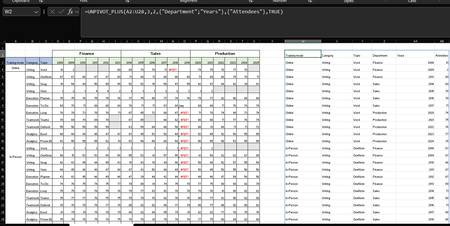
unpivot data and handle merged cells without using Power Query (Unpivot_Toolkit)
Hey, guys!! I’ve been working on a set of functional Excel Lambdas to solve a common headache: transforming "Wide" human-readable data into "Long" database formats without having to open Power Query every time. =UNPIVOT_PLUS(table, [no_of_cols], [no_of_headers], [attribute_names], [value_name], [remove_errors], [remove_blanks],[pad_blanks_with],[pad_errors_with]) Don’t worry about the full list, most use cases only require 5 arguments. I've included a table of default values at the end. Merged Cell Support: Automatically handles fill-down/fill-right logic for merged headers/columns. Bonus Helper: SPLIT_INJECT =SPLIT_INJECT(array, target_indices, delimiter, [ignore_empty], [match_mode], [pad_with]) It targets specific columns, splits them by a delimiter (like TEXTSPLIT), and expands the entire table horizontally while keeping all other columns perfectly stable. Optional arguments match TEXTSPLIT defaults. Feel free to tear this apart or adapt it for your own edge cases. I’d love to hear how you end up using it! You can grab both functions from my GitHub Gist https://gist.github.com/Medohh2120/f8553c149684e39bb499249e39f01017. Argument Description Default Behavior table The array or range of data to unpivot. Required argument (no default) [no_of_cols] Fixed left columns to keep as identifiers. 1 [no_of_headers] Top rows used as headers, handling merged cells. 1 [attribute_names] Header name for the unpivoted attributes . "Attribute" [value_name] Header name for the unpivoted values. "Value" [remove_errors] Excludes grid rows with formula errors. FALSE [remove_blanks] Removes grid empty cells and empty strings. TRUE [pad_blanks_with] Value to substitute for empty cells. Leaves cell blank [pad_errors_with] Value to substitute for errors. Leaves error as-is218Views0likes0Comments
Copy and Paste Will Not Using the Destination Formatting
I am writing a book in Wood and will submit it to Amazon KDP, and I have set up the document per KDP guidelines. I am working on an English version and a Spanish version at the same time as two separate documents. The text is justified. Both documents have Normal/Modify settings set up exactly the same. The Fonts and Paragraph settings are exactly the same. I have gone into the Options/Advanced area of Word and played with all of the Cut, Copy, and Paste settings to try to fix my problem. But I can't figure out what is going on. I created the Spanish document by using Google Translate to take English paragraphs, translate them, and pasted them into the Spanish document The Spanish document is completed, and all of the formatting looks fine. So I already have paragraphs that are a certain size in the document, meaning they take up a certain number of lines. I am now editing the book using the English document. Something has changed with the Spanish document! If I make a small edit in an English paragraph, use Google Translate to deal with the edit and do a new translation, and then copy and paste that edited Spanish paragraph from Google Translate back into the same place as the original paragraph in the Spanish document, the words are slightly more compressed together, so the paragraph gets shorter! This happens if I even change just a single word in a paragraph, which has not really changed the length of the translation. The paragraph will become shorte by a half of a line, or a full line on long paragraphs. This is all becasue the words are being spaced slightly closer toegether now, versus when I originally crated the document. Also, when I start to do the paste, from Paste Option only get the option for "Keep Text Only." I don't get the multi-paste option box. Something has changed in my setup of Word from the time I created the original Spanish document, and what is happening now. I can't figure out why the formatting of the destination, or using merge formatting, is not working! It's making up it's own jutification spacing all of a sudden. I can't figure out why now a cut and pasted paragraph from Google Translate is making the spread between the words just slightly tighter. The latest thing I tried was Review/Language and choosing Spanish for the Spanish document, and that did not work. Any ideas? Gordon28Views0likes0CommentsPlanner’s Newly Redesigned Interface
Microsoft has launched a redesigned user interface for the Planner app. The big news is the inclusion of task chat. Goals are also available, but only to people with a Microsoft 365 Copilot or Planner Premium licenses. Task Chat is a nice feature, and I am sure that it will be popular. UX redesigns often disappoint. At least this one offers new features. https://office365itpros.com/2026/02/27/planner-new-ux/32Views0likes0CommentsExtending Protection for Confidential SharePoint Online Files
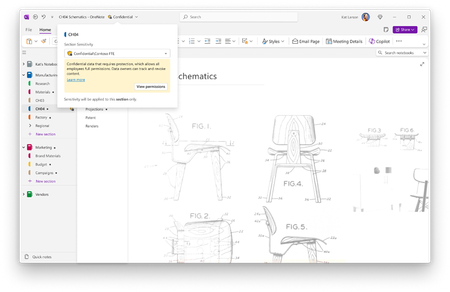
Sensitivity labels offer great protection against unauthorized access, but sometimes files that aren’t encrypted escape from a document library. SharePoint Online can now use sensitivity labels configured with user-defined permissions (UDP) to extend protection to downloaded files. The magic works by configuring permissions on download based on the membership of the user who downloads a file. https://office365itpros.com/2026/02/26/sensitivity-label-extend-protection/27Views0likes0Comments
How to public mobile layout to web
Hi, I have prepared a Power BI dashboard using the mobile layout, and we would like to make this mobile view available on the web. However, I can only see it working in the Power BI mobile app, and I am experiencing difficulties when trying to implement it on a web page. Is there any way to publish the mobile layout on the web? If so, how? Thanks.2Views0likes0CommentsHow to Use Scoped Graph Permissions with SharePoint Lists
This article explains how to use scoped Graph permissions to restrict app access to lists and list items in SharePoint Online and OneDrive for Business sites. It's a follow-up to other articles covering how to restrict app access to SharePoint Online sites and files. Scoping app access to specific objects is important because otherwise apps can access everything in SharePoint Online, and that isn't good. https://office365itpros.com/2026/02/25/scoped-graph-permission-lists/22Views0likes0CommentsMicrosoft Extends DLP Policy for Copilot Protection to All Storage Locations
Microsoft has enhanced the DLP policy for Copilot to cover Office files held in any storage location instead of only Microsoft 365 locations like SharePoint Online and OneDrive for Business. The change is made in the Office augmentation loop, a little-known internal component that coordinates use of connected experiences by apps. Extending the DLP policy to cover all locations makes perfect sense. https://office365itpros.com/2026/02/24/dlp-policy-for-copilot-storage/134Views0likes0Comments
Excel workbooks keep breaking
Hi All, Sorry if this is not the right place to ask, I'm new here. Since a couple of days, my Excel workbooks keep breaking. When opening specific files, Excel states the file needs to be repaired. Everytime certain formulas are being deleted and the values are just pasted as is. I haven't had any issues with these files in the past. Previously I used a license which I bought online via a third party. It seems the issues started after an update. I switched to a license which I bought directly from Microsoft. I did a clean installation, removed all the previous versions files but the issue still exists. For a couple of days I can open the files without problems. And then yesterday excel showed an update was available and excel had to be reopened. After doing so, the issues came up again. I have a Office Home 2024 License, Excel version 16.106.1, on macOS Tahoe 26.2. T.I.A61Views1like0CommentsMicrosoft Takes Aim at ChatGPT
Microsoft would very much like Microsoft 365 tenants to use Copilot instead of ChatGPT. A recent comparison between Copilot and ChatGPT outlines some areas that Microsoft thinks are important when deciding which AI tool to use. Microsoft has a point because Copilot is embedded into Microsoft 365 whereas ChatGPT is more of an add-on. The competition for hearts and minds is very intense in the AI space. https://office365itpros.com/2026/02/20/copilot-and-chatgpt/57Views0likes0CommentsUsing Dev Proxy with the Microsoft Graph PowerShell SDK
Dev Proxy is a Microsoft tool built to help developers figure out the most effective way of using Microsoft Graph API requests. On the surface, Dev Proxy doesn’t seem like a tool that would interest people who use the Microsoft Graph PowerShell SDK to write scripts for Microsoft 365. But all tools have some use, and Dev Proxy can help. https://office365itpros.com/2026/02/19/dev-proxy-graph-sdk/29Views0likes0CommentsHow to Use Scoped Graph Permissions to Access SharePoint Files
Scoped permissions grant apps granular access to files and folders in SharePoint Online and OneDrive for Business sites using the Files.SelectedOperations.Selected Graph permission. The permission allows apps to access specific files or all the files in a folder. It’s a great way to make sure that apps don’t have unfettered access to confidential documents. Not that any app would try to have that kind of access… https://office365itpros.com/2026/02/18/scoped-access-files-and-folders/36Views0likes0Comments





Events

Learn more about the capabilities of Agent 365 in this live 'Ask Microsoft Anything' with product and engineering team experts! Get your questions answered about capabilities for agent observability,...
Wednesday, Mar 18, 2026, 09:00 AM PDTOnline
0likes
14Attendees
0Comments

You’re passionate about what you do, and we’re passionate about empowering your potential. Microsoft 365 Community Conference - is your chance to keep up with AI, build game-changing skills, and take...
Tuesday, Apr 21, 2026, 08:00 AM PDTIn-Person
0likes
3Attendees
0Comments
Recent Blogs
- On Wednesday, March 18, 2026 at 9:00 AM PT, the Agent 365 team will be live on Tech Community with an AMA to answer your questions and share the latest news.Mar 05, 202636Views1like0Comments
- Sensitivity labels are now generally available in OneNote, helping organizations classify and protect sensitive notes.Mar 05, 2026116Views0likes0Comments