Recent Discussions

Newly created folder and files doesn't appear in power query transform data
Hi team Happy Thursday !! I wants to merge all files in a SharePoint folder. However, that newly created file and folder doesn't appear in the Power query. I have tried to clear caches, it still doens't appear there Can anyone please assist to solve this issue ? ThanksSolved50Views0likes4Comments
Add 1 Year to the Second to a Date
Hi! I have a need to add 1 year to the second to a date in Excel. For example: Start: 3/16/2026 4:06:28 PM MST End: 3/16/2027 4:06:28 PM MST I know that EDate can be used to easily add 1 year to the date portion of the datetime value, but that zeros out the time portion of the value. I'm thinking that I could extract the time portion of the starting datetime value, use EDate to add 1 year to the date portion, and then add the time portion back on. My Excel skills are a bit rusty, but I could probably figure that out. That being said, I'm hoping there is an easier way, like maybe a function that I'm not aware of that can handle it easily. I would prefer to do this without needing macros. What's the best way to add 1 year to the second to a datetime value in Excel? Thanks in advance for any help that you can offer! --TomSolved73Views0likes2Comments
Sumif inside Xlookup
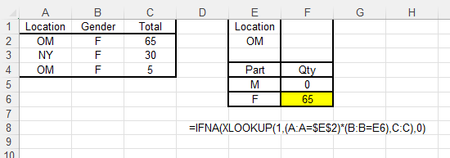
Can someone tell me how to sum within Xlookup please? Correct answer above would have been 65+5=70. I am looking for total qty, if part is "F" and Location is "OM". Main Table has two matches. My current Xlookup formula only selects one record. This Xlookup formulas only works for one unique record. Thank you in advance.Solved157Views0likes7Comments
mac Excel: can't select form Group Box
Hi, I'm using Excel 16.107 on a Mac. I have Developer mode enabled and placed form elements, including group boxes. What I've found is if I delete the text label for a group box, the group box then becomes impossible to select -- there's nothing to click on with my pointer. See attached. Any attempt merely selects the cell, not the group box. How can I select group boxes like this, so that I can delete it or edit its properties?Solved86Views0likes2Comments
Selecting a specific year using the FILTER function
I am trying to use the filter function to get all the records from a table for a specific year. I have a table that has a date column The filter I am trying to use is =FILTER(Venues14,Venues14[Date=K5,"Is not found"). Cell K5 is a dropdown list that has 2026, 2027 and 2028 in it. I am trying to use the dropdown list to extract all the entries in the table using a date I select. It gives me all the dates instead of just the one.Solved99Views0likes4Comments
Creating a pie chart for peoples attendance
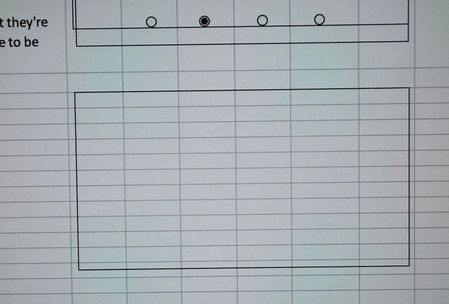
Hi guys I was wondering if I could ask for a bit of help with a excel document I'm trying to create. I created a document that lets me enter sick days, annual leave days, late starts and early finish days along with overtime hours worked and I would like to create a pie chart that represents those days but for the life of me I can't work out how to do it. What I have is 1 overview sheet which shows the total view of the 12 months then I have 12 sheets 1 for each month which lists staff names along with the mentioned days off. The overview sheet takes the totals from the 12 months and lists them in a nice easy to read view. On the right side of the overview sheet I have another page where I have a drop down box to select the staffs name which then fills the boxes containing the mentioned days off coming from the overview page. I also have a number of working days being calculated from July 1 2025 minus listed public holidays and annual leave days we had during the christmas factory shutdown. This is where I would like the pie chart to be in the empty space below here. What I'm aiming for is to have the pie chart dynamically change based on name of the person selected from the drop down box. Ideally I would like the pie chart to represent the number of working days as the whole pie then sick days, annual leave days, late starts and early finishes as a piece of the pie along with the name of each pie section. The overtime hours worked doesn't need to be shown on the graph as thats just reference. Any help would be greatly appreciated. I can upload the document as I created a temp file and changed the names so as not to break privacy rules. I don't see a place to attach the file though unless I have gone completely blind. Thanks so much for your help.Solved111Views0likes3CommentsMax of Fiscal Year in pivot table Value section is not working
There are three data columns in the shared Excel file at the link below. Membership ID formatted as text Num (billing id) formatted as text FiscalYear formatted as numeric The pivot table values for the MAX of FiscalYear in the Value section are all 0. I expected to see the most recent fiscal year for each unique membership id. The FiscalYear data column: has no blank cells has no text cells has no mixed numeric/text cell values The pivot table has been refreshed. Would you please explain why the most recent fiscal year for each membership id is zero? Once I understand what the issue is and resolution, I will expand the pivot table range to reference the entire column for each of the three columns instead of a ranged specified by specific row numbers. The link to the Excel file is: https://docs.google.com/spreadsheets/d/16B3JJ_Zn1848R4THgxYcz1piwju5Zlg7/edit?usp=sharing&ouid=111420556245583625384&rtpof=true&sd=true Thanks in advance for your help!Solved88Views0likes3CommentsMAX of numeric data column in excel pivot table returns 0
There are three data columns in the shared excel file - a Membership ID column formatted as text, a billing number in column Num formatted as text, and a FiscalYear column formatted as numbers. As I want to see the most recent fiscal year in the pivot table for each unique membership id, I added MAX of FiscalYear in the pivot table Value section. In the FiscalYear data column: There are no text entries. There are no blank cells in the column in the pivot table range. The formatting in the Value Field Settings for MAX of Fiscal Year is numeric. I have refreshed the pivot table. Yet I am seeing a zero for each Membership ID rather that the most recent fiscal year. Would you please explain why the Max of FiscalYear is not working correctly, and once I understand how to correct the problem, will the correction also work when I expand the pivot table range to reference the entire FiscalYear column rather than the column cell values in the first 29 rows? There will be blanks in the unpopulated FiscalYear column cells as the remaining rows will be blank for all three data columns until more rows are added over time. Link to the Excel file on OneDrive https://docs.google.com/spreadsheets/d/16B3JJ_Zn1848R4THgxYcz1piwju5Zlg7/edit?usp=sharing&ouid=111420556245583625384&rtpof=true&sd=true Thanks in advance for your help?Solved100Views0likes3Comments
Calculating and adding time
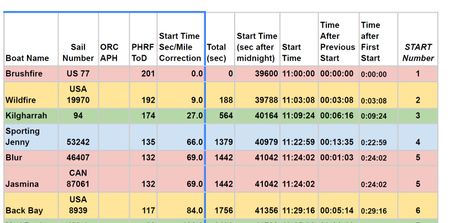
I am trying to figure out how to automatically calculate time differences for a delayed racing start time. I have: a rating which provides a handicap correction factor: PHRF Tod A Sec/ Mile correction number A Total correction in Seconds (based on a distance) This I figured out. I have a set start time for the first entry at 11:00:00 I need to figure out the Start time for the delayed boats as shown in the diagram, but I don't know what formulas will do this. This diagram is taken from a pdf document.Solved110Views0likes4CommentsOutlook "Classic" issues
Without any changes being made to my system, I am suddenly getting the following error message when trying to send/receive mail. Task 'email address removed for privacy reasons: Folder:Inbox Check for new mail.' reported error (0x800CCC0E) : 'Outlook cannot download folder Inbox from the IMAP email server for account email address removed for privacy reasons. Error: Cannot connect to the server. If you continue to receive this message, contact your server administrator or Internet service provider (ISP).' I have followed all of the suggested solutions that I could find including editing the registry but nothing is working. Hope someone can help as thjis is a big problem for me.Solved54Views0likes2Comments
Technical Question: Is a Range argument passed to SUM as a Reference or an Evaluated Array?
Hi everyone, I have a technical question regarding the internal mechanics of the SUM function's arguments in Excel. Specifically, I’ve noticed that in the ODF (OpenFormula) specification, the argument is defined as a NumberSequenceList. However, I am unsure how Excel’s internal engine implements this. When a formula is written as =SUM(A1:B5), what exactly is passed to the function? I am trying to understand which of the following conceptual models is correct: Reference Passing: A Reference to the range A1:B5 is passed, and the SUM function iterates through the cells internally. Pre-evaluation: The range A1:B5 is Evaluated into a sequence (or array) of numbers before it is passed as an argument to the SUM function. I am authoring a technical manual and want to ensure I describe the relationship between cell references and function arguments accurately. Does Excel follow a similar abstraction to the ODF NumberSequenceList, or is there a different internal logic? Thank you in advance for your insights!Solved83Views0likes2Comments
Data Formatting
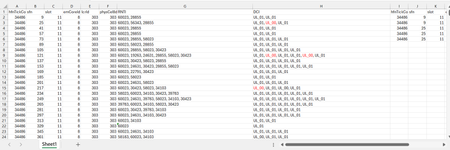
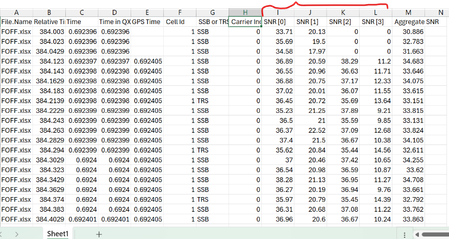
Dear Experts, I have a Data like below :- Each row can have 1 or more RNTIs( seperated by ",") and their DCI( UL_01 or UL_00), I want to put them in a format like in Col - I~P gave examples for the 1st two entries. Attached worksheet. Thanks & Regards Anupam ShrivastavaSolved196Views0likes5CommentsCorrelation Study with Filters
Dear Experts , I have a data like below( Attached worksheet) And want study the correlation between SNR[0~3], there will be 6 combinations as below:- I want make like this but with Filters/Slices for the "File.Name" & "SSB or TRS" & "Carrier Index", different colors for different Carrier Index(0 &1) Thanks & Regards Anupam ShrivastavaSolved148Views0likes2Comments
Why is my create file from OneDrive for Business node isn't working?
I have a power automate cloud flow that, in some point, gets a word .docx from my sharepoint site, then it creates the same document in onedrive so that I can convert it to PDF then returns it to sharepoint. This idea came from the necessity of converting a .docx to .pdf without the need of premium conectors. I have 2 scenarios: 1° Scenario: Flow: I get the data from the word that I need > I create the same file on OneDrive > I convert the file to .pdf > then I create the file on Sharepoint. Problem: When I run my flow, it gets a 404 error: "message": "File Not Found\r\nclientRequestId: y-f695-48b1-9556-xc\r\nserviceRequestId: x-e051-b000-efc3-y" Error image: 2° Scenario: Flow: The same as the above, the only thing I did after research, is that the node that I get content from file from my sharepoint site also returns the "$content-type", so I specified that for the create file from OneDrive I'll only want the "$content" attribute. In resume, it creates the file in onedrive but I can't open it, it appears to be corrupted, at first I thought my sharepoint file was also broken, but then I could open it with no errors as on OneDrive. Problem: When I run my flow, it gets the error that it can't convert that kind of file (as I wrote above, the file creates corrupted), the main problem is understanding why it gets corrupted, it even returs the content-type that I'm not passing anymore. Error image: Message: "message": "Error from microservice: {\"status\":406,\"message\":\"Não há suporte para a conversão desse arquivo para PDF. (cannotOpenFile / Error from Office Service. Url=https://wordcs.officeapps.live.com/document/export/pdf HttpCode=BadRequest)\",\"source\":\"api.connectorp.svc.ms\"}\r\nclientRequestId: y-13f3-4e1a-a77a-x\r\nserviceRequestId: y-a09f-b000-f272-x" NB: This flow actually worked for more than 1 year with no problems like that, the last time it ran without errors was last week (6-7 days from today).Solved132Views0likes2Commentsline spacing
I'm creating a word doc (w/the help of ChatGPT). I copied and pasted from GPT into a Word doc, but I can't duplicate the spacing from one line to another. When I put the cursor behind a line and hit enter, the next line doesn't match up. Industries We Serve ✔ Medical & Clinical Laboratories ✔ Pharmaceutical & Biotech Facilities ✔ Research Laboratories ✔ Dialysis Centers ✔ Electronics Manufacturing ✔ Industrial Processing Facilities This is what happens when I put the cursor behind Laboratories. The spacing is way bigger and has no checkmark. What gives? ✔ Medical & Clinical Laboratories ✔ Pharmaceutical & Biotech Facilities ✔ Research Laboratories ✔ Dialysis Centers ✔ Electronics Manufacturing ✔ Industrial Processing FacilitiesSolved93Views0likes3CommentsLooking for help with a single Dynamic Formula Ranking Points by player and dropping lowest score
Name Finishes Andrew 1,1,2,3,7,8 Randy 2,4,5,5,8,9 Chris 1,1,2,3,7,8 Bill 1,4,6,6,7,9 Jeff 2,3,5,7,8,8 Reed 4,4,6,7,7,9 Doc 3,5,5,6,7,9 Steve 1,3,5,6,8,9 Paul 2,2,3,3,4,9 Points (1st, 2nd, etc) 165 105 75 50 35 25 20 15 10 Expected answer with lowest point dropped Name Points Chris 530 Andrew 510 Paul 410 Steve 315 Bill 285 Jeff 250 Randy 240 Doc 190 Reed 165Solved356Views0likes18CommentsUser input fields in power query
I have a power query table of employees from an employees worksheet in the current workbook. First Name Last Name Address Etc. Which I feed into Power Query. I want to generate other tables in the workbook using the first and last names from the above table as a starting point, but adding user input fields. I was able to do this initially by having power query generate the first two columns, and put another table next to it with the user input fields to "fake it" and combine everything in a subsequent query. I was wondering if there was a more elegant way of creating a new Excel table (and probably a new sheet to put it on) by using the two columns from the sheet I already have, plus any additional columns I need for users to fill in. Either using standard Excel or power query, if I can stop power query from zapping the user input fields on a refresh. Note: I don't know how to have Power Query add a column without assigning it an initial value like null. That is why my user input fields are getting zapped building the entire thing in Power Query at the start.Solved134Views0likes3CommentsMS Word is throwing up 'Error 4608' I haven't a clue what to do.
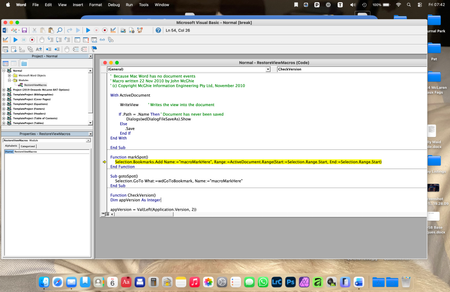
Hello, I wonder if anyone can help me here, because I am at a TOTAL los... I have a Word document that I have been updating for a few years, which is a sort of log. It has worked well up until today. Now, whenever I try to save the updated document, a very old fashioned (looks like Windows 3.1!), error message window appears which is headed 'Visual Basic for Applications' and in the window it says: Run-time error: '4608': Undefined dialogue record field There are then four buttons at the bottom labelled Help, Continue (which is greyed out), End and Debug. I have no idea what this error message means. Clicking on End gets rid of the error message, but prevents me from saving my updated document, and the next time I try to save it the error message just reappears. Clicking on Help takes me to a website with the title 'No F1 help match was found', followed by a load of technical computer-geek stuff I don't understand. Clicking on Debug seems to open a new window, but I do not know what it is... Here is a screen-shot of it: The highlighted text seems to refer to Bookmarks, which is throws me because I only associate Bookmarks with my web browser, not MS Word. I'm sure I haven't added any bookmarks to my document in any case. Can anyone enlighten me as to what is going on here please? ThanksSolved145Views0likes6Commentsequation or function?
+0.3°c -0.1°c +0.4°c Looking for either an equation or function for this, in order to simply enter column A & B and have answer autofill. The number in column A is the constant number that I want column B to be ie: what must happen to column B to equal column A, as you can see in column C you add 0.4 so that column B equals +0.3. As seen below there is variation from positive and negative numbers in both columns therefore at any given time it will be adding or subtracting?? +0.2°c -0.2°c +0.4°c +0.3°c -0.3°c +0.6°c 0.0°c -0.1°c +0.1°c -0.1°c +0.3°c -0.4°c -0.2°c 0.0°c -0.2°c -0.1°c +0.2°c -0.3°c anyone help me out, could save some considerable productivity time?Solved121Views0likes4Comments

Events

REGISTER HERE
As content continues to grow, organizations need better ways to manage inactive data without sacrificing security, compliance, or discoverability.
Join us for an overview of how M...
Tuesday, Apr 07, 2026, 10:00 AM PDTOnline
0likes
2Attendees
0Comments

You’re passionate about what you do, and we’re passionate about empowering your potential. Microsoft 365 Community Conference - is your chance to keep up with AI, build game-changing skills, and take...
Tuesday, Apr 21, 2026, 08:00 AM PDTIn-Person
0likes
6Attendees
0Comments
Recent Blogs
- 3 MIN READAs SharePoint turns 25, we’re taking a moment to look back at how far it’s come.Mar 27, 2026186Views0likes0Comments
- Change is the only constant, but adapting to change isn't always easy. If we consider the celestial speed at which technology is evolving, keeping up with every trending tool can be daunting. An ecos...Mar 26, 2026183Views0likes0Comments