Recent Discussions

Cannot verify email
I have put in a request for quota to deploy an OpenAI model. I was then sent a link to verify my email address - I've signed out everywhere, tried incognito windows in multiple browsers, copied the link out of the email and pasted it into a browser etc. but when I click the link to verify I always get: The request is blocked. Any ideas?!7Views0likes1Comment
Microsoft's six Responsible AI pillars: how do you operationalize them in practice?
Deploying AI without a trust criterion isn't innovation. It's risk taken on without awareness. Microsoft organizes this problem into six pillars: reliability and safety, privacy and security, inclusiveness, transparency, accountability, and fairness. It's not a marketing list. It's a governance structure applicable to any AI adoption decision. The pillar that generates the most debate in practice, at least in the conversations I've had, is transparency. Systems that can't explain why they reached a given output create a real accountability problem: who signs off on the decision, the model or the manager? Accountability doesn't transfer to the tool. It stays with whoever decided to use it. Fairness also tends to be underestimated. Models trained on historical data carry the biases in that data. If the historical record was biased, the model replicates it at scale. Speed amplifies the problem, it doesn't fix it. Privacy and security are about where the data goes, who accesses it, what gets retained. Questions that need answers before deployment, not after an incident. The framework doesn't guarantee an outcome. It creates the right questions before any adoption decision. I'd like to hear how this plays out in practice for you all: which of these six pillars tends to be the hardest to operationalize on your team? And how are you documenting that decision process today?34Views1like2Comments
One agent, three runtimes: porting a CSA agent to Microsoft Scout and Foundry Local
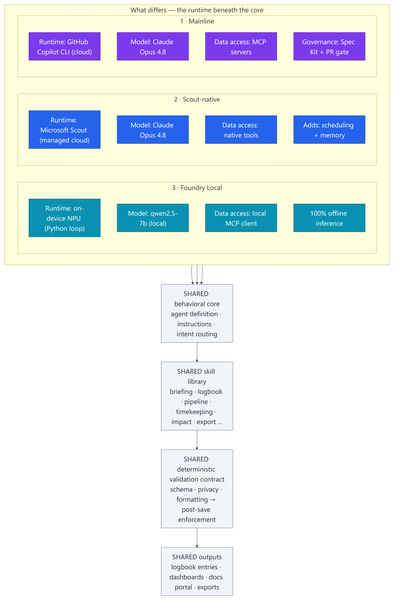
Most of my posts here are about Azure infrastructure lessons from customer engagements. This one is a little different — it's a real‑world engineering lesson from something I built to run my own practice. In my role as a Senior Cloud Solution Architect (CSA), I'm part of a grass-roots organic development team for an internal persona‑driven productivity agent called CSA‑Sherpa. It runs my daily rhythm: a morning briefing, a running logbook of wins and blockers, pipeline and timekeeping summaries, and reporting/exports. It started life in the GitHub Copilot CLI. But over the last few months two things changed the ground under it: Microsoft Scout arrived as a managed cloud agent with native tooling, scheduling, and memory; and Foundry Local made it realistic to run a capable model entirely on‑device on a Copilot+ PC's NPU — no cloud round‑trip at all. That raised a question I think a lot of people building agents will eventually ask: If I designed the framework well, can I change how the model runs without rewriting the agent? To find out, I stood the same agent up in three runtimes, then wrote a whitepaper and a comparison deck measuring what actually changed. This post explains: How one shared, deterministic core made three very different runtimes comparable What the three ports — Copilot CLI, Scout‑native, and Foundry Local (on‑device NPU) — actually took What the analysis showed, and a simple decision framework for which runtime to use when The part that stayed the same: a deterministic core The whole exercise only works because all three implementations load the same behavioral core: Agent definition — persona, behavioral rules, intent routing, workflow dispatch Instructions — conventions, session bootstrap, change‑management rules Skill library — one procedure file per workflow (morning briefing, logbook, pipeline, timekeeping, impact, ops, export…) A deterministic validation contract — schema, formatting, and privacy validators plus a post‑save enforcement chain That last point is the whole thesis: reliability belongs in code, not in the prompt. Rather than asking the model to "remember" to validate its output, a real gate (a validation step → a post‑save enforcement chain → index regeneration) enforces it every single run. This wasn't my idea in a vacuum — it follows the enterprise prompt‑engineering principles Kathiravan Thangavelu lays out in his article Prompt Engineering for Enterprise AI: Why Reliability Matters: keep deterministic logic in code, prefer schema‑driven / structured output over prompt‑enforced formatting, and replace "before you answer, verify that…" mental checklists with real machine validation. My validation gate is that principle in practice. And because that contract is identical across all three runtimes, I'm comparing three ways to execute one product — not three different products. The deterministic payoff: faster and cheaper Retrofitting those principles into the agent — moving work out of the model and into deterministic scripts — is the single change that paid off the most, on two axes at once: Faster. Letting code (not the model) gather and aggregate history cut the average model round‑trips per workflow from ~8.7 to ~5.5 — roughly a third fewer turns. Fewer turns means less waiting on generation and less back‑and‑forth to finish a task. Cheaper. The same change cut usage‑based cost ~24% — and, more importantly, held it flat as the logbook grew to hundreds of entries, because scripts carry the history the model used to re‑read every run. That's the quiet lesson: the reliability work I did for correctness turned out to be the same work that made the agent quicker and less expensive. Determinism isn't a tax on speed — here it bought all three. The work: three repositories, three runtimes Everything below the core — runtime, data access, governance, file layout — is where the effort went. 1 · Mainline — Copilot CLI + MCP. The upstream, most feature‑complete build. Runs as a primary agent in the GitHub Copilot CLI on Claude Opus 4.8; data services are discovered through MCP. It carries the heaviest governance: a Spec Kit layer (spec‑driven‑development agents, a constitution + templates, and 50+ per‑feature spec artifacts gated at PR time) plus an add‑on framework. The richest architecture — and the most complex to operate. 2 · Scout‑native. A thin wrapper loads the exact same core onto Microsoft Scout — again on Claude Opus 4.8 — but data access is re‑platformed onto Scout's native tooling instead of MCP subprocesses. No broker to configure; native tools negotiate their own auth. It adds two things the CLI can't do as cleanly: ✅ Scheduled automations — my morning briefing fires automatically on weekday mornings ✅ Cross‑session memory in place of hand‑off files The deterministic finalize gate stays fully intact. 3 · Foundry Local — on‑device NPU. The genuine outlier and the most involved port: a Python re‑implementation that runs the model — qwen2.5‑7b, an open ~7‑billion‑parameter model — 100% locally on the device's NPU (a Snapdragon X Elite Copilot+ PC) via Foundry Local's OpenAI‑compatible server. The agent loop, an MCP client, skill loading, and a distinct finalize pipeline all had to be rebuilt outside the CLI. The model never leaves the machine; only data connectors reach out when connected. The trade‑offs are real — modest throughput and a fixed context window — but so is the payoff: offline, private, near‑zero marginal cost. The effort This wasn't a weekend spike. Across the three code bases (plus a clean isolation clone I kept as an A/B baseline): ~340–380 commits per repository, three versions maintained in parallel 17 skills in each cloud build; 18 in the Foundry port ~37 scripts in the streamlined Scout build, up to ~97 in the governed Mainline build A Spec Kit governance layer with 50+ feature specs on Mainline A four‑part cost study and two written deliverables: an architecture whitepaper and a 20‑slide comparison deck The analysis and reporting The whitepaper and deck do two jobs. First, they document each runtime as a layered diagram — runtime, core, skills, scripting/validation, external services — so the differences are visible at a glance. Second, they convert the architecture fork into economics: a study that measured the actual token footprints of each repo and priced runs across billing models and hardware. The four dimensions: per‑skill cost, optimized‑vs‑out‑of‑the‑box, Copilot CLI vs Scout, and cloud vs local NPU. By the numbers The study priced measured token footprints at frontier‑model rates (treat the dollars as ±30% — the relative conclusions are far more robust than the absolute figures): Per skill: roughly $0.6–$1.4 per run usage‑based — or a single flat "premium request" under request‑based billing The determinism dividend: optimized, script‑driven skills cut model round‑trips ~8.7 → ~5.5 and usage‑based cost ~24% — and held cost flat as the logbook grew Scout vs CLI: Scout ran ~37% cheaper across a five‑command session and consumed none of the premium‑request allowance Cloud vs local: on‑device NPU inference came in 50–3,400× cheaper in cash than cloud — at the cost of throughput, context, and first‑pass reliability A full active day (~4 runs) landed around a few dollars usage‑based The headline isn't any single figure — it's the shape: cloud cents buy first‑pass reliability, on‑device near‑zero cost trades your time, and determinism makes either one cheaper and steadier. What held up The core is portable. The same agent, skills, and validation gate ran under all three runtimes. Good separation of concerns paid off. Determinism pays three ways — faster, cheaper, and more reliable (detailed above). It was the highest‑leverage change I made. Managed cloud wins the day job. Scout is the best daily driver: reliability gate intact, lower setup friction, scheduling + memory, and cheaper across a multi‑command session because it caches the bootstrap. On‑device is strategic — but reliability is the tax. Local NPU inference is dramatically cheaper in cash. We ran an in‑depth test pass across every function and closed the gaps it surfaced — yet the smaller model that makes Foundry Local possible still hallucinates and drops instructions often enough on the first pass to matter. Each re‑run is nearly free in dollars, but it costs real time to catch and correct. The winning pattern is hybrid. Draft and triage locally for ~nothing; escalate the correctness‑critical steps to cloud Opus 4.8, paying only where it buys first‑pass reliability. Three runtimes, side by side Figure: Three runtimes, one shared core. Only the top rows — runtime, model, data access, and governance — differ; the behavioral core, skill library, validation gate, and outputs are identical across all three. Capability Mainline (Copilot CLI) Scout‑native Foundry Local (NPU) Runtime Copilot CLI (cloud) Scout (cloud, managed) On‑device NPU Model Claude Opus 4.8 Claude Opus 4.8 qwen2.5‑7b (open, ~7B) Data access MCP Native tools MCP via local client Governance Spec Kit + PR gate Behavioral rules Behavioral rules Scheduling + memory ❌ ✅ ❌ Runs fully offline ❌ ❌ ✅ Marginal cost / run cloud per‑token cloud per‑token (cheaper/session) ≈ free Best for Framework development Daily production Offline / privacy / bulk When to use each Daily CSA workflows → Scout‑native. Managed, cheaper across a session, reliable, and it doesn't burn your Copilot request allowance. Building or versioning the framework → Mainline. Spec Kit governance and the add‑on system earn their keep here. Offline, air‑gapped, or sensitive data → Foundry Local. 100% on‑device inference. Bulk / high‑volume / non‑critical → Foundry Local. Zero marginal cost. Must be right on the first pass → Cloud Opus 4.8. The cents are worth it. Mixed, cost‑sensitive workload → Hybrid. Local draft → cloud escalate. Closing Thoughts The most useful reframe from this work: the three architectures aren't competitors — they're a portfolio. A managed cloud daily‑driver (Scout), a governed development platform (Mainline), and a sovereign on‑device runtime (Foundry Local). The job is to match the runtime to the task, not to crown one winner. And the same lesson that applies to Azure infrastructure applies to agents: build reliability into the system, not into good intentions. Because CSA‑Sherpa keeps its guarantees in code, I could change the entire execution model underneath it — cloud CLI, managed cloud, on‑device NPU — and the agent still behaved the same way. That portability is the dividend of a deterministic design. These workflows are genuinely complex, and that's exactly where the small model shows its limits: even after closing the gaps our testing surfaced, it still hallucinates and drops instructions often enough on the first pass to be a real cost. That's the honest trade‑off — near‑zero dollars, paid back in review‑and‑retry time — and it's why my recommendation lands on hybrid: let the small model draft where it's cheap and low‑risk, and escalate anything that has to be right the first time to cloud Opus 4.8. I use the agent in Microsoft Scout daily, as part of my personal production process. I did use AI to help draft and format this post — fittingly, the very agent it describes. The architecture, the analysis, and the conclusions are my own. Thanks for reading.
Microsoft Foundry External MCP Server Traffic Routing via Corporate Firewall
The customer would like to confirm whether traffic from an Azure AI Foundry agent to an external MCP server can be routed through a corporate firewall and whether this scenario is officially supported. To validate this scenario, I configured the following in my lab: Deployed an Azure AI Foundry resource using the Standard Agent Service with network injection. Created a dedicated subnet for the Foundry Agent Service and delegated it to Microsoft.App/environments. Associated a route table with the Foundry Agent subnet to route outbound traffic through Azure Firewall. Configured the required application and network rules on Azure Firewall. The Foundry agent is able to successfully retrieve data from the external MCP server. However, no corresponding traffic is visible in the Azure Firewall logs. Could you please confirm whether outbound traffic from the Foundry agent to an external MCP server can be routed through Azure Firewall or a corporate firewall? Also, is this routing scenario officially supported? Appreciate your support!39Views0likes1Comment
Hosted Agent ZIP deployment fails because adduser is missing for fuse-zip
Hi, I am encountering a reproducible issue with a Microsoft Foundry Hosted Agent deployed through the Source Code ZIP deployment path. Environment: - Region: West Europe - Runtime: dotnet_10 - Target framework: net10.0 - Publish runtime: linux-x64 - Dependency resolution: bundled - Protocol: Responses 2.0.0 - API version: 2025-11-15-preview The agent version reaches the "active" status. However, the first invocation fails with: session_not_ready The relevant session logs are: Selecting previously unselected package fuse. Unpacking fuse (2.9.9-5ubuntu3) ... Selecting previously unselected package fuse-zip. Unpacking fuse-zip (0.6.0-0ubuntu3) ... dpkg: dependency problems prevent configuration of fuse: fuse depends on adduser; however: Package adduser is not installed. dpkg: error processing package fuse (--install): dependency problems - leaving unconfigured dpkg: dependency problems prevent configuration of fuse-zip: fuse-zip depends on fuse; however: Package fuse is not configured yet. dpkg: error processing package fuse-zip (--install): dependency problems - leaving unconfigured Errors were encountered while processing: fuse fuse-zip Successfully connected to container No .NET application startup logs appear after this. The application entry point does not appear to be executed, and /readiness never becomes healthy. I have already verified: A clean linux-x64 publish is used. The entry DLL is located directly at the ZIP root. The ZIP contains no nested bin, obj, or artifacts directories. All dependencies are bundled. appsettings.json, .deps.json, and .runtimeconfig.json are present. The exact published application starts successfully locally. The local /readiness endpoint returns HTTP 200. The issue is reproducible with newly deployed agent versions and new sessions. The current Foundry hosting packages and Responses Protocol 2.0 are used. The same Source Code ZIP deployment path worked successfully approximately two weeks ago. Is this a known regression in the managed source-code runtime in West Europe? Is there a workaround other than switching to the container-based deployment path? Session and request IDs can be provided privately to the Microsoft product team if required.58Views0likes1Comment
Getting Started with AI Applications and Agents on Azure
Hello everyone 👋 After exploring Microsoft Fabric and Microsoft Copilot, I wanted to explore another important area of Microsoft's AI ecosystem: building AI applications and agents on Azure. For anyone interested in AI, Data Science, or software development, this Microsoft Learn path provides a beginner-friendly introduction to several important AI workloads. You can explore topics such as: 🤖 Generative AI and AI agents 📝 Text analysis 🎙️ Speech 👁️ Computer vision 📄 Information extraction 📘 Learning path: https://learn.microsoft.com/training/paths/get-started-ai-apps-agents/?wt.mc_id=studentamb_547403 This is a useful starting point for students and developers who want to understand how AI workloads can be built and explored on Microsoft Azure. I think learning the fundamentals of different AI workloads is valuable before moving into more advanced AI application development. Which area of AI are you most interested in learning: Generative AI, AI Agents, Computer Vision, NLP, or Speech? #AzureAI #ArtificialIntelligence #GenerativeAI #AIAgents #MicrosoftLearn30Views0likes1Comment
Multiple Fabric Data Agent Tools on a Single Foundry Agent
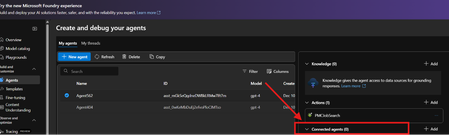
a { text-decoration: none; color: #464feb; } tr th, tr td { border: 1px solid #e6e6e6; } tr th { background-color: #f5f5f5; } We are evaluating the Microsoft Fabric Data Agent integration with Azure AI Foundry Agents and are looking for clarification on the supported architecture. Scenario We would like to create a single Foundry Agent as the orchestrator and attach multiple Microsoft Fabric Data Agents as tools. Each Fabric Data Agent is registered as a separate Foundry tool representing a specific business domain. Executive Assistant Agent (Orchestrator) ├─ Too: Sales Fabric Data Agent ├─ Tool: Finance Fabric Data Agent └─ Tool: HR Fabric Data Agent The expectation is that the Foundry Agent would automatically select the appropriate Fabric Data Agent tool based on the user's request. Examples: "What was our Q2 revenue?" → Sales Fabric Data Agent tool "What is current headcount?" → HR Fabric Data Agent tool "Show budget variance by region." → Finance Fabric Data Agent tool Is it a supported scenario to attach multiple Microsoft Fabric Data Agent tools to a single Foundry Agent? We are unable to find documentation that explicitly states whether: Multiple Fabric Data Agent tools can be attached to the same Foundry Agent. Multiple Fabric tools are supported within a single agent configuration. The error Duplicate tool argument name: 'azure_fabric' indicates a configuration issue, SDK limitation, or unsupported architecture44Views0likes2Comments
Data Visualisation / Charting in Azure Foundry
Hi Foundry community, We are working on an agent that can query internal data sources, and are looking for ways that we can visualise data (think pie charts, bar charts, etc.). This would be consumed by end users through Copilot/Teams. However we are unable to find a way to do so, which is surprising given that you easily can create charts through M365 Copilot Chat and through Copilot Studio. We have tried using the 'Code Interpreter' tool, but the Teams/Copilot client UIs just do not render the results inline, either interactive or as an embedded image. They also do not give any option to download them. Has anyone tackled this before? How have you been able generate charts? Many thanks!65Views0likes2Comments
Roadmap for additional languages in MAI-voice-2 TTS?
Hi, I’ve been following the release of MAI-voice-2, and the capabilities of this new TTS model are very impressive. From what I understand, it currently supports around 15 languages. Is there an official roadmap or timeline for adding support for more languages? Also, is there any indication of when MAI-voice-2 is expected to move out of preview and become generally available? Thanks!71Views0likes1CommentDate extraction regression: 2025-05-01-preview vs 2025-11-01 (GA) in Azure Content Understanding
Issue: When using the documentFieldExtraction scenario in Azure Content Understanding, the GA version (2025-11-01) produces significantly worse results compared to the preview version (2025-05-01-preview) for date field extraction on scanned (Dutch) medical documents. Observed behavior: With 2025-05-01-preview: all date fields are extracted correctly, including dates that are split across three separate handwritten fields (day, month, year). With 2025-11-01 (GA): multiple date fields are either not found, returned as null, or extracted with day and year swapped (e.g. 2027-12-01 instead of 2001-12-27). Document characteristics: Scanned PDF (not native digital) Dutch language 4-16 pages Dates are handwritten and split across three separate labeled fields: dag (day), maand (month), jaar (year) Year is written as 2 digits (e.g. "26" for 2026, "01" for 2001) Schema used: documentFieldExtraction with type: date fields and explicit descriptions instructing the model to read day → month → year in order and expand 2-digit years to 4 digits. Expected behavior: The GA version should perform at least on par with the preview version when using the exact same prompts. Is this a known regression? Any recommended workarounds while waiting for a fix?48Views0likes1CommentUnable to Connect Localhost MCP Server from Azure AI Foundry Hosted Agent (o4-mini)
I'm using the Azure AI Foundry Toolkit in VS Code and have configured an MCP server running on my local machine (localhost). When I run my Azure AI Foundry-hosted agent (o4-mini), it fails to connect to the MCP server. Based on the error logs, it appears that the hosted agent cannot reach the localhost endpoint. My understanding is that the MCP server is running correctly locally, but the hosted agent seems unable to access services running on my machine. Has anyone successfully connected a locally hosted MCP server to an Azure AI Foundry-hosted agent while using the Foundry Toolkit in VS Code?88Views0likes1CommentAzure AI Foundry Agent Unable to Use Credentials Stored in Key Vault Through Playwright MCP Tool
Hello everyone, I am trying to understand how Azure AI Foundry agents interact with Azure Key Vault when using custom MCP tools, and I would appreciate any guidance from the community. My Setup - Created an Azure AI Foundry agent. - Created an Azure Key Vault and configured all permissions according to Microsoft's official documentation. - Stored the required website credentials (username and password) in the Key Vault. - Deployed the official Playwright MCP Docker image. - Exposed the MCP server using ngrok and verified that the endpoint is accessible. - Connected the MCP endpoint as a Custom MCP Tool in Azure AI Foundry. - Performed all configuration through the Azure portal, Foundry UI, and Playground only (no SDK or custom application code involved). The Issue The agent can access and use the Playwright MCP tool. However, when I ask it to log in to a website using credentials that are already stored in Key Vault, it does not populate the username and password fields. My expectation was that the agent would be able to retrieve the secrets from Key Vault and provide them to the Playwright tool during execution. Questions Is there currently a supported mechanism for Azure AI Foundry agents to automatically retrieve Key Vault secrets and pass them to a Custom MCP tool? Does the Playwright MCP Docker image have any built-in integration with Azure Key Vault? When using only the Foundry UI (without SDK code), can a Foundry agent securely inject Key Vault secrets into MCP tool calls? Are additional configurations required beyond Key Vault permissions and agent connections? Has anyone successfully implemented a similar setup where a Foundry agent uses credentials stored in Key Vault to perform browser automation through Playwright MCP? Any clarification on the expected architecture and whether this scenario is currently supported in Azure AI Foundry would be greatly appreciated. Thank you.164Views0likes3CommentsAPIM within Foundry
Dear Azure AI Foundry team at Microsoft, Please reconsider the current architecture and developer experience around AI observability and token analytics. As it stands today, customers are expected to assemble an entire distributed system — APIM, Azure Functions, Static Web Apps, App Insights, Log Analytics, custom SSE parsing, and additional infrastructure — just to answer very basic operational questions: Which users are consuming the most tokens? Which models are being used the most? What are our real-time streaming costs? Which subscriptions/projects are generating spend? Even worse, many of these solutions break down when using streamed/SSE AI responses because APIM policies are not designed to reliably process chunked AI streams and partial JSON bodies. So customers end up building increasingly complicated middleware pipelines for functionality that should already exist natively inside the platform. At the same time: Azure clearly has access to token and billing telemetry internally customers are still billed for usage yet customers themselves are not given equivalent real-time visibility or tooling That creates a frustrating disconnect, making it feel like a money grab when. It's like paying for groceries and not allowing customers to receive a receipt. Another major issue is API key management. Providing effectively a single project-level credential for enterprise AI workloads creates operational and governance limitations that make multi-user auditing unnecessarily difficult. Why in the world, would the foundry team design this with only api key per project? Is there a secret reason for this, other than annoying customers? To be blunt: the current system design feels massively overengineered for customers while simultaneously underdelivering on the core metrics enterprises actually need. AI platform teams should not need to build 10+ supporting Azure services just to approximate token analytics for a single Foundry project. Azure has excellent infrastructure capabilities overall, which is exactly why this experience is so surprising. But if the platform architecture and observability story for AI workloads do not improve soon, many organizations — including ours — will seriously evaluate moving to alternative cloud providers and AI gateway solutions that provide simpler and more transparent operational tooling. Please prioritize: native streaming token telemetry first-class SSE observability proper per-user/per-model analytics better API credential management simpler AI cost governance workflows Right now, the operational overhead compared to the value delivered is far too high.97Views4likes1CommentAzure AI Foundry HTTP 403 "unusual behavior" block on Elevate-grant resource
SUMMARY Azure AI Foundry resource is returning HTTP 403 with the message "Your resource has been temporarily blocked because we detected unusual behavior" and has remained blocked for 24+ hours with no auto-clear, even at less than 2 RPM with a 10-token probe. The bigger issue: every standard support path is closed because the subscription sits on a Developer support plan — both the Azure Portal ticket form AND the az support REST/CLI API gate on plan tier. Posting here as one of the few remaining surfaces a Microsoft engineer can pick up. RESOURCE DETAILS Resource: bda-ai-foundry Subscription: f60e8dd3-ec1a-42bc-ba90-f79e7e835505 Organization: Bharat Dharma Academy Limited — Australian registered charitable NFP, Sanatan Dharma educational content Grant: Microsoft Elevate AFFECTED DEPLOYMENTS - gpt-5-mini (chat/completions, primary workhorse) - gpt-5-pro (responses endpoint, premium tier) - o4-mini (fast fallback) - text-embedding-3-large - Cohere-embed-v3-multilingual - FLUX-1.1-pro SUSPECTED TRIGGER Per Microsoft Q&A guidance from a volunteer moderator (May 22 2026), the most likely trigger is anomaly detection from: (a) the same API key being used from two geographically distant origins — Render in US East (Virginia) and a Mac workstation in Australia (Sydney); (b) bursty smoke-test calls after long idle periods. That diagnosis is consistent with the symptom: a 403 that does NOT auto-clear, and is NOT a traditional 429 quota error. SUPPORT PATHS ATTEMPTED (ALL BLOCKED) 1. Azure Portal -> Help + Support -> New Support Request -> redirects to Q&A / support-plan gate. 2. Direct support-request URL (typed manually in browser) -> same redirect / gate. 3. Microsoft Support virtual agent (contact page) -> loops back to Q&A. 4. Azure CLI in Cloud Shell — full az support in-subscription tickets create command with all required parameters populated (service classification, severity, contact details). Returned: (InvalidSupportPlan) Your support plan type is Developer. To create and update support tickets, and add communication operations, you need access to our high tier-support plans. 5. Microsoft for Nonprofits contact form — submitted in parallel. 6. Microsoft Q&A — root cause confirmed by volunteer moderator, awaiting MS engineer pickup. MITIGATIONS ALREADY IMPLEMENTED ON OUR SIDE To demonstrate this is not a runaway script: - All Azure traffic PAUSED — we are NOT retrying (we understand retries worsen the anomaly signal). - Async rate limiter + circuit breaker shipped on every Azure caller; any 403 immediately opens a 6-hour circuit so the resource cannot be hammered. - Going forward: * separate API keys per origin (Render in Virginia and Mac in Sydney) * separate deployments per workload (web vs batch) * Diagnostic Settings routed to Log Analytics WHAT I AM ASKING FOR 1. Manual review and clearance of the block on bda-ai-foundry. 2. The specific trigger reason if visible internally, so we can confirm our preventive mitigations are correct. 3. Guidance for the community: should grant-funded Microsoft Elevate / Nonprofit subscriptions have an alternative support escalation path that does not require a paid plan upgrade? The current state — every standard channel closed for Developer-plan subscriptions — is a significant gap for charitable projects that, by design, run on Microsoft's grant credits and do not maintain paid support contracts. This is a live charitable educational workload (Sanatan Dharma content serving the global Hindu community). Happy to provide any further diagnostic information. Thank you. Parag Srivastava Founder, Bharat Dharma Academy Limited Contact email available via my Tech Community profile.57Views0likes1CommentThe Cloud Foundation for Safe Agentic AI
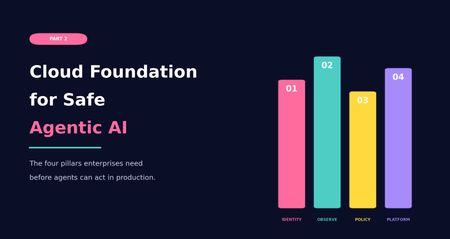
Why enterprise agents need more than a working prototype Most AI conversations start with the model. Which model should we use? Which framework? Which agent platform? Which demo can we build quickly enough to make the idea feel real? Those questions are not wrong, but they are rarely the first questions that matter in an enterprise environment. In real projects, the hard part usually appears after the first prototype works. The demo can answer a question, call a tool, retrieve a document, or update a record. Then someone asks whether it can be connected to production data, used by more teams, or allowed to trigger real actions. That is where the conversation changes. In the first part of this series, I looked at why many companies are less ready for agentic AI than they think. The blockers were practical and familiar: unclear business problems, immature processes, weak data foundations, and no clear owner when an AI system makes a poor recommendation or takes a wrong action. The message was simple: Before a company asks what agents can do, it needs to understand what it is ready to delegate. But business readiness is only the first layer. Even when the use case is clear, the process is understood, and leadership is aligned, another question appears. Is the platform ready to support agents safely? This is where Part 2 begins. Agentic AI does not behave like a normal application workload. A traditional application usually follows predefined paths. It receives a request, processes logic, returns a response, writes to a database, or calls an API. Agents introduce a different pattern. They reason over context, retrieve information, choose tools, trigger actions, interact with other services, and sometimes operate across multiple systems at once. That makes the surrounding cloud platform much more important. There is also a shadow AI angle to this. In many organizations, agent-like capabilities are already entering through SaaS platforms, vendor copilots, browser extensions, and productivity tools. These systems may not run inside the organization’s governed Azure subscriptions, but they can still interact with enterprise data and business workflows. If the official platform is not ready, teams will often find less governed ways to experiment anyway. That is not always malicious. Sometimes it is just people trying to solve their work with the tools available to them. The marketing analyst pasting customer data into a public chatbot because the official AI platform is six months away. The support team using a browser extension that summarizes tickets, without anyone realizing those tickets are also being sent to a third-party service. From a governance point of view, the effect is the same. Cloud readiness for agentic AI is not defined by access to cloud services or model endpoints alone. The real question is whether the platform can support controlled autonomy. Before enterprises can trust agents to act, the platform must be able to identify them, observe their behavior, restrict their permissions, enforce policy, and contain failure. Without that, an organization is not really deploying an intelligent assistant in a controlled way. It is introducing a workload that can interact with enterprise systems without anyone clearly watching what it does or being able to stop it. From business readiness to cloud readiness After the business foundation is clear, the next layer is the cloud foundation. A company may have a strong use case, executive support, and even a working prototype. But that does not mean it is ready to deploy agents in production. A prototype can run with broad access, manual supervision, loose logging, and a small group of test users. Production requires more discipline. It requires clear identity, controlled access, traceable activity, enforceable policy, and operational ownership. Cloud readiness for agentic AI comes down to four pillars, in this order: Identity-first architecture Observability Policy controls Platform constraints The order matters. 1. Identity-first architecture Identity comes first because nothing can be governed properly if it cannot be identified. In traditional cloud systems, we already learned this lesson with users, applications, service principals, managed identities, and workloads. Agents add another layer of non-human actors into the enterprise environment. If an agent can retrieve data, call tools, trigger workflows, or interact with business systems, it needs a clear identity. Without that foundation, governance becomes fragile. Teams may struggle to control what the agent can access, understand what it did, or determine who is accountable when something goes wrong. I have seen agents running in production where nobody could clearly say who owned them. They worked. Until they did not. Identity-first architecture means each agent or agentic workload should have a defined identity, ownership model, permission scope, and lifecycle. It should be clear whether the agent is acting on behalf of a user, acting as a service, or operating within a delegated boundary. This matters because permissions are not an implementation detail. They define the blast radius and accountability model of the system. In Azure environments, this is where Microsoft Entra ID and newer agent identity capabilities become important. As agents become more common across Azure AI Foundry, Copilot Studio, Microsoft 365, and custom frameworks, organizations need a way to understand which agents exist, who owns them, what they can access, and how their lifecycle is managed. Identity is not only about authentication. It is also about visibility, traceability, ownership, permission boundaries, and accountability. Agents should not remain hidden inside application logic or operate through shared identities. If they can retrieve data, call tools, or trigger actions, they need to be managed with the same care as any other production workload. 2. Observability Once identity is established, observability becomes the next pillar. Knowing that an agent exists is not enough. The platform must be able to show what the agent did. For normal applications, observability often focuses on service health, latency, failures, and resource usage. For agents, those signals still matter, but they are incomplete. Agent observability also needs to capture the execution path across model calls, retrieved context, orchestration steps, tool calls, policy decisions, approvals, denials, and final actions. This changes how we think about monitoring. With agentic systems, the question is not only whether a request succeeded or failed. Teams also need to understand the path that led to the outcome, the context used, the tools called, the policies applied, and the point where behavior changed. Without that visibility, it is difficult to investigate failures and improve reliability. This is also where observability starts to support governance, not just troubleshooting. Once teams can measure how agents behave, they can move toward KPI-based governance. That may include reliability, escalation rates, policy denials, grounding quality, tool-call failures, cost per interaction, latency, and business outcome metrics. Without this measurement layer, maturity remains mostly opinion-based. With it, governance becomes evidence-based. In Azure, Azure Monitor is the obvious starting point. Together with services such as Application Insights and Log Analytics, it provides the telemetry foundation needed to understand how AI workloads behave in production. For agentic systems, this usually requires combining platform telemetry with application-level traces from orchestration, retrieval, model calls, policy decisions, and tool execution. This visibility is what makes continuous improvement possible. It is also what allows governance to mature from “we think the agent is behaving correctly” to “we can measure how the agent behaves over time.” Small difference. Large consequence. 3. Policy controls The third pillar is policy controls. This comes after identity and observability because policy needs both. Identity defines who or what the rule applies to. Observability helps teams understand whether the rule is effective, bypassed, misconfigured, or too restrictive. Policy controls define the boundaries for what agents are allowed to do. They determine how agents access data, which tools they can use, which environments are in scope, when approval is required, and when an action or response should be blocked. The key point is simple: Prompts can guide behavior, but they are not a reliable enforcement layer. For enterprise systems, policy needs to be external, testable, auditable, and enforceable. This becomes especially important because agents may operate across multiple systems. An agent may retrieve information from one source, reason over the result, call a tool, update a ticket, send a message, or trigger a workflow. Each step may appear safe in isolation, while the full chain creates risk. Policy controls provide boundaries around that chain. In Azure, this starts at the cloud governance layer. Azure landing zones, management group structures, and Azure Policy can help define where AI workloads are deployed, how environments are separated, and which rules apply consistently across subscriptions. At runtime, Azure AI Content Safety can help detect harmful content, prompt attacks, unsafe interactions, or outputs that drift away from the intended task. For tool and API access, Azure API Management can also be used as a controlled gateway between agents and downstream systems. This can support centralized authentication, throttling, mediation, logging, and policy enforcement. It is not mandatory in every design, but it is a useful option when agents need governed access to APIs instead of direct backend connectivity. The goal is not to create friction for the sake of control. The goal is to make sure the agent operates inside boundaries that are defined outside the prompt and outside the model response. 4. Platform constraints The fourth pillar is platform constraints. This area often receives less attention early in the project, but it strongly shapes whether an agentic system can operate safely and reliably in production. These constraints include network isolation, private connectivity, data residency, regional availability, quota limits, model throughput, latency, logging retention, integration boundaries, cost behavior, and operational ownership. They may seem like implementation details during early design discussions, but they often determine whether the system can actually run in production. For agentic workloads, these constraints also shape where experimentation happens. Sandboxed environments, isolated subscriptions, limited tool access, and controlled test data can help teams evaluate agent behavior before exposing it to production systems. This becomes even more important when agents are allowed to generate code, call external tools, or execute actions that may not be fully trusted at design time. Platform constraints are where the earlier pillars meet implementation reality. Identity affects how agents connect to services. Observability affects logging cost, retention, and investigation capability. Policy affects routing, network design, tool exposure, and user experience. By the time an agentic system reaches production, these constraints are no longer background details. They become design boundaries. In Azure, this is where landing zone design, private networking, regional planning, quota management, cost management, and operational runbooks matter. Azure landing zones, private endpoints, private DNS, Azure Firewall, NSGs, and controlled network paths all influence whether the agent architecture can move from prototype to production without being redesigned halfway through. And yes, that redesign usually happens at the least convenient moment. Architecture has a sense of humor. Not a kind one. From principles to Azure capabilities The four pillars are not only architectural principles. They need to be translated into platform capabilities, operating practices, and governance controls. In practice, controlled agent deployment is rarely achieved by a single product or service. It requires multiple layers working together. Identity, monitoring, policy, networking, runtime safety, API exposure, and operational controls all play a part. Azure provides several services and patterns that can help implement these controls, but there is no fixed blueprint that applies to every organization. The right combination depends on the use case, regulatory requirements, existing landing zone design, integration landscape, and the level of autonomy expected from the agent. The examples below should be seen as a practical toolset, not as a mandatory checklist. Pillar Goal Example Azure capabilities Identity-first architecture Make agents visible, owned, permissioned, and governable as enterprise workloads. Microsoft Entra ID, Microsoft Entra Agent ID, managed identities, service principals, workload identities, access reviews, Conditional Access, Privileged Identity Management Observability Understand runtime behavior, trace execution paths, investigate failures, and improve reliability. Azure Monitor, Application Insights, Log Analytics, Azure AI Foundry tracing, diagnostic settings, distributed tracing, correlation IDs, application-level telemetry Policy controls Enforce boundaries around access, actions, content safety, APIs, and governance. Azure landing zones, management groups, Azure Policy, Azure AI Content Safety, Prompt Shields, Microsoft Purview, Azure API Management, RBAC, approval flows Platform constraints Operate within real cloud boundaries such as networking, region, quota, compliance, and operations. Azure landing zones, private endpoints, private DNS, private networking, Azure Firewall, NSGs, quota planning, regional architecture, cost management The purpose of this mapping is not to suggest that Azure has one single service for each pillar. It does not. The practical goal is to combine the right services and patterns so the platform can identify agents, monitor their behavior, enforce boundaries, and operate within known cloud constraints. Conclusion Agentic AI does not become enterprise-ready simply because a model is available, a prototype works, or a business sponsor is excited. The real question is whether the surrounding cloud foundation can support agents that act within boundaries the platform actually enforces. Together, these pillars move the discussion from building an agent to preparing the environment in which the agent can operate responsibly. That distinction is important. A prototype can rely on broad access, limited logging, and close manual supervision. A production system needs clearer boundaries around ownership, access, traceability, and control. This is also where the series moves naturally into Part 3. Once the business foundation is clear and the cloud foundation is in place, the next challenge is the design of the agent itself. The cloud foundation matters here because it provides the controlled environment in which agents can be tested, limited, and observed before they are trusted with broader enterprise access. For more advanced scenarios, that also includes sandboxing patterns for generated code, tool execution, and untrusted actions. In Part 3, I will move closer to implementation and look at how to design an enterprise-ready agent. That means defining the agent’s scope, grounding it with reliable knowledge, deciding which tools it can use, designing safe execution loops, adding human oversight where it matters, and thinking carefully about when a single agent is enough versus when multi-agent coordination is justified. That is where agentic AI starts becoming more than an idea. And, as usual, that is also where the architecture starts to matter. This article is part of my Agentic AI readiness series and was also published on Medium.71Views0likes0Comments8 Architectural Pillars to Boost GenAI LLM Accuracy and Performance in Low Cost
Smarter AI architecture, not bigger LLM models - how engineering teams push LLM accuracy and high performance in low cost. Enterprises using LLM (Large Language Models) hits the same ceiling and paying big price! A raw API call to a frontier model- GPT-4, Claude, Gemini delivers only 35-40% accuracy on structured output tasks like code generation, NL to DAX query generation, domain-specific reasoning. Prompt engineering pushes that to ~60%. But the final 35+ percentage points? Those come from system architecture, not model upgrades. This guide presents 8 architectural pillars, distilled from production Gen AI systems, that compound to close the accuracy gap. These patterns are model-agnostic and domain-agnostic, they apply equally to chatbots, coding assistants, content/query generators, automation agents, and any application where an LLM produces structured or semi-structured output. It’s based on my recent Gen AI projects. The key takeaway: use the LLM as one component in a larger system, not as the system itself. Surround it with deterministic guardrails, verified knowledge, and feedback loops. Pillar 1: Enhance Prompts with Verified Knowledge Context Impact: +35–40% accuracy (based on production use cases; may vary by domain) Top source of LLM errors in production is hallucinated identifiers knowledgebase, the model invents names, references, or structures that don't exist in the target system. This happens because LLMs are trained on general knowledge but deployed against specific, private enterprise systems they've never seen local database and knowledgebase. The fix is straightforward: inject verified, system-specific context (type definitions, API specs, ontologies, configuration schemas, entity catalogues) directly into the prompt so the model composes from known-good elements rather than recalling from training data. Use Knowledge Graph for better sematic knowledge. How to Implement Provide explicit context, never implicit- Whatever the LLM needs to reference identifiers, valid values, semantic knowledge, structures must appear verbatim in the prompt or retrieved context window. Filter aggressively. A full knowledge base with thousands of entities overwhelms the context window and confuses the model. Use intelligent filtering to surface only needed 5-10 most relevant elements per request. Store structured semantic knowledge in a graph or searchable index. This enables relationship-aware retrieval: "given entity X, what related entities, attributes, and constraints are also needed?" Include rich Semantic metadata. Names alone are insufficient. Include types, constraints, valid value ranges, relationships, and usage notes to minimize ambiguity. Keep context fresh. Stale context causes a different class of hallucination the model generates valid-looking output that references outdated structures. Sync your knowledge store with your source of truth. Why This Works LLMs excel at composition and reasoning combining elements, applying logic, following patterns. They are unreliable at recall of specific identifiers exact names, valid values, structural constraints. By offloading recall to a deterministic retrieval system and giving the LLM only composition tasks, you play to each system's strengths. Pillar 2: Tiered LLM Approach: Route Deterministically First, Use LLMs Last Impact: 80% cost reduction, 85% latency reduction, eliminates non-deterministic errors for most traffic. The most impactful architectural insight: most production requests don't need an LLM at all. A well-designed system handles 60-70% of traffic with deterministic logic templates, composition rules, cached results and reserves expensive, non-deterministic LLM calls only for genuinely novel inputs. The Three-Tier Model These metrics are from a real use case to convert NLP to Power BI DAX query. Tier Strategy Uses LLM ? Latency Accuracy Tier 0 Template slot-filling - handles requests that match known patterns exactly the system fills slots in a pre-built template with extracted parameters. No LLM, no non-determinism, near-perfect accuracy, sub-100ms response. No ~50ms 95-98% Tier 1 Compose from pre-validated fragments- handles requests that combine known patterns in new ways. The system retrieves pre-validated building blocks via search, composes them using deterministic rules, and validates the result. Still no LLM call. No ~200ms 90-95% Tier 2 Full LLM generation with enriched context- is reserved for genuinely novel requests that can't be served deterministically. Even here, the LLM receives maximum support: filtered context, relevant examples, explicit rules, and structured planning. Yes (1 call) 2-5s 88-93% Complexity-Based Routing A lightweight scoring function (evaluated in <1ms) routes each incoming request: Factors: reasoning depth, number of components, cross-references, constraints, nesting depth, novelty (distance from known patterns) Score 0-39: Tier 0 (deterministic template) Score 40-59: Tier 1 if confidence ≥ 85%, else Tier 2 Score 60+: Tier 2 (LLM generation) This routing achieves 96%+ accuracy in tier assignment and ensures the expensive path is only taken when necessary. Why This Matters Cost: 70-80% of requests cost zero LLM tokens Latency: Majority of responses in <200ms instead of 2-5s Reliability: Deterministic tiers produce identical output for identical input. Scalability: Deterministic tiers scale horizontally with trivial compute Pillar 3: Encode Prompt Anti-Patterns as Explicit Rules Impact: +8-10% accuracy, ~80% reduction in common structural errors LLM mistakes are patterned, not random. In any domain, 80% of errors cluster around a small set of 6-13 recurring structural mistakes. Instead of hoping the model avoids them through general instruction-following, compile these mistakes into explicit WRONG => CORRECT rules embedded directly in the system prompt. How to Implement Collect error data. Run 100+ requests through your system and categorize the failures. You'll find the same 6-13 patterns appearing repeatedly. Write concrete rules. For each pattern, show the exact wrong output and the exact correct alternative, with a one-line explanation of why. Embed in system prompt. Place rules prominently after the task description, before examples. Use formatting that's hard to ignore (headers, bold, explicit "NEVER" language). Keep the list short. 6-13 rules maximum. Beyond that, attention dilutes and the model starts ignoring rules. Prioritize by frequency. Refresh continuously. As the system improves (via other pillars), some errors disappear. New error types emerge. Update the rule set quarterly. Why This Works LLMs respond strongly to explicit negative examples. A generic instruction like "be careful with X" has minimal impact. But showing the exact wrong output the model tends to produce, paired with the correction, creates a strong avoidance signal. It's analogous to unit tests. Pillar 4: Retrieve Few-Shot Examples Dynamically Impact: +5-15% accuracy depending on domain complexity Static examples hardcoded in a prompt become stale, irrelevant of context tokens. Dynamic few-shot retrieval selects the 3-5 most relevant examples for each specific request, maximizing the signal-to-noise ratio in the prompt. Hybrid Retrieval Architecture The most effective approach combines two search strategies for intent search to understand natural language (NL) context: Keyword search (BM25) Finds examples with exact matching terms, identifiers, and domain vocabulary Vector search (semantic similarity) Finds examples with similar intent and structure, even if wording differs Rank fusion Merges results from both strategies, re-ranking by combined relevance This hybrid approach outperforms either strategy alone because keyword search catches exact identifier matches that vector search dilutes, while vector search captures semantic similarity that keyword search misses entirely. Best Gen AI Architectural Practices Match complexity to complexity. Simple requests should see simple examples. Complex requests should see complex examples. Mismatched examples confuse the model. Include negative examples. For the detected request type, include 1-2 "wrong => correct" pairs alongside positive examples. This reinforces Pillar 3's anti-pattern rules with concrete, contextually relevant demonstrations. Pre-compute embeddings. Generate vector embeddings at indexing time, not at query time. Cache retrieval results for repeated patterns. Curate quality over quantity. 3 excellent, diverse examples beat 10 mediocre ones. Each example should demonstrate a distinct pattern or edge case. Keep examples current. As your system evolves, old examples may demonstrate outdated patterns. Review and refresh the example store periodically. Pillar 5: Feedback Loop- Validate and Auto-Fix Every Output Deterministically Impact: +3-5% accuracy as a safety net, plus continuous improvement via feedback No matter how well-prompted, LLMs will occasionally produce outputs with minor structural errors - wrong casing, missing delimiters, references to slightly-incorrect identifiers, or subtle format violations. A deterministic post-processing pipeline catches and fixes these without any additional LLM calls. The Validation Pipeline LLM Output => Parse (grammar/AST) => Rule-Based Fixes => Compliance Check/validation => Final Output Each stage is fully deterministic: Parsing: Use a formal grammar or AST parser (ANTLR, tree-sitter, language-native parsers) to structurally analyse the output. Never regex-parse structured output - it's fragile and misses edge cases. Rule-based fixes: 10-20 deterministic transformation rules that correct known error patterns - name normalization, casing fixes, missing delimiters, structural repairs. Compliance check: Verify every identifier referenced in the output actually exists in the provided context. Flag unknown references. Design Principles Zero LLM calls in the fix pipeline. Every fix is a regex, an AST transformation, or a lookup table operation. Instant, free, deterministic, 100% reliable. Fail safe. If a fix is ambiguous (multiple valid corrections possible), pass through rather than corrupt. A minor error is better than a confident wrong "fix." Log everything. Track every fix applied, categorized by type. This data drives the feedback loop. The Critical Feedback Loop- The validation pipeline's most important function isn't fixing outputs, it's generating improvement signals: This creates a feedback loop: the auto-fix catches errors → the errors get promoted to upstream prevention → fewer errors reach the auto-fix → the system continuously tightens. Pillar 6: Multi-Agent Orchestration with Fewer Agents and Clear Contracts Impact: Reduced latency, clearer debugging, fewer failure modes The multi-agent pattern is powerful but commonly over-applied. The counter-intuitive lesson from production systems: fewer agents with well-defined responsibilities outperform many fine-grained agents. Why Fewer Is Better Each agent handoff introduces: Latency - serialization, network calls, context assembly Context loss - information dropped between boundaries Failure modes - each handoff is a potential error point Debugging complexity - tracing issues across many agents is exponentially harder Multi-Agent Orchestration Principles Merge agents that always run sequentially. If Agent A always feeds into Agent B with no branching or conditional logic, they should be one agent with two internal steps. Parallelize independent operations. Context retrieval and example lookup are independent, run them concurrently to halve retrieval latency. Route sub-tasks to cheaper models. Decomposed sub-problems are simpler by design. Use a smaller, faster, cheaper model (3x cost savings, 2x speed improvement). Define strict contracts. Each agent boundary should have an explicit schema defining inputs and outputs. No implicit assumptions about what crosses the boundary. Only 2 of 4 agents should call an LLM. The rest are purely deterministic. This minimizes non-deterministic behavior and cost. Pillar 7: Multi-Agent Cache at Multiple Hierarchical Levels Impact: 40-50% faster responses, 85%+ combined hit rate, significant cost reduction A single cache layer captures only one type of repetition. Production systems need hierarchical caching where multiple levels catch different repetition patterns , from exact duplicates to semantic near-misses. with -> A single cache layer captures only one type of repetition. Production systems need multi-level caching to handle exact matches, similar requests, and reusable fragments. or -> with Production systems need hierarchical caching where multiple levels handle exact matches, similar requests, and reusable fragments. Pillar 8: Measure Everything, Learn Continuously Impact: Enables data-driven iteration and prevents accuracy regressions. Architecture without observability is guesswork. The final pillar ensures every other pillar stays effective over time through comprehensive metrics and automated feedback loops. This isn't a one-time setup; it's a perpetual feedback loop. Every week, the top error patterns shift slightly. The auto-fix metrics tell you exactly where to focus next. Over months, this flywheel compounds into dramatic accuracy gains that no single prompt rewrite could achieve. Auto-Learning for New Domains When extending your system to new domains or knowledge areas: Auto-classify elements using naming conventions, type analysis, and structural patterns Auto-generate templates from universal patterns (transformations, comparisons, compositions, sequences) Bootstrap few-shot examples from successful template outputs Monitor for the first 100 requests, then curate only the edge cases manually This reduces domain onboarding from days of manual work to minutes of automated bootstrapping plus focused human review of outliers. Key Takeaways Architecture beats model size. A well-architected system with a smaller model outperforms a raw frontier model call on structured tasks at a fraction of the cost. Deterministic systems should do the heavy lifting. Reserve LLMs for genuinely novel, creative tasks. 70-80% of production requests should never touch an LLM. Verified knowledge is your top accuracy lever. Ground every prompt in context the model can trust. Errors are patterned, not random- Track them, compile them, and explicitly forbid them. Build feedback loops, not static systems- Every auto-fix, every cache miss, every routing decision is a signal for improvement. Fewer agents, done well- Fewer agents with strict contracts outperform 9 agents with fuzzy boundaries in accuracy, latency, and debuggability. Measure what matters and iterates- The system that wins isn't the one with the best day-one prompt, it's the one that improves fastest over time. Production-grade GenAI isn't about finding the perfect prompt or waiting for the next LLM model release. It's about building architectural guardrails that make failure nearly impossible and when failure does occur, the system learns from it automatically. These 8 pillars, applied together, transform any LLM from an unreliable black box into a precise, efficient, and continuously improving production system. -> Production Gen AI success is not about perfect prompts or waiting for the next LLM release. It comes from designing strong system guardrails that reduce failures and ensure consistent output. Even when failures happen, the system learns and improves automatically. When applied together, these 8 pillars turn an LLM into a reliable, efficient, and continuously improving production system.381Views1like1CommentFoundry Toolbox preview not working for hosted agent
Tried calling a hosted foundry agent with calls to Toolbox where I tried both web search and code interpreter. Neither of them work. If i use session.call_tool, I get an error like " meta={'tool_configuration': {'type': 'web_search'}} content=[TextContent(type='text', text='NotFound[404, user=The API deployment for this resource does not exist. If you created the deployment within the last 5 minutes, please wait a moment and try again.]', annotations=None, meta=None)] structuredContent=None isError=True". If i try agent.run asking for latest news on a topic ,I either get a generic pretrained knowledge based response (without reference to web search tool) Or a generic error of the type " I wasn't able to retrieve the latest news at the moment due to a technical issue." I have verified that the code uses the appropriate headers like " headers={"Foundry-Features": "Toolboxes=V1Preview"}" I have verified that a Foundry portal agent calling web search tool works as expected. However when I create a custom tool using MCP Server where I provide the URL of the foundry toolbox and then try to use this tool in a Portal created agent I always get an access issue even if i use project identity as the Entra authentication and despite the fact that Project Identity has Foundry User privilege on Foundry Project. I have also tried the github samples for deploying hosted agents with foundry toolbox without luck. Version of agent-framework as of date that I have tried is 1.4.0. Please advise on a resolution. Thanks!83Views0likes1CommentGPT-5.5-Pro not listed in foundry?
The model is mentioned in this blog post : https://azure.microsoft.com/en-us/blog/openais-gpt-5-5-in-microsoft-foundry-frontier-intelligence-on-an-enterprise-ready-platform/ But it is currently not listed on Foundry. Only latest pro model is 5.4-pro. When will 5.5-pro model be available on azure foundry?241Views0likes1Comment


Events
Recent Blogs
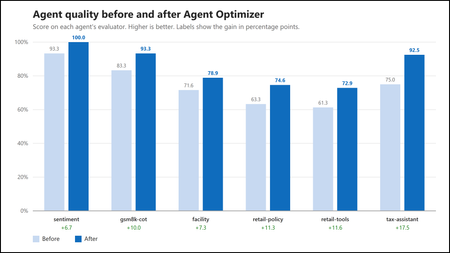
- Authors: Abi Komma, Charles Kim, Luffy Chen, Morteza Ziyadi Why hand-tuning agents does not scale An agent’s behavior comes mostly from its natural-language configuration: its instructions, skil...Aug 07, 2026119Views0likes1Comment
- 8 MIN READThe setup You've built the deployment the enterprise architecture review asked for. Nothing touches the public internet. Your Microsoft Foundry resource is private — public network access disable...Aug 07, 2026249Views1like0Comments