artificial intelligence
219 Topics
Now in Foundry: Meta Muse Spark Open, NVIDIA Nemotron 3.5 Super VL, and Reflection Beam
This week's Model Mondays edition highlights three Hugging Face models newly available in Microsoft Foundry, giving developers more open-weight options for enterprise coding and agentic work: Meta's Muse Spark Open, NVIDIA's Nemotron 3.5 Super VL, and Reflection's Beam 1.0. Models of the week Meta: Muse-Spark-Open-816B-A42B-NVFP4 Model Specs Parameters / size: 816B total / 42B active; Mixture of Experts, which activates a subset of parameters for each token; NVIDIA's 4-bit floating-point format (NVFP4). Context length: 1,048,576 tokens in the Foundry deployment. Primary task: Multimodal reasoning, multi-step reasoning, coding, and agentic task completion. Why it's interesting Published agent and coding evaluations: Meta reports scores of 89.2 on MCP-Atlas, which evaluates tool use through the Model Context Protocol (MCP), and 76.4 on Terminal-Bench 2.1, using the Terminus 2 agent. These are Muse Spark Open results at xhigh reasoning effort; the benchmark table does not identify them as NVFP4-specific measurements. Adjust reasoning effort to the task: The model supports planning, sequential tool calls, and recovery from tool failures. Its reasoning_effort setting offers low, medium, high, and xhigh; Meta recommends the higher settings for complex coding and agentic work. See the model card. Bring visual and conversational evidence into the same workflow: Muse Spark is natively multimodal. It can interpret screenshots, documents, and recordings alongside text. For developers building a product support agent, that opens up end-to-end agentic task completion. Hardware and deployment configuration: Muse Spark's NVFP4 deployment on Azure Foundry has a 1M-context deployment template on NVIDIA H200, intended for long-context reasoning, coding, agentic tasks, and multimodal workloads. Eight GPUs jointly serve one model instance, with both the model tensors and its experts distributed across them. Configuration H200 template Best for Long-context coding and reasoning, multimodal analysis, and extended tool-using workflows Hardware per model instance 8 × NVIDIA H200, 141 GB GPU memory each Azure instance type Standard_ND96isr_H200_v5 Model weights NVFP4 Maximum context 1,048,576 tokens Inputs / output Text, images, audio, and video / text Agent capabilities Tool calling and reasoning; per-request effort of low, medium, high, or xhigh (default) Request timeout 5 minutes This preset retains the model's full native context window, allowing prompts, media, tool results, and generated output to share a single extended context. NVIDIA: NVIDIA-Nemotron-3.5-Super-VL-120B-A12B-BF16 Model Specs Parameters / size: 120B total / 12B active; hybrid MoE architecture; Brain Floating Point 16 (BF16) weights. Context length: Up to 1M tokens natively; 524,288 tokens in the current Foundry deployment presets. Primary task: Vision-language reasoning, document and video understanding, coding, and tool use; text, image, and video input, with text output. Why it's interesting Visual understanding alongside reasoning. A vision encoder connects images and video frames to a language backbone combining Mamba-2 state-space layers, attention, and sparse experts. Developers can use the model to interpret document layouts, charts, and application screens in the same workflow as textual instructions. Reasoning that can be switched on or off. The model supports configurable thinking, giving applications a way to distinguish straightforward extraction from questions that require several reasoning steps. Document and chart evaluation results. NVIDIA reports 62.82 on MMLongBench-Doc, 65.08 on OCR-Reasoning (optical character recognition with reasoning), and 80.82 on CharXiv reasoning, which tests understanding of scientific charts. These are publisher-reported results for the BF16 model; see the benchmark table and evaluation methodology. Hardware and deployment configurations: Nemotron's BF16 deployment on Azure Foundry is available on NVIDIA A100 and H100 templates, both configured for 512K context. Each uses four GPUs per model instance. The main configuration difference is the attention cache, which stores information from earlier tokens: the A100 preset retains BF16 precision, while the H100 preset uses 8-bit floating point (FP8) to reduce cache memory. Configuration A100 template H100 template Best for Document, chart, and application-screen understanding when preserving BF16 cache precision matters The same visual and reasoning tasks when faster generation and shorter waits on long prompts matter Hardware per model instance 4 × NVIDIA A100, 80 GB GPU memory each 4 × NVIDIA H100, 80 GB GPU memory each Azure instance type Standard_ND96amsr_A100_v4 Standard_ND96isr_H100_v5 Model weights BF16 BF16 Attention-cache precision BF16 FP8 Maximum context 524,288 tokens 524,288 tokens Active sequence cap per instance 32 32 Request timeout 90 seconds 90 seconds Choose A100 for cache precision; choose H100 for response speed. The template descriptions position H100 as the faster option for generation and long-prompt processing, using a lower-precision cache while keeping the model weights in BF16. Both presets offer the same context window and active sequence cap, so this choice is about cache precision and performance rather than additional context capacity. Both templates enable tool calling, reasoning, and reuse of cached prompt prefixes. They accept text plus up to one image and one video per prompt; video sampling is configured at two frames per second, with a maximum of 256 sampled frames. Both also enable speculative decoding with three proposed tokens per step, using the model's ability to predict multiple upcoming tokens to accelerate generation. Reflection: Beam-1.0-501B-A23B Model Specs Parameters / size: 501.3B total / 23.4B active; sparse MoE; available with BF16, FP8, and NVFP4 weights. Context length: 1,048,576 tokens natively; 524,288 tokens in the Foundry BF16 preset and 262,144 tokens in the FP8 and NVFP4 presets. Primary task: Text generation for software engineering, reasoning, and agentic tool use; developed predominantly for English. Why it's interesting Built around software engineering workflows. Beam is designed to work with repositories, terminal environments, and tools across extended tasks. Its text-only interface fits coding agent workflows. Reasoning efficiency is an explicit training objective. Reflection describes training with a length penalty that discourages unnecessary generated tokens while rewarding successful solutions. Its launch post explains the trade-off between reasoning effort and task performance. BF16 coding and tool-use results. The release model card reports 81.6% on SWE-bench Verified, 80.1% on Terminal Bench v2.1, and 80.8% on MCP Atlas for BF16. These cover repository issue resolution, terminal tasks, and tool use respectively. Hardware and deployment configurations: The same Beam model is available in three weight precisions: BF16, FP8, and NVFP4. All retain the same parameter count and text, reasoning, and tool-calling capabilities. The lower-precision releases reduce the memory needed for weights, opening up A100 and H100 deployment options. Weight precision Hardware per model instance Default Azure instance type Maximum context Best for BF16 8 × NVIDIA H200, 141 GB GPU memory each Standard_ND96isr_H200_v5 524,288 tokens (512K) Long-context reasoning and agentic tool use with full-precision weights FP8 8 × NVIDIA A100, 80 GB GPU memory each Standard_ND96amsr_A100_v4 262,144 tokens (256K) Reasoning and tool use on A100 while retaining higher weight precision than NVFP4 FP8 8 × NVIDIA H100, 80 GB GPU memory each Standard_ND96isr_H100_v5 262,144 tokens (256K) The same FP8 workloads when H100 capacity or measured workload performance fits better NVFP4 4 × NVIDIA A100, 80 GB GPU memory each Standard_ND96amsr_A100_v4 262,144 tokens (256K) Reasoning and tool use with a smaller GPU allocation on A100 NVFP4 4 × NVIDIA H100, 80 GB GPU memory each Standard_ND96isr_H100_v5 262,144 tokens (256K) The same four-GPU option when H100 capacity or measured workload performance fits better All five templates use an FP8 attention cache, support tool calling with automatic tool selection and reasoning, enable reuse of cached prompt prefixes and processing long prompts in chunks, and set a 90-second request timeout. Getting started You can deploy these Hugging Face models in Microsoft Foundry by browsing the Hugging Face collection in the Foundry model catalog and selecting a managed endpoint deployment. Read Hugging Face on Azure docs Explore models in Microsoft Foundry133Views0likes0CommentsIntroducing Microsoft-Decision-1 in Microsoft Foundry for decision and classification workloads
Not every step in an AI application needs a large language model to generate a response. Many high-volume application steps are decisions: classify an input, select an option, assign a score, verify a condition, prioritize an item, or control a workflow. To suit these tasks, a new class of models have been developed to address these fast, structured, requests. We are excited to be adding Microsoft-Decision-1 to the Foundry Models Catalog. Our newest, decision model for applications that need to choose among predefined options rather than generate open-ended text. What are decision models? As AI applications mature, the industry is moving beyond the idea that every model interaction needs to result in generated content. Developers are increasingly building systems composed of different models, tools, and application logic, each suited to a different part of the workload. Within those systems, many of the most frequent operations are not generation problems at all. They are decisions about what should happen next. Decision models were designed for this emerging layer of the AI stack. Rather than producing an open-ended response, they evaluate a defined set of possibilities and return structured signals that an application can use to take action. That makes them particularly relevant as developers move toward more dynamic AI applications, where models need to work together and applications must continuously determine where requests should go, which actions should be taken, and when additional processing is needed. For developers, this creates an opportunity to be more intentional about where and how different models are used. Instead of relying on a general-purpose generative model for every step, developers can match the model to the task, using generative and reasoning models where their capabilities are needed and decision models for focused, repeatable choices. The result is a more modular approach to AI application design, where generation, reasoning, and decision-making become complementary building blocks for creating intelligent systems. What is Microsoft-Decision-1? Now available in public preview, Microsoft-Decision-1 is a decision model built on Qwen3.5-9B and designed for applications that need to make fast, structured choices among predefined options. It brings a purpose-built decision capability to the Foundry Models catalog, giving developers another building block for designing AI applications where different steps may benefit from different types of models. Built for predefined decisions. Microsoft-Decision-1 supports use cases such as agent controls, model routing, intent analysis, data labeling, AI judging, incident response routing, data validation, and content classification. Structured for application logic. The model produces predefined answers and confidence signals that applications can use to select the next action or route uncertain results for further review. Designed for lower-latency, lower-cost workflows. Microsoft-Decision-1 is intended for simple, repeatable, and time-sensitive decisions that do not require the generative capabilities or extended reasoning of a larger language model. You can explore these capabilities in the Foundry Playground. This example below shows Microsoft-Decision-1 checking urgency, selecting a support team, and scoring priority for a customer request. Microsoft-Decision-1 represents an area of continued model innovation at Microsoft. The team will rebase future iterations of the model on OpenAI models and Microsoft’s MAI models, bringing together advances from Microsoft’s own model portfolio with a model architecture purpose-built for decision-making. Over time, this work could create opportunities to further explore how Microsoft models can be specialized for the high-volume decisions that sit inside applications and agentic systems. For developers, Microsoft-Decision-1 expands the choices available when building applications and agents with Foundry. Rather than using the same model for every step, developers can combine generative and reasoning models with a decision model and choose the capability that best fits each part of the workflow. That model diversity is increasingly important as AI applications evolve from single-model experiences into systems that coordinate specialized models, tools, and actions. How developers are building with Microsoft-Decision-1 Enterprise applications make decisions throughout a workflow: identifying a customer’s intent, selecting a tool, routing an incident or checking whether a response meets specified criteria. For example, a support application could classify a request as a billing question, a technical issue or an account-access problem. An agent could evaluate a proposed response against a quality rubric and determine whether to accept it, revise it or request review. If the player doesn’t load, open the video in a new window: Open video These decisions can sit alongside generative and reasoning steps in the same application. A language model might draft a response, while Microsoft-Decision-1 evaluates it against defined criteria. With Microsoft-Decision-1 in the Foundry catalog, developers can explore decision workloads through the platform they use to discover and deploy models across various scenarios: Classification: Assign inputs to defined categories, such as customer intents or feedback themes. Routing: Select a model, tool, destination or workflow from a set of options. Evaluation and verification: Assess responses or inputs against specified criteria. Workflow control: Decide whether to continue, retry, stop or send a case for review. A different model for a different kind of workload For developers, decision models introduce a different way to think about optimization. An AI application may make thousands of small choices around a comparatively small number of complex generative or reasoning tasks. Running every one of those steps through the same general-purpose model can overlook an opportunity to optimize the system around the work each step actually needs to perform. That pattern is showing up across Microsoft. Xbox Research used Microsoft-Decision-1 to categorize more than 10,000 pieces of open-ended feedback into researcher-defined themes, reporting quality competitive with GPT-5 while running 80–100 times faster. Other Microsoft teams have also evaluated the model for assessing Copilot response quality and supporting adaptive replanning in Microsoft Discovery. These scenarios matter because they are not simply classification benchmarks. They are examples of decisions embedded inside larger applications. As AI architectures become more modular, developers can consider generation, reasoning, and decision-making as distinct workloads, then select models based on what each step actually requires. For benchmark methodology, measured results and additional examples, read the Command Line blog here. Putting Microsoft-Decision-1 to work For tasks with predefined outcomes, evaluate Microsoft-Decision-1 using representative inputs and the quality, latency and cost requirements of your application. Compare decision accuracy, including ambiguous cases, latency under expected traffic and cost per completed decision. Where confidence estimates inform automation or review thresholds, validate their calibration on your own data. Start with a decision in your application: The following Python example shows how to compare support-routing decisions with expected labels and measure request latency. Replace the illustrative messages and category definitions with examples from your own workload. Before running: Deploy Microsoft-Decision-1 in your Microsoft Foundry subscription and configure FOUNDRY_BASE_URL and FOUNDRY_API_KEY. Set FOUNDRY_MODEL to the model or deployment identifier specified in the quickstart. Keep credentials outside the source code. Model requests incur applicable usage charges. Integration note: Confirm the route and authentication header before running it against your deployment. #!/usr/bin/env python3 """Classify support requests with Microsoft-Decision-1.""" import json import os import urllib.error import urllib.request from collections.abc import Mapping from statistics import median from time import perf_counter from typing import Any from azure.identity import DefaultAzureCredential OPTIONS = { "billing": "Charges, invoices, refunds, or subscription payments", "technical": "Software errors, bugs, or integration failures", "account": "Sign-in, password, or account-access problems", } EXAMPLES = [ ("I was charged twice.", "billing"), ("The integration crashes during checkout.", "technical"), ("I cannot sign in after resetting my password.", "account"), ] AZURE_ENDPOINT = os.environ["AZURE_ENDPOINT"].rstrip("/") DEPLOYMENT_NAME = os.environ["DEPLOYMENT_NAME"] TIMEOUT_SECONDS = 60 TOKEN_SCOPE = "https://cognitiveservices.azure.com/.default" CREDENTIAL = DefaultAzureCredential() class DecisionAPIError(RuntimeError): """Raised when the API can't return a valid classification.""" def read_choice( payload: Any, options: Mapping[str, str], ) -> str: if not isinstance(payload, dict): raise DecisionAPIError("The API returned an invalid response.") answers = payload.get("answers") if not isinstance(answers, dict): raise DecisionAPIError("The API returned no answers object.") answer = answers.get("team") if not isinstance(answer, dict) or answer.get("type") != "choice": raise DecisionAPIError("The API returned an invalid answer.") choice = answer.get("choice") if not isinstance(choice, str) or choice not in options: raise DecisionAPIError( f"The API selected an unsupported team: {choice!r}." ) return choice def predict( text: str, options: Mapping[str, str], ) -> str: if not text.strip(): raise ValueError("text must not be empty.") if len(options) < 2: raise ValueError("options must contain at least two choices.") body = json.dumps( { "model": DEPLOYMENT_NAME, "state": text, "questions": { "team": { "type": "choice", "instructions": ( "Which team should handle this customer support " "request? Select exactly one team based on the " "primary problem." ), "criteria": dict(options), } }, } ).encode("utf-8") access_token = CREDENTIAL.get_token(TOKEN_SCOPE).token request = urllib.request.Request( f"{AZURE_ENDPOINT}/providers/microsoft/v1/systemone", data=body, headers={ "Authorization": f"Bearer {access_token}", "Content-Type": "application/json", "Accept": "application/json", }, method="POST", ) try: with urllib.request.urlopen( request, timeout=TIMEOUT_SECONDS, ) as response: response_body = response.read() except urllib.error.HTTPError as exc: raise DecisionAPIError( f"The API returned HTTP {exc.code}." ) from exc except urllib.error.URLError as exc: raise DecisionAPIError( f"Couldn't reach the API: {exc.reason}." ) from exc try: payload = json.loads(response_body) except (json.JSONDecodeError, UnicodeDecodeError) as exc: raise DecisionAPIError( "The API returned invalid JSON." ) from exc return read_choice(payload, options) def main() -> None: correct = 0 latencies_ms = [] for text, expected in EXAMPLES: start = perf_counter() predicted = predict(text, OPTIONS) elapsed_ms = (perf_counter() - start) * 1000 correct += int(predicted == expected) latencies_ms.append(elapsed_ms) print( f"Expected={expected}, predicted={predicted}, " f"latency={elapsed_ms:.1f} ms" ) accuracy = correct / len(EXAMPLES) print(f"Accuracy: {accuracy:.1%}") print( "Median request latency: " f"{median(latencies_ms):.1f} ms" ) if __name__ == "__main__": main() This small dataset illustrates the evaluation process. For meaningful results, use a larger, representative labeled dataset and inspect errors by category. The measured latency includes the client call and network time; sequential requests do not measure latency under production load. Assess cost and confidence calibration separately. Your application defines the available options and resulting actions. Use evaluation results to determine where automation is appropriate and where additional validation or human review is needed. Pricing Model Deployment Type Input Tokens (#/1M) Output tokens (#/1M) Microsoft-Decision-1 US Datazone $0.042 N/A EU Datazone $0.042 N/A Get started Explore Microsoft-Decision-1 in the Foundry catalog to make your first request. We look forward to seeing how developers use Microsoft-Decision-1 to bring structured decisions into their applications and agents through Microsoft Foundry.6.6KViews1like1CommentClosing the AI Agent Governance Gap with Microsoft Foundry
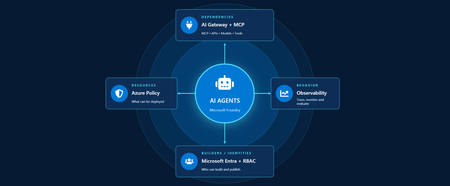
Developers are shipping agents faster than security teams can catalog them. As organizations move beyond pilots and begin operating dozens or hundreds of agents, one question keeps coming up: how do we actually get visibility into our AI agents across our environment? In this article, we'll walk through how Azure services can help establish visibility, guardrails, and cost accountability across your AI estate. Governance for AI happens across four layers: Resources – who can create new AI resources Builders – who can develop and publish agents in a certain scope Behavior – how agent outputs are evaluated, monitored, and governed Dependencies – what models, tools, APIs, and MCP servers agents can interact with Most organizations already have governance controls for identities, networking, and compliance. The challenge isn't creating new controls. It's connecting existing controls into an operating model that works for AI agents. Below we walk through each area and go a bit deeper on how to close the gap. Setting up boundaries with Azure Policy First, let's start in the Azure portal with Azure Policy. Azure Policy lets you set guardrails on what can be deployed in your environment and flags or blocks anything that doesn't comply. For AI workloads, the built-in definitions range from limiting models that people in your organization can deploy to locking down the network through enabling private endpoints. Some policies you get started with: Foundry model deployments should only use approved models: Restricts deployments to models or publishers your organization has explicitly approved Foundry model deployments should meet eligibility requirements (preview): Applies rules based on model attributes like preview vs. GA status and distribution source Azure AI Services resources should have key access disabled: Makes Microsoft Entra ID the only entry point The full list of policies related to Azure AI Services are available here: List of built-in policy definitions - Azure Policy | Microsoft Learn Why this comes first: Policy checks resources before they are created, so it proactively keeps your environment aligned with your standards. Implementing role-based access control (RBAC) Once these boundaries are in place, the next step is RBAC. Setting RBAC up early ensures that people and identities building agents have the right scope for what they actually need to do. Foundry roles only apply when you authenticate using Microsoft Entra ID. If you're using key-based authentication instead, the key grants full access with without role restrictions. API keys are convenient for quick development usage but when moving towards production, Microsoft Entra ID is the preferred method. Roles can be assigned at three scopes: the Foundry resource, a Foundry project, or an individual agent itself. Below is an example of how different personas within organization can map to a certain scope for creating and building agents with Foundry. Here's how each role in the diagram compares, from least to most privileged: Role Privilege Level What it does in Microsoft Foundry Foundry Agent Consumer Least Interact with agent endpoints in a project. This is your least-privilege role for people who only need to use agents. Foundry User Low Grants reader access to the Foundry project, the Foundry resource, and data actions for your Foundry project. Least-privilege access role for developers building and testing agents. Foundry Project Manager Medium This role lets you perform management actions on Foundry projects, build and develop with projects, and conditionally assign the Foundry User role to other user principals. Foundry Account Owner Higher Grants full access to manage Foundry projects and resources, and lets you assign the Foundry User role to other user principals. Foundry Owner Highest Grants full access to manage Foundry projects and resources to build and develop with projects. This role can also assign the Foundry User, ACR, and monitoring roles to users in the environment. Source: Role-based access control for Microsoft Foundry - Microsoft Foundry | Microsoft Learn For the agent resources themselves, assign managed identities rather than API keys since it lowers the risk of having compromised credentials. Note if you're scripting RBAC permissions: these roles were recently renamed from Azure AI User, Azure AI Owner, Azure AI Account Owner, and Azure AI Project Manager. The role IDs and permissions didn't change, so use the role definition GUID in your code to avoid issues while the rename rolls out. Observability in Microsoft Foundry Governance requires more than access control. Organizations also need evidence of how agents are being used. Observability provides the audit trail needed to investigate incidents, understand usage patterns, and track costs. The Foundry Control Plane brings these observability and governance tools together in one place, alongside services like Azure Monitor, Microsoft Entra, Microsoft Purview, and Azure Policy. In the Foundry portal, tracing is a good starting point. Once you connect an Application Insights resource to your project, Foundry turns on tracing automatically so every run, including the ones you test in the playground, is logged. After it is completed, you can search by Response ID or Trace ID to see the conversation history, token usage, run steps, tool calls, and inputs and outputs between the user and the agent. For more granular queries, you can write KQL to dive into individual agent runs or use the prebuilt Grafana dashboards in Azure Monitor. With client-side tracing, you can also export traces to observability tools you may already use, such as Datadog or Jaeger. Note: Permissions required for viewing this telemetry requires the Log Analytics Reader role on the connected Application Insights resource, and Privileged Monitoring Data Reader on top of that if the underlying Log Analytics tables are protected. Alongside all of these monitoring features, every agent comes with content safety guardrails and evaluations let you test and optimize performance before and after you publish your agents. When agents get published to Microsoft Teams and Microsoft 365 Copilot, Microsoft 365 admins can approve usage requests. These requests can be further scoped to a limited group for pilot testing/department usage or the full organization. Adding an AI gateway Observability tells you what your agents are doing, but how do you actually control them? This is where Azure API Management comes in. Once you have more than one agent, model deployment, or multiple teams consuming them, you need a single enforcement point between the agents and the resources they call. Adding Azure API Management in front of Microsoft Foundry gives you: Rate limiting and load balancing across regions and model deployments Consistent authentication and quota policies for model and tool traffic Usage tracking per team or cost center so you can accurately charge back to different departments Governed access to your custom and remote MCP servers Note: When choosing MCP servers, start with trusted, enterprise supported sources (GitHub, Microsoft, internally developed servers, etc.) that have documented security controls, enterprise authentication, clear ownership, and least-privilege permissions. Treat community MCP servers as untrusted until they have undergone a formal security review and are verified by organizations. Adding an AI gateway completes the governance picture. Azure Policy governs what can be deployed. RBAC governs who can build and manage agents. Observability provides evidence of how agents behave in production. The AI gateway extends governance into runtime, controlling how agents interact with models, tools, and external systems. Combined, these layers help organizations move beyond simply building agents to operating them responsibly at scale. Extend governance across the wider estate A few directions to take this further: MCP registry in Azure API Center – As MCP usage grows, you can create an approved inventory of MCP servers and APIs that can be used across an organization. Microsoft Agent 365 – Microsoft's enterprise control plane for AI agents. It gives every agent its own Microsoft Entra Agent ID and published Foundry agents sync to its registry automatically. This gives your IT team one place to run access reviews, lifecycle policies, and owner attestation across every agent in the tenant, including shadow agents discovered outside Foundry. Copilot Studio – when you add an MCP tool, you can point it at the API Management URL instead of the direct remote endpoint to gain additional observability through the gateway. GitHub Copilot – you can apply the same AI gateway-fronted MCP registry, applied to the developer side. Microsoft Purview – data classification, DLP, audit, and AI interaction governance across the wider estate. Where to go next Looking for a quick start? Turn on the three Azure Policy definitions above in audit mode against a non-production subscription and see what gets flagged that is out of compliance. Ready to design the end-to-end pattern? Take a look at this Cloud Adoption Framework guidance on AI governance and governing Azure platform services for AI. Want to go deeper on agent observability? Start with these articles around Application Insights integrations with Foundry: Use Insights in Microsoft Foundry and Monitor AI Agents with Application Insights Governing AI agents doesn't require starting from scratch. The identity, policy, monitoring, and cost controls you already use for the rest of your Azure estate can extend to AI workloads. Start with one layer, connect the next, and build a governance foundation that grows with your AI adoption.643Views3likes0Comments
Your Agents Need More Than a Place to Run
In architecture reviews with enterprise teams moving their first agentic applications toward production, I often hear the same plan: the team has containerized their agent and intends to run it on the managed Kubernetes cluster the organization already trusts. The reasoning is sensible, since the platform team knows the tooling and security has approved the network model, and for the first use case or two it is often the right call. Having watched this unfold in my years leading AgenticAI customer engineers and forward deployed engineers, and now helping customers reach production on Azure, I want to describe what happens next, before leaders commit rather than after. One thing to note is Azure supports multiple ways to build and operate agents. Foundry Agent Service provides an integrated managed runtime around your agent code. Azure Kubernetes Service supports teams that need Kubernetes-level control or want to extend an established platform, while Azure Container Apps provides managed container hosting. These services can work together. The decision is which capabilities and responsibilities best fit the workload. Where the cluster is the right answer A stateless retrieval application, a document extraction pipeline, or a classification job is a web service that happens to call a model, and a container platform runs web services well. A large retail customer of mine ran an invoice extraction agent on containers for over a year with almost no issues, and I never suggested they move it. The cluster remains the right home for several other situations as well. LLM invocations embedded inside existing microservices, event driven, or batch pipelines fit container platforms naturally. Genuine constraints such as air-gapped or sovereign environment, regions where a managed service is not yet offered are a good reason to run your own stack, and strong engineering team that already operates at that level can be a real asset. Even when the agents themselves move to a managed runtime, the tool servers, business APIs, and data services those agents call, often stay on your cluster, so they are complementary far more often than they are competitors. The problem is that these early wins can make agents seem like just another workload. Where the wheels come off The first failure is the state. A research agent that plans, searches, and synthesizes for ninety minutes is a long-running stateful process, while a Kubernetes pod is a disposable container the scheduler may restart at any time. A financial services team I worked with lost costly research run to a routine node upgrade, and responded as capable engineers do by building checkpointing, a durable store, and a resume mechanism. It worked, but they now owned a piece of infrastructure they had to keep correct as their agent's framework changed beneath it. A managed agent runtime absorbs this. Hosted agents in Foundry Agent Service, as one example, give every session a VM-isolated sandbox with a persistent file system, a durable state store that survives crashes and restarts and can hold checkpoints for frameworks such as LangGraph or Microsoft Agent Framework, and a resilient execution mode that recovers long-running work after a process interruption. The second is the human-in-the-loop. A commercial insurance customer’s claims agent needed sign-off from an adjuster and sometimes a second reviewer, with days between steps. Stopping an agent cleanly at the moment it needs a decision, holding its full session for four days without paying to keep it running, and resuming it correctly when the approval arrives is not something a container orchestrator gives out the box. The team built agent session suspend and resume, a queue, a durable state store, notifications, and an approval interface, and ended up with a small workflow engine nobody had planned to own. In hosted agents, an idle session is deprovisioned with its state persisted and restored onto fresh compute when the same session ID returns, so an agent waiting on an approval cost nothing while it waits, and sessions are retained for up to thirty days of inactivity. The approval experience remains yours to design, which is where your engineers' time should go. The third is multi-turn conversation, which quietly pushes teams into building their own context management system. The first version appends each turn to history, and within few turns the history outgrows the context window while cost and latency climb. So, the team adds truncation, then summarization, then retrieval of earlier turns, then per-user and per-tenant scoping, then expiry and deletion rules for privacy. An industrial customer's safety compliance assistant, with conversations stretching across days, followed exactly this path and ended up with a bespoke thread store and summarization pipeline nobody had budgeted for. Its first serious incident came when a summary silently dropped a compliance-relevant instruction. With the Responses protocol in hosted agents in Foundry, conversation history is a durable, platform-managed record keyed by a conversation ID and reachable from any channel, so the thread store is no longer yours to build, although deciding what to summarize or retrieve remains a design choice for your agent. The fourth is identity. On a cluster, the path of least resistance is a shared service account, and in one review a security architect asked which actions had been taken on behalf of which user, only to learn that the logs could not say. Hosted agents create a dedicated Microsoft Entra agent identity for each agent at deploy time, use on-behalf-of flows to act with the user's delegated permissions in interactive scenarios and the agent's own identity in autonomous ones, and keep the agent identifiable for audit in both cases. The fifth is per-user session isolation, which is the difference between an agent that serves many people and an agent that mixes them up. Agents read files, run code, and hold working data, and on a shared pod the default is that many users share a process, a file system, and often a cache. Giving every user session its own sandboxed environment and storage, so that one person's documents and intermediate results can never surface in another's, means engineering hard isolation boundaries and proving them to your security team. Hosted agents make a VM-isolated sandbox per session the default, and their durable state store can partition items per end user, so one store is safe to share across the users of a multitenant agent. And lastly, Evaluation and optimization are where the gap widens. The largest difference between teams that scale and those that stall is evaluation. Because agents are probabilistic and multi-step, staging tests often miss failures such as a wrong tool choice or a policy violation deep in a task. One customer’s agent passed every offline check but degraded unnoticed for weeks after a model update because evaluation stopped at release. Mature teams continuously evaluate production traces, combine automated judges with sampled human review, and red-team regularly.Once quality is measurable, teams can deliberately balance prompts, models, tools, latency, and cost. One team cut per-task cost by routing simple steps to smaller models after evaluation confirmed quality held. Self-built stacks require teams to assemble and maintain tracing, datasets, judges, and release gates. Hosted agents instead combines default OpenTelemetry traces with continuous evaluation, adversarial testing, and datasets generated from agent instructions. Staged closed-loop optimization uses those traces to improve instructions, tool descriptions, and model selection without extra plumbing. The real cost is the velocity gap Leaders usually expect me to quantify the initial build, and that is the smaller number. A team of four building the first agent often becomes ten or twelve within a year, and a growing share of them are maintaining a runtime for agents rather than building agents that serve the business. The enterprise has quietly created an internal agent infrastructure company in a field where the patterns for memory, tools, evaluation, and safety are rewritten every few months, while hyperscalers put hundreds of engineers on exactly this problem and ship at a cadence no single platform group can match. Foundry Agent Service, for instance, bundle content safety guardrails into the runtime and route outbound traffic through a customer virtual network, capabilities that platform teams otherwise assemble one integration at a time. This plumbing does not differentiate your organization, so the question is whether your scarcest engineers should spend years on it or on the workflows, data, and judgment only your company has. This is also why the technology companies held up as examples are a poor template. Many built their own runtimes because managed options did not yet exist and had large platform organizations to carry the load. Even they tend to invest in a custom runtime for the first handful of use cases and then migrate as managed services mature, because the maintenance burden compounds while the strategic value of owning the plumbing does not. What I would do as the leader I am not arguing against Kubernetes or for moving everything tomorrow. Comparable managed runtimes exist across the hyperscalers, and I use hosted agents as the running example only because it is the one I know best from the inside. Managed agent services are still maturing, some workloads have real data residency or customization needs, and abstraction always constrains something. What I am arguing for is a deliberate choice for each use case, guided by three questions: whether the agent must outlive a single request by running long, waiting on humans, or remembering across sessions whether it must act with its own identity, auditable delegation, and policy enforcement whether your team would be building anything a managed service already provides, and who will still maintain it in two years. Key takeaways Match the runtime to the workload. Containers on your existing cluster suit stateless, short-lived agents, while long-running, human-in-the-loop, and memory-dependent agents need capabilities your platform team was never hired to build. Count the hidden team. The real cost of self-hosting is the growing group of engineers maintaining state, identity, memory, guardrails, and tracing instead of solving business problems. Make evaluation continuous and connected to production traces. Pre-release testing alone will miss the drift and trajectory failures that hurt you, and optimization of quality, cost, and latency depends on that evaluation data. Follow the pattern of the leaders, not their early architecture. Companies that built custom runtimes did so before managed options matured, and most of them move toward managed services as those options improve. A practical place to begin is your roadmap for the next twelve months. Sort each use case into stateless and short-lived or long-running and human-dependent, and for every agent in the second group put a price on the engineers who would maintain the runtime rather than the business logic. I would like to hear how you have drawn this line, and where a managed service was not yet ready for something you needed.796Views2likes0CommentsIntroducing GPT-6.1 Sol in Microsoft Foundry: Advanced intelligence, optimized for production agents
Today, OpenAI's GPT-6.1 Sol is generally available in Microsoft Foundry. GPT-6.1 Sol is an upgrade to GPT-6 Sol, delivering substantial improvements in agentic coding, computer use, and professional work, with performance approaching GPT-6 Astra across these evaluations. It offers a new balance of capability and cost for important work at higher frequency, making it more affordable for developers to build and run very capable agents at scale. Just one week after GPT-6 Sol and Luna joined our generally available lineup, this release continues the momentum of the GPT-6 series in Foundry: models that produce less noise and are more capable of completing full tasks with agents. GPT-6.1 Sol carries that progress forward for teams whose production workloads run all day, every day. What's new in GPT-6.1 Sol GPT-6.1 Sol advances the three capabilities that matter most for production agents: Agentic coding. GPT-6.1 Sol plans, edits, tests, and iterates across a codebase with improved performance on complex tasks and extended workflows involving multiple tool calls. More capable computer use. Improved reliability navigating real interfaces help agents operate the workflows that span multiple application steps, with permissions and human oversight suited to the task. Deeper Professional work. Stronger performance on the analysis, drafting, and multi-step knowledge tasks that make up daily enterprise work, with improvements in factual accuracy those workflows demand. GPT-6.1 Sol accepts text and image inputs and produces text, with a total context window of up to 1M tokens. This provides room to bring large codebases and document sets, within the model’s context limits. Flexible reasoning lets teams tailor the model’s depth of analysis to the needs of each task. This can help teams use tokens more efficiently by reserving deeper reasoning for the work that needs it. As in last Tuesday's announcement, the starting point is quality alongside cost per task, not model capability in isolation. Use that lens to evaluate GPT-6.1 Sol against the needs of your own production workloads. Where to put GPT-6.1 Sol to work Because these gains compound in agentic loops, valuable use cases include agent workloads that run frequently: Software engineering agents that triage issues, implement changes across a repository, respond to code review, and keep CI green, with costs that support running them on every pull request, not just the hard ones. Computer-use agents that complete back-office processes end to end: updating records across line-of-business systems, reconciling data between applications, and handling workflows in browsers. Professional work agents for research synthesis, contract and document review, financial analysis, and report generation, where work recurs weekly or daily and rewards consistent quality per task. High-frequency customer and employee workflows, where GPT-6.1 Sol's capability-cost balance lets teams upgrade the intelligence behind every interaction without upgrading the budget. The right intelligence behind every agent The right model for a job should be determined through evaluations. GPT-6.1 Sol joins GPT-6 Astra, GPT-6 Sol, and GPT-6 Luna in the Foundry model catalog: start with GPT-6 Astra for the most demanding reasoning, use GPT-6.1 Sol as the new default for production agents and complex workflows, and scale high-volume data and preparatory tasks with Luna. As with the rest of the GPT-6 series, look beyond price per token to cost per task, alongside quality and reliability. Foundry brings evaluation, tracing, and monitoring together so teams can make that call with evidence, then switch models without re-platforming. Deploy it your way With GPT-6.1 Sol in Microsoft Foundry, teams can choose how they scale and where processing takes place. Standard deployment offers flexible capacity billed by usage across Global regions and US, EU, and APAC Data Zones. Provisioned Throughput is available at launch through Global and US Data Zone deployments, providing reserved capacity for critical production workloads. Additional regions and deployment options will follow soon. That is the Foundry advantage: the flexibility to balance capacity, performance, and data residency requirements within one enterprise platform. Teams can match each workload to a supported combination of serving option and processing location, rather than apply the same deployment approach to every application. GPT-6.1 Sol Pricing* Model Deployment Context Length Pricing (USD $/million tokens) Input Cached Input Cached Writes Output GPT-6.1 Sol Global Standard Short context $2.00 $0.10 $2.50 $10.00 Long context $4.00 $0.20 $5.00 $15.00 Data Zone Standard (US) Short context $2.20 $0.11 $2.75 $11.00 Long context $4.40 $0.22 $5.50 $16.50 Data Zone Standard (EU) Short context $2.40 $0.12 $3.00 $12.00 Long context $4.80 $0.24 $6.00 $18.00 Data Zone Standard (APAC) Short context $2.40 $0.12 $3.00 $12.00 Long context $4.80 $0.24 $6.00 $18.00 *Prices shown are for Standard deployments. Provisioned Throughput pricing varies by deployment type. For each offer, the US Data Zone is priced at a 10% premium to Global, and the EU and APAC Data Zones are priced at a 20% premium to Global. For current rates and terms, see the Azure OpenAI pricing page., see the Azure OpenAI pricing page. Build safer agents on Foundry GPT-6.1 Sol runs with the same layered protections as the GPT-6 series in Foundry: alignment training in the model, content filters and guardrails on prompts and outputs, prompt injection mitigations on tool calls and responses, and enterprise identity and access controls governing what agents can reach. Microsoft Purview applies data policies and human checkpoints at every phase. Start building Your next agent needs more than a powerful model. Foundry pairs GPT-6.1 Sol with the deployment flexibility, observability, and enterprise controls to take it from first workload to production at scale. Explore GPT-6.1 Sol in the Microsoft Foundry model catalog and evaluate where it fits in your next agent.5.7KViews1like0CommentsModel router updates: new regions, a refreshed model pool, and understanding the hill climb
Across Microsoft, "hill climbing" has become shorthand for how real AI progress happens: not in one dramatic leap, but through a disciplined loop. Microsoft AI defines the hill climb as an organization that continuously improves, cycle after cycle, through more compute, better data, and sharper evaluation. Reinforcement fine-tuning in Foundry defines it as improving the deployable model package one measured step at a time across quality, latency, and cost. Different altitudes, same premise: progress is not a one-shot decision. It's a loop. For most teams, the decision of what model to use when is made manually or with custom routing tools. A developer picks a model based on benchmarks, familiarity, or the last launch that made headlines, ships it, and revisits the choice only when something breaks. In an ecosystem where the frontier moves monthly, that decision goes stale fast. Model router in Foundry Models brings the hill climb to the selection layer. What's new: a bigger pool, in more places This release expands where teams can deploy model router, broaden the supported model pool, and delivers updates through a stable endpoint. Together, these changes help teams run production workloads in more locations, match a wider range of tasks to suitable models, and adopt supported updates without changing the application integration. A refreshed model pool. The supported model list now includes Anthropic Claude Opus 4.8 — a high-capability model built for complex reasoning and long-form generation, for scenarios that demand depth, structure, and quality — and the GPT-5.6 family. Just as importantly, the pool is pruned: gpt-5-chat, gpt-5.2-chat, gpt-5.3-chat, Deepseek-V3.1 have been removed from the model router as models reach the end of their lifecycle and are deprecated in Foundry. New region availability. The model router is now available in 28 regions for global standard and 21 data zone regions. For many organizations, inference requests must stay within specific geographic boundaries for regulatory, governance, or customer-trust reasons — and intelligent routing shouldn't force a compromise on that. Find the full list of regions here. The most important detail is what you don't have to do: these updates occur automatically*. The endpoint remains stable as the supported model pool is refreshed, so teams do not need to redeploy the model router to receive the update. Applications can continue using the same integration while the model router evaluates requests against the current supported pool. Teams should continue monitoring routing traces and application outcomes to confirm that quality, cost, latency, and governance requirements are met. *Models from Anthropic still need to be deployed separately before they can be routed to through the model router. Interested in hearing more about what's new to the model router? Tune in for the next episode of Model Mondays with Sanjeev Jagtap and Lee Stott, where they talk all things model router from evaluations to hill climbing. Sign up here to watch live or view the replay: Model Mondays - Spotlight On Model router in Microsoft Foundry | Microsoft Reactor The selection-layer hill climb At the selection layer, a step is a routing decision. Each one is a micro-optimization against your objective, and each one is instrumented: every response from the model router includes a model field showing which underlying model was selected, so the climb leaves a complete, auditable trail. Model router supports three parts of the optimization loop: A/B testing to compare two router configurations to understand quality, cost, and latency tradeoffs; model decomposition to use routing results to decompose a single-model application into a multi-model or multi-agent design, and continuous routing to keep the router in production for continuous per-request selection. Each pattern turns model choice into a measured, repeatable process rather than a fixed decision. 1. A/B Testing Question: Which model or routing strategy should I use in production? A/B testing helps teams compare candidate models, model families, or router configurations against the same workload. Representative traffic is sent to competing deployments, and teams compare quality, cost, latency, and governance outcomes. The goal is to understand tradeoffs and identify the model or routing strategy that best meets workload requirements before promoting it to production. 2. Model Decomposition Question: What work is my application actually doing? Model decomposition uses model router as a diagnostic tool. By deploying the model router against a representative workload and examining routing telemetry, teams can see how requests naturally separate into different task classes. Simple retrieval, classification, and summarization requests may route to smaller models, while reasoning, planning, and agentic workflows may require more capable models. The goal is not to choose a winner, but to understand the structure of the workload and uncover opportunities for optimization, specialization, or architectural improvements. 3. Route continuously Question: Why choose a single model at all? Route continuously is the pattern model router was designed for but is not limited to. Rather than treating model selection as a one-time decision, teams leave the model router in production and allow the best-fit model to be selected for each request. As the supported model pool, regional availability, and platform capabilities evolve, teams can continue using the same endpoint while evaluating whether updates improve workload outcomes. Model selection becomes an ongoing optimization process rather than a project that must be repeated every time the model landscape changes. Together, these patterns illustrate a broader shift: the model router is more than a model. It is a tool for the optimization loop itself, helping teams evaluate tradeoffs, understand workload behavior, test hypotheses, and continuously refine model selection as requirements evolve. Whether used to compare candidate models, decompose applications into specialized tasks, or automate per-request routing in production, model router turns model selection into an observable, measurable, and repeatable process. As the model landscape continues to change, that optimization loop becomes a durable advantage. Getting Started Ready to start your own hill climb? Whether you're exploring the model router for the first time, evaluating routing strategies against your workload, or building a long-term optimization practice, these resources can help you move from experimentation to production with Microsoft Foundry. What's new in model router? Sign up for the next Model Mondays episode for a deep dive into new features, optimization patterns, and the latest model router updates. How do I build agents with model router? Check out the Model Router Agents Lab and build agent experiences with routing, retrieval, web search, tool calling, and multi-agent patterns. How do I evaluate model router? Compare model router against baseline models using your own prompts, then review quality, cost, latency, and routing decisions with the Auto Evaluation Toolkit. How do I optimize model router for my workload? Start your hill-climbing journey with the Model Mastery workshop, where you'll test one optimization lever at a time and measure how each change impacts workload outcomes. How do I build a model router optimization playbook? Explore the Model Releases repository to track new capabilities, understand the optimization question behind each release, and try focused notebooks that demonstrate one optimization lever at a time.2.9KViews2likes0CommentsIntroducing GPT-transcribe and GPT-live-transcribe in Microsoft Foundry
A transcription model hears “account number 8-4-7-2” but returns “account number eighty-four seventy-two.” A single error can break a downstream automation workflow. Developers building voice applications need transcription models that can handle real-world audio conditions, natural speech patterns, and business-critical details, including codes, dates, addresses, account numbers, mixed-language conversations, specialized terminology, and quiet or low-volume speech. GPT-transcribe and GPT-live-transcribe do just that and are available in Microsoft Foundry today. Two updates to the audio model family designed to improve automatic speech recognition across asynchronous transcription and live streaming scenarios. Built for More Accurate Transcription in Real-World Audio GPT-transcribe is the highest accuracy ASR model from Open AI, designed for asynchronous speech-to-text transcription of completed audio files and batch workloads. It accepts audio input and returns text output, making it a strong fit for workflows that process recorded, uploaded, or submitted audio, including meeting recordings, voicemails, and media files. GPT-live-transcribe is designed for low-latency streaming transcription through the Realtime API. It supports real-time audio input and text output, helping developers build live experiences where speech needs to be transcribed continuously as audio arrives. This model also introduces “tunable latency” where developers can adjust the latency/accuracy trade-off for streaming. It is a strong fit for live captions, voice assistants, contact center workflows, accessibility experiences, field service applications, real-time intake, and monitoring systems. Together, these models give developers transcription options in Microsoft Foundry for stored audio and live voice interactions. Their text output can support downstream workflows such as search, summarization, routing, analytics, automation, and quality review. What’s New in Both Models The features of the new transcription models focus on improving transcription quality in real-world audio environments where speech can be brief, noisy, accented, quiet, domain-specific, or mixed across languages. Key capabilities include: Background noise: Helps isolate speech in noisy environments so transcription quality can remain more reliable when audio conditions are not controlled. Short utterances: Improves recognition of brief commands, confirmations, interruptions, and clipped speech that can be difficult to capture accurately. Alphanumeric perception: Strengthens transcription of IDs, codes, phone numbers, dates, addresses, account numbers, and mixed letter-number sequences. Domain terminology understanding: Improves recognition of specialized vocabulary used in product, workflow, industry, and business-process contexts. Codemix: Improves understanding when speakers switch between languages within a conversation or utterance. Context awareness: Uses topic hints and past conversation context to improve transcription accuracy and help maintain consistency. Accent robustness: Improves handling of regional accents, non-native accents, dialects, and varied speaking styles. Whispering: Improves recognition of quiet or low-volume speech, including whispered commands and private dictation. Live captioning and accessibility experiences: Generate real-time captions for meetings, events, media experiences, and assistive applications. Contact center and voice workflows: Capture spoken details as conversations happen, supporting routing, quality review, summarization, and downstream automation. Monitoring, analytics, and compliance workflows: Provide text visibility into ongoing spoken input so teams can analyze, review, and act on conversation data. Also Available: GPT-realtime-2.1 and GPT-realtime-mini-2.1 gpt-realtime-2.1 and gpt-realtime-mini-2.1 are also available in Microsoft Foundry for developers building speech-to-speech applications. Unlike GPT-transcribe and GPT-live-transcribe, which return text, these models accept audio and generate audio for low-latency conversational experiences over the Realtime API. gpt-realtime-2.1 focuses on interaction quality and robustness, while gpt-realtime-mini-2.1 provides a smaller, faster, and more cost-efficient option for high-volume deployments. Together with GPT-transcribe and GPT-live-transcribe, these realtime audio updates give developers more flexibility to build voice applications that need both accurate transcription and responsive spoken interaction, whether the experience is centered on capturing speech as text, responding with audio, or combining both patterns in a single workflow. Use Cases by Model GPT-transcribe Use GPT-transcribe when the application needs accurate text transcripts from recorded, uploaded, or submitted audio. It is a strong fit for meeting and call transcription, media transcription, customer support intake, voicemail and message processing, quality review, compliance workflows, and domain-specific transcription where short utterances, structured alphanumeric details, specialized terminology, accents, background noise, code-mixed speech, or quiet audio can affect downstream accuracy. GPT-live-transcribe Use GPT-live-transcribe when the application needs live streaming transcription with low latency. It is designed for real-time captions, accessibility experiences, contact center transcription, voice-enabled workflows, live monitoring, operational dashboards, and agent-assist scenarios where spoken input needs to become text continuously as the interaction unfolds. Pricing The following pricing example shows Global Standard rates by model and modality. Rates for GPT-realtime-2.1 and GPT-realtime-mini-2.1 are listed per 1 million tokens. GPT-transcribe and GPT-live-transcribe are listed per audio hour. Model Deployment Modality Input Cached Input Output GPT-realtime-2.1 Global Standard Audio $32.00 $0.40 $64.00 Text $4.00 $0.40 $24.00 Image $5.00 $0.50 -- GPT-realtime-mini-2.1 Global Standard Audio $10.00 $0.30 $20.00 Text $0.60 $0.06 $2.40 Image $0.80 $0.08 -- GPT-live-transcribe Global Standard Audio -- -- $1.02/hour GPT-transcribe Global Standard Audio -- -- $0.27/hour Getting Started Choose GPT-transcribe when your application processes complete audio files asynchronously, or GPT-live-transcribe when it needs text continuously as speech arrives. Try the models in Microsoft Foundry, then use the resources below to explore the Realtime API, follow the audio quickstart, compare available models, and review Azure OpenAI in Foundry Models documentation. For asynchronous transcription, submit a complete audio file to GPT-transcribe and process the returned transcript after the request completes. This pattern works well for recordings, voicemails, and uploaded media. For streaming transcription, open a Realtime API session with GPT-live-transcribe, send audio as it is captured, and handle incremental transcript events. This pattern supports live captioning and agent-assist experiences that need text during an active interaction. Refer to the linked quickstart and Realtime API documentation for current SDK setup, authentication, request schemas, and supported audio formats. Explore Microsoft Learn documentation to learn more: Use GPT Realtime API for speech and audio with Azure OpenAI in Foundry Models GPT Realtime audio quickstart Azure OpenAI in Foundry Models overview3.7KViews0likes0CommentsPost-Stream Refinement is now generally available in Microsoft Foundry
When we introduced Post-Stream Refinement in public preview earlier this year, it closed the oldest trade-off in real-time speech: you could finally keep instant streaming results and get a highly accurate final transcript, with no penalty to first-token latency. A second recognition pass runs in parallel with streaming and replaces each final segment with a more accurate version once the utterance completes. Today, Post-Stream Refinement reaches general availability for Azure AI Speech in Microsoft Foundry, backed by a production SLA. Just as important, it now ships with the capabilities production transcription actually depends on: diarization to preserve who said what, phrase lists for your product names and domain vocabulary, and a much wider footprint of 19 locales across 22 Azure regions. Everything you already know about Post-Stream Refinement still applies. The real-time contract is unchanged, your partial results stream exactly as before, and you enable refinement by setting a single property on your existing SpeechConfig. What changes at GA is that the refined transcript is now production-grade and speaker-aware. 📖 Read the Documentation What's new at general availability If you have already used Post-Stream Refinement in preview, here is exactly what changes at GA, and what stays the same. The streaming path and SDK contract are untouched; the refinement pass is now production-ready and gains speaker and vocabulary features. How Post-Stream Refinement works Real-time and final results serve different needs. Partial results must appear quickly so captions, voice interfaces, and agent turn-taking stay responsive. Final results need enough context to support storage, search, summarization, and business workflows. Post-Stream Refinement runs both at once: a fast streaming pass and a deeper refinement pass over the same audio, in parallel. Because the two passes share one input stream, enabling refinement does not require a second transcription job or a separate client pipeline. Your existing recognition events and partial-result handling stay exactly as they are. Speaker attribution with diarization New at GA, diarization is supported on the Post-Stream Refinement path, so the refined final transcript keeps its speaker labels. That makes the release a strong fit for meetings, contact centers, interviews, and any workflow where the transcript needs to identify who spoke, not just what was said. The refinement pass improves the wording, including proper nouns and named entities, while every utterance stays attributed to the right speaker. Phrase lists for your vocabulary Phrase lists let the recognizer prioritize the names and terms that matter to your application: product catalogs, medical and technical vocabulary, organization names, and acronyms that general speech models might not recognize consistently. At GA you can pair phrase lists with refinement so the second pass has both broad audio context and your domain vocabulary to draw on, which is where the largest accuracy gains on named entities show up. Quality impact In internal testing and partner evaluations across supported locales, Post-Stream Refinement reduced final-transcript word error rate by double-digit relative percentages compared with standard real-time transcription, with the largest gains on the hardest content: long utterances, proper nouns, and domain-specific speech. Pairing phrase lists with refinement improves named-entity accuracy further. Partial-result latency is unchanged; only the final transcript is refined. The refined final result may add a small amount of latency to the final segment because refinement happens after the segment audio is received. Partial results are unaffected. Supported languages and regions General availability supports 19 locales. You declare one locale per session, so the service is tuned to the language you expect. Alongside the Tier-1 languages, GA adds Indic locales, including Bengali, Marathi, Punjabi, and Telugu. Post-Stream Refinement is generally available in 22 Azure regions across the Americas, Europe, and Asia Pacific. Proven at Microsoft scale The technology behind Post-Stream Refinement already powers meeting transcription and Microsoft 365 Copilot experiences in Microsoft Teams, serving millions of users across meetings, webinars, and live events every day. General availability brings the same quality bar to every Azure AI Speech customer through a supported SDK integration, not a research prototype. Preview customers across industries, including automotive, consumer electronics, and aviation, reported positive gains in transcription quality, with the clearest improvements on the hardest content: proper nouns, long-form speech, and domain-specific audio. Several are now moving those workloads into production on the GA release. Get started Enabling Post-Stream Refinement is a small configuration change on your existing SpeechConfig. You will need: Speech SDK 1.50 or later. Earlier versions do not support the refinement path. A Speech resource in one of the supported regions listed above. The session locale you expect, set on the recognizer. Set the post-processing option to PostRefinement. The example below also shows the optional phrase list for your domain vocabulary. import azure.cognitiveservices.speech as speechsdk speech_config = speechsdk.SpeechConfig( subscription="YourSpeechKey", region="YourSpeechRegion") # Declare one locale for the session speech_config.speech_recognition_language = "en-US" # 1) Refine the final transcript (Post-Stream Refinement) speech_config.set_property( speechsdk.PropertyId.SpeechServiceResponse_PostProcessingOption, "PostRefinement") audio_config = speechsdk.AudioConfig(use_default_microphone=True) recognizer = speechsdk.SpeechRecognizer( speech_config=speech_config, audio_config=audio_config) # 2) (Optional) Phrase list for names, acronyms, and domain terms phrase_list = speechsdk.PhraseListGrammar.from_recognizer(recognizer) for term in ["Contoso", "Fabrikam", "Foundry", "OAuth"]: phrase_list.addPhrase(term) Your existing recognition events and partial-result handling remain unchanged. For speaker attribution, enable diarization through the established real-time diarization path; refinement applies to the final transcript while speaker labels are preserved. Choose the right release for your workload Post-Stream Refinement now has two paths. They are the same product family with a different feature boundary, so match the path to what your customer needs. Monolingual PSR — generally available Multilingual PSR — public preview Language selection One locale declared per session Automatic detection and code-switching in a single stream (open-range, no locale declared) Supported locales 19 locales, including Indic bn / mr / pa / te 25 languages / 29 locales, auto-detected Azure regions 22 Azure regions across the Americas, Europe, and Asia Pacific 6 Azure regions Phrase lists & diarization Supported Only diarization is supported Working across languages? If a single stream needs to handle multiple languages or code-switching without a declared locale, use Multilingual Post-Stream Refinement, now in public preview. For a known session locale with phrase lists and diarization, monolingual GA is the right path. Try Post-Stream Refinement Today Turn on higher-accuracy, language-aware transcription in your Azure AI Speech applications with a single configuration change. 📖 Read the Documentation We would love your feedback. Try Post-Stream Refinement in your applications and tell us how it improves your transcription quality.861Views0likes0CommentsFoundry IQ: Improve recall by up to 54% with knowledge bases
Foundry IQ: Improve recall by up to 54% with knowledge bases. Foundry IQ (Azure AI Search) has improved its agentic retrieval engine resulting in better answer quality and improved token cost savings. We compared standalone retrieval tools to knowledge bases using the challenging BrowseComp-Plus benchmark and found: Replacing single-shot RAG with a knowledge base improves evidence recall by up to 46%. Combining a smaller agent model with agentic retrieval improves evidence recall by up to 54% while controlling costs and increasing agent responsiveness. In both cases, the amount of retrieval tool calls your agent makes is reduced, resulting in 34% token cost savings.4KViews4likes1CommentIntroducing MAI-Transcribe-1, MAI-Voice-1, and MAI-Image-2 in Microsoft Foundry
Another Step Towards a Complete AI Platform Since inception, our goal with Microsoft Foundry has been to deliver the most complete AI and app agent factory; giving developers access to the latest frontier models, tools, infrastructure, security, and reliability to confidently build and scale their AI solutions. Today, we're taking another step towards that vision by announcing the public preview of three new models from Microsoft AI in Microsoft Foundry: MAI-Transcribe-1: Our first-generation speech recognition model, delivering enterprise-grade accuracy across 25 languages at approximately 50% lower GPU cost than leading alternatives. MAI-Voice-1: A high-fidelity speech generation model capable of producing 60 seconds of expressive audio in under one second on a single GPU. MAI-Image-2: Our highest-capability text-to-image model, which debuted on #3 on the Arena.ai leaderboard for image model families. These are the same models already powering our own products such as Copilot, Bing, PowerPoint, and Azure Speech, and now they're available exclusively on Foundry for developers to use. We can't wait to see what you create with these new multimedia AI models in public preview. Read on for a deeper look at each model's capabilities and how to start building with them in Foundry! MAI-Transcribe-1 & Voice-1: End-To-End Voice Experiences Voice and speech are rapidly becoming the primary interface for the next generation of AI agents, and building great voice experiences requires models that can both speak and listen with precision. With MAI-Voice-1 and MAI-Transcribe-1, Microsoft is delivering exactly that: a comprehensive, first-party audio AI stack purpose-built for developers. MAI-Voice-1 is a lightning-fast speech generation model capable of producing a full minute of audio in under a second on a single GPU; making it one of the most efficient speech systems available today. On the listening side, MAI-Transcribe-1 supports up to 25 languages and is engineered for enterprise-grade reliability across accents, languages, and real-world audio conditions. But what truly sets it apart is its efficiency: when benchmarked against leading transcription models, MAI-Transcribe-1 delivers competitive accuracy at nearly half the GPU cost; an advantage that translates directly into more predictable, scalable pricing for enterprises 1 . Use cases for MAI-Transcribe-1 and MAI-Voice-1 MAI-Voice-1 and MAI-Transcribe-1 are designed for production use across a broad set of real-world scenarios: Conversational AI & Agent Assist: Enable real‑time transcription for IVR systems, virtual assistants, and call‑center workflows to power voice‑driven interfaces, live agent assist, and post‑call summarization. Live Captioning & Accessibility: Deliver real‑time captions for large events, enterprise meetings, and digital communications to improve accessibility and inclusivity across spoken experiences. Media, Subtitling & Archiving: Automate video subtitling, dialogue indexing, and transcription to support scalable content production, searchability, and long‑term media archiving. Education & Training Platforms: Transcribe lectures, learning modules, and certification programs to enhance discoverability, reviewability, and knowledge retention in e‑learning environments. Customer & Market Insights: Convert spoken interactions across research interviews, focus groups, and support channels into structured data for downstream analytics and business intelligence. We're also applying these model capabilities inside Microsoft's own products. MAI-Voice-1 powers the expressive voice experiences in Copilot's Audio Expressions and podcast features. MAI-Transcribe-1 drives Copilot's Voice Mode transcriptions and the new dictation feature, connecting natural voice input with the generative power of Copilot's language models. Both models are available through Azure Speech, where developers can tap into first-party MAI model quality alongside the enterprise-grade reliability, scalability, and 700+ voice gallery of the Azure Speech ecosystem. Try MAI-Transcribe-1 & Voice-1 Today MAI-Transcribe-1 and Voice-1 are available now through Azure Speech. Here's how to get started: Experiment in MAI Playground: Speak, record, or upload audio to see the models in action at the MAI playground. Build in Foundry: deploy MAI-Transcribe-1 and MAI-Voice-1 in Azure Speech. MAI-Transcribe-1 starts at $0.36 USD per hour, while MAI-Voice-1 pricing starts at $22 USD per 1M characters. Developers looking to create custom voices using MAI-Voice-1 can do so through the Personal Voice feature in Azure Speech — including the ability to clone a voice from a short 10-second audio sample. Note that custom voice creation requires an approval process consistent with Microsoft's responsible AI policies. MAI-Image-2: Limitless Creativity For Every Builder Images are at the center of how developers build compelling AI-powered creative experiences; from marketing tools to content platforms to multimodal agents. MAI-Image-2 is Microsoft's answer to that demand. This model has been developed in close collaboration with photographers, designers, and visual storytellers and debuted in the top-3 text-to-image model families on the Arena.ai leaderboard. It raises the bar across the capabilities that matter most in real creative workflows; more natural, photorealistic image generation, stronger in-image text rendering for infographics and diagrams, and greater precision on complex layouts, detailed scenes, and cinematic visuals. Use cases for MAI-Image-2 Developers can integrate MAI-Image-2 across a range of high-impact workflows: Media & Creative Ideation: Designers, illustrators, and creative teams use text‑to‑image generation to explore visual directions, styles, and compositions early in the creative process—moving from concept to exploration faster. Enterprise Communications & Internal Branding: Organizations create custom visuals for internal campaigns, training materials, and executive communications directly from text, ensuring clarity, polish, and brand alignment without relying on stock imagery. UX & Product Concept Visualization: Product teams visualize interfaces, workflows, environments, and conceptual product scenarios from text descriptions, helping teams communicate ideas and align early—before engineering or design resources are engaged. WPP, one of the world's largest marketing and communications groups, is among the first enterprise partners building with MAI-Image-2 at scale, using it to power creative production workflows that previously required significant manual effort. "MAI-Image-2 is a genuine game-changer. It's a platform that not only responds to the intricate nuance of creative direction, but deeply respects the sheer craft involved in generating real-world, campaign-ready images. WPP has some of the best creative talent in the world and MAI-Image-2 is making them even better." -Rob Reilly, Global Chief Creative Officer, WPP We’re also implementing MAI-Image-2 to power image generation within Microsoft’s own products, including Copilot, Bing Image Creator, and PowerPoint, and now you have access to this powerful, cost effective model for your own apps. Try MAI-Image-2 Today Experiment in the MAI Playground: Preview MAI-Image-2 at MAI playground and share feedback directly with the team. Build in Foundry: deploy MAI-Image-2 via the API and start building your apps and agents! MAI-Image-2 starts at $5 USD per 1M tokens for text input and $33 USD per 1M tokens for image output. We look forward to your feedback on these models in Foundry. References: 1 1 st on overall WER on the FLEURS benchmark. Out of the top 25 global languages, MAI-Transcribe-1 ranks 1st by FLEURS in 11 core languages. It wins against Whisper-large-v3 on the remaining 14 and Gemini 3.1 Flash on 11 of those 14.22KViews1like1Comment