model inference
15 TopicsInformation Extraction with Low-Inference-Cost Models: 85% F1 Gain via Foundry Interactive Training
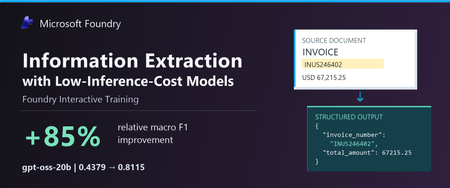
The task: turn documents into structured data Many business workflows need to turn documents into structured data. The model must find the right values, capture the requested records, and return output the next system can use. Long documents and repeated tables make this harder. We tested gpt-oss-20b and gpt-oss-120b to explore lower-cost alternatives to frontier models. In our baseline tests, both fell short on field coverage. gpt-oss-20b also declined the task or returned unparseable output. We wanted to see whether task-specific fine-tuning could improve these results. In Figure 1, we show an invoice that we held out from training. We can quickly spot the invoice number, customer, due date, and balance, but our application must map those values to the correct schema fields, preserve all 37 line items, and return complete, valid JSON. A wrong or missing value can trigger downstream errors or manual review, while invalid JSON can break the workflow altogether. We used schema-guided extraction. We gave the model document text and a JSON Schema defining the required fields, then asked it to return one JSON object. Our grader compared normalized field-path/value pairs with the expected answer, counting repeated occurrences. We measure precision as the share of extracted pairs that match the expected answer, and recall as the share of expected pairs we recover correctly. We use F1 to combine the two into one score, using their harmonic mean. F1 ranges from 0 to 1, with higher scores indicating better extraction. A wrong value hurts precision and can also hurt recall if the expected value remains unmatched. A missing value hurts recall. What changed after fine-tuning We evaluated the base and fine-tuned versions of gpt-oss-20b and gpt-oss-120b on the same 20 documents. Both improved their extraction F1. gpt-oss-20b rose from 0.4379 to 0.8115, and gpt-oss-120b rose from 0.6816 to 0.8573. gpt-oss-20b made the larger gain, with an 85.3% relative improvement after 100 GRPO steps. Fine-tuned gpt-oss-120b finished with the higher F1. Fine-tuning helped both models, but the size of the improvement differed. We also evaluated GPT-5.5, GPT-5.6-sol, and GPT-6-sol as reference models. They scored 0.9760, 0.9766, and 0.9764, respectively—still higher than our fine-tuned models. gpt-oss-20b reached 83.1% of GPT-5.6-sol’s reference F1. This is a substantial improvement for gpt-oss-20b and a promising starting point for further task-specific tuning. Our base and tuned scores are averaged across repeated evaluations, while the reference models used a different single-pass protocol. These reference scores provide useful context for the progress we made, with the evaluation differences noted above. These improvements make lower inference-cost base models worth a closer look. Table 1 compares published Azure inference prices. The pricing comparison is intended to provide inference-cost context only and should not be interpreted as a complete total-cost-of-ownership analysis, which would also include training, hosting, retries, and operational costs. Table 1. Extraction macro F1 and published Azure inference prices (USD per 1M tokens); GPT-5.5, GPT-5.6-sol, and GPT-6-sol are included as frontier-model references Model Macro F1 Azure input / 1M Azure output / 1M gpt-oss-20b 0.8115 $0.07 $0.30 gpt-oss-120b 0.8573 $0.15 $0.60 GPT-5.6-sol 0.9766 $4.00 $20.00 GPT-5.5 0.9760 $5.00 $30.00 GPT-6-sol 0.9764 $2.00 $10.00 Notes: Prices checked October 9, 2026, in USD; input rates are uncached. gpt-oss-20b prices are published fine-tuned inference rates for Regional deployments. gpt-oss-120b prices are base-model rates; its fine-tuned rates remain unconfirmed. Frontier prices use Global Standard pricing, with the short-context tier for GPT-5.6-sol and GPT-6-sol. These rates do not represent measured deployment costs for our experimental checkpoints. Token rates exclude training and hosting costs. F1 scores come from fine-tuned checkpoints for the two gpt-oss models and reference runs for the frontier models. All use the same 20 documents, but tuned scores average repeated evaluations while frontier references use a different single-pass protocol. We observed more parseable output and higher coverage We looked through gpt-oss-20b’s responses and found examples where it declined the task or said it could not finish. We tracked this with a “refusal-wording rate”: the share of responses where our grader detected an apology or cannot-complete language. This measures wording, not whether the model made a safety refusal. We tracked JSON parseability and field coverage separately, although these problems can overlap. After fine-tuning, the refusal-wording rate (Refusals) fell from 25% to zero; JSON parseability (Valid JSON) rose from 63.8% to 98.8%, and coverage rose from 47.1% to 94.9%. Valid JSON means our grader could read the response as an object or array. Coverage compares the number of predicted field/value pairs with the expected count, capped at 100%. Wrong or extra pairs can raise coverage, so we read it alongside F1 rather than treat it as a measure of correctness. Extraction quality and output behavior before and after fine-tuning on the same 20 documents. Bars show means across repeated evaluations. “Valid JSON” measures JSON parseability, not schema compliance or value correctness. “Refusal rate” measures detected refusal wording, not safety refusals. Higher is better except for refusal rate. Figure 4 shows how these measures changed during training. We repeated the full training run with a second seed. It reached 0.8101 F1, close to the headline run’s 0.8115. We ran four temperature-0 evaluations for each seed. Across all eight post-training evaluations, our grader detected no refusal wording. What we learned from the model comparison We saw different starting points and different gains between the two models. gpt-oss-20b had clearer output problems before training: it sometimes declined the task, returned unparseable JSON, or missed required information. After fine-tuning, we saw improvements in extraction F1, JSON parseability, and field coverage, along with less refusal wording. gpt-oss-120b started with fewer format problems. We detected no refusal wording, and 96.3% of its baseline responses were parseable JSON. But parseable output did not mean complete or correct extraction. After fine-tuning, its field coverage rose from 74.1% to 94.1%, and its F1 rose from 0.6816 to 0.8573. gpt-oss-20b made the larger F1 gain, while fine-tuned gpt-oss-120b finished with the higher F1. For us, the lesson is to measure the problem first. Try simpler, lower-cost changes, such as prompting, before committing to training. Then consider fine-tuning when your grader can reward the improvements your application needs. How we trained with Foundry Interactive Training We used the Foundry Interactive Training API [1] with 17 training documents, expected structured answers, and a Python grader. We followed the cookbook to connect our grader to Foundry’s managed generation and training operations. We ran 100 group relative policy optimization, or GRPO, steps and saved checkpoints for evaluation. For each document, we had gpt-oss-20b generates eight candidate answers. Our grader awarded partial credit for correct values and penalized invalid JSON. GRPO used the candidates’ relative scores to reinforce better answers. We used the expected answers only for grading. We did not include them in the inputs we gave the model during reinforcement training. The model had to produce its own answers, and the grader supplied the feedback. 5. Customers define the application outcome and quality bar; Foundry Interactive Training runs the post-training loop in Microsoft Foundry. How customers can use Foundry Interactive Training To try this approach, bring four ingredients: a supported base model, examples from your workload, expected outcomes, or another way to check the answers, and a Python grader. Your grader should measure what matters to the application—not just whether an answer looks convincing. Get connected. Request access to the Microsoft Foundry Interactive Training public preview [2] and connect the onboarding cookbook [3][4] to an assigned Foundry project. Separate your data. Build training, validation, and final test sets. Use validation data to choose checkpoints. Keep the final test set for an independent check, with new sources and document structures where possible. Build your grader. Implement a grader that rewards the desired outcome. For our extraction task, we checked normalized field-path/value pairs and penalized unparseable JSON. Run a bounded experiment. Set a training budget, inspect the training signal, and compare saved checkpoints on the validation set. Once you choose a checkpoint, evaluate it on the untouched final test set. Evaluate and prepare for deployment. Use session sampling to test your LoRA adapter on held-out prompts and compare it with the baseline. Save checkpoints so you can continue experimenting. Before using the model in an application, confirm the supported deployment path, model compatibility, and serving costs. Takeaway With Foundry Interactive Training, we improved extraction F1 for both gpt-oss-20b and gpt-oss-120b. We brought our task examples and a Python grader, and Foundry managed the generation and training loop. gpt-oss-20b made the larger gain, while fine-tuned gpt-oss-120b reached the higher F1. We did not match the frontier references, but our results show why task-specific fine-tuning is worth exploring before switching to a higher-priced model. The final choice should depend on independently tested quality and the full cost of deployment. Reference [1] https://github.com/microsoft-foundry/fine-tuning [2] What is interactive training (preview) in Microsoft Foundry? - Microsoft Foundry | Microsoft Learn [3] Interactive Training - Public Preview Intake Form [4] https://github.com/microsoft-foundry/fine-tuning/tree/main/interactive_training299Views0likes0CommentsIntroducing Grok 4.3 on Microsoft Foundry: Latest Generation Agentic Capabilities
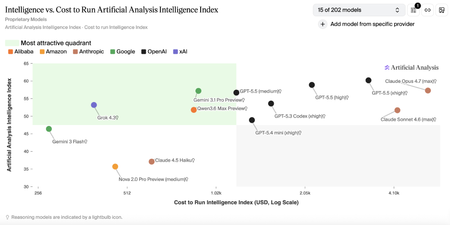
Customers building advanced AI systems increasingly need models that can reason deeply, act autonomously, and integrate reliably into real‑world workflows—all without compromising on governance or cost efficiency. Grok 4.3, xAI’s latest flagship model, is now available in Microsoft Foundry, giving developers and enterprises access to latest agentic intelligence within a production‑ready environment designed for scale. With Grok 4.3 on Microsoft Foundry, customers can more easily experiment with, evaluate, and deploy a powerful new option for agent‑based and domain‑specific applications—while benefiting from the safety controls, monitoring, and operational tooling needed to move from prototype to production with confidence. About Grok 4.3 Grok 4.3 is xAI’s latest flagship model, designed to support agent-based and productivity-focused workflows across a wide range of professional scenarios. Based on information provided by xAI and independent research conducted by Artificial Analysis, Grok 4.3 demonstrates strong performance across multiple benchmarks, reflecting a favorable balance between model capability and reported benchmark cost. *Benchmark data and cost metrics are provided by xAI and independently analyzed by Artificial Analysis. Source: https://artificialanalysis.ai Improved agentic capabilities Grok 4.3 is purpose‑built for agentic systems, improving in tool calling, instruction following, and lower hallucination, as reported by xAI. Grok 4.3 also enables policy‑aware support agents with reliable tool use and consistent behavior across extended conversations. On Microsoft Foundry, Grok 4.3 supports up to a 200k token context window, enabling extended multi‑turn reasoning and agent workflows. Multi-modal and domain‑specific strengths Grok 4.3 delivers strong performance across a range of professional and technical domains: Multimodal analysis: Native understanding across text, images, diagrams, and mixed data sources, enabling synthesis of visual and textual information for complex reasoning tasks. Web development: Excels in full‑stack web development, producing clean, production‑ready code with minimal guidance. Legal reasoning: supports interpretation of contracts, case law, and regulatory documents. Finance agents: supports financial analysis, modeling, and human decisions Built‑In Native Capabilities Grok 4.3 includes powerful native capabilities that simplify real‑world application development: Web search and X search for real‑time context Python code execution for analysis and automation File search (RAG) for enterprise knowledge grounding Excel, PDF, and PowerPoint generation for end‑to‑end workflows Together, these capabilities allow Grok 4.3 to function as a powerful agentic productivity engine, not just a language mode. Why Grok 4.3 on Microsoft Foundry Bringing Grok 4.3 to Microsoft Foundry delivers value beyond raw model performance. When deployed through Foundry, Azure AI Content Safety is enabled by default, adding an additional layer of protection for enterprise use. Customers can review the Microsoft Foundry model card for detailed safety and usage considerations. Microsoft Foundry also provides tools to support our customers with their responsible AI efforts, including model cards during selection, configurable guardrails such as jailbreak detection and content filtering, pre‑deployment evaluations and red teaming, and post‑deployment monitoring and governance. These capabilities help customers maintain output quality and deploy Grok 4.3 responsibly at scale. Pricing Model Deployment Input/1M Tokens Output/1M Tokens Availability Grok 4.3 Global Standard $1.25 $2.50 Public Preview Getting started Grok 4.3 is now available in Microsoft Foundry. Explore the model details in the Foundry model catalog, evaluate it using your own datasets, and start building and deployment in minutes.1.9KViews0likes0Comments"Not Available in Your Region" Isn't a Dead End: A Security Assessment of Global Deployments
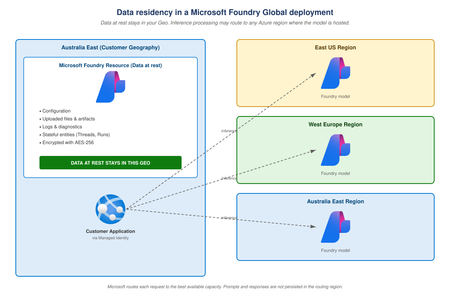
You want to build with the latest Microsoft Foundry model. You checked the regional availability, and it isn't there yet — only Global Standard. Now you're weighing the capability you actually need against your instinct to keep everything in a regional SKU. This post is for that moment. This is a more common situation than people realise. Microsoft typically releases new and preview models on Global first, then expands into specific regions over time as capacity is built out. It isn't an oversight. It's how Microsoft makes new capabilities available to the broadest set of customers as quickly as possible. If you want those capabilities, Global is the path. The good news is that the path is well-paved. Microsoft Foundry Global Standard is a secure, enterprise-grade deployment type backed by the same Azure controls you already rely on, with explicit contractual commitments on how your data is used. The data protection guarantees don't change because the model is newer or because regional capacity hasn't caught up — they're the same on day one of a new model on Global as they are on a model that's been deployed regionally for a year. The rest of this post walks through what Microsoft commits to, what you get out of the box, what you add on top, and the small number of cases where Global is genuinely the wrong choice. It's written for three audiences: Developers who want to know if they're allowed to ship on Global. Solution architects weighing the model choice against latency, quota, and resilience. Security architects who need to map Foundry's behaviour to enterprise controls before they sign off. Where does my data actually go? This is the question that drives most of the concern, and the answer has two parts. Mixing them up is what causes the confusion. Data at rest stays in the Azure geography of your Foundry resource. That includes your configuration, uploaded files, stored artifacts, and logs. This is true for Global deployments, exactly the same as it is for regional ones. Microsoft commits to this in the Azure data residency page. Data in processing is different. When you send a prompt, the model processes it in memory for a few hundred milliseconds and returns a response. For Global deployments, that processing can happen in any Azure region where the model is hosted. This is how Microsoft gives you the highest available capacity and the broadest model access. The prompt and response are not persisted as part of inference processing in the region that processed them. Once you separate "where my data lives" from "where the request runs," the residency picture becomes much clearer. Your customer data lives where you put it. The model that processes that data runs on Microsoft's global fleet. You can read the official description on the Microsoft Foundry deployment types page. What Microsoft commits These commitments are contractual, not marketing language — they sit inside Microsoft's Product Terms and Data Protection Addendum. According to the data privacy page for Azure Direct Models, your prompts and completions are not used to train Microsoft or OpenAI models, and your fine-tuned models are exclusively yours. Microsoft is also explicit that your data does not touch consumer OpenAI services: "Microsoft hosts the Azure Direct Models in Microsoft's Azure environment and Azure Direct Models do NOT interact with any services operated by Azure Direct Model providers, for example, OpenAI (e.g. ChatGPT, or the OpenAI API)." For partner and community models served through serverless APIs, the model catalog data privacy page confirms that those models are stateless and that Microsoft does not use prompts or outputs to train any model. What Global does NOT do A Global deployment does not replicate your stored data into other regions, does not expose your prompts to consumer OpenAI services, and does not use your inputs or outputs for training. The only cross‑region behavior is the transient execution of model inference, which is stateless and not customer‑addressable. What Global gives you on day one Before you configure anything yourself, a Global Standard deployment already includes the following: Encryption at rest using FIPS 140-2 compliant 256-bit AES with Microsoft-managed keys, applied transparently. See the Microsoft Foundry architecture page. Encryption in transit using TLS 1.2 or higher, enforced by the platform. Microsoft Entra ID authentication with Azure RBAC. Foundry separates control-plane actions (like creating deployments) from data-plane actions (like invoking models), so you can grant least privilege without writing custom roles. Tenant isolation. Your Foundry resource lives in your subscription, your data lives in your tenant, and any fine-tuned models you create are exclusively yours. Compliance inheritance. Foundry runs on Azure and inherits Azure's compliance controls, including ISO 27001, SOC 1/2/3, HIPAA, PCI DSS, FedRAMP, and many others. The current authoritative list is in the Azure compliance offerings catalogue and the Microsoft Trust Center. This baseline, with no extra configuration, already meets the security posture most enterprise teams target for new workloads. The controls you already know Securing Microsoft Foundry uses the same building blocks as securing any other Azure PaaS service. If your team already knows how to lock down Azure Storage or Azure SQL, you already know how to lock down Foundry. Developers see familiar patterns. Architects get a clean fit into the landing zone. Security architects review the same control surfaces they review elsewhere. The controls you'd apply are exactly what you'd expect: Private networking: Map the Foundry resource to a private IP using Private Link, back it with Private DNS, disable public network access, and route egress through Azure Firewall or an NVA. For agent workloads, Microsoft publishes a private networking template for Foundry Agent Service you can deploy with Bicep or Terraform. Note that Private Link secures the path to the endpoint, not the routing of requests inside the model fleet — you get a private network path without giving up Global's capacity benefits. Azure APIM GenAI gateway: Put Azure API Management's GenAI gateway in front of your Foundry Global deployments to control who can call models, how much they can use, and under what policies, independent of where inference runs. It enforces central auth, per‑consumer token limits, logging, and policy controls, turning Global deployments from “globally available” into centrally governed and auditable services. Identity and secrets: Use Managed Identity for application-to-model calls and avoid embedding API keys in code. Apply Conditional Access to admin sign-in and use Privileged Identity Management for just-in-time elevation on admin roles. Customer-managed keys: If your compliance regime requires key ownership, enable CMK on the Foundry resource via Azure Key Vault for rotation, revocation, and separation of duties. Logging and monitoring: Send diagnostics to a customer-owned Log Analytics workspace, enable the Azure Activity Log, and alert on token-usage spikes, unusual source IPs, and repeated authentication failures. Governance at scale: Use Azure Policy to enforce baselines (allowed locations, mandatory diagnostics, required private access) across your tenant, and pair it with Microsoft Defender for Cloud for continuous posture management. The risk that deserves attention: Data Exfiltration The most common security risk in any LLM deployment, on any SKU, is not Microsoft's infrastructure. It's the application layer. Examples include over-broad RAG retrieval pulling data the user shouldn't see, a tool-calling agent reaching an unintended destination, or a prompt that quietly echoes PII into a downstream log. These risks exist on Global, Data Zone, and Regional deployments equally. Choosing a more restrictive SKU does not mitigate them. The good news is that the mitigations are well understood and entirely under your control: Use Private Endpoints for Storage, AI Search, Cosmos DB, and any other backing services your application uses for RAG, so retrieval traffic stays off the public internet. For tool-calling and agent scenarios, route outbound traffic through Azure Firewall with FQDN filtering, and keep an explicit allowlist of destinations the agent is permitted to reach. Apply DLP and redaction at the application layer for high-risk data classes, before that data ever becomes part of a prompt. Treat prompts and completions as transient. Don't persist them unless you have a specific, auditable reason to do so. Doing this work on a Global deployment gives you exactly the same protection as doing it on a regional one. Is Global Deployment right for you? For most teams building on Microsoft Foundry, the answer is yes. Global Standard gives you: The highest default quotas and the broadest model availability in the catalogue. First access to new models and features, often weeks or months ahead of regional rollouts. Elastic absorption of demand spikes through Microsoft's global capacity pool. A simpler architecture, with no regional duplication or custom failover logic. The full Azure security stack: Entra ID, RBAC, Private Link, CMK, Azure Policy, Defender for Cloud, and Monitor. Contractual guarantees that your data isn't used for training and isn't shared with consumer OpenAI services. Global is not the right choice when a specific regulation explicitly requires inference processing to occur within a named country or zone. Note the word "processing" there: not data at rest, but the transient processing of the prompt itself. These cases do exist, particularly in some government, healthcare, and financial sector contexts, and Microsoft Foundry offers Data Zone (US or EU) and Regional SKUs for exactly those situations. But unless someone has pointed you at a specific clause in a specific regulation that names processing locality, you most likely don't need to step down from Global. Summary Microsoft Foundry Global deployments are secure, compliant, and enterprise‑ready. Data at rest remains in your chosen Azure geography. Prompts and completions are not used for training and do not interact with consumer AI services. Encryption, identity, networking, logging, governance, and monitoring are all first‑class Azure controls. Modified Abuse Monitoring is available for qualifying enterprise customers where required. A short summary for each audience: Developers: you can build on Global with confidence, using the Azure patterns you already know. Solution architects: Global is a sensible default unless a regulatory requirement specifically rules it out. Data Zone and Regional remain available for the cases that need them. Security architects: the control surfaces are familiar, the contractual commitments are explicit, and Global can be approved on the same basis as any other Azure PaaS service handling equivalent data classifications. If you've been defaulting to a regional SKU "just to be safe," it's worth taking a fresh look at whether Global actually fits your workload. In most cases, it will.907Views1like0CommentsGrok 4.20 is now available in Microsoft Foundry
Grok 4.20 from xAI is now available in Microsoft Foundry. Microsoft Foundry is designed to help teams move from model exploration to production-grade AI systems with consistency and control. With the addition of Grok 4.20, customers can evaluate advanced reasoning models within a governed environment, apply safety and content policies, and operationalize them with confidence. About Grok 4.20 Grok 4.20 is a general-purpose large language model in the Grok 4.x family, designed for reasoning-intensive and real-world problem-solving tasks. A key architectural concept is its agentic “swarm” approach, where multiple specialized agents collaborate across workflows combining reasoning, coding, retrieval, and coordination to improve accuracy on complex tasks. This release also reflects a rapid iteration model, with frequent updates that teams can continuously evaluate in Foundry using consistent benchmarks and datasets. Capabilities According to xAI, Grok 4.20 introduces a set of capabilities that teams can evaluate directly in Foundry for their specific workloads: High reliability and reduced hallucination Grok 4.20 is designed to prioritize truthfulness, favoring grounded responses and explicitly acknowledging uncertainty when needed. Multi-agent verification patterns help reduce errors and improve reliability for high-stakes applications. Strong instruction following and consistency The model demonstrates high adherence to prompts, system instructions, and structured workflows, enabling more predictable and controllable outputs across agentic and multi-step tasks. Multi-agent reasoning (agentic swarms) Specialized agents working in parallel enable stronger reasoning across complex workflows, improving performance in areas like coding, analysis, and decision-making. Fast performance and cost efficiency Grok 4.20 is optimized for high-throughput, low-latency workloads, making it suitable for interactive applications and large-scale deployments while maintaining strong cost efficiency. Tool use and real-time retrieval The model is designed to integrate with tools and external data sources, enabling real-time search, retrieval, and evidence-grounded responses for dynamic and time-sensitive scenarios. Coding and technical reasoning Grok 4.20 performs well on code generation, debugging, and iterative development tasks, making it a strong fit for developer workflows and agent-driven engineering scenarios. Long-form and creative workflows With strong instruction adherence and long context, the model supports consistent long-form generation, including document creation, storytelling, and structured content pipelines. Pricing Model Deployment Input/1M Tokens Output/1M Tokens Availability Grok 4.20 Global Standard $2.00 $6.00 Public Preview Using Grok 4.20 in Foundry Grok 4.20 is available in the Foundry model catalog for teams that want to evaluate and operationalize the model within a standardized pipeline. Foundry provides: Tools to run repeatable evaluations on your own datasets The ability to apply scenario-specific safety and content-filtering policies Managed endpoints with monitoring and governance for production deployments To get started, select Grok 4.20 in the Foundry model catalog and run an initial evaluation with a small prompt set. You can expand to broader and more complex scenarios, compare results across models, and deploy the configuration that best meets your requirements. Conclusion Microsoft Foundry enables teams to explore models like Grok 4.20 within a governed environment designed for evaluation and production deployment. By combining model choice with consistent evaluation, safety controls, and operational tooling, teams can move from experimentation to reliable AI systems faster. Try Grok 4.20 in Foundry Models Today1.9KViews1like0CommentsTracking Every Token: Granular Cost and Usage Metrics for Microsoft Foundry Agents
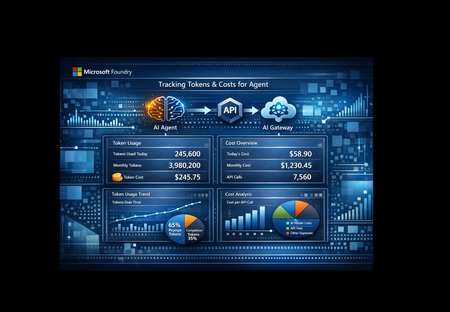
As organizations scale their use of AI agents, one question keeps surfacing: how much is each agent actually costing us? Not at the subscription level. Not at the resource group level. Per agent, per model, per request. This post walks through a solution that answers that question by combining three Azure services Microsoft AI Foundry, Azure API Management (APIM), and Application Insights into an observable, metered AI gateway with granular token-level telemetry including custom dates greater than a month for deeper analysis. The Problem: AI Costs Can be a Black Box Foundry’s built-in monitoring and cost views are ultimately powered by telemetry stored in Application Insights, and the out-of-the-box dashboards don’t always provide the exact per-request/per-caller token breakdown or the custom aggregations/joins teams may want for bespoke dashboards (for example, breaking down tokens by APIM subscription, product, tenant, user, route, or agent step). Using APIM to stamp consistent caller/context metadata (headers/claims), Foundry to generate the agent/model run telemetry, and App Insights as the queryable store to let you correlate gateway, agent run, tool/model calls and then build custom KQL-driven dashboards. With data captured in App Insights and custom KQL queries, questions such as below can be answered: Which agent consumed the most tokens last week? What's the average cost per request for a specific agent? How do prompt tokens vs. completion tokens break down per model? Is one agent disproportionately expensive compared to others? Why This Solution Was Built This solution was built to close the observability gap between "we deployed agents" and "we understand what those agents cost." The goals were straightforward: Per-agent, per-model cost attribution - Know exactly which agent is consuming what, down to the token. Real-time telemetry, not batch reports - Metrics flow into Application Insights within minutes, query via KQL. Zero agent modification - The agents themselves don't need to know about telemetry. The tracking happens at the gateway layer. Extensibility - Any agent hosted in Microsoft Foundry and exposed through APIM can be added with a single function call. How It Works The architecture is intentionally simple three services, one data flow. The notebook serves as a testing and prototyping environment, but the same `call_agent()` and `track_llm_usage()` code can be lifted directly into any production Python application that calls Foundry agents. Azure API Management acts as the AI Gateway. Every request to a Foundry-hosted agent flows through APIM, which handles routing, rate limiting, authentication, and tracing. APIM adds its own trace headers (`Ocp-Apim-Trace-Location`) so you can correlate gateway-level diagnostics with your application telemetry. After the API request is successfully completed, we can extract the necessary data from response headers. The notebook is designed for testing and rapid iteration call an agent, inspect the response, verify that telemetry lands in App Insights. It uses `httpx` to call agents through APIM, authenticating with `DefaultAzureCredential` and an APIM subscription key. After each response, it extracts the `usage` object `input_tokens`, `output_tokens`, `total_tokens` — and calculates an estimated cost based on built-in per-model pricing. Application Insights receives this telemetry via OpenTelemetry. The solution sends data to two tables: customMetrics - Cumulative counters for prompt tokens, completion tokens, total tokens, and cost in USD. These power dashboards and alerts. traces - Structured log entries with `custom_dimensions` containing agent name, model, operation ID, token counts, and cost per request. These power ad-hoc KQL queries. traces - stores your application’s trace/log messages (plus custom properties/measurements) as queryable records in Azure Monitor Logs. Demonstrating Granular Cost and Usage Metrics This is where the solution shines. Once telemetry is flowing, you can answer detailed questions with simple KQL queries. Per-Request Detail Query the `traces` table to see every individual agent call with full token and cost breakdown: traces | where message == "llm.usage" | extend cd = parse_json(replace_string( tostring(customDimensions["custom_dimensions"]), "'", "\"")) | extend agent_name = tostring(cd["agent_name"]), model = tostring(cd["model"]), prompt_tokens = toint(cd["prompt_tokens"]), completion_tokens = toint(cd["completion_tokens"]), total_tokens = toint(cd["total_tokens"]), cost_usd = todouble(cd["cost_usd"]) | project timestamp, agent_name, model, prompt_tokens, completion_tokens, total_tokens, cost_usd | order by timestamp desc This gives you a line-item audit trail every request, every agent, every token. Aggregated Metrics Per Agent Summarize across all requests to see averages and totals grouped by agent and model: traces | where message == "llm.usage" | extend cd = parse_json(replace_string( tostring(customDimensions["custom_dimensions"]), "'", "\"")) | extend agent_name = tostring(cd["agent_name"]), model = tostring(cd["model"]), prompt_tokens = toint(cd["prompt_tokens"]), completion_tokens = toint(cd["completion_tokens"]), total_tokens = toint(cd["total_tokens"]), cost_usd = todouble(cd["cost_usd"]) | summarize calls = count(), avg_prompt = avg(prompt_tokens), avg_completion = avg(completion_tokens), avg_total = avg(total_tokens), avg_cost = avg(cost_usd), total_cost = sum(cost_usd) by agent_name, model | order by total_cost desc Now you can see at a glance: Which agent is the most expensive across all calls Average token consumption per request useful for prompt optimization Prompt-to-completion ratio a high ratio may indicate verbose system prompts that could be trimmed Cost trends by model is GPT-4.1 worth the premium over GPT-4o-mini for a particular agent? The same can be done in code with your custom solution: from datetime import timedelta from azure.identity import DefaultAzureCredential from azure.monitor.query import LogsQueryClient KQL = r""" traces | where message == "llm.usage" | extend cd_raw = tostring(customDimensions["custom_dimensions"]) | extend cd = parse_json(replace_string(cd_raw, "'", "\"")) | extend agent_name = tostring(cd["agent_name"]), model = tostring(cd["model"]), operation_id = tostring(cd["operation_id"]), prompt_tokens = toint(cd["prompt_tokens"]), completion_tokens = toint(cd["completion_tokens"]), total_tokens = toint(cd["total_tokens"]), cost_usd = todouble(cd["cost_usd"]) | project timestamp, agent_name, model, operation_id, prompt_tokens, completion_tokens, total_tokens, cost_usd | order by timestamp desc """ def query_logs(): credential = DefaultAzureCredential() client = LogsQueryClient(credential) resp = client.query_resource( resource_id=APP_INSIGHTS_RESOURCE_ID, # defined in config cell query=KQL, timespan=None, # No time filter — returns all available data (up to 90-day retention) ) if resp.status != "Success": raise RuntimeError(f"Query failed: {resp.status} - {getattr(resp, 'error', None)}") table = resp.tables[0] rows = [dict(zip(table.columns, r)) for r in table.rows] return rows if __name__ == "__main__": rows = query_logs() if not rows: print("No telemetry found. Wait 2-5 min after running the agent cell and try again.") else: print(f"Found {len(rows)} records\n") print(f"{'Timestamp':<28} {'Agent':<16} {'Model':<12} {'Op ID':<12} " f"{'Prompt':>8} {'Completion':>11} {'Total':>8} {'Cost ($)':>10}") print("-" * 110) for r in rows[:20]: ts = str(r.get("timestamp", ""))[:19] print(f"{ts:<28} {r.get('agent_name',''):<16} {r.get('model',''):<12} " f"{r.get('operation_id',''):<12} {r.get('prompt_tokens',0):>8} " f"{r.get('completion_tokens',0):>11} {r.get('total_tokens',0):>8} " f"{r.get('cost_usd',0):>10.6f}") What You Can Build on Top Azure Workbooks - Build interactive dashboards showing cost trends over time, agent comparison charts, and token distribution heatmaps. Alerts - Trigger notifications when a single agent exceeds a cost threshold or when token consumption spikes unexpectedly. Azure Dashboard pinning - Pin KQL query results directly to a shared Azure Dashboard for team visibility. Power BI integration - Export telemetry data for executive-level cost reporting across all AI agents. Extensibility: Add Any Agent in One Line The solution is designed to scale with your agent portfolio. Any agent hosted in Microsoft Foundry and exposed through APIM can be integrated without modifying the telemetry pipeline. Adding a new agent is a single function call: response = call_agent("YourNewAgent", "Your prompt here") Token tracking, cost estimation, and telemetry export happen automatically. No additional configuration, no new infrastructure. From Notebook to Production The notebook is a testing harness, a fast way to validate agent connectivity, inspect raw responses, and confirm that telemetry arrives in App Insights. But the code isn't limited to notebooks. The core functions `call_agent()`, `track_llm_usage()`, and the OpenTelemetry configuration are plain Python. They can be dropped directly into any production application that calls Foundry agents through APIM: FastAPI / Flask web service - Wrap `call_agent()` in an endpoint and get per-request cost tracking out of the box. Azure Functions - Call agents from a serverless function with the same telemetry pipeline. Background workers or batch pipelines - Process multiple agent calls and aggregate cost data across runs. CLI tools or scheduled jobs - Run agent evaluations on a schedule with automatic cost logging. The pattern stays the same regardless of where the code runs: # 1. Configure OpenTelemetry + App Insights (once at startup) configure_azure_monitor(connection_string=APP_INSIGHTS_CONN) # 2. Call any agent through APIM response = call_agent("FinanceAgent", "Summarize Q4 earnings") # 3. Token usage and cost are tracked automatically # → customMetrics and traces tables in App Insights Start with the notebook to prove the pattern works. Then move the same code into your production codebase, the telemetry travels with it. Key Takeaways AI cost observability matters. As agent counts grow, per-agent cost attribution becomes essential for budgeting and optimization. APIM as an AI Gateway gives you routing, rate limiting, and tracing in one place without touching agent code. OpenTelemetry + Application Insights provides a battle-tested telemetry pipeline that scales from a single notebook to production workloads. KQL makes the data actionable. Per-request audits, per-agent summaries, and cost trending are all a query away. The solution is additive, not invasive. Agents don't need modification. The telemetry layer wraps around them. This approach gives developers the abiility to view metrics per user, API Key, Agent, request / tool call, or business dimensions(Cost Center, app, environment). If you're running AI agents in Microsoft Foundry and want to understand what they cost at a granular level this pattern gives you the visibility to make informed decisions about model selection, prompt design, and budget allocation. The full solution is available on GitHub: https://github.com/ccoellomsft/foundry-agents-apim-appinsights4.2KViews2likes0CommentsAnnouncing Fireworks AI on Microsoft Foundry
We’re excited to announce that starting today, Microsoft Foundry customers can access high performance, low latency inference performance of popular open models hosted on the Fireworks cloud from their Foundry projects, and even deploy their own customized versions, too! As part of the Public Preview launch, we’re offering the most popular open models for serverless inference in both pay-per-token (US Data Zone) and provisioned throughput (Global Provisioned Managed) deployments. This includes: Minimax M2.5 🆕 OpenAI’s gpt-oss-120b MoonshotAI’s Kimi-K2.5 DeepSeek-v3.2 For customers that have been looking for a path to production with models they’ve post-trained, you can now import your own fine-tuned versions of popular open models and deploy them at production scale with Fireworks AI on Microsoft Foundry. Serverless (pay-per-token) For customers wanting per-token pricing, we’re launching with Data Zone Standard in the United States. You can make model deployments for Foundry resources in the following regions: East US East US 2 Central US North Central US West US West US 3 Depending on your Azure subscription type, you’ll automatically receive either a 250K or 25K tokens per minute (TPM) quota limit per region and model. (Azure Student and Trial subscriptions will not receive quota at this time.) Per-token pricing rates include input, cached input, and output tokens priced per million tokens. Model Input Tokens ($/1M tokens) Cached Tokens ($/1M tokens) Output Tokens ($/1M tokens) gpt-oss-120b $0.17 $0.09 $0.66 kimi-k2.5 $0.66 $0.11 $3.30 deepseek-v3.2 $0.62 $0.31 $1.85 minimax-m2.5 $0.33 $0.03 $1.32 As we work together with Fireworks to launch the latest OSS models, the supported models will evolve as popular research labs push the frontier! Provisioned Throughput For customers looking to shift or scale production workloads on these models, we’re launching with support for Global provisioned throughput. (Data Zone support will be coming soon!) Provisioned throughput for Fireworks models works just like it does for Foundry models: PTUs are designed to deliver consistent performance in terms of time between token latency. Your existing quota for Global PTUs works as does any reservation commitments! gpt-oss-120b Kimi-K2.5 DeepSeek-v3.2 MiniMax-M2.5 Global provisioned minimum deployment 80 800 1,200 400 Global provisioned scale increment 40 400 600 200 Input TPM per PTU 13,500 530 1,500 3,000 Latency Target Value 99% > 50 Tokens Per Second^ 99% > 50 Tokens Per Second^ 99% > 50 Tokens Per Second^ 99% > 50 Tokens Per Second^ ^ Calculated as p50 request latency on a per 5 minute basis. Custom Models Have you post-trained a model like gpt-oss-120b for your particular use case? With Fireworks on Foundry you can deploy, govern, and scale your custom models all within your Foundry project. This means full fine-tuned versions of models from the following families can be imported and deployed as part of preview: Qwen3-14B OpenAI gpt-oss-120b Kimi K2 and K2.5 DeepSeek v3.1 and v3.2 The new Custom Models page in the Models experience lets you initiate the import process for copying your model weights into your Foundry project. > Models -> Custom Models. For performing a high-speed transfer of the files into Foundry, we’ve added a new feature to Azure Developer CLI (azd) for facilitating the transfer of a directory of model weights. The Foundry UI will give you cli arguments to copy and paste for quickly running azd ai models create pointed to your Foundry project. Enabling Fireworks AI on Microsoft Foundry in your Subscription While in preview, customers must opt-in to integrate their Microsoft Foundry resources with the Fireworks inference cloud to perform model deployments and send inference requests. Opt-in is self-service and available in the Preview features panel within your Azure portal. For additional details on finding and enabling the preview feature, please see the new product documentation for Fireworks on Foundry. Frequently Asked Questions How are Fireworks AI on Microsoft Foundry models different than Foundry Models? Models provided direct from Azure include some open-source models as well as proprietary models from labs like Black Forest Labs, Cohere, and xAI, and others. These models undergo rigorous model safety and risks assessments based on Microsoft’s Responsible AI standard. For customers needing the latest open-source models from emerging frontier labs, break-neck speed, or the ability to deploy their own post-trained custom models, Fireworks delivers best-in-class inference performance. Whether you’re focused on minimizing latency or just staying ahead of the trends, Fireworks AI on Microsoft Foundry gives you additional choice in the model catalog. Still need to quantify model safety and risk? Foundry provides a suite of observability tools with built-in risk and safety evaluators, letting you build AI systems confidently. How is model retirement handled? Customers using serverless per-token offers of models via Fireworks on Foundry will receive notice no less than 30 days before potential model retirement. You’ll be recommended to upgrade to either an equivalent, longer-term supported Azure Direct model or a newer model provided by Fireworks. For customers looking to use models beyond the retirement period, they may do so via Provisioned throughput deployments. How can I get more quota? For TPM quota, you may submit requests via our current Fireworks on Foundry quota form. For PTU quota, please contact your Microsoft account team. Can you support my custom model? Let’s talk! In general, if your model meets Fireworks’ current requirements, we have you covered. You can either reach out to your Microsoft account team or your contacts you may already have with Fireworks.4KViews1like1CommentHow Do We Know AI Isn’t Lying? The Art of Evaluating LLMs in RAG Systems
🔍 1. Why Evaluating LLM Responses is Hard In classical programming, correctness is binary. Input Expected Result 2 + 2 4 ✔ Correct 2 + 2 5 ✘ Wrong Software is deterministic — same input → same output. LLMs are probabilistic. They generate one of many valid word combinations, like forming sentences from multiple possible synonyms and sentence structures. Example: Prompt: "Explain gravity like I'm 10" Possible responses: Response A Response B Gravity is a force that pulls everything to Earth. Gravity bends space-time causing objects to attract. Both are correct. Which is better? Depends on audience. So evaluation needs to look beyond text similarity. We must check: ✔ Is the answer meaningful? ✔ Is it correct? ✔ Is it easy to understand? ✔ Does it follow prompt intent? Testing LLMs is like grading essays — not checking numeric outputs. 🧠 2. Why RAG Evaluation is Even Harder RAG introduces an additional layer — retrieval. The model no longer answers from memory; it must first read context, then summarise it. Evaluation now has multi-dimensions: Evaluation Layer What we must verify Retrieval Did we fetch the right documents? Understanding Did the model interpret context correctly? Grounding Is the answer based on retrieved data? Generation Quality Is final response complete & clear? A simple story makes this intuitive: Teacher asks student to explain Photosynthesis. Student goes to library → selects a book → reads → writes explanation. We must evaluate: Did they pick the right book? → Retrieval Did they understand the topic? → Reasoning Did they copy facts correctly without inventing? → Faithfulness Is written explanation clear enough for another child to learn from? → Answer Quality One failure → total failure. 🧩 3. Two Types of Evaluation 🔹 Intrinsic Evaluation — Quality of the Response Itself Here we judge the answer, ignoring real-world impact. We check: ✔ Grammar & coherence ✔ Completeness of explanation ✔ No hallucination ✔ Logic flow & clarity ✔ Semantic correctness This is similar to checking how well the essay is written. Even if the result did not solve the real problem, the answer could still look good — that’s why intrinsic alone is not enough. 🔹 Extrinsic Evaluation — Did It Achieve the Goal? This measures task success. If a customer support bot writes a beautifully worded paragraph, but the user still doesn’t get their refund — it failed extrinsically. Examples: System Type Extrinsic Goal Banking RAG Bot Did user get correct KYC procedure? Medical RAG Was advice safe & factual? Legal search assistant Did it return the right section of the law? Technical summariser Did summary capture key meaning? Intrinsic = writing quality. Extrinsic = impact quality. A production-grade RAG system must satisfy both. 📏 4. Core RAG Evaluation Metrics (Explained with Very Simple Analogies) Metric Meaning Analogy Relevance Does answer match question? Ask who invented C++? → model talks about Java ❌ Faithfulness No invented facts Book says started 2004, response says 1990 ❌ Groundedness Answer traceable to sources Claims facts that don’t exist in context ❌ Completeness Covers all parts of question User asks Windows vs Linux → only explains Windows Context Recall / Precision Correct docs retrieved & used Student opens wrong chapter Hallucination Rate Degree of made-up info “Taj Mahal is in London” 😱 Semantic Similarity Meaning-level match “Engine died” = “Car stopped running” 💡 Good evaluation doesn’t check exact wording. It checks meaning + truth + usefulness. 🛠 5. Tools for RAG Evaluation 🔹 1. RAGAS — Foundation for RAG Scoring RAGAS evaluates responses based on: ✔ Faithfulness ✔ Relevance ✔ Context recall ✔ Answer similarity Think of RAGAS as a teacher grading with a rubric. It reads both answer + source documents, then scores based on truthfulness & alignment. 🔹 2. LangChain Evaluators LangChain offers multiple evaluation types: Type What it checks String or regex Basic keyword presence Embedding based Meaning similarity, not text match LLM-as-a-Judge AI evaluates AI (deep reasoning) LangChain = testing toolbox RAGAS = grading framework Together they form a complete QA ecosystem. 🔹 3. PyTest + CI for Automated LLM Testing Instead of manually validating outputs, we automate: Feed preset questions to RAG Capture answers Run RAGAS/LangChain scoring Fail test if hallucination > threshold This brings AI closer to software-engineering discipline. RAG systems stop being experiments — they become testable, trackable, production-grade products. 🚀 6. The Future: LLM-as-a-Judge The future of evaluation is simple: LLMs will evaluate other LLMs. One model writes an answer. Another model checks: ✔ Was it truthful? ✔ Was it relevant? ✔ Did it follow context? This enables: Benefit Why it matters Scalable evaluation No humans needed for every query Continuous improvement Model learns from mistakes Real-time scoring Detect errors before user sees them This is like autopilot for AI systems — not only navigating, but self-correcting mid-flight. And that is where enterprise AI is headed. 🎯 Final Summary Evaluating LLM responses is not checking if strings match. It is checking if the machine: ✔ Understood the question ✔ Retrieved relevant knowledge ✔ Avoided hallucination ✔ Provided complete, meaningful reasoning ✔ Grounded answer in real source text RAG evaluation demands multi-layer validation — retrieval, reasoning, grounding, semantics, safety. Frameworks like RAGAS + LangChain evaluators + PyTest pipelines are shaping the discipline of measurable, reliable AI — pushing LLM-powered RAG from cool demo → trustworthy enterprise intelligence. Useful Resources What is Retrieval-Augmented Generation (RAG) : https://azure.microsoft.com/en-in/resources/cloud-computing-dictionary/what-is-retrieval-augmented-generation-rag/ Retrieval-Augmented Generation concepts (Azure AI) : https://learn.microsoft.com/en-us/azure/ai-services/content-understanding/concepts/retrieval-augmented-generation RAG with Azure AI Search – Overview : https://learn.microsoft.com/en-us/azure/search/retrieval-augmented-generation-overview Evaluate Generative AI Applications (Microsoft Learn – Learning Path) : https://learn.microsoft.com/en-us/training/paths/evaluate-generative-ai-apps/ Evaluate Generative AI Models in Microsoft Foundry Portal : https://learn.microsoft.com/en-us/training/modules/evaluate-models-azure-ai-studio/ RAG Evaluation Metrics (Relevance, Groundedness, Faithfulness) : https://learn.microsoft.com/en-us/azure/ai-foundry/concepts/evaluation-evaluators/rag-evaluators RAGAS – Evaluation Framework for RAG Systems : https://docs.ragas.io/865Views0likes0CommentsIntroducing GPT-5.4 in Microsoft Foundry
Today, we’re thrilled to announce that OpenAI’s GPT‑5.4 is now generally available in Microsoft Foundry: a model designed to help organizations move from planning work to reliably completing it in production environments. As AI agents are applied to longer, more complex workflows; consistency and follow‑through become as important as raw intelligence. GPT‑5.4 combines stronger reasoning with built in computer use capabilities to support automation scenarios, and dependable execution across tools, files, and multi‑step workflows at scale. GPT-5.4: Enhanced Reliability in Production AI GPT-5.4 is designed for organizations operating AI in real production environments, where consistency, instruction adherence, and sustained context are critical to success. The model brings together advances in reasoning, coding, and agentic workflows to help AI systems not only plan tasks but complete them with fewer interruptions and reduced manual oversight. Compared with earlier generations, GPT-5.4 emphasizes stability across longer interactions, enabling teams to deploy agentic AI with greater confidence in day-to-day production use. GPT-5.4 introduces advancements that aim for production grade AI: More consistent reasoning over time, helping maintain intent across multi‑turn and multi‑step interactions Enhanced instruction alignment to reduce prompt tuning and oversight Latency improved performance for responsive, real-time workflows Integrated computer use capabilities for structured orchestration of tools, file access, data extraction, guarded code execution, and agent handoffs More dependable tool invocation reducing prompt tuning and human oversight Higher‑quality generated artifacts, including documents, spreadsheets, and presentations with more consistent structure Together, these improvements support AI systems that behave more predictably as tasks grow in length and complexity. From capability to real-world outcomes GPT‑5.4 delivers practical value across a wide range of production scenarios where follow‑through and reliability are essential: Agent‑driven workflows, such as customer support, research assistance, and business process automation Enterprise knowledge work, including document drafting, data analysis, and presentation‑ready outputs Developer workflows, spanning code generation, refactoring, debugging support, and UI scaffolding Extended reasoning tasks, where logical consistency must be preserved across longer interactions Teams benefit from reduced task drift, fewer mid‑workflow failures, and more predictable outcomes when deploying GPT‑5.4 in production. GPT-5.4 Pro: Deeper analysis for complex decision workflows GPT‑5.4 Pro, a premium variant designed for scenarios where analytical depth and completeness are prioritized over latency. Additional capabilities include: Multi‑path reasoning evaluation, allowing alternative approaches to be explored before selecting a final response Greater analytical depth, supporting problems with trade‑offs or multiple valid solutions Improved stability across long reasoning chains, especially in sustained analytical tasks Enhanced decision support, where rigor and thoroughness outweigh speed considerations Organizations typically select GPT‑5.4 Pro when deeper analysis is required such as scientific research and complex problems, while GPT‑5.4 remains the right choice for workloads that prioritize reliable execution and agentic follow‑through. Microsoft Foundry: Enterprise‑Grade Control from Day One GPT‑5.4 and GPT‑5.4 Pro are available through Microsoft Foundry, which provides the operational controls organizations need to deploy AI responsibly in production environments. Foundry supports policy enforcement, monitoring, version management, and auditability, helping teams manage AI systems throughout their lifecycle. By deploying GPT‑5.4 through Microsoft Foundry, organizations can integrate advanced agentic capabilities into existing environments while aligning with security, compliance, and operational requirements from day one. Customer Spotlight Get Started with GPT-5.4 in Microsoft Foundry GPT‑5.4 sets a new bar for production‑ready AI by combining stronger reasoning with dependable execution. Through enterprise‑grade deployment in Microsoft Foundry, organizations can move beyond experimentation and confidently build AI systems that complete complex work at scale. Computer use capabilities will be introduced shortly after launch. GPT‑5.4 <272K input tokens context length in Microsoft Foundry is priced at $2.50 per million input tokens, $0.25 per million cached input tokens, and $15.00 per million output tokens. The GPT‑5.4 >272K input tokens context length in Microsoft Foundry is priced at $5.00 per million input tokens, $0.50 per million cached input tokens, and $22.50 per million output tokens. The GPT-5.4 is available at launch in Standard Global and Standard Data Zone (US), with additional deployment options coming soon. GPT‑5.4 Pro is priced at $30.00 per million input tokens, and $180.00 per million output tokens, and is available at launch in Standard Global. Build agents for real-world workloads. Start building with GPT‑5.4 in Microsoft Foundry today.25KViews4likes2CommentsIntroducing GPT-5.3 Chat in Microsoft Foundry: A more grounded way to chat at enterprise scale
OpenAI’s GPT‑5.3 Chat marks the next step in the GPT‑5 series, designed to deliver more dependable, context‑aware chat experiences for enterprise workloads. The model emphasizes steadier instruction handling and clearer responses, supporting high‑volume, real‑world conversations with greater consistency. GPT‑5.3 Chat is now available via API in Microsoft Foundry, where teams will be able to deploy production‑ready chat and agent experiences that are standardized, governed, and built to scale across the enterprise. What’s new in GPT‑5.3 Chat GPT‑5.3 Chat centers on predictable behavior, relevance, and response quality, helping teams build chat experiences that operate reliably across end‑to‑end workflows while aligning with enterprise safety and compliance expectations. Fewer dead ends, more resolved conversations Reduces unnecessary refusals by responding more proportionately when safe context is available Supports compliant reformulation to keep interactions moving forward Enables end‑to‑end resolution in support, IT, and policy‑driven workflows Grounded answers you can operationalize Combines built‑in web search with model reasoning to surface relevant, actionable information Prioritizes relevance and context over long lists of loosely related results Keeps responses actionable while maintaining enterprise controls and traceability Consistent outputs at scale Improved tone, explanation quality, and instruction following Easier to template, govern, and monitor across apps Less downstream cleanup as usage scales Built for production in Microsoft Foundry Production‑grade infrastructure Observability, failover, quota management, and performance monitoring Designed for real workloads—not experiments Consistent behavior across regions and use cases without re‑architecting Smarter scaling with quota tiers Automatic quota increases with sustained usage Fewer rate‑limit interruptions as demand grows Flexible tiers from Free through Tier 6 Security and compliance by default Identity, access controls, policy enforcement, and data boundaries built in Meets regulated‑industry requirements out of the box Teams can move fast without compromising trust GPT-5.3 Chat in Microsoft Foundry is priced at $1.75 per million input tokens, $0.175 per million cached input tokens, and $14.00 per million output tokens. Ready to build with GPT‑5.3 Chat in Foundry? Start turning reliable conversations into real applications. Explore GPT-5.3 Chat in Microsoft Foundry and begin building production ready‑ chat and agent experiences today.8.6KViews2likes1CommentUnlocking Efficient and Secure AI for Android with Foundry Local
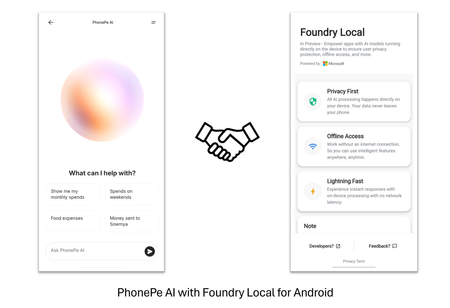
The ability to run advanced AI models directly on smartphones is transforming the mobile landscape. Foundry Local for Android simplifies the integration of generative AI models, allowing teams to deliver sophisticated, secure, and low-latency AI experiences natively on mobile devices. This post highlights Foundry Local for Android as a compelling solution for Android developers, helping them efficiently build and deploy powerful on-device AI capabilities within their applications. The Challenges of Deploying AI on Mobile Devices On-device AI offers the promise of offline capabilities, enhanced privacy, and low-latency processing. However, implementing these capabilities on mobile devices introduces several technical obstacles: Limited computing and storage: Mobile devices operate with constrained processing power and storage compared to traditional PCs. Even the most compact language models can occupy significant space and demand substantial computational resources. Efficient solutions for model and runtime optimization are critical for successful deployment. Concerns about the app size: Integrating large AI models and libraries can dramatically increase application size, reducing install rates and degrading other app features. It remains a challenge to provide advanced AI capabilities while keeping the application compact and efficient. Complexity of development and integration: Most mobile development teams are not specialized in machine learning. The process of adapting, optimizing, and deploying models for mobile inference can be resource intensive. Streamlined APIs and pre-optimized models simplify integration and accelerate time to market. Introducing Foundry Local for Android Foundry Local is designed as a comprehensive on-device AI solution, featuring pre-optimized models, a cross-platform inference engine, and intuitive APIs for seamless integration. Initially announced at //Build 2025 with support for Windows and MacOS desktops, Foundry Local now extends its capabilities to Android in private preview. You can sign up for the private preview https://aka.ms/foundrylocal-androidprp for early evaluation and feedback. To meet the demands of production deployments, Foundry Local for Android is architected as a dedicated Android app paired with an SDK. The app manages model distribution, hosts the AI runtime, and operates as a specialized background service. Client applications interface with this service using a lightweight Foundry Local Android SDK, ensuring minimal overhead and streamlined connectivity. One Model, Multiple Apps: Foundry Local centralizes model management, ensuring that if multiple applications utilize the same model in Foundry Local, it is downloaded and stored only once. This approach optimizes storage and streamlines resource usage. Minimal App Footprint: Client applications are freed from embedding bulky machine learning libraries and models. This avoids ballooning app size and memory usage. Run Separately from Client Apps: The Foundry Local operates independently of client applications. Developers benefit from continuous enhancements without the need for frequent app releases. Customer Story: PhonePe PhonePe, one of India's largest consumer payments platforms that enables access to payments and financial services to hundreds of millions of people across the country. With Foundry Local, PhonePe is enabling AI that allows their users to gain deeper insights into their transactions and payments behavior directly on their mobile device. And because inferencing happens locally, all data stays private and secure. This collaboration addresses PhonePe's key priority of delivering an AI experience that upholds privacy. Foundry Local enables PhonePe to differentiate their app experience in a competitive market using AI while ensuring compliance with privacy commitments. Explore their journey here: PhonePe Product Showcase at Microsoft Ignite 2025 Call to Action Foundry Local equips Android apps with on-device AI, supporting the development of smarter applications for the future. Developers are able to build efficient and secure AI capabilities into their apps, even without extensive expertise in artificial intelligence. See more about Foundry Local in action in this episode of Microsoft Mechanics: https://aka.ms/FL_IGNITE_MSMechanics We look forward to seeing you light up AI capabilities in your Android app with Foundry Local. Don’t miss our private preview: https://aka.ms/foundrylocal-androidprp. We appreciate your feedback, as it will help us make our product better. Thanks to the contribution from NimbleEdge which delivers real-time, on-device personalization for millions of mobile devices. NimbleEdge's mobile technology expertise helps Foundry Local deliver a better experience for Android users.871Views0likes0Comments